

Live Visitors
Monitor live visitors in Swetrix to see current website activity, active pages, traffic sources, and real-time audience trends.
Swetrix provides real-time traffic monitoring, allowing you to see how many people are on your website right now.
The Live Counter
In the top right corner of your dashboard (and on the main Traffic overview), you will see a Live indicator with a pulsing green dot.
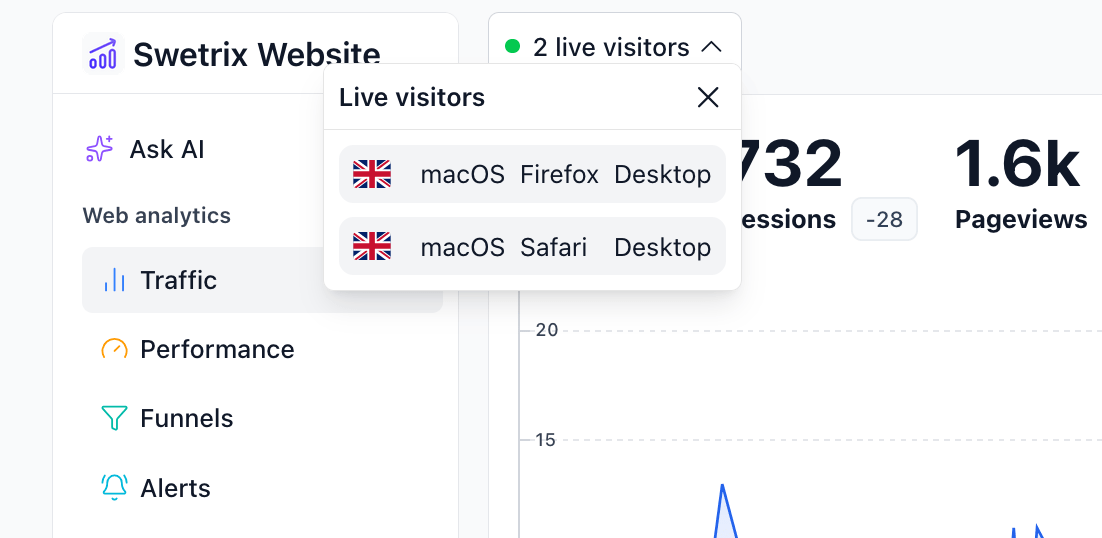
- What it counts: This number represents the count of unique visitors who have initiated a session or viewed a page within the last 5 minutes.
- Updates: The counter updates in real-time as new visitors arrive or existing ones leave (time out).
Live Visitors Over Time
The live counter tells you what's happening right now, but you can also chart concurrency historically. Unlike unique visitors (which only count when a session starts), this metric shows how many people were using your site at the same time — so you can spot peak load, quiet hours, and how long people actually stay around.
To enable it:
- Open the Traffic dashboard.
- Click the Metrics visualisation (eye) icon above the chart.
- Check Live visitors.
How to read the chart:
- Minute granularity (e.g. the "Today" period): each point is the exact number of visitors who were active during that minute.
- Hour, day or month granularity: each point is the peak number of concurrent visitors within that bucket. A value of 69 on Tuesday means that at some moment on Tuesday, 69 people were on your site at once.
A visitor counts as active from their first pageview until their last recorded activity (pageviews, custom events, or the tracking script's periodic heartbeats), so the chart also works for single-page apps where people stay on one page for a long time.
:::info Live visitors can't be combined with dashboard filters (country, page, browser, etc.), as concurrency is reconstructed from session activity that carries no dimension data. The metric toggle is disabled while filters are applied. The chart is also limited to time ranges of up to a year — for longer ranges it shows zeros. :::
Live Visitors in Browser Title
You can configure Swetrix to display the live visitor count directly in your browser tab's title. This is useful for keeping an eye on traffic without having the dashboard tab active.
To enable this:
- Go to your Account Settings.
- Open the Interface tab.
- Check the box for Show live visitors in browser title.
Once enabled, your browser tab will look something like this: (12) Project Name | Swetrix.

Help us improve Swetrix
Was this page helpful to you?