

Bot Protection
Configure Swetrix bot protection, review blocked traffic, and allow trusted IP addresses to keep automated visits out of your analytics.
Swetrix automatically filters out automated traffic so the numbers in your dashboard reflect real visitors. Beyond user-agent matching, the Strict level inspects request headers, the URL being tracked, the source referrer, and the IP's network type — and gives you a per-project report of exactly how many requests were blocked and why.
You will never be billed for blocked bot requests.
Where to find it
The bot protection settings live in Project Settings → Shields. You can learn how to access settings here.
The page contains:
- A Bot traffic filtering selector (
Off,Basic,Strict) - A Blocked traffic report showing how many requests were filtered out over the last 7 / 30 / 90 days, broken down by classification and by country
Protection levels
Swetrix offers three levels of bot protection. You can switch between them at any time and the change takes effect immediately on the next request.
| Level | What it does |
|---|---|
| Off | All traffic is recorded, including obvious bots. Useful only if you want to debug why a real user is being mis-classified, or if you are running tests. |
| Basic (default) | Detects bots based on their user agent string and known headless-browser fingerprints. Catches the long tail of search-engine crawlers and naive scripts. |
| Strict | Everything Basic does, plus four additional checks (suspicious headers, vulnerability-scan paths, referrer spam, and — on cloud — datacenter IPs). |
We recommend Basic for most sites. Switch to Strict if you see noticeable spam in your dashboard (e.g. recurring referrer-spam hosts, traffic from /wp-admin/-style probes, or suspicious country spikes).
Bot protection is per project. You can run different levels for different sites — e.g. Strict on a marketing site that gets scanned constantly, and Basic on an internal tool with very controlled traffic.
How detection works
Each incoming request is evaluated against the checks below in this exact order. The first match wins, and that's the reason you'll see in the report.
1. Bot user agent
We match the User-Agent header against a comprehensive list of known bots (Googlebot, Bingbot, AhrefsBot, curl, headless tools, etc.) maintained by the isbot project. This catches search-engine crawlers, SEO tools, uptime monitors, and most scripts that don't bother to spoof their UA.
This check runs at Basic and above.
2. Headless browser fingerprint
Headless and automation frameworks usually leave traces in their UA — we look for HeadlessChrome, PhantomJS, SlimerJS, Selenium, WebDriver, Puppeteer, Playwright, Cypress, Nightmare, and Splash.
This check runs at Basic and above.
The official Swetrix tracker also drops events on the client before they ever leave the
browser if navigator.webdriver === true, so most automation traffic is filtered upstream. This
server-side check exists as a safety net for legacy SDKs and for self-rolled tracking
integrations.
3. Suspicious headers
Real browsers always send Accept, Accept-Language, and Accept-Encoding headers. If two or more of these are missing on a pageview, custom event, error, or heartbeat request, the request is treated as a bot.
This check runs at Strict only. It does not apply to the noscript fallback (/log/noscript), which is always sent without these headers.
4. Vulnerability-scan paths (probe paths)
Mass-scanners crawl the internet looking for misconfigured sites and leak common config files. If they hit your site and your tracking script fires on the resulting 404 page, those probes show up in your dashboard. Strict mode discards pageviews whose URL starts with any of:
| Category | Examples |
|---|---|
| Hidden dotfiles | /.env, /.env.local, /.git/config, /.svn/, /.aws/credentials, /.ssh/authorized_keys, /.htaccess, /.DS_Store |
| Server internals | /server-status, /server-info, /cgi-bin/... |
| Build / config leaks | /composer.json, /composer.lock, /composer.phar, /vendor/phpunit/..., /vendor/composer/... |
| Common scanner probes | /owa/, /ecp/, /autodiscover.xml, /HNAP1, /boaform |
The list is intentionally conservative — paths like /wp-admin, /wp-login.php, /admin, and /phpmyadmin are deliberately not in it because plenty of legitimate sites genuinely host those.
This check runs at Strict only.
5. Referrer spam
We maintain a snapshot of the matomo-org/referrer-spam-list (~2,300 known spam hosts). If the request's Referer (or Origin) matches any of those hosts — or is a subdomain of one — the request is dropped.
This check runs at Strict only.
6. Datacenter IP (cloud only)
Real users browse from residential, mobile, or business ISPs. Bots, scrapers, and abuse traffic almost always come from cloud / hosting providers (AWS, GCP, OVH, Hetzner, DigitalOcean, etc.). We use the DB-IP IP-to-Location-ISP database to identify hosting traffic and discard it.
This check runs at Strict only and is only available on Swetrix Cloud.
Self-hosted installations do not include the commercial DB-IP ISP database out of the box, so only
the datacenter_ip reason is omitted from the report. Strict mode still runs the other three
non-cloud-only checks (suspicious_headers, probe_path, and referrer_spam) — five checks in
total once you count Basic's user_agent and headless_browser — which already cover the vast
majority of automated traffic.
Reading the report
The report on the Shields tab summarises blocks for the selected period (7, 30, or 90 days):
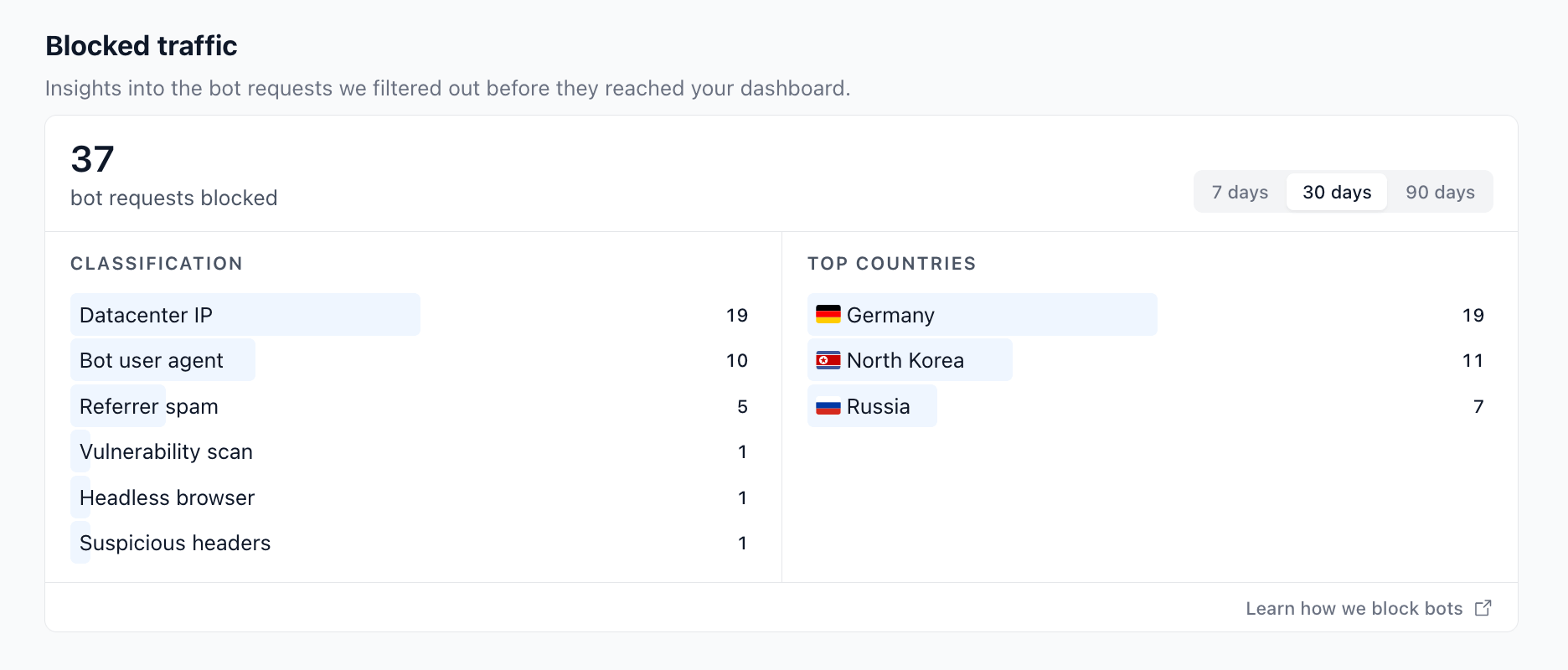
- Classification lists each detection reason with the number of requests it caught, sorted from most to least frequent. A single request can only count toward one reason — the first one matched in the priority order above.
- Top countries is the geographic breakdown of all blocked requests (top 10), based on the IP geolocation lookup we already do for analytics.
Data is retained for 90 days. If you switch a project from Off to Basic or Strict today, the report will start showing numbers immediately and fill out over the next few days as bot traffic comes in.
The report is shown only when bot protection is on. If you switch the level to Off, the
panel disappears (existing data is kept and reappears as soon as you re-enable protection).
Privacy
Swetrix's no-tracking ethos extends to the bot protection feature. The bot_blocks table stores only:
- Project ID — so we can scope the report to your project
- Reason — one of the categories above
- Country code — derived from the IP using our regular geolocation step
- Timestamp — for the period filter
We do not store IP addresses, user agents, request paths, referrer hosts, or any other identifying data on blocked requests. Records are automatically purged after 90 days.
What about false positives?
Every detection method has trade-offs:
user_agent— extremely high precision; the rare miss is usually a niche browser whose UA contains the word "bot" (e.g.BotvolBrowser).headless_browser— near-zero false positives unless someone is running a real Electron desktop app that loads your site.suspicious_headers— real browsers consistently send the three headers we check; old IE-based corporate browsers occasionally don't.probe_path— practically zero false positives because we only list paths that no real visitor would ever request. If you genuinely host one of these, open an issue and we'll exempt it.referrer_spam— the matomo list is community-curated and very strict; false positives are rare but possible if someone legitimately migrates onto a domain that used to be a spam farm.datacenter_ip— the highest false-positive rate of the bunch. VPN users, server-side rendering hits, and cloud-based RSS readers can all be caught. Only enable Strict if datacenter traffic is materially polluting your dashboard.
If you suspect a false positive, switch to Basic to isolate the cause: the only checks that run there are user-agent and headless-browser, and both are deterministic. If the false positives come from a fixed set of IP addresses — your own backend, an office network, a monitoring service you want counted — add them to the Trusted IP addresses list instead of lowering the protection level.
Trusted IP addresses
The Trusted IP addresses field on the Shields tab lets you exempt specific IPs (or CIDR ranges) from bot detection entirely. Requests from a trusted IP skip the whole detection chain — none of the six checks run, no block is recorded, and the event is processed as regular traffic.
The most common reason to use it is server-side event tracking on Strict mode: events sent from your own backend (via @swetrix/node or the Events API) originate from a hosting provider's network, so the datacenter_ip check would classify them as bot traffic and silently drop them. Add your servers' egress IPs to the trusted list and they'll pass.
- Separate multiple values with commas.
- IPv4, IPv6, and CIDR ranges are supported, for example
172.126.10.16,192.168.0.1/32, or::1. - Trusted IPs bypass bot detection only. The Blocked IP addresses list, origin checks, and country blocks still apply.
- Available on both cloud and self-hosted (community) editions.
When bots are detected
When a request is identified as a bot, Swetrix:
- Records the block in the
bot_blockstable (used by the report). - Returns a
200 OKresponse — the same status a successful pageview would get. - Does not save a pageview, custom event, error, or session for the request.
We deliberately don't return 403, 429, or anything else that would tell the bot it has been detected. Returning 200 OK is the same thing every other privacy-friendly analytics tool does and avoids tipping off attackers about your site's defences.
Self-hosted
If you self-host Swetrix Community, the bot protection feature works out of the box with one caveat: the datacenter_ip check is omitted because it depends on the commercial DB-IP IP-to-Location-ISP database, which is not bundled with the open-source release.
The other five detections (user agent, headless browser, suspicious headers, probe paths, referrer spam) run identically on community and cloud, and the report renders the same way.
FAQ
Do blocked requests count toward my plan's event quota?
No. Bot detection runs before the event is recorded, so you only pay for real traffic.
Can I add my own UA rules or IP ranges?
Custom user-agent rules aren't supported, but IP-based rules are: use Blocked IP addresses to deny specific IPs or ranges, and Trusted IP addresses to exempt IPs or ranges from bot detection entirely.
My GoogleBot / SEO crawler stats disappeared after I enabled Basic. Is that a bug?
That's by design — search-engine crawlers are detected by their user agent and excluded. If you specifically want to count crawler hits, switch to Off, or add the crawler's published IP ranges to Trusted IP addresses to exempt just that crawler.
My server-side events stopped showing up after I enabled Strict. Why?
Events sent from a backend originate from a datacenter IP, so Strict mode's datacenter_ip check drops them. Add your servers' egress IPs to Trusted IP addresses and they'll be tracked again.
Why does my report only show one or two reasons?
Each request is matched against checks in priority order and the first match wins. If almost all your bot traffic is caught by the user-agent check (which runs first), you won't see any referrer_spam or datacenter_ip blocks — those checks only fire on requests that already passed the earlier ones.
How fast is the detection?
The whole detection pass is in-memory and runs in well under a millisecond per request. The block insert into ClickHouse is fire-and-forget, so even bot floods don't degrade your tracking endpoint's response time.

Help us improve Swetrix
Was this page helpful to you?
Project Configuration & Security
Manage your Swetrix project settings, allowed domains, shields, and security options to control how website traffic is collected.
How to invite users to your website
Invite teammates or clients to a Swetrix project and manage their access to your website analytics without sharing account credentials.