

Get analytics email reports
Set up scheduled Swetrix analytics email reports for your website and manage report recipients, frequency, and delivery settings.
You can send regular email reports to your team or clients to keep them updated on your website's traffic. You can set up the frequency of the reports and the recipients.
How to set up email reports
- Go to your site's settings.
- Navigate to the "Email reports" section.
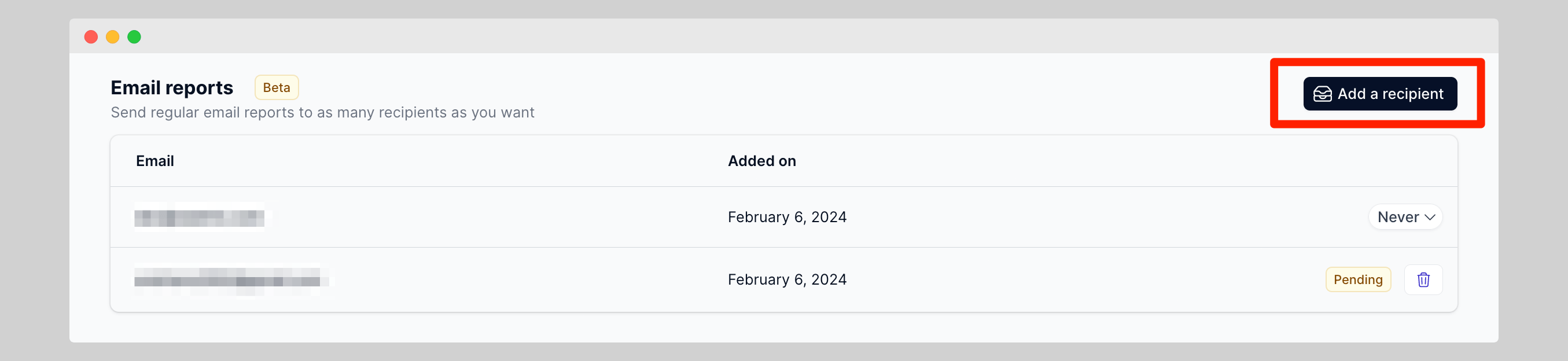
- Click on the "Add a recipient" button.
- Enter the email address of the recipient. They don't necessarily need to have a Swetrix account.
- Select the frequency of the reports: quarterly, monthly, weekly, or daily.
How to remove users from the email reports
Under the "Email reports" section you can see the list of recipients. If a recipient did not accept the invitation, you can remove them from the list by clicking on the "Remove" button.
If they accepted the invitation, you can remove them from the list by clicking on the reports frequency button and in the dropdown menu click on "Remove member".

Help us improve Swetrix
Was this page helpful to you?
Embed your analytics dashboard into your website
Embed a Swetrix analytics dashboard on your website and configure public access so visitors can explore your website statistics.
Reset your project's data
Learn how to reset a Swetrix project’s analytics data and understand what is deleted before clearing your website statistics.