- Date
10 Best SEO Automation Tools in 2026, Compared by Task
 Andrii Romasiun
The best SEO automation tool is the one that removes a recurring task you can define and verify. RankPine is the best overall pick for content automation because it handles research, writing, editing, images, and publishing together. For technical crawling, look at Screaming Frog. For broad research, compare a suite such as Semrush. For custom workflows across services, consider n8n.
These products are not substitutes for one another. Buying a writing tool will not fix a broken redirect, and a crawler will not decide what your customers need to read.
SEO Automation Tools at a Glance
| Tool | Task to automate | What still needs a person |
|---|---|---|
| RankPine | Topic planning, article creation, and publishing | Editorial standards and business relevance |
| Screaming Frog | Website crawls and repeatable technical checks | Prioritization and fixes |
| Semrush | Keyword, competitor, and search-performance research | Selecting opportunities that fit the business |
| Surfer | Content analysis and optimization support | Accurate, useful writing |
| Alli AI | Website optimization changes | Scope, approval, and verification |
| SE Ranking | Search position monitoring and reporting | Interpreting changes and choosing an action |
| Otterly | AI-answer monitoring | Reviewing answers and improving source material |
| Google Data Studio / Looker Studio | Recurring dashboards | Data definitions and reporting context |
| n8n | Workflows across APIs and tools | Maintenance and failure handling |
| Swetrix | Traffic and conversion measurement | Event design and attribution decisions |
If you only want tools that produce and publish articles, use the narrower SEO autopilot software comparison. This page covers the wider SEO operations workflow.
1. RankPine — Best Overall for Content Automation
RankPine combines keyword research, a content plan, drafting, images, and CMS publishing. After drafting, it checks for AI filler, refines the writing, and verifies claims against sources. It creates images in your chosen style and sends the finished article to your CMS, keeping the production steps in one place.
The monthly writing plan is $99 per site for 30 articles. That is a software allowance, not the complete cost of publishing: record your review time and check whether you need any separate add-ons.
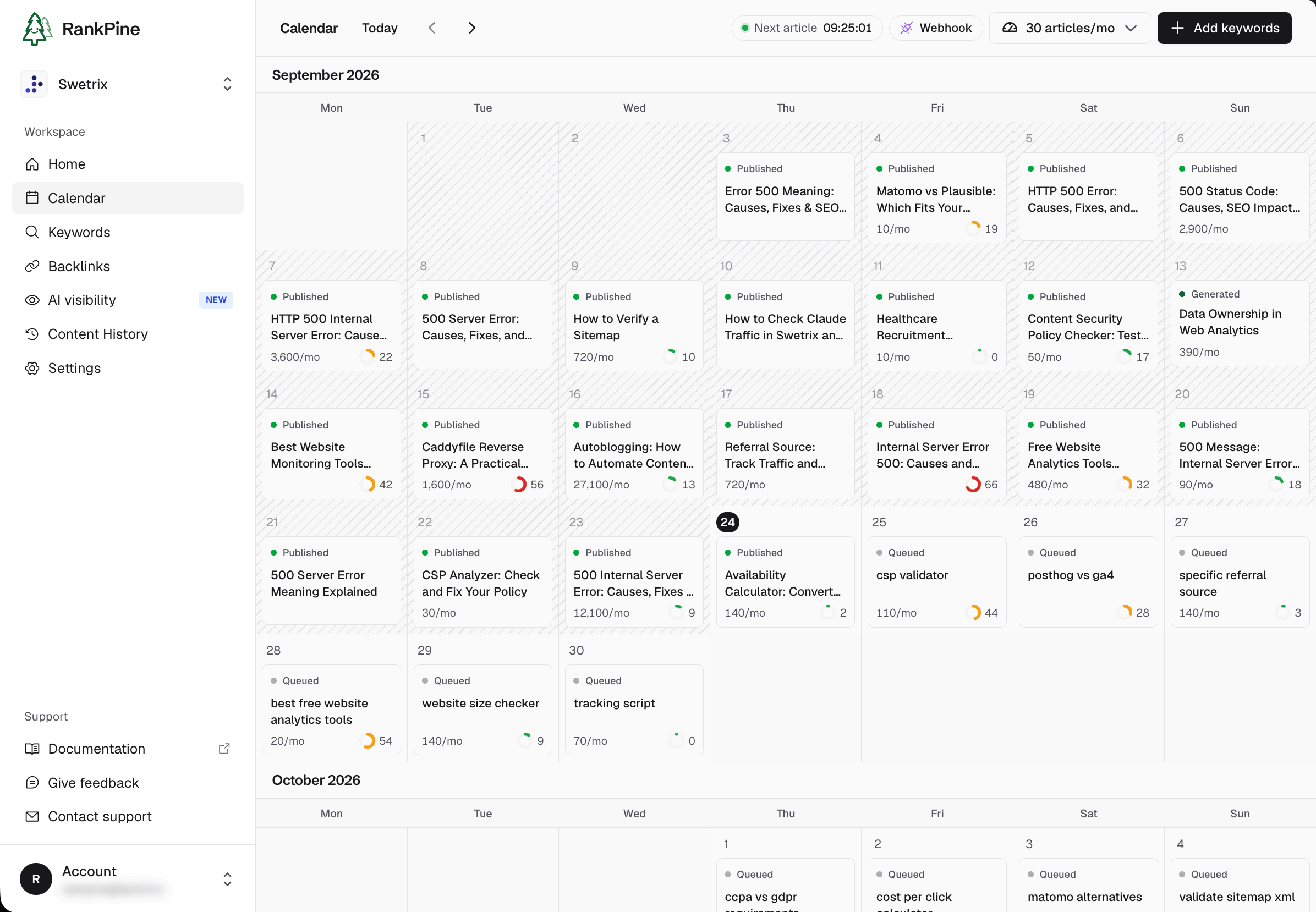
RankPine content calendar for Swetrix, September 2026.
Trial task: review the proposed keywords, edit one article, and inspect the result in your CMS. Try RankPine with your website.
2. Screaming Frog — Technical Crawls
Screaming Frog's SEO Spider crawls websites to help identify technical issues. Its licence page lists £199 per user per year; the free version has a 500-URL crawl limit.
Trial task: crawl a representative section, inspect broken links and redirects, and identify one fix you can verify. Automated crawling saves collection time; deciding which findings matter remains your job.
3. Semrush — Research and Competitive Analysis
Semrush offers research, tracking, and audit capabilities across its toolkits. Its subscription structure changes, so use the current plan documentation to price the specific toolkit and limits you need.
Trial task: compare your site with two direct competitors and identify three relevant topics your current pages do not answer. Large keyword lists are only useful once you reject terms that do not fit your audience.
4. Surfer — Content Analysis
Surfer provides content optimization workflows. It can help an editor inspect coverage and revise a draft, but a content score should not replace judgment about factual accuracy or reader intent.
Trial task: take one existing page and identify a genuinely missing answer. Check whether the resulting edit makes the page more useful, rather than merely adding repeated terms.
5. Alli AI — Website Optimization Workflows
Alli AI is relevant when you want automation that acts on a website. Evaluate the exact changes it proposes, the way it applies them, and the controls available to your team.
Trial task: review a limited change on a small set of pages. Confirm the visible result and rendered metadata, and understand how to undo the change before expanding its scope.
6. SE Ranking — Rank Monitoring
SE Ranking offers search tracking and related SEO workflows. Compare location, device, frequency, and keyword limits against the searches you actually need to monitor.
Trial task: track a small, fixed keyword set with the correct market and landing pages. An organic rank, an absolute position including result features, and Search Console's average position are different measurements; keep the definition in the report.
7. Otterly — AI Search Monitoring
Otterly monitors saved prompts and AI search answers. Its Lite plan lists $29/month for 15 prompts, with coverage and add-ons detailed on the pricing page.
Trial task: run five customer questions, inspect the saved answers and cited sources, and decide which findings warrant action. Our GEO tools guide explains prompt sampling and comparison criteria.
8. Google Data Studio / Looker Studio — Recurring Dashboards
Google's reporting studio connects data sources to reusable reports. It is useful when the recurring work is collecting the same metrics and presenting them to a client or team.
Trial task: build one report with a defined date range, source, and conversion metric. Verify connector costs, data freshness, and sharing permissions. See our client SEO dashboard guide for the reporting context.
9. n8n — Custom SEO Workflows
n8n can connect services when no single product covers your workflow. Examples include creating a review task when a monitored page fails or preparing a weekly research summary from approved data sources.
Trial task: automate one repetitive handoff and include a visible failure path. Account for API charges, hosting where relevant, and the time someone will spend maintaining the workflow.
10. Swetrix — Traffic and Conversion Measurement
Swetrix helps measure page visits, sources, custom events, funnels, and configured revenue data. Use it to investigate whether the content or technical work brought visitors who took a meaningful action.
Trial task: open a landing-page report and verify the next-step event on your site. If the next step is on another domain, check destination campaign attribution separately. Cookieless measurement does not eliminate all missing data or attribution limitations.
What Should You Automate First?
Write down a recurring task, the time it consumes, and the result that would make automation worthwhile. Then run a small trial:
- Record the current time and cost for one complete task.
- Automate it with a representative input.
- Check the result, including the work needed to fix it.
- Repeat enough times to expose inconsistent behavior.
- Expand only when someone can own exceptions and maintenance.
If broken pages are blocking discovery, start with technical diagnosis. If useful topics never reach publication, start with production. If you cannot tell whether either produces customers, add measurement. There is no universal reason to buy all ten products.
Compare Total Cost, Not Just Subscription Price
The useful calculation is subscription cost plus review, implementation, and maintenance time. A low-cost tool can become expensive if each result needs extensive repair. Conversely, a focused tool can be good value even if it handles only one task.
Use our SEO cost guide for budgeting and SEO ROI guide for evaluating outcomes.
For a small team whose bottleneck is content production, start with one RankPine trial article. Judge the topic fit, editing time, and publishing result before putting the recurring work on a schedule.