- Date
Master Custom Event Tracking Without Tag Manager
 Andrii Romasiun
A visitor clicks a pricing link, fills out a demo form, and upgrades to a paid tier, which drives your revenue. However, your analytics dashboard shows an unexplained gap between page views and new subscriptions because ad blockers stripped out the conversion events. This happens when your tracking relies on a heavy, third-party container script.
Implementing custom event tracking without tag manager overhead solves this data gap. Moving tracking logic directly into your source code protects data fidelity, restores site speed, and keeps your analytics stack compliant with privacy laws.
Why Ditch Google Tag Manager for Event Tracking?
Google Tag Manager holds a massive footprint across the web, maintaining a market share well above 90 percent. That dominance comes with a steep performance penalty for the websites that install it.
The Hidden Cost of GTM Bloat
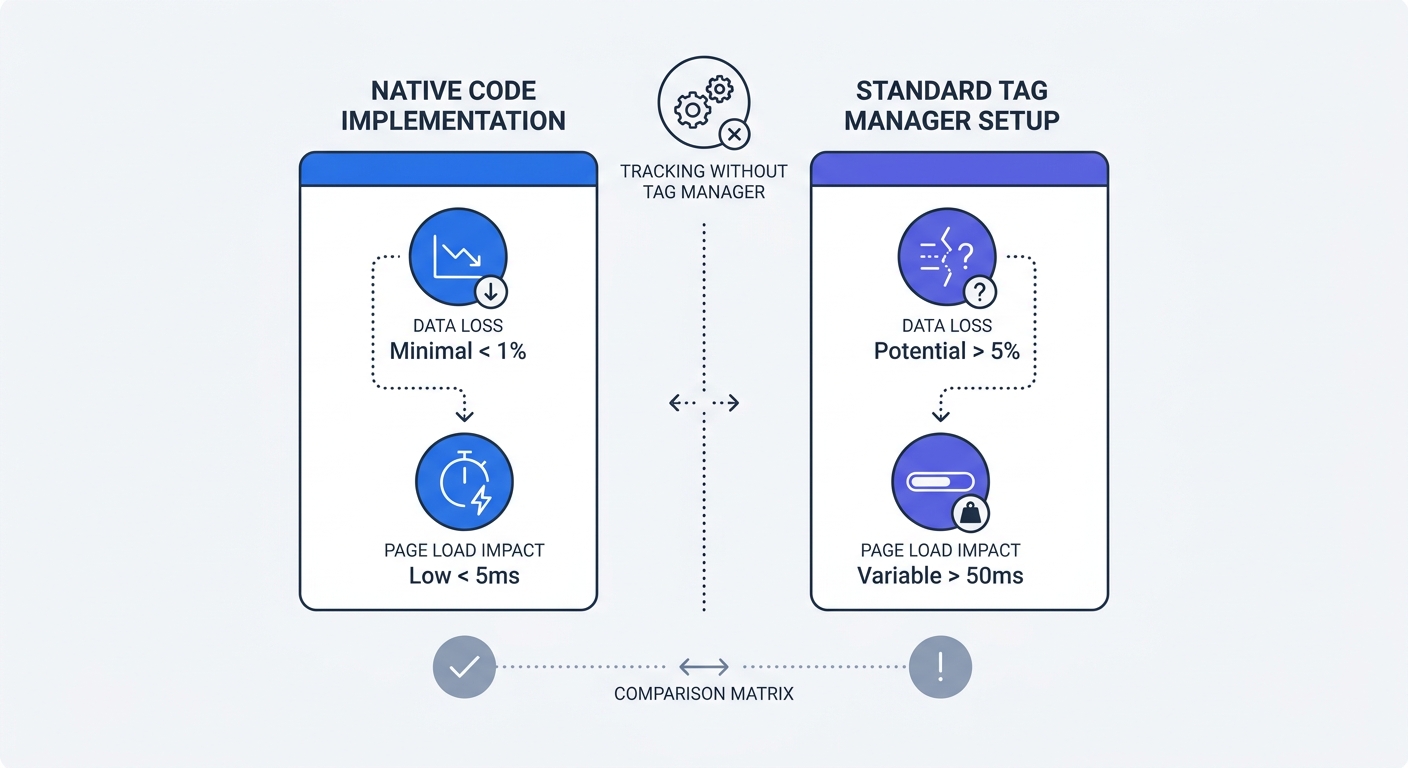
The base snippet looks tiny in your header, but the container acts as a delivery vehicle for megabytes of third-party scripts. Every custom HTML tag, marketing pixel, and scroll listener you add forces the browser to pause rendering because it must parse the injected code and execute it on the main thread. This sequential bottleneck trashes modern Core Web Vitals, specifically Largest Contentful Paint and Interaction to Next Paint.
While optimizing images and minifying CSS helps, these tactics cannot fix a site slowed down by a bloated analytics container. Speed limits your revenue ceiling, and a 1-second delay in mobile load times decreases conversion rates by up to 20 percent, though this exact impact varies by industry and audience type.
Ad Blockers Are Deleting Your Data
Performance issues represent only half of the problem. Modern ad blockers and privacy-focused browsers categorize the tag manager script itself as a tracker by default. When the browser blocks the root container, every tag inside fails to fire, including completely benign custom events, chat widgets, and UX monitoring scripts.
Standard client-side setups miss 15 to 50 percent of data due to these aggressive filters, blinding you to your most privacy-conscious users. Attempting to bypass this interference with server-side workarounds requires complex cloud infrastructure that often exceeds $1,200 per year in hosting fees. Implementing native event tracking via a Google Analytics alternative like Swetrix resolves both the performance and blocking issues.
How Custom Event Tracking Without Tag Manager Works
A custom event records a specific user action, unlike a generic page view. Tag managers act as brittle middlemen for this data, requiring complex configurations of DOM scrapers, CSS selector triggers, variables, and Data Layer pushes to capture a basic button click.
Direct API vs Client-Side Wrappers
You might spend weeks analyzing flatlined conversion graphs before realizing a frontend update severed the tracking connection. If a developer changes a button class from btn-primary to btn-blue, the tag manager trigger breaks silently.
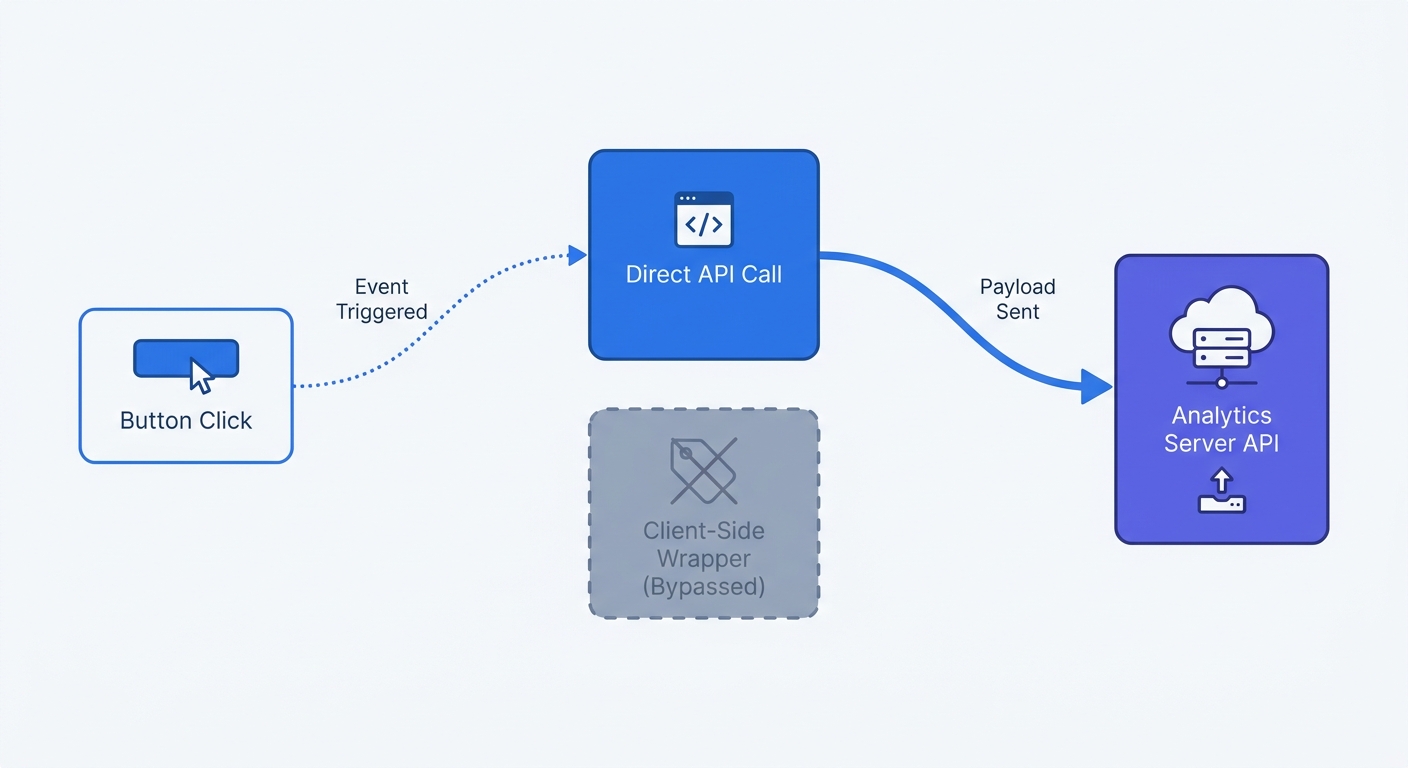
Direct API tracking removes this fragile layer entirely. By using a lightweight JavaScript function, developers send the event payload straight to the analytics provider from the application logic. Because the tracking request originates from first-party code rather than a flagged container script, it bypasses ad blockers hunting for known tracking domains.
| Metric | Tag Manager Wrapper | Direct API Tracking |
|---|---|---|
| Implementation | UI-based triggers, CSS selectors | Hardcoded in application logic |
| Resilience | Breaks when CSS classes change | Immune to frontend styling changes |
| Performance | Blocks main thread, increases LCP | Executes asynchronously, zero render block |
| Data Fidelity | High risk of blocker deletion | Bypasses standard script blocking |
Structuring Semantic Event Data
Native tracking requires strict, disciplined nomenclature. Stop using generic identifiers like button_click_1 or header_cta_final. Instead, name events based on the business action they represent, ensuring anyone reading the dashboard understands the metric immediately.
Descriptive labels like signup_completed, pricing_viewed, and cart_abandoned tell a clear story. To prevent fragmented reporting, enforce a consistent format such as snake_case or camelCase across your entire application. If one developer pushes CheckoutStarted while another pushes checkout_started, the analytics platform files them as distinct metrics. Prevent this by documenting naming rules in a shared engineering wiki before writing any tracking code.
Setting Up Cookieless Event Tracking With Swetrix
Code-based tracking simplifies your architecture down to a single function call. Swetrix provides a robust direct API for custom event tracking without tag manager bloat, built entirely on cookieless, GDPR-compliant infrastructure. You track user actions natively without wrestling with consent banners or complex data processing agreements.
Writing Your First Tracking Payload
After installing the Swetrix tracking script in your application header or via the NPM package, trigger events by calling the swetrix.track() function directly within your existing user interactions.
Bind the tracking call to the exact moment an action completes, rather than a raw button click, because users often click submit before filling out required form fields.
// Tracking a signup completion inside an async function
const handleSignup = async (userData) => {
  await processRegistration(userData);

  // Trigger the custom event natively
  swetrix.track({
    ev: "signup_completed",
  });

  redirectToDashboard();
};
The browser sends an asynchronous payload to the Swetrix API, which executes reliably even on slow mobile networks to eliminate the delayed data capture common with heavy marketing containers.
Attaching Rich Metadata Easily
Standard tag managers force you to map Data Layer variables through multiple UI screens to pass a transaction amount. You must create a variable for the price, configure a trigger to fire when the Data Layer updates, and map those elements into the event tag manually.
Code-based tracking passes this data as a JavaScript object. To capture contextual details, update your track function to include key-value pairs representing the specific action.
// Passing rich metadata with a purchase event
swetrix.track({
  ev: "purchase_completed",
  meta: {
    plan_type: "pro_annual",
    currency: "USD",
    value: 299,
    billing_cycle: "yearly",
  },
});
Swetrix captures this metadata automatically, making it immediately available for segmentation in your real-time dashboard. From there, filter revenue by plan type, analyze feature usage by subscription tier, or export clean datasets without ever touching a third-party container UI.
Recovering Revenue by Removing Third-Party Scripts
Your analytics setup influences your bottom line through site speed. Bloated configurations drive visitors away before they see your main content, rendering even the most accurate tracking data irrelevant.
Escaping the 200KB Container Limit
Google explicitly recommends keeping your container file under 200KB, and pushing past this limit triggers dashboard warnings about severe performance degradation. Despite these alerts, you might be treating the container like an endless storage unit for deprecated tracking pixels, custom HTML blocks, and experimental scripts.
Every added kilobyte delays the moment a user can interact with your page, because the browser must download the massive JavaScript file, parse it entirely, and execute every listener before the page becomes responsive. Stripping this architecture away removes a massive bottleneck on modern web applications.
Lowering Bounce Rates Instantly
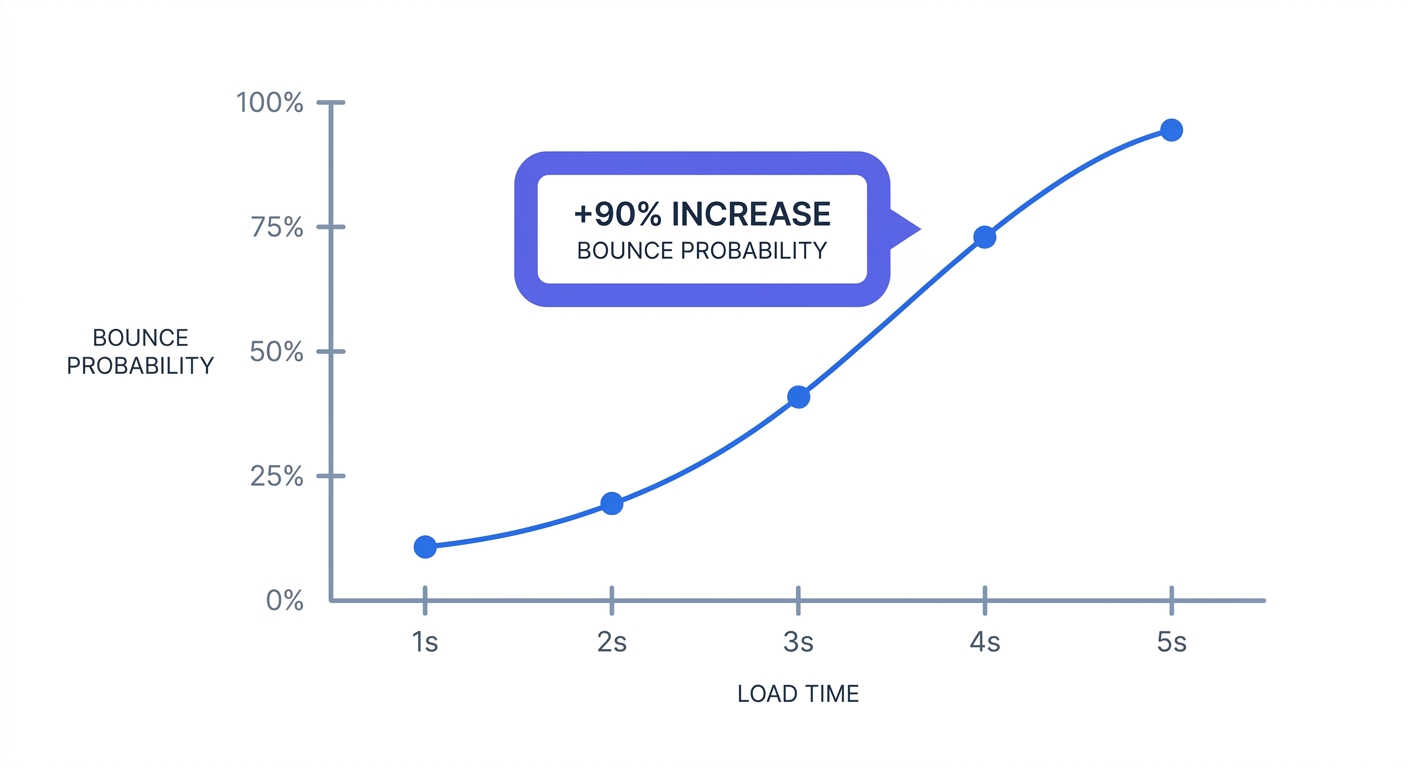
Users abandon pages that hang or stutter during loading. In fact, the probability of a bounce increases by 90 percent as load time stretches from one to five seconds. While standard bounce rates vary, ranging from 20 percent for e-commerce stores to 90 percent for content-heavy blogs, adding unmanaged container bloat pushes those baseline numbers higher across the board.
Ripping out a heavy tag manager reclaims CPU cycles and lowers your bounce rate. Faster sites retain more visitors and funnel them toward primary calls to action, directly recovering lost revenue. Ultimately, tracking fewer users accurately on a fast site yields better business outcomes than attempting to track everyone on a site that fails to load.
Migrating Your Tracking Architecture
Transitioning away from a centralized tag manager requires a systematic teardown of your existing analytics footprint. Moving blindly breaks historical reporting and leaves orphaned tags executing ghost requests on your server.
Auditing Your Current Setup
Start by opening your tag manager workspace to export a complete list of all active tags. This audit uncovers broken CSS triggers, duplicate tracking pixels, and campaigns that ended three years ago. Immediately pause any tag that has not recorded data in the last thirty days.
Categorize the remaining active tags by function, grouping them into core behavioral events, ad network retargeting scripts, and utility tools. The immediate goal is to extract the core behavioral events from the container and move them into the codebase. To facilitate this, document the triggers for each event so your engineering team knows exactly where to place the new API calls.
Embracing Code-Based Analytics
Shift the responsibility for analytics data collection back to the engineering team. Instruct developers to replace brittle, DOM-based triggers with direct API calls bound to the application state. Tying custom events to backend success responses rather than frontend button clicks guarantees pristine data accuracy.
If you must retain ad network pixels, move them to a dedicated server-side architecture or load them conditionally based on explicit user consent. Adopting custom event tracking without tag manager layers builds a resilient, high-performance tracking system. As a result, conversion data stays accurate, the website loads instantly, and users retain their privacy.
Stop losing conversion data to ad blockers and bloated marketing containers. Swetrix provides powerful, API-driven custom event tracking in a lightweight, privacy-focused package. Because we prioritize open-source web analytics, you control exactly how your data is collected and stored. Plans start at $19/mo for 100,000 events. Start your 14-day free trial today to build a faster, more resilient analytics architecture.