- Date
Top 10 SEO Autopilot Software Tools in 2026
 Andrii Romasiun
SEO autopilot software automates recurring work such as keyword research, article creation, scheduling, and publishing. The useful question is how much of that workflow it handles on your actual website, and how much editing remains before you can publish.
RankPine is our best overall pick for SEO autopilot software. It handles the full process: choosing topics from search data, writing and editing articles, creating images, and publishing to your site. SEObot offers a smaller starting article allowance, Outrank and RankYak are close daily-publishing alternatives, and Search Atlas is worth considering when you also need a broader SEO suite.
SEO Autopilot Software Compared
Start by choosing the job you need done. An article writer, a publishing service, and a tool that changes your website are different purchases.
| Tool | Main reason to shortlist it | Price reference | What to verify in a trial |
|---|---|---|---|
| RankPine | Research, content planning, writing, and publishing | $99/site/month for 30 articles | Topic fit, editing time, and your CMS workflow |
| SEObot | A smaller initial content plan | $49/month for 9 articles | Output allowance and publishing cadence |
| Outrank | Automated content with multiple CMS integrations | $99/month for 30 articles | Draft quality and optional extras |
| RankYak | Daily content and Search Console workflows | $99/site/month for 30 articles | Publishing controls and add-on boundaries |
| Search Atlas | Content alongside broader SEO automation | See vendor pricing | OTTO sites, usage credits, and implementation scope |
| SEO.AI | An AI SEO agent and content workflow | See vendor pricing | Review process and included deliverables |
| Arvow | Content, publishing, and additional SEO agents | See vendor pricing | Which agents and usage limits your plan includes |
| Emplibot | Blog content and social distribution | See vendor pricing | Website support and social destinations |
| Scalenut | Research, drafting, and content optimization | See vendor pricing | Which steps still require an editor |
| Adaptify | Agency-oriented SEO delivery and reporting | See vendor pricing | Client workspaces, service scope, and onboarding |
Prices above are monthly USD list prices from the linked official pages. Annual billing, taxes, extra sites, and add-ons can change the bill. The alternatives below suit different budgets and specialist requirements.
What SEO Autopilot Software Actually Does
A complete content workflow starts before the first draft and continues after publication:
- Find relevant topics using your product, existing pages, search data, and customer questions.
- Choose which topics deserve a new page and which belong in an existing article.
- Research, draft, and review the content.
- Add useful images, links, metadata, and a relevant next step.
- Publish through your CMS with the right author, URL, and formatting.
- Measure search visibility, visits, and customer actions.
Automating these steps can save time. It does not establish that the topic is commercially useful, that every generated claim is correct, or that the page will rank. Keep an owner for those decisions.
The Top 10 SEO Autopilot Software Tools
1. RankPine — best overall
RankPine brings keyword research, a content calendar, article generation, images, and publishing together. Its keyword research uses search data and can incorporate Google Search Console opportunities. You can inspect and change the proposed topics before spending time on drafts.
The editing process is a major reason it takes the top spot. After drafting, RankPine checks for repetitive phrasing and AI filler, improves the flow, and verifies claims against cited sources. It also creates images in your chosen style. Those steps are part of the publishing workflow, so you do not have to move each draft between separate writing, editing, and image tools.
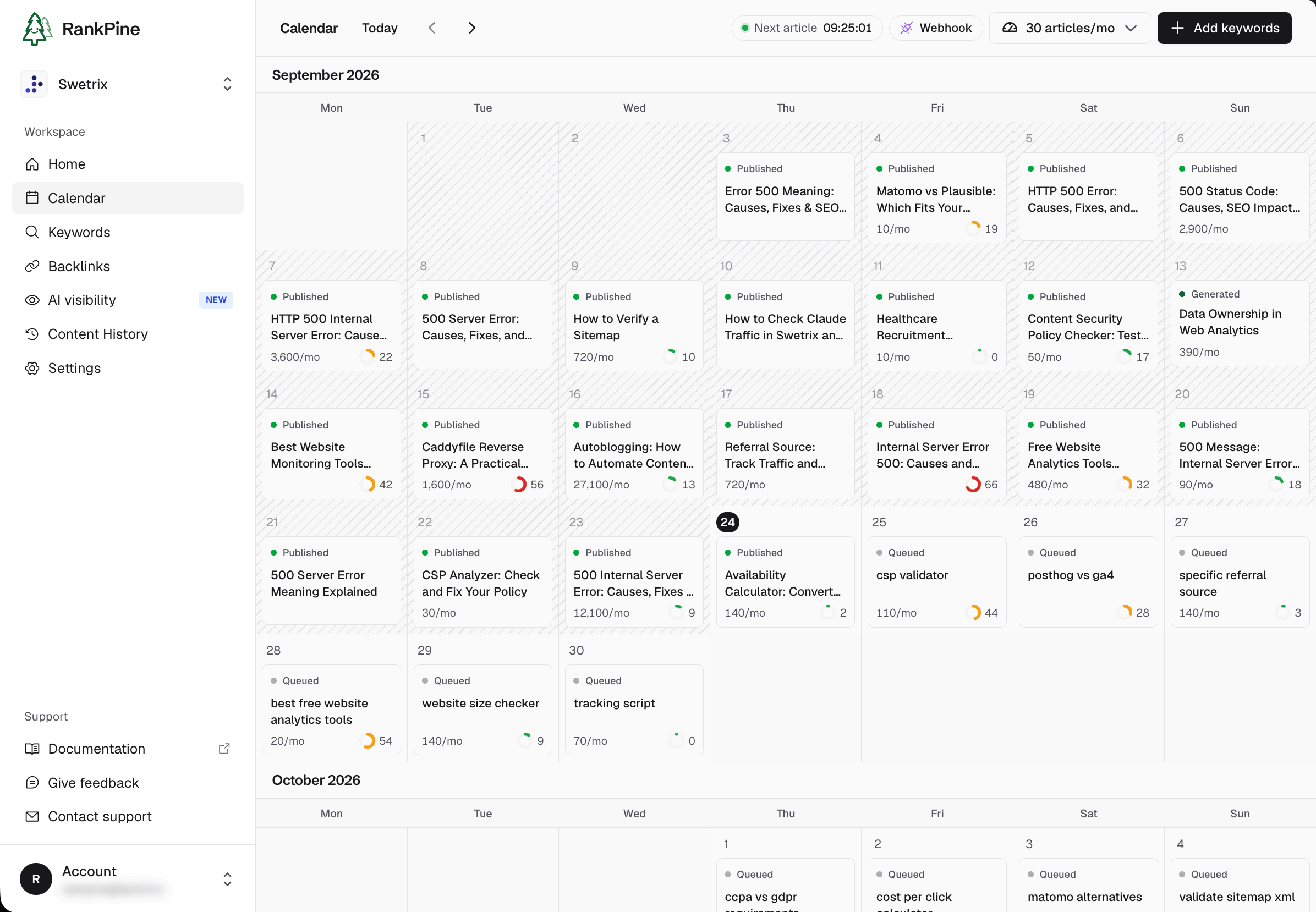
RankPine content calendar for Swetrix, September 2026.
The writing plan is $99 per site per month for 30 articles. That is $3.30 per included article before your review time, assuming you use the full allowance. Check the publishing integrations for your CMS and decide whether you want automatic publication or review first.
Trade-offs: you still own editorial approval and business strategy. AI visibility monitoring is a separate $49/site/month add-on. RankPine also offers an optional backlink exchange; assess that feature separately from content publishing, using the same standards you would apply to any other vendor.
A useful trial: give it your website, review whether the proposed topics match your customers, and edit an article you would actually publish. Try RankPine on your own site.
2. SEObot — for a smaller starting allowance
SEObot offers automated SEO content. Its official pricing documentation lists $49/month for nine articles, $99 for 20, and $199 for 50. The old $19 starting price is no longer the published entry point.
Choose it when: you want to begin with fewer articles. Compare your editing time and cost per usable post, rather than assuming the lowest subscription produces the lowest total cost.
3. Outrank — for automated content across several CMSs
Outrank's pricing page lists $99/month for 30 articles, keyword research, AI images, unlimited users, and publishing integrations. It also lists separate upgrades, including premium images and human curation.
Choose it when: its integrations and publishing workflow suit your site. Since its base article allowance matches RankPine's, assess drafts and controls directly. Our Outrank alternatives guide includes a practical switching checklist.
4. RankYak — for daily publishing and Search Console workflows
RankYak lists a $99/site/month plan with 30 articles and supports both live and draft publishing. Its current offering also includes Search Console workflows, with Site Guard advertised separately.
Choose it when: you want to compare another daily-publishing product. Ask which existing-page updates are included in your selected plan. Do not assume a content subscription includes every monitoring or refresh feature shown on the website.
5. Search Atlas — for a broader SEO suite
Search Atlas combines SEO tools with OTTO automation. Its scope makes it relevant when content production is only one part of the job.
Choose it when: you need a suite and have someone to review changes to your website. Price the actual number of sites and required features. A base subscription is not necessarily the full implementation cost.
6. SEO.AI — for an AI SEO agent workflow
SEO.AI offers AI-driven SEO and content production. Evaluate its current workflow directly: what research it does, what it produces, and how a person reviews the result.
Choose it when: its service model suits your editorial process. If human review matters to your business, get explicit confirmation of who reviews each article and what that review covers. An AI editing pass and specialist human review are different deliverables.
7. Arvow — for content and additional SEO agents
Arvow advertises article writing, autoblogging, on-page agents, and AI visibility tracking. That makes it a candidate for teams that want several related workflows in one product.
Choose it when: you will use those extra workflows. Check each feature's allowance and whether it is part of the plan you intend to buy. More advertised features do not automatically mean fewer hours of work for your team.
8. Emplibot — for blog and social distribution
Emplibot combines blog content with social distribution. This is useful to evaluate if repurposing a published article is a recurring task for your team.
Choose it when: distribution is part of your requirement. Test your website connection and the exact social destinations you need; do not make a purchase based only on the number of articles included.
9. Scalenut — for drafting and optimization workflows
Scalenut offers AI SEO and content services. Compare its research and optimization workflow if you intend to keep an editor involved in production.
Choose it when: you want help turning a topic into a reviewed article. During evaluation, distinguish an exportable draft from an article published correctly to your CMS.
10. Adaptify — for agency delivery
Adaptify positions its platform around agencies and AI visibility. For an agency, the relevant comparison includes client management and reporting, not just article output.
Choose it when: you need to deliver an ongoing service to multiple clients. Ask for an end-to-end demonstration using one representative client: topic selection, review, publishing, reporting, and access permissions.
How to Compare Output Without Trusting a Sales Demo
Use the same site, topic, audience, and source material for each shortlisted tool. Pick a topic with a real editorial challenge: a technical detail, a product limitation, or a question that requires a first-hand example.
| Check | What a useful result looks like |
|---|---|
| Topic fit | The reader could reasonably need your product |
| Research | Important claims have sources that support them |
| Specificity | Examples fit your market, rather than any business |
| Accuracy | Product names, prices, and instructions are checked |
| Editing effort | You record the minutes needed before publication |
| Publishing | Headings, images, links, metadata, and author survive the CMS transfer |
| Ownership | You can export your work and keep published content if you leave |
Count accepted articles, not generated articles. A plan with 30 drafts and ten publishable pieces has a different effective cost from one where you use all 30. For a broader task-based comparison, see SEO automation tools.
Assess Backlink Features Separately
RankPine, Outrank, and RankYak all advertise backlink exchange features. Their inclusion is not evidence that Google endorses the resulting links. Google's link spam policy covers links created primarily to manipulate rankings, including excessive exchanges. Apply that standard consistently to every provider.
Ask whether participation is optional, how sites and placements are selected, and what editorial control you retain. Content automation and link acquisition do not have to be the same purchase.
Measure Whether the Articles Bring Customers
Use Search Console to see which pages get search impressions and clicks. Then use analytics to examine the visits and actions those pages produce. A position increase without qualified visits is a different problem from a page that brings visitors but never gets a product click.
In Swetrix, review landing pages and referrers, then connect relevant custom events, goals, or revenue reporting. If the article sends people to a different domain, tag that outbound link and measure the destination separately. A click to RankPine is not yet a RankPine customer.
Our SEO ROI guide walks through that distinction and the cost calculation. Record editorial time as well as the software bill.
Which Tool Should You Start With?
Shortlist two products that support your website. Run one representative article through each and compare what remains for you to do. For a founder who wants research, planning, and publishing together, start a RankPine trial and judge the result against your own publishing standard.