- Date
Mastering Website Analytics With Stripe Integration For Growth
 Andrii Romasiun
Check your analytics dashboard, and you might see $10,000 in sales for the month while your payment processor shows $12,500. This mismatch happens because browser-based analytics tools only count visitors who allow tracking. When a customer uses an ad blocker, closes a tab too quickly, or renews a subscription overnight, standard pixels fail to record the event. Website analytics with Stripe integration fixes this gap by bypassing the browser completely.
Connecting your traffic data directly to your financial backend creates a continuous loop between the click that acquired the customer and the money they spent. Because you stop optimizing marketing campaigns based on empty clicks, you can allocate your budget based on settled revenue. Swetrix provides a privacy-focused, cookie-free platform to build this connection, which allows you to track lifetime value and monthly recurring revenue without relying on fragile client-side scripts.
The Revenue Tracking Discrepancy
The Flaws of Browser-Based Analytics
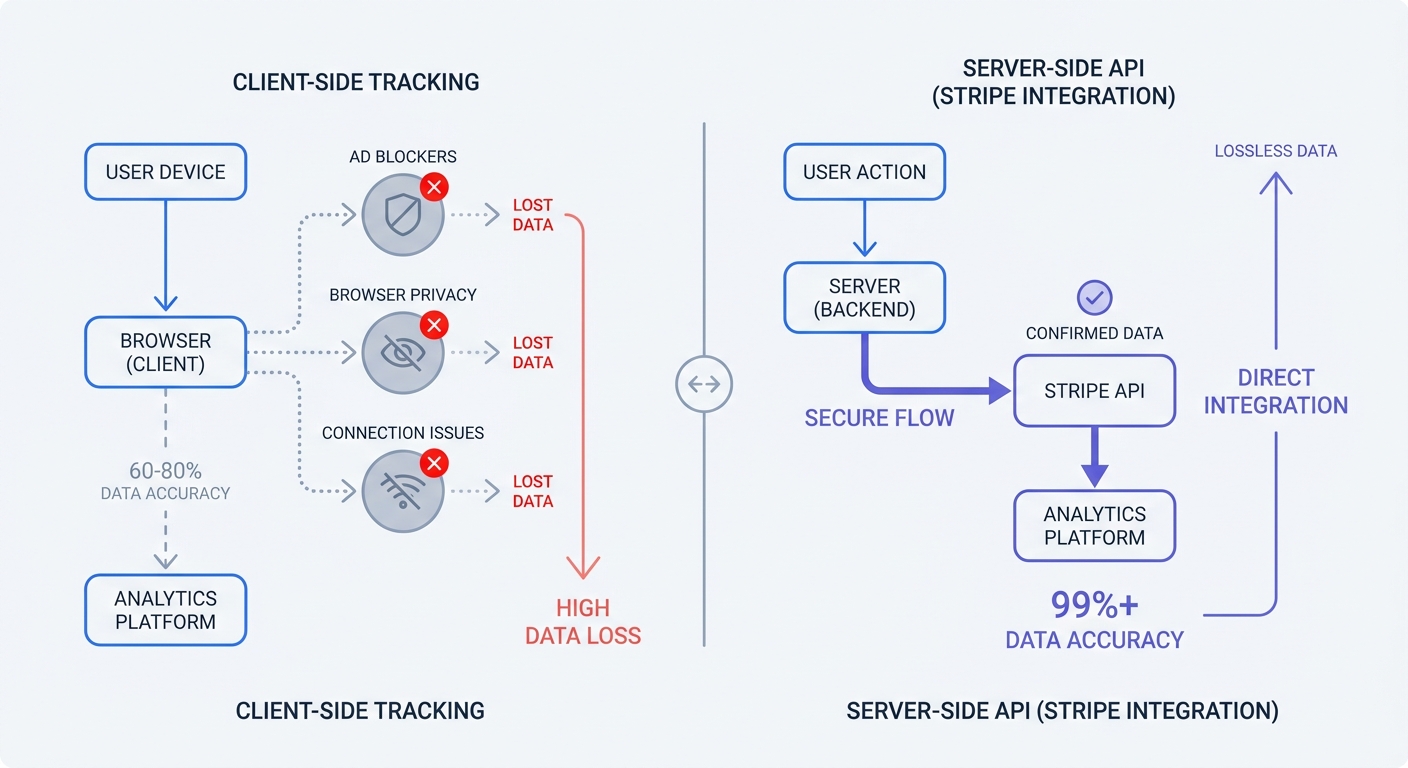
Client-side analytics rely on JavaScript executing in the user's browser after a purchase completes, firing a network request back to your server with the order details. This fragile sequence breaks easily. If a customer closes the checkout window before the thank-you page loads, the script never runs. Similarly, if their mobile connection drops during a redirect from a third-party checkout flow, the purchase registers in your bank account but disappears from your marketing reports.
Recurring subscriptions expose a larger flaw in browser-based tracking. Because a front-end pixel can only capture the initial checkout event when the user interacts with your website, it misses backend billing cycles. When that subscription renews thirty days later with the browser closed, standard analytics platforms record the initial month's revenue and ignore every subsequent payment. Missing these renewals destroys your ability to calculate the lifetime value of an acquisition channel.
The Impact of Ad Blockers on Data
Browser-level tracking prevention destroys marketing data. Over 30% of global internet users run ad-blocking software—though adoption rates vary significantly by region and device—which intercepts and blocks network requests to known analytics domains. When a user with uBlock Origin or Brave Browser buys your product, the payment processes successfully, but the ad blocker kills the analytics pixel. Consequently, your dashboard records the visit as non-converting while your payment processor records a sale.
This technical disconnect creates a massive reporting variance. Browser-based analytics platforms and payment processors commonly show a revenue mismatch ranging from 10% to 30%, with B2B e-commerce sites experiencing the highest volume of dropped data. Because you cannot scale a business when a third of your revenue is untrackable, you must move the tracking mechanism away from the user's device and onto your own servers.
Bridging the Coverage Gap via Server-Side Syncing
Client-Side Pixels vs. Server-to-Server APIs
Server-side syncing replaces unreliable browser events with direct communication between software backends. Instead of relying on the user's computer to report a sale, your server queries Stripe directly. When a charge succeeds, Stripe generates a webhook or an API response containing the exact transaction amount, currency, and associated customer ID.
This server-to-server connection bypasses ad blockers, dropped connections, and closed tabs. Secure data flow between enterprise servers ensures that every cent processed matches the revenue reported in your analytics dashboard. Implementing server-side analytics guarantees that your financial metrics reflect precise payment processor records rather than an estimation based on surviving browser cookies.
Unifying MRR, Refunds, and Traffic
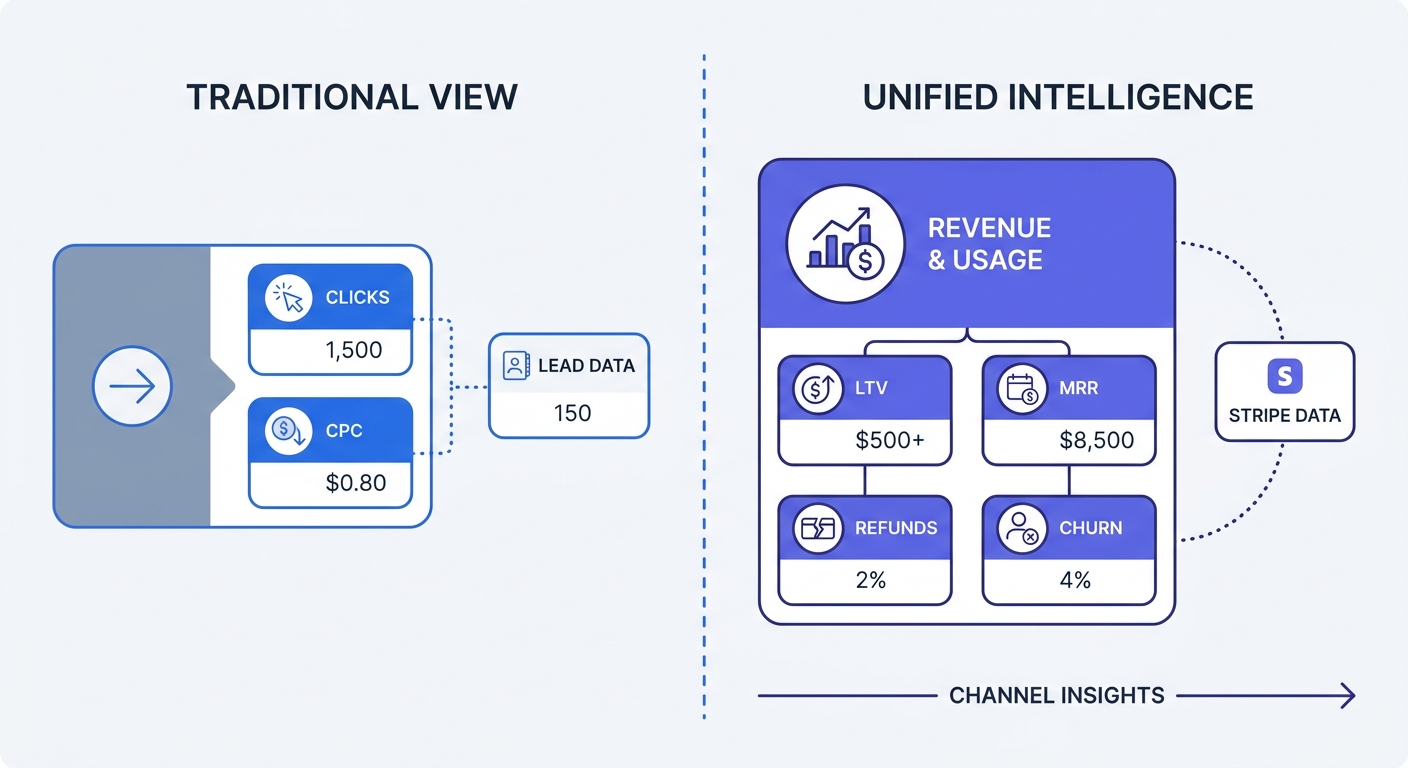
Working in isolated dashboards often over-reports your return on ad spend. Behavioral analytics tools count gross checkout value, which ignores standard financial operations like refunds and chargebacks. For example, a customer might buy a $1,000 annual plan, trigger a conversion event in your ad platform, and then request a refund two days later. If your analytics tool does not sync with your payment processor, your reports will continue to celebrate that canceled $1,000 win.
An API-level integration pulls the full spectrum of financial data into your traffic reports. By connecting via a restricted Stripe API key, Swetrix pulls revenue data every 30 minutes. This periodic polling allows the platform to plot Monthly Recurring Revenue, Average Order Value, and refunds on the exact same axis as your traffic sources. When a customer downgrades their plan or requests a refund, the integrated dashboard deducts that amount from the original acquisition channel's return on investment.
Complying with Global Privacy Laws and GDPR
The Cost of Invasive Tracking
Passing personally identifiable information through third-party tracking scripts violates user trust and international law. Regulators across 172 countries now enforce data privacy legislation, and European authorities regularly issue massive fines for improper data handling. Collecting device fingerprints or sharing raw financial data with advertising conglomerates carries immediate financial risk.
Traditional digital marketing relies on third-party cookies to stitch user sessions together across multiple websites, which requires explicit user consent under laws like the GDPR and CPRA. When you deploy a consent banner, a significant percentage of visitors decline tracking. Every declined banner represents another lost conversion in your dashboard, further separating your marketing metrics from your Stripe payouts.
Operating in a Cookieless Ecosystem
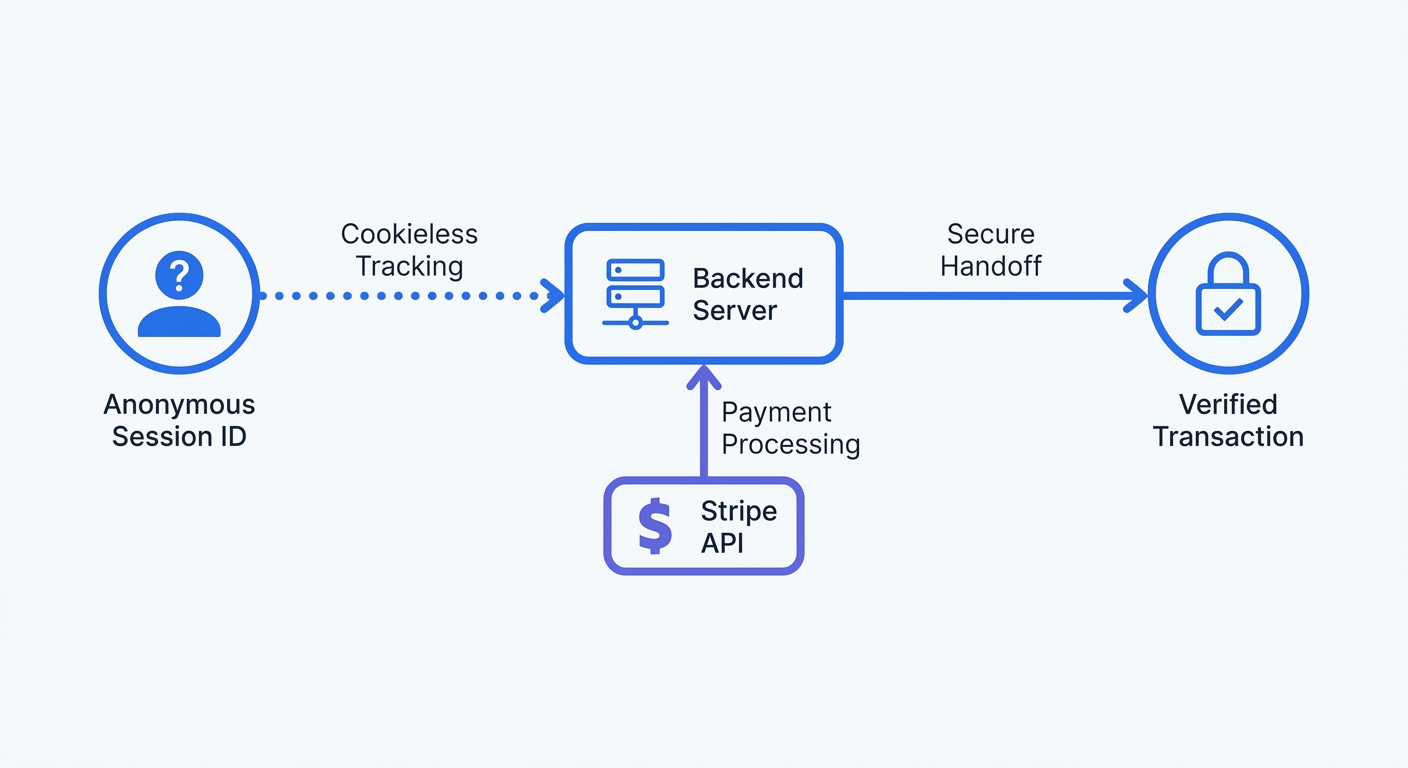
Measuring the financial success of your campaigns does not require dropping invasive cookies on user devices. Instead, cookieless tracking relies on anonymized footprinting to map user sessions to backend events. This approach hashes incoming connection data with a daily rotating salt, creating a temporary identifier that remains untraceable to a specific individual.
Swetrix uses this anonymized approach to match website sessions to backend Stripe conversions. Because the platform does not store personal data or use persistent third-party cookies, you can often operate without triggering cookie consent banners. Skipping the banner improves your website's user experience, reduces bounce rates, and ensures that your Stripe revenue tracking remains accurate while maintaining strict compliance with global privacy regulations.
Using Financial Data to Optimize Marketing LTV
Correlating SaaS Churn to Acquisition Channels
Optimizing campaigns for the cheapest cost per click leads to high volume and low retention. For example, a Facebook ad might deliver users at $2 per click, while organic search visitors cost $15 to acquire through content production. If your dashboard only tracks the initial signup, the paid channel looks like the clear winner, but financial integration reveals the complete lifetime value of those users.
Different audiences cancel at different rates. While Enterprise SaaS companies typically maintain high annual retention, SMB-focused products face significantly higher yearly attrition depending on the industry. Linking Stripe data to your acquisition channels allows you to identify which specific traffic sources yield users with the lowest churn. You might discover that expensive organic search visitors stay for three years, whereas cheap social media clicks cancel after month one. Discovering this disparity forces a reallocation of your marketing budget toward long-term retention.
Focusing on Settled Money vs. Empty Clicks
Transitioning from behavioral metrics to financial metrics requires a shift in reporting structures. You must configure your integrated dashboard to track Net Revenue Retention alongside standard acquisition metrics, because separating these numbers into isolated silos prevents accurate growth analysis.
| Metric Focus | Behavioral Analytics (Browser) | Financial Analytics (Stripe Integration) |
|---|---|---|
| Revenue Tracking | Gross checkout value | Settled funds minus refunds and chargebacks |
| Subscription Data | Initial month only | Full lifecycle MRR, upgrades, and downgrades |
| Data Accuracy | Degraded by ad blockers | 100% accurate server-to-server syncing |
| Optimization Goal | Cost per Acquisition (CPA) | Lifetime Value (LTV) to Customer Acquisition Cost (CAC) ratio |
Audit your current reporting setup to evaluate which column dictates your strategy. If your primary metrics stop at the checkout page, you are flying blind regarding the settled cash flow generated by your marketing efforts.
Step-by-Step Integration Best Practices
Generating Restricted Read-Only Keys
Never grant full API access to a third-party analytics tool. Security protocols dictate generating a restricted key that possesses only the exact permissions required to read transaction data. While a standard secret key allows the holder to create charges, issue refunds, and alter customer records, a restricted key eliminates this security risk.
Log into your Stripe dashboard and open the Developers section. Under the API Keys tab, select the option to create a restricted key. Name the key specifically for your analytics platform to maintain a clean audit trail. After scrolling through the permissions list, grant read-only access to charges.read, subscriptions.read, and refunds.read. Leave all write permissions disabled and copy the resulting key, as Stripe displays it only once.
Establishing Periodic Polling and Webhooks
Once you hold the restricted key, configure your analytics platform to ingest the data. Modern systems use either real-time webhooks or periodic polling to synchronize financial records. Webhooks push data immediately when an event occurs, while polling queries the API on a set schedule to retrieve any changes.
Open your Swetrix project settings and locate the integrations panel. Paste the restricted read-only key into the Stripe configuration field and save the changes. Swetrix establishes a periodic polling schedule to pull transaction data every 30 minutes. This sync ensures that upgrades, downgrades, and refunds map directly to your marketing return on investment calculations without requiring manual data exports. Check the integration status after the first hour to confirm that live transaction data appears alongside your traffic sources.
Relying on browser pixels to track revenue creates permanent blind spots in your business intelligence. Ad blockers and privacy settings destroy client-side data, leaving you to guess which marketing channels generate profit. By implementing a server-side Stripe integration, you guarantee that every dollar processed in your backend maps directly to the traffic source that drove it.
Swetrix provides a cookie-free, open-source web analytics platform designed to solve this reporting gap. With built-in Stripe integration, real-time dashboards, and custom event tracking, you can monitor your MRR and marketing performance in one place. Our EU-hosted cloud infrastructure ensures GDPR compliance, and plans start at $19/mo for 100,000 events. Start your 14-day free trial today to bridge the gap between your traffic data and your settled revenue.