- Date
How to Accurately Track Stripe Revenue in Web Analytics
 Andrii Romasiun
A customer buys a $100 subscription on your website. Stripe logs the payment, but your web analytics dashboard shows $0. Multiply this missing data across thousands of transactions to see how marketing attribution breaks.
Track Stripe revenue in web analytics without relying on fragile browser pixels. Standard client-side tracking drops data when visitors use ad blockers or reject cookie banners. Server-side tracking bypasses these restrictions. Implementing a server-to-server connection captures complete revenue data, maintains GDPR compliance, and maps purchases back to the correct marketing campaigns.
Swetrix makes this setup much easier than building a custom Stripe webhook pipeline. Connect Stripe from Project Settings > Revenue, paste a restricted Stripe API key, choose your reporting currency, and Swetrix automatically syncs sales, subscriptions, and refunds into the same dashboard where you already analyze traffic.
Reasons Your Analytics Dashboard Fails to Match Stripe
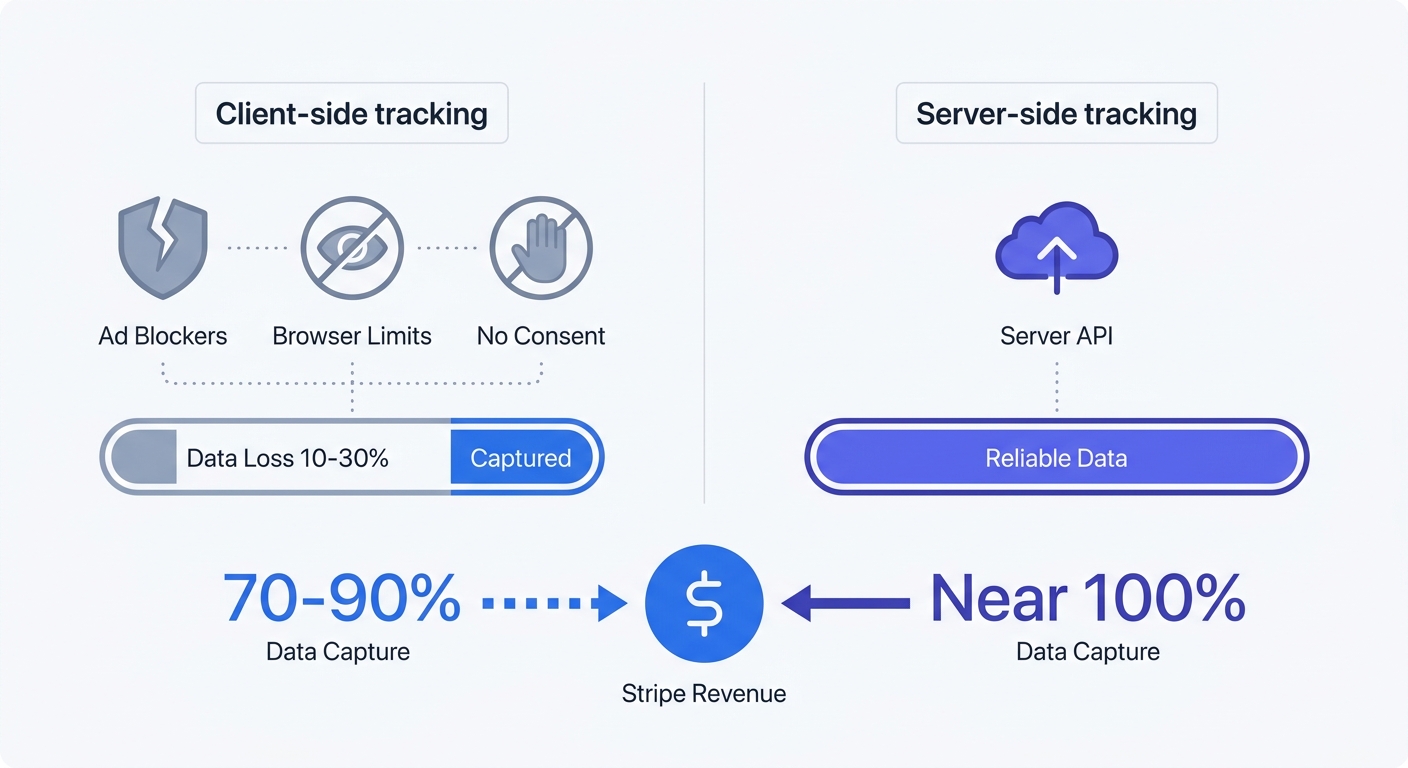
Compare your web analytics revenue to your Stripe payouts to find permanent discrepancies. Standard browser-based analytics setups capture 10% to 30% less revenue than payment processors, with B2B e-commerce sites seeing the highest variance.
Pixels fire in the browser, leaving them vulnerable to technical failures. A user closes the tab before the thank-you page loads. Mobile devices lose network connections during checkout. Strict privacy settings block tracking scripts. The payment clears on Stripe's backend, but the client-side pixel fails to send the conversion event to your dashboard.
Relying on the browser to report revenue creates permanent blind spots. Marketing teams pause profitable ad campaigns because client-side analytics tools fail to record the resulting sales.
Ad Blockers Create Data Black Holes
Ad blockers strip away massive segments of website data. Over 30% of global internet users run ad-blocking software, with developer and B2B audiences reaching block rates above 50%. These browser extensions hide between 15% and 45% of website visitors by intercepting third-party tracking requests.
Consent banners cause further data loss. Traditional analytics setups underreport traffic by an average of 11% to 20% depending on the region and banner design. Users click 'Reject All,' and their subsequent purchases vanish from your dashboards.
Swetrix provides a privacy-compliant tracking structure. The platform monitors user behavior without invasive cross-site cookies to bypass client-side restrictions. Implement this infrastructure to capture accurate traffic numbers without building non-compliant user profiles.
| Feature | Client-Side Tracking | Server-Side Tracking |
|---|---|---|
| Ad Blocker Resilience | Low (Blocked by most plugins) | High (Bypasses browser filters) |
| Data Loss Rate | 15% to 45% | Near 0% |
| Page Speed Impact | Slows down page load | Zero impact on client browser |
| Recurring Revenue | Cannot track off-site renewals | Captures all automated billing |
Transitioning to Server-Side Tracking
Safari and Firefox block cross-site trackers by default. Apple's Intelligent Tracking Prevention restricts client-side cookies to a seven-day lifespan, destroying long-term attribution. A user clicks an ad on Monday and buys on the following Tuesday. The browser deletes the tracking cookie before the purchase happens, forcing the analytics platform to register the conversion as direct traffic.
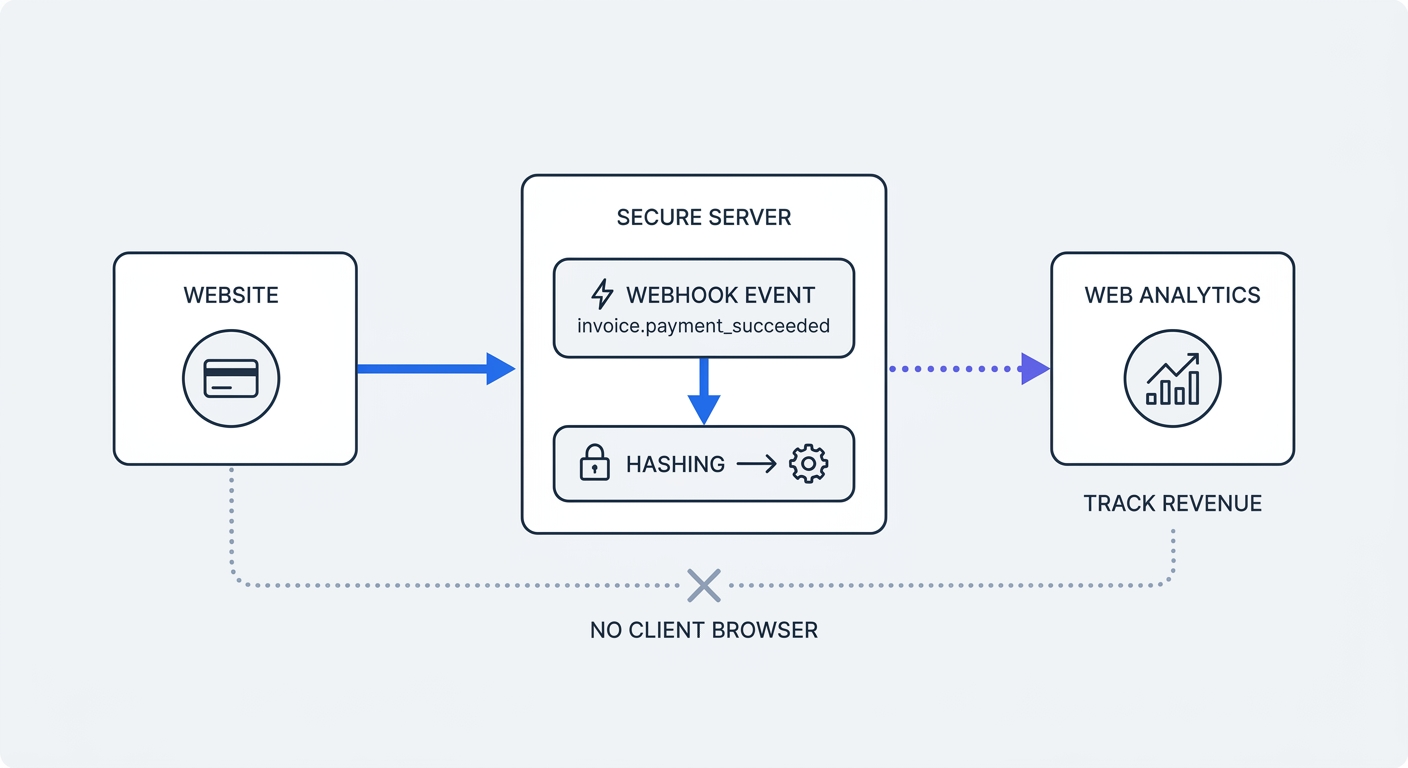
Move your tracking infrastructure to the server to regain data control. Instead of relying on a browser pixel to report revenue after checkout, let your analytics platform sync confirmed transactions from Stripe. Swetrix keeps the financial event server-side, avoids sending sensitive customer details to the browser, and connects clean revenue data to your Google Analytics alternative.
Capturing Recurring Subscription Revenue
SaaS businesses rely on usage-based and recurring billing models. Capturing monthly recurring revenue requires tracking off-site events through backend systems. A customer's subscription renews at 2:00 AM while their devices remain offline. A client-side pixel fails to fire during this automated process.
Without a server-to-server connection, your analytics platform ignores all subsequent subscription payments. Ignoring renewal data degrades your customer lifetime value. Connect Stripe to Swetrix Revenue Tracking to record sales, renewals, and refunds independent of browser activity.
Handling prorated upgrades creates similar reporting failures within browser-based setups. A user upgrades from a $10 plan to a $50 plan mid-month, prompting Stripe to calculate the proration and charge $23. Client-side pixels hardcoded to track a standard $50 checkout report the wrong revenue figure. Swetrix reads the exact charge amount from Stripe to prevent these accounting errors.
How to Track Stripe Sales with Swetrix
Swetrix has a built-in Stripe integration, so most teams do not need to write a webhook handler, normalize Stripe payloads, or maintain a separate revenue database. The integration pulls verified Stripe transactions into Swetrix automatically and shows revenue next to the traffic, UTM, referrer, country, device, and browser data you already use.
Follow these steps to connect Stripe:
- Open your Swetrix project dashboard.
- Go to Project Settings > Revenue.
- Open the Stripe section and click Create a key in Stripe.
- Confirm the restricted key in Stripe and copy the key that starts with
rk_live_. - Paste the key into Swetrix, click Connect, and choose your reporting currency.
- Open Traffic Analytics and enable the Revenue metric in the chart selector.
After the connection is active, Swetrix syncs Stripe sales, subscriptions, and refunds automatically every 30 minutes. Net revenue appears as solid bars in the Traffic chart, refunds are stacked on top for comparison, and the dashboard also gives you totals, average order value, monthly recurring revenue, and a transactions table.
That matters because Stripe tells you what was paid, while Swetrix tells you where the buyer came from. You can filter revenue by campaign, traffic source, country, device, page, or segment without exporting Stripe data into a spreadsheet and manually matching it against analytics sessions.
Attribute Stripe Revenue to Visitors
Basic sales tracking works as soon as Stripe is connected. For deeper attribution, pass the Swetrix profile ID or session ID into Stripe metadata before the payment is created. Swetrix looks for swetrix_profile_id and swetrix_session_id on Stripe PaymentIntents or Charges when it syncs transactions.
Get the anonymous IDs from the Swetrix script:
const profileId = await swetrix.getProfileId();
const sessionId = await swetrix.getSessionId();
Send those values to your backend when you create the Stripe payment, then attach them as metadata:
const paymentIntent = await stripe.paymentIntents.create({
  amount: 2000,
  currency: "usd",
  metadata: {
    swetrix_profile_id: profileId,
    swetrix_session_id: sessionId,
  },
});
When the payment syncs, Swetrix links the confirmed revenue to the visitor profile or browsing session. You do not need to send customer emails, names, billing addresses, or card-related data to your analytics stack.
When to Use the Revenue API Instead
Use the Swetrix Revenue API when you sell through a platform that is not Stripe or Paddle, or when you run a fully custom checkout and want complete control over which backend events count as revenue. The API accepts sales, subscription charges, and refunds from your server through POST /log/revenue.
Stripe users should prefer the built-in integration. A project can only have one active revenue source at a time, which prevents double-counting the same payment through both Stripe sync and manual API calls.
Securing Your Marketing Attribution Infrastructure
Browser filters target third-party domains to block tracking attempts. Ad blockers flag the request when your website attempts to load a script from an external server. Server-side proxies bypass these filters by masking the ultimate destination of the data packet.
Route your analytics requests through a custom sub-domain. System administrators configure a proxy on the host server at analytics.yourdomain.com to handle the incoming traffic. The proxy forwards these localized requests to the external analytics provider.
The browser identifies a first-party request matching the core website domain name. Ad blockers allow the localized request to pass unrestricted. This proxy setup secures the initial website visit data, establishing the foundation for server-side Stripe revenue attribution.
If you use Nginx, add a location block to your server configuration:
location /analytics/ {
    proxy_pass https://api.swetrix.org/;
    proxy_set_header Host api.swetrix.org;
    proxy_set_header X-Real-IP $remote_addr;
}
Next.js environments achieve identical routing results using the next.config.js rewrites function. Developers map a local path to the external analytics API. Proxied routing eliminates DNS lookup delays and shields the tracking script from browser-level interventions.
Cookieless Attribution via Swetrix
Traditional UTM tracking mechanisms fail when browsers reject cookies. Engineering teams must pair off-site Stripe conversions with on-site marketing clicks without violating regional privacy laws.
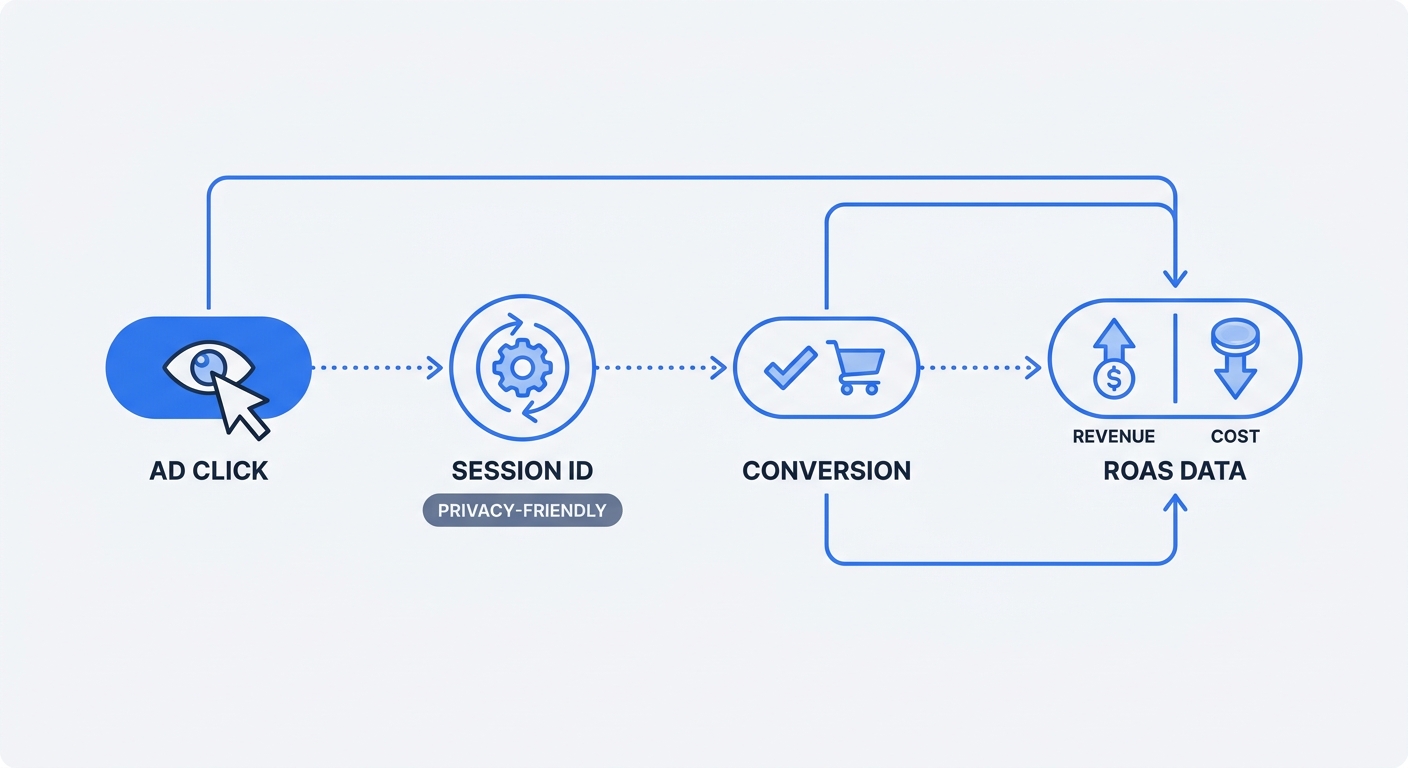
Swetrix assigns privacy-friendly profile and session IDs to incoming visitors. When a prospect clicks a tagged campaign link, Swetrix logs the UTM parameters against that browsing session. The customer proceeds to complete the checkout process, and your Stripe integration syncs the confirmed payment back into Swetrix.
If you passed swetrix_profile_id or swetrix_session_id into Stripe metadata, Swetrix links the off-site payment to the original visitor journey. This server-to-server mechanism restores full visibility to customer acquisition reporting without storing personal data in your analytics dashboard.
Marketers calculate Return on Ad Spend (ROAS) using verified numbers. A campaign spends $1,000, but client-side tracking reports a partial $1,200 in revenue due to browser restrictions. The marketing team assumes a low 1.2x ROAS and pauses the ads. Server-side tracking captures the blocked traffic alongside off-site renewals to report the accurate $2,100 revenue total. The team identifies the true 2.1x ROAS and scales the profitable campaign.
Accurate tracking demands a resilient technical infrastructure. Companies stop losing revenue data to ad blockers and browser restrictions by migrating their analytics stack to a privacy-first, server-side environment.
Swetrix provides cookieless web analytics and built-in Stripe revenue tracking without invasive cross-site scripts. Maintain GDPR compliance while capturing accurate sales, subscription, and refund metrics. Start a 14-day free trial to secure full visibility over your Stripe revenue data. Paid plans start at $19/mo for 100,000 events.