- Date
How To Self Host Web Analytics For Data Privacy
 Andrii Romasiun
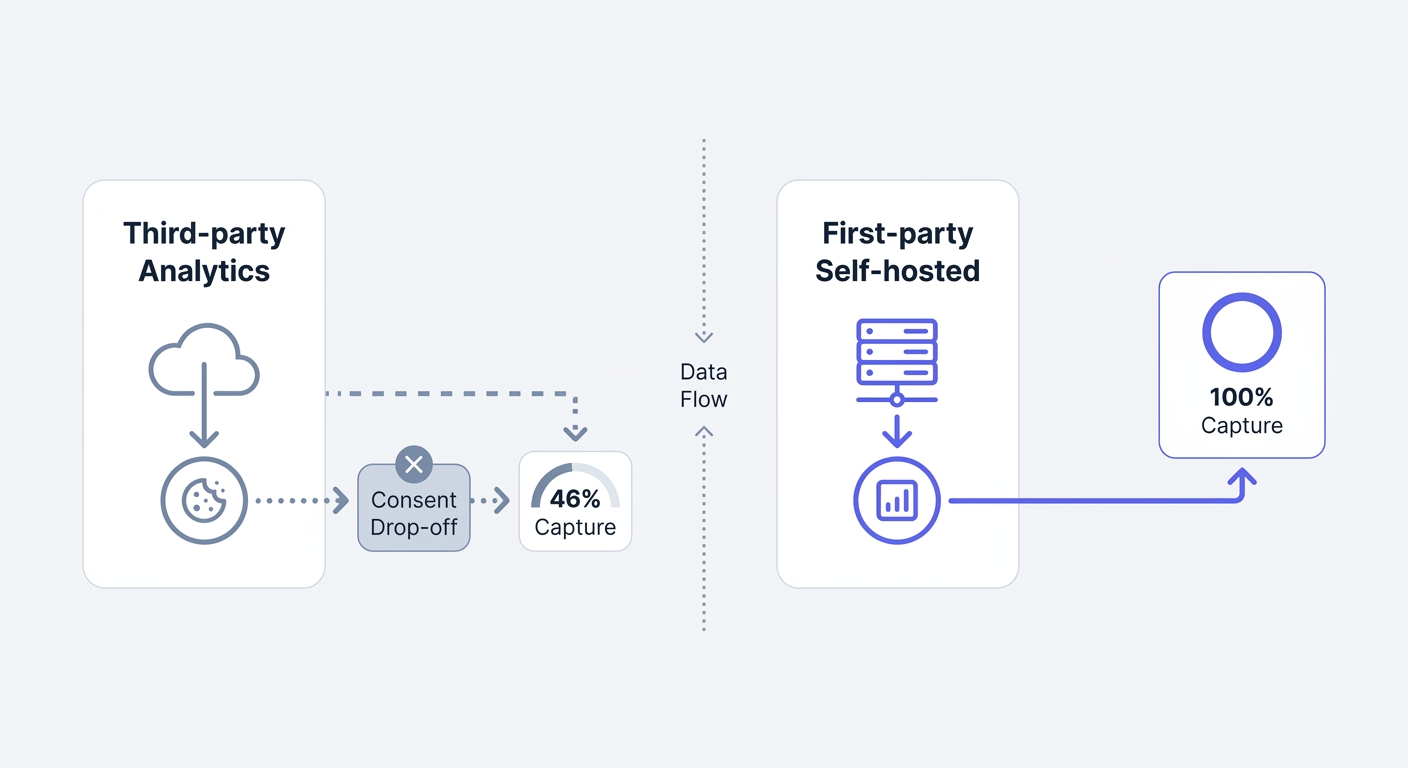
Most websites lose half their traffic data before the page finishes rendering. European consent banners block third-party tracking scripts by default. Visitors land on your homepage, read your content, and leave without clicking "Accept" on the cookie prompt. You capture nothing from these sessions in cloud-based analytics platforms.
You solve this data hemorrhage by learning how to self host web analytics. Engineers guarantee total data sovereignty by running an open-source analytics engine on your own infrastructure. You bypass browser ad-blockers using first-party tracking endpoints, and developers eliminate the need for GDPR cookie consent banners using privacy-preserving architectures. Marketers regain visibility into campaign performance. Developers shed the performance tax of bloated third-party scripts.
We built Swetrix as a privacy-focused, cookie-free web analytics platform to address these infrastructure challenges. Open-source deployment puts the entire tracking stack under your control.
The Case Against Cloud Analytics Trackers
The High Cost of Cookie Consent Banners
Default cloud trackers operate on third-party cookies. Privacy regulators require website owners to secure explicit user consent before loading these scripts. This opt-in requirement creates massive visibility gaps.
Recent benchmark data shows the average marketing cookie consent rate in the European Union sits between 42% and 47%, though opt-in rates vary heavily by industry, hovering around 40% to 50% for B2B tech audiences[^1] and dropping below 30% for ad-supported media[^2]. Marketers relying on traditional analytics tools fly blind for over half of their EU audience. A marketing team might spend $10,000 on a regional ad campaign and track a fraction of the resulting traffic.
Check your data gap by comparing your server logs against your cloud analytics dashboard. The discrepancy between server requests and recorded sessions represents your lost data. You recover this invisible traffic by moving to a self-hosted, cookieless platform.
Escaping GDPR Schrems II Liability
European data protection authorities enforce strict penalties on cross-border data transfers. The Schrems II ruling invalidated the Privacy Shield framework, making it illegal for companies to send European citizen data to United States servers without robust safeguards.
Regulators issue severe financial penalties for these violations. Annual GDPR fines topped €1.2 billion in 2025, and a CMS.law report calculates the average historical fine at €2.27 million. Regulators target more than enterprise tech companies. Standard retail stores and healthcare providers face routine fines ranging from €25,000 to €75,000 for basic cookie consent violations and unauthorized data transfers.
You keep all visitor data within local jurisdictions by renting a European Virtual Private Server (VPS) for your analytics database. No third-party corporation processes the traffic. No data crosses the Atlantic. You achieve compliance as a byproduct of your infrastructure choices.
The Core Benefits of Running Your Own Stack
Achieving 100% Data Sovereignty
Using a SaaS analytics provider requires giving a third party access to your behavioral data. Many free platforms aggregate this data to build advertising profiles or benchmark industry trends.
You lock the database down by operating your own analytics stack on a first-party domain. Your company owns the hardware, the software, and the raw event logs. Users running network-level ad-blockers like Pi-hole or browser extensions like uBlock Origin filter known third-party tracking domains. You blend the requests into standard first-party website functionality by routing analytics traffic through a subdomain like metrics.yourcompany.com. The proxy bypasses these filters. Your data capture rate returns to near total coverage.
Recovering Accurate Marketing ROI
Campaign attribution breaks when browsers block analytics scripts. UTM parameters append source, medium, and campaign tags to inbound links. The tracking platform ignores the UTM data when a script fails to load. The visitor converts, but the marketing team receives no credit for the acquisition.
You capture every UTM parameter on page load using self-hosted tracking endpoints. Marketers evaluate accurate Return on Ad Spend (ROAS) because the analytics software records the source of every transaction. You map user journeys from the initial ad click to the final checkout step without relying on intrusive fingerprinting techniques.
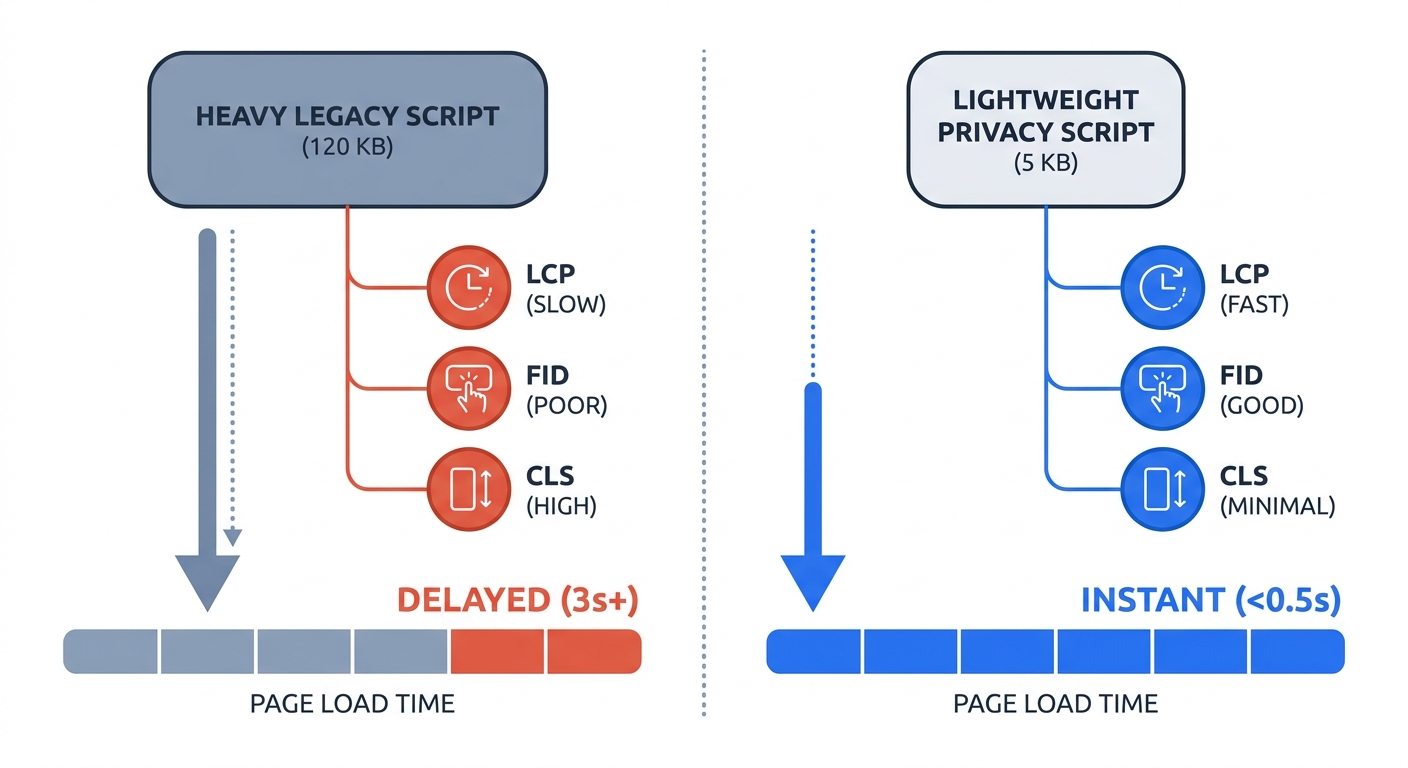
Installing analytics scripts imposes a performance tax. Legacy trackers like Google Analytics load approximately 134–139 KB gzipped (or 232 KB uncompressed) and trigger multiple external network requests. Visitors experience delayed Core Web Vitals metrics like Largest Contentful Paint (LCP) due to this bloat. Open-source trackers operate with minimal code. Swetrix provides a tracking script weighing under 5 KB. Browsers execute the file in milliseconds, preserving high performance scores for organic search rankings.
Deployment Prerequisites
Selecting the Right Server Infrastructure
Modern web analytics platforms process millions of distinct events using specialized database structures. Database administrators struggle to manage high-volume time-series data in traditional relational databases. Developers rely on column-oriented databases like ClickHouse to aggregate metrics without slowing down queries.
Provision a Virtual Private Server (VPS) from a cloud provider like Hetzner or DigitalOcean. You need a machine starting at $5 to $10 per month for a standard deployment. You must select the correct hardware architecture for column-oriented databases. Ensure the CPU supports SSE 4.2 or NEON instruction sets. Allocate a minimum of 2GB of RAM to prevent the database container from crashing during traffic spikes. Upgrade the RAM and CPU cores as your monthly event volume scales.
Choosing Your Open-Source Software
Developers can choose from multiple frameworks in the self-hosted analytics market. Selecting the correct stack determines your maintenance burden and feature availability.
| Feature | Swetrix | Plausible | Matomo |
|---|---|---|---|
| Tech Stack | NestJS, ClickHouse, Redis | Elixir, ClickHouse, PostgreSQL | PHP, MySQL/MariaDB |
| Script Size | < 5 KB | < 1 KB | ~ 22 KB |
| Database Structure | Modern Column-Oriented | Modern Column-Oriented | Legacy Row-Oriented |
| Performance Tracking | Yes (TTFB, Web Vitals) | No | Requires Plugins |
| Error Tracking | Yes (JS Stack Traces) | No | No |
| Cookie Requirement | Cookieless | Cookieless | Cookie-based (default) |
Swetrix serves teams requiring deep technical insights alongside marketing data. Swetrix utilizes a NestJS and ClickHouse architecture. Beyond basic pageviews, Swetrix acts as a Google Analytics alternative that integrates site speed monitoring and client-side error tracking.
Plausible offers a lightweight alternative written in Elixir. Deployment takes minutes, but the dashboard limits data to baseline traffic metrics and lacks developer monitoring tools.
Matomo functions as a direct Universal Analytics clone. The software provides detailed legacy reports but relies on an aging PHP and MySQL foundation. System administrators must provision massive server resources to keep Matomo queries fast on high-traffic sites, and the default configuration requires tracking cookies.
Step-by-Step Container Deployment Guide
Setting Up Docker Containers
System administrators face complex dependency management during bare-metal software installations. Containerization streamlines the process. System administrators use Docker Compose to define and run multi-container applications. You deploy a complete analytics database, API, and frontend in under two hours.
Install Docker and Docker Compose on your Ubuntu or Debian VPS. Clone the analytics repository to your server. You define the necessary services in a standard docker-compose.yml file: the ClickHouse database for event storage, Redis for caching, an API backend for processing events, and a frontend dashboard for data visualization.
Note: The following is a minimal simplified example to illustrate the basic structure. For a complete production-ready configuration with all required services (including ingestion and frontend services) and proper networking setup, consult the official Swetrix self-hosting documentation.
version: "3.8"
services:
  clickhouse:
    image: clickhouse/clickhouse-server:latest
    volumes:
      - ./data/clickhouse:/var/lib/clickhouse
    networks:
      - analytics-net

  redis:
    image: redis:alpine
    networks:
      - analytics-net

  api:
    image: swetrix/api:latest
    environment:
      - CLICKHOUSE_HOST=clickhouse
      - REDIS_HOST=redis
    ports:
      - "3000:3000"
    networks:
      - analytics-net
    depends_on:
      - clickhouse
      - redis

networks:
  analytics-net:
    driver: bridge
Review the official documentation for the exact environment variables required by your chosen platform. Start the stack using the docker compose up -d command. Docker downloads and initializes the containers in the background.
Configuring First-Party Proxy Routing
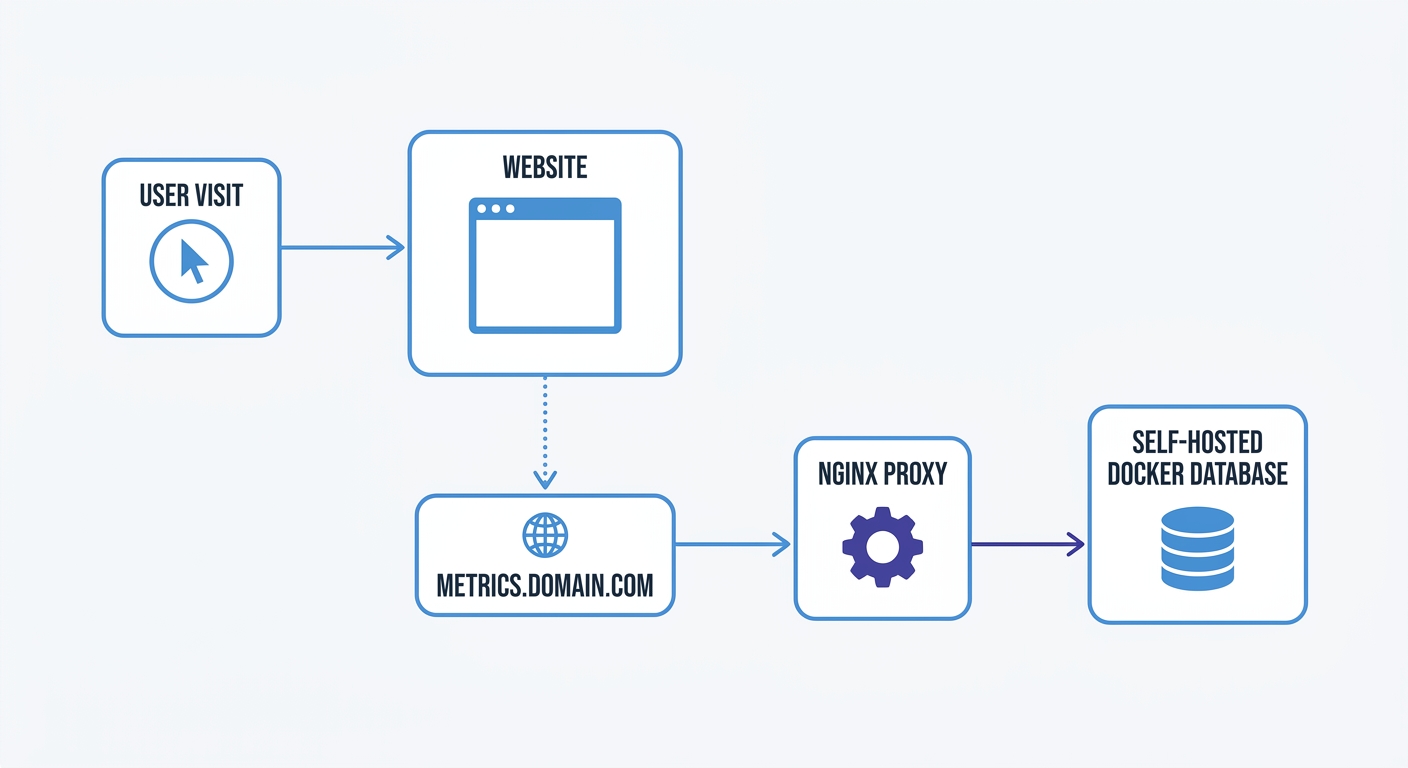
You create security vulnerabilities and trigger ad-blockers by exposing a container port to the internet. You mask the analytics server behind your existing website domain using first-party proxy routing.
Point a DNS A-record from a subdomain like metrics.yourdomain.com to your VPS IP address. Next, install an Nginx reverse proxy on the server. Configure Nginx to listen on port 80 and forward incoming requests to your analytics API container on port 3000.
Secure the connection using a Let's Encrypt SSL certificate. Install Certbot and run the automated Nginx configuration command. Nginx handles the SSL termination and passes decrypted traffic to your local Docker network.
Update your website's tracking snippet to point to https://metrics.yourdomain.com instead of the public cloud API. Browsers interpret the tracking request as a native resource from your own domain. You guarantee encrypted data transmission and seamless data capture with this configuration.
Unlocking Cookieless Tracking
Privacy-Preserving Hashes Explained
Legacy analytics frameworks identify unique visitors by placing a persistent text file inside the browser cache. Modern alternatives track users without cookies, local storage, or device fingerprinting.
Engineers build cookieless tracking on privacy-preserving hashes. When a visitor requests a page, the analytics API combines the incoming IP address and the browser's User Agent string. The server adds a randomized daily salt to this combination and runs the data through a cryptographic hash function like SHA-256.
The resulting hash string identifies the visitor for a single day. At midnight, the server discards the daily salt and generates a new salt. The same visitor returning the next day generates a different hash string. You track distinct daily users and session flows without retaining Personal Identifiable Information (PII). You remove the legal requirement for GDPR or PECR consent banners with this mechanism.
Monitoring Core Web Vitals and Errors
You transform standard web analytics into a complete site monitoring solution by self-hosting a platform like Swetrix. Marketing traffic data fails to show the technical friction preventing conversions.
Configure your tracking script to monitor user-centric performance metrics. The Swetrix platform captures Time to First Byte (TTFB), DNS resolution times, and DOM load speeds. You identify precise moments when server latency causes users to abandon the shopping cart. You view performance monitoring data in the same dashboard as your traffic sources.
JavaScript errors ruin the user experience in modern Single Page Applications. A broken checkout button or a failed API fetch results in lost revenue. Swetrix includes built-in error tracking capabilities. Swetrix catches unhandled client-side exceptions and aggregates the stack traces, allowing developers to review the specific browser versions and operating systems triggering the faults. You fix critical bugs before they impact multiple customers.
You solve data loss and compliance liabilities in one move by taking control of your analytics infrastructure. You drop the consent banners, recover your UTM tracking, and protect user privacy. Swetrix offers a modern, open-source stack designed for web applications. Access our GitHub repository to configure your self-hosted instance today, or test the capabilities of our EU-hosted cloud platform with a 14-day free trial.
[^1]: Industry benchmark data for B2B tech audience consent rates (40-50%) based on sector-specific analytics research.
[^2]: Industry benchmark data for ad-supported media consent rates (<30%) based on sector-specific analytics research.