- Date
How to Use UTM Parameters on Facebook for Better Tracking
 Andrii Romasiun
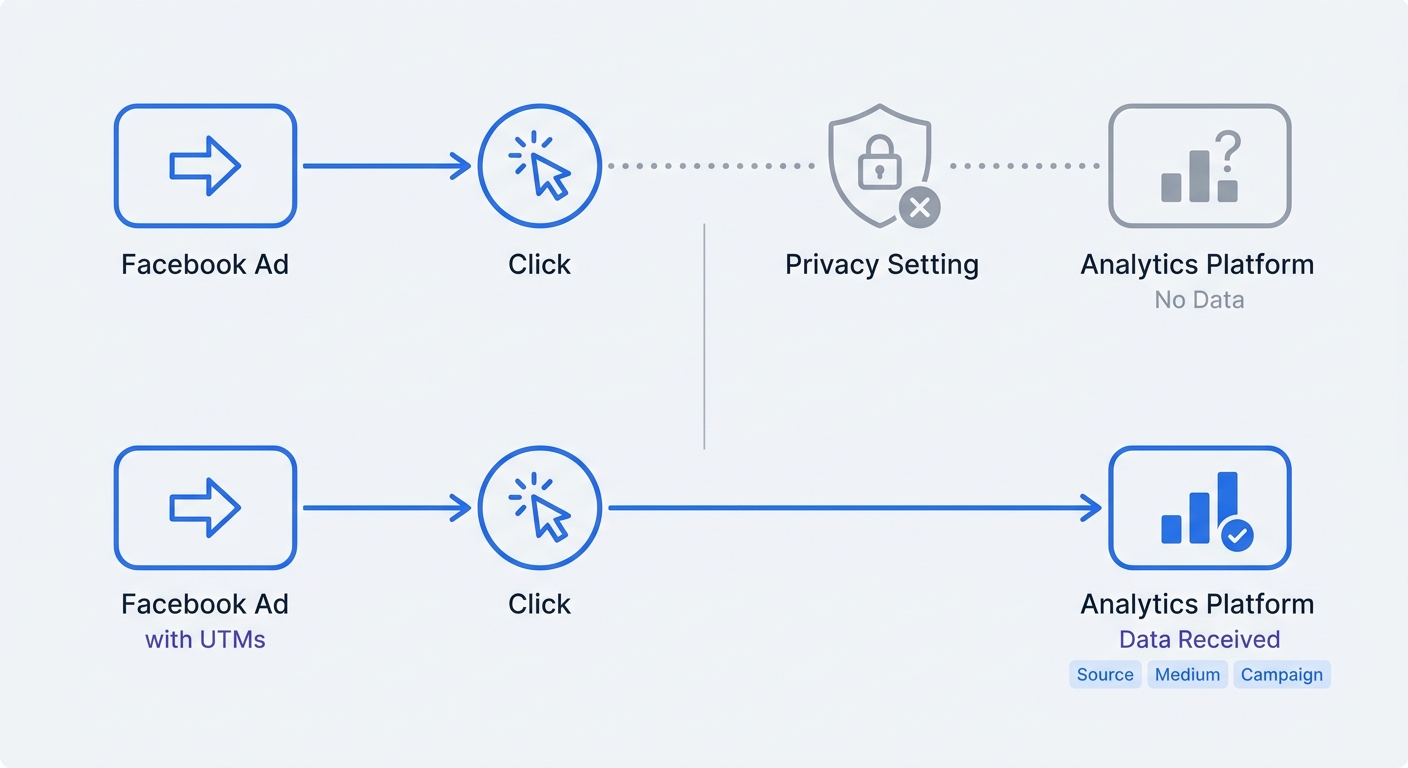
When a user taps your Facebook ad on their phone, browses your product page, and leaves, they might return two days later via a laptop search to complete the purchase. Because privacy features block third-party cookies, the Meta Pixel drops this cross-device connection, which means your default analytics report credits the entire sale to organic search and leaves the initiating campaign with zero return on ad spend.
Appending UTM parameters to your Facebook ad URLs fixes this disconnect by attaching specific source, medium, and campaign data directly to the link. When a visitor lands on your site, the URL carries that tracking data with it so Swetrix can read it and map the visit to the exact ad that drove it. This setup gives you clear attribution without relying on invasive tracking pixels.
If you run paid social campaigns, relying on default platform reporting guarantees data loss, but structuring your URLs correctly ensures every click registers in your database.
Why Facebook UTM Tracking is Required in 2026
Client-side tracking scripts fail frequently because browsers block them, users reject cookie banners, and network firewalls intercept their requests. When you rely solely on the Meta Pixel to track campaign performance, you lose a massive percentage of your conversion data.
The Impact of iOS 14+ and Pixel Degradation
Recent privacy updates changed how devices handle third-party scripts. Apple's iOS 14 and subsequent Safari updates restrict cross-site tracking by default, causing Meta Pixel reliability to plummet. If an iPhone user clicks your ad, the pixel often fails to send that click data back to Facebook, which means you spend money on the placement while the advertising platform reports zero return.
UTM parameters bypass this client-side failure by sitting inside the URL string itself, meaning the tracking data loads as part of the destination page. Your analytics server reads the URL and logs the campaign source before any third-party script blocker can intervene, preventing data loss and giving you accurate numbers to base your marketing budget on.
Relying on first-party data collection methods like UTMs protects your tracking from future Intelligent Tracking Prevention (ITP) updates because the browser interprets the UTM string as standard page data rather than a cross-site tracker.
The Cost of Missing Attribution Data
Companies optimizing their spend based on accurate URL data see major efficiency gains. Industry analyses show ecommerce businesses actively tracking attribution this way see significant improvements in their marketing ROI, proving you cannot scale a campaign if you do not know which specific ads generate sales.
Cross-device behavior complicates tracking further, as consumers rarely buy on a single device anymore. Checkout behavior data across retail sectors indicates that 81 percent of shoppers want a seamless, cross-device shopping experience before completing a purchase. UTM tracking combined with a multi-touch attribution model captures these complex user journeys. If a user clicks an ad on their phone and buys on their desktop, UTM data collected during the first visit helps your analytics platform stitch the session together.
The Core Components of a Facebook UTM Strategy
A complete tracking setup requires five distinct parameters, where two are mandatory and three add the granularity required for scaling ad accounts.
| Parameter | Purpose | Example |
|---|---|---|
utm_source | Identifies the platform sending the traffic. | facebook |
utm_medium | Identifies the marketing channel or cost model. | paid-social |
utm_campaign | Names the specific promotional effort. | spring-sale-2026 |
utm_term | Tracks the specific audience or ad set. | retargeting-30d |
utm_content | Distinguishes between different ad creatives. | video-testimonial-v2 |
Your analytics dashboard parses this exact string when a user visits your site. If you leave out utm_campaign, your platform will group all Facebook traffic together, making it impossible to tell your top-of-funnel ads from your retargeting campaigns.
Facebook vs. Meta as UTM Source
When deciding whether to use facebook or meta for the source parameter, stick entirely to facebook in lowercase letters. Analytics platforms use default channel grouping rules to categorize incoming traffic, and most systems automatically recognize facebook to route it into Organic Social or Paid Social buckets.
If you tag your links with meta, the platform fails to recognize the source and dumps those visits into an "Unassigned" or "Other" traffic row. You then have to build custom filtering rules to see your social media performance, whereas standardizing on facebook keeps your dashboards clean out of the box.
For Instagram campaigns running through the same Ads Manager account, use instagram as the source rather than grouping them under a generic parent company name.
Step-by-Step: How to Use UTM Parameters on Facebook
Baking UTM strings directly into your destination URL field causes problems because if you duplicate the ad later, the hardcoded URL comes with it and brings the old campaign name into your new ad data. Instead, use Meta's dedicated URL parameter tool at the ad level to separate your base landing page link from the tracking data.
Building URLs at the Ad Level
Instead of pasting a messy, manually constructed link into your ad setup, use the dedicated tracking fields provided in Ads Manager.
- Open Facebook Ads Manager and navigate to the Ad level.
- Scroll down past your creative assets and primary text to the Destination section.
- Enter your clean, untagged landing page link in the Website URL field (e.g.,
https://yourwebsite.com/product). - Scroll to the Tracking section at the bottom of the page.
- Click the link that says Build a URL Parameter.
- Fill in the source and medium fields manually, then configure dynamic macros for the rest.
If you prefer to generate static tracking links for organic social posts or influencer collaborations, use a free UTM generator tool to ensure your syntax is flawless before posting.
Automating with Dynamic Parameters
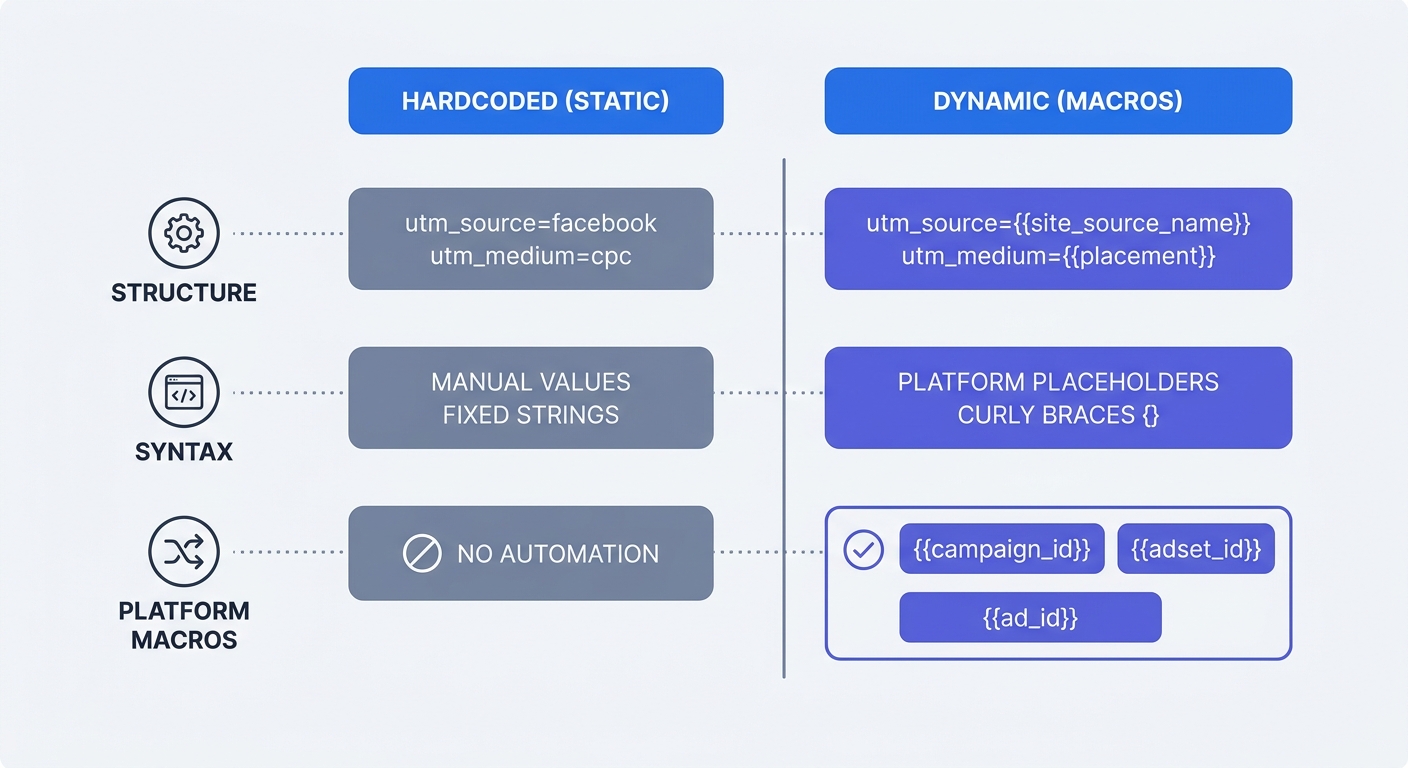
Because typing out campaign and ad names by hand scales poorly, Meta provides dynamic macros that pull the exact names you used in Ads Manager and insert them into the URL string. When a user clicks the ad, Meta replaces the macro with the live data.
Copy and paste this exact string into the URL Parameters text box:
utm_source=facebook&utm_medium=paid-social&utm_campaign={{campaign.name}}&utm_term={{adset.name}}&utm_content={{ad.name}}
Pay close attention to the syntax, as Meta requires double curly braces for its dynamic parameters. Google Ads uses single braces {campaignid} and TikTok uses underscores __CAMPAIGN_NAME__, making syntax mix-ups a common configuration error. If you use Google's syntax in Facebook, the literal text {campaign.name} will show up in your reports instead of the actual campaign title.
Auto-Appended Meta Parameters
In early 2024, Meta began automatically appending basic URL parameters to some ad traffic to aid their internal modeling. Do not rely on these auto-generated strings for your third-party analytics, as they are designed exclusively for Meta's servers. Continue building your own complete UTM structures so your analytics software receives clean, human-readable campaign names.
Costly Mistakes to Avoid with Facebook UTMs
While dynamic parameters automate your workflow, they require strict discipline in Ads Manager because a single naming error corrupts your database and obscures your true cost per acquisition.
The Danger of Renaming Active Campaigns
When you use {{campaign.name}}, the UTM string updates in real time based on whatever that campaign is currently called in Facebook.
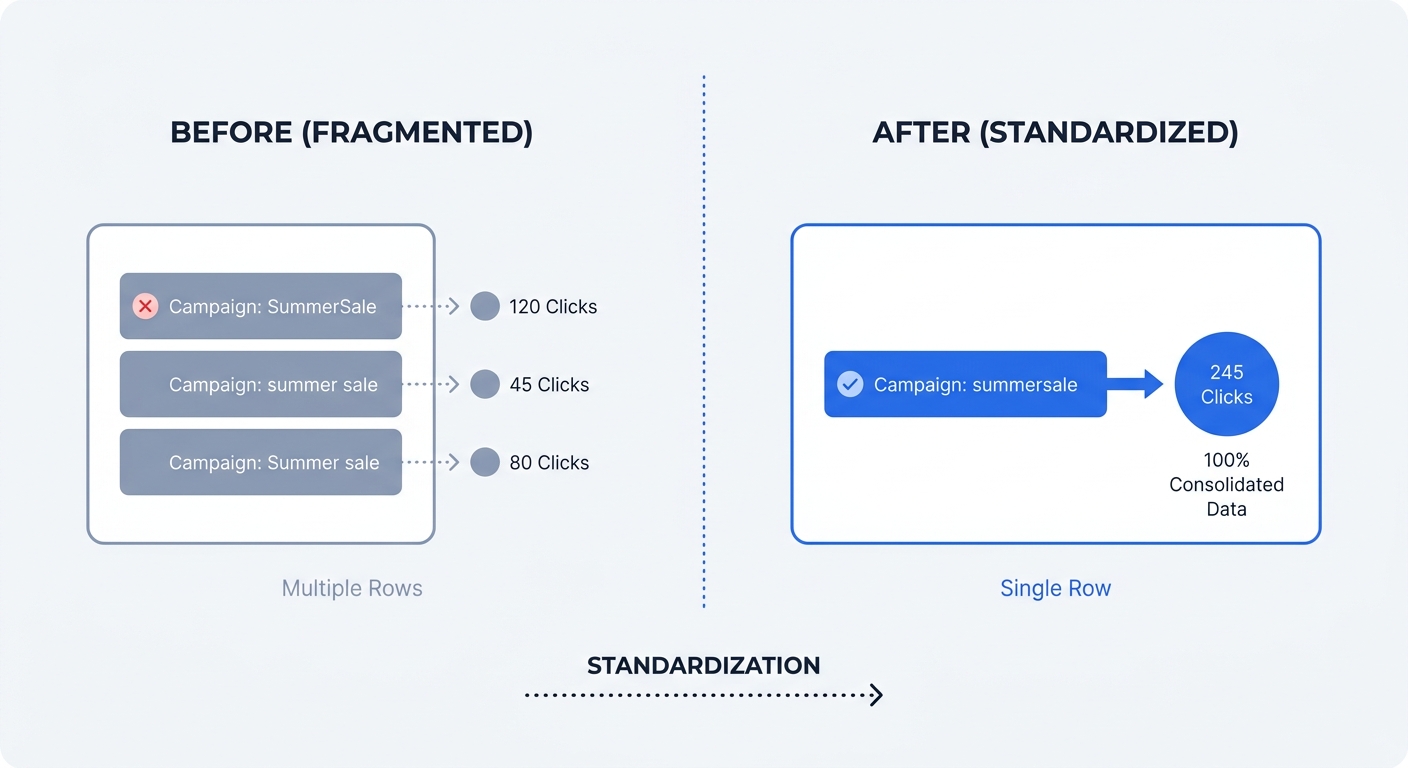
Do not rename active campaigns or ad sets. If you launch a campaign named q3-prospecting and change it to q3-prospecting-new three days later, Facebook instantly alters the UTM output on all live ads, causing your analytics platform to see a brand new campaign. Your historical data remains under the old name while all new traffic logs under the new name, forcing you to export the data and manually merge the rows in a spreadsheet to analyze total performance.
If you need to change a naming convention, duplicate the campaign, apply the new name, and pause the old one to preserve your historical data structure.
Case Sensitivity and Spacing Errors
Analytics databases treat strings with absolute literal precision, meaning a capital letter changes the entire identity of the parameter.
If your ad names are Video Ad 1 and video ad 1, Facebook dynamic macros push those exact formats into your UTMs. Your analytics platform will then split them into two different rows because the differing capitalization prevents a match.
Spaces create an even larger mess since browsers cannot process blank spaces in a URL string and encode them as %20. An ad named Retargeting Audience becomes utm_term=Retargeting%20Audience, which makes your reports difficult to read.
Force yourself into a strict naming convention before you build anything in Ads Manager by using lowercase letters exclusively and replacing all spaces with hyphens. Name your campaigns
q3-prospectinginstead ofQ3 Prospectingto ensure your tracking parses accurately every time.
Query String Syntax Failures
Manual UTM tagging often fails because of incorrect URL syntax, as the first parameter in any link must follow a question mark ? while every subsequent parameter follows an ampersand &.
If your base URL already contains a question mark, which is common with e-commerce product variants like site.com/shirt?color=blue, adding another question mark breaks the link. The tracking parameters must attach with an ampersand (site.com/shirt?color=blue&utm_source=facebook). Using Meta's built-in URL Parameter tool prevents this error because the platform automatically detects existing query strings and formats the separators correctly.
Tracking Facebook Ad Success in Swetrix
Sending clean UTM data to a dedicated platform maximizes your visibility. Swetrix captures this parameter data server-side without relying on invasive cookies or tracking pixels.
Cookie-Free Multi-Touch Attribution
When a user lands on your site from a Facebook ad, the URL contains your structured UTM tags. Swetrix parses those tags to attribute the session to the correct source, medium, and campaign, processing the information entirely as first-party data.
Because this method does not drop a persistent third-party cookie onto the user's browser, you achieve ecommerce conversion tracking without cookies. You avoid interrupting the user experience with a massive GDPR consent banner to track your own ad performance, as the contextual data lives in the URL they clicked and remains privacy-compliant.
Bypassing Ad Blockers with First-Party Data
This first-party approach solves the ad blocker problem. Browser extensions like uBlock Origin and Brave's native shields automatically block network requests sent to Facebook's tracking domains, causing the Meta Pixel to fail silently on these devices and leaving massive gaps in your Ads Manager reporting.
Because UTM parameters live in the page URL rather than a third-party script, they bypass ad blockers. Swetrix logs the pageview and the associated campaign data securely on our servers via your own domain, giving you an accurate picture of your Facebook ad performance even from privacy-conscious users who block traditional tracking pixels.
View this data in real-time on your Swetrix dashboard by filtering your entire traffic view by utm_source = facebook to isolate your social media performance. Switch to the conversions tab to see which ad creatives, defined by your utm_content values, drive the most revenue.
Setting up UTM tracking takes a few minutes per campaign, but it permanently fixes your attribution data. Stop letting browser updates and ad blockers hide your most profitable Facebook ads.
Pair your new tracking strategy with an analytics platform designed for accuracy and privacy. Swetrix Cloud offers powerful, cookie-free web analytics starting at 100,000 events per month for $19/mo.
Start your 14-day free trial today and see which campaigns drive your business forward.