- Date
How To Bypass Ad Blockers For Analytics Safely
 Andrii Romasiun
Check your server logs, and they show 10,000 unique visitors this month. Open your web analytics dashboard, and it reports 7,000. The missing 3,000 users did not disappear, and your server did not miscount. These visitors use browser extensions that block tracking scripts from loading on their devices.
Globally, roughly 912 million active ad-blocking users browse the internet every day. Visitors install tools like uBlock Origin, Ghostery, or Pi-Hole to stop intrusive advertising, but these extensions cannot differentiate between invasive retargeting pixels and basic website performance analytics. When a visitor loads your page, the blocker checks every outbound network request against a massive filter list, killing the request before the JavaScript executes if your analytics script matches a known tracker domain.
Relying on traditional client-side tracking means businesses routinely lose between 10% and 40% of their attribution and analytics data depending on audience demographics. This gap grows even wider depending on your target market, scaling up to 50% for highly technical audiences like software developers, B2B professionals, or privacy-conscious users.
Missing this data impacts budget allocation. Because ad platforms lose visibility into a third of your conversions, their optimization algorithms assume the campaigns are failing. Cost Per Acquisition metrics look artificially high, which causes you to pause profitable ads and double down on less effective channels that happen to track better.
Restoring visibility requires a method that respects the privacy expectations of your visitors. Swetrix solves this by utilizing a managed reverse proxy that routes your analytics data through a first-party subdomain. Because the requests never hit a third-party server directly, the system bypasses browser-level restrictions, recovering your missing traffic data legally and ethically.
Client-Side vs. Server-Side Tracking
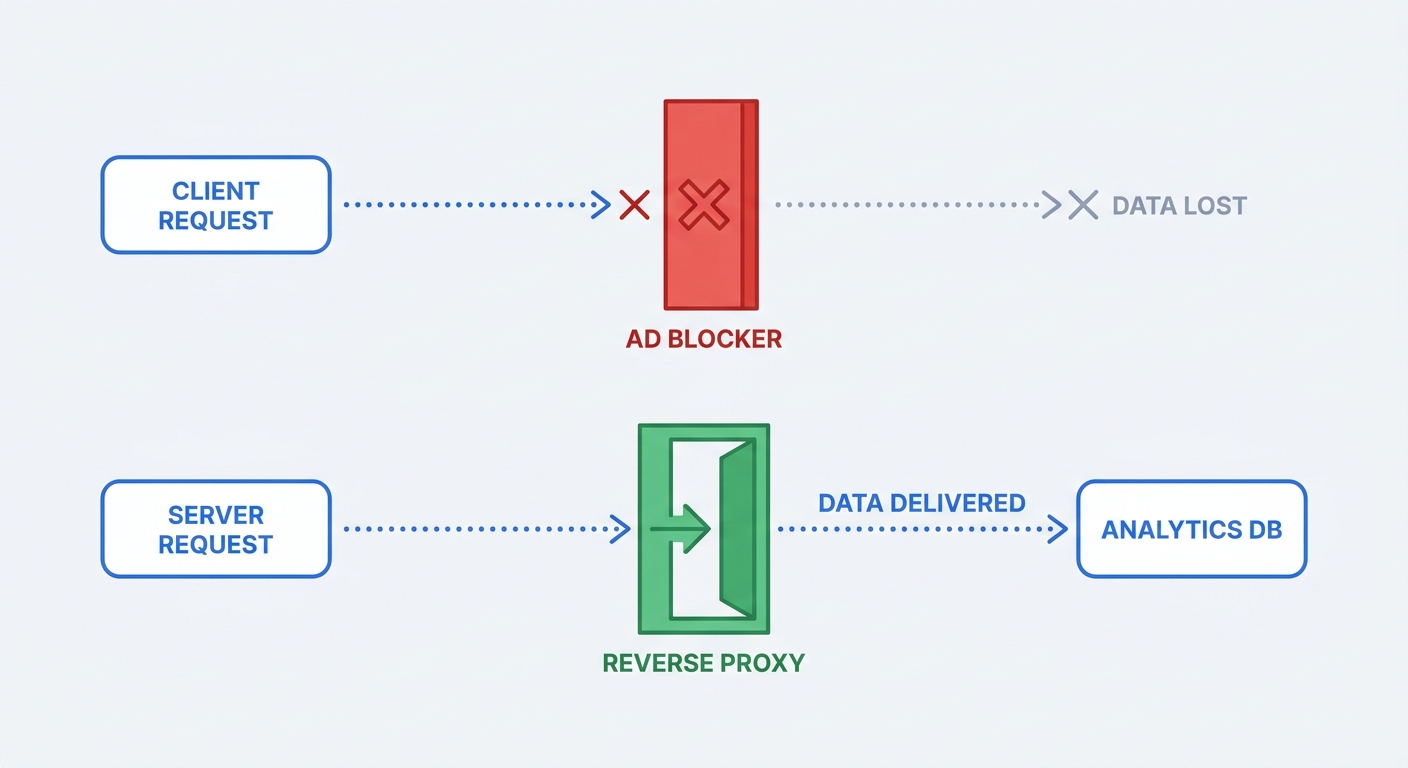
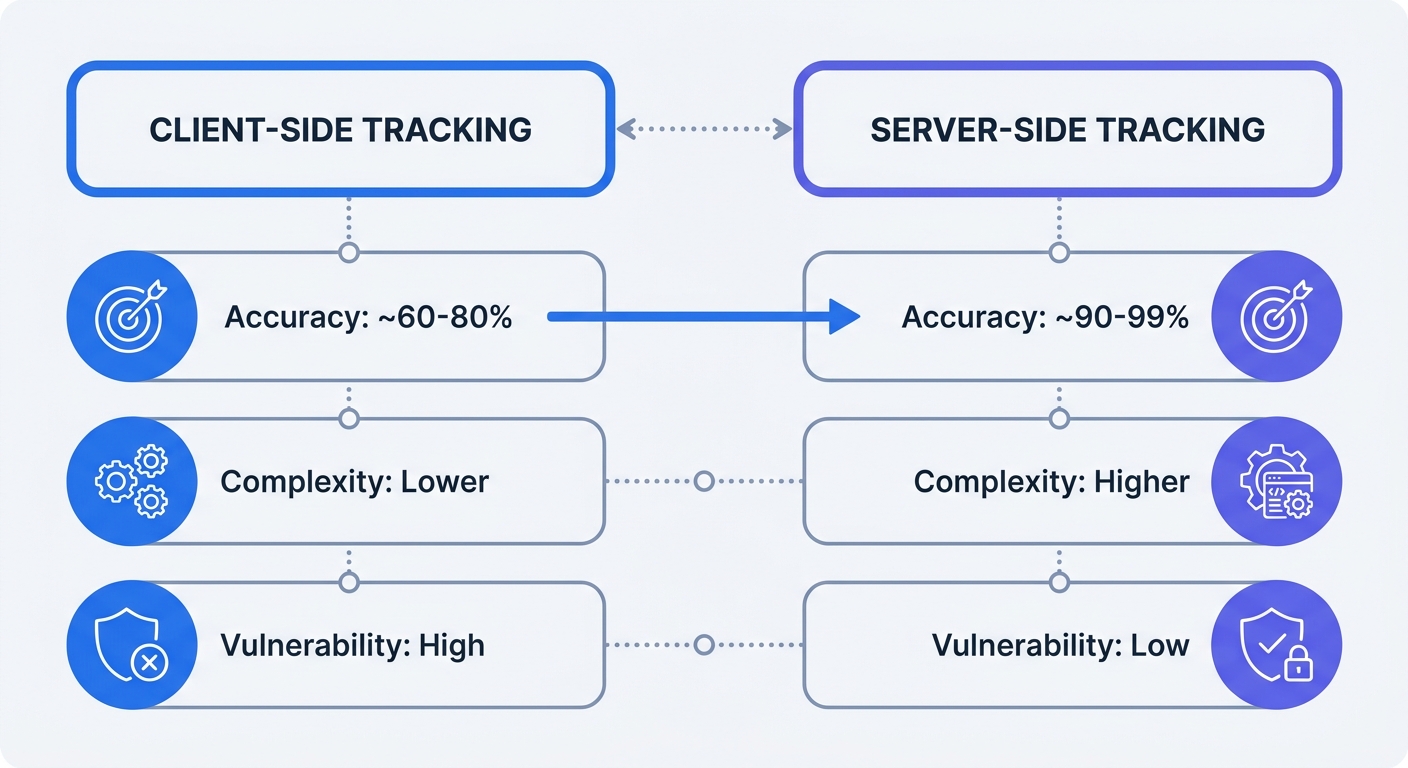
Most analytics setups rely entirely on client-side tracking. After pasting a JavaScript snippet into your website header, a visitor's browser downloads the script and executes it locally. The browser then packages the data, including pageviews, referral sources, and button clicks, before sending it via an HTTP request directly to a third-party destination like Google Analytics.
Filter lists target this exact mechanism by monitoring the network tab of the browser for outgoing requests directed at blacklisted domains. When the browser attempts to contact a known tracker, the extension returns a net::ERR_BLOCKED_BY_CLIENT error, effectively dropping the data payload into a black hole.
Server-side tracking moves the data collection process away from the user's browser, sending the behavioral data to your own internal server first instead of instructing the browser to contact an external analytics company. Because the data flows to a subdomain you control, the request looks like a native piece of your website infrastructure, which ad blockers ignore. Once your internal server receives the payload, it forwards the data to your final analytics destination behind the scenes.
Test your current vulnerability by simulating a blocked user in Google Chrome DevTools. Navigate to the Network tab, enable a strict ad blocker like uBlock Origin, and refresh your homepage while filtering the network requests by your analytics provider's name. The resulting red blocked status codes reveal the specific volume of data your current setup loses during standard operation.
Migrating to server-side infrastructure puts data collection back under your control. The browser only sees a standard first-party HTTP request, while your backend handles the heavy lifting of routing the data to your dashboards.
Utilizing First-Party Reverse Proxies
Building a full server-side tagging environment from scratch requires high engineering overhead, forcing your team to provision cloud servers, write data transformation logic, and maintain uptime for the routing containers. First-party reverse proxies offer the same bypassing capabilities with a fraction of the technical debt.
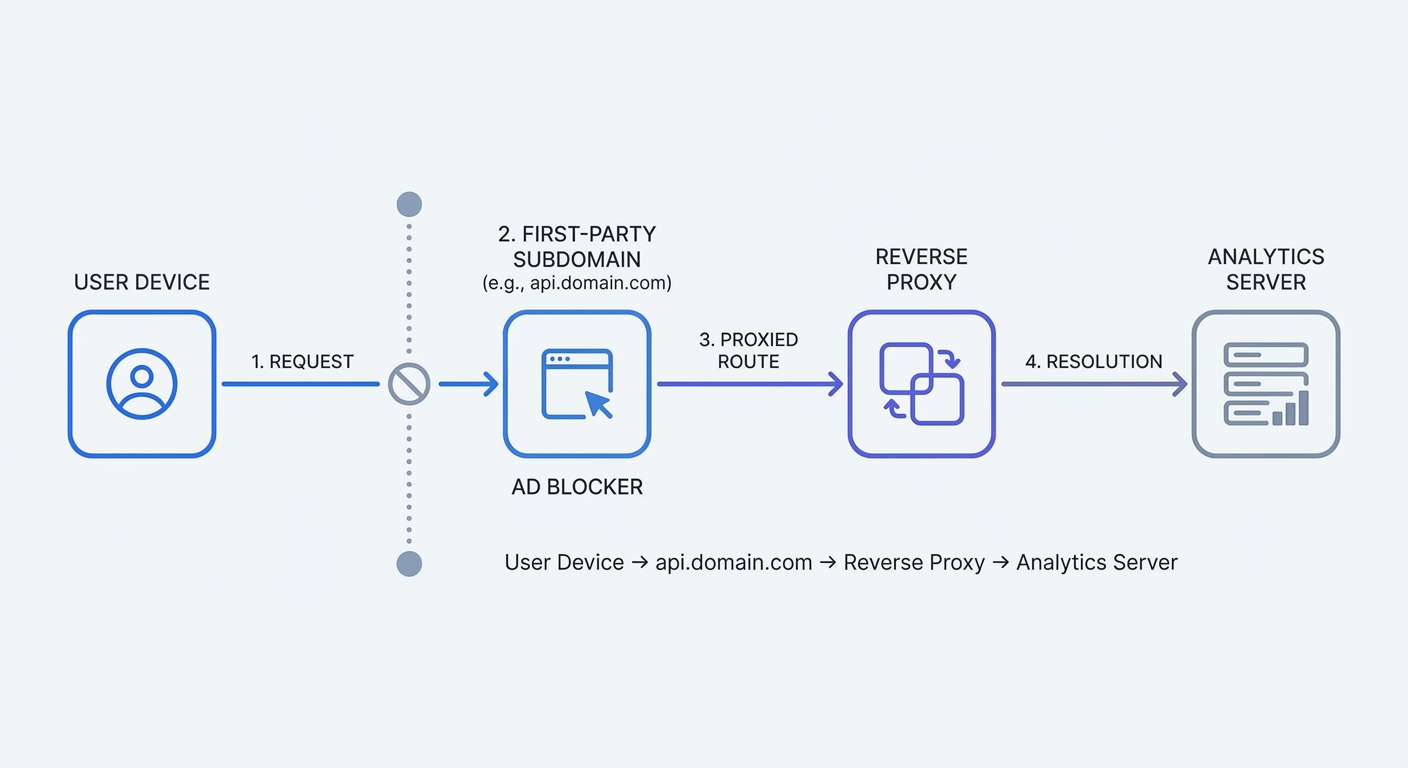
A reverse proxy acts as a traffic director sitting between the visitor's browser and your analytics provider. Rather than standing up an entirely new server environment to process data, you configure a subdomain to act as a mirrored tunnel, allowing the browser to send the analytics request to the proxy before silently handing it off to the final endpoint.
Running your own infrastructure allows you to set this up manually using Nginx. Create a new location block in your server configuration that intercepts requests sent to a specific path and uses the proxy_pass directive to forward them to the analytics API. The proxy must also forward the user's IP address and user agent via the X-Forwarded-For header, otherwise all traffic appears to originate from your own server IP.
For teams avoiding server maintenance, platforms like Swetrix provide managed reverse proxies built directly into the tracking ecosystem.
Setting up a managed proxy with Swetrix requires minimal configuration. Begin by creating a new CNAME record in your domain registrar pointing a custom subdomain to the Swetrix proxy servers. Once the DNS propagates, update the script on your website to send data to your new custom URL instead of the default API, letting the platform handle the SSL certificate generation, HTTP header forwarding, and server uptime automatically.
Proper URL obfuscation determines the success of this strategy because ad blockers constantly update their rule sets to flag suspicious patterns. If you map your CNAME to track.yourdomain.com or analytics.yourdomain.com, the regex engines in the filter lists block the request based on the terminology alone.
Use generic routing terms like api, metrics, ping, or telemetry for your subdomains to fly under the radar. The endpoint path requires the same treatment, as a request hitting api.yourdomain.com/collect triggers red flags, whereas api.yourdomain.com/v1/health processes without issue. Swetrix allows you to customize both the tracking script filename and the API endpoints, ensuring your setup remains indistinguishable from standard website functions.
Legal Compliance and Privacy Laws
Solving the technical problem of ad blockers introduces a legal hazard. Converting third-party requests into first-party requests bypasses browser restrictions, yet the General Data Protection Regulation (GDPR) and the ePrivacy Directive still govern the specific data you collect rather than the routing method.
Moving tracking to a first-party proxy does not eliminate the need for consent banners. If your analytics platform drops persistent cookies on a user's device, or if it collects Personally Identifiable Information (PII) like cross-site device IDs, explicit user consent remains a legal requirement. Forwarding a tracking cookie through a reverse proxy without permission constitutes a deliberate compliance violation rather than an accidental oversight.
Traditional platforms like Google Analytics rely on cookies to stitch user sessions together across multiple days. If you use a proxy to force GA4 payloads past ad blockers, you collect data from users who explicitly opted out of tracking, creating a liability risk during data privacy audits.
Swetrix eliminates this friction by operating without cookies, relying instead on a temporary hashing mechanism to track sessions ethically. When a user visits your site, the platform combines their IP address with their browser user agent and applies a cryptographic salt that rotates daily.
This process generates an anonymized hash that tracks pageviews and conversions for that specific session. At midnight, the salt changes, making it mathematically impossible to connect current hashes with historical data. Because the platform stores no personal data and places no tracking files on the user's device, the analytics fall outside the scope of GDPR consent requirements.
A reverse proxy ensures the script executes and the data reaches your dashboard, while cookie-free hashing protects user privacy and prevents regulatory fines. Review your data collection pipeline and strip out any persistent identifiers before they hit your proxy to maintain compliance.
Alternative Methods to Bypass Blockers
While a managed reverse proxy offers an efficient path for most businesses, complex enterprise tracking requirements often necessitate alternative routing methods with distinct technical tradeoffs.
Server-Side Google Tag Manager (sGTM) stands as a common enterprise alternative. Instead of routing data directly to an analytics platform, you provision a dedicated server environment on Google Cloud Platform using App Engine or Cloud Run. After deploying a server-side GTM container to this environment, you configure your web-side tags to send all data to the server container first.
Inside the server container, rules clean, modify, or obscure the data before distributing it to third-party marketing tools like Meta, TikTok, or Google Ads. This setup provides high control over your data stream, allowing you to strip PII from a purchase event before Facebook sees it, which ensures compliance while still feeding the advertising algorithms.
The drawback of sGTM lies in the financial and technical overhead. Google Cloud environments require ongoing funding, with minimum active deployments generally starting between $40 and $120 a month in server costs alone, scaling upward with traffic volume. The system also leaves you dependent on Google's infrastructure, which privacy-conscious users often block at the DNS level.
Basic CNAME DNS mapping provides a cheaper, stripped-down alternative. Some analytics tools allow a CNAME record to point directly at their main servers without a dedicated proxy layer. The browser sees a first-party URL, but the DNS record resolves directly to the tracking company's IP address.
Filter lists adapted to this tactic by implementing CNAME cloaking checks, resolving the DNS lookup before approving the network request. If your custom subdomain resolves to an IP block owned by a known tracking company, the browser intercepts the request. True reverse proxies like the one built into Swetrix avoid this detection by terminating the connection on a neutral server before forwarding the payload, hiding the final destination IP from the browser's inspection tools.
Weighing implementation complexity against data recovery rates reveals that a privacy-first platform paired with a managed proxy offers a high return on engineering time. This architecture restores visibility into the 30% of traffic missing from typical reports without requiring custom cloud infrastructure or risking GDPR violations.
Check your current traffic gaps by comparing your web analytics totals against your internal server logs or payment gateway transactions. If the numbers do not align, ad blockers are skewing your marketing data.
Swetrix provides all the tools necessary to deploy a cookie-free, proxy-enabled analytics environment. The platform offers real-time dashboards, custom event tracking, and built-in proxy support designed to recover lost data legally. Pricing starts at $19 per month for up to 100,000 events, with no hidden server costs. Start your 14-day free trial to see the exact traffic volume your site is missing.