- Date
Navigating The Apple Intelligent Tracking Prevention Impact On Analytics
 Andrii Romasiun
A prospect clicks a Facebook ad on a smartphone during a morning commute. The same prospect searches the brand on a laptop three days later and buys a product. Both touchpoints drove the sale. Marketing analysts relying on default web tracking setups credit the search engine and ignore the social media ad. The Apple intelligent tracking prevention impact fractures cross-device user journeys and hides the original source of marketing conversions. Marketing teams must adopt privacy-first analytics to restore data accuracy and measure traffic without relying on fragile browser storage.
Understanding The Apple Intelligent Tracking Prevention Impact
Apple treats cross-site data collection as a security threat. Safari blocks all third-party cookies by default. To enforce this rule, Apple built Intelligent Tracking Prevention (ITP) into the WebKit browser engine. ITP uses on-device machine learning to monitor how distinct domains interact. When the browser detects a domain engaging in cross-site tracking behavior, Apple flags the domain and restricts data storage.
Marketers cannot ignore this filter. Safari controls over 50% of the mobile browser market in the United States, though B2B sectors often see higher desktop Chrome usage. Half of consumer mobile traffic passes through Apple privacy shields. Engineers built legacy analytics platforms to depend on persistent cookies to stitch website sessions together. As those mechanisms fail on iOS and macOS hardware, companies lose visibility into customer behavior. The Swetrix tracking script ignores client-side storage, ensuring your traffic data remains accurate regardless of browser restrictions.
Security engineers using static blocklists fail to catch new tracking domains. Apple engineered ITP to adapt. Apple programmed the browser to build a local dynamic model of website interactions. If a script loads from an advertising network across three separate websites, Apple tags that network as a cross-site tracker through its machine learning classifier. The browser applies severe restrictions to any data that script attempts to save on the user device.
How Browser Restrictions Degrade Traditional Analytics Data
Apple engineers target the technical methods analytics vendors use to identify users. You must master these specific limits to interpret standard traffic reports without making budget errors.
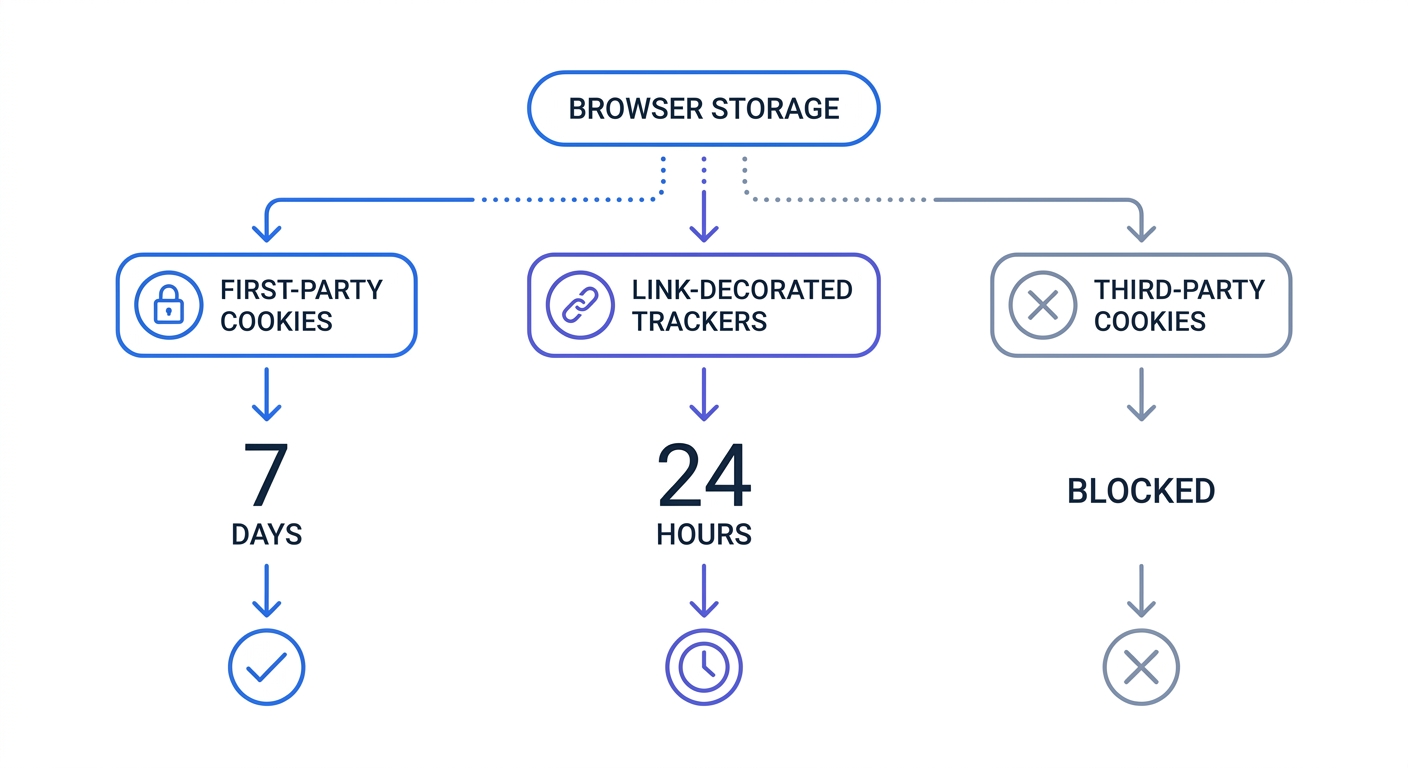
The 7-Day First-Party Cookie Expiration
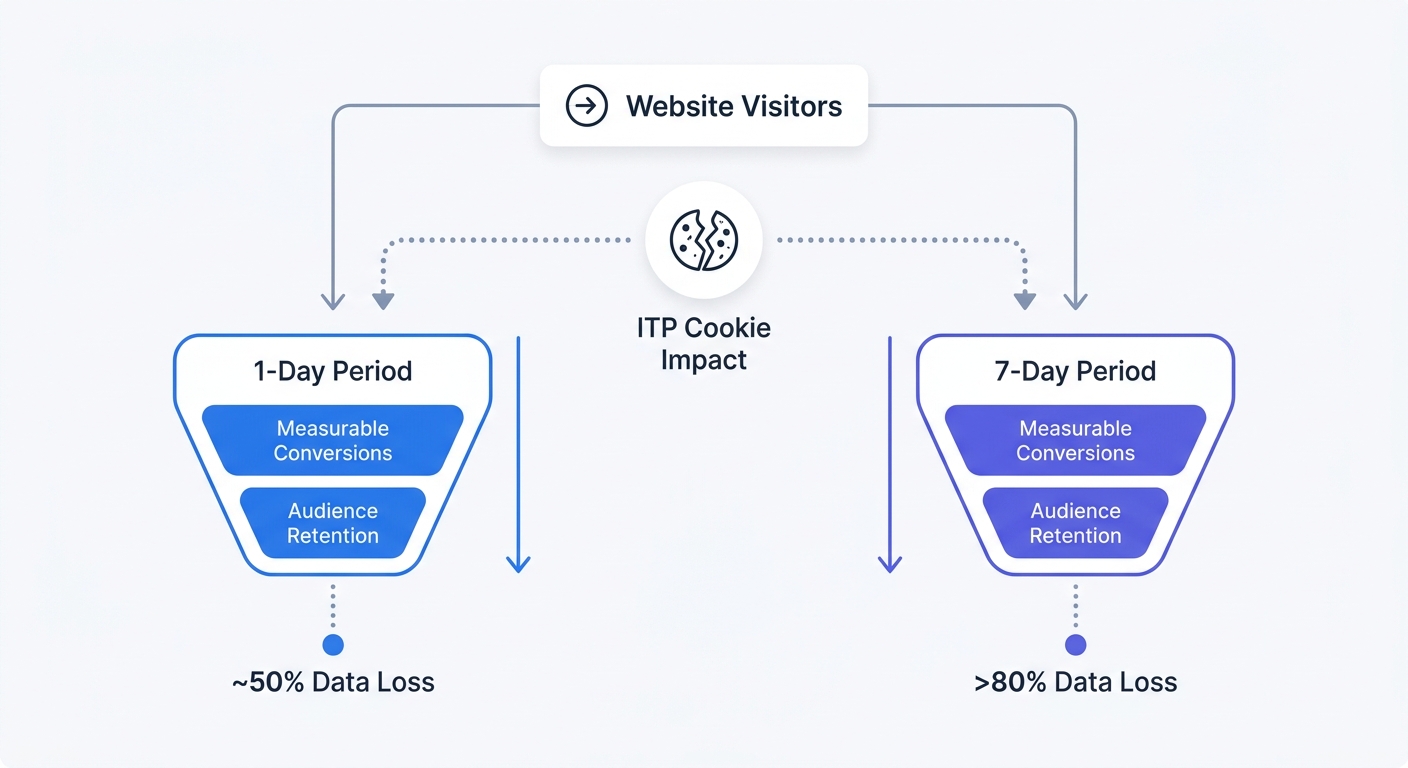
Developers set most analytics identifiers using client-side JavaScript via the document.cookie command. Apple caps the lifespan of these first-party cookies to seven days. A user visits your online store on a Monday, and Apple saves the analytics identifier within the browser. The user returns the following Tuesday to browse new products. Apple deletes the original identifier before the page loads. Your analytics vendor generates a new tracking ID.
Marketing analysts see the returning visitor registered as a brand-new user on the dashboard. This mechanic causes marketers to miscalculate retention metrics. Follow these steps to audit your reports today:
- Open your current analytics platform.
- Segment your traffic by browser type.
- Compare the ratio of new versus returning users on Safari against Chrome.
A massive spike in new Safari users indicates ITP data fragmentation. Use this insight to identify the breaking points in your current data pipeline.
The 24-Hour Link Decoration Penalty
Advertisers append query parameters to outbound URLs to attribute clicks to specific campaigns. Google uses ?gclid=, and Meta uses ?fbclid=. Apple categorizes this practice as link decoration. Apple engineers designed Safari to enforce a strict 24-hour cookie limit when a prospect arrives at your site via a decorated link from a known tracking domain.
Developers attempted to bypass this rule using local storage and session storage. Apple closed the loophole. The browser applies a 24-hour cap specifically to persistent cookies created with document.cookie after link decoration from a classified tracking domain. Separately, a broader 7-day cap applies to all script-writable storage without first-party user interaction. Check your conversion lag reports. Marketers lose campaign attribution data for any purchase happening more than 24 hours after an ad click on an Apple device.
| Storage Type | Setting Method | ITP Lifespan | Impact on Analytics |
|---|---|---|---|
| Third-Party Cookie | Cross-domain requests | Blocked by default | Destroys cross-site retargeting |
| First-Party Cookie | Client-side JavaScript | 7 Days | Inflates new user counts |
| First-Party Cookie (Ad Click) | Decorated URL + JS | 24 Hours | Breaks multi-day ad attribution |
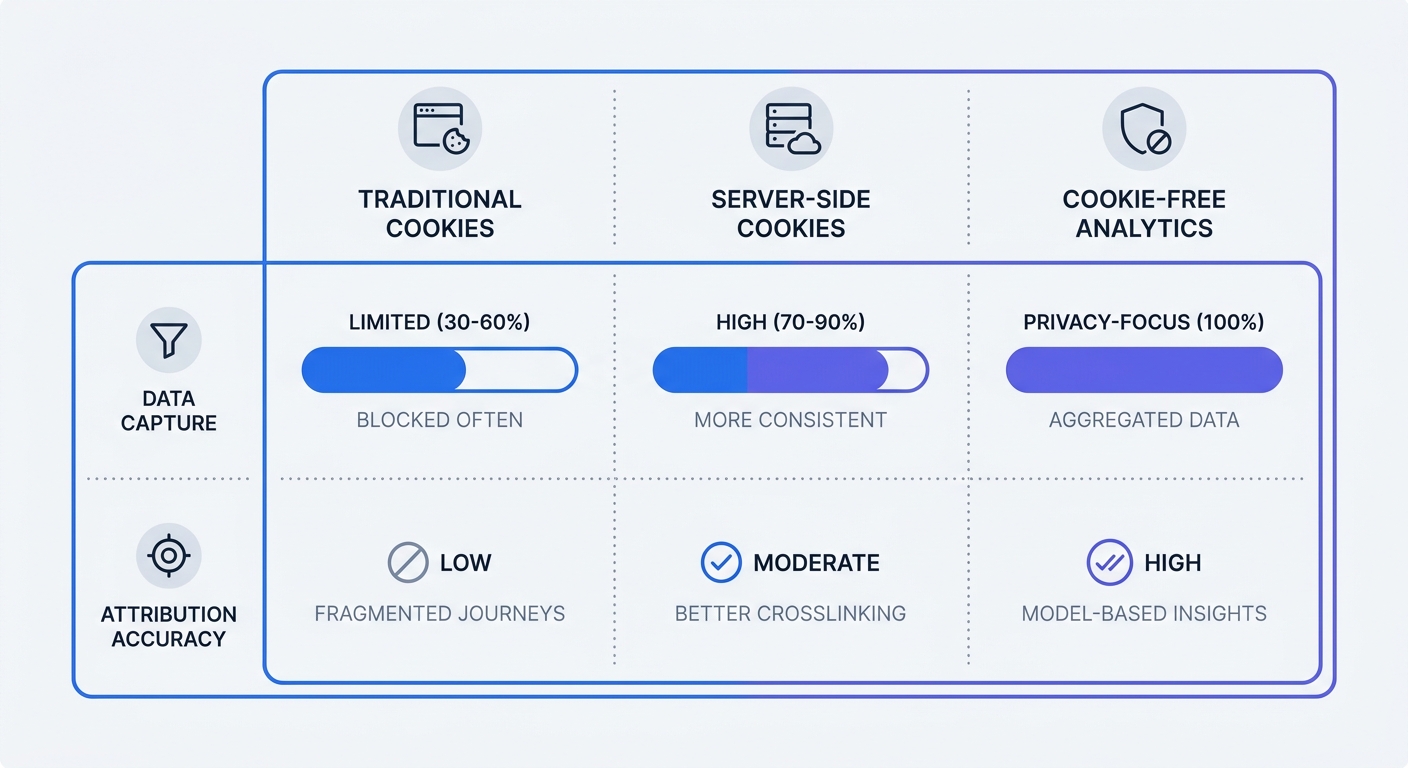
| First-Party Cookie | Server-side HTTP Header | 7 Days | Maintains session continuity |
Measuring The Apple Intelligent Tracking Prevention Impact On Marketing
Marketing teams lose the tools they rely on for campaign optimization when browser-level restrictions block data collection.
Collapsing Multi-Touch Attribution
B2B buyers require multiple touchpoints before signing a contract. Apple shatters multi-touch attribution models through ITP. A manager clicks a LinkedIn ad on an iPhone, reads a whitepaper, and subscribes to a software demo three weeks later via organic search. Your analytics vendor credits the demo request to organic search because the original ad cookie expired.
Marketers running A/B tests suffer the same fate. Engineers use browser storage within testing tools to keep a visitor anchored to a specific page variant. Apple purges that storage after a week. The visitor returns, falls into a different test variant, and ruins the statistical validity of the experiment.
Update your reporting dashboard to use seven-day lookback windows, ensuring your Apple device metrics reflect measured user behavior.
How iOS 17 Worsens the Problem
Apple continues to expand its privacy ecosystem. Apple shipped Link Tracking Protection with iOS 17 and macOS Sonoma. The update strips user-identifiable tracking parameters from URLs shared in Apple Mail, Messages, and Safari Private Browsing mode.
Click a promotional email link in the default Mail app. A prospect loads the resulting URL on your site without its unique identifier. This update forces thousands of brands to lose email marketing attribution. Marketers can track standard UTM parameters like source and medium, but they lose access to user-specific click IDs.
Rely on last-click attribution for Apple users. Keep your ROI calculations grounded in measurable events to avoid relying on modeled estimates. Use the Swetrix ROI Calculator to evaluate campaign performance under these restricted parameters.
Actionable Solutions to Overcome Tracking Restrictions
Marketing departments must rebuild tracking infrastructure to survive aggressive browser purges. Teams relying on legacy JavaScript tags will capture corrupted data.
Implementing Server-Side Tracking Containers
Engineers load client-side tags inside the browser window, placing the data under ITP jurisdiction. Developers move data processing to your own cloud infrastructure by implementing server-side tracking. A customer sends an anonymized event from their device to your cloud server, which forwards the data to your chosen analytics vendor.
System administrators set cookies inside HTTP headers instead of deploying client-side scripts. However, Apple enforces a 7-day cap on HTTP-response cookies in CNAME and IP cloaking scenarios, as documented at webkit.org/tracking-prevention/.
Follow these steps to transition:
- Provision a cloud server instance.
- Install a server-side tag management container.
- Route your website traffic through a custom subdomain matching your primary domain.
- Configure the server to set HttpOnly tracking cookies.
- Migrate core conversion events away from browser-side scripts.
You preserve session continuity for your iOS users and hide your vendor tags from ad blockers by adopting this architecture.
Pivoting to First-Party Data Collection
Marketers fail when they rely on anonymous browser identifiers. User authentication provides a reliable method for maintaining persistent sessions. Offer a discount code in exchange for an email address on the first visit. You can also prompt returning visitors to create an account to save their preferences.
When a customer logs in, your analytics team connects their actions across multiple devices and browsers without relying on fragile cookies.
Marketing leaders must reallocate advertising budgets targeting Apple users. Shift funds away from behavioral retargeting toward contextual advertising by placing ads on pages relevant to your product category. For example, a running shoe brand should buy ads on marathon training blogs instead of chasing individual users across the web. This strategy bypasses device-level tracking limits.
Future-Proofing Analytics With Privacy-First Tools
Apple enforces data minimization at the browser level. Marketers gain no protection against ITP data purges from consent management platforms and cookie banners.
Aligning With Strict Privacy Frameworks
Apple designed ITP to act as an automated privacy enforcer. The browser restricts data collection regardless of whether the user clicks "Accept" on your cookie banner. Apple assumes all persistent cross-site tracking is hostile. Engineering teams waste hours fighting these restrictions with complex workarounds. Apple updates WebKit multiple times a year to patch tracking exploits.
To stop losing data, you must adopt measurement tools designed for the strict privacy requirements of iOS and Safari.
Why Swetrix Solves Browser Tracking Restrictions
Marketers secure a permanent solution to browser-level tracking prevention by adopting cookie-free platforms. You can operate Swetrix without client-side cookies, device fingerprinting, or invasive persistent identifiers. Analysts measure traffic using anonymized data points through the platform.
Because Swetrix avoids storing tracking payloads on the user device, ITP has nothing to delete. Your reports remain accurate. You capture every pageview, custom event, and conversion without triggering Apple privacy alarms. Marketing teams maintain full visibility into their traffic sources and top pages.
Swetrix offers robust tools to analyze your marketing efforts:
- UTM Tracking: Capture campaign performance using standard UTM parameters that survive link protection filters. Standardize your campaign links using the Swetrix UTM Generator.
- Performance Monitoring: Track page load times and identify bottlenecks impacting user experience via the performance dashboard.
- Error Tracking: Log JavaScript crashes on your live site with the error tracking feature to fix bugs before they impact sales.
- Custom Events: Track button clicks, form submissions, and video plays without complex tag managers.
You can scale pricing with your business. Swetrix offers Cloud plans starting at $19 per month for 100,000 events. Growing businesses can support their traffic volume without facing aggressive overage fees. Companies with strict compliance requirements can use the open-source architecture to self-host the software on internal servers.
Stop guessing how much mobile traffic you lose to browser restrictions. By installing the Swetrix lightweight script alongside your legacy analytics tool, you can compare the traffic metrics after one week. You will see the exact volume of iOS and macOS data your current setup fails to capture.
Start capturing accurate traffic data today. The team at Swetrix provides cookie-free, open-source web analytics that bypass tracking prevention algorithms and respect user privacy. Claim your 14-day free trial at swetrix.com/signup and restore visibility to your marketing campaigns.