- Date
Does Local Storage Require Cookie Consent? A Compliance Guide
 Andrii Romasiun
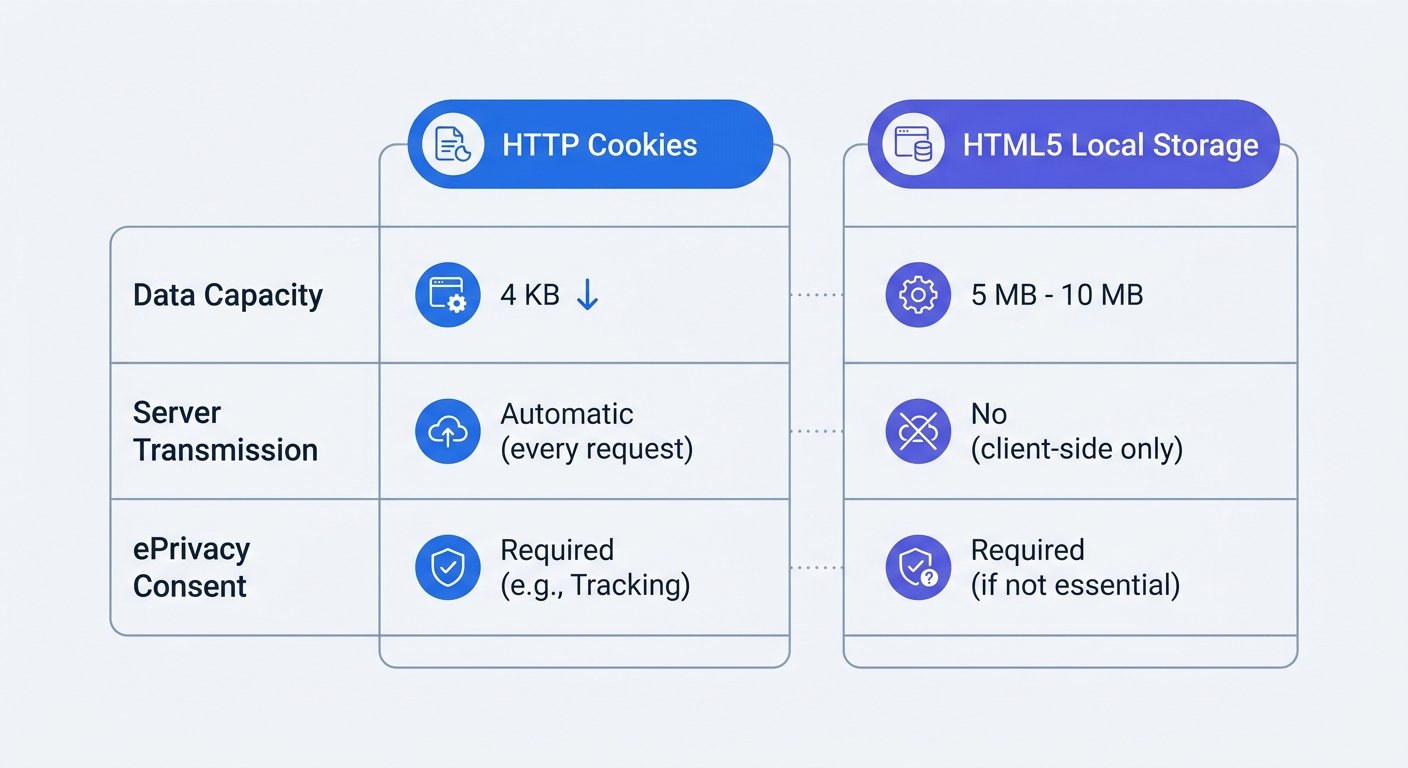
Developers frequently swap HTTP cookies for HTML5 Local Storage to improve website performance and tighten network security. Because local storage keeps data within the browser and stops identifiers from riding on server requests, it feels like a cleaner way to handle user sessions and tracking. You reduce bandwidth overhead, bypass old cookie size limits, and keep data away from the network layer, but if you use that storage for unnecessary tracking, you still need a consent banner. Regulatory frameworks do not care about the technical distinction between a cookie and a local storage key. When you rely on client-side storage to run your web analytics, you are legally required to ask for permission, which destroys your data visibility as users ignore or reject the prompt. Moving to a storage-free analytics platform like Swetrix bypasses this compliance trap. By avoiding terminal equipment, you regain a full view of your traffic without breaking privacy laws.
The Legal Reality: ePrivacy Covers All Terminal Storage
The confusion around local storage stems from the nickname given to the ePrivacy Directive. Because people call it the "Cookie Law," you might assume that avoiding .cookie in your JavaScript exempts you from compliance. The text of ePrivacy Article 5(3) never uses the word cookie as a limiting factor. It mandates that storing information, or gaining access to information already stored, in the terminal equipment of a subscriber requires prior informed consent. The legal trigger is the device itself, meaning a laptop, smartphone, or tablet acts as terminal equipment. If you write a unique user ID to a visitor's local storage, session storage, or IndexedDB to track their path across your site, you are storing information on their device, which requires you to ask for permission first.
This requirement operates independently of the GDPR. While the GDPR governs the processing of personal data, the ePrivacy Directive governs the storage mechanism. If you use local storage to hold a random string of numbers that tracks a user's page views, ePrivacy demands a banner because you accessed their device. If that string of numbers can be tied back to an IP address or a user account, the GDPR also applies because you are processing personal data. You cannot escape the requirement by changing the file format, so check your current analytics provider's documentation. If they list local storage as their fallback mechanism for identifying unique visitors when cookies are blocked, your site legally requires an opt-in banner before that script loads.
The Hidden Cost of Storage Consent Banners
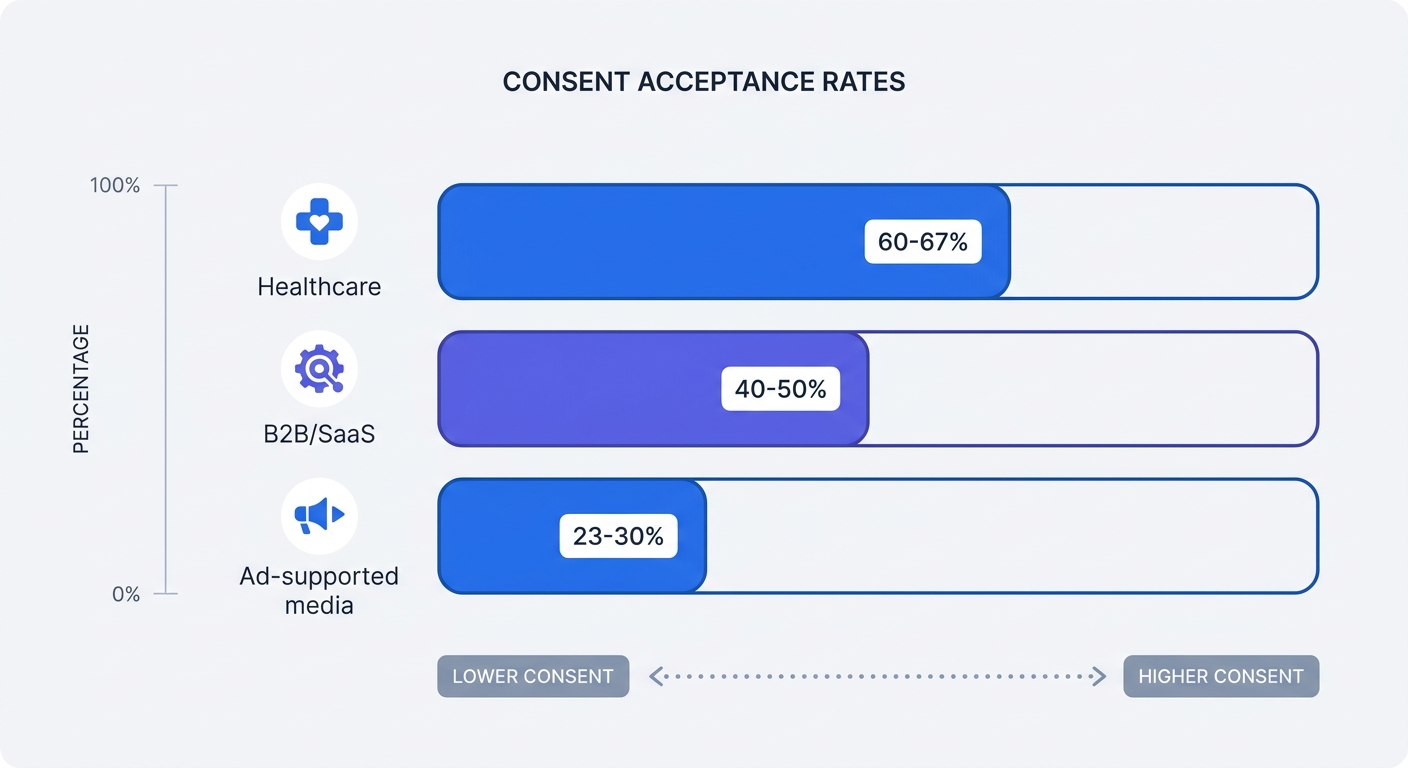
Triggering ePrivacy consent requirements causes data loss of up to 50% because a significant portion of users will reject tracking prompts. A Kukie.io analysis found that the cross-industry average for cookie and storage consent hovers between 42% and 47%. Websites using storage-based analytics operate blind to more than half of their traffic. If a user ignores your banner, your analytics script remains blocked. They might browse five pages, read your pricing tier, and leave, meaning your server logs record every network hit while your dashboard shows zero visits.
This baseline data loss varies heavily by sector, as healthcare websites maintain relatively high consent rates around 60% to 67%, while B2B and SaaS platforms sit between 40% and 50%. Ad-supported media properties face the steepest drop, with acceptance rates plummeting to 23% to 30%. Banner fatigue accelerates this trend, as users grow tired of managing preferences on every domain they visit. Roughly 46% of internet users click "Accept all" less often today than they did three years ago. Data protection authorities actively enforce equal-prominence rules, requiring your "Reject All" button to be as visible, colorful, and easy to click as your "Accept All" button. Banners that hide the rejection option behind a "Manage Preferences" link face heavy fines, and fixing those deceptive designs causes consent rates to drop further.
To calculate your specific data loss today, pull a 30-day traffic log from your hosting provider or CDN, such as Cloudflare or AWS CloudFront, and compare the total unique IP requests to the unique visitor count in your analytics dashboard. The gap between those two numbers represents the traffic you cannot measure, attribute, or optimize.
When Can You Use Local Storage Without Consent?
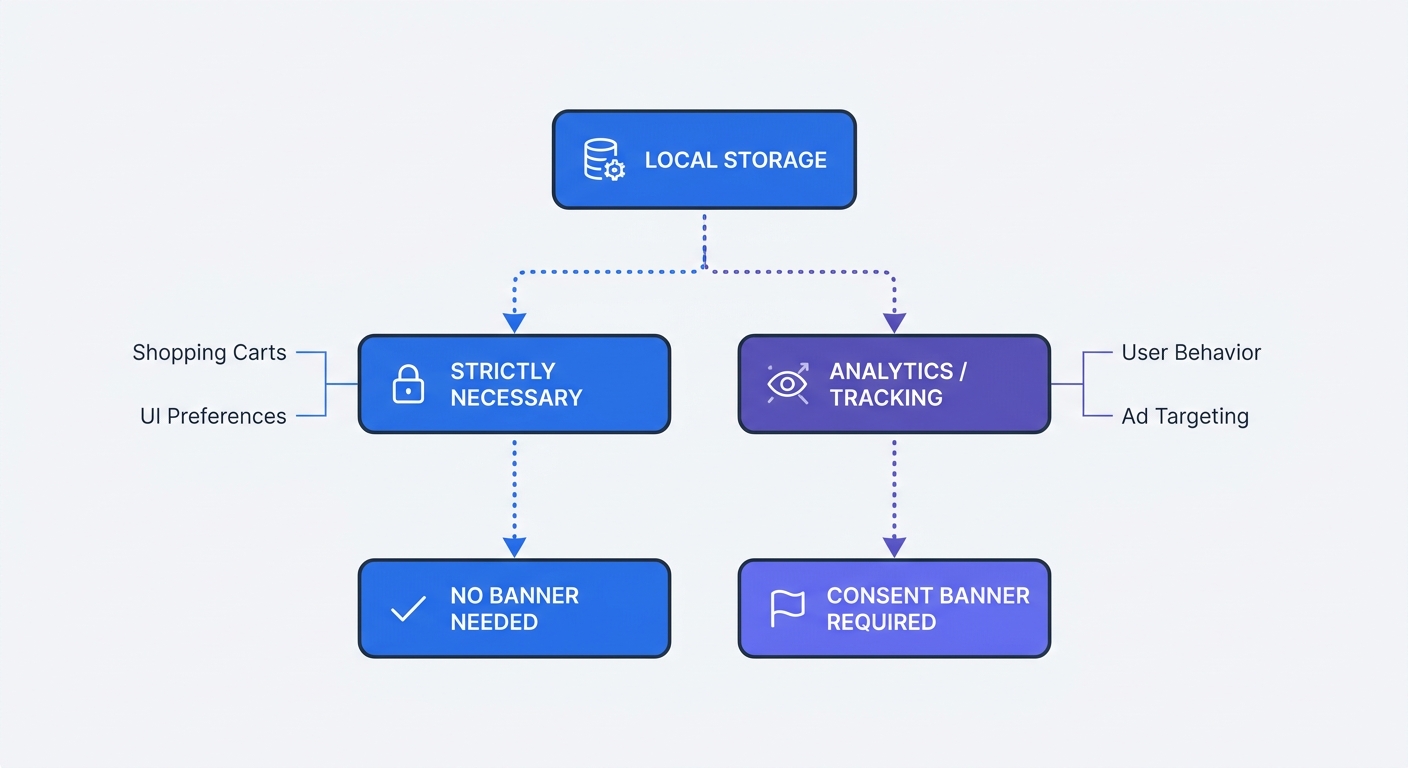
The law provides one major exemption, allowing you to bypass the consent banner if the local storage is strictly necessary to provide a service explicitly requested by the user. This exemption covers core website functionality, meaning if removing the local storage key breaks a feature the user intentionally engaged with, the storage is exempt.
Examples of necessary local storage include:
- Saving the contents of a shopping cart as a user navigates between category pages.
- Storing a secure JSON Web Token (JWT) after a user successfully logs into their account.
- Remembering a user's explicit UI preferences, such as a dark mode toggle or language selection.
- Recording the user's privacy and consent choices so the banner does not reappear on every page load.
These functions serve the user, and the exemption fails the moment you use local storage to serve your own business interests. Examples of local storage that legally require a consent banner include:
- Assigning a persistent visitor ID to track returning users across multiple days.
- Storing affiliate link parameters to credit a partner for a future sale.
- Saving A/B testing variations so the user consistently sees the same landing page design.
- Recording granular user behavior, such as scroll depth or video play duration, for product analytics.
Open your website, list every key-value pair written to your browser's local storage, and classify each one as either core functionality or tracking. If a single key maps back to a marketing platform, a third-party advertising network, or a traditional analytics tool, you must gate it behind a consent banner.
The U.S. Privacy Patchwork Complicates Storage
Storage consent is no longer exclusively a European problem. While the United States lacks a unified federal equivalent to the ePrivacy Directive, a patchwork of state-level laws restricts how you handle browser storage. The California Privacy Rights Act (CPRA), alongside privacy laws in Virginia, Colorado, and Connecticut, enforces rules around the collection and sharing of consumer data. While these laws typically operate on an opt-out model rather than the opt-in model of the EU, they mandate that you honor browser-level opt-out signals.
When a user enables Global Privacy Control (GPC) in their browser settings, your website must automatically detect that signal and halt any unnecessary data collection. If your analytics tool writes a tracking identifier to local storage while ignoring the GPC signal, you risk enforcement action under state laws. To manage this matrix of state requirements, U.S. websites increasingly adopt European-style banners, voluntarily subjecting themselves to the same data loss problem. You can verify your compliance by enabling GPC in a browser like Brave or Firefox and checking your storage console to ensure tracking scripts remain blocked.
Bypassing the Banner: The Cookieless Analytics Solution
If writing data to a device mandates a banner, the solution is to stop writing data to the device by switching to a platform that processes traffic without touching the user's terminal equipment. Swetrix provides web analytics engineered to bypass the ePrivacy storage trap because the platform does not use cookies, local storage, session storage, or IndexedDB to track users.
Instead of generating a unique ID and forcing the browser to remember it, Swetrix uses temporary hashes generated on the server side. When a visitor requests a page, the system combines their IP address and browser user agent with a daily rotating salt to create a hashed string that identifies a unique session for that day. At midnight, the salt changes, making the previous day's hash mathematically impossible to connect to the new one.
This technical architecture changes your legal standing. Because nothing is stored on the user's laptop or phone, ePrivacy Article 5(3) does not apply, and because the data is anonymized and impossible to trace back to a specific individual, it falls outside the scope of GDPR personal data processing. Dropping the consent banner allows you to regain 100% visibility into website traffic, page views, and bounce rates. You can measure marketing campaign ROI because every click registers in the dashboard, regardless of whether the user installed an ad blocker or uses Safari's strict tracking prevention. Many tools market themselves as privacy-friendly while relying on local storage to pad their unique visitor counts, which forces you to choose between breaking the law or losing half your data. Swetrix avoids the choice by keeping the tracking mechanism memory-based and server-side.
How to Audit Your Website for Rogue Storage Scripts
Automated privacy scanners often miss local storage violations because these compliance tools rely on intercepting HTTP headers to find cookies, leaving them blind to JavaScript executing within the client's browser. To ensure your site is compliant, perform a manual audit. Follow these steps to check your site for rogue storage:
- Open an incognito or private browsing window.
- Navigate to your website and leave the consent banner visible on the screen without interacting with it.
- Right-click anywhere on the page and select Inspect to open Developer Tools.
- Navigate to the Application tab (in Chrome/Edge) or the Storage tab (in Firefox).
- Expand the Local Storage and Session Storage dropdown menus in the left sidebar and click your domain.
Review the key-value pairs populated in the table. Because you have not yet granted consent, this area should be empty, or it should only contain necessary operational keys like consent_status: pending. If you see keys like _ga, mp_id, or hubspotutk populated before you click accept, your implementation violates the ePrivacy Directive because the scripts running your marketing tools are bypassing your banner and writing directly to the device.
Fixing CMP and JavaScript Implementations
If you retain tools that rely on local storage, configure your Consent Management Platform (CMP) to block the JavaScript from executing until the user opts in. A common implementation failure occurs when developers load tracking libraries directly in the <head> of the HTML document and try to handle consent via configuration flags later, as the marketing script has already written its identifiers to local storage by the time the CMP initializes. Wrap the initialization code for any storage-dependent tool in a consent check.
// Wait for the CMP to register an explicit consent event
window.addEventListener("consent_updated", function (e) {
  if (e.detail.analytics === true) {
    // Only load the storage-heavy analytics tool after positive consent
    loadLegacyAnalyticsLibrary();
  }
});
Map every script loading on your page and classify them in your CMP as necessary, preferences, analytics, or marketing. Ensure your tag manager configuration requires a positive consent variable before firing any tag in the analytics or marketing categories. Automated compliance sweeps by regulators look for local storage writes that occur before a positive consent signal is registered, and data protection authorities issued €5.88 billion in GDPR fines by early 2025 to penalize these failures.
Structuring a Compliant Analytics Stack
Managing CMP configurations, debugging tag manager loading sequences, and accepting 50% data loss drains resources, making the removal of storage-heavy tracking tools the most efficient path to compliance. Transition your core traffic analysis to a privacy-first platform. When you set up custom event tracking in Swetrix, the events transmit directly to the analytics API without leaving breadcrumbs in the browser's local storage, allowing you to measure button clicks, form submissions, and video engagement while ignoring the terminal equipment.
If your organization requires control over data sovereignty, deploying a self-hosted web analytics instance of Swetrix on your own infrastructure ensures no third party touches your traffic data. This deployment method satisfies enterprise security requirements and educational privacy mandates. For teams that want a managed solution, the Swetrix cloud infrastructure operates within the European Union, letting you capture referrers, device types, and UTM parameters without deploying consent banners or writing data to local storage.
Auditing your local storage payload exposes the data your marketing stack leaves behind. By removing client-side storage from your analytics architecture, you respect user privacy, eliminate compliance risks, and recover the 50% of traffic missing from your dashboards.
You can stop losing half your traffic to ignored consent banners because Swetrix delivers 100% data visibility without cookies or local storage. Track campaigns, monitor website performance, and capture custom events legally under GDPR and ePrivacy rules. Paid plans start at $19/month for 100,000 events. Start your 14-day free trial today and see the traffic your current analytics tool is missing.