- Date
How To Track UTM Parameters Effectively For Attribution
 Andrii Romasiun
A buyer sees your ad on Tuesday and converts on Thursday. Both interactions prompt the purchase. Marketing teams relying on default analytics miss the initial interaction and credit the entire conversion to a direct website visit.
Learning how to track UTM parameters effectively captures this lost attribution. You append these text snippets to the end of your URLs to pass source data into your tracking software. You pass the traffic source, medium, and campaign name through each tagged link. Adding ?utm_source=facebook&utm_medium=cpc&utm_campaign=spring_sale to your ad URLs passes the tags to the platform on page load to file each visit under the correct campaign.
Without tags, marketers blur paid and organic traffic together in reports. A $5,000 ad campaign might drive 300 conversions that register as direct traffic because the links lacked source parameters. Tagging every link reveals exact revenue attribution. Traditional platforms discard this data when users reject tracking cookies. We built Swetrix to solve this problem. Our privacy-focused analytics capture UTM data without relying on invasive cookies.
The New Rules of UTM Tracking
Marketers must provide explicit instructions for traffic categorization. Marketing teams cannot rely on default referrer data to identify traffic sources. Browsers block third-party trackers based on user consent preferences.
Why UTMs Secure Your Attribution Data
Tech platforms mask outward-bound traffic to protect user privacy. A visitor clicking a link in a mobile app registers as direct traffic because the app strips the referring domain from the request headers. Marketers bypass this restriction using UTM parameters. You embed the source data within the URL itself to retain this context.
Marketing teams rely heavily on UTM tracking to ensure attribution accuracy. This reliance increases as browsers phase out third-party cookies. Contextual link tagging remains a reliable method for categorizing inbound visitors.
The Apple iOS 17 and Cookie Banner Impact
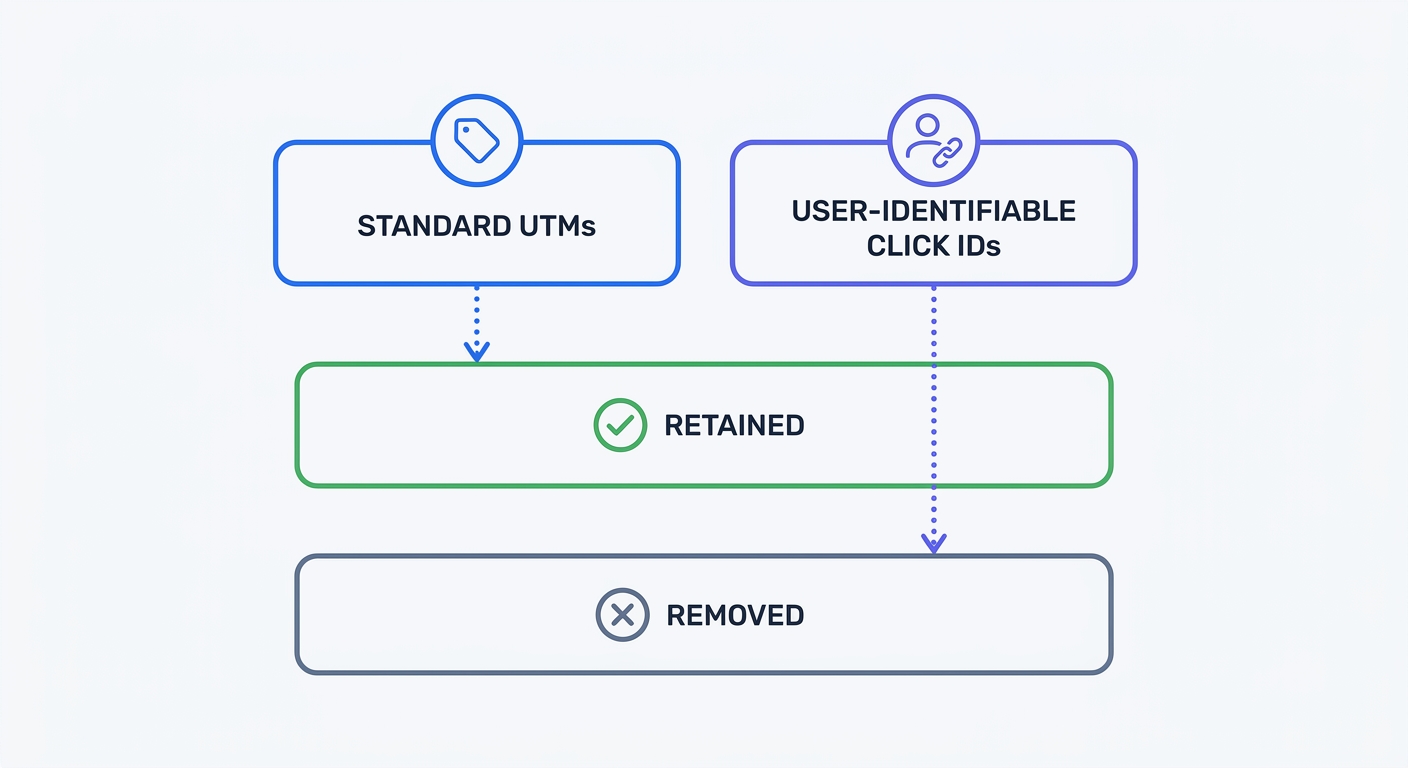
Apple introduced Link Tracking Protection in iOS 17. This feature strips user-identifiable click IDs from URLs shared in Messages, Mail, and Safari Private Browsing. Parameters like Google's gclid and Meta's fbclid disappear from the link. Apple removes these strings because they track individual user behavior across the web.
Standard UTM parameters survive this purge. Tags like utm_campaign track the marketing asset rather than the individual person. Apple retains them.
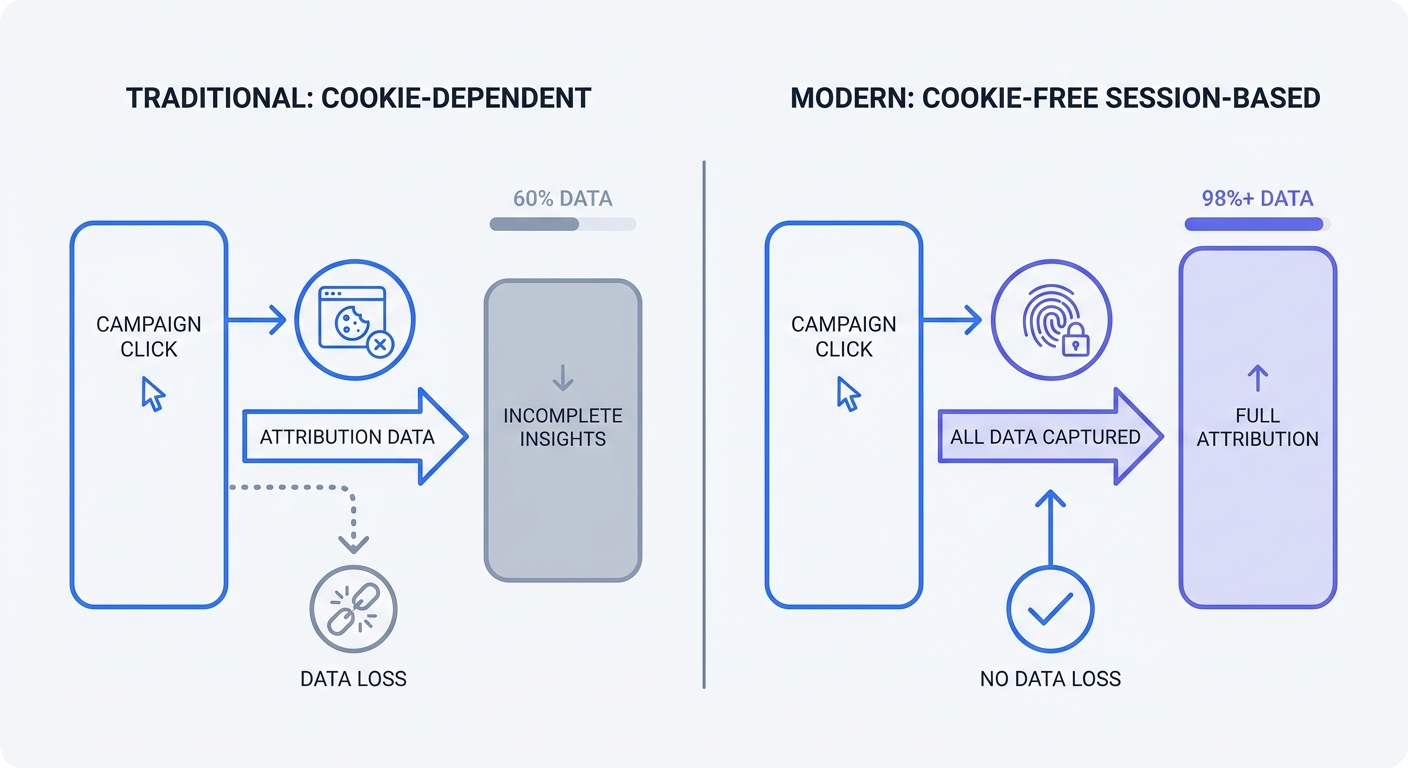
Consent requirements create a massive gap in traditional tracking. European e-commerce and SaaS users reject tracking at high rates. Research into cookie banner behavior reveals 40.6 percent of these visitors reject all cookies, while another 33.6 percent ignore the banner. Three-quarters of this audience blocks persistent tracking. Traditional platforms tie UTM parameters to a tracking cookie. When users reject the cookie, the platform discards the campaign data.
Mastering the Five Core UTM Parameters
You build UTM strings using five distinct parameters. Add each tag to provide an extra layer of granularity in your traffic reports.
Source, Medium, and Campaign Fundamentals
Analytics platforms require the first two parameters to categorize traffic. You use the third parameter to group individual links into a specific marketing push.
| Parameter | Purpose | Example |
|---|---|---|
utm_source | Identifies the specific platform or vendor sending traffic. | google, newsletter, linkedin |
utm_medium | Identifies the broader marketing channel or payment model. | cpc, email, social |
utm_campaign | Groups multiple links under one specific promotional effort. | q3-webinar, summer-sale |
utm_content | Differentiates identical links pointing to the same URL. | header-link, footer-button |
utm_term | Tracks the specific keyword purchased in paid search. | analytics-software |
Format your URLs by placing a question mark ? after the base URL, followed by your first parameter. Separate subsequent parameters with an ampersand &.
https://swetrix.com/features?utm_source=newsletter&utm_medium=email&utm_campaign=launch
Advanced Tactics with Content and Term
You use the content parameter to test different elements within the same campaign asset. Imagine sending a promotional email containing three links to your pricing page. One link sits in the header image, while another acts as a standalone text link. The third displays as a bright button at the bottom.
You identify which placement drives the highest click volume by assigning a unique utm_content value to each link.
utm_content=hero-imageutm_content=inline-textutm_content=bottom-button
Never place UTM tags on internal website links. When a visitor clicks an internal UTM link, the analytics platform overwrites their original acquisition source. A prospect arrives from a paid Google ad. They click an internal link tagged with utm_source=homepage. Your tracking software abandons the paid ad attribution and credits the homepage for any subsequent conversion. Use custom events to track internal user behavior instead.
Analyzing UTM Data Without Cookie Loss
Cookie-dependent analytics platforms fail to track campaigns under modern privacy regulations. You need a tracking infrastructure built for a consent-first web.
The Cookie Banner Attribution Gap
Google Analytics relies on cookies to store UTM data across multiple page views. A user clicks your tagged Facebook ad and lands on your homepage. They see a cookie banner and click "Decline." The analytics script registers the first page view with the UTM parameters.
The user navigates to your pricing page. Analytics platforms drop the UTM data because no cookie exists to connect page two with page one. If that user buys your product, the conversion registers as direct traffic. Your paid campaign receives zero credit for the sale.
Swetrix Versus Legacy Analytics
Campaign UTMs are not Personally Identifiable Information under GDPR unless you pair them with unique user IDs or cross-site tracking cookies. Marketers track campaign performance without asking for cookie consent.
You can resolve the attribution gap using session-based, anonymized tracking in Swetrix. The platform tracks page views and conversions without dropping persistent trackers on the user's device. We maintain the session context on the server. This architecture preserves your UTM data for the duration of the visit, regardless of cookie banner interactions.
Swetrix Cloud starts at $19 per month for 100,000 events. Subscribers gain access to real-time dashboards, custom events, and performance monitoring without compromising user privacy. Retaining your attribution data remains possible while complying with global privacy laws.
Creating a Foolproof UTM Governance Strategy
Marketers destroy data integrity through human error. A misspelled campaign name creates a redundant row in your analytics dashboard. Teams prevent these fragmentation issues by standardizing processes.
Standardizing Naming Conventions
Analytics platforms process text with case sensitivity. The tags utm_source=LinkedIn and utm_source=linkedin register as two unrelated traffic sources. Marketing teams must agree on formatting rules before launching campaigns.
Implement these baseline rules for all team members:
- Use lowercase letters for every parameter.
- Replace spaces with hyphens.
- Avoid special characters or underscores.
- Keep names short and descriptive.
Standardizing parameter naming ensures clean data, allowing you to group campaigns by channel and calculate accurate return on ad spend.
Automating Your UTM Creation
Manual URL typing causes typos. Enterprise marketing teams prevent these errors by adopting UTM automation and governance tools.
Create a protected team spreadsheet to generate URLs. Place your base URLs in column A. Next, build dropdown menus for source and medium in columns B and C. Finish by using a concatenation formula to output the final link.
=A2&"?utm_source="&B2&"&utm_medium="&C2&"&utm_campaign="&D2
Test every link before deploying the campaign. Paste the generated URL into a browser and press enter. You must check the address bar to confirm the parameters remain intact after the page loads. Misconfigured servers strip query strings from the URL. Fixing any server-side HTTP to HTTPS redirects ensures they pass the UTM variables to the final destination.
Implement canonical tags on your destination pages. Appending UTM parameters creates duplicate URLs for the same piece of content. Search engines penalize duplicate content in rankings. Add a rel="canonical" link in your page header pointing to the clean base URL.
<link rel="canonical" href="https://swetrix.com/features" />
Reclaiming Dark Social and Hidden Traffic
Buyers share links outside of public social networks. This peer-to-peer sharing breaks traditional tracking models. You must engineer tracking mechanisms to capture this intent.
Uncovering the Dark Social Blindspot
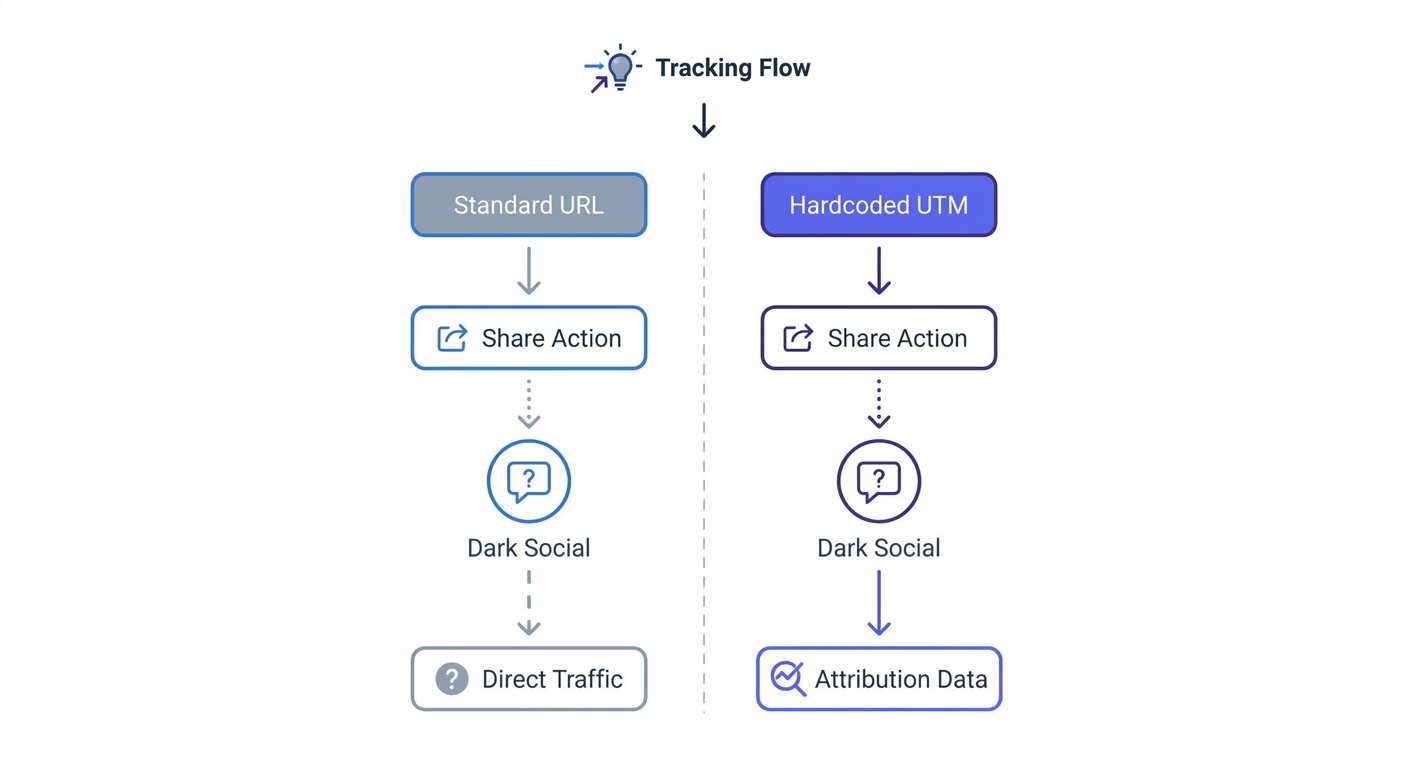
Prospects copy your blog post URL and paste it into Slack, WhatsApp, or an email. Analytics tools categorize these visits as direct traffic because private messaging apps do not pass referrer data.
Content shares happen through private channels 84 percent of the time, though this rate ranges from 56 to 84 percent depending on the specific industry. This behavior creates a massive blind spot for content marketers. You see high direct traffic volumes but cannot prove which articles drive distribution.
Hardcoding UTMs for Peer-to-Peer Sharing
You reclaim this attribution by hardcoding UTM parameters into the share buttons on your website. When a reader clicks a "Share via Email" button, you dictate the URL they send to their colleague.
Append specific dark social parameters to the links within your sharing widgets:
<a
  href="mailto:?subject=Read this guide&body=https://swetrix.com/blog/example-post?utm_source=website-share&utm_medium=dark-social"
>
  Share via Email
</a>
Replicating this tactic for "Copy Link" buttons adds another layer of tracking. Configure the copy function to append ?utm_source=copy-link&utm_medium=dark-social to the URL placed on the user's clipboard. Analytics dashboards register any subsequent clicks from that pasted link under the dark social medium.
Tracking these parameters isolates peer-to-peer distribution from direct traffic. This data proves the return on investment for your content marketing efforts.
Stop losing campaign data to cookie banners and broken tracking setups. Swetrix provides a privacy-first, cookie-free web analytics platform that captures every UTM parameter without tracking individual users. Build custom dashboards, monitor website performance, and maintain GDPR compliance. Start your 14-day free trial of Swetrix today and see accurate campaign attribution in real time.