- Date
Why Your SEO Reports Are Missing AI Search Traffic
 Andrii Romasiun
Your SEO report can look green while the channel changes under it. Search Console may show impressions. GA4 may show fewer organic sessions. The missing part sits between those two reports: AI search can use your page, answer the query, and send no click, a referral from an AI product, or a visit that lands under Direct.
Use Swetrix to pair AI discovery with referrers, UTM tracking, custom events, goals, funnels, user flows, performance data, error tracking, and revenue analytics. You can see whether an AI-sourced visitor reads, returns, signs up, or pays.
The Report Gap
Your team can answer four old questions with a traditional SEO report: did rankings move, did impressions rise, did clicks change, and did analytics count organic sessions. Keep those checks. Add the questions AI search created.
Start with zero-click search. Pew Research Center found that Google users clicked a traditional result on 8% of visits with an AI summary, compared with 15% of visits without one. Users clicked a source link inside the AI summary on 1% of visits, and around two-thirds of searches ended with more Google browsing or no click to an outside site, according to the same Pew Research Center analysis.
Add this tab to your report:
| Metric | Why It Belongs | Action |
|---|---|---|
| GSC impressions and clicks | Google visibility still matters | Segment by query group and landing page |
| AI referral sessions | AI products can send real traffic | Create an AI source group |
| Direct traffic on cited pages | App handoffs and untagged AI clicks can land here | Compare 7-day baselines before and after citations |
| Goal and funnel conversion rate | AI visitors can arrive with high intent | Lead with conversion rate |
| Revenue by source | Founders care about money, not rank movement | Connect Stripe, Paddle, or your API |
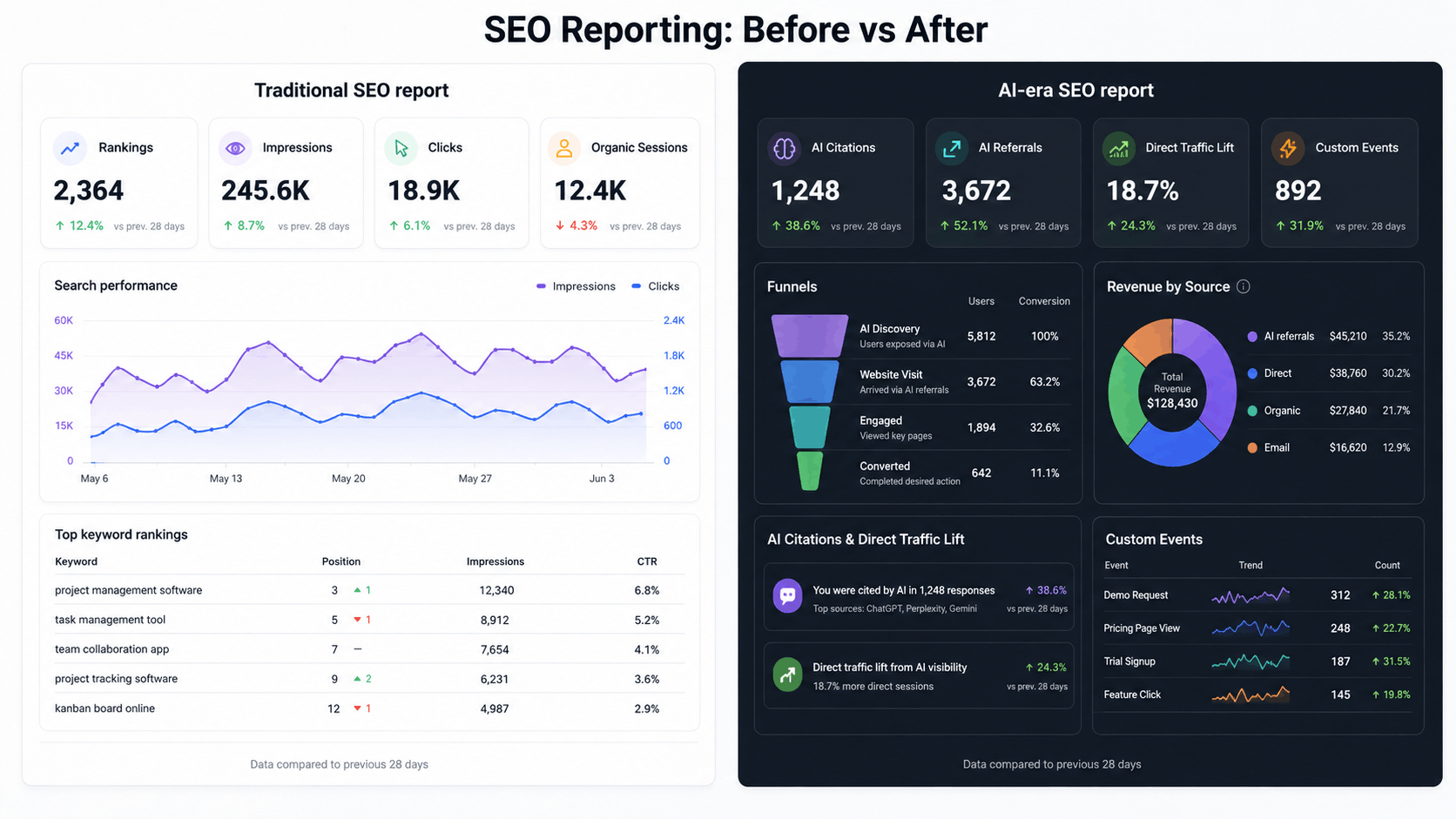
Search Console Stops At Google
Use Search Console for Google visibility. Pair it with site analytics for behavior and conversions.
Google says AI Overviews and AI Mode count inside Search Console's Web search type, and AI Mode may use query fan-out across subtopics and data sources. In the same Google Search Central guidance, Google tells site owners to track conversions and time on site in analytics tools.
That gives you a clean split:
| Tool | Use It For | Do Next |
|---|---|---|
| Google Search Console | Google impressions, clicks, query families, landing pages | Find pages that get visibility but lose clicks |
| Swetrix | Referrers, Direct traffic, UTMs, custom events, goals, funnels, user flows, revenue | Find pages that turn AI discovery into business outcomes |
| Prompt log | AI citations, source changes, uncredited retrieval | Track which pages AI systems mention or use |
A query with 20,000 impressions, 80 clicks, and 12 signups beats a query with 70,000 impressions, 400 clicks, and 1 signup. Put that math on page one.
Use a simple value model:
AI SEO value = (trial starts * trial value) + (demo requests * lead value) + paid revenue
Assign values before the report period starts. A SaaS team might value a trial start at $40, a demo request at $250, and a paid signup at its first invoice amount. Review the same numbers each month so your team tracks change instead of argument.
AI Referrals Arrive With Messy Labels
OpenAI tells publishers to allow OAI-SearchBot for ChatGPT search inclusion and says ChatGPT adds utm_source=chatgpt.com to referral URLs. OpenAI gives you one clean signal in its publisher FAQ.
Other visits can arrive as chatgpt.com / referral, an AI domain referrer, a UTM tag, or Direct after an app opens a browser without referrer context. Build the source group yourself.
Start with this pattern:
chatgpt\.com|perplexity\.ai|claude\.ai|gemini\.google\.com|copilot\.microsoft\.com|poe\.com
Then run this setup:
- Open your referrers report and export the top 100 sources.
- Mark AI product domains and AI search subdomains.
- Create a saved segment or channel group named
AI search. - Split Direct traffic by landing page.
- Add your AI-cited pages to a Direct watchlist.
- Compare goal rate for
AI search,Organic Search, andDirect on AI watchlist.
In Swetrix, use referrers, UTM tracking, custom events, goals, funnels, and user/session analysis to follow the visit after the source label ends. If your team uses AI Chat in Swetrix, ask: Which AI referrers sent visitors who completed signup_started this month?
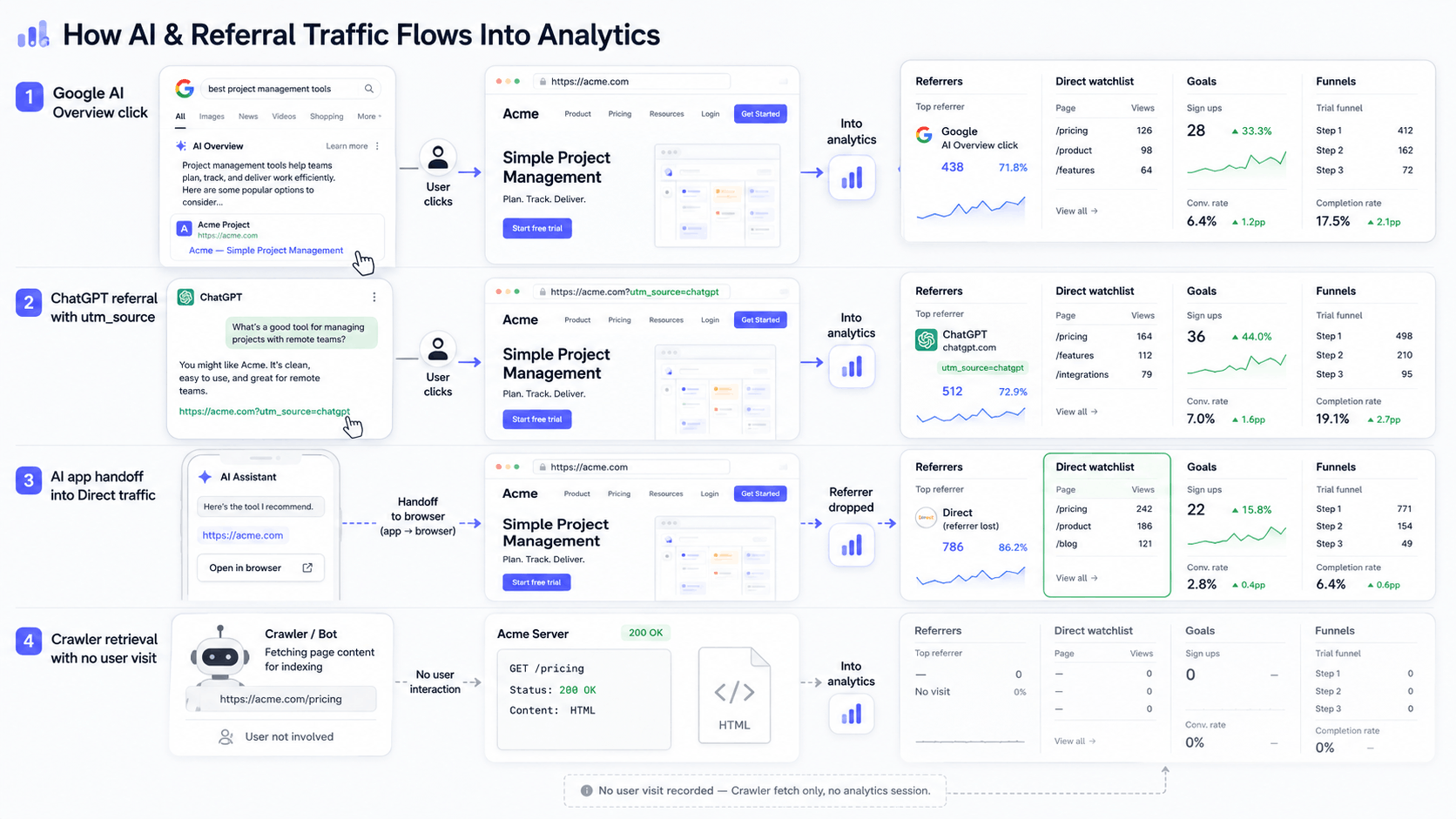
Uncredited Retrieval Still Has Business Value
An AI crawler can fetch your article, use it to answer a question, and send no user to your site. A marketer can read that answer, remember your name, and type the URL two days later. In your report, you see a Direct session.
Create an AI retrieval watchlist:
- Pick 20 pages that answer buyer questions.
- Record the target prompt, page URL, last update date, and expected conversion.
- Test the prompt in Google AI Mode, ChatGPT, Perplexity, and Gemini once per week.
- Log cited domains, mentioned brands, and answer claims.
- Watch Direct traffic, branded search, and returning sessions for those pages in the same date range.
- Add a custom event on the next step, such as
demo_requested,pricing_viewed, orsignup_started.
Server logs can help when you store them. Check crawler user agents beside page updates and AI citations. Keep crawler fetches separate from human sessions so bots do not inflate traffic.
Source Volatility Breaks One-Off SEO Audits
AI answers change sources. Google says AI Overviews and AI Mode can use different models and techniques, so response links vary. You can miss the week when a competitor replaces your page in the answer if you run one audit and stop.
Run repeated checks with a small prompt panel:
| Prompt | Surface | Cited Domain | Your Domain Present? | Landing Page | Conversion Event | Date |
|---|---|---|---|---|---|---|
best privacy analytics for saas | ChatGPT | Example domains | Yes or no | /google-analytics-alternative | trial_started | June 08 |
how to track ai search traffic | Google AI Mode | Example domains | Yes or no | /blog/... | signup_started | June 08 |
gdpr analytics without cookies | Perplexity | Example domains | Yes or no | /blog/... | demo_requested | June 08 |
Test the same prompts each week. Record source swaps. Tie those swaps to behavior metrics in Swetrix. If ChatGPT referrals rise but funnel conversion drops, update the landing page before editing title tags.
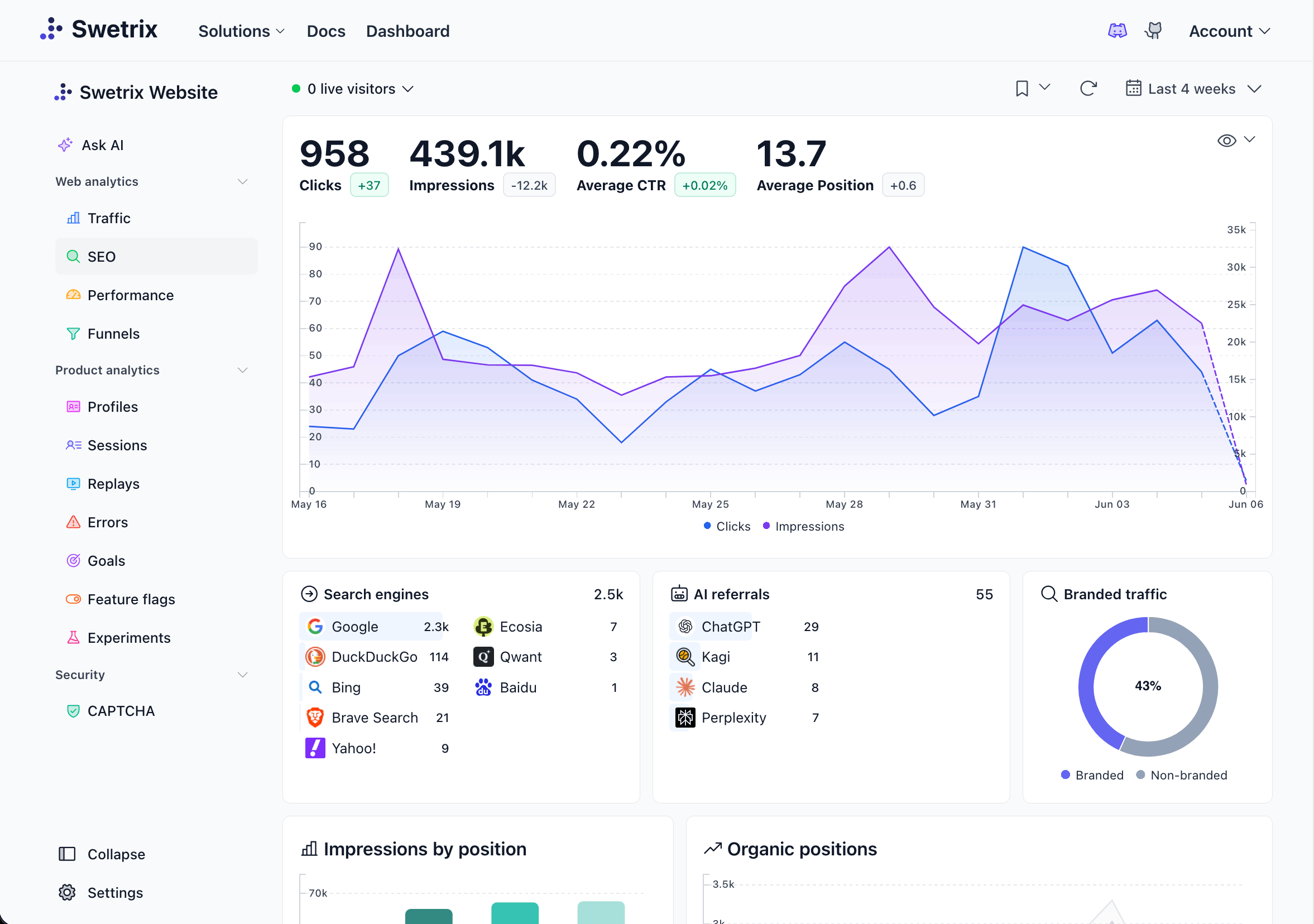
Add Behavior And Conversions To The SEO Report
AI search can pre-qualify visitors. Fewer visits can still produce better outcomes.
Build the conversion layer before you judge AI search:
- Create custom events for
pricing_viewed,signup_started,trial_started,demo_requested, andpurchase_completed. - Build a funnel from blog post to docs, pricing, signup, and activation.
- Add goals for each high-value step.
- Filter the funnel by source group: Google organic, AI search, Direct watchlist, paid, and referral.
- Connect revenue analytics through Stripe, Paddle, or the Swetrix API.
- Share the dashboard with the team or client.
Track performance monitoring and error tracking on the same landing pages. An AI click has no value if the page takes too long to load, the signup button fails, or a JavaScript error breaks the form. Use user flows to see whether AI visitors move from a blog answer to docs, pricing, or signup. Use session analysis to inspect broken steps. Agencies can share dashboards and use organisations to keep clients separate.
Swetrix gives you cookieless analytics and no personal data collection, with EU-hosted Cloud and self-hosting options. Privacy-conscious teams can use that setup to collect source, behavior, and conversion data without turning visitors into ad profiles.
A Better SEO Report Template
Replace the first page of your SEO deck with this table:
| Old Row | AI Search Row | Action |
|---|---|---|
| Keyword rankings | Query group and prompt visibility | Update pages with clearer definitions, comparison tables, and original examples |
| GSC clicks | Google clicks plus AI referrals and Direct watchlist | Show click loss and conversion rate side by side |
| Organic sessions | Source groups by Google, Bing, AI products, and Direct watchlist | Find visits Search Console cannot explain |
| Engagement | User flows, session analysis, errors, and performance | Fix dead ends and broken scripts |
| Leads and revenue | Goals, funnels, and revenue analytics | Prove ROI by source |
Use this report cadence:
- Review GSC visibility each week.
- Review AI referrals and Direct watchlist traffic each week.
- Review source volatility from the prompt panel each week.
- Review goals, funnels, and revenue at month close.
- Rewrite pages that earn citations but no next-step events.
- Deprioritize pages that generate sessions without goals or revenue.
Final Recommendation
Keep Search Console for query visibility. Keep rank tracking if it helps content planning. Put analytics-side outcomes above vanity movement.
Use Swetrix as the behavior and conversion layer for AI search reporting. Track referrers, UTMs, Direct watchlists, custom events, goals, funnels, user flows, performance, errors, shared dashboards, revenue, and AI Chat in one place. Add a small prompt log for uncredited retrieval and source volatility.
Founders, marketers, agencies, and product teams can act on that report: which AI surfaces mention you, which visits reach the site, and which visits turn into pipeline or revenue.
If GA4 and Search Console no longer explain where your best visitors come from, add Swetrix as the privacy-first analytics layer. Start a 14-day free trial at swetrix.com/signup, then track AI referrals, Direct traffic, custom events, funnels, and revenue without collecting personal data.

Time to ditch Google Analytics
Google Analytics is overkill for most site owners. Swetrix is a simple, privacy-focused alternative that's easy to use and doesn't require cookie consent banners.