- Date
Is Google Analytics 4 GDPR Compliant in 2026?
 Andrii Romasiun
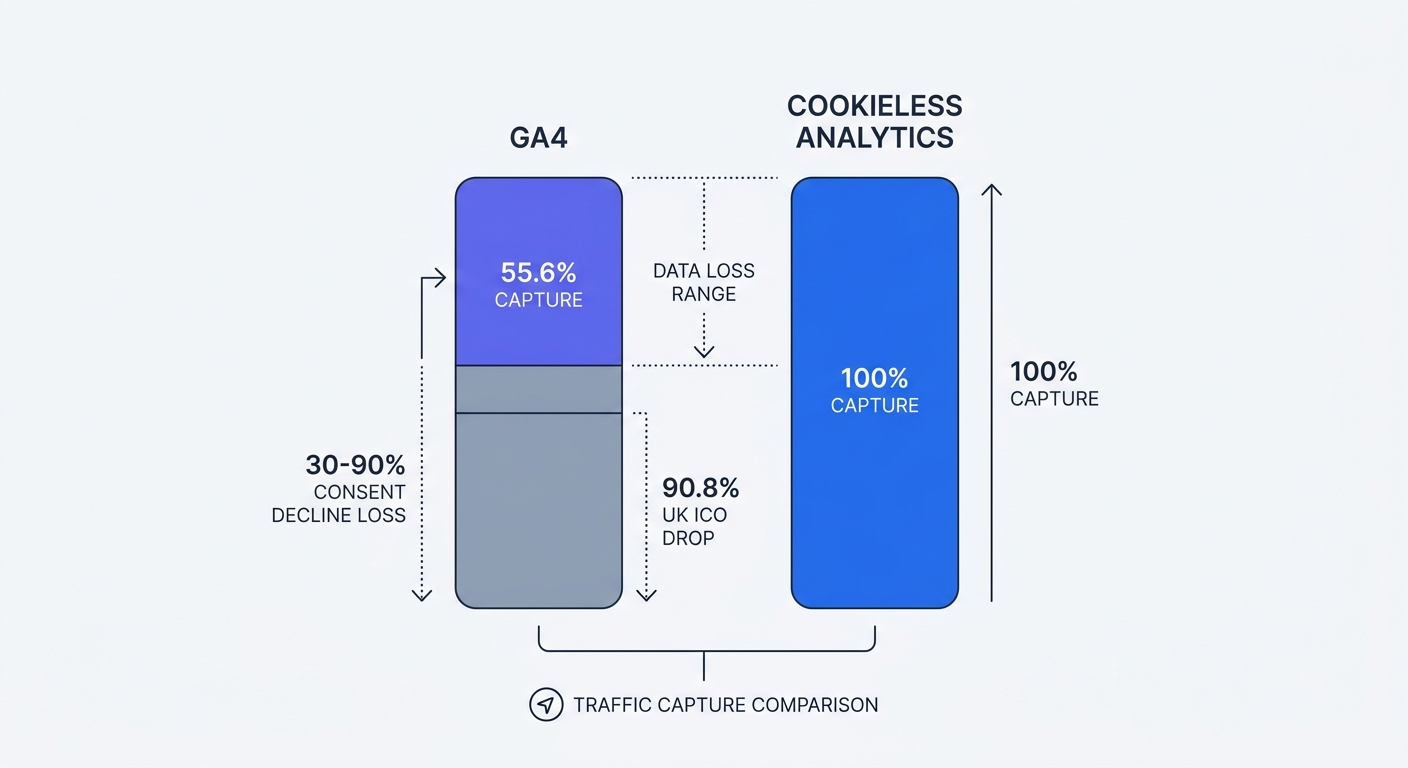
Google Analytics 4 sits in legal limbo across Europe. Seven national data protection authorities have ruled against it since January 2022, yet millions of websites still run GA4 tracking scripts. The platform can achieve GDPR compliance with proper configuration, but that compliance comes at a steep cost: most sites lose 30-90% of their traffic data to cookie consent declines.
Swetrix sidesteps this entire problem for standard analytics. The platform requires no cookies, no consent banners, and no data transfers to US servers for core traffic measurement. Deploy the tracking script and capture 100% of your traffic from day one. EU hosting keeps data within GDPR jurisdiction, eliminating the legal uncertainty that plagues GA4 implementations.
The Short Answer: GA4 Compliance Is Conditional
GA4 neither violates nor satisfies GDPR requirements by default. Website owners must configure the platform correctly and maintain proper documentation. Miss a single compliance step and your entire analytics setup becomes a regulatory liability.
What Makes GA4 Compliance Complex
GA4 processes personally identifiable information through visitor tracking. Every pageview, click, and conversion event creates a data point that GDPR regulates. The platform stores this data on US-based servers owned by Google LLC, a company subject to US surveillance laws. Data transfers from EU visitors to American servers require legal justification under GDPR Article 44.
IP addresses arrive with every web request. GA4 anonymizes these addresses by default in the current version, but earlier implementations logged full IPs. Data retention settings determine how long Google stores user-level and event-level data—choose between 2 months or 14 months. Cookie consent mechanisms must fire before GA4 loads, blocking the tracking script until visitors agree to analytics tracking.
Seven EU Countries Have Ruled Against GA4
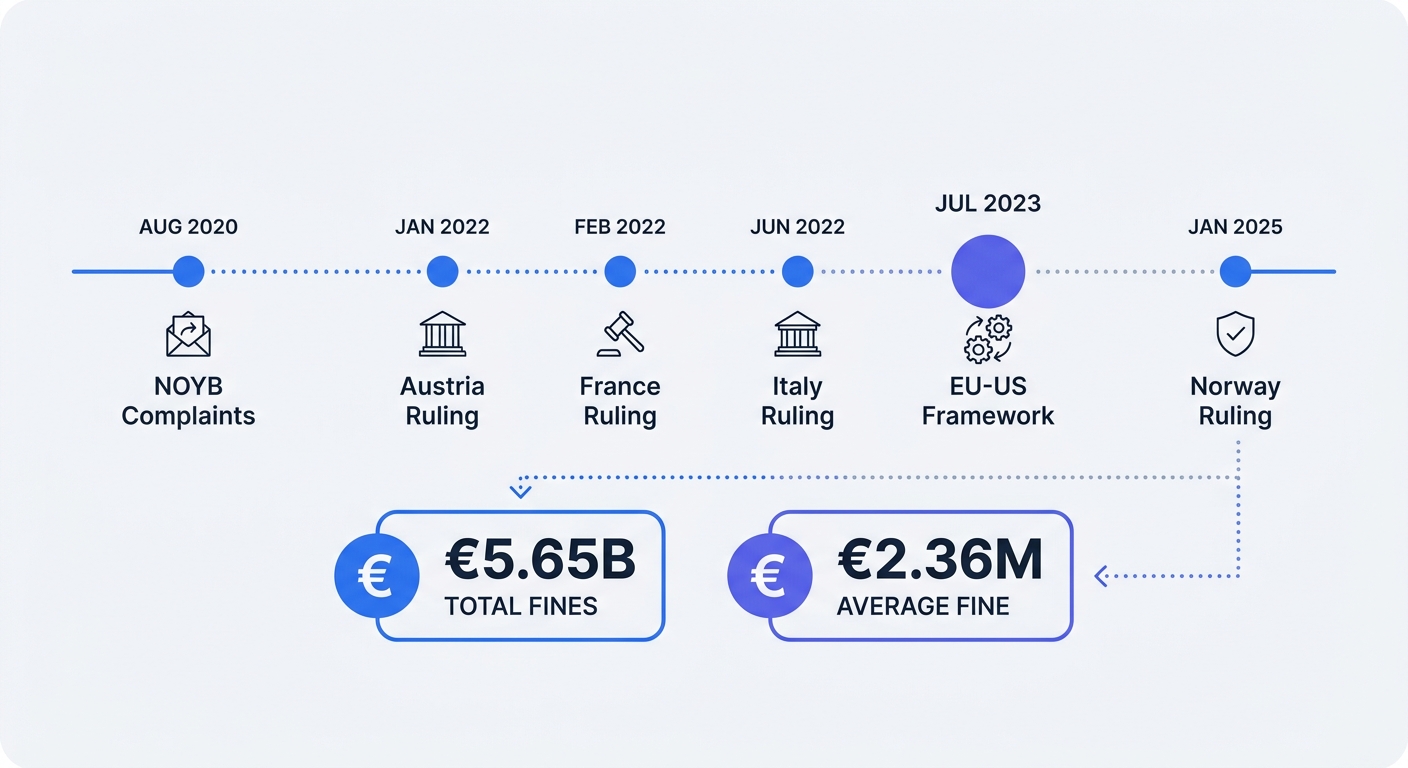
Austria's Data Protection Authority issued the first ruling on 22 Dec 2021, declaring that US intelligence services could access GA4 data. France's CNIL followed on 4 Jan 2022, then Italy's Garante on 9 Jun 2022. Denmark, Finland, Norway, and Sweden joined the list through 2025, with Norway's decision arriving in January 2025.
The European Data Protection Board created a task force in September 2020 to coordinate enforcement following concerns about US data transfers. These coordinated actions produced the wave of national rulings that continue today.
Why the EU-US Data Privacy Framework Doesn't Solve Everything
The European Commission adopted an adequacy decision for the EU-US Data Privacy Framework on 10 Jul 2023. This framework provides a legal basis for transferring personal data from the EU to certified US companies, including Google. The framework addresses data transfers but not collection practices.
NOYB plans to challenge the framework in court—a potential "Schrems III" case that could invalidate the agreement as Schrems I and II invalidated previous frameworks. Legal uncertainty persists until the Court of Justice of the EU rules on any challenge. Website owners who rely on the Data Privacy Framework for compliance face renewed risk if the court strikes down the agreement.
Configure GA4 properly or accept that your analytics setup might not survive regulatory scrutiny. The alternative: switch to cookieless analytics that eliminate data transfer concerns entirely.
The Hidden Cost: How Cookie Consent Destroys Your Data
Cookie consent banners don't annoy visitors—they create massive blind spots in your analytics. A study by Orbit Media comparing GA4 to Plausible found that 55.6% of traffic data is missing when users were shown the consent banner .
GA4 Captures Only 44.4% of Actual Traffic
Visitors who decline cookies disappear from your reports. GA4 requires consent to set tracking cookies, so declined consent means no data collection. The Orbit Media study measured traffic on the same website using both GA4 (with consent requirements) and Plausible (cookieless). With 55.6% missing, GA4 captured only 44.4% of visitors—meaning GA4 missed slightly more than half of all visitors.
Run your own comparison test. Install a cookieless analytics platform alongside GA4 for 30 days. Compare total pageview counts between the two platforms. The gap reveals how much traffic you're currently missing in GA4 reports.
Why 30-90% Data Loss Happens
Most sites experience 30-90% organic data loss in GA4, depending on audience demographics, geographic location, brand trust, and consent banner design. The UK's Information Commissioner's Office shared that their website traffic dropped by 90.8% after implementing a compliant consent banner—from 119,417 users per day to just 10,967 . Privacy-conscious audiences in Germany, France, and Scandinavia decline consent at higher rates than visitors from other regions.
Brand trust affects consent rates. Established brands with strong reputations see higher acceptance rates because visitors trust them with data. New sites or unfamiliar brands face more declines. Banner design matters too—aggressive popups that block content push visitors toward rejection, while subtle banners that explain value propositions improve acceptance.
The optimistic estimate sits at 10-15% data loss for sites with well-designed banners and trusting audiences. Even this best-case scenario means making decisions based on incomplete information.
What Happens to Your Marketing Decisions
Incomplete data corrupts every downstream decision. A $5,000 Facebook ad campaign drives 300 conversions, but 200 of those visitors declined cookies. GA4 shows only 100 conversions, making the campaign appear unprofitable. You cut the budget or kill the campaign entirely based on false data.
Attribution modeling breaks down when permissions aren't managed. Multi-touch attribution requires tracking visitors across sessions and devices. Cookie consent gaps create blind spots in customer journey analysis. A visitor who declines consent on their first visit but accepts on their second appears as two separate users in your reports.
Audience segmentation fails when half your traffic lacks demographic data. Geographic reports show only consenting visitors, skewing your understanding of where traffic originates. Device and browser breakdowns become unreliable when mobile users decline consent at different rates than desktop users.
Swetrix captures 100% of traffic without consent banners, giving you the full picture for confident decision-making. Standard analytics tracks pageviews, referrers, and user flows without processing personal data that requires consent. Deploy it alongside GA4 to measure your data loss, then decide whether partial visibility justifies the compliance burden.
How to Make GA4 GDPR Compliant (If You Keep Using It)
GA4 compliance requires multiple configuration steps, legal documentation, and ongoing maintenance. Skip any step and your setup fails regulatory requirements.
Step 1: Implement Google Consent Mode v2
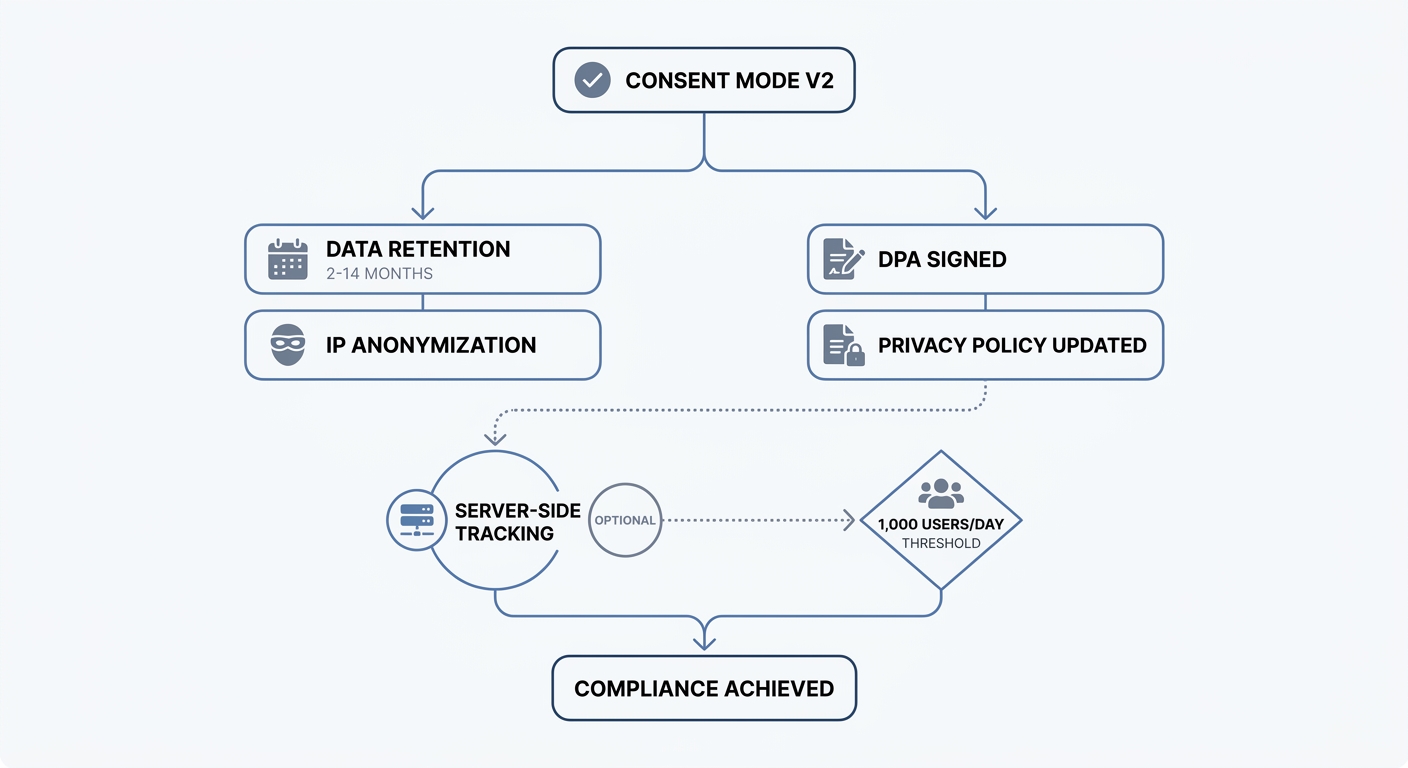
Google Consent Mode v2 became mandatory for sites receiving EEA traffic in March 2024. The system adjusts data collection based on user consent choices. Consent Mode v2 passes two extra consent signals—ad_user_data and ad_personalization—allowing GA4 tags to honor visitor choices while still modeling aggregated data.
Configure Consent Mode through your consent management platform (CMP). The CMP fires before GA4 loads and sets consent state for analytics_storage, ad_storage, ad_user_data, and ad_personalization. GA4 reads these signals and adjusts tracking behavior.
Visitors who decline consent trigger cookieless pings instead of full measurement hits. These pings carry no client ID, no session ID, and no user-scoped dimensions. Each pageview arrives as if it belongs to a brand-new anonymous visitor. GA4 uses machine learning to estimate conversions and other metrics based on users who provided consent, then applies those estimates to the non-consenting population.
Modeling requires minimum thresholds: at least 1,000 users per day with analytics_storage='granted' for a minimum of 7 out of the previous 28 days, plus at least 1,000 events per day with analytics_storage='denied' for a minimum of 7 days. Sites below these thresholds get no modeling and lose all data from declined visitors.
Step 2: Configure Data Retention and IP Anonymization
Open your GA4 property settings and navigate to Data Retention. Choose between 2 months or 14 months for user-level and event-level data. Shorter retention periods reduce compliance risk but limit historical analysis. Set retention based on your business needs—if you never analyze data older than 3 months, choose the 2-month option.
IP anonymization activates by default in GA4 and cannot be adjusted. The platform does not log or store IP addresses from EU-based users. This default configuration satisfies GDPR requirements for IP address handling, but verify it remains active by checking your data stream settings.
Step 3: Sign Data Processing Agreements and Update Privacy Policies
Accept Google's data processing terms through your Google Analytics account settings. Navigate to Admin > Account Settings > Data Processing Amendment. Review the terms and accept them to create a binding Data Processing Agreement (DPA) between your organization and Google. This DPA demonstrates that you've established contractual safeguards for data processing.
Update your privacy policy to disclose GA4 usage. List Google Analytics as a third-party service, explain what data it collects, state the legal basis for processing (consent), and provide a link to Google's privacy policy. Include information about data retention periods and visitor rights under GDPR.
Step 4: Consider Server-Side Tracking
Server-side tracking routes data through your own server before sending it to Google. Load gtag.js and associated pixels via Server-side Google Tag Manager from an EU server. Purge IP addresses before sending data to Google Analytics for processing. This approach keeps data processing within EU borders until anonymization completes.
Server-side GA4 adds technical complexity. Set up server infrastructure to receive and process events. Maintain the tracking logic yourself. Some automatic features like enhanced measurement stop working. Regulatory requirements remain—you're still processing personal data, so lawful bases like consent may still apply.
Server-side tracking offers benefits: control data collection, implement first-party cookies from your own domain, and gain flexibility in what data you send to Google. Evaluate whether these benefits justify the implementation and maintenance costs.
Why Privacy-Focused Analytics Are Gaining Ground
GA4's compliance complexity and data loss problems drive adoption of cookieless alternatives. These platforms capture complete traffic data without consent banners, eliminate data transfer concerns, and simplify regulatory compliance.
Swetrix: Cookieless, EU-Hosted, 100% Data Accuracy
Swetrix standard analytics processes no personal data requiring consent. The platform tracks pageviews, referrers, UTM parameters, custom events, and user flows without cookies. Deploy the tracking script and start collecting data—no consent banner required for core analytics.
Optional session replays are separate. They are available on Swetrix Cloud only, are not recorded by default, and start only when your site calls startSessionReplay(). Review consent, masking, page exclusions, and retention before enabling replay recording.
EU hosting keeps all data on servers within GDPR jurisdiction. Data never transfers to US servers or third-party processors. This architecture eliminates the legal uncertainty around transatlantic data transfers that affects GA4. Check your dashboard for real-time traffic data, campaign performance, and conversion tracking without worrying about DPA rulings or framework challenges.
Custom events track specific user actions: form submissions, button clicks, video plays, file downloads. Set up event tracking in minutes by adding event names to your tracking calls. Performance monitoring measures page load times, Time to First Byte, and Core Web Vitals. Error tracking captures JavaScript errors and API failures in production.
Shared dashboards let you grant clients or team members access without sharing login credentials. Generate public dashboard links for transparent reporting. Export data via API for custom analysis or integration with other tools.
Swetrix offers a 14-day free trial with full feature access. Pricing starts at 100,000 events per month for $19/month or $190/year. Scale to millions of events without hitting arbitrary limits or surprise charges.
Other GDPR-Compliant Alternatives Worth Considering
Plausible provides lightweight, open-source analytics with a simple dashboard. The platform collects no personally identifiable information and requires no consent banners. Self-host the open-source version or use the hosted cloud service.
Matomo runs on over 1 million websites. France's CNIL provides an "audience measurement" exemption from tracking consent, but only when Matomo is configured to meet strict conditions. This exemption applies whether you self-host Matomo on your own servers or use Matomo Cloud for managed hosting. Matomo offers detailed guidance on configuring for CNIL exemption and provides a configuration user guide. For more details on CNIL's cookie rules, see their FAQ.
Fathom Analytics stores no PII and requires no cookie consent. The platform focuses on metrics: pageviews, referrers, goals, and campaign tracking. Fathom's simplicity appeals to users who want basic analytics without GA4's complexity.
PostHog combines product analytics, session replay, feature flags, and A/B testing in one platform. Configure PostHog for cookieless tracking to remove consent banner requirements. Self-host the open-source version or use PostHog Cloud.
When to Switch vs. When to Stay with GA4
Stay with GA4 if you need deep Google Ads integration and have resources for complex compliance setup. GA4's connection to Google Ads enables automated bidding strategies, audience syncing, and attribution across Google's advertising ecosystem. Large enterprises with dedicated analytics teams can manage the compliance burden and accept the data loss from consent declines.
Switch to Swetrix or other cookieless alternatives if you prioritize data accuracy, legal certainty, and simplified compliance. Small and medium businesses without compliance teams benefit most from platforms that eliminate consent requirements. Marketing agencies managing multiple client sites reduce overhead by deploying cookieless analytics that require no ongoing compliance maintenance.
Run both platforms in parallel for 30 days. Compare traffic volumes, conversion tracking accuracy, and insight quality. Calculate the data loss in GA4 by measuring the gap between platforms. If GA4 shows 40% less traffic than Swetrix, you're making decisions based on a 40% incomplete picture.
The Risks: GDPR Fines and Enforcement
GDPR violations carry financial penalties that scale with company size and violation severity. Enforcement activity continues to increase as data protection authorities mature their processes and coordinate across borders.
Current Fine Landscape: €7.1 Billion and Counting
GDPR penalties since 2018 now exceed €7.1 billion, with the CMS GDPR Enforcement Tracker recording 2,245 documented fines through early 2026 . Maximum penalties reach 4% of annual global turnover or €20 million, whichever is higher.
Small fines for minor violations start at a few thousand euros. Mid-range fines for consent violations, inadequate documentation, or improper data transfers fall between €50,000 and €500,000. Major violations involving large-scale data breaches, systematic non-compliance, or refusal to cooperate with authorities trigger seven-figure penalties.
Google's €10 Million Penalty and What It Means for You
Spain's AEPD imposed a €10 million fine on Google LLC in 2022 for disclosing personal data to third parties without a valid legal basis and hindering data subjects' right to erasure. The fine targeted Google as a data processor, but website owners who use GA4 act as data controllers under GDPR.
Data controllers bear primary responsibility for compliance. If your GA4 implementation violates GDPR, your organization faces the fine—not Google. The DPA you signed with Google establishes processor obligations, but it doesn't transfer controller liability. Regulators investigate website owners first when GA4 complaints arrive.
Documentation You Need to Survive an Audit
Create a compliance file containing your privacy policy, DPA, consent implementation documentation, and data retention settings. Store evidence that you obtained proper consent: screenshots of your cookie banner, CMP configuration settings, and consent logs showing when visitors accepted or declined tracking.
Document your legal basis for processing. If you rely on consent, maintain records proving that consent was freely given, specific, informed, and unambiguous. If you rely on legitimate interests, document your legitimate interest assessment showing that your interests don't override visitor privacy rights.
Record data retention policies and deletion procedures. Show how you honor data subject rights: access requests, deletion requests, objection to processing. Keep correspondence with data protection authorities and any compliance audits you've conducted.
Regulators require this documentation during investigations. Missing documentation signals non-compliance and increases penalty severity. Complete documentation demonstrates good-faith compliance efforts and may reduce fines even if violations occurred.
Cookieless analytics like Swetrix eliminate most of this compliance burden for core analytics. The standard analytics setup processes no personal data requiring consent, so consent documentation becomes unnecessary for that component. Data stays within EU borders, removing data transfer documentation requirements. Focus on building your business instead of maintaining compliance files.
Your Action Plan: Making the Right Choice for 2026
GA4's market share doesn't make it the best choice—the most familiar one. Privacy-focused alternatives offer legal certainty, complete data, and simplified compliance. Evaluate your current setup and make an informed decision based on data accuracy needs and compliance resources.
Audit Your Current GA4 Setup
Check Consent Mode v2 status in your GA4 property. Navigate to Admin > Data Streams > Configure tag settings > Show more. Verify that consent signals appear in the configuration. If Consent Mode isn't active, your GA4 implementation violates GDPR requirements for EEA visitors.
Review data retention settings under Admin > Data Settings > Data Retention. Confirm the retention period matches your privacy policy disclosures. Verify that IP anonymization remains active by checking data stream settings.
Locate your signed DPA in Admin > Account Settings > Data Processing Amendment. If you haven't accepted Google's data processing terms, do it now. Update your privacy policy to describe GA4 usage, data collection practices, and visitor rights.
Calculate Your True Data Loss
Install Swetrix alongside your existing GA4 setup. Run both platforms in parallel for 30 days. Compare total pageview counts, unique visitor counts, and conversion tracking between platforms.
Calculate the percentage gap: (Swetrix pageviews - GA4 pageviews) / Swetrix pageviews × 100. If Swetrix shows 10,000 pageviews and GA4 shows 6,000, you're losing 40% of your traffic data to consent declines. This gap represents decisions you're making based on incomplete information.
Check server logs for another comparison point. Server logs capture every request regardless of consent status. Compare log entries to GA4 pageviews for the same time period. The gap reveals total data loss including both consent declines and ad blocker interference.
Evaluate Cookieless Alternatives
Test Swetrix's 14-day free trial with full feature access. Set up custom events for your key conversion actions. Configure UTM parameters using the UTM generator tool for campaign tracking. Share dashboards with stakeholders to gather feedback on the interface and available metrics.
Compare data completeness, insight quality, and ease of use. Check whether Swetrix provides the metrics you use for decision-making. Most businesses need pageviews, referrers, conversion tracking, and campaign performance—all available without cookies or consent banners in the standard analytics setup.
Calculate total cost of ownership. GA4 appears free but requires CMP subscriptions ($50-500/month), compliance consulting, legal review, and ongoing maintenance. Swetrix pricing starts at $19/month for 100,000 events with no hidden costs or compliance overhead.
Make the switch if you're seeing >30% data loss, facing EU regulatory scrutiny, or spending excessive time on compliance. Privacy-focused analytics deliver better ROI through complete data, simplified compliance, and reduced overhead. GA4's familiarity doesn't justify the cost when alternatives provide superior accuracy and legal certainty.
Ready to see your complete traffic picture? Start your free 14-day Swetrix trial and capture 100% of your core analytics visitors without consent banners. No credit card required.