- Date
How to Set Up Event Tracking on a Website
 Andrii Romasiun
A visitor clicks the "Start Trial" button on your homepage. That single interaction signals buying intent far better than ten generic pageviews. Standard analytics platforms log the page load, ignoring the button click entirely.
Event tracking captures specific actions to reveal user behavior, conversion funnels, and product friction.
Learn how to set up event tracking on a website without relying on invasive cookies or triggering compliance warnings.
What is Event Tracking and The Data Loss Crisis
Defining Web Event Tracking
Pageviews record a URL load. Event tracking records subsequent user actions.
Analysts monitor button clicks, video plays, file downloads, and form submissions. Each interaction generates a distinct data point. Teams group these points to build conversion funnels. If 1,000 people view a checkout page and only 40 click "Submit Order," the 96% drop-off indicates a friction point.
Track granular events to identify the specific element causing the drop-off. Broken discount code fields and malfunctioning payment gateways leave digital trails. Engineers read the event logs and deploy fixes.
The Cookie Rejection and Ad Blocker Impact
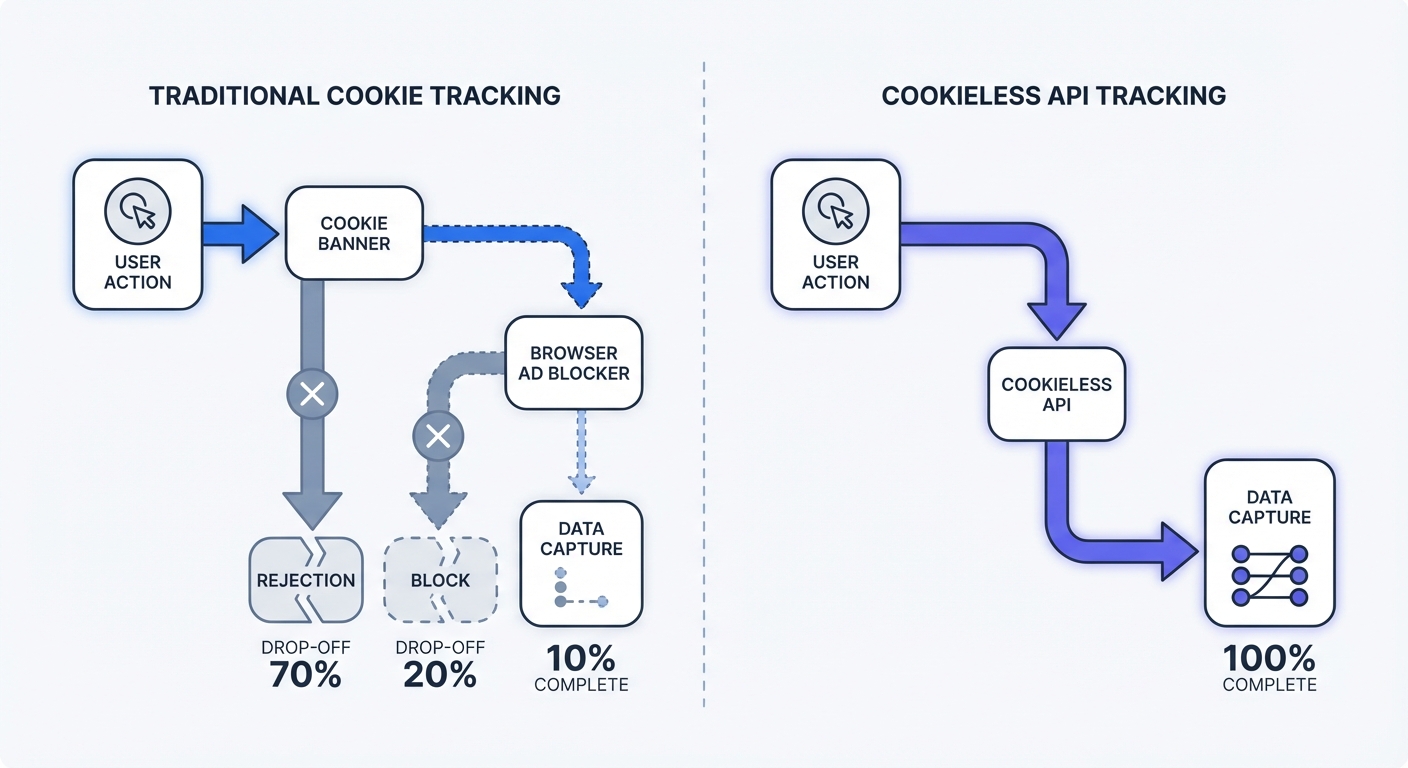
Traditional tracking methods rely on client-side cookies. ePrivacy and GDPR regulations require explicit user consent before browsers load these trackers.
European cookie rejection rates hover between 60% and 65%. German users reject non-mandated cookies at an 87% rate. French rejection rates hit 73%. When a visitor declines the banner, Google Analytics 4 (GA4) drops the session data.
Browser-level ad blockers compound the problem. Extensions like uBlock Origin and browsers like Brave block GA4 scripts by default. These tools eliminate another 25% to 40% of visitor data.
Combined data loss blinds marketing teams. Websites running standard GA4 setups lose up to 87% of visitor interactions. GA4 still controls roughly 75% of the web analytics market across 14.2 million websites.
Cookieless platforms bypass these restrictions to capture the missing data, allowing marketers to make decisions based on complete user behavior.
Planning Your Event Tracking Strategy
Identifying North Star Metrics
Tracking every mouse movement bloats the database and slows down the website. The resulting network congestion drops analytics payloads.
Focus tracking efforts on North Star metrics. These metrics combine multiple specific actions to measure business impact. A generic pageview carries zero business weight. Combined event paths show product adoption.
Map the core user journey. Define the actions users must take to achieve value in the product. SaaS platforms require tracking account_created followed by onboarding_completed. Ecommerce stores need to measure add_to_cart transitioning to checkout_completed.
Group these core interactions into a funnel report. Product managers evaluate platform health based on the completion rate of these specific event paths.
Standardizing Your Event Naming Taxonomy
Poor naming conventions ruin dashboards. Misspelled tracking tags split data into duplicate rows.
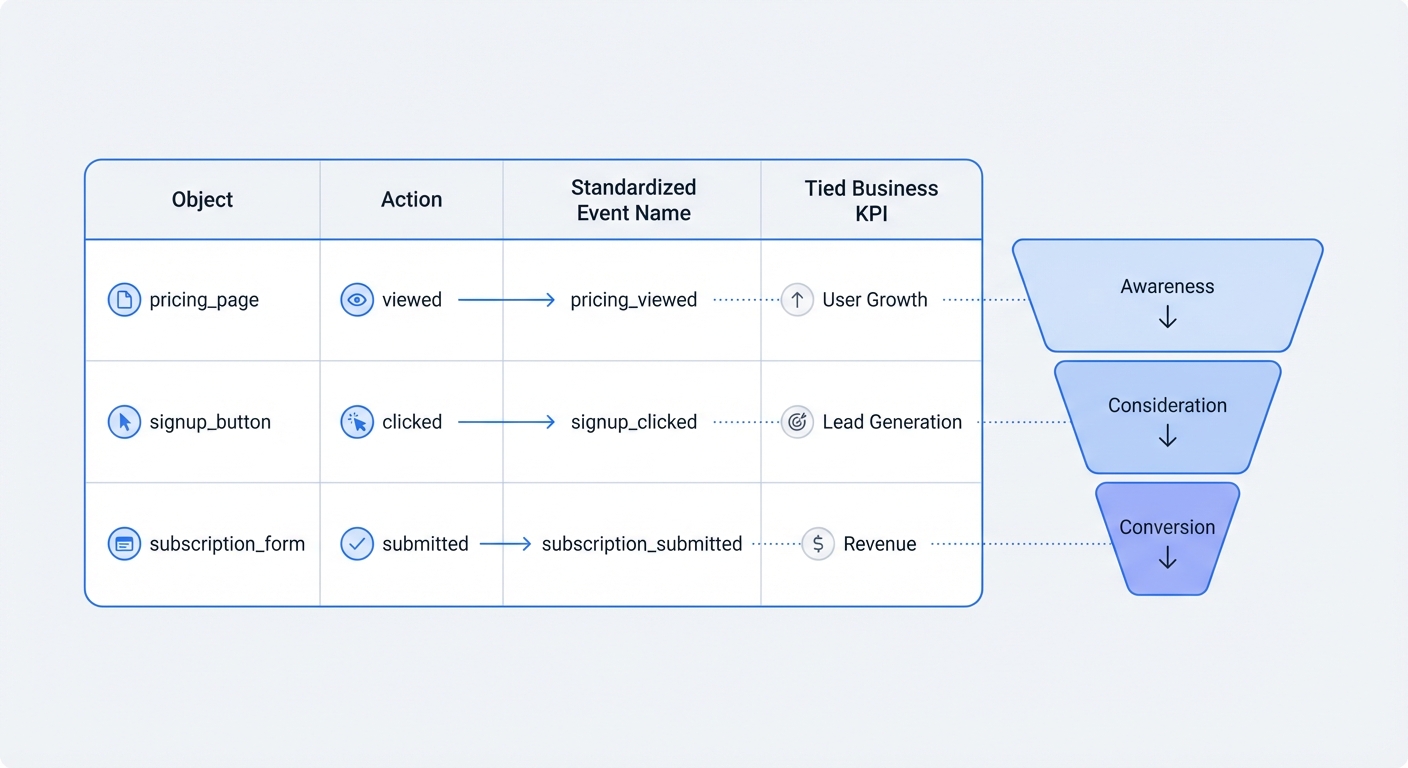
Adopt a strict object_action naming framework. Standardize this taxonomy in a shared spreadsheet before writing code. Developers and marketers must use precise nomenclature.
The object represents the noun the user interacts with. The action details the verb.
| Object | Action | Standardized Event Name | Tied Business KPI |
|---|---|---|---|
| pricing_page | viewed | pricing_page_viewed | Interest Generation |
| trial_button | clicked | trial_button_clicked | Conversion Rate |
| payment_form | submitted | payment_form_submitted | Revenue Acquisition |
| error_modal | displayed | error_modal_displayed | System Health |
Keep names lowercase. Replace spaces with underscores. This consistency prevents one developer from logging Click_Pricing while another logs pricingButton_click. Cleaning data at the source removes the need for complex transformations.
Mapping Events to the Customer Journey Funnel
Users take multiple visits to convert. They move through stages over time. Marketers must map specific events to these distinct phases.
Track blog_post_scrolled or video_player_started for top-of-funnel awareness. Measure middle-of-funnel consideration by logging pricing_table_toggled or case_study_downloaded. Bottom-of-funnel conversions trigger demo_requested or checkout_completed.
Assigning events to journey stages clarifies reporting. Analysts build funnel visualizations in the analytics dashboard. A 40% drop between consideration and conversion points to a pricing problem. A 60% drop between awareness and consideration points to poor content relevance.
Traditional vs. Cookieless Tracking Methods
The Limitations of Google Tag Manager
Marketing teams default to Google Tag Manager (GTM) for event deployment. The platform requires loading a heavy container script on every page.
GTM introduces points of failure. Administrators configure tags, triggers, and variables through a complex third-party interface. A developer changes a button class name on the website, causing the GTM trigger to break without warning.
Heavy client-side containers impact site speed. Websites force users to download unoptimized JavaScript. Slower load times decrease conversion rates and harm search engine rankings. Ad blockers target the GTM domain structure, blocking the container from loading and blinding the analytics platform.
The Shift to Cookieless and Server-Side Events
Modern web analytics operate without cookies or persistent storage. Cookieless platforms use hashed IP routing and referrer data to record user interactions.
The process prioritizes privacy. Servers generate temporary hashes based on user IP addresses and browser user agents. These hashes reset daily. Marketers track user sessions without storing personal identifiable information (PII) on client hard drives.
Hashed routing can reduce compliance overhead when implemented correctly. Teams should still validate GDPR, CCPA, and PECR obligations with legal counsel based on their data flows and jurisdiction.
Server-side API tracking offers a more robust solution. Web servers send event data to the analytics endpoint. Ad blockers cannot intercept server-to-server communication. Systems capture total interaction data. The global API management market will hit $49.95 billion by 2032 due to this shift toward secure server-side data routing.
How to Set Up Event Tracking on a Website via Swetrix
Step 1: Initializing the Tracking Script
Swetrix provides a lightweight, open-source script that respects user privacy. Setup takes two minutes.
Create a Swetrix account and register the project to receive a unique Project ID. Open the website source code. Locate the <head> tag in the main layout file.
Paste the initialization script before the closing </head> tag:
<script src="https://swetrix.org/swetrix.js" defer></script>
<script>
  document.addEventListener("DOMContentLoaded", () => {
    swetrix.init("YOUR_PROJECT_ID");
    swetrix.trackViews();
  });
</script>
The defer attribute ensures the script loads without blocking page rendering. The trackViews() function handles basic page tracking. Replace YOUR_PROJECT_ID with the provided identifier.
Step 2: Implementation for React and Next.js Applications
Single-page applications (SPAs) require specialized routing handling. Standard scripts fail to register page changes when the browser does not perform a hard reload.
Install the dedicated Swetrix React package. Open the terminal and run npm install @swetrix/react. Import the tracking hook into the root layout or App.js component.
import { useSwetrix } from "@swetrix/react";
import { useEffect } from "react";

export default function App({ Component, pageProps }) {
  useSwetrix("YOUR_PROJECT_ID", {
    debug: process.env.NODE_ENV === "development",
  });

  return <Component {...pageProps} />;
}
The hook manages route changes without manual intervention. A new pageview event fires whenever the React router updates the URL path.
Track custom interactions using the track method imported from the package.
import { track } from "@swetrix/react";

export function PricingCard() {
  const handleUpgrade = () => {
    track({ name: "upgrade_plan_clicked", meta: { plan: "premium" } });
  };

  return <button onClick={handleUpgrade}>Upgrade Now</button>;
}
Component-level tracking isolates analytics logic. This isolation keeps the codebase clean. Developers read the component and understand the specific metrics generated.
Step 3: Firing Custom Actions and Batching Events
Track granular actions by attaching the tracking function to specific HTML elements on vanilla sites.
Open the pricing page code. Find the "Start Trial" button component. Add an onClick event handler to pass the standardized event name to the tracking script.
<button onClick="swetrix.track({ name: 'trial_button_clicked' })">Start Free Trial</button>
Pass custom metadata alongside the event name. To track the specific pricing tier selected, add a custom payload:
swetrix.track({
  name: "checkout_initiated",
  meta: {
    tier: "pro_plan",
    billing: "annual",
  },
});
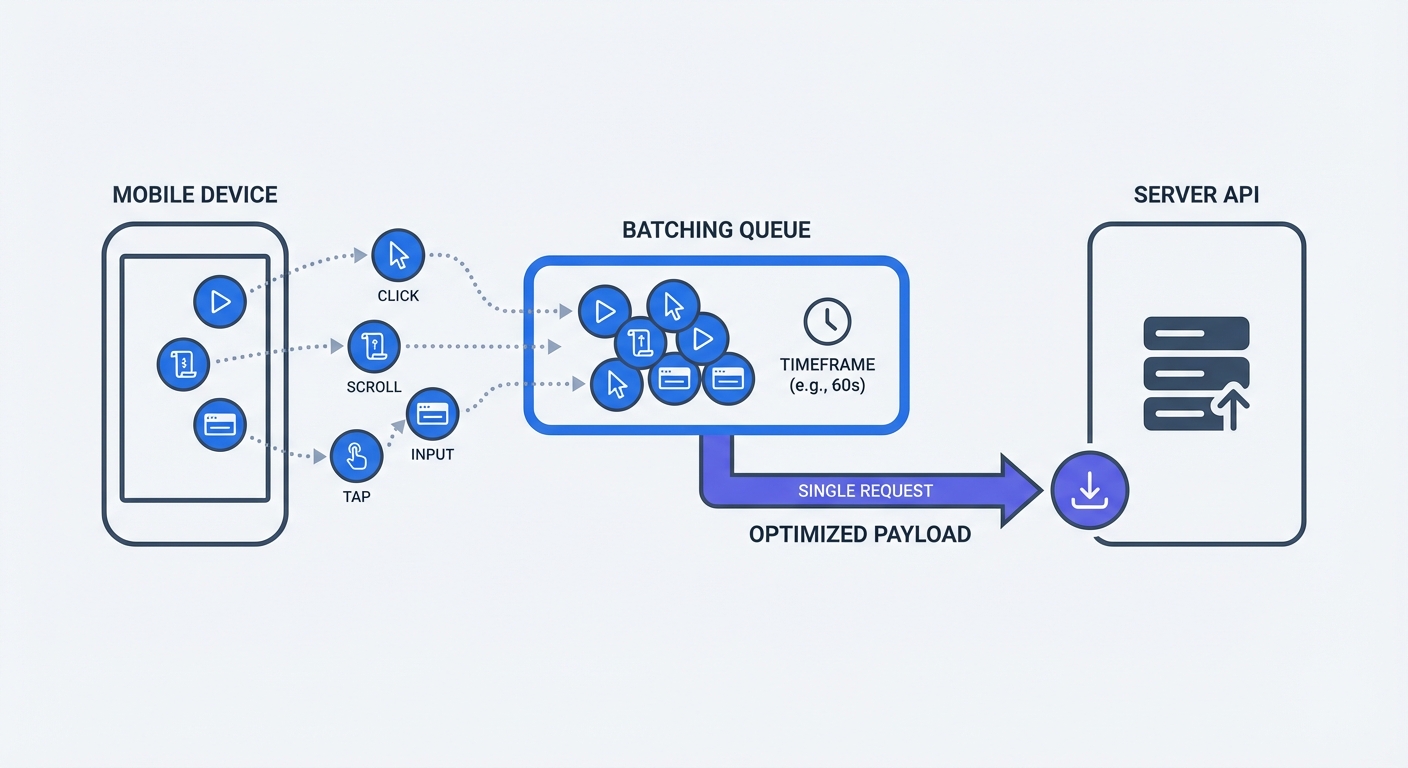
Mobile applications and high-traffic sites benefit from event batching. Firing individual API requests for every interaction drains mobile battery life and floods networks with tiny payloads.
Swetrix APIs support batching. The script stores multiple interactions in memory for a short duration. It bundles these interactions into a single optimized payload to save device resources and protect analytics endpoints from crashing during traffic spikes.
Step 4: Sending Server-to-Server Tracking Payloads
Client-side tracking faces network instability. Mobile users drop connections, while aggressive firewalls block outgoing analytics requests.
Server-side tracking solves network unreliability. Backend application servers communicate with the Swetrix API endpoint.
Format a POST request to https://api.swetrix.com/log. The JSON body must include the project ID and the event details.
fetch("https://api.swetrix.com/log", {
  method: "POST",
  headers: {
    "Content-Type": "application/json",
  },
  body: JSON.stringify({
    pid: "YOUR_PROJECT_ID",
    name: "subscription_renewed",
    type: "custom",
    meta: {
      revenue: 49.99,
    },
  }),
});
Execute this fetch call within the payment webhook handler. When Stripe confirms a successful charge, the server fires the event. This configuration ensures perfect data accuracy for financial metrics. Ad blockers have zero impact on backend node communication.
Step 5: Integrating Error Tracking
Event tracking extends beyond marketing metrics. Engineering teams use it to log system failures.
Track client-side JavaScript errors as standard events. Configure the tracking payload to fire and capture error details upon browser exceptions.
window.addEventListener("error", (event) => {
  swetrix.track({
    name: "javascript_error",
    meta: {
      message: event.message,
      file: event.filename,
      line: event.lineno,
    },
  });
});
One error logged equals one tracked event. Marketing teams monitor the frequency of broken features. Spikes in payment_gateway_failed events trigger ad spend pauses and engineering alerts. Read our guide on error tracking to configure advanced alerting rules.
Validating Your Setup and Marketing Attribution
Testing Payloads Without the Consent Wall
Never deploy event tracking without verifying the data flow. Broken implementations pollute the database.
Open the website in Google Chrome. Press F12 to open Developer Tools. Navigate to the "Network" tab and type "swetrix" into the filter bar.
Click the tagged button. Watch the Network tab for an outgoing HTTP request. Inspect the request payload to view the data. The specific object_action event name and custom metadata appear in this window.
Verify the HTTP status code. A 200 OK or 201 Created confirms server acceptance. A 400 Bad Request points to malformed JSON in the custom payload.
Swetrix operates without cookies, enabling payload testing without consent banner interaction. Data flows without restriction.
Auditing Your Event Tracking Implementation
Data rot ruins analytics over time. Setups verified in March break by September.
Schedule quarterly tracking audits. Centralized tracking plan documents keep teams aligned. List every active event, its trigger condition, and the expected metadata payload.
Compare the tracking plan against raw dashboard data to find orphaned events. An event named old_pricing_button_click receiving zero hits indicates developers removed the element without updating the documentation.
Check for volume anomalies. Use an anomaly detection tool to spot sudden spikes or drops in event frequency. A 500% increase in login_failed events points to a broken authentication service. Read our guide on anomaly detection to set up automated alerts for baseline deviations.
Mapping Events to Multi-Channel Campaigns
Raw event data provides limited value without context. Marketers must track traffic sources to understand user origins.
Combine custom events with UTM parameters to measure channel performance. The tracking script captures the utm_source and utm_medium from the URL when users click tagged links in newsletters.
Generate tagged links using a UTM generator. Append ?utm_source=newsletter&utm_medium=email to campaign URLs.
The analytics platform binds the traffic source to subsequent events. Dashboards filter the trial_button_clicked event by traffic source. This data reveals the exact number of trial signups originating from the email campaign.
Multi-channel attribution simplifies marketing decisions. Marketers allocate budgets based on specific conversion events instead of surface-level pageviews. If organic search drives 80% of checkout_completed events, teams shift resources away from underperforming paid social channels.
Calculate the exact return on investment using our ROI calculator. Input campaign spend and the value of tracked conversion events.
Privacy-first event tracking bridges the gap between compliance and data accuracy. Organizations protect user anonymity while capturing the core business metrics required for growth.
Stop losing marketing data to ad blockers and rejected cookie banners. Build a compliant, high-accuracy analytics pipeline by starting a free trial with Swetrix.