- Date
What Are First Party Analytics Cookies And Their Impact
 Andrii Romasiun
A visitor lands on your pricing page, reads through the feature tiers, and closes the tab. Thirty minutes later, they return directly to the signup page and convert. You want to credit the original campaign that brought them in, but traditional tracking platforms attempt this attribution by dropping a persistent text file on the user's device. Because modern privacy laws strictly govern data storage, you must explicitly ask for permission before placing that file. When the user clicks "Reject" on your consent banner, your analytics dashboard records exactly zero pageviews, zero sessions, and zero conversions for that visitor.
To understand why your marketing reports show massive gaps, you need to understand how first-party tracking mechanics conflict with modern privacy legislation. Platforms like Google Analytics rely on local text files to identify returning users and stitch pageviews together, forcing a tradeoff between accurate measurement and legal compliance because these files trigger strict consent requirements. We built Swetrix to solve this problem. By replacing persistent trackers with temporary, anonymized server hashes, you can measure 100% of your website traffic without plastering consent banners across your homepage.
The Basics of Analytics Tracking
What Are First Party Analytics Cookies?
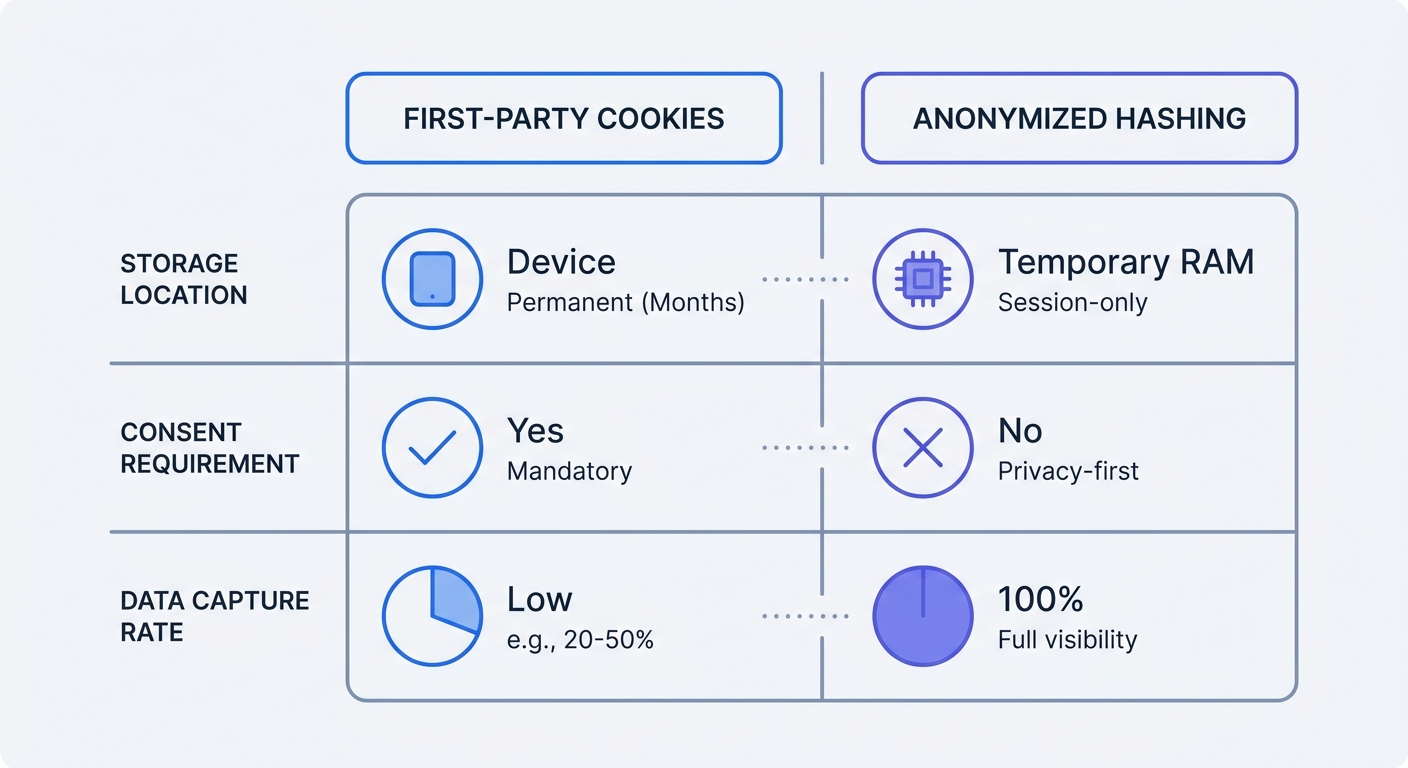
A first-party cookie is a small text file generated and placed on a visitor's device by the exact domain they are browsing. When someone visits your website, your server sends an HTTP response header that instructs their browser to store a specific identifier. If they return tomorrow, the browser sends that identifier back to your server.
Analytics platforms use these stored files to connect individual pageviews into a coherent session. When you deploy Google Analytics 4 in its default configuration, it immediately executes JavaScript that sets two first-party cookies, notably _ga, which carries a two-year expiration date. Other platforms exhibit similar behavior to force user identification. Adobe Analytics can load up to six tracking files, while a Piwik PRO deployment standardizes on two default identifiers. These files allow the software to differentiate a single user viewing ten pages from ten separate users viewing one page each.
To see what your current setup leaves on user devices, open your website in a fresh incognito window. Right-click anywhere on the page, select Inspect, and navigate to the Application tab in Chrome or the Storage tab in Firefox. Expand the Cookies dropdown in the left sidebar and click your domain. Any tracking file listed here before you interact with a consent banner represents a potential compliance violation under European law.
First-Party vs. Third-Party Tracking
People often confuse the source of a tracker with its privacy implications. Third-party cookies come from external domains embedded on your site. If you load a Facebook pixel, Meta sets a file that tracks your visitor across completely unrelated websites to build a global advertising profile, though browsers like Safari and Firefox block these third-party requests by default to prevent mass surveillance by ad networks.
First-party trackers seem safer because they restrict data flow to your specific domain. A _ga cookie set by your domain cannot be read by a competitor's website, but this safety from cross-site tracking does not exempt you from privacy regulations. The moment you store any non-critical identifier on a user's device, you cross the regulatory threshold for consent. It does not matter that you own the domain, that the data stays in your analytics account, or that you use the data exclusively for internal optimization.
Why First-Party Cookies Cause Massive Data Loss
The Impact of Consent Banners
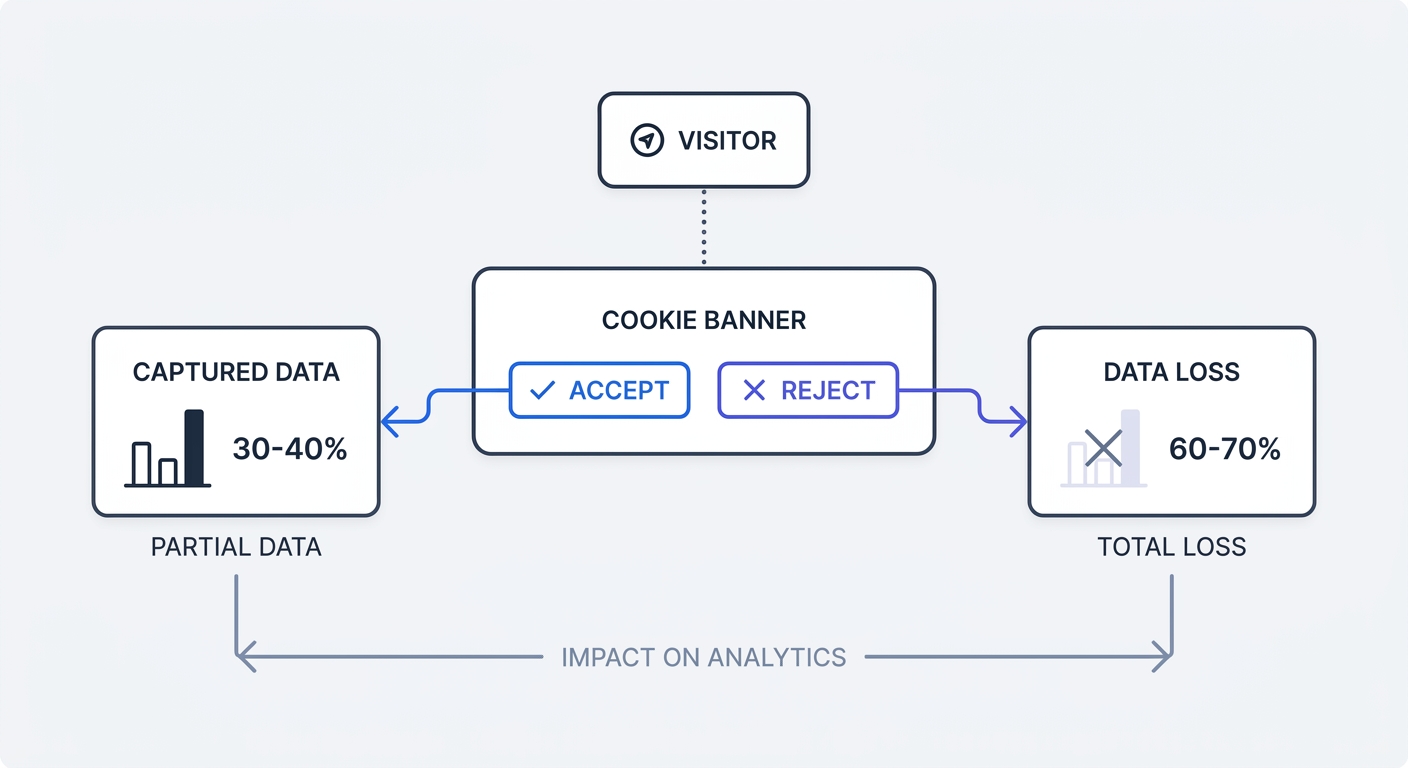
The General Data Protection Regulation (GDPR) and the ePrivacy Directive mandate explicit user opt-in before you can store analytics tracking files. To comply, you install a Consent Management Platform (CMP) that displays a banner requesting permission, which introduces severe friction into the user experience and breaks your measurement accuracy.
Visitors actively dislike consent banners, frequently installing browser extensions to auto-hide them or immediately clicking "Reject All" to clear the screen. Industry reports indicate that EU consent rejection rates typically range between 60% and 70%. When users decline tracking, platforms tied to first-party cookies remain entirely blind to their activity. Even highly optimized banners fail to capture the majority of your audience, with cross-industry benchmarks putting marketing consent opt-in rates at 46%—though this metric varies significantly by sector, ranging from 20% in real estate to over 60% in healthcare. If your site caters to a technical audience or B2B professionals, that adoption rate drops even lower.
The Hidden Cost of Blind Spots
Relying on first-party cookies means you optimize your marketing budget based on a fraction of reality. If you spend $5,000 on a Google Ads campaign that generates 1,000 clicks, but 650 users reject your consent banner, your analytics dashboard attributes only 350 visits to that ad spend. Your cost-per-acquisition looks artificially high, causing you to pause profitable campaigns based on incomplete measurement.
Multi-touch attribution models collapse entirely under these conditions. If a user clicks an email link on Monday, accept cookies, returns via organic search on Wednesday, and rejects cookies, traditional analytics cannot connect the two events. The resulting data fragmentation makes it impossible to calculate precise return on investment for long sales cycles.
Calculate your data loss by pulling a raw access log from your web hosting provider or CDN for the past 30 days. Filter out known bot IP addresses and server-monitoring pings. Count the remaining unique hits, then compare that figure against the session volume reported in your analytics dashboard over the same period. The gap between those two numbers represents the human traffic you currently miss.
Complying With GDPR and Privacy Regulations
The Transition to Strict Law Enforcement
Regulators no longer issue warnings solely for missing a cookie policy page. Instead, data protection authorities conduct technical audits to penalize operational failures, using automated scanning tools to check if trackers fire before explicit consent is granted. If your setup loads a tracking script the second a user arrives, a delayed banner does not protect you from liability.
The financial penalties for improper tracking architecture scale rapidly. The California Attorney General issued a $2.75 million penalty to Disney for failing to honor global opt-out signals and user privacy requests. Enforcement applies to any mechanism that stores data on a user's terminal equipment, which means attempting to bypass cookie rules by using HTML5 LocalStorage, IndexedDB, or ETag caching carries the same legal penalties under the ePrivacy Directive.
Avoiding Dark Patterns and Fines
You cannot trick users into clicking "Accept." Authorities specifically target deceptive user interfaces known as dark patterns, meaning that making the accept button bright green while hiding the reject option behind a microscopic settings link violates compliance standards. Both choices must carry equal visual weight and require the same number of clicks.
The healthcare sector demonstrates the liability of poorly configured trackers. Recent audits of major US hospitals have found that many sites continued to track visitors even after the user explicitly opted out through the consent interface. A visible banner provides zero legal protection if the underlying JavaScript ignores the user's choice.
Audit your consent implementation by opening your site in a clean browser session and clicking the explicit "Reject" or "Opt-Out" button. Once declined, open your browser's network tab and navigate through several pages. Filter the network requests for your analytics provider's endpoint. If data payloads continue to transmit, your CMP is improperly configured and actively exposes your business to regulatory fines.
Solving the Problem With Cookieless Analytics
How Zero-Cookie Tracking Works
You can track users without cookies and bypass consent banners entirely without breaking the law. Because ePrivacy regulations target the storage of persistent files on a user's device, not storing a file means you never need to ask for permission to do so.
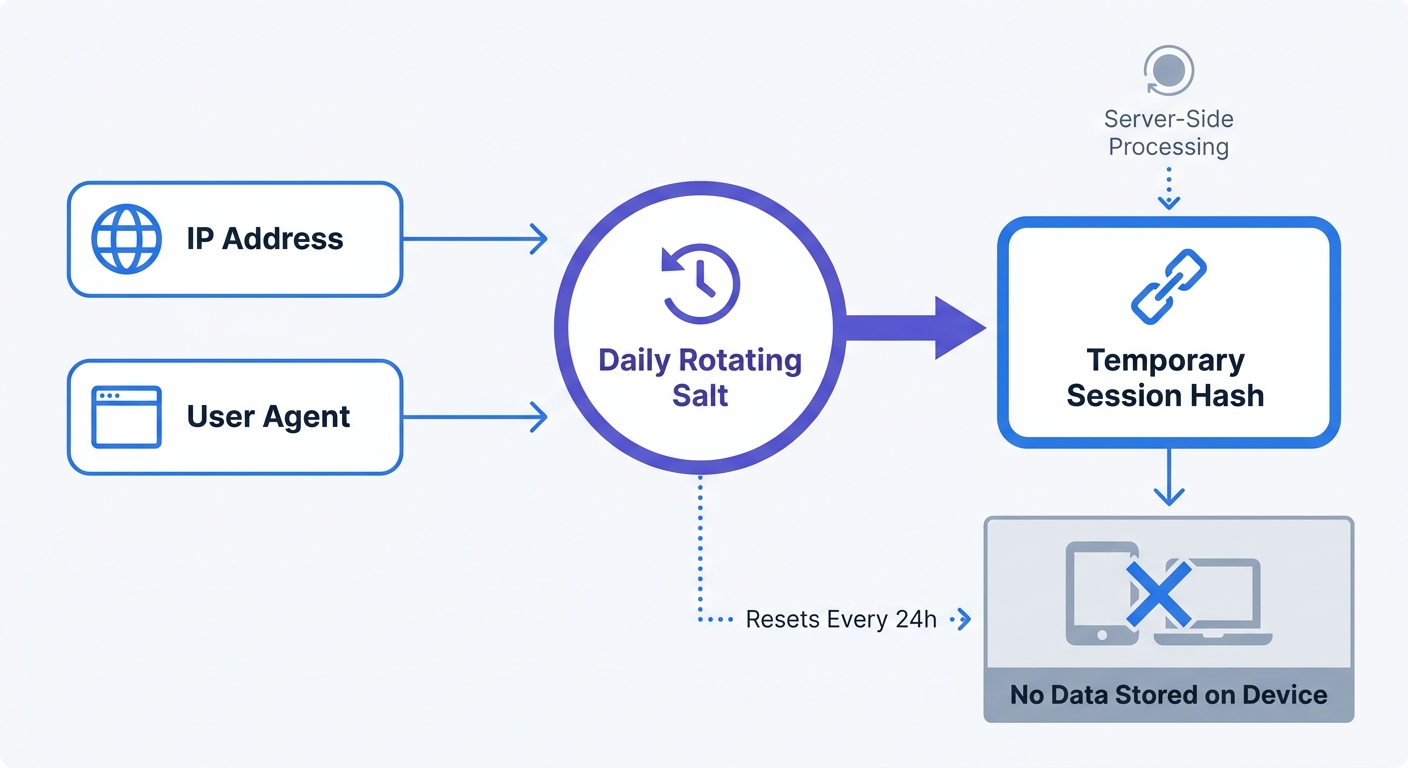
Cookieless platforms replace persistent identifiers with anonymized hashes. When a visitor requests a page, the analytics script captures their IP address and browser user agent. Instead of saving this raw personal data, the server combines it with a random cryptographic salt that rotates daily to generate a unique hash, stores it temporarily in the server's RAM, and permanently discards the raw inputs.
This cryptographic technique groups pageviews into a session without ever touching the visitor's hard drive. Because the salt changes at midnight, the resulting hash completely changes the next day, making cross-day profiling technically impossible. You retain accurate session data, bounce rates, and traffic sources while strictly adhering to data minimization principles.
This process differs entirely from server-side tagging. Moving Google Tag Manager to a server-side container protects raw client data from third-party vendors, but the GA4 instance inside that container still relies on a first-party cookie to identify the user. Consequently, server-side GA4 requires the same consent banner as a standard client-side installation.
Swetrix: The Privacy-First Alternative
We built Swetrix to capture the 70% of traffic traditional tools miss. As a fully open-source, cookieless platform, Swetrix never reads or writes data to a visitor's device, giving you real-time dashboards, custom event tracking, and campaign attribution without deploying a single consent banner.
Because Swetrix utilizes short-lived, salted hashes hosted on European cloud servers, it complies with GDPR, CCPA, and upcoming UK PECR updates. You see which marketing channels drive conversions, and your visitors enjoy a frictionless browsing experience devoid of intrusive pop-ups. We also include integrated error tracking and performance monitoring, allowing you to debug JavaScript issues and monitor page load speeds from the same privacy-first dashboard.
Run a cookieless tool alongside your current setup to quantify the difference. Add the lightweight Swetrix tracking script to your website's <head> tag, leaving your existing GA4 installation and cookie banner as they are. After a week, compare the session counts to see the volume of traffic your CMP was actively blocking.
Transitioning Away from First-Party Cookies
Auditing Your Current Analytics Stack
Migrating to a privacy-centric measurement model requires documenting every tool that drops a cookie on your domain. Web analytics platforms represent only one layer of the tracking stack, as heatmap tools, session replay software, embedded YouTube videos, and A/B testing scripts all place first-party identifiers that trigger consent requirements.
List all active marketing scripts currently loading via your tag manager. Categorize them into critical operations (like payment gateway tokens or security challenge validations) and non-critical trackers. The UK's Data Use and Access Act updates the Privacy and Electronic Communications Regulations to ease restrictions on statistical analytics, which accelerates the shift toward privacy-friendly platforms, but until you strip the persistent trackers from your codebase, you remain bound by strict opt-in rules.
Use your browser's developer tools to verify script removal. Disable your ad blocker, clear your browser cache, and load your homepage. If your storage tab shows zero cookies set before interaction, you have successfully neutralized your tracking liability.
Adopting Privacy-Centric Measurement
If your organization mandates keeping traditional tools for legacy reporting, you must isolate them completely. Configure your Consent Management Platform to block the execution of GA4 and Meta pixels until the user registers an affirmative opt-in, acknowledging to your internal teams that the data in those specific dashboards represents a highly skewed, partial sample of your audience.
To restore visibility to your marketing performance, move your primary performance metrics to a privacy-first platform by setting up your acquisition channels, conversion funnels, and UTM parameters in Swetrix. Because Swetrix tracks everything without triggering consent requirements, this dashboard becomes your single source of truth for total traffic volume, landing page performance, and overall campaign ROI.
Map your existing conversion events to the new system. If you currently track a "purchase" event in GA4, replicate that custom event trigger in Swetrix. Once you migrate your critical reporting to a zero-cookie framework and remove legacy tracking scripts from your site, you can legally remove the consent banner, allowing you to recover lost data, speed up your page load times, and stop treating your website visitors like surveillance targets.
Swetrix offers a powerful, privacy-first alternative that measures 100% of your traffic without storing persistent files on user devices. Current public pricing for Swetrix Cloud starts at $19/mo for 100,000 events, giving you accurate campaign attribution, custom events, and performance tracking right out of the box. Start your 14-day free trial today and see the traffic you are missing.