- Date
Mastering Website Analytics For Agencies In A Cookieless World
 Andrii Romasiun
Clients demand clear ROI from marketing campaigns. Checking the CRM reveals fifty new leads, yet the analytics dashboard shows thirty recorded conversions. Explaining this twenty-lead discrepancy damages trust. Legacy tracking scripts drop session data. Browser protections and strict privacy laws block third-party trackers. Implementing modern website analytics for agencies solves this data gap to restore client confidence.
The Urgent Shift Toward Privacy-First Website Analytics For Agencies
Understanding The Cookie Rejection Rate
Consent metrics define the boundaries of modern data collection. Researchers note 48.1 percent of global internet users maintain high concern regarding online data privacy. Consumer behavior reflects this anxiety at the consent prompt. Studies reveal 64 percent of consumers over 65 refuse tracking cookies upon entering a site. Younger demographics exercise similar caution by treating consent banners as obstacles instead of agreements.
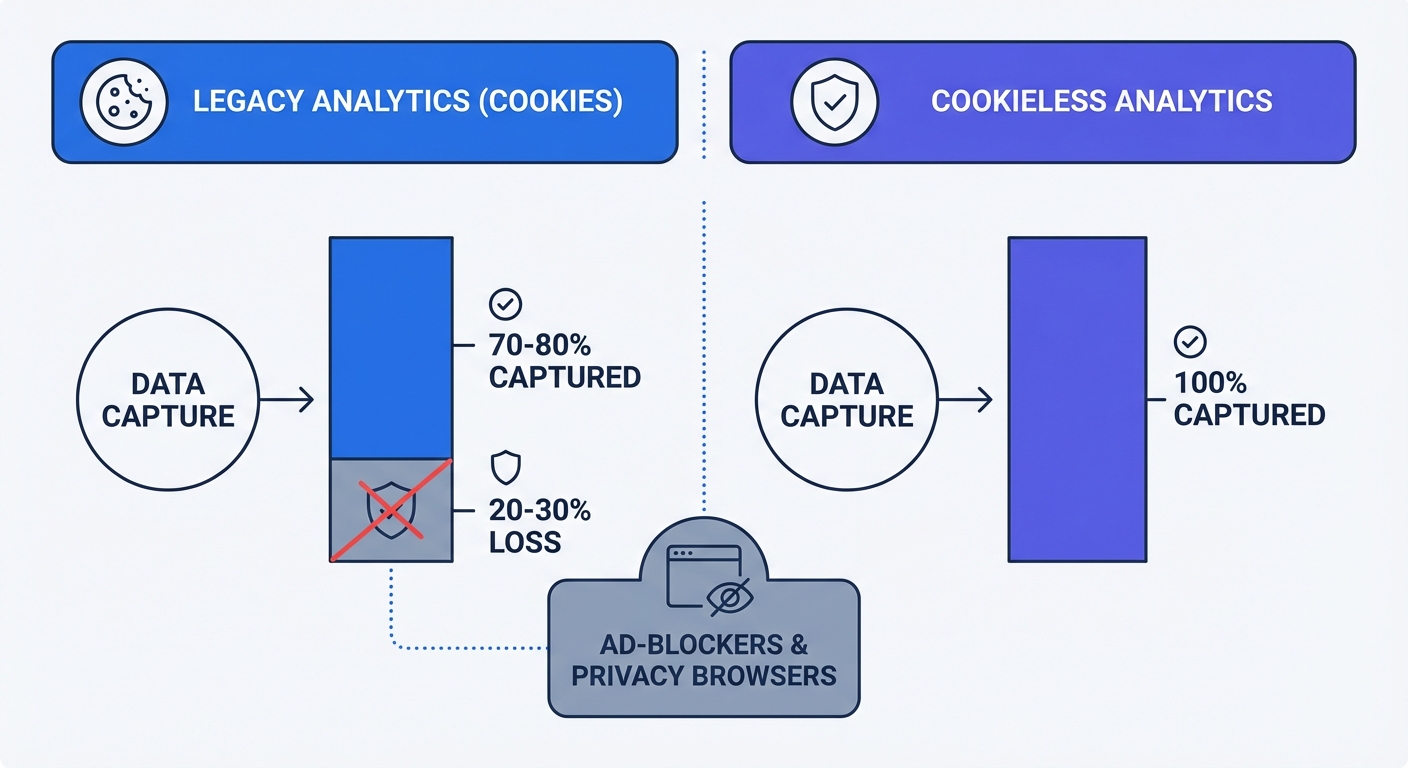
Keeping legacy analytics guarantees a drop in visible traffic. Every clicked "Decline" button stops traditional scripts from firing. Pageviews vanish, and source attribution breaks. Calculating cost-per-acquisition fails when half the users from a paid search campaign bypass the final report. First-party data collection strategies mitigate this loss by avoiding third-party cookies.
Ad-Blocker Blind Spots Costing Data
Privacy-focused browsers and extensions target heavy legacy scripts. Brave, Firefox, and Safari block tracking domains at the network level. Users browsing with uBlock Origin bypass the Google Analytics library. Agencies deploying these outdated tools miss 20 to 30 percent of baseline traffic data.
This blind spot skews conversion rate optimization efforts. A landing page might process one hundred transactions while the dashboard attributes seventy to specific marketing channels. The remaining thirty transactions register as untrackable anomalies. Ad-blockers force agencies to report false low return on ad spend (ROAS) to clients.
Audit the current analytics setup to quantify this data loss. Follow these steps to calculate the blind spot:
- Export 30 days of paid conversion data from the backend CRM or payment processor.
- Export the identical 30-day period of goal completions from the legacy analytics platform.
- Subtract the analytics total from the CRM total.
- Divide the difference by the CRM total.
The resulting percentage represents the volume of traffic obscured by ad-blockers and declined consent banners. Present this figure during client meetings to build a business case for switching to cookieless tracking.
Protecting Client Trust With Strict Compliance
Meeting EU Data Residency Rules
Agencies hold liability as technical consultants. Recommending a non-compliant data collection tool exposes clients to financial penalties. The 2025 Schrems II enforcement actions set strict precedents regarding international data transfers. Regional courts, including the Cologne District Court, penalized organizations for sending unauthorized data to US-based servers.
Hosting client data on EU-isolated servers protects businesses from GDPR infractions. Privacy-first website analytics for agencies guarantee full data ownership. Platforms built with rigid data residency frameworks process visitor interactions within European borders. Teams remove the legal risk of transatlantic data transfer while providing clients with compliant GDPR solutions.
| Compliance Factor | Legacy Platforms | Privacy-First Analytics |
|---|---|---|
| Data Residency | US Servers (Default) | EU-Isolated Servers |
| Data Ownership | Vendor controlled | 100% Client owned |
| IP Anonymization | Manual configuration required | Default behavior |
| Schrems II Risk | High | Lower (implementation-dependent) |
Eliminating The Cookie Banner
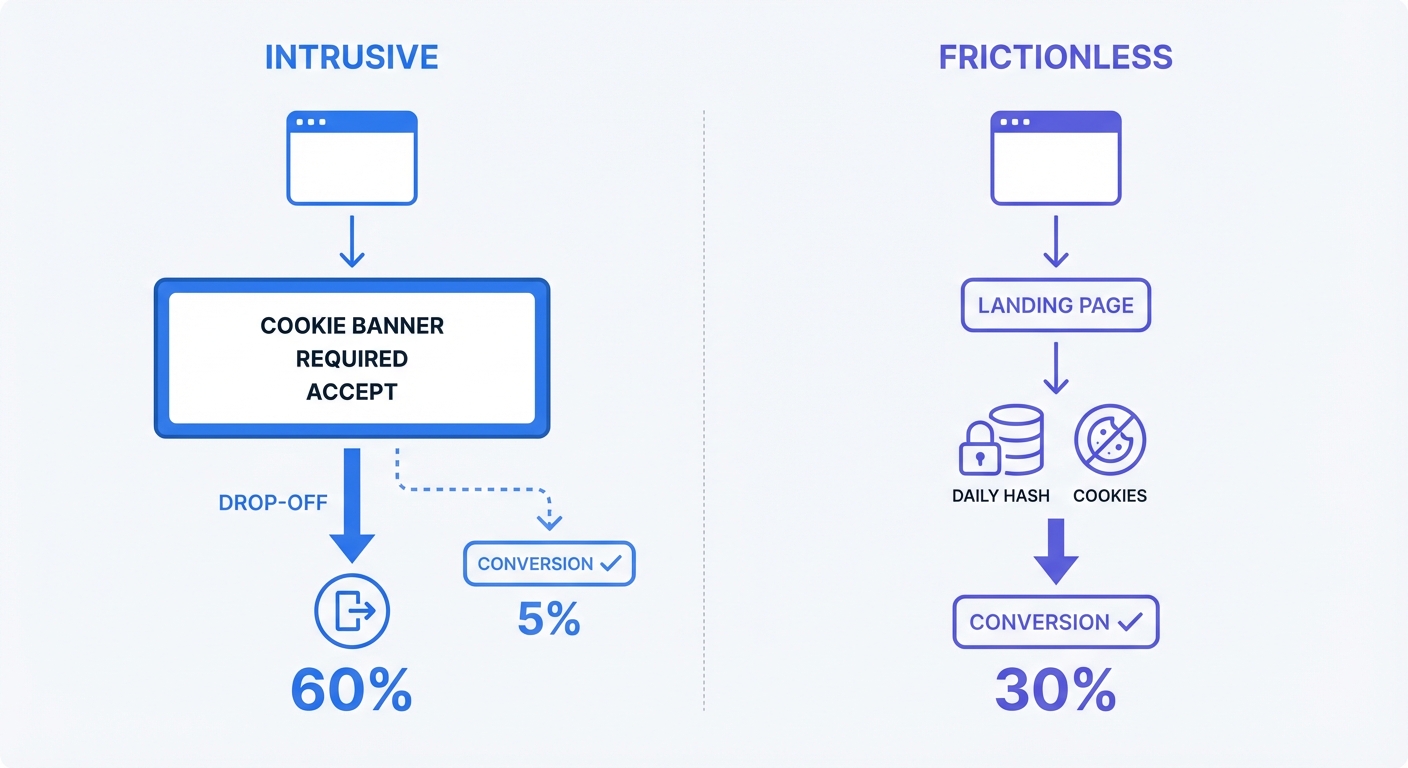
Cookie consent pop-ups introduce friction to the user experience. Visitors abandon landing pages before reading the primary headline. Removing this obstacle increases engagement and drives improved conversion rates.
Cookieless tools utilize randomized hashed strings to bypass the legal requirement for consent banners. The server combines the visitor IP address and User Agent with a rotating cryptographic salt to generate an anonymous session identifier. The system resets the salt at midnight. Returning visitors disconnect from their previous session footprints. This technical structure tracks page navigation and user flow without creating persistent profiles.
Implement privacy-by-design tracking to improve client site speed. Take these distinct actions:
- Replace the legacy tracking code with a cookieless script.
- Remove the consent management platform (CMP) plugin from the content management system.
- Delete the cookie banner pop-up script from the site header.
- Monitor the bounce rate drop over the next seven days.
Boosting SEO And Speed With Lightweight Scripts
Script Size And Core Web Vitals Impact
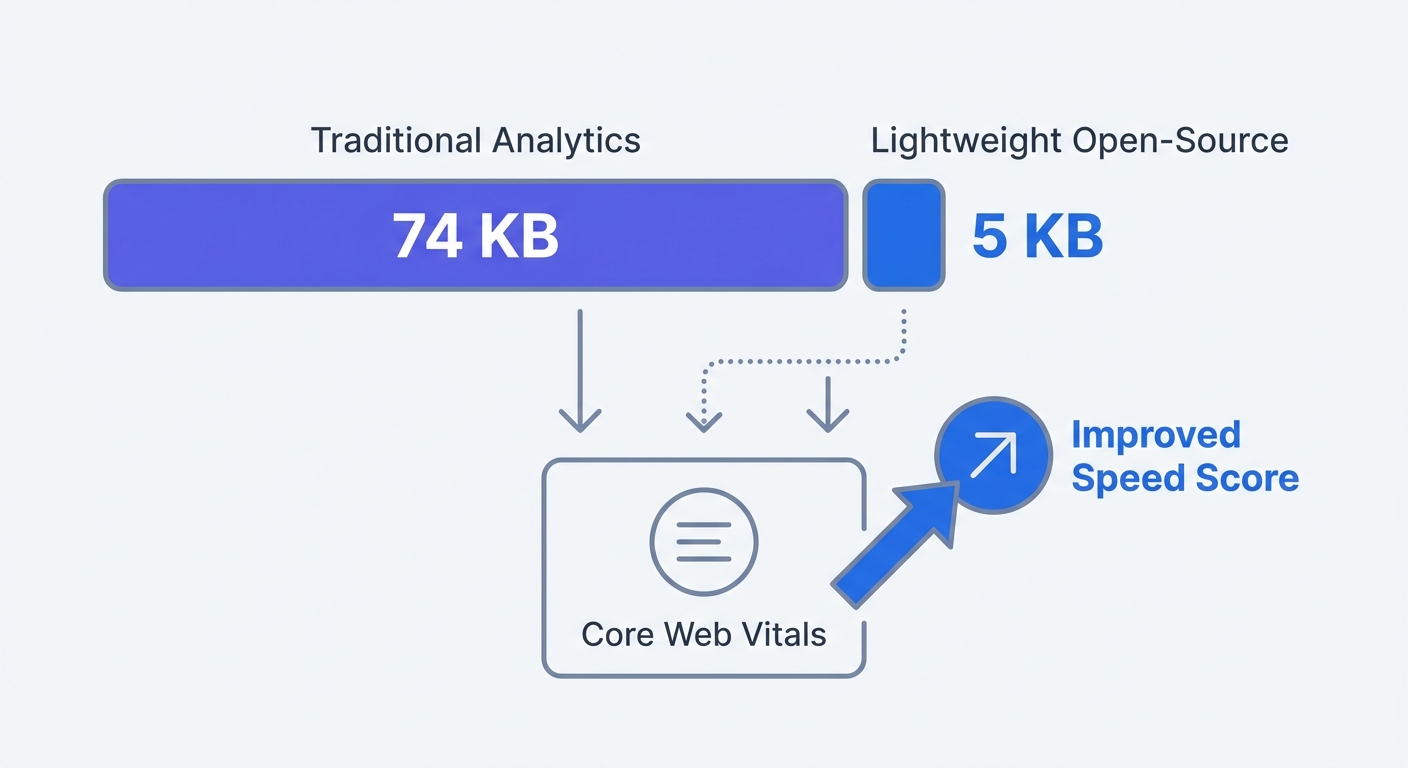
Heavy tracking scripts slow page load times and degrade search engine rankings. Google Analytics 4 burdens client websites with a 74 KB JavaScript file. Every downloaded byte can delay Largest Contentful Paint (LCP) and Interaction to Next Paint (INP). Search engines penalize domains failing these Core Web Vitals assessments. Modern website analytics for agencies run on minimal code. Open-source tracking scripts weigh between 3.5 and 5 KB. This 90 percent reduction in script bloat accelerates page rendering. Mobile browsers process the code in milliseconds. Improving website performance correlates with increased organic search visibility and decreased bounce rates.
Swap heavy legacy scripts using a Content Delivery Network (CDN):
- Locate the existing tracking code in the
<head>section of the client website. - Delete the legacy script tags.
- Insert the lightweight CDN link provided by the new analytics platform.
- Run a Google PageSpeed Insights test to measure the LCP score improvement.
Proactive Frontend Error Tracking
Marketers track pageviews through standard dashboards, while engineers use frontend error tracking to identify broken experiences. A WordPress theme update might break the JavaScript powering a checkout button. Visitors click the purchase link, the button fails, and the user exits the site. Traditional setups record this interaction as a standard bounce. Account managers remain unaware of the technical failure until the client complains about dropping sales.
Consolidating the tech stack solves this visibility problem. Advanced platforms combine traffic monitoring with frontend error tracking. The script captures console errors, network failures, and broken API calls.
Configure error alerts to protect client revenue streams:
- Open the error monitoring dashboard in the analytics platform.
- Set a trigger condition for HTTP 500 status codes and unhandled JavaScript exceptions.
- Route these alerts to an internal agency Slack or Discord channel.
- Dispatch a developer to fix broken elements before the client notices a revenue drop.
Streamlining Workflows With Modern Agency Tools
Managing Clients With Multi-Tenant Workspaces
Managing fifty separate client logins destroys agency efficiency. Account managers waste hours retrieving passwords, authenticating two-factor prompts, and operating disjointed interfaces. Modern website analytics for agencies eliminate this friction through consolidated infrastructure.
Multi-tenant workspaces group all client properties under a single agency master account. Teams switch between a local dental practice and a regional ecommerce brand via a unified dropdown menu. This structure centralizes billing and standardizes the tracking deployment process.
Implement Role-Based Access Control (RBAC) to secure client data by assigning permissions based on user requirements:
- Owner: Agency founders controlling billing and master settings.
- Admin: Account directors managing team access and global filters.
- Editor: SEO specialists configuring custom events and conversion goals.
- Viewer: Clients checking weekly traffic metrics.
Restrict clients to the Viewer role. This limits business owners from deleting conversion goals or modifying tracking parameters.
Automating Client Reporting And Dashboards
Manual spreadsheet generation drains profitability. Pulling data from three different platforms to build a monthly PDF report consumes unbillable administrative time. Consolidating business analytics allows agencies to automate communication.
Build a master reporting template within the multi-tenant workspace. Configure widgets tracking total sessions, unique visitors, top referring channels, and goal completions. Apply white-label settings to replace the vendor logo with agency branding. Add custom CSS themes to match the brand colors of the client.
Set up automated delivery to eliminate manual export tasks:
- Open the reporting configuration panel.
- Select the completed white-label dashboard template.
- Add the executive team email addresses for the account.
- Schedule the delivery for 8:00 AM every Monday.
- Generate a public shared link for clients preferring real-time dashboard access.
Future-Proofing Campaigns With AI Forecasting
Adopting Privacy-Enhancing Technologies
Artificial intelligence transforms incomplete data into accurate projections. Analysts report over 60 percent of large businesses employ Privacy-Enhancing Technologies (PETs) in 2026. These systems process aggregate interaction data without exposing individual user paths or violating compliance regulations.
Agencies apply machine learning algorithms to fill the gaps created by missing cookies. The software identifies historical traffic patterns, seasonal fluctuations, and baseline conversion rates. Processing these aggregate variables constructs detailed behavioral models. Marketing teams uncover audience behavioral trends without compromising user privacy.
Predicting ROI Without Invasive Tracking
Traffic forecasting models predict pageviews, unique visitors, and session duration. Machine learning analyzes historical campaign data to project future performance. This capability upgrades agency retainer renewals. Data-backed projections replace guesswork when pitching budget increases.
Use AI forecasting to predict ad campaign performance and prove return on investment:
- Activate the AI forecasting module within the analytics workspace.
- Feed three months of historical campaign data into the model.
- Define the target conversion metrics for the upcoming quarter.
- Export the generated projection chart.
- Present this chart during the client strategy meeting to justify proposed budget allocations.
Embracing modern infrastructure separates your agency from competitors relying on blocked legacy scripts. Adopting a privacy-first analytics stack automates internal reporting workflows while securing client revenue and accelerating site performance.
Replace blocked legacy tools with GDPR-compliant tracking. Build public dashboards, monitor frontend errors, and automate routine client reporting with Swetrix. Start a 14-day free trial today to test the multi-tenant agency features.