- Date
Best Simple Visitor Counters For Static Websites
 Andrii Romasiun
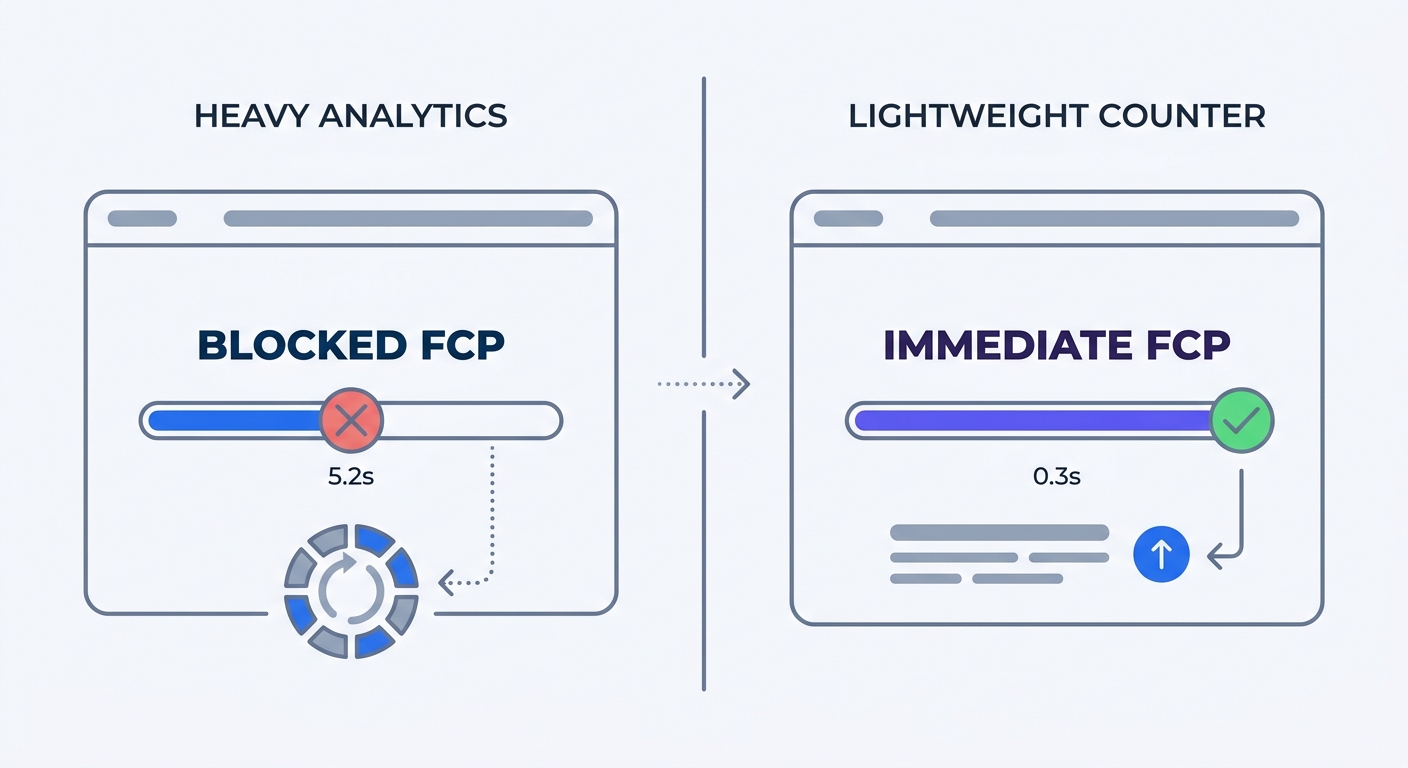
Static websites render HTML pages instantly, giving users a fast experience without database lookups or backend processing. But when you paste a standard analytics script into the header, the browser pauses rendering to download the tracking code and wait for a remote response. Consequently, your fast site slows down.
Because you build static sites to maximize speed and security, standard analytics platforms work against your goals. Heavy tracking scripts drag down performance, trigger privacy blockers, and force you to implement cookie banners. Simple visitor counters for static websites solve this problem. Lightweight, privacy-focused tools like Swetrix track traffic accurately without degrading the user experience, allowing you to ditch the consent popup while capturing a complete picture of your audience.
The Analytics Dilemma on Static Sites
The Jamstack Boom and Site Speed
Developers are rapidly shifting away from traditional database-driven content management systems because pre-rendered websites deliver unmatched speed. However, you lose that advantage the moment you add a bloated tracking script to the <head> of your document.
Research consistently measures how heavy scripts impact user behavior across industries. Pages with longer load times experience significantly higher bounce rates, while sites that load in under one second see much higher visitor retention. Adding a standard tracker inflates your bounce rate through delayed rendering, forcing the browser to parse megabytes of external JavaScript before the visitor can read the first paragraph of your content.
Test your current setup by running your static site through Lighthouse or PageSpeed Insights without your tracking code. After recording the metrics, add the script back in and run the test again. A First Contentful Paint score that drops by more than a fraction of a second indicates that your analytics tool is degrading the user experience and costing you visitors.
Why GA4 Fails Static Sites
Google Analytics 4 remains the dominant tracking engine on over 15 million active websites, relying on client-side JavaScript execution and third-party cookies. Static site users often run ad blockers or strict privacy browsers like Brave or Firefox with enhanced tracking protection. Because these browsers block traditional tracking scripts, standard analytics tools fail to capture accurate visitor data.
Aggressive ad blockers often cause GA4 to undercount visitors, creating marketing reports that show declining traffic while your server logs show steady growth. Swetrix provides a lightweight alternative that fits static environments by using minimal code. By respecting user privacy, the tool captures the traffic that heavy scripts miss.
Legacy tools also struggle with new traffic sources, whereas simple static counters and lightweight trackers capture traffic driven by AI agents, chatbots, and LLM web crawlers. Many standard platforms ignore these non-human requests, creating a blind spot in your data. Tracking AI agents and SEO impacts requires a system that recognizes non-browser user agents to provide a complete picture of your site's reach.
Privacy Laws and the Cookie Consent Drop-Off
The Data Black Hole of Cookie Banners
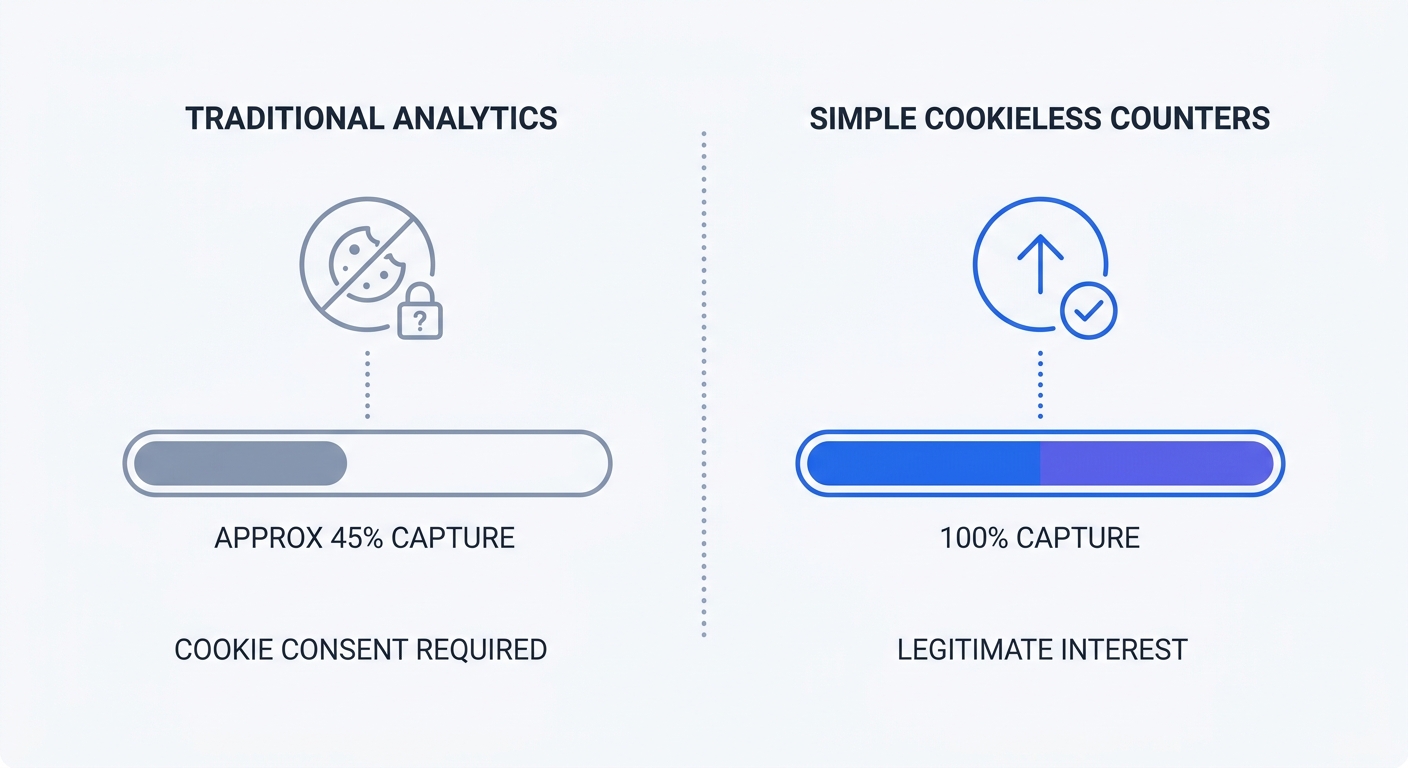
Most analytics platforms require a cookie consent banner to comply with privacy regulations, creating friction for visitors. Industry reports on user privacy preferences show that cookie consent opt-in rates vary significantly by sector.
When users decline or ignore the banner, traditional analytics tools fail to track them, causing you to lose half your data before the page finishes loading. You end up making business decisions based on a fragmented sample. If a campaign brings in a thousand visitors but only four hundred accept cookies, your recorded conversion rates inflate while your raw traffic numbers appear artificially low.
Continuing to track users who decline cookies violates compliance laws, yet a compliance report shows that 65.4% of websites collect data illegally after explicit rejection. This practice exposes your business to regulatory liability. You can verify your own data loss by opening your analytics dashboard and comparing your recorded sessions to your Content Delivery Network requests, where a large gap indicates missing data from the consent drop-off.
Bypassing Consent with Legitimate Interest
Regulatory bodies actively penalize poor data practices, issuing over €7.1 billion in GDPR fines. Over €2 billion of those penalties tie directly to cross-border data transfers, because the Schrems II ruling makes transferring European IP addresses to US-based servers a compliance risk.
You avoid these fines by switching to a cookieless visitor counter that operates under the legal framework of "legitimate interest" instead of explicit consent. Because these tools collect zero personally identifiable information, you can remove the consent banner. This approach captures your total basic traffic volume legally while improving site performance, allowing you to delete your cookie banner plugin if your site only uses it for analytics.
How Modern Cookieless Counters Work
IP Hashing vs Personal Data
Traditional tracking files each visitor under a persistent identifier stored on their device, whereas cookieless counters calculate metrics server-side. When a user lands on your static site, the server receives their IP address and user agent string before the analytics platform runs this data through a cryptographic hash function alongside a rotating daily salt.
The resulting string cannot be reversed to reveal the original IP address, and it exists only long enough to count unique page views for a 24-hour period. When the day ends, the salt changes so that the same visitor returning tomorrow generates a different hash. This daily rotation tracks aggregate behavioral patterns without creating long-term behavioral profiles.
Check your privacy policy to update the language, stating that your analytics system uses anonymized, rotating data points rather than persistent device storage. If your current document is outdated, use an online tool to generate a free website privacy policy.
Edge Computing and Tracking Pixels
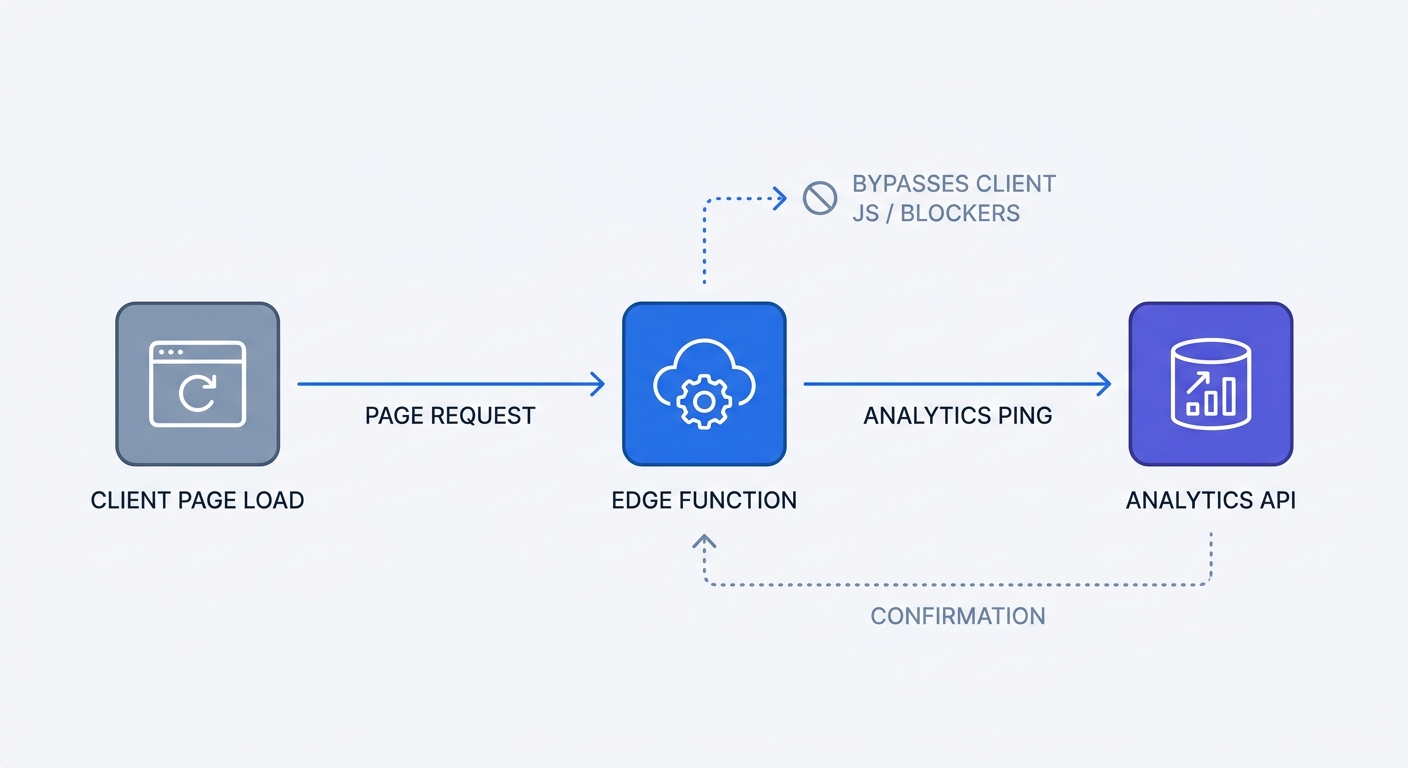
Static sites rely on Content Delivery Networks to serve files globally, prompting modern analytics tools to shift the tracking process to the edge. If you build with Next.js or Astro, you can create serverless edge functions that ping an external analytics API. The tracking happens server-side at the CDN level, ensuring the client's browser never downloads a tracking script.
Alternatively, you can use a 1x1 invisible image tag embedded directly in the HTML. When the browser requests the image, the server logs the page view without requiring any JavaScript execution.
<!-- Example of a no-JS tracking pixel implementation -->
<noscript>
  <img
    src="https://api.swetrix.com/log/pixel.gif?pid=YOUR_PROJECT_ID"
    alt=""
    width="1"
    height="1"
    style="display:none;"
  />
</noscript>
Swetrix integrates with these server-side methods, providing an API-first methodology that tracks views accurately without triggering JavaScript blockers. To set up a basic edge tracker in Next.js, add a middleware file that sends the request URL to your analytics provider before serving the static page. The user sees the content without delay, and the counter logs the visit behind the scenes.
Adding Social Proof Without Ruining UX
Displaying Public Counters Safely
Displaying a live visitor count builds credibility, as showing that ten thousand people read a blog post provides social proof. However, executing this widget via client-side JavaScript delays static site rendering. The browser stops processing your content to fetch the counter data from a remote server, degrading the page load speed.
You prevent this blocking behavior by adding the defer or async attribute to your public counter widget tags. The defer attribute tells the browser to download the script in the background and execute it only after parsing the HTML, so the page remains fast while the visitor count populates milliseconds later.
If you use a static site generator like Hugo or Eleventy, fetch the analytics data during your build process by following these steps:
- Write a pre-build script that hits the Swetrix API.
- Download the total page views for each slug.
- Save the data to a local JSON file.
- Pass the JSON data into your templates during the build.
Because the visitor count becomes part of the raw HTML text, you avoid client-side requests. Scheduling your build to run once a day keeps the numbers fresh without impacting user experience.
Preserving Core Web Vitals
Storing user identifiers in LocalStorage or SessionStorage to bypass cookie regulations violates European privacy laws, which treat all local client storage equally under the ePrivacy Directive. Using local storage for tracking still requires a compliant consent banner.
Relying on API responses for your public counters maintains compliance. Fetch the aggregate view count from your analytics provider and inject it into your static build process to preserve your Core Web Vitals. Avoiding scripts that write to the user's browser memory ensures a frictionless experience for your visitors.
Top Tools for Static Website Analytics
Swetrix: The Premier Open-Source Choice
Swetrix offers a privacy-focused, cookie-free web analytics platform engineered for speed. Designed for static site architectures, the script is lightweight to ensure your pages load fast.
The platform provides strict EU data isolation, solving the cross-border transfer issues highlighted by recent GDPR enforcement. You can run it via their cloud service starting at $19 per month for 100,000 events, or self-host the open-source version on your own infrastructure. Self-hosting guarantees that no third party ever touches your visitor logs.
Built-in features like performance monitoring and custom event tracking provide detailed insights without requiring invasive data collection or slowing down the static delivery.
Other Privacy-First Alternatives
Several other platforms specialize in cookieless tracking for static websites, each offering distinct advantages based on your technical requirements.
| Platform | Best Feature | Limitation | Self-Hostable |
|---|---|---|---|
| Swetrix | Deep custom event tracking and performance monitoring | Requires basic configuration for edge tracking | Yes |
| GoatCounter | Extremely basic interface for raw tallies | Lacks advanced marketing features like deep UTM tracking | Yes |
| Plausible | Small script size | Fewer built-in extensions for user flow analysis | Yes |
| Fathom | Intuitive single-page dashboard | No open-source tier available for self-hosting | No |
Select a platform that aligns with the data minimization principle, as GDPR Article 5 requires you to collect only the data necessary for your specific purpose. Swetrix limits collection to specific aggregate metrics while giving you full control over the infrastructure.
Tracking your static site traffic should not require sacrificing speed or forcing users to click through legal banners. Implementing simple visitor counters for static websites respects privacy and captures every page view accurately. Start your 14-day free trial of Swetrix today to see who visits your site without slowing it down.