- Date
How to Track Outbound Link Clicks Privately and Accurately
 Andrii Romasiun
A visitor reads your software review, clicks the partner link, and buys a subscription. Analytics software records this event as a bounce. A successful conversion mimics a user abandoning the page. Learn how to track outbound link clicks without massive cookie files or complex Tag Manager setups to boost affiliate return on investment and protect user privacy.
The Hidden Value of Outbound Link Tracking
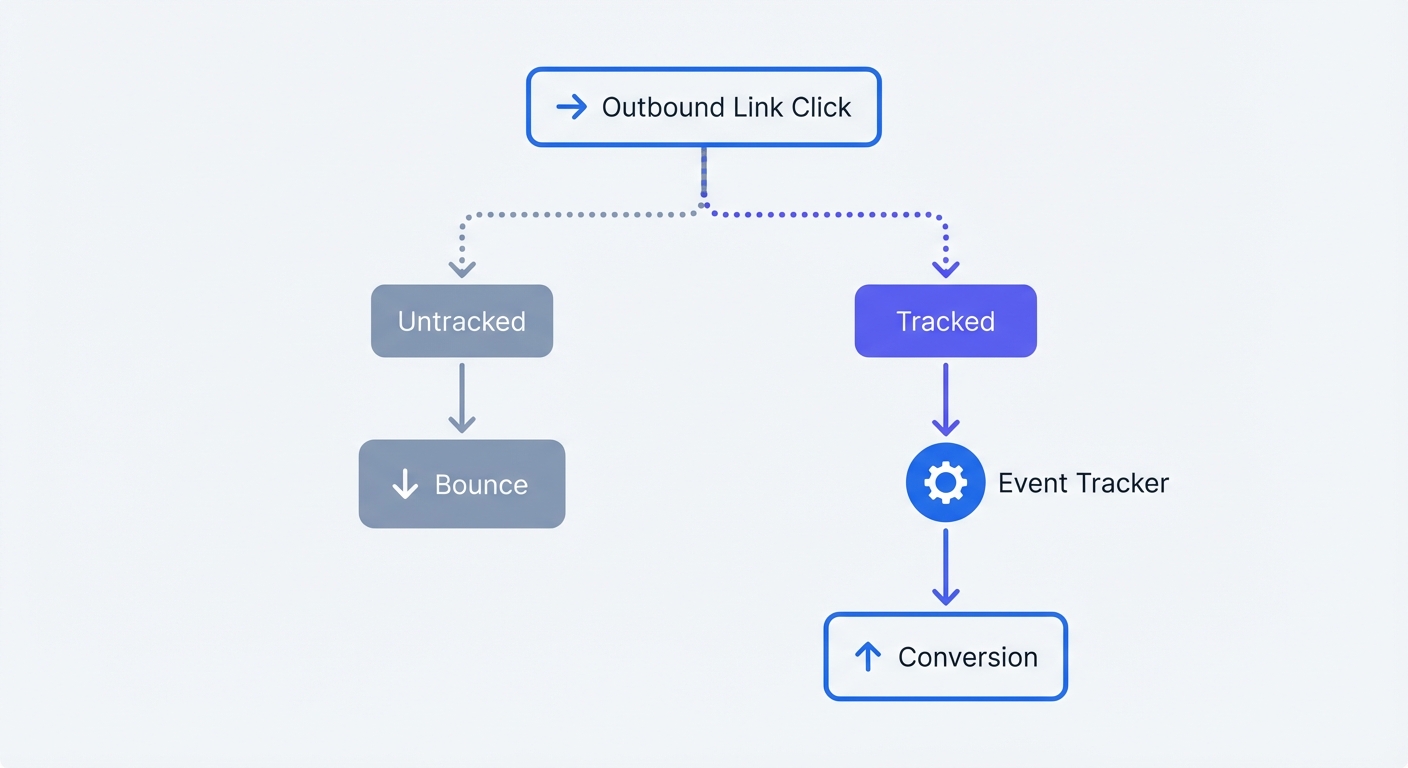
Defining Exits as Conversions
An outbound link click occurs when a user leaves your domain for an external website. Clicking an affiliate link, a partner logo, or a social profile constitutes a profitable interaction. Analysts measure engagement using standard tools that focus on internal pageviews. Analytics platforms record a bounce when visitors view one page and leave before the thirty-minute timeout window expires. A visitor might spend twenty-nine minutes reading your content and click your primary call-to-action leading to an external payment processor. Default analytics settings record this purchasing user as unengaged.
Tracking external links allows marketers to map the exact destinations users visit upon exiting a domain. Site managers reshape their understanding of performance using this destination data. Advertisers consider high exit rates a success when clicks route users to conversion endpoints. Check your metrics against the baseline bounce rate in Google Analytics to spot the discrepancy.
Measuring Affiliate and Partner ROI
B2B marketers rely on external transfers for lead attribution. Sending a prospect to a third-party tool like Calendly or a distinct checkout domain represents a milestone in the sales pipeline. Affiliate marketers depend on outbound tracking to measure revenue and content performance.
Consider a software directory comparing CRM tools. You spend $2,000 on paid ads to drive traffic to the comparison page. Advertisers see the inbound traffic but lose visibility the moment visitors click the provider links. Marketers cannot calculate return on ad spend without tracking these external exits.
Implement custom event tracking on destination links. Comparing click data against affiliate dashboards reveals the specific traffic sources generating the highest volume of qualified exits. Running a resource directory requires proving value to partners through these metrics. Count every transfer to validate your content strategy and negotiate higher commission rates.
The Problem with Legacy Tracking Methods
GA4 Complexity and GTM Bloat
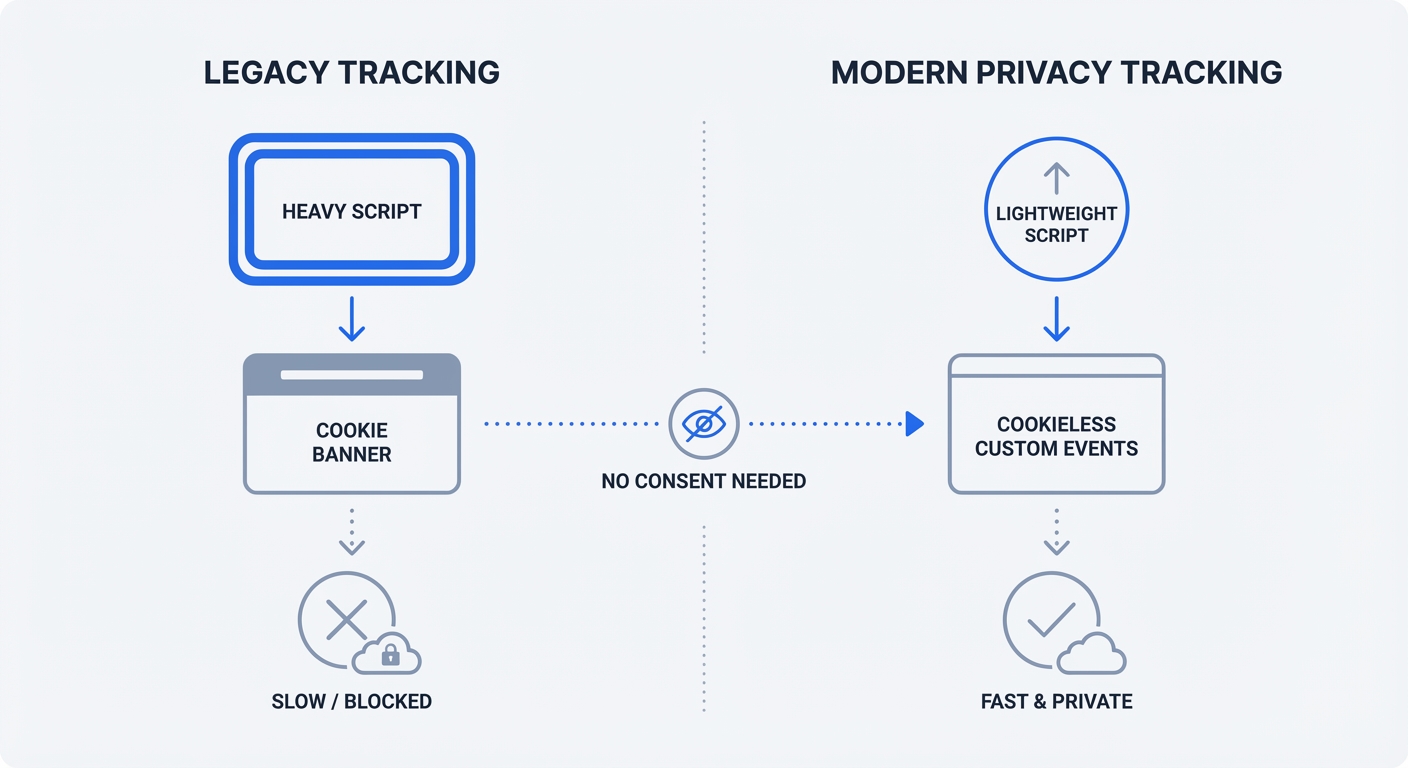
Engineers treat event tracking as a complex task when using legacy systems. Google Tag Manager requires configuring auto-event variables, custom triggers, and heavy tag deployments. Adding these scripts forces browsers to load massive JavaScript libraries before parsing page content.
Deploying 50KB of tracking tags damages site speed metrics and lowers Core Web Vitals scores. Browsers suspend rendering upon hitting a <script> tag. The waterfall effect begins. The browser loads the container, fires the configuration tag, and executes the event listeners. Mobile users on cellular connections experience noticeable load delays. Monitor these load times using performance monitoring tools to quantify the technical impact.
Marketers can use the "Enhanced Measurement" toggle for outbound clicks in Google Analytics 4. Activating the feature takes one click, but reading the destination URLs requires extensive configuration. Analysts must click through multiple menus, build custom Exploration reports, import specific dimensions like link_url, and construct tables from scratch. Teams struggle to extract insights from this complex interface.
Privacy and Compliance Risks
Cross-site tracking mechanics expose companies to severe privacy issues. Platforms like Google Analytics use persistent identifiers to follow users across domains. Legislators dictate strict rules for data collection through privacy regulations.
Website owners must display GDPR and CCPA cookie banners before loading tracking scripts. Ad blockers stop the scripts before they load. Privacy-conscious users decline the tracking prompts. Relying on this system leaves marketers with incomplete data sets and legal liabilities. Read more about how to comply with GDPR to understand the requirements.
Operating a site in the European Union requires explicit consent for any analytical cookie. Regulators scale fines for non-compliance based on total company revenue. Switch to cookieless event tracking to record external clicks without introducing legal exposure.
How to Track Outbound Link Clicks Without Cookies
The Lightweight Custom Event Approach
Developers replace bloated tags with lightweight scripts. Swetrix uses a 3.5 KB tracking snippet. Deploying this approach eliminates page load delays and renders content faster.
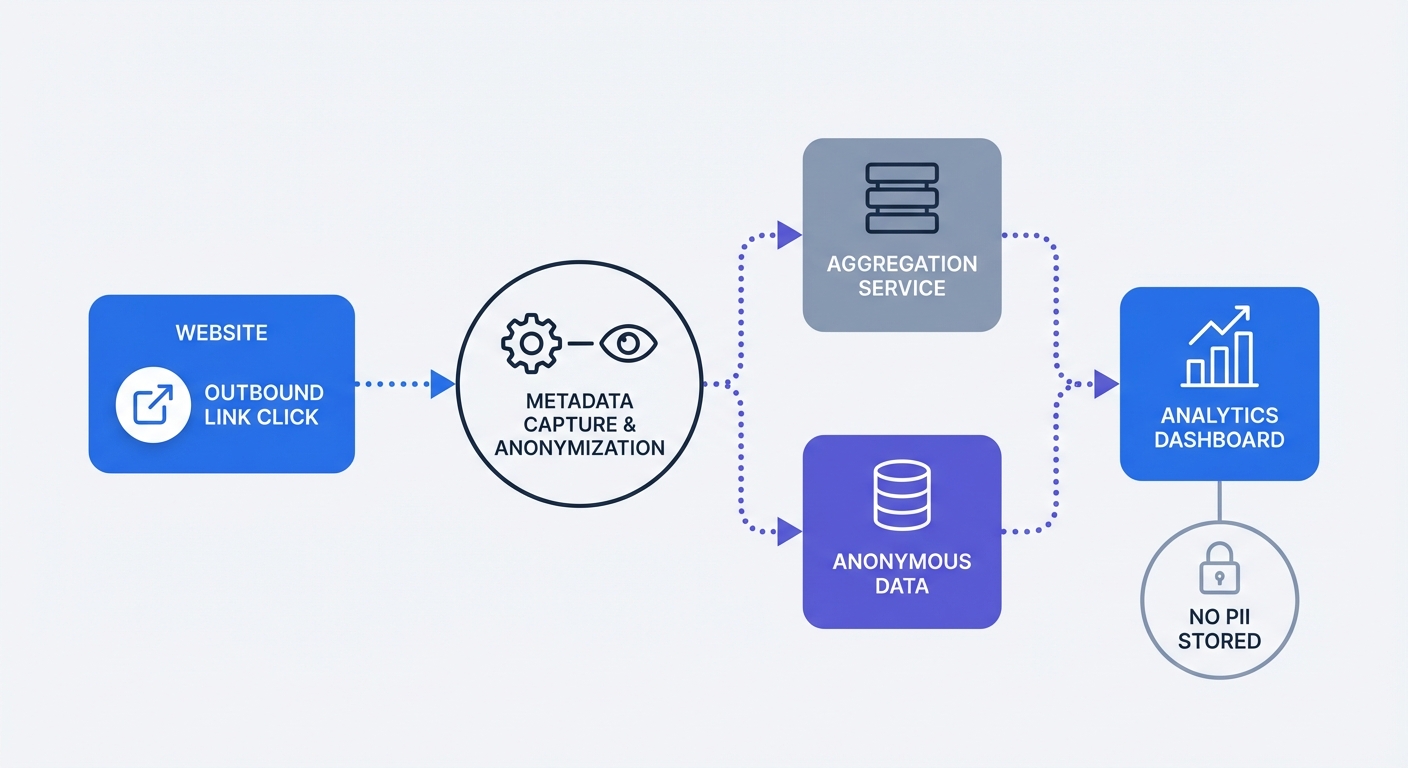
Developers build cookieless tracking systems using anonymous data aggregation instead of persistent identifiers. System administrators record the click event without setting files on the user device. The platform logs the action using a temporary session hash that resets every 24 hours. This method ensures accurate conversion tracking while respecting user privacy.
Website owners eliminate the need for consent banners by removing tracking cookies. Marketers capture a complete picture of outbound traffic because ad blockers ignore first-party endpoints that lack cookies. Build a reliable foundation of first-party data using this method.
Passing Actionable Metadata
Marketers extract minimal conversion rate optimization value from recording raw click counts. Business leaders require context to make decisions. Pass custom metadata alongside outbound clicks to understand user behavior.
Send specific parameters to the analytics dashboard. Teams should capture:
destination_url: The exact address the user visited.link_location: The page element containing the link (e.g., "header", "footer", "sidebar").user_tier: The subscription level of the logged-in user making the click.anchor_text: The exact words the user clicked.
Recording a generic total of 1,000 clicks provides a baseline number. Recording 1,000 free-tier user clicks on a specific Twitter profile link generates a clear optimization signal. Marketers use this insight to redesign the footer or push premium upgrades through social channels.
Implementation Guide for Outbound Link Clicks
Using Native HTML onClick Handlers
Track standard HTML links using inline JavaScript by adding a specific onclick attribute to your anchor tags. The Swetrix track function dispatches an event payload upon interaction.
<a
  href="https://affiliate-partner.com/signup"
  onclick="swetrix.track({
     name: 'outbound_click',
     meta: {
       destination: 'affiliate-partner.com',
       location: 'pricing_table'
     }
   })"
>
  Start Free Trial
</a>
The browser executes this snippet upon click to send the event name and relevant metadata to your dashboard. Test the implementation by clicking the link on a staging server. The platform populates the custom events table in your live analytics view within seconds.
Writing inline handlers for sites with hundreds of links wastes development time. Add a vanilla JavaScript event listener to automate the process across the entire document.
document.addEventListener("click", function (event) {
  const link = event.target.closest("a");

  if (!link) return;

  const href = link.getAttribute("href");
  let isExternal = false;

  if (href && href.startsWith("http")) {
    try {
      const url = new URL(href);
      isExternal = url.hostname !== window.location.hostname;
    } catch (e) {
      isExternal = false;
    }
  }

  if (isExternal) {
    event.preventDefault();

    const trackingPromise = swetrix.track({
      name: "outbound_click",
      meta: {
        url: href,
        text: link.innerText,
      },
    });

    // Navigate after tracking completes or fallback after timeout
    if (trackingPromise && typeof trackingPromise.then === "function") {
      Promise.race([trackingPromise, new Promise((resolve) => setTimeout(resolve, 300))]).finally(
        () => {
          window.location.href = href;
        },
      );
    } else {
      // Fallback using sendBeacon for synchronous tracking
      navigator.sendBeacon &&
        navigator.sendBeacon(
          "/track",
          JSON.stringify({
            name: "outbound_click",
            meta: { url: href, text: link.innerText },
          }),
        );
      window.location.href = href;
    }
  }
});
Place this script before your closing body tag to monitor all clicks, verify target domains, and dispatch tracking payloads.
Integrating with Modern Frameworks
Single-page applications require a tailored tracking approach because frameworks manage their own routing and component lifecycles. Learn the basics of analytics for single-page applications to structure your codebase. Create reusable components to standardize event tracking across the application.
Here is a React component for tracking external links:
import { track } from "swetrix";

export default function TrackedLink({ href, children, location, className }) {
  const handleClick = async (event) => {
    event.preventDefault();

    const trackingPromise = track({
      name: "outbound_click",
      meta: {
        destination: href,
        placement: location,
      },
    });

    // Wait for tracking to complete or timeout
    if (trackingPromise && typeof trackingPromise.then === "function") {
      await Promise.race([trackingPromise, new Promise((resolve) => setTimeout(resolve, 300))]);
    }

    // Navigate after tracking completes
    window.open(href, "_blank", "noopener,noreferrer");
  };

  return (
    <a
      href={href}
      onClick={handleClick}
      target="_blank"
      rel="noopener noreferrer"
      className={className}
    >
      {children}
    </a>
  );
}
Import this component into your pages and replace standard anchor tags with the new <TrackedLink> element.
Vue and Nuxt projects require a different component structure. Developers achieve the same tracking result using the <script setup> syntax.
<template>
  <a :href="href" @click.prevent="trackClick" target="_blank" rel="noopener noreferrer">
    <slot></slot>
  </a>
</template>

<script setup>
import { track } from "swetrix";

const props = defineProps(["href", "location"]);

const trackClick = async () => {
  const trackingPromise = track({
    name: "outbound_click",
    meta: {
      destination: props.href,
      placement: props.location,
    },
  });

  // Wait for tracking to complete or timeout
  if (trackingPromise && typeof trackingPromise.then === "function") {
    await Promise.race([trackingPromise, new Promise((resolve) => setTimeout(resolve, 300))]);
  }

  // Navigate after tracking completes
  window.open(props.href, "_blank", "noopener,noreferrer");
};
</script>
Developers keep tracking logic centralized using this architecture. Engineers update the event structure or add a metadata field in one file instead of hunting down hundreds of individual links.
Best Practices for Outbound Link Strategy
Focus on High-Value Links
Analysts ruin their reporting by tracking every external citation. Logging Wikipedia links, academic citations, and random blog references fills the dashboard with useless data. Teams struggle to find revenue-generating clicks among these meaningless data points.
Restrict outbound tracking to specific, high-value categories:
- Affiliate links driving direct commission revenue.
- Partner logos in your customer trust carousel.
- External scheduling pages like Calendly or SavvyCal.
- App store download buttons for mobile applications.
- Company social media profiles.
Audit your tracking setup every month by opening the custom events report. Identify metadata parameters receiving fewer than ten clicks and remove the tracking scripts from those underperforming links. Maintain a clean setup to improve data quality and inform accurate business decisions.
| Link Type | Action Required | Business Value |
|---|---|---|
| Affiliate link | Track with metadata | Revenue generation |
| Scheduling tool | Track with placement data | Lead generation |
| App store badge | Track with OS parameters | User acquisition |
| Citation source | Do not track | None |
| Blog reference | Do not track | None |
Prioritizing User Security
Developers expose users to security vulnerabilities by misconfiguring external links. Add specific HTML attributes to every tracked outbound link to protect visitors.
Always use target="_blank" to open the destination URL in a new browser tab. This attribute keeps your site open in the background so users can return to your content after viewing the external resource.
Pair this attribute with rel="noopener noreferrer" to prevent reverse tabnabbing attacks. Hackers execute tabnabbing exploits by using the window.opener object to hijack the original tab and replace your website with a phishing page.
Browsers sever the connection between the new tab and the original window when reading the noopener attribute. The noreferrer attribute prevents the browser from passing the HTTP referer header to the destination site. This protects your specific page URLs from appearing in external server logs.
Security protocols and event tracking work in parallel. Implement these attributes to protect visitors while gathering conversion data.
Aligning Outbound Analytics with Traffic Sources
Marketers must track user traffic sources to understand outbound clicks. A visitor arriving from an organic Google search behaves differently than a visitor acquired through a paid Facebook ad.
Combine outbound link data with inbound traffic metrics to build a complete funnel. Marketers should tag inbound campaigns using standard UTM parameters. Generate standardized tags using a UTM generator. The analytics platform records the source, medium, and campaign when a user lands on your site via a tagged link.
Analyze outbound clicks by filtering for specific inbound sources to see which channels drive exits. Marketers use this comparison to determine whether organic traffic clicks affiliate links at a higher rate than paid traffic. Advertisers shift funds away from underperforming ad campaigns to improve ROI based on this metric.
Build custom dashboards to display this relationship. Placing inbound traffic sources next to top outbound destinations generates a clear map of user flow through your digital property.
Stop losing conversion data to ad blockers and complex tag managers. Swetrix provides accurate, privacy-first event tracking without script bloat or cookie banners. Start a free trial at Swetrix.com to implement cookieless outbound tracking on your domain.