- Date
Mastering Analytics for Single Page Applications in 2026
 Andrii Romasiun
You build single page applications to deliver speed, loading the shell once and swapping out content with JavaScript to create a native software experience. Users abandon sites that take more than three seconds to load. A load time under two seconds yields a 50% higher engagement rate, which drives projected corporate investments of $82.4 billion in the web app development market by 2026.
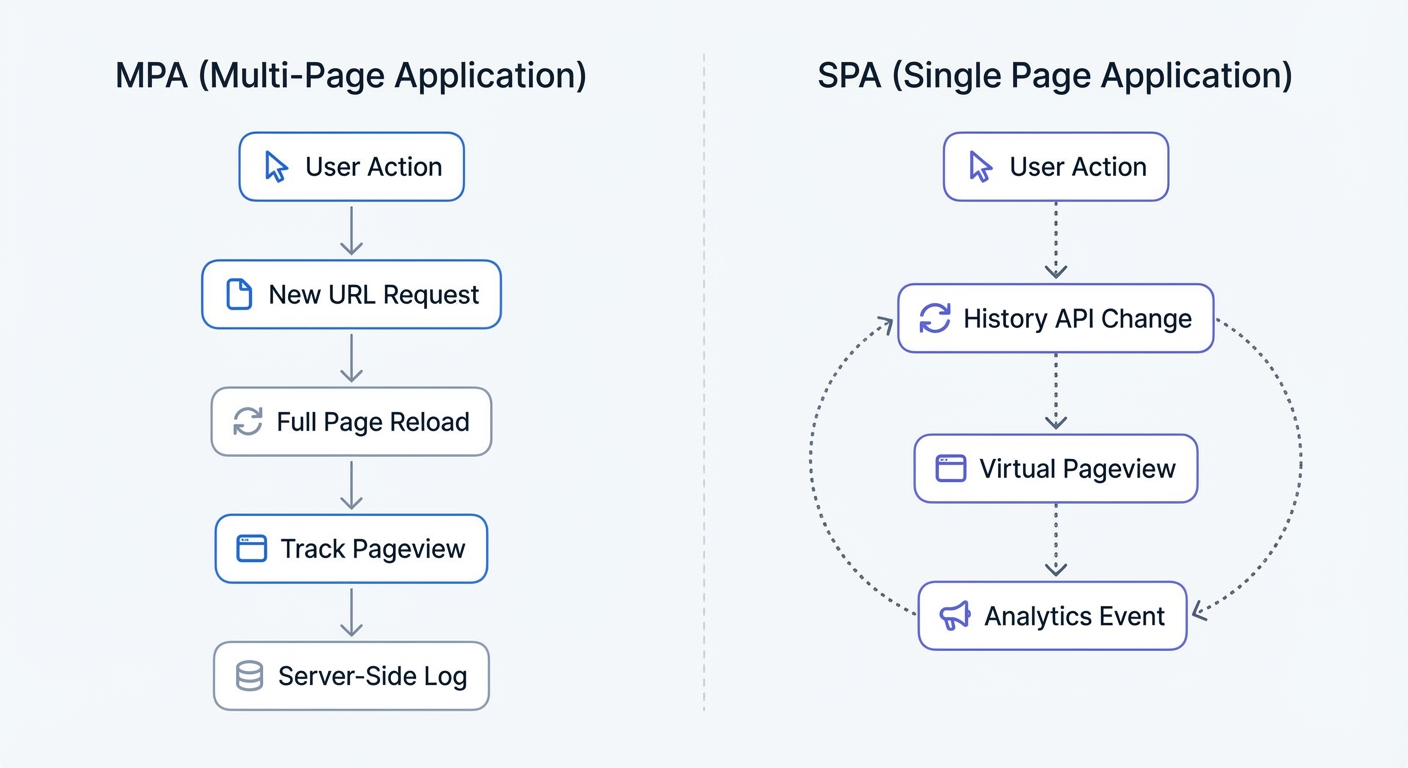
These performance gains introduce immediate tracking problems upon deployment. Traditional tracking scripts expect browsers to request a new HTML document for every page. Your SPA architecture bypasses this process. A user clicking a link triggers your router to fetch a JSON payload and update the Document Object Model. The browser address bar displays a new URL, but you never trigger a full page reload.
Open your analytics dashboard and check the bounce rate. A bounce rate above 90% and an average pages-per-session of 1.0 indicate a tracking failure. You recorded the first page load but lost visibility into the rest of the user session. Tracking analytics for single page applications requires a system built for dynamic state changes.
Why Traditional Trackers Fail at Analytics for Single Page Applications
The High-Performance Demand Behind SPAs
Developers choose frameworks like React, Vue, and Svelte to eliminate server round-trips. This architecture makes applications feel instantaneous. Such performance demands drive a projected $600 billion software market valuation by 2030.
You optimize bundle sizes and implement lazy loading to shave milliseconds off the initial paint. Dropping a legacy tracking script into your head tag destroys those performance gains. Old trackers block the browser main thread, forcing the browser to execute synchronous code and wait. Software teams plan to spend $4.51 billion on Browser Real User Monitoring by 2027 to find tracking solutions that preserve load times without sacrificing user data.
The Virtual DOM Disconnect
Modern web development relies on the Virtual Document Object Model. Your framework builds a lightweight copy of the user interface in memory. A user interacts with the application, prompting the framework to compare the new state to the previous state. You update specific pixels on the screen while leaving the rest of the page intact.
This method creates a blind spot for standard analytics. A user might open a modal window to read a product description, filter a list of items using a sidebar toggle, or paginate through a data table. None of these actions trigger a network request for a new HTML document.
Legacy vendors ignore these interactions, leaving your dashboard showing zero engagement. You must configure your tracking setup to monitor the application state. Track the components the user views instead of document loads.
The First-Pageview Trap
Legacy analytics tools rely on the window.onload event, meaning you fire your tracking beacon one time.
SPAs use the History API or hash routing to transition between views without firing the window.onload event a second time. A user views ten products, adds items to a cart, and completes a checkout. You log a single pageview on the landing page and record a bounce.
You make flawed marketing decisions based on corrupted data. You cut the budget for sales-driving campaigns because the dashboard shows a 100% bounce rate for those parameters. Implement trackers that listen to state changes to fix this error.
The Limitations of GA4 in Single Page Apps
Enhanced Measurement Flaws
Google built Enhanced Measurement to solve the SPA problem. You toggle a switch in the GA4 admin panel to track history changes.
Gaps appear in your data minutes after deployment. Setting up GA4 to listen for browser history events introduces race conditions. You send the tracking payload before the JavaScript framework updates the document title. You see the URL of the new page alongside the title of the previous page on the dashboard.
Hash-based routing creates another obstacle in GA4. Many applications use URL fragments to manage state. The standard GA4 configuration strips these fragments before sending the payload, eliminating visibility into any view dependent on a hash parameter. Clustering thousands of pageviews on the base URL obscures the user journey. Choose a Google Analytics alternative that captures the complete transition path.
Broken Marketing Attribution
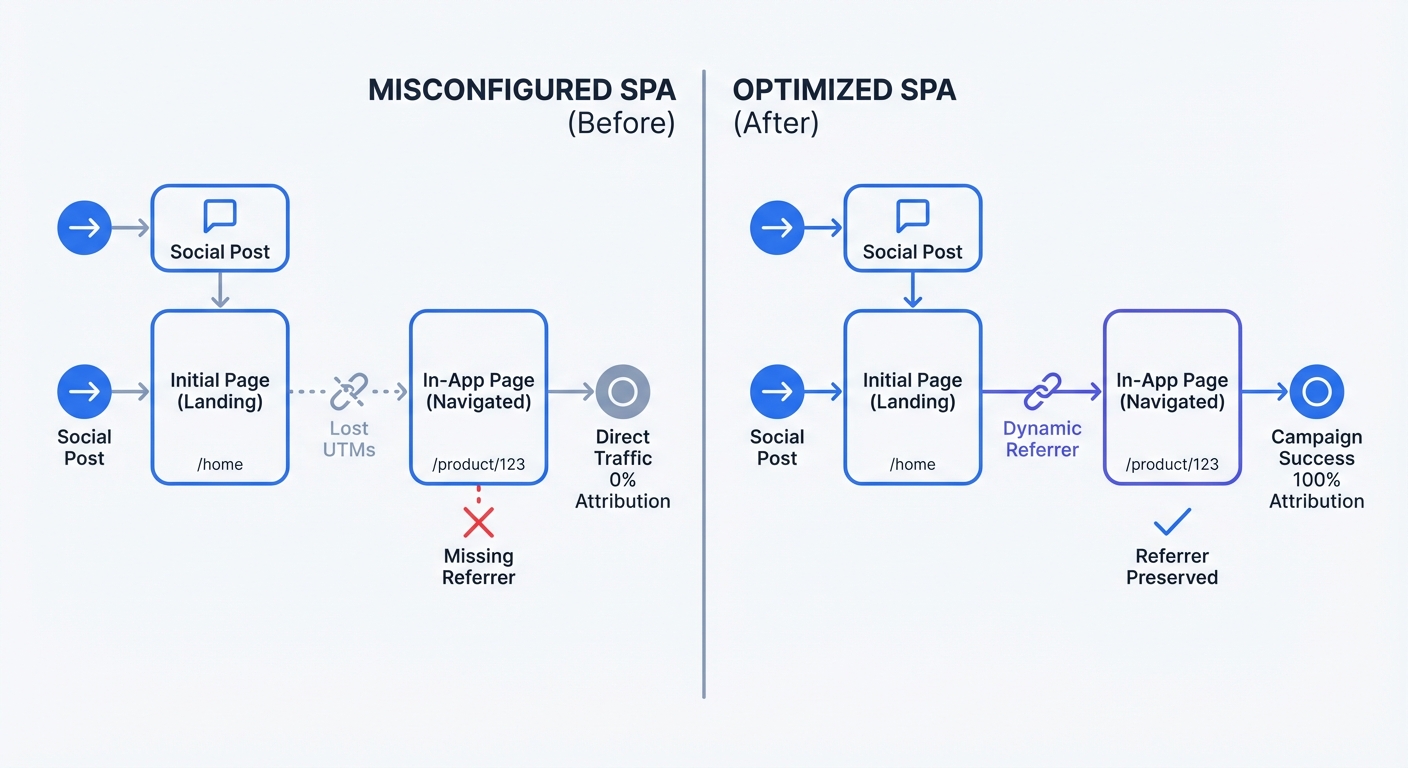
You tag paid advertising campaigns with precise tracking parameters. A user clicks a social media ad and lands on your SPA homepage, displaying those tracking tags in the URL.
A user clicking a button to view your pricing page prompts the SPA router to change the URL to /pricing. This router action removes the parameters from the address bar to keep the URL clean.
Failing to cache initial parameters deletes the attribution data for the pricing view. The user proceeds to checkout and converts, but the dashboard attributes the conversion to direct traffic. Use an ROI calculator to measure the financial impact of broken attribution. Adopt a tracking method that pins the initial source data to the user session to calculate precise return on investment.
The Shift to Server-Side Tracking
Moving analytics logic to the server bypasses client-side limitations. Set up a tagging server using Server-Side Google Tag Manager. Send a single stream of data from the SPA to the tagging server to format and forward the information to your analytics endpoints.
This approach grants complete control over the data payload while introducing technical overhead. You must provision servers, manage scaling, and monitor uptime. This adds the maintenance burden of a separate infrastructure piece to your workflow.
With companies facing an estimated 4 million unfilled developer positions in 2026, teams lack the engineering hours to maintain a complex server-side tracking environment. Weigh the infrastructure costs against the data accuracy benefits. Evaluating server-side tracking vs client-side tracking reveals a steep tradeoff where organizations spend excess resources maintaining a server setup for minimal data gains.
Privacy and Analytics for Single Page Applications
GDPR and Cookie Consent Friction
Tracking vendors rely on persistent cookies to tie a session together. You set a cookie on the initial page load and read that cookie on subsequent pageviews to identify the user.
Legislators enforcing privacy laws like GDPR require explicit user consent before placing non-essential cookies on a device, forcing you to implement a consent banner.
A user clicking "Decline" prevents you from setting a cookie and breaks the tracking. This removes visibility into a major portion of your traffic. You cannot optimize your funnel using data from a small fraction of users who accept cookies.
The Cookie-Free Advantage
Adopt cookie-free analytics to bypass the consent banner problem. Platforms like Swetrix use anonymized, rotating identifiers. Generate a unique hash based on the user IP address and user agent, then salt this hash with a daily rotating string.
Resetting the identifier every 24 hours lets you track the continuous user journey across SPA views today while viewing that same user as a new visitor tomorrow.
You collect zero Personally Identifiable Information and store no data on the user device. This eliminates the need for a consent banner. Regain full visibility into your traffic while remaining compliant with global privacy regulations to restore confidence in your data.
Technical Best Practices for Implementation
Native History API Hooking
Tracking virtual pageviews requires either pushing events to a data layer by hand or using a script that hooks into the browser History API.
Manual implementation requires code changes in your router to fire an event every time the route changes.
- Import your analytics library into your router configuration file.
- Add an event listener to push the new URL to your tracking provider on route changes.
This approach creates technical debt because you must update the custom code whenever you change routing libraries.
Save time by using a drop-in script that hooks the pushState and replaceState methods. Overriding the default browser history methods injects the tracking logic before calling the original method. Add a single <script> tag to your index.html file to automate the tracking process.
Capturing Fragments and Referrers
Capture URL fragments to build an accurate picture of the user journey by configuring your analytics tool to read everything after the # symbol.
Dynamic referrer updating solves broken traffic source chains. Traditional multi-page websites send the URL of the previous page as the referrer on every request. SPAs ignore this step.
A user clicks an ad and lands on your site, registering the ad network as the referrer. A user clicking an internal link to view a product does not trigger a page reload. Poor trackers send the ad network as the referrer for the subsequent product page view.
Update the page_referrer value on every virtual pageview. Log the first page URL as the referrer for the second page to maintain the chain of pageviews and preserve marketing attribution.
Tracking Custom Events Without Page Reloads
SPAs rely on asynchronous network requests for user actions. A user submitting a signup form prompts you to send a JSON payload to the server using the Fetch API. Instead of reloading the page to show a success screen, you update the interface in place.
Trigger a custom event via JavaScript to track these micro-conversions instead of relying on destination URLs for goal tracking.
Add a single line of code inside your API response handler. Push the event to your analytics provider after the server returns a success status code.
async function handleSignup(data) {
  const response = await fetch("/api/signup", {
    method: "POST",
    body: JSON.stringify(data),
  });

  if (response.ok) {
    swetrix.track({
      name: "user_signup",
      meta: { plan: "pro" },
    });
    showSuccessMessage();
  }
}
This method guarantees data accuracy by recording a conversion after the server confirms the action. This stops you from logging fake conversions from users who click the submit button with validation errors.
Common Questions About SPA Analytics
Do I Need a Developer to Set This Up?
A developer is required to implement custom event tracking for specific buttons or form submissions. Basic pageview tracking requires zero engineering hours when using a modern drop-in privacy tracker.
Copy a snippet of code and paste it into the <head> section of your codebase. The automated History API hooking handles the routing events in the background.
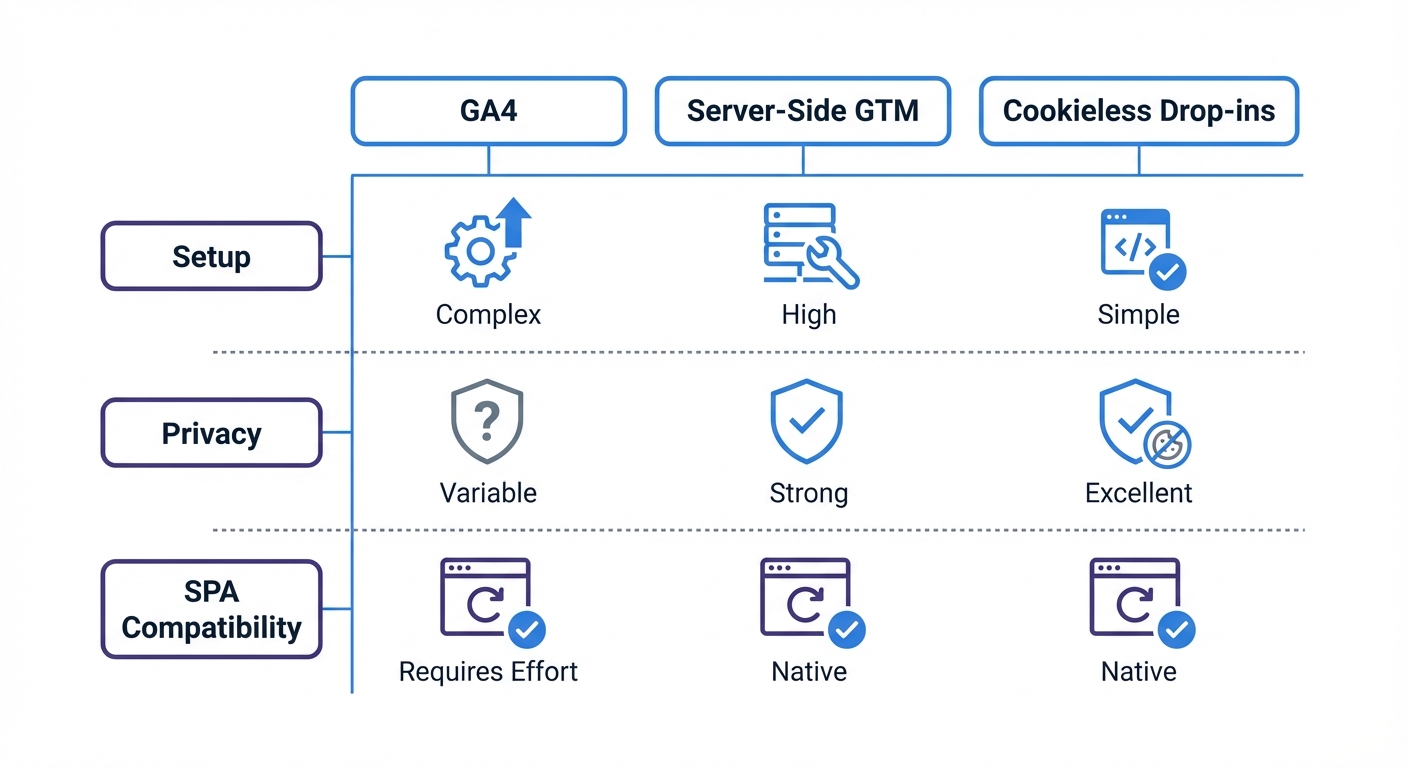
Evaluate the setup complexity of your tracking stack. Use this comparison to guide your decision:
| Analytics Method | Setup Complexity | Developer Maintenance | Privacy Banner Required | Native SPA Support |
|---|---|---|---|---|
| Google Analytics 4 | Medium | High | Yes | Poor |
| Server-Side GTM | Extreme | Extreme | Yes | Good |
| Drop-in Cookieless | Low | None | No | Excellent |
How Do I Fix the Rogue Referrer Issue?
Failing to update the referring URL with your tracking script during client-side view changes creates a rogue referrer issue. This overwrites external marketing sources with internal links, deleting the tracking parameters attached to the initial landing page.
Fix this by implementing a script that caches the source data in memory. Read the parameters on the first load and store them in a JavaScript variable. As the user views different components, attach the cached parameters to subsequent virtual pageview events. Generate clean tracking URLs with a UTM code builder before launching your campaigns.
Verify your fix by opening the application with a parameter in the URL and visiting three different views. Check your real-time dashboard to confirm three distinct pageviews attributed to the original source. Seeing direct traffic or internal referrers indicates your tool drops the state.
How Do I Measure SPA Performance?
Tracking performance metrics keeps users engaged. Core Web Vitals present specific challenges inside an SPA.
Measure the initial load with Largest Contentful Paint. Measure visual stability with Cumulative Layout Shift as components mount and unmount. Implement a performance monitoring system that measures virtual transitions.
Configure your script to record the time your JavaScript framework takes to render new views. A user clicking a link forces the framework to fetch data and render the component. Track the milliseconds between the click and the final paint. Set alerts for any route taking more than one second to render to protect conversion rates.
Clear data improves web applications. Traditional trackers deployed on single page architecture destroy that clarity. Swetrix captures every virtual pageview, caches marketing attribution, and preserves load speeds. Drop the script into your index file to regain full visibility without cookie banners. Start a free trial at Swetrix to track the complete user journey.