- Date
How to Track ChatGPT Referrals in Swetrix
 Andrii Romasiun
ChatGPT can send visitors from cited answers, shared chats, custom GPTs, and search results. OpenAI describes ChatGPT search as a way to get answers with links to relevant web sources, which means your site can receive real buyer traffic from a chat interface instead of a search results page.
Swetrix gives you a clean way to measure that traffic without cookies. Use Referrers to find ChatGPT visits, Entry Pages to see which content earned the click, custom events to measure intent, Goals and Funnels to measure conversion, and Revenue Tracking to connect AI-originated sessions to sales.
Start with a ChatGPT referrer filter
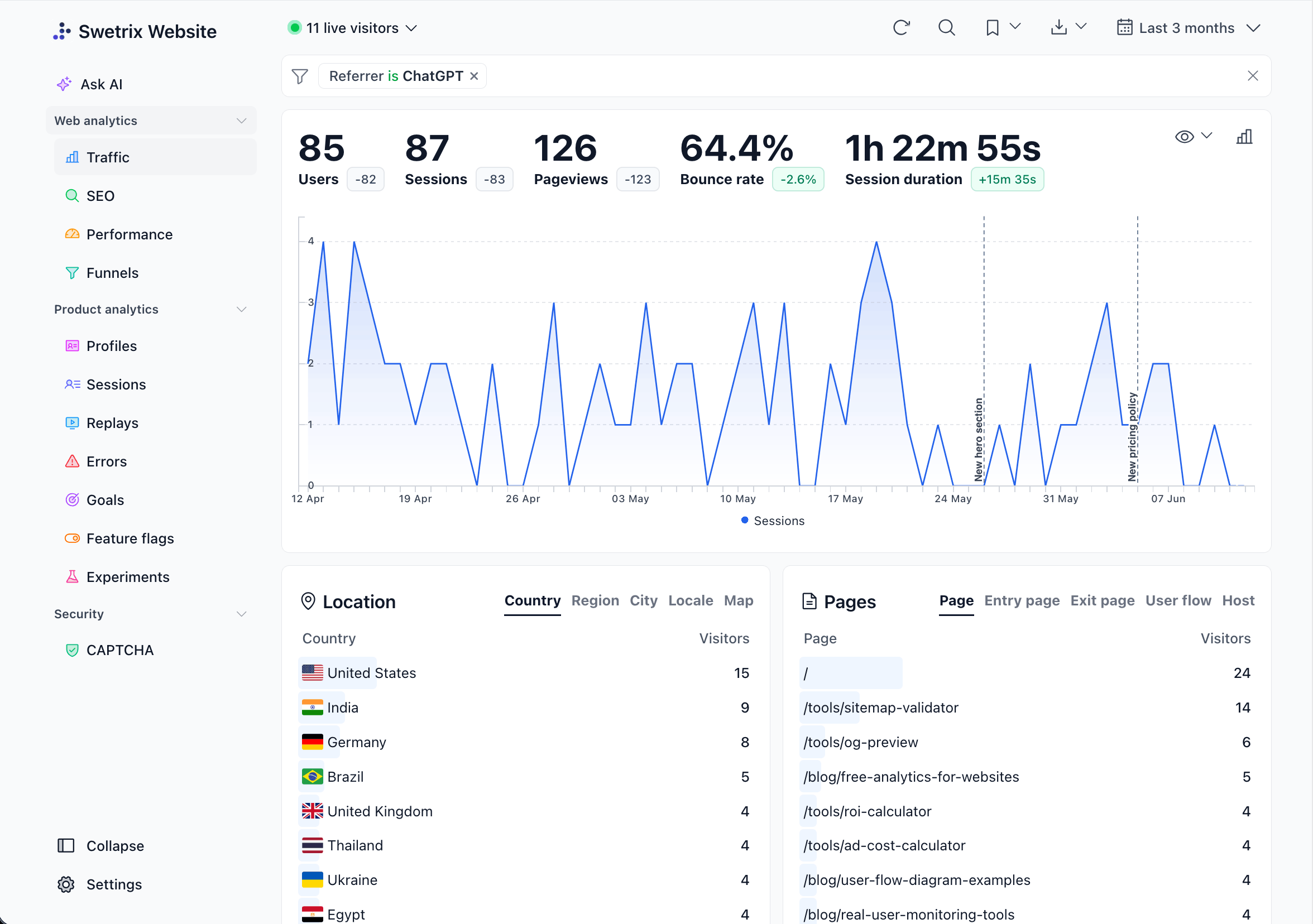
Open your Swetrix project dashboard and set the date range to Last 30 days. In Traffic Sources, open Referrers and search for ChatGPT-related hosts.
Check these patterns first:
| Pattern | What to check | How to read it |
|---|---|---|
chatgpt.com | Current ChatGPT web traffic | Treat this as your main ChatGPT referral source. |
chat.openai.com | Older ChatGPT sessions or saved links | Keep it in saved filters so older traffic stays visible. |
openai.com | OpenAI pages, docs, or product links | Inspect landing pages before you group it with ChatGPT. |
Save the filter as a Swetrix Segment named ChatGPT referrals. Swetrix docs list Referrers, Source / Medium, Campaigns, Entry Pages, custom events, and Segments in the Traffic Analytics dashboard, so this saved view becomes your base report for every later step.
Separate user referrals from OpenAI bots
Do not mix human visits with bot fetches. OpenAI documents OAI-SearchBot for search indexing and ChatGPT-User for some user-triggered page visits in ChatGPT, and its crawler docs list both user agents.
Use this split:
| Signal | Where it appears | Action |
|---|---|---|
chatgpt.com in Referrers | Swetrix Traffic Analytics | Analyze it as user traffic. |
OAI-SearchBot in server logs | Web server, CDN, WAF | Allow it if you want ChatGPT search visibility. |
ChatGPT-User in server logs | Web server, CDN, WAF | Treat it as a fetch tied to a user action, not a website session. |
If your server logs show OpenAI user agents but Swetrix shows no ChatGPT referral traffic, your content may appear in ChatGPT answers without earning clicks yet. Improve the page title, answer the query near the top, and add a next step that matches the visitor's intent.
Read landing pages before traffic volume
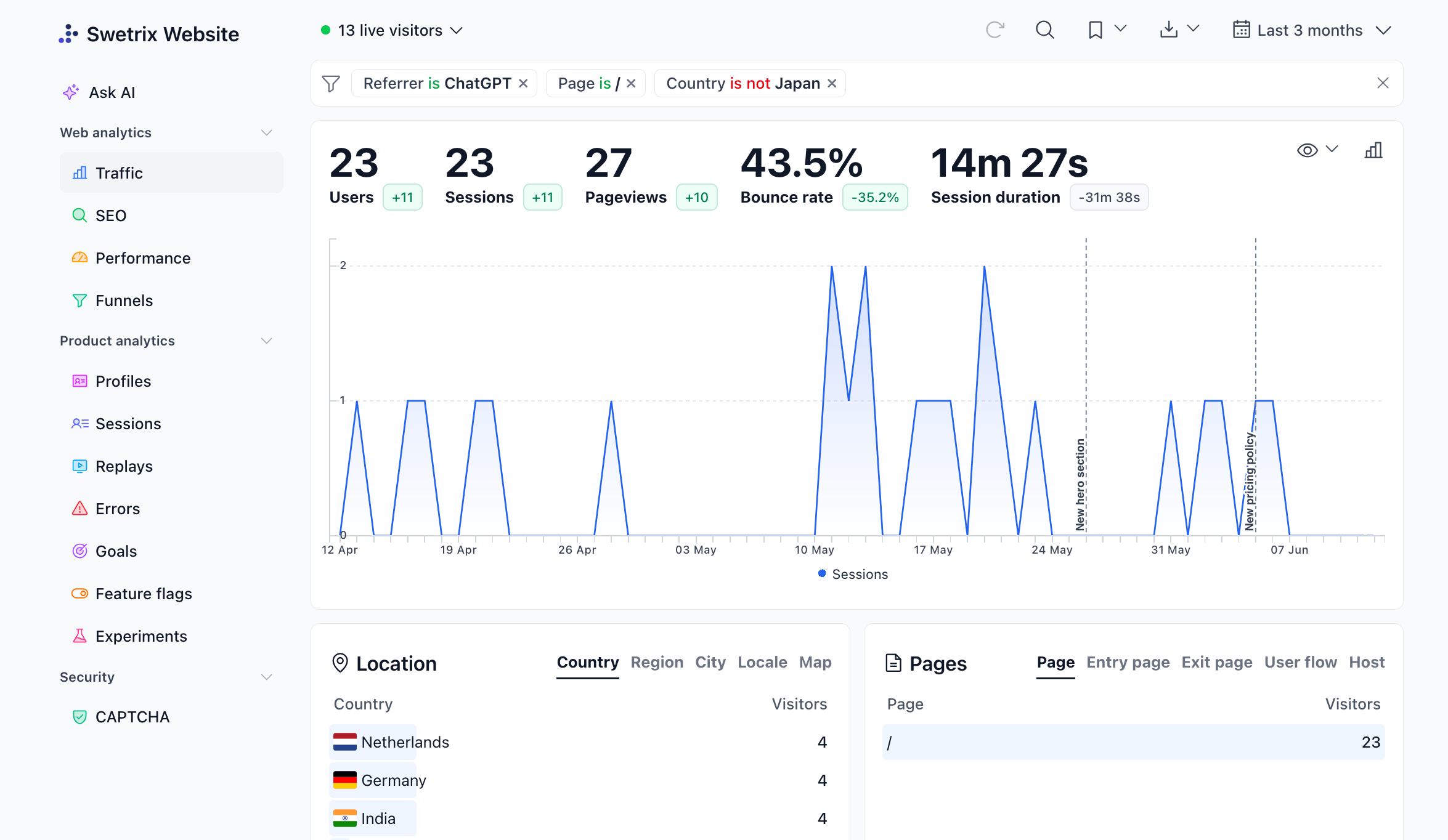
Click into your ChatGPT referrals Segment and open Entry Pages. The entry page tells you which answer, citation, or copied link sent the visitor.
Run this check:
- Sort Entry Pages by sessions.
- Compare bounce rate and session duration for each page.
- Open the top three pages and check whether the first screen answers the query that ChatGPT could cite.
- Add a clear next step on each page, such as a signup button, pricing link, demo form, or docs link.
Use this table during review:
| Landing page pattern | What it means | Fix |
|---|---|---|
| Blog post gets traffic but no events | Readers get the answer and leave | Add a contextual CTA near the answer. |
| Pricing page gets traffic and high bounce | Visitor expected a plan match | Add plan guidance above the fold. |
| Docs page gets traffic and trial starts | Technical intent converts | Link the docs page to signup and onboarding. |
| Home page gets most traffic | ChatGPT has weak source context | Build topic pages with sharper answers. |
Swetrix shows Entry Pages and User Flow in the Pages breakdown. Use those views before you rewrite content, because traffic volume alone does not tell you whether ChatGPT sent research traffic, buying traffic, or support traffic.
Use UTMs when you control the link
You cannot add UTM tags to organic ChatGPT citations. Add UTMs to links your team controls, such as support macros, docs snippets, community answers, or AI assistant templates.
Use this format:
https://example.com/pricing?utm_source=chatgpt&utm_medium=ai-assistant&utm_campaign=pricing-research&utm_content=cta-link
Keep the values short:
| Parameter | Value | Reason |
|---|---|---|
utm_source | chatgpt | Groups the source. |
utm_medium | ai-assistant | Keeps it separate from search, social, and email. |
utm_campaign | pricing-research | Ties the click to intent. |
utm_content | cta-link | Separates link placements. |
After launch, open Source / Medium and Campaigns in Swetrix. Compare tagged links against raw chatgpt.com referrals so you can see which traffic came from links you placed and which traffic came from organic ChatGPT citations.
Track events that prove intent
Pageviews show interest. Custom events show action.
Track the moments that matter for ChatGPT visitors:
| Event | Where to fire it | Why it helps |
|---|---|---|
pricing_viewed | Pricing page load or plan toggle | Measures commercial intent. |
trial_started | Signup button click | Measures conversion intent. |
demo_requested | Demo form submit | Measures sales intent. |
docs_cta_clicked | Docs to signup click | Measures developer intent. |
Add event tracking to high-intent actions:
<button data-start-trial>Start trial</button>

<script>
  document.querySelector("[data-start-trial]")?.addEventListener("click", () => {
    swetrix.track({
      ev: "trial_started",
      unique: true,
      meta: {
        surface: "pricing",
        plan: "pro",
      },
    });
  });
</script>
Do not send names, emails, account IDs, message text, or chat transcripts in event metadata. Use page type, plan, CTA placement, and campaign labels. The Swetrix tracking script reference explains custom event metadata limits and the track() API.
Build goals and funnels for ChatGPT traffic
Create one broad Goal first:
- Open Goals in your Swetrix project.
- Create a multi-condition Goal named
ChatGPT trial start. - Add a referrer condition for
chatgpt.comORchat.openai.com. - Add a custom event condition for
trial_started. - Save the Goal and review conversion rate for the last 30 days.
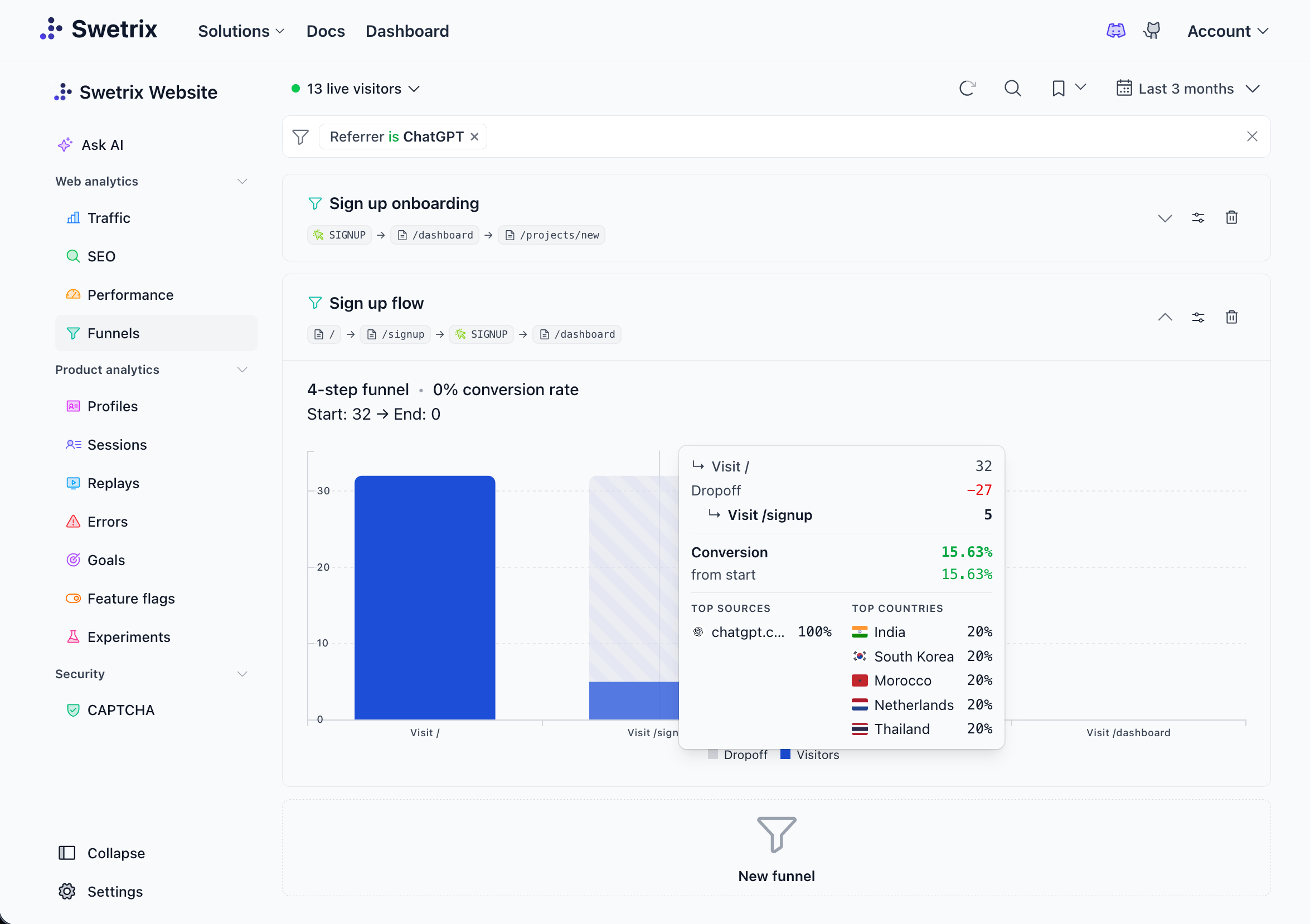
Then build a funnel that follows the visitor path:
| Step | Type | Example |
|---|---|---|
| 1 | Page | /blog/ai-analytics |
| 2 | Page | /pricing |
| 3 | Event | trial_started |
| 4 | Event | onboarding_completed |
Filter the funnel by the ChatGPT referrals Segment. If many visitors reach /pricing and stop, adjust plan copy or trial CTA placement. If they start signup and stop before onboarding, review the signup flow and inspect sessions for friction.
Connect ChatGPT sessions to revenue
Traffic does not matter much unless you can connect it to pipeline or revenue. Swetrix Revenue Tracking supports Stripe, Paddle, and API transactions, and Swetrix shows revenue in the same Traffic Analytics chart with the same filters you use for referrers and campaigns in the revenue docs.
For Stripe or Paddle attribution, pass Swetrix IDs into checkout metadata:
const profileId = await swetrix.getProfileId();
const sessionId = await swetrix.getSessionId();

await fetch("/create-checkout", {
  method: "POST",
  headers: {
    "Content-Type": "application/json",
  },
  body: JSON.stringify({
    plan: "pro",
    profileId,
    sessionId,
  }),
});
On your backend, attach those values to the payment:
metadata: {
  swetrix_profile_id: profileId,
  swetrix_session_id: sessionId,
}
After revenue sync runs, open your ChatGPT referrals Segment and enable the Revenue metric. Compare:
| Metric | Question to answer |
|---|---|
| Revenue | Did ChatGPT traffic pay? |
| AOV | Did ChatGPT buyers choose higher plans? |
| Trial starts | Did content create intent? |
| Funnel conversion | Did the path lose buyers before checkout? |
Account for Direct traffic caveats
Some ChatGPT-originated visits will land in Direct. Apps, browsers, redirects, privacy tools, and referrer policies can remove source data before your site receives the request. MDN documents that Referrer-Policy can omit the Referer header or reduce cross-origin referrers to an origin under the default policy.
Use this checklist when Direct traffic rises after a ChatGPT mention:
- Compare Direct Entry Pages against pages that ChatGPT could cite.
- Check whether Direct sessions land on long-tail blog posts, docs, or comparison pages.
- Compare Direct conversion rate against
chatgpt.comconversion rate. - Add UTMs to links you control.
- Watch the same pages for seven more days before you change attribution rules.
Do not force every unexplained visit into ChatGPT. Mark it as an informed estimate in reports, then show the supporting entry pages, dates, and conversion behavior.
Monitor the segment each week
Create a short review ritual:
- Open the saved
ChatGPT referralsSegment. - Compare Last 7 days against the previous period.
- Review Referrers, Entry Pages, Events, Goals, Funnels, and Revenue.
- Export the view to CSV if your team tracks AI search in a shared report.
- Add an annotation when you update a cited page, publish a new comparison page, or change signup copy.
Use Swetrix AI Chat for the first pass. Ask:
Compare ChatGPT referrals against Google organic for the last 30 days. Show sessions, top entry pages, trial_started events, funnel conversion, and revenue.
Open the linked dashboard view after the AI answer and verify the numbers before you act on them.
Final recommendation
Track ChatGPT referrals as a source segment, not as a single magic channel. Start with chatgpt.com and chat.openai.com, review landing pages, add intent events, build a Goal, connect a Funnel, and inspect Revenue. Use UTMs where you control the link, and keep Direct traffic caveats visible in your reports.
Swetrix fits this workflow because it gives you cookieless analytics, referrers, UTMs, custom events, goals, funnels, user sessions, revenue analytics, shared dashboards, and AI Chat in one privacy-first product.
Want to see ChatGPT referrals, conversion paths, and revenue in one dashboard? Start a 14-day free trial of Swetrix.

The web analytics your site deserves.
Tired of bloated dashboards, privacy concerns, and data you can't trust? Switch to Swetrix and get simple, powerful analytics that respects your users.