- Date
How To Filter Internal Traffic From Analytics
 Andrii Romasiun
Your marketing team launches a new landing page, and the analytics dashboard shows a massive spike in traffic. Time on page looks incredible, but the conversion rate flatlines. Before you kill the campaign, check who is visiting that page, because it is likely your own developers, content writers, and executives refreshing the site to see their updates.
Unfiltered internal traffic pollutes your dataset, because when employees interact with your website, they do not behave like customers. They jump straight to deep administrative pages, leave tabs open for hours, and rarely fill out lead forms. This behavior creates a phantom layer of engagement that makes bad campaigns look good and profitable channels look terrible. You need to filter internal traffic from analytics to maintain a clean foundation for business decisions. Swetrix solves this problem by offering cookieless, privacy-focused tracking mechanisms that let you exclude team data without violating compliance laws or relying on obsolete IP blocking.
The Hidden Cost of Unfiltered Traffic
Skewed Engagement Metrics
Employees treat your website like a workspace rather than a storefront. A developer hunting for a CSS bug will click through twenty pages in under a minute, driving your average session duration to near zero. Conversely, a copywriter might leave a blog draft open on a second monitor all afternoon, and neither action reflects customer intent.
The cross-industry average time on page sits around 52 seconds, though B2B websites average closer to 82 seconds depending on the specific industry and content type. Internal testing severely warps these baselines. Reviewing a campaign report with a three-minute average session duration might prompt you to allocate more budget to that channel, but if half of those sessions belong to your QA team verifying form functionality, you wasted marketing spend on a false signal.
Check your current bounce rate on newly published pages. If it drops to zero within the first 24 hours of publication, internal team members are likely navigating directly to the URL and clicking around. To verify this, create an immediate segment in your dashboard that excludes known company networks and watch if the engagement drops back to normal levels.
Artificially Deflated Conversion Rates
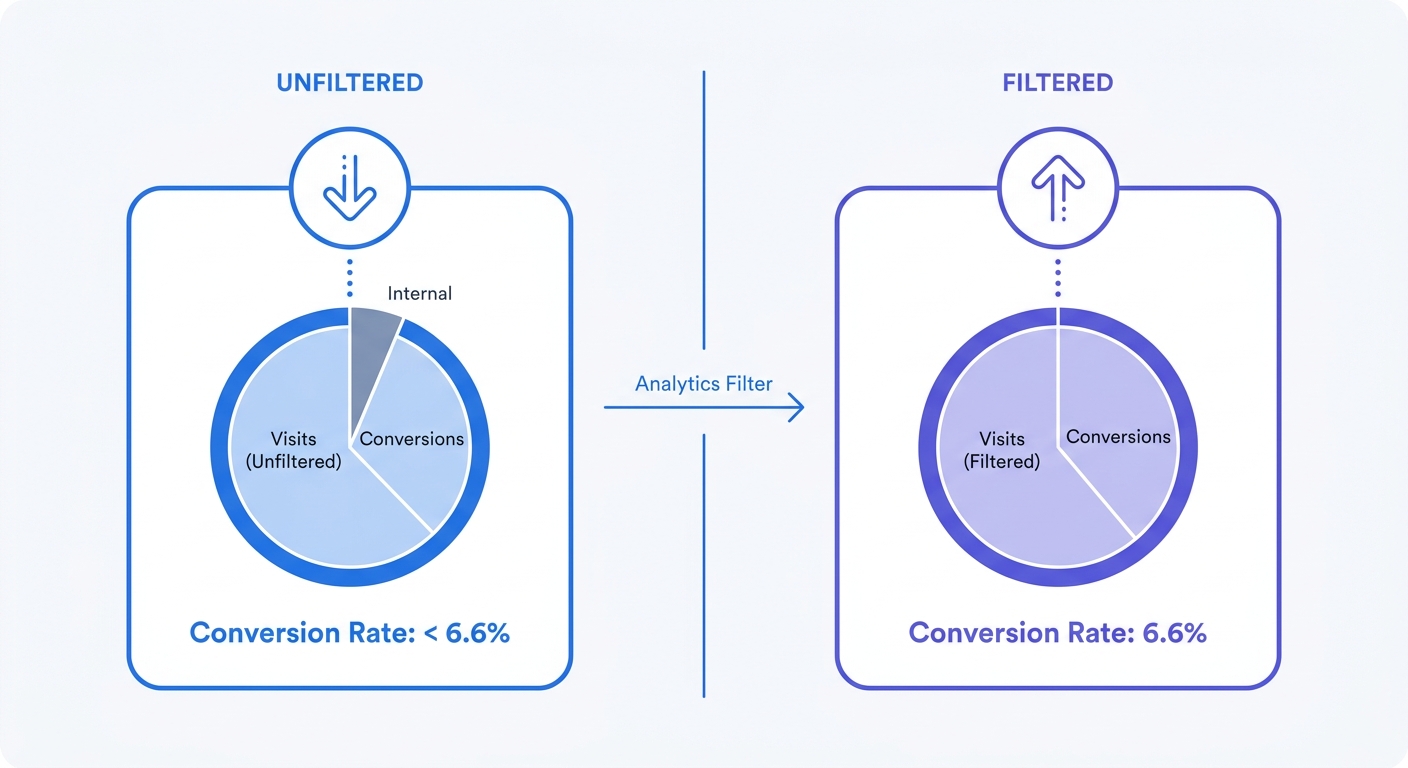
Conversion rate math relies on an accurate denominator, which you calculate by dividing total conversions by total sessions. A 2024 Unbounce benchmark report places the median landing page conversion rate at 6.6 percent across all industries, though this ranges from 3.8 to 12.3 percent depending on the specific sector. Failing to exclude your staff inflates your session count, artificially driving your reported conversion rate down.
Imagine your site gets 1,000 real visitors and 66 of them convert, hitting that 6.6 percent benchmark. Adding 300 sessions from employees who never buy anything pushes your total sessions to 1,300 while conversions stay at 66. Your dashboard consequently reports a 5 percent conversion rate. Reviewing that deflated metric might convince you to completely redesign a landing page that already converts well.
Start by auditing your conversion paths. Open your analytics platform to filter for paths with zero conversion events over a 30-day period, and look for traffic spikes clustered around the dates you deployed code or published new content. When those spikes correlate with internal release schedules, internal visits are actively suppressing your metrics.
Why Static IP Filtering is Dead
The Impact of Remote Work
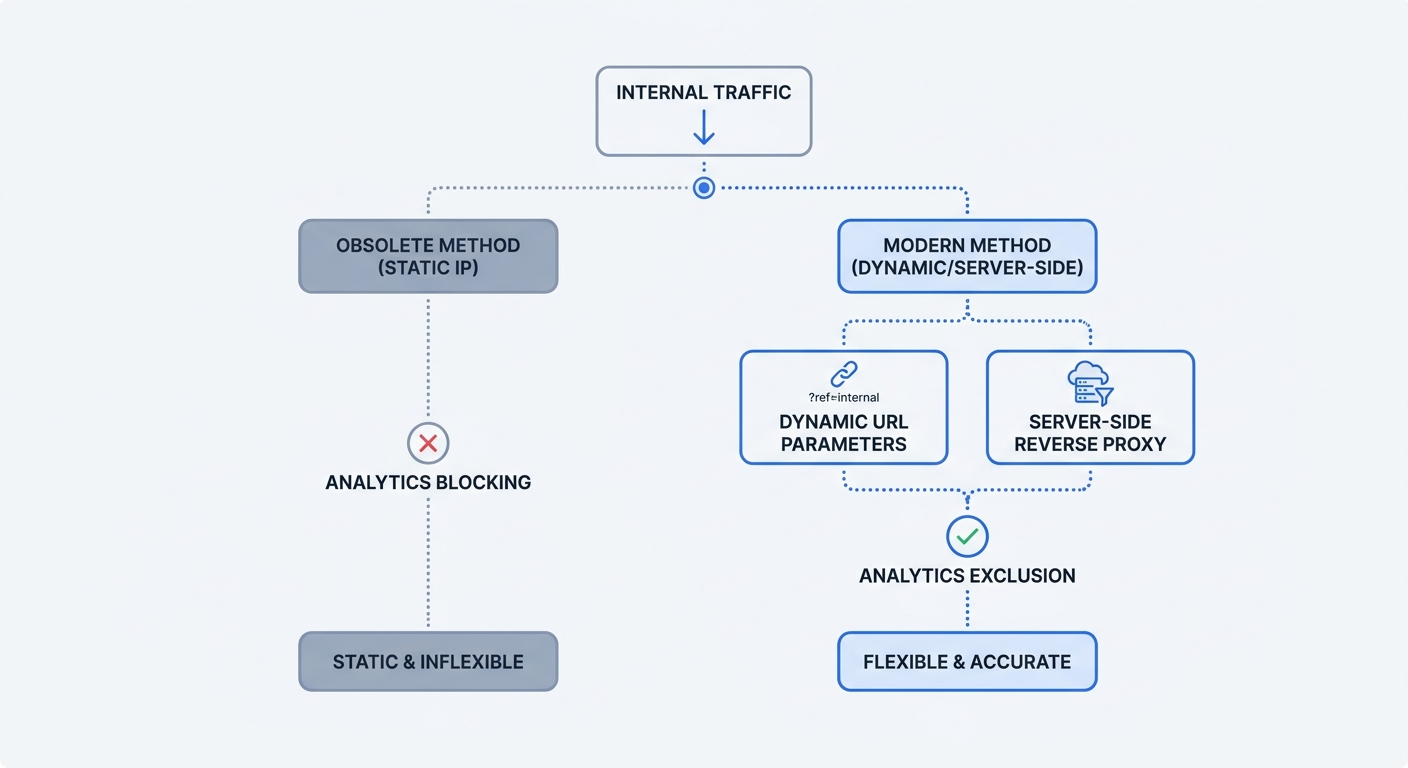
Ten years ago, administrators filtered internal traffic by blocking the corporate office's static IP block. You opened your analytics settings, typed in a CIDR range, and the software dropped any hit originating from the building. Remote work broke this system entirely because employees now log in from home networks, coffee shops, and mobile hotspots. Their Internet Service Providers assign dynamic IP addresses that change every time they reset a router, making static lists useless.
You cannot whitelist thousands of residential IP addresses, as the list will become outdated within a week. Blocking static ranges only works for legacy environments where everyone sits in the same room. For distributed teams, network-level exclusion requires a different approach, which means you must stop relying on remote employees to provide their current IP addresses.
GDPR and IP Addresses as PII
Storing raw IP addresses to filter internal traffic exposes your company to regulatory fines. The European Union classifies dynamic IP addresses as Personally Identifiable Information under the GDPR, a precedent established by the 2016 Court of Justice of the European Union Breyer v. Germany ruling. Consequently, collecting and storing an IP address to check if it belongs to an employee constitutes processing personal data.
Traditional analytics platforms often log this data by default before applying filters, meaning if a user rejects your consent banner, you cannot legally process their IP address to filter them out. Privacy-focused platforms handle this differently by hashing IP addresses immediately at the edge server. Because the raw data never touches a database, platforms like Swetrix keep you compliant while allowing you to build exclusion rules based on anonymized identifiers.
Modern Methods to Filter Internal Teams
URL Parameter Tracking
Since you cannot rely on IP addresses, you must use dynamic identification. The simplest method involves distributing a custom URL parameter to your team by giving every employee a bookmarked link formatted as yourdomain.com/?internal=true.
Configure your website to detect this parameter when the browser loads the page. A small script checks the URL string, and if it finds the internal tag, the script writes a flag to the browser's local storage. Modifying your analytics tracking code to look for this local storage key prevents the system from sending a tracking payload for that user.
Implement this logic in your site's header above your analytics tracking script. Write a JavaScript snippet that uses new URLSearchParams(window.location.search) to look for the internal key, and if found, call localStorage.setItem('internal_user', 'true'). Next, wrap your analytics execution script in an if statement that checks localStorage.getItem('internal_user') !== 'true'. This ensures that even if the employee clicks a normal link later, their browser remembers they are an internal user and continues to block tracking payloads. This works with Swetrix, preventing team data from triggering a pageview event.
Browser Opt-Out Extensions
URL parameters fail when employees forget to use their bookmarks. To build a stronger defense, require internal staff to install privacy extensions on their work browsers. Tools like uBlock Origin or Brave Shields allow users to create manual blocking rules for specific domains.
Instruct your IT department to deploy these extensions across all company-managed devices. Open the extension dashboard, navigate to the custom filters section, and add a rule blocking your specific analytics script URL. Teams using a cloud-hosted platform must block the provider's tracking domain, whereas self-hosting Swetrix requires blocking the specific subdomain used for data collection.
This approach requires zero code changes to your website, as the employee's browser refuses to execute the tracking script or send the POST request. Analytics platforms that respect browser tracking protection features will drop these blocked requests, keeping your reports clean.
Advanced Server-Side Exclusions
Reverse Proxies for First-Party Analytics
While client-side filtering relies on the browser to enforce rules, server-side filtering intercepts traffic before it reaches your analytics database. Standard practice involves serving analytics through a managed reverse proxy. Instead of sending data to a third-party domain, you route traffic through a first-party subdomain like metrics.yourcompany.com.
This setup makes tracking requests look like native website functionality, bypassing network-level ad blockers while giving you a server edge to evaluate incoming requests. Write rules on your proxy server using Nginx or Cloudflare Workers to inspect incoming traffic. If the payload originates from your corporate VPN IP range, configure the proxy to return a 200 OK status to the browser without forwarding the POST request to the analytics server.
To set this up, point a CNAME record from your subdomain to your analytics provider and apply firewall rules at the DNS level. Configure the system to drop any request hitting that specific subdomain that carries an internal VPN signature or a custom HTTP header injected by your corporate network.
Cookieless Event Attribution with Hashes
The deprecation of third-party cookies forces analytics platforms to change how they identify unique sessions. If an employee clicks "Reject All" on a consent banner, standard cookie-based custom dimensions fail to track them, leaving their visits unsegmented.
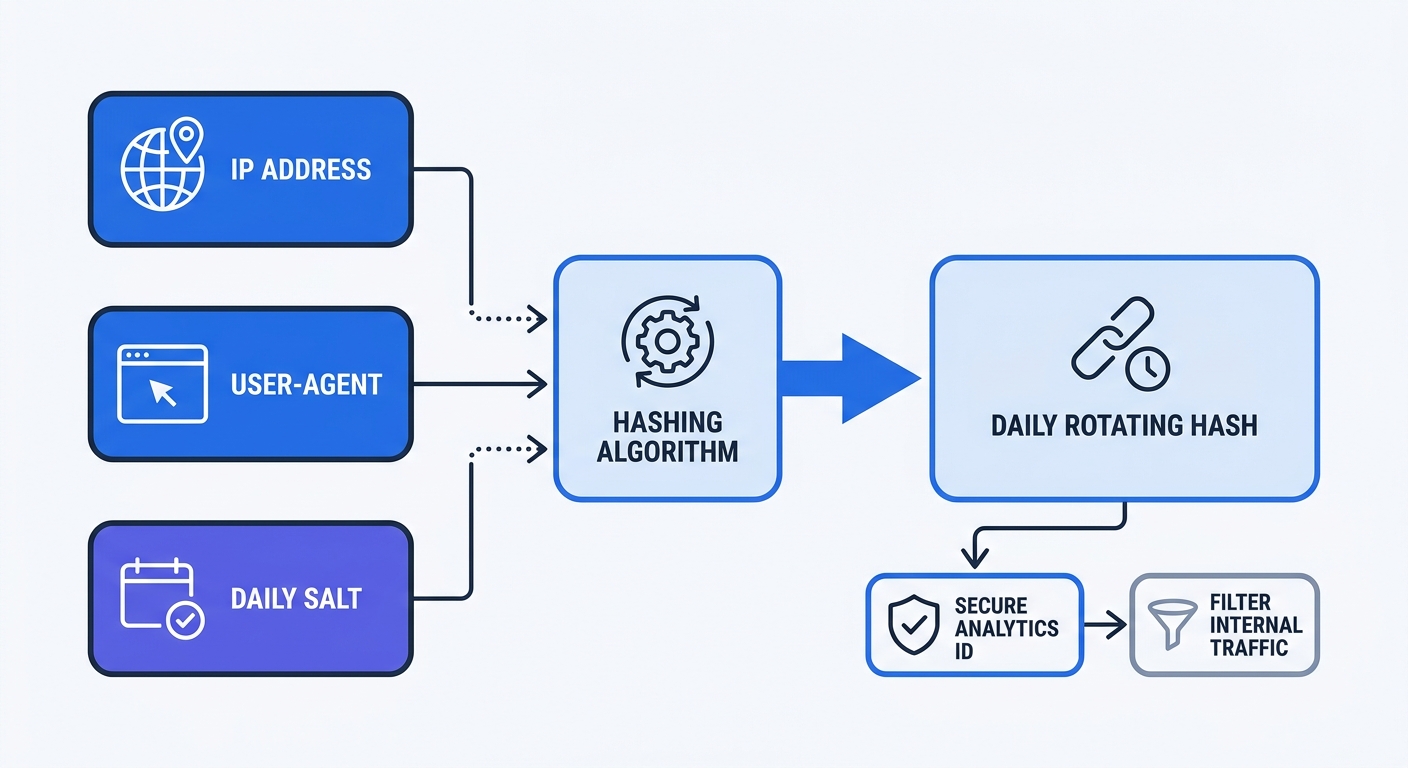
Swetrix uses a daily rotating hash instead of cookies by combining a daily random salt, the visitor's IP address, and their User-Agent string to generate a secure hash. This mechanism identifies distinct sessions without storing personal data on the device or relying on persistent identifiers.
Because this method operates independently of consent cookies, you capture your entire traffic baseline based on legitimate interest. This complete data capture makes server-side filtering mandatory, as you want to see every real user while dropping internal data. Combining cookieless event tracking with a proxy exclusion rule solves this: the proxy drops the internal VPN traffic, and the analytics platform securely hashes the remaining legitimate visitors.
Best Practices for Clean Analytics Data
Maintaining a Raw Data View
Filtering modifies your historical record permanently, meaning once you drop an internal session, you cannot recover it. For this reason, you should never apply filters to your only analytics workspace, and must instead maintain one completely unfiltered raw data view.
Create a primary project in your analytics platform labeled "Marketing Dashboard" and a secondary project labeled "Raw Server Traffic". Apply all your internal exclusion rules, URL parameter blocks, and proxy drops to the marketing view while leaving the raw view completely open.
Use the raw view to monitor total server load, diagnose traffic spikes, and verify that your internal team can access the site. When your web hosting provider reports 50,000 requests but your raw view only shows 10,000, you have a fundamental tracking failure. Relying solely on a filtered marketing view hides whether the discrepancy comes from your filters or a broken script.
Setting Up Developer Data Layers
Developers need to test analytics implementations to verify that a button click fires a specific custom event or that an e-commerce purchase logs revenue correctly. Testing these actions on a live site pollutes the marketing data, but blocking their traffic entirely prevents them from verifying their code works.
Solve this by setting up a developer data layer through a tag manager or a custom tracking script to evaluate the environment. If the website loads on a staging server (staging.yourdomain.com) or runs on a local machine (localhost), configure the script to change the analytics project ID dynamically.
Configure your tracking snippet to evaluate window.location.hostname and route all staging and local traffic to a dedicated "QA Testing" project in Swetrix. This setup allows your engineering team to click buttons, fire test events, and watch the real-time dashboard update without touching the production metrics, ensuring your marketers get clean data and your developers get immediate feedback.
Clean analytics data starts with a platform designed for modern privacy standards. Swetrix provides cookieless tracking, custom event attribution, and native support for complex traffic filtering setups without storing PII. Start capturing accurate, untainted metrics today with a 14-day free trial.