- Date
Browser Tracking Protection Features Explained: A Complete Guide
 Andrii Romasiun
A visitor clicks a Facebook ad on their iPhone during a morning commute. That evening, they open their laptop, search your brand name, and complete a purchase. Both interactions generated the sale. Default analytics platforms credit the search engine and ignore the social media ad.
Client-side measurement scripts break when they encounter modern browser safeguards. Marketers lose visibility into the customer journey. Revenue attribution fails. Marketers who get browser tracking protection features explained can identify why data dashboards show sudden traffic drops and inflated new user metrics.
Safari, Firefox, and Brave intercept tracking scripts to enforce user privacy. These browsers account for up to a quarter of all global website traffic. If your analytics stack relies on persistent cookies and third-party JavaScript, a massive segment of your audience leaves no trace.
Swetrix offers a privacy-by-design alternative. Marketers bypass tracking restrictions by abandoning invasive user profiling. This approach measures aggregate traffic patterns, keeps data intact, and respects consumer privacy boundaries.
The New Era of Default Data Privacy
Browser developers compete on privacy features. Standard configurations prioritize device anonymity over marketing visibility.
The Rise of Tracker Blocking
Users do not wait for legislation to protect their web activity. Analysts at ElectroIQ report that 63.7% of global web users block trackers by default, though this rate spikes higher in tech-savvy B2B industries. Built-in browser shields and third-party extensions intercept measurement requests before they leave the device.
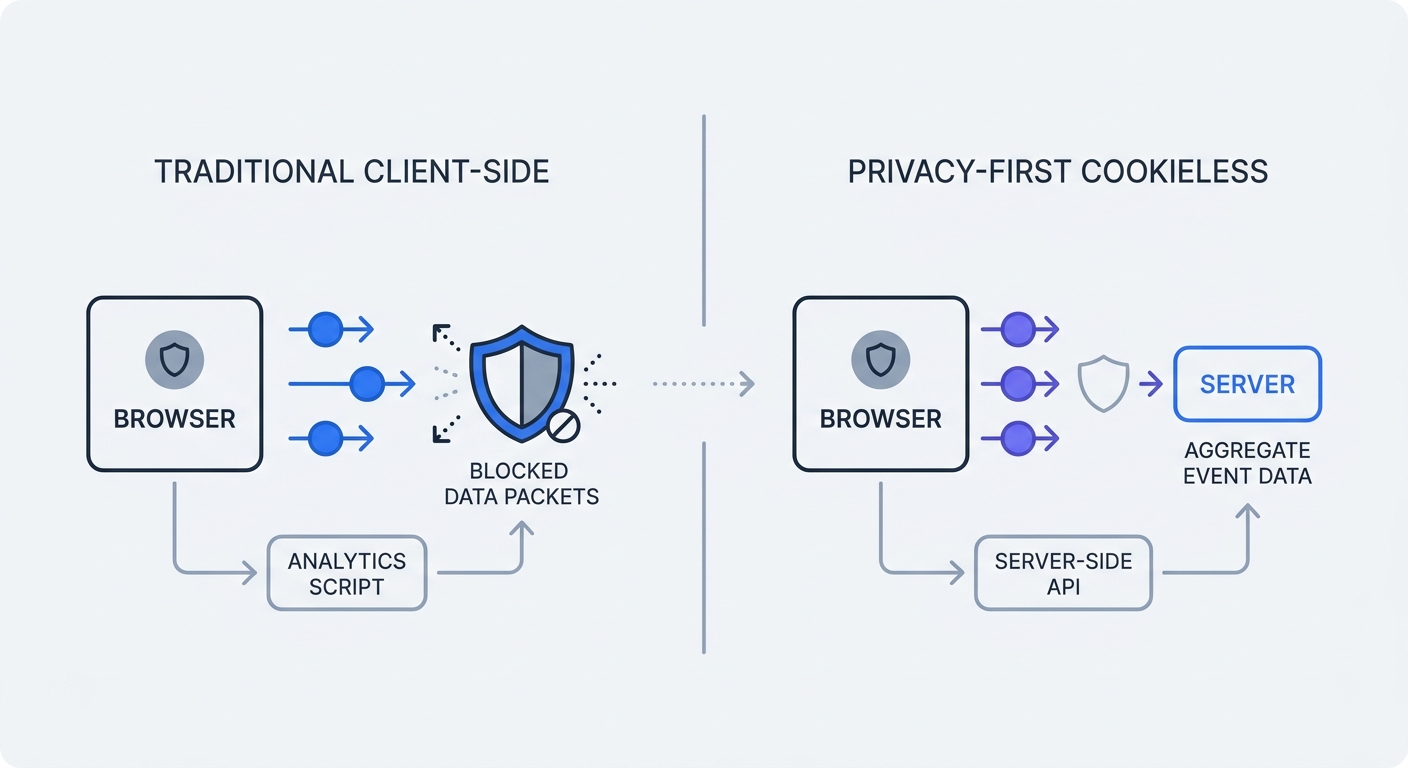
Analytics platforms built around individual user tracking suffer data degradation. The script loads, attempts to drop a cookie, and hits a firewall. The browser drops the connection. Your dashboard registers a zero-second session or fails to record the visit.
Audit your analytics payload by opening your website network tab. Filter the requests for your tracking vendor. If the status column shows blocked requests when you activate standard ad blockers, your current setup leaks data.
The Failure of Traditional Analytics
Legacy tracking depends on a specific sequence. A script generates a unique identifier, stores it in the browser as a cookie, and references that identifier every time the user returns. This cross-site tracking method powers behavioral profiling and long-term attribution.
Browsers target this mechanism. They delete the cookie, strip the identifier, or block the script from loading.
Traditional platforms attempt to compensate with complex machine learning models. These models guess the missing data to fill reporting gaps. Marketers make budget decisions based on algorithmic assumptions instead of recorded events.
Switching to a cookieless framework resolves the data loss. Systems designed around aggregate session metrics operate unimpeded within tight privacy constraints.
Core Browser Tracking Protection Features Explained
Every major browser engine implements different technical barriers. Understand their specific mechanics to adapt your measurement strategy.
Apple Safari: ITP and Link Tracking Protection
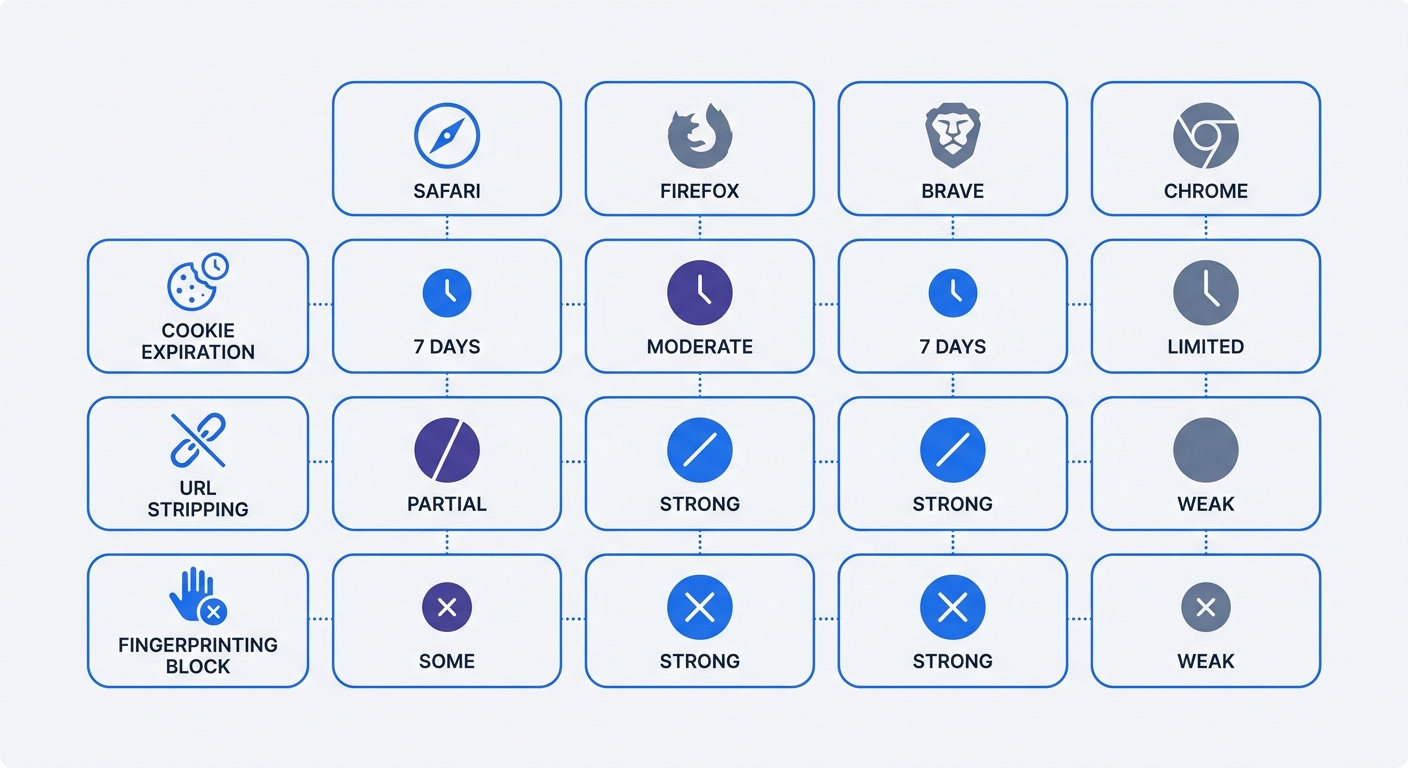
Apple controls the iOS ecosystem. All mobile browsers on iPhones, including Google Chrome, run on Apple's WebKit engine. This mandate extends Safari's Intelligent Tracking Prevention (ITP) across 27% of all mobile web traffic.
Apple imposes aggressive expiration limits on client-side cookies through ITP. Standard analytics cookies expire after a maximum of seven days. If a user clicks a URL containing known ad identifiers like gclid or fbclid, Safari restricts the cookie lifespan to 24 hours. A prospect who clicks an ad on Monday and buys on Wednesday registers as a new visitor. The ad platform receives zero credit.
Apple compounded this issue with Link Tracking Protection (LTP). In Safari Private Browsing, Apple Mail, and Messages, the operating system intercepts the URL before the page loads. The system identifies proprietary tracking parameters and deletes them.
Apple introduced Advanced Fingerprinting Protection in Safari 26 to limit the system hardware data shared with websites. Screen resolution, system fonts, and graphics card details return generic values.
Check the referral sources for your iOS traffic. If direct traffic spikes while organic social or paid search drops on mobile devices, ITP and LTP are altering your data flow.
Firefox (ETP) and Brave: Fingerprinting Defense
Mozilla Firefox and Brave take a strict, list-based approach to privacy.
Mozilla relies on Enhanced Tracking Protection (ETP) for Firefox. ETP isolates cookies within specific site containers. A tracking script cannot read a cookie set by another website. Ad platforms try to bypass this by using bounce tracking. They force the user through an invisible tracking domain to read a first-party cookie before loading the destination page. Firefox version 145 implemented stateless bounce tracking mitigations to block these redirects.
Brave utilizes an aggressive shield system. The browser blocks all recognized third-party tracking scripts at the network layer. The analytics code fails to execute. Brave also randomizes WebGL and Canvas graphics rendering. When a tracker attempts to identify the device by asking the browser to draw a hidden shape, Brave adds invisible mathematical noise to the output. Every session appears to come from a different device.
Test your website measurement in Brave by setting the shields to aggressive. Click through your conversion funnel. If your analytics platform records zero pageviews, your business operates blind to this user segment.
Google Chrome: The Third-Party Cookie Reversal
Google spent years planning to deprecate third-party cookies. Marketers rebuilt entire tracking architectures in anticipation of a cookieless Chrome environment. In April 2025, Google reversed course.
Chrome retains third-party cookies. The browser handles user choice through existing browser settings instead of a mandatory technical block. Google shifted its privacy development focus to strengthening Incognito mode.
This reversal creates a bifurcated measurement environment. Chrome desktop traffic maintains traditional tracking capabilities. Safari, Firefox, and mobile traffic operate under strict privacy rules.
Isolate browser data in reporting tools. Evaluate conversion windows for Chrome users separate from Safari users. Blending these cohorts hides the technical limitations impacting Apple traffic.
The Business Impact: Lost Data and Attribution Black Holes
Technical tracking restrictions waste ad spend for digital marketing campaigns. Operating without data leads to misallocated budgets.
Fixing iOS Traffic Drop-Offs
Marketers reviewing campaign reports see steep drop-offs in Apple device traffic. Users continue visiting the site. The tracking mechanisms fail to label these visits.
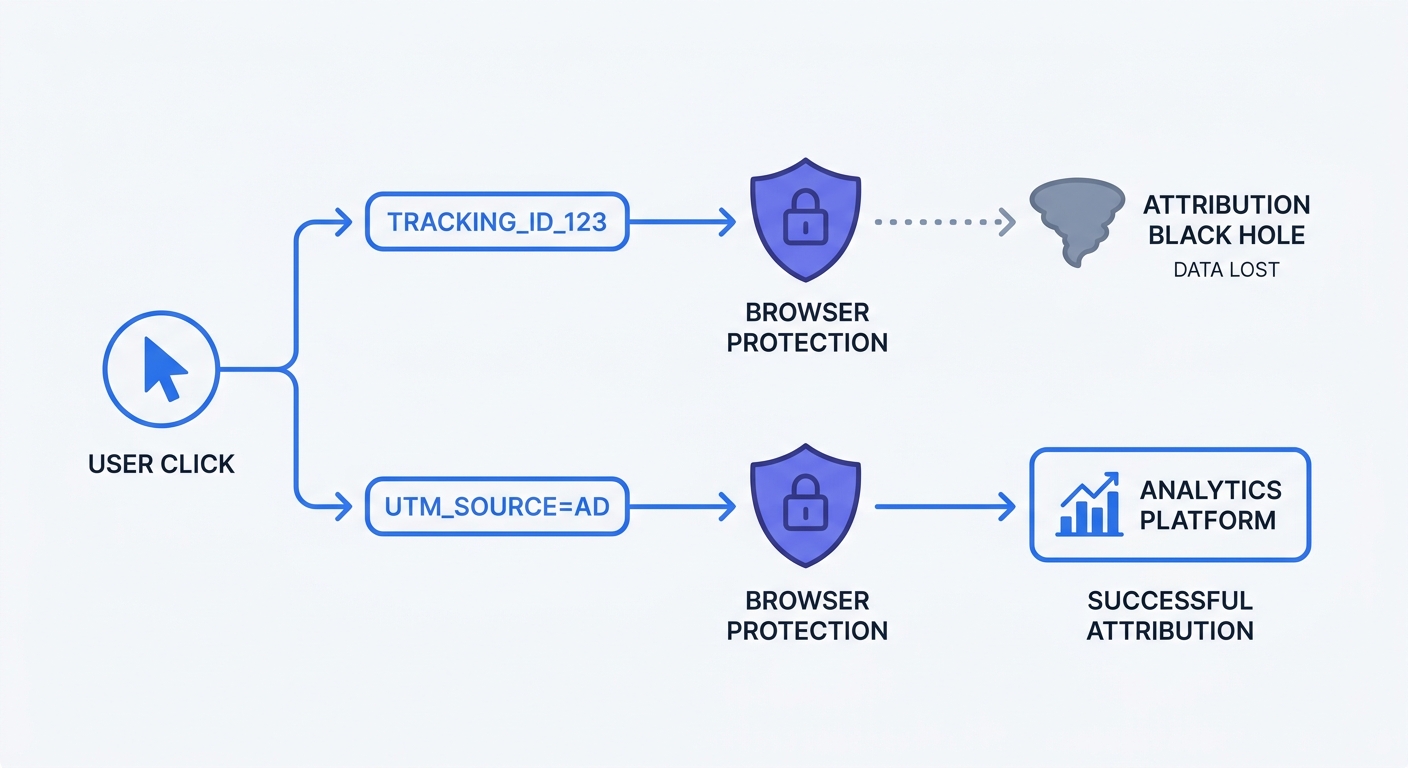
When Link Tracking Protection strips a Facebook click identifier from an Apple Mail link, the destination website loses the context of the visit. The traffic falls into the generic direct traffic bucket. Social media managers struggle to prove the return on investment for their content. Paid media buyers pause profitable campaigns because they see zero recorded sales in the dashboard.
Compare your platform analytics to your server logs. Server logs record every request made to your hosting infrastructure. If server requests remain stable but client-side analytics show a 20% decline, browser protections are the culprit.
The Death of Customer Lifetime Value (LTV) Tracking
Browser tracking protections destroy long-term behavioral mapping. Calculating Customer Lifetime Value requires recognizing the same user across months or years of interactions.
The 7-day cookie limit in Safari forces a measurement reset. If a customer buys a subscription in January and returns in March to upgrade, legacy analytics tools record two distinct, unrelated users. The platform inflates your total user count while driving down your average revenue per user metric.
Stop optimizing campaigns for 30-day conversion windows. Shift your attribution modeling to immediate, single-session outcomes, and evaluate landing page performance based on same-day conversion rates.
How Swetrix Solves the Browser Tracking Problem
Fixing broken analytics requires abandoning the legacy cross-site tracking model. Swetrix provides a modern architecture built for current privacy constraints.
Cookieless Analytics by Design
Swetrix operates without persistent tracking cookies. The platform uses short-lived, anonymized hashes to measure pageviews, session duration, and custom events.
This technical approach bypasses browser penalties. Safari ITP ignores Swetrix because the script does not attempt to store persistent data in the local browser environment. Brave allows the requests because Swetrix does not share data with advertising networks or participate in cross-site behavioral profiling.
Marketers receive accurate, real-time traffic data without violating user trust. Swetrix Cloud pricing starts at $19 per month for 100,000 events. Customers gain enterprise-grade reporting, detailed performance monitoring, and complete data ownership.
Aligning with Consumer Privacy and GDPR
Consumer sentiment aligns with technical browser restrictions. Researchers in a Cisco benchmark study note that 94% of organizations say their customers will not buy from them if their data is not properly protected. Trust impacts conversion rates.
European GDPR and ePrivacy regulations require explicit user consent before setting tracking cookies. Managing cookie banners disrupts the user experience and degrades site performance.
Swetrix requires no cookie banner. The platform anonymizes IP addresses at the edge network before processing. No personally identifiable information touches the database. Companies maintain GDPR compliance by default.
Remove invasive analytics tools from your codebase and replace them with Swetrix. Page load speeds improve, legal liability drops, and traffic data remains intact.
Actionable Strategies to Future-Proof Your Measurement
You control how your infrastructure responds to tracking restrictions. Implement these architectural changes to secure your data pipeline.
Standardize Your UTM Taxonomy
Apple Link Tracking Protection targets proprietary, opaque micro-parameters. The system deletes identifiers like gclid, fbclid, and twclid.
Standard macro-parameters survive. Apple permits the traditional utm_source, utm_medium, and utm_campaign tags. Marketers must return to explicit, manual link tagging to maintain visibility.
Establish a strict naming convention for all outbound links.
- Open a shared spreadsheet for your marketing team.
- Define lowercase, underscore-separated values for your primary traffic sources.
- Require all team members to append
utm_sourceandutm_mediumto every campaign URL. - Use the Swetrix UTM Generator to ensure correct formatting.
Consistent tagging forces the browser to pass the traffic source in the URL string. This secures baseline attribution regardless of client-side cookie limitations.
Shift to Server-Side Tagging
Client-side scripts run in a hostile environment. The user's browser controls the execution and blocks external requests. Server-side tagging shifts the measurement process to a secure, first-party environment.
Configure a custom tracking domain that matches your primary website. Map analytics.yourcompany.com to your analytics infrastructure using a DNS CNAME record.
When a user visits the site, the measurement request routes through a custom subdomain. Network-level ad blockers evaluate the request as first-party traffic and permit the connection. The server processes the data, removes sensitive identifiers, and forwards the clean event to the analytics dashboard.
This setup requires technical configuration. Access the domain registrar and create the required DNS records to point the custom subdomain to the Swetrix servers. This single configuration change recovers blocked traffic.
Focus on Aggregate Event-Based Tracking
Individual user journeys lack reliable data. Tracking a specific person across multiple devices, browsers, and weeks yields broken data chains.
Transition your reporting strategy to aggregate event tracking. Measure how cohorts interact with specific page elements. Track the volume of button clicks, form submissions, and video plays across the entire audience.
Define success by page performance. If 1,000 users load a checkout page and 400 complete the purchase, the page holds a 40% conversion rate. You do not need to know the individual identity of those 400 users to validate the page design.
Configure custom events in the Swetrix dashboard to target critical user actions. Monitor the aggregate trend lines week over week. When marketing teams optimize for total event volume instead of individual tracking paths, browser privacy features stop impacting decision-making capabilities.
Recover missing traffic data and respect user privacy. Start a 14-day free trial at Swetrix. Build a resilient, cookieless analytics stack that thrives in the modern web environment.