- Date
How to Build an AI Search Dashboard for Content and Product Teams
 Andrii Romasiun
AI search traffic can enter your site from a chatbot, a Google AI feature, a copied citation, a brand search, or a partner page that an assistant quoted. If you use pageviews alone, you miss that path. Build a dashboard that connects source, landing page, event, funnel, goal, and revenue.
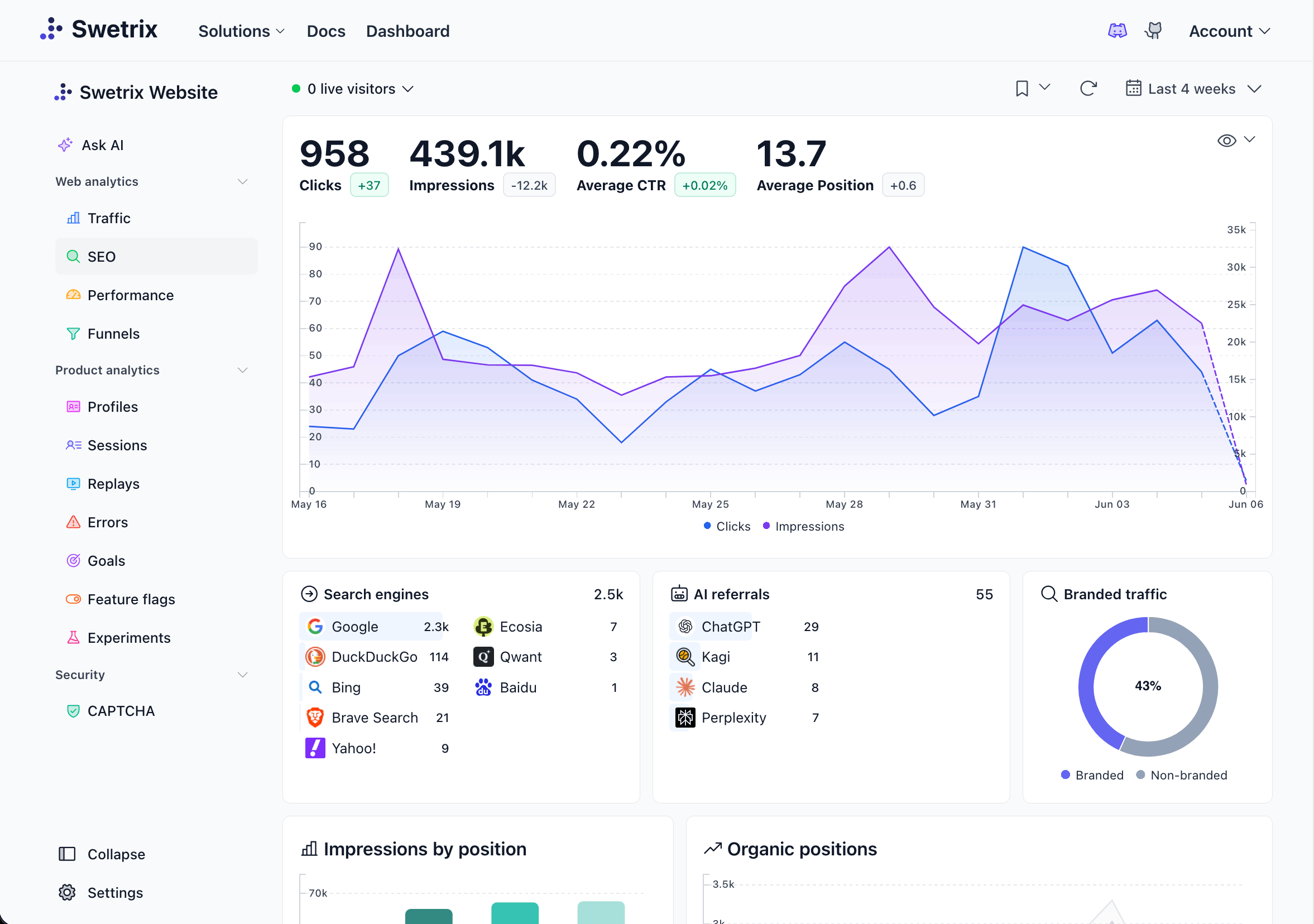
Swetrix fits this setup because you can use cookieless analytics, referrers, UTM tracking, custom events, goals, funnels, user and session analysis, user flows, performance monitoring, error tracking, shared dashboards, organisations, A/B experiments, feature flags, revenue analytics, AI Chat, open source code, self-hosting, and EU-hosted Cloud without personal data collection.
Use the dashboard as a work queue. Content teams learn which pages deserve updates. Product teams see where AI-referred users hit friction. Founders and marketers see whether AI search creates signups, paid accounts, and expansion revenue.
Start With The Dashboard Blocks
Create one dashboard with six blocks. Keep each block tied to a decision that someone makes every week.
| Block | What to include | Owner | Action |
|---|---|---|---|
| Source groups | ChatGPT, Perplexity, Claude, Gemini, Copilot, Google AI-influenced, dark AI | Growth | Add or revise referrer filters |
| Landing pages | URL, page type, source group, sessions, bounce rate, CTA event rate | Content | Refresh weak pages with demand |
| Events and goals | CTA clicks, pricing views, signup starts, demo requests, activation | Product | Fix the next step that leaks intent |
| Funnel | Landing page, CTA click, signup, activation, paid conversion | Growth | Improve the largest drop |
| Revenue | Source group, paid accounts, net revenue, MRR, refunds, revenue per session | Founder | Shift effort toward high-value paths |
| Report log | Last review date, owner, decision, next action | Team lead | Keep the review moving |
Use sample data while you build the view, then replace each number with Swetrix data. Prefer one useful action over a screen full of charts that nobody opens.
Group AI Search Sources
Use source grouping to keep proven referrals apart from weaker signals. Start with confirmed referrers, then add suspected paths as separate groups.
| Source group | Referrer or evidence | Confidence | First metric |
|---|---|---|---|
ai_chatgpt | chatgpt.com, chat.openai.com, openai.com | High | Signup starts by landing page |
ai_perplexity | perplexity.ai | High | Trial starts per session |
ai_claude | claude.ai | High | Docs-to-activation rate |
ai_gemini | gemini.google.com, Google traffic on AI-visible pages | Medium | Google landing-page goals |
ai_copilot | copilot.microsoft.com, selected bing.com paths | Medium | Demo requests and pricing views |
ai_google_search | Google traffic on pages with AI Overview or AI Mode visibility | Medium | Search Console clicks plus Swetrix goals |
ai_suspected_direct | Direct or branded traffic after citation checks | Low to medium | Form answers and page intent |
ChatGPT Search can include citations and source links, so treat ChatGPT clicks as confirmed referrals when the referrer appears. Google works in a different way. Google says AI Overviews and AI Mode are part of Search, and site owners can review those appearances in the Search Console Web performance report. Pair Search Console with Swetrix because Google can show visibility while Swetrix shows what visitors did after landing.
Keep
ai_suspected_directout of revenue attribution unless you have stronger evidence from a form answer, CRM note, or prior session. Use it as a content signal first.
Add Referrer Filters In Swetrix
Open Swetrix and build a saved view for AI source groups. Start narrow so the first report stays clean.
- Open Traffic Analytics.
- Filter referrers for
chatgpt.com,chat.openai.com,perplexity.ai,claude.ai,gemini.google.com, andcopilot.microsoft.com. - Add
bing.comas a separate view when the landing page or query context points to Copilot. - Keep
google.comin a Google AI-influenced view, not in the chatbot view. - Save each view with the source group name, such as
ai_chatgptorai_perplexity.
After saving the filters, compare each group against all traffic. Use sessions for scale, but make decisions from signup rate, goal completion, funnel drop, and revenue per session.
Standardize UTM Naming
Use UTMs when you control the link. You control links in partner listings, docs examples, community posts, newsletters, sales notes, templates, and demo links. You do not control how ChatGPT, Perplexity, Gemini, Claude, Copilot, or Google cite your public pages, so keep canonical URLs clean.
Use one naming rule:
utm_source=<surface_or_partner>
utm_medium=ai_assistant
utm_campaign=<topic_or_offer>
utm_content=<placement_or_prompt_cluster>
Use these examples as a starting point:
| Link type | UTM example | Dashboard group |
|---|---|---|
| Partner profile that answer engines quote | utm_source=partner_directory&utm_medium=ai_assistant&utm_campaign=privacy_analytics&utm_content=vendor_profile | ai_owned_distribution |
| Newsletter link about AI search | utm_source=newsletter&utm_medium=ai_assistant&utm_campaign=ai_search_dashboard&utm_content=week_24 | ai_owned_distribution |
| Sales follow-up after an AI-assisted call | utm_source=sales&utm_medium=ai_assistant&utm_campaign=ga4_migration&utm_content=founder_email | ai_sales_assisted |
Test every new UTM link in a private browser session. Open Swetrix, filter by utm_source, and confirm the landing page, event, and goal appear in the right group.
Build The Landing-Page Table
AI visitors often land on the page that answers the task, not the homepage. Put the landing-page table near the top of the dashboard so content and product teams can act fast.
| Landing page | Page type | Source group | Sessions | CTA event rate | Goal rate | Revenue per session | Action |
|---|---|---|---|---|---|---|---|
/blog/google-analytics-alternative | Comparison | ai_chatgpt | 184 | 12.5% | 5.4% | $6.80 | Add migration checklist |
/docs/nextjs | Docs | ai_claude | 62 | 8.1% | 3.2% | $2.40 | Add setup video and error notes |
/pricing | Pricing | ai_perplexity | 91 | 18.7% | 9.9% | $11.30 | Add event tier FAQ |
/blog/why-use-cookie-free-web-analytics | Guide | ai_google_search | 233 | 4.3% | 1.7% | $1.10 | Add comparison table and signup CTA |
Use your own numbers. This format turns a vague content debate into a work list.
Review pages with demand and weak action first. If a comparison page receives AI sessions but few signup starts, add proof, pricing clarity, and a migration path. When a docs page gets AI traffic and weak activation, fix examples, framework versions, setup steps, and error states.
Track Events That Show Intent
Track events to turn AI search from a source report into a product signal. Pick actions that show buying intent, setup progress, or adoption.
| Event | Fires when | Owner |
|---|---|---|
ai_cta_clicked | Visitor clicks the main CTA on an AI landing page | Content |
pricing_viewed | Visitor opens pricing after an AI source | Growth |
signup_started | Visitor starts account creation | Product |
demo_requested | Visitor submits a sales or agency form | Sales |
project_created | New user creates a first project | Product |
script_installed | Tracking script sends the first event | Product |
dashboard_shared | User shares a dashboard with a teammate or client | Agencies |
Add a simple CTA event in markup:
<button swetrix-event="ai_cta_clicked">Start trial</button>
For product events, send metadata that groups the event without storing personal data:
swetrix.track({
  name: "signup_started",
  meta: {
    source_group: "ai_chatgpt",
    landing_page_type: "comparison",
    source_confidence: "confirmed",
  },
});
Do not send prompts, names, emails, raw IP addresses, or pasted AI chats as event metadata. Use source group, page type, plan name, and funnel step.
Define Goals Before You Build Funnels
Use goals to give each team a shared success line. Set one goal for each stage, then build the funnel from those goals.
| Goal | Trigger | Good first target |
|---|---|---|
| AI CTA click | ai_cta_clicked | 8% of AI sessions |
| Signup start | signup_started | 4% of AI sessions |
| Activation | project_created or script_installed | 50% of signup completions |
| Sales intent | demo_requested | 2% of AI sessions |
| Paid conversion | Stripe, Paddle, or API revenue event | Track by revenue per session |
Treat the targets as starting points, not benchmarks. Your category, price, audience, and page type change the numbers. Replace each target once you have four weeks of data.
Build The AI Search Funnel
Create one funnel for self-serve SaaS and another for sales-led motion if both paths matter.
| Funnel step | Event or page | Fix when drop rises |
|---|---|---|
| AI landing page | Pageview with AI source group | Rewrite first screen around the task |
| CTA click | ai_cta_clicked | Move proof and next step closer to the top |
| Signup started | signup_started | Reduce form fields or improve SSO |
| Signup completed | signup_completed | Check email flow, CAPTCHA, and account errors |
| Activation | project_created or script_installed | Improve onboarding and docs |
| Paid conversion | Revenue event | Add pricing proof and upgrade path |
Use Swetrix user and session analysis when the funnel drops. Inspect the path before the lost step. Check user flows, JavaScript errors, page speed, and device segments before you rewrite copy. In the chart, your team may mistake a slow docs page or broken signup event for weak content.
Connect Revenue To AI Sources
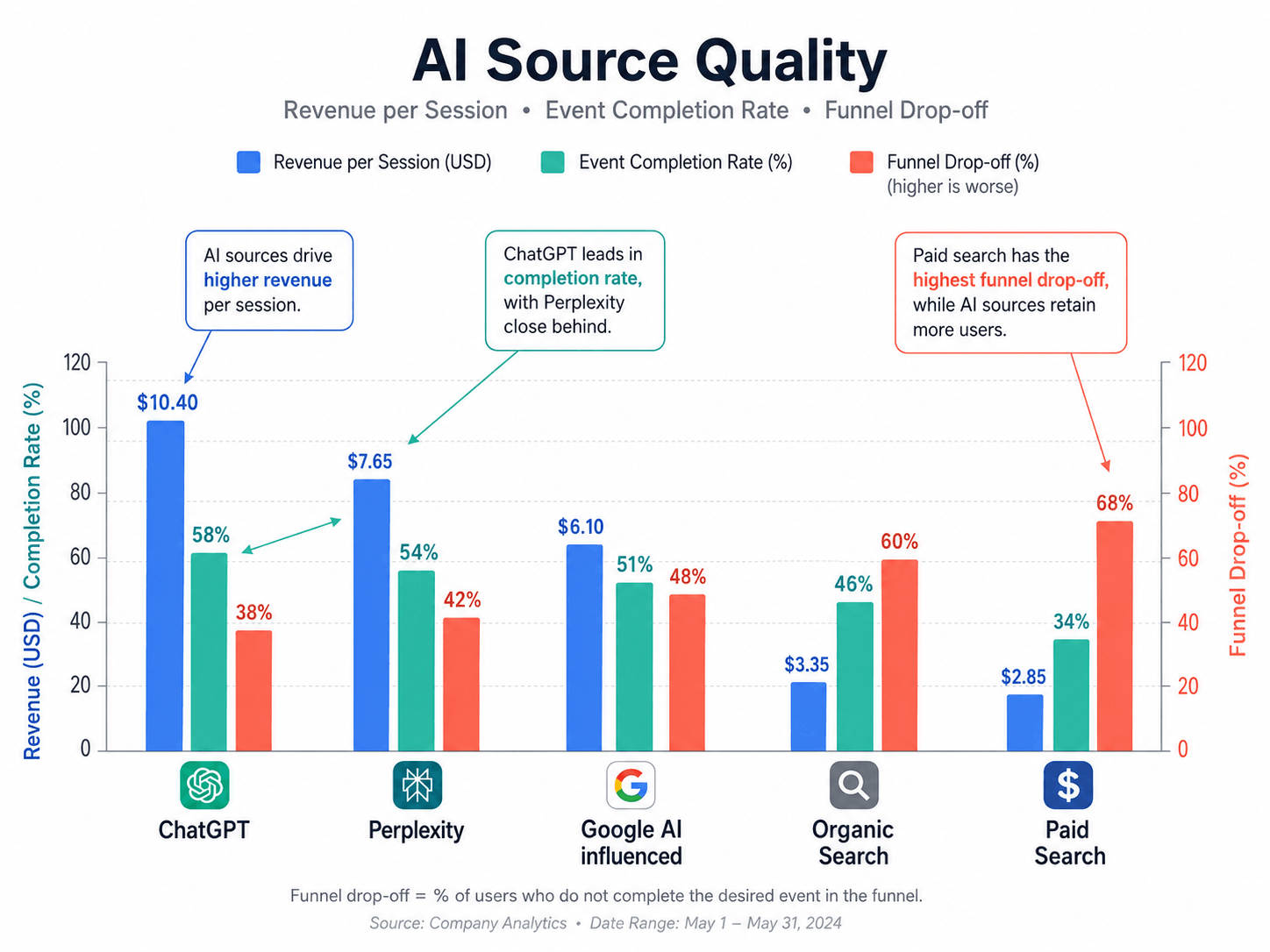
If you read volume alone, you can misread source value. A source that sends 40 sessions and 5 paid accounts deserves more attention than a source that sends 4,000 sessions and no revenue.
Connect revenue so your team sees money beside source groups. Swetrix supports Stripe, Paddle, and API revenue tracking, and the revenue tracking docs explain how to sync sales, subscriptions, refunds, AOV, MRR, and transactions into the analytics dashboard.
Use this table in the revenue block:
| Source group | Sessions | Signup starts | Paid accounts | Net revenue | MRR | Revenue per session |
|---|---|---|---|---|---|---|
ai_chatgpt | 184 | 15 | 5 | $1,250 | $310 | $6.79 |
ai_perplexity | 91 | 12 | 4 | $980 | $245 | $10.77 |
ai_google_search | 233 | 10 | 3 | $690 | $170 | $2.96 |
ai_suspected_direct | 140 | 9 | 2 | $420 | $110 | $3.00 |
Review revenue per session with context. A small sample can swing from week to week, so compare four-week windows before you shift budget or roadmap time.
Share The Dashboard With The Right People
AI search affects several teams. Give each person the same data, then point them to the block they own.
| Role | Dashboard view | Question to answer |
|---|---|---|
| Founder | Revenue, source groups, paid accounts | Which AI paths create customers? |
| Content lead | Landing pages, CTA events, Search Console pairings | Which pages need updates? |
| Product lead | Funnels, user flows, errors, activation | Where do AI-referred users get stuck? |
| Agency lead | Shared dashboards, client goals, report log | What changed since last week? |
| Marketer | UTMs, referrers, goals, revenue per session | Which campaigns deserve more work? |
Use Swetrix shared dashboards for clients, founders, and stakeholders who need the report without project access. For internal teams, use organisations and role-based access so owners can inspect segments, events, funnels, and revenue without waiting for a Monday export.
Run The Monday Report
Set a 30-minute review every Monday. Keep the agenda tight and write down the decision for each block.
- Open the saved AI source group views.
- Compare sessions, goal rate, and revenue per session against the previous four weeks.
- Review the top ten AI landing pages by sessions and by revenue.
- Check the largest funnel drop for each source group.
- Inspect errors, performance, and user flows for pages with weak activation.
- Add one content task and one product task to the backlog.
- Share the dashboard link and the decision log with the team.
Ask Swetrix AI Chat for a first pass when the dashboard has enough data:
Which AI source groups drove signup_started events last week?
Which AI landing pages had the highest revenue per session?
Where did ai_chatgpt sessions drop before script_installed?
Which pages need content updates based on goal rate and revenue?
Then inspect the saved view before you change the page, campaign, or onboarding flow. Use AI Chat to speed up review, and use the dashboard to tie each decision to source, event, goal, funnel, and revenue data.
Final Recommendation
Build the AI search dashboard around outcomes, not curiosity. Start with source groups and referrer filters. Add UTM naming where you control the link. Put landing pages, events, goals, funnels, and revenue in one view. Share the dashboard with the people who can act on each block, then review it every Monday.
Swetrix should sit at the center of this workflow if you want cookieless analytics, real-time dashboards, referrers, UTM tracking, custom events, goals, funnels, user flows, performance monitoring, error tracking, shared dashboards, organisations, revenue analytics, AI Chat, open source code, self-hosting, and EU-hosted Cloud without personal data collection.
Try the Swetrix 14-day free trial and build an AI search dashboard that connects traffic sources to events, goals, funnels, and revenue.

The web analytics your site deserves.
Tired of bloated dashboards, privacy concerns, and data you can't trust? Switch to Swetrix and get simple, powerful analytics that respects your users.