- Date
Google Analytics Privacy Focused Alternatives: Complete 2026 Guide
 Andrii Romasiun
A Swedish company receives a €1 million fine for using Google Analytics. The violation: transferring user data to US servers where intelligence agencies can access it without a warrant. Seven European countries now classify Google Analytics as illegal under GDPR, and enforcement actions have generated €6.11 billion in penalties across 2,685 violations as of March 2026.
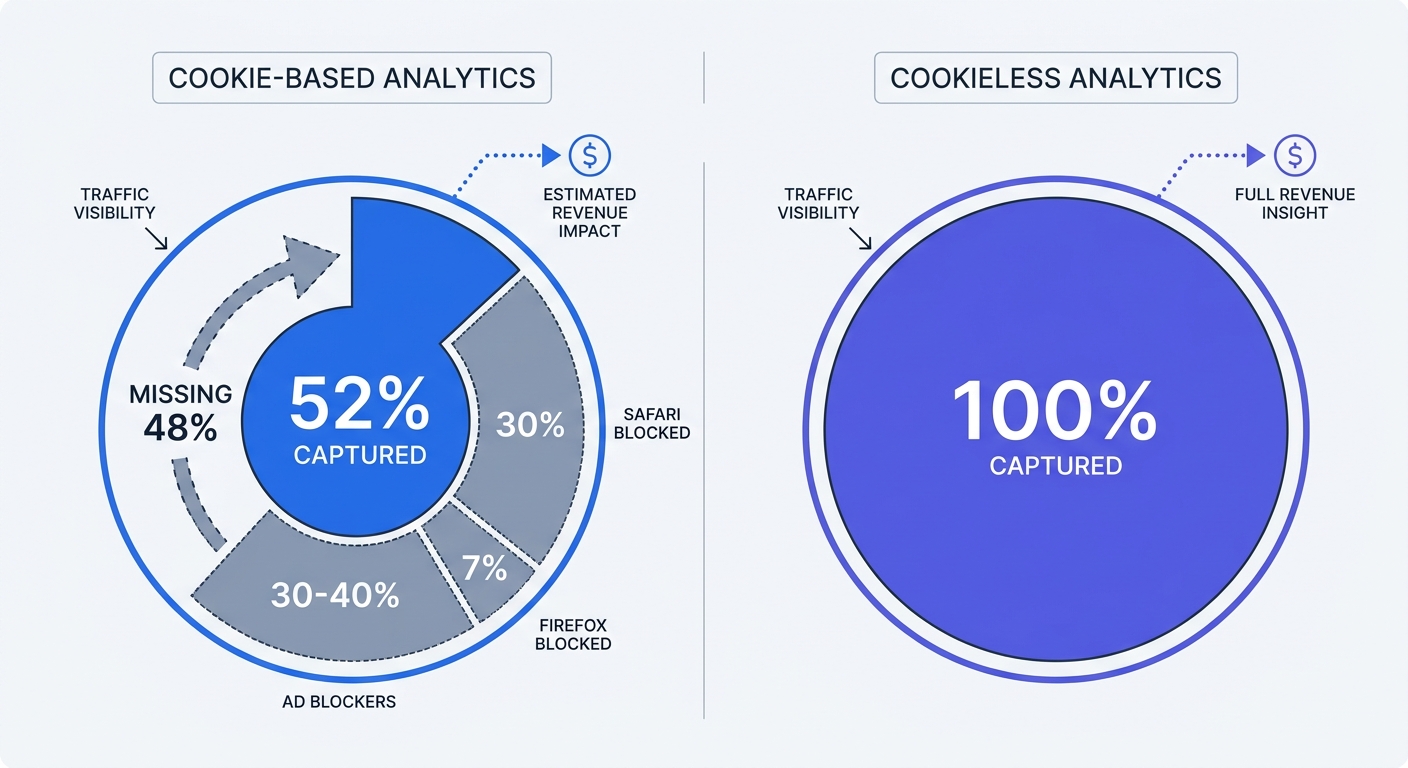
The legal risk is real, but the hidden cost runs deeper. Cookie-based analytics captures only 52% of your actual traffic. Safari blocks third-party cookies by default and holds 26% of desktop share plus 53% of mobile traffic in the US. Firefox adds another 7% of desktop users. Ad blockers strip tracking pixels from 30-40% of sessions before data reaches your dashboard. The other 48% of your visitors exist, browse, and convert—but vanish from your reports because they rejected a consent banner or run privacy tools.
Businesses switching to cookieless analytics report 40-50% more traffic than Google Analytics showed. That traffic was always there. Cookie-dependent tools couldn't see it.
Privacy-focused alternatives solve both problems. They comply with GDPR without consent banners, and they capture the full visitor count because they don't rely on cookies. Swetrix exemplifies this approach: a cookieless, EU-hosted analytics platform that reveals hidden traffic while keeping you off regulators' radar. Install the sub-1KB script, and your dashboard populates with real-time data from every visitor—no cookie prompts, no data transfers to US servers, no sampling or estimates.
Why Google Analytics Is Illegal in 7 European Countries
The Schrems II Ruling and GDPR Violations
Austria, France, Italy, Denmark, Finland, Norway, and Sweden have banned Google Analytics due to illegal data transfers to the United States. The 2020 Schrems II ruling invalidated the Privacy Shield framework that allowed EU-US data flows. European courts determined that US surveillance laws—FISA Section 702 and Executive Order 12333—permit intelligence agencies to access data from US companies without adequate judicial oversight.
Google operates as an "electronic communication service provider" under US law. This classification means the NSA or FBI can compel Google to disclose personal data collected from EU citizens. The company must comply with these orders and cannot inform affected users. GDPR Article 44 prohibits transferring personal data to countries without equivalent privacy protections, and US surveillance laws fail that test.
The Austrian Data Protection Authority ruled first in January 2022, followed by France's CNIL and Italy's Garante. Each decision reached the same conclusion: websites using Google Analytics enable illegal data exports because Google's US servers fall under American intelligence jurisdiction. The July 2023 EU-US Data Privacy Framework attempted to address these concerns, but privacy activist Max Schrems plans to challenge the new agreement before the Court of Justice of the European Union, arguing it violates the EU Charter of Fundamental Rights.
Real Fines: €6.7 Billion and Counting
GDPR enforcement has generated €6.11 billion in fines across 2,685 violations as of March 2026. Sweden issued the first significant Google Analytics-specific penalty of €1 million against telecom provider Tele2. Individual violations can reach €20 million or 4% of global annual revenue, whichever is higher.
These numbers represent reported enforcement actions. Thousands of companies receive warning letters and compliance orders that never appear in public databases. A French retailer might get 60 days to remove Google Analytics and submit proof of migration. A German SaaS company might face a formal investigation that costs €50,000 in legal fees even if no fine is issued.
Check your current setup. If your analytics platform transfers data to US servers, you're operating in a regulatory gray zone that's darkening every quarter. Data protection authorities prioritize high-traffic websites and companies that ignore initial warnings, but enforcement is expanding to mid-market businesses as regulators hire more staff.
The Hidden Cost: Missing 48% of Your Traffic
Traditional cookie-based analytics only captures 52% of actual traffic. The other 48% disappears because users reject consent banners, browse with Safari or Firefox, or run ad blockers that strip tracking pixels before data reaches your platform.
Safari and Firefox together represent 30% of global browser usage and block third-party cookies by default. Safari's Intelligent Tracking Prevention strips cookies after seven days, and Firefox's Enhanced Tracking Protection blocks known analytics domains. Chrome holds 65% market share, but Google's 2024 announcement introduced a user-choice model that lets users disable third-party cookies. Early data suggests 20-30% of Chrome users will opt out.
According to a February 2023 UK survey, 23% of respondents aged 45-54 reject cookies daily. Younger cohorts reject at higher rates. Consent banner rejection rates vary by industry—finance and healthcare see 40-50% rejection, e-commerce averages 30-35%, and media sites fall around 25-30%.
Run this test: install a cookieless analytics tool alongside Google Analytics for 30 days. Compare total pageviews. Most businesses discover 40-50% more traffic in the cookieless platform. That gap represents real visitors who browsed your site, read content, and converted—but never appeared in your Google Analytics reports because they declined tracking.
The revenue impact scales with traffic. A site with 100,000 monthly visitors in Google Analytics receives 150,000-180,000 actual visitors. If conversion rate is 2%, you're missing data on 1,000-1,600 conversions per month. Multiply that by average order value, and the hidden revenue becomes material.
How Privacy-Focused Analytics Works
Cookieless Tracking: Server-Side vs. Client-Side
Client-side tracking loads a JavaScript snippet in the user's browser. The script collects data—page URL, referrer, screen resolution, timestamp—and sends it to the analytics vendor's servers. Browser extensions and privacy tools intercept these requests and block them. Safari and Firefox classify analytics domains as trackers and refuse to load the scripts.
Server-side tracking routes data through your own infrastructure first. A visitor loads your page, triggering an event that hits your server. Your server processes the request, extracts relevant data, and forwards it to the analytics platform. Because the initial request goes to your domain, browsers don't classify it as third-party tracking. Ad blockers see a first-party request to your server and allow it.
Server-side methods capture 25-35% more conversions than client-side pixels. Meta's Conversions API and Google Enhanced Conversions both use server-side approaches to improve match rates when configured correctly, compared to pixel-only implementations.
Cookieless tracking eliminates the need for persistent identifiers stored in the browser. Platforms use ephemeral session IDs, hashed IP addresses, and referrer headers to group pageviews into sessions. A visitor arrives from Google, views three pages, and leaves. The analytics platform records three pageviews from the same session without storing a cookie or fingerprinting the device.
Swetrix uses this approach. The tracking script weighs less than 1KB—compared to Google Analytics' 45KB—and generates a temporary session identifier that expires when the user closes the browser. No cookies. No local storage. No fingerprinting. The platform aggregates data on EU servers and never transfers it to third-party services.
IP Anonymization and Data Minimization
Privacy-focused platforms implement IP anonymization by default. A visitor loads your page, and the analytics script captures their IP address to determine geographic location—country, region, city. The platform then hashes or truncates the IP address before storing it. Hashing applies a one-way cryptographic function that converts 192.168.1.1 into a3f7c8e2d1b9. Truncation removes the last octet, changing 192.168.1.1 to 192.168.1.0.
Both methods preserve geographic data while preventing identification of individual users. A hashed IP can't be reversed to reveal the original address. A truncated IP represents 256 possible addresses, making it impossible to pinpoint a specific device.
Data minimization means collecting only what you need to answer business questions. Google Analytics collects device IDs, user IDs, client IDs, cross-device graphs, and dozens of behavioral signals to build advertising profiles. Privacy-focused tools collect page URL, referrer, timestamp, country, device type, and browser. That's enough to answer "Which pages get the most traffic?" and "Where do visitors come from?" without building a surveillance apparatus.
France's CNIL has approved Matomo as one of the only web analytics tools that can collect data without tracking consent when configured with IP anonymization, no cookies, and data retention under 13 months (CNIL exemption: under 13 months when IP anonymization, no cookies, and no third-party sharing are in place). The CNIL's guidance establishes a legal framework: if your analytics tool doesn't identify individuals and doesn't share data with third parties, you can operate without consent banners.
Why You Don't Need Consent Banners
GDPR requires consent for processing personal data, but aggregate analytics data isn't personal data if it can't be linked to an individual. A pageview count for /pricing doesn't identify anyone. A referrer showing google.com doesn't reveal user identity. A session duration of 3 minutes and 42 seconds is a statistical measurement, not personal information.
Configuration determines whether you need consent. If your analytics platform stores cookies, tracks users across sessions, or transfers data to third-party services, you need consent. If it collects aggregate behavioral patterns without persistent identifiers, you don't.
Set up your privacy-focused tool with these parameters:
- Enable IP anonymization (hash or truncate before storage)
- Disable cookies and local storage
- Set data retention to 24 months maximum (general best practice; note that CNIL exemption requires under 13 months for consent-free operation)
- Host data on EU servers or your own infrastructure
- Block data transfers to third-party services
Update your privacy policy to document what you track, where you store it, and how long you retain it. List the specific data points: page URL, referrer, timestamp, country, device type, browser. Specify that you don't use cookies, don't track individuals across sessions, and don't share data with advertising networks.
Consult your legal counsel to confirm compliance in your jurisdiction, but the CNIL framework provides a template. Cookieless, first-party analytics with IP anonymization and data minimization qualifies as consent-free under GDPR Article 6(1)(f), which allows processing for legitimate interests when privacy impact is minimal.
Top 5 Privacy-Focused Google Analytics Alternatives
Swetrix: Cookieless Analytics That Captures Hidden Traffic
Swetrix reveals the 40-50% of traffic that cookie-based tools miss. The platform uses cookieless tracking with a sub-1KB script that loads faster than Google Analytics and doesn't trigger browser privacy protections. Data stays on EU servers, and the architecture requires zero consent banners because it collects aggregate behavioral patterns without identifying individuals.
Real-time dashboards update every second. Open the interface, and you see current visitors, active pages, traffic sources, and conversion events as they happen. No sampling. No estimates. Every visitor counts.
Campaign tracking works through UTM parameters and custom events. Tag your ad links with ?utm_source=facebook&utm_medium=cpc, and Swetrix attributes conversions to the correct campaign. Set up custom events to track form submissions, button clicks, video plays, or any user action. The event API accepts parameters, so you can pass revenue values and segment conversions by product category.
Performance monitoring and error tracking are built in. Swetrix measures page load time, time to first byte, and core web vitals for every pageview. If JavaScript errors occur, the platform captures the error message, stack trace, and affected URL. One dashboard shows traffic patterns, site performance, and technical issues.
Pricing starts at 100,000 events per month for $19/month or $190/year. Events include pageviews, custom events, and performance measurements. A typical marketing site with 30,000 monthly visitors generates 60,000-80,000 events. A SaaS dashboard with heavy interaction might hit 200,000 events at 50,000 monthly active users. Scale up to 10 million events per month for $149/month. Self-hosting is free and open source if you prefer to run Swetrix on your own infrastructure.
The platform offers a 14-day free trial with full feature access. Install the script, run it alongside Google Analytics for two weeks, and compare the traffic counts. Most businesses see 40-50% more visitors in Swetrix because cookieless tracking captures Safari users, Firefox users, and anyone who rejected your consent banner.
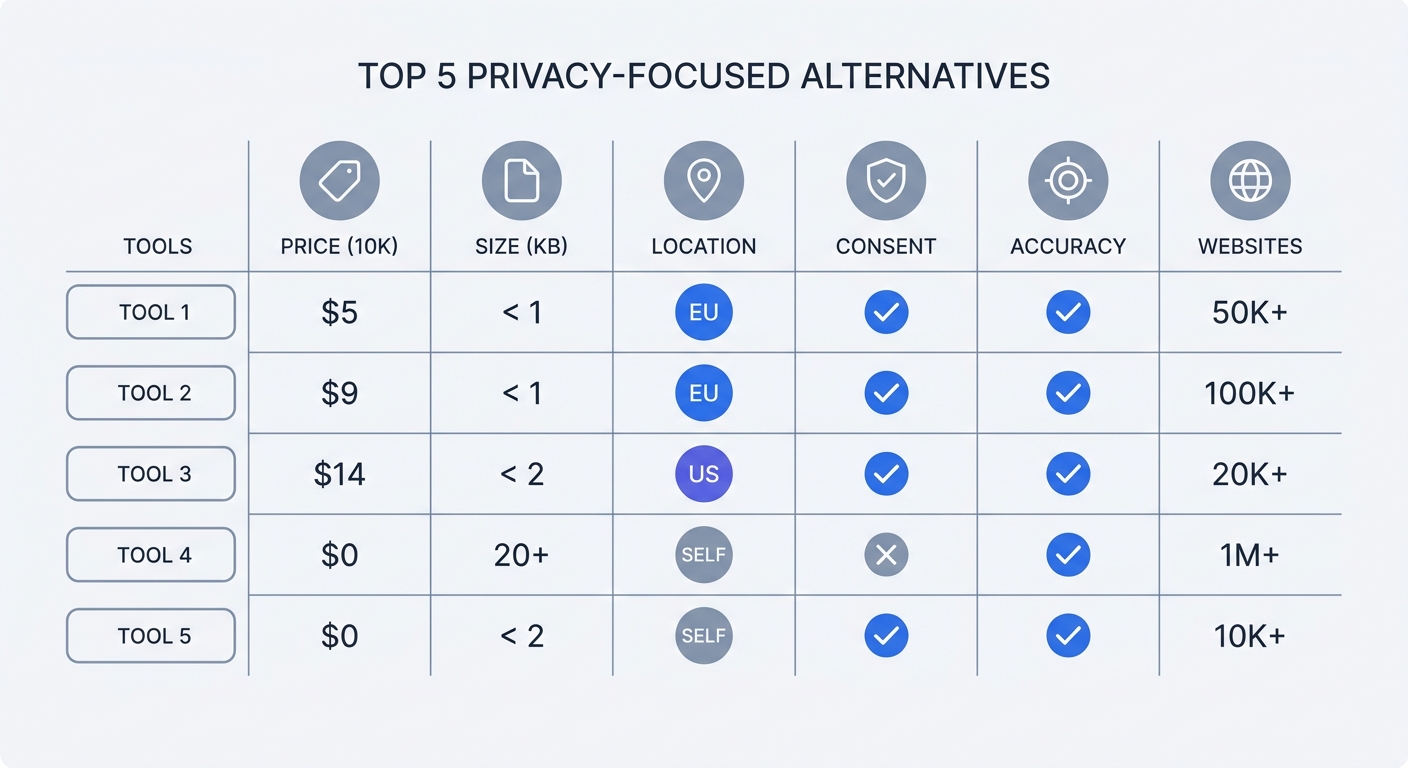
Plausible, Fathom, and Matomo Compared
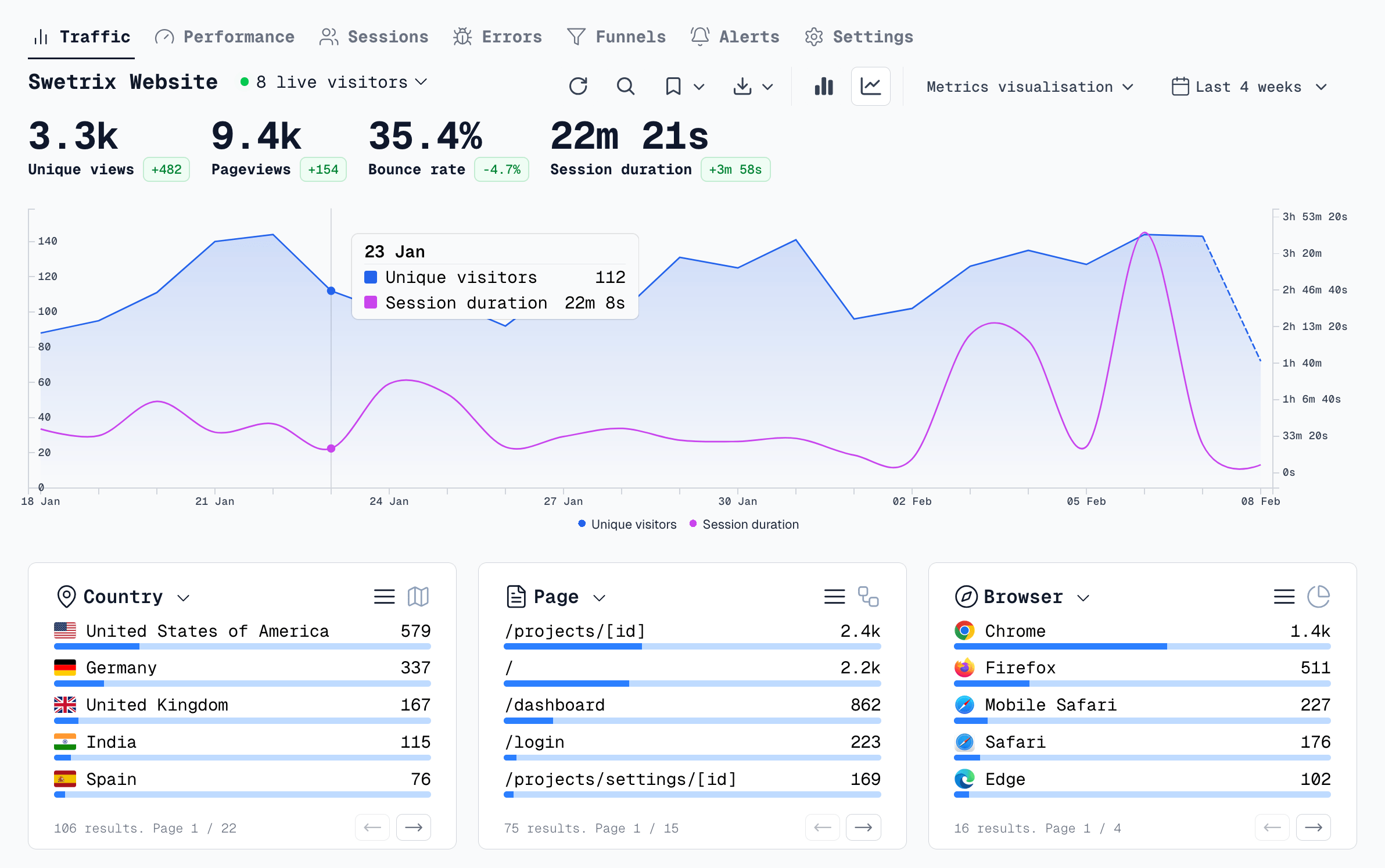
Plausible Analytics focuses on a simple website analytics dashboard. The dashboard shows pageviews, visitors, bounce rate, visit duration, and top pages in a single screen. No drill-down menus. No configuration complexity. Pricing starts at $9/month for 10,000 monthly pageviews, scaling to $69/month for 100,000 pageviews. Over 200,000 websites use Plausible. Data stays on EU servers, and the platform doesn't use cookies. The trade-off: limited event tracking and no built-in conversion funnels.
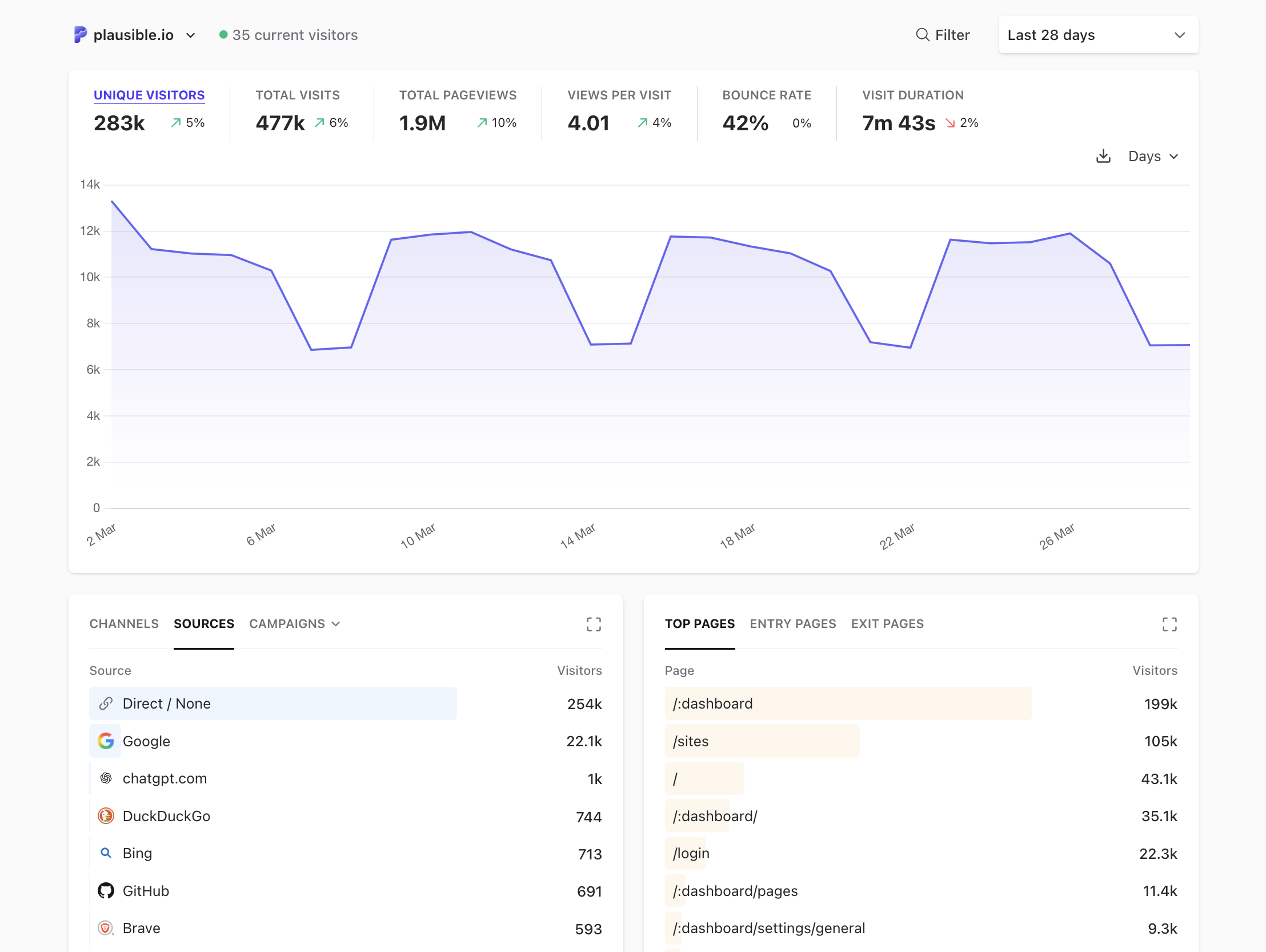
Fathom Analytics offers similar simplicity with pricing starting at $9/month. The interface shows traffic sources, popular pages, and goal completions. Fathom supports unlimited websites per account, making it cost-effective for agencies managing multiple clients. The platform provides email reports and Slack notifications when traffic spikes. Over 200,000 websites use Fathom. The limitation: basic event tracking and no real-time data.
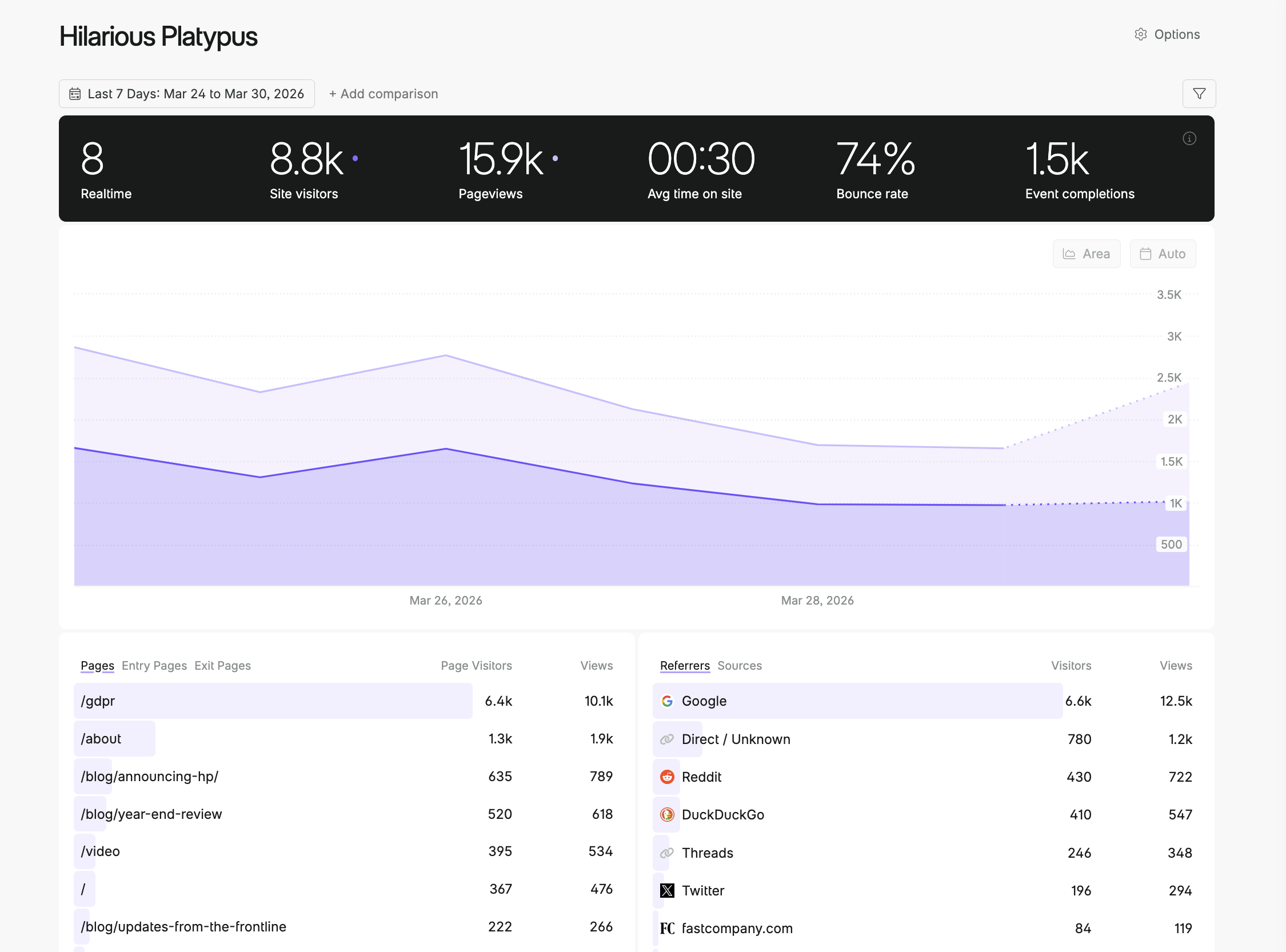
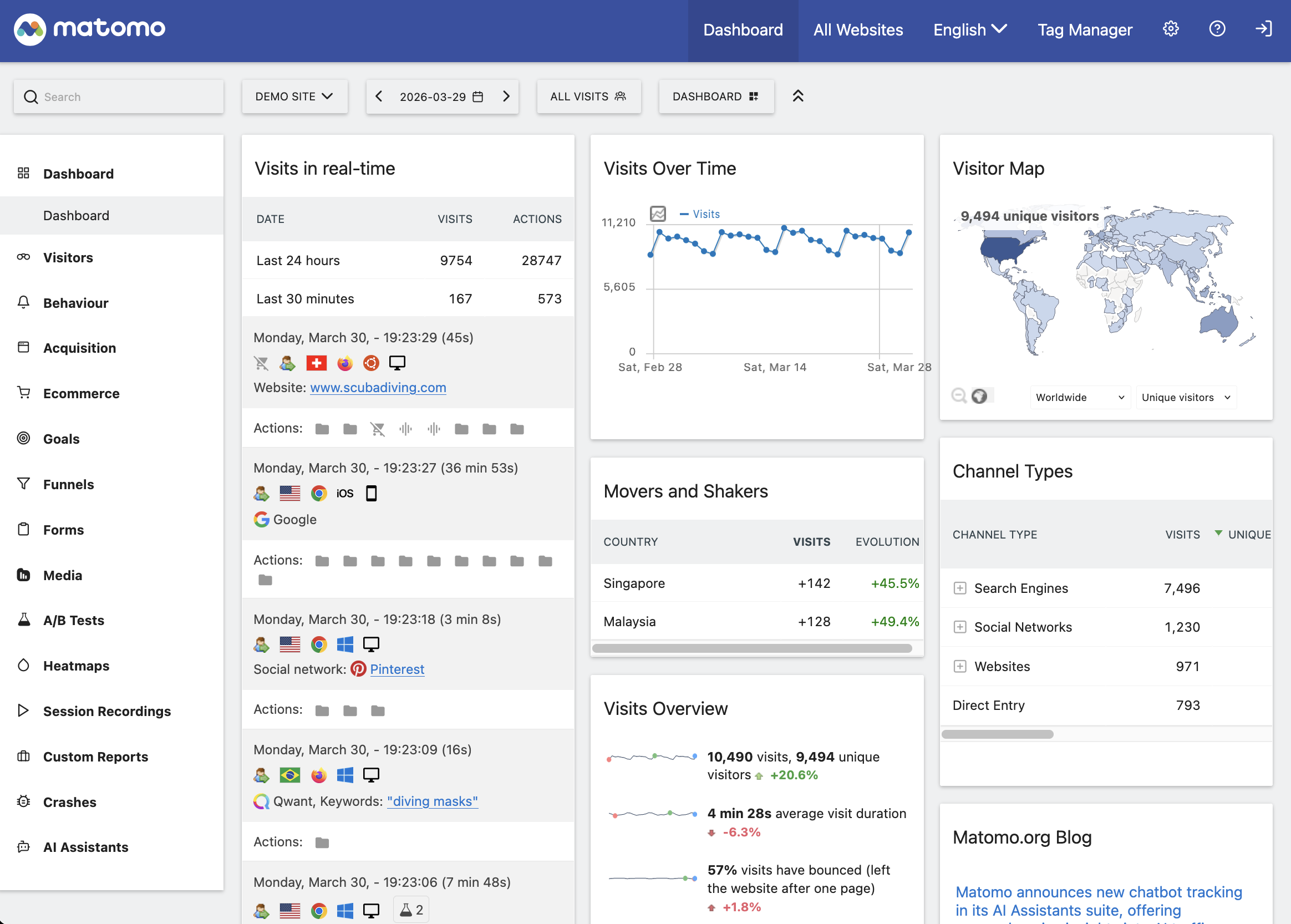
Matomo serves over one million websites across 190+ countries. The platform offers two deployment options: free self-hosted or cloud plans starting at $29/month. Self-hosting gives you complete data ownership but requires server management. Cloud hosting handles infrastructure while keeping data on EU servers. Matomo provides advanced features—heatmaps, session recordings, A/B testing, and funnel analysis—that match Google Analytics' depth. France's CNIL has approved Matomo as GDPR-compliant when configured with IP anonymization and no cookies. The complexity: extensive configuration options that require technical knowledge.
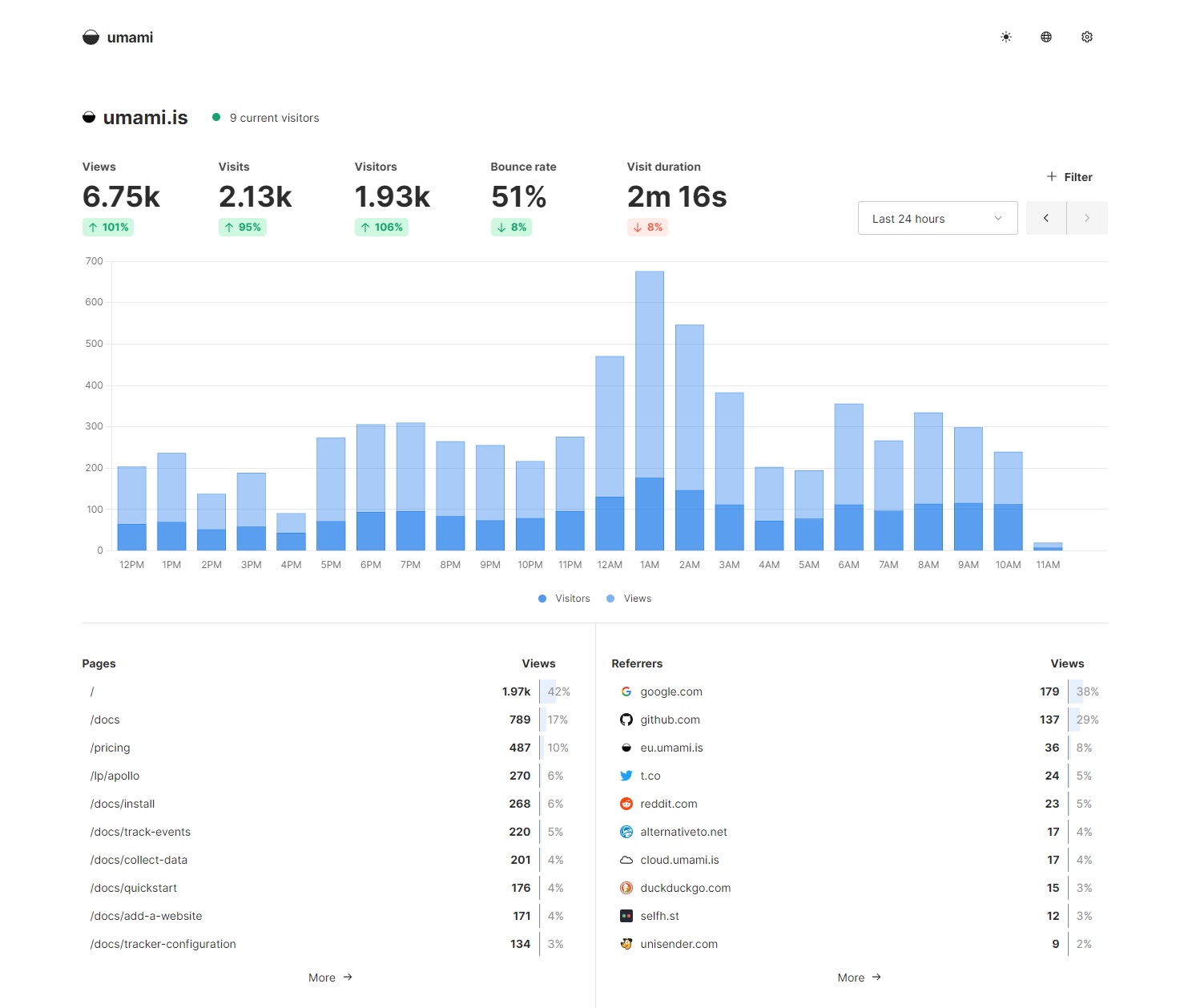
Umami is a free, open-source tool built for developers. Over 500,000 websites use Umami. Self-host it on your infrastructure, and you pay only for server costs. The interface shows real-time traffic, referrers, pages, and custom events. Umami supports multiple websites per installation and includes a public dashboard feature for sharing stats. The requirement: technical skills to deploy and maintain the application.
Open-Source vs. Cloud-Hosted: Which to Choose
Open-source tools (Matomo self-hosted, Umami, Swetrix self-hosted) give you complete control. Data never leaves your infrastructure. You own the codebase and can modify it to fit specific requirements. The cost is server resources and maintenance time. Expect to spend 2-4 hours per month on updates, backups, and monitoring.
Cloud-hosted platforms (Swetrix Cloud, Plausible, Fathom, Matomo Cloud) handle infrastructure, security, and updates. Install a tracking script, and data flows to the vendor's servers. You pay a monthly fee based on traffic volume. The trade-off: less control over data storage and processing, though reputable vendors keep data on EU servers and don't share it with third parties.
Choose open-source if you have technical staff, need custom integrations, or operate in a regulated industry where data must stay on your servers. Choose cloud-hosted if you want to start tracking in 10 minutes, prefer predictable monthly costs, and trust the vendor's security practices.
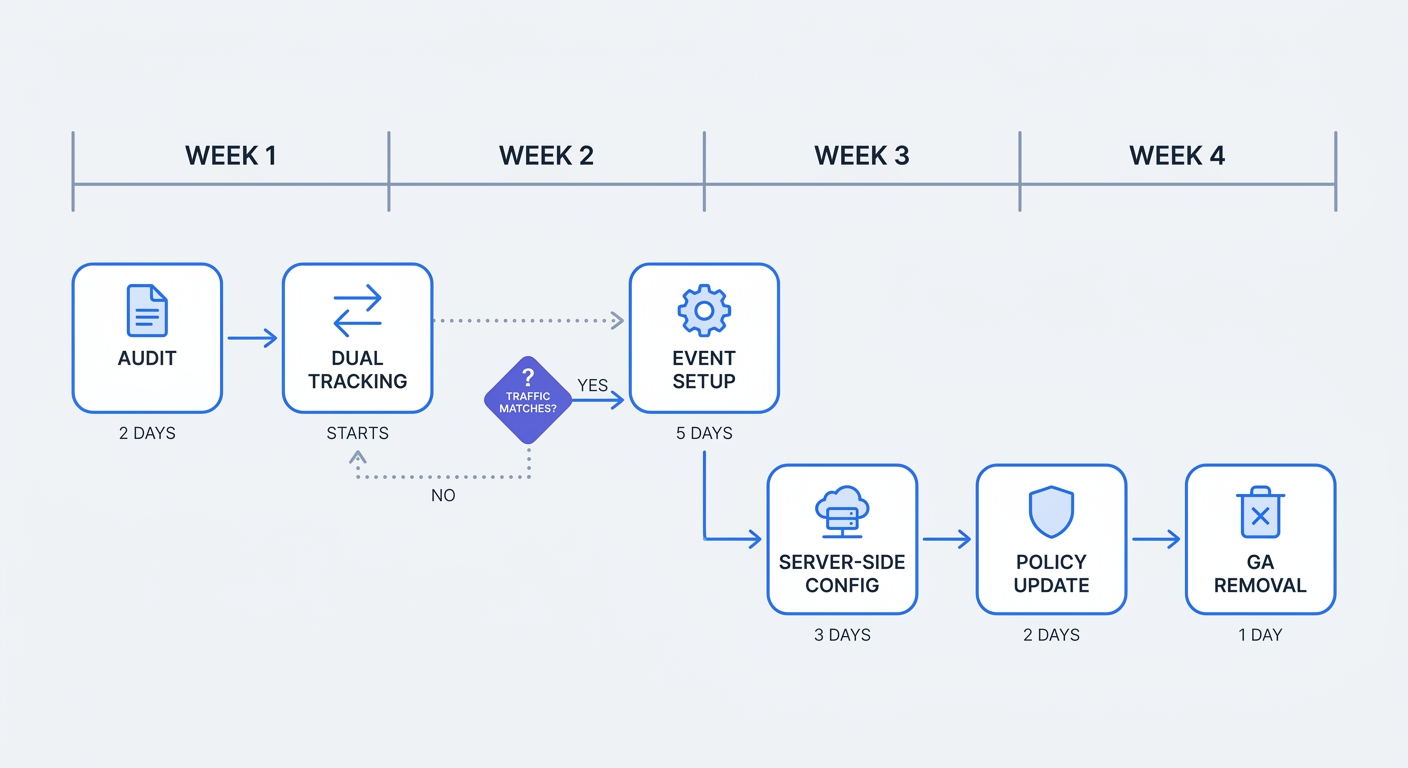
6-Step Migration Plan: Switching from Google Analytics
Audit Your Current Data and Set Goals
Document what you track in Google Analytics today. Open your GA4 property and list the reports you check weekly: traffic sources, landing pages, conversion events, user demographics, campaign performance. Export the last 90 days of data for each report. This baseline lets you verify that your new tool captures equivalent data.
Identify must-have metrics. Most businesses need traffic volume, traffic sources, top pages, bounce rate, and conversion tracking. Advanced users might require funnel analysis, cohort reports, or cross-device tracking. Write down the five metrics that drive decisions. If your new tool can't track them, keep searching.
Set up goals in your current system if you haven't already. A goal might be "user reaches /thank-you page" or "user clicks 'Download' button." Goals become conversion events in privacy-focused tools. Knowing your current conversion rate establishes a benchmark for the new platform.
Run Dual Tracking for 30 Days
Install your privacy-focused tool alongside Google Analytics. Both scripts run simultaneously, collecting data in parallel. This dual-tracking period reveals discrepancies and builds confidence in the new platform.
For Swetrix, add the tracking script to your site's <head> section:
<script src="https://swetrix.org/swetrix.js" defer></script>
<script>
  document.addEventListener("DOMContentLoaded", function () {
    swetrix.init("YOUR_PROJECT_ID");
    swetrix.trackViews();
  });
</script>
Replace YOUR_PROJECT_ID with your actual project ID from the Swetrix dashboard. The script loads asynchronously and doesn't block page rendering.
Wait 30 days. Compare total pageviews, unique visitors, and traffic sources between Google Analytics and your new tool. Expect to see 40-50% more traffic in the cookieless platform. This gap represents visitors who rejected consent banners or use privacy tools that block Google Analytics.
Check conversion tracking. If Google Analytics shows 100 conversions and your new tool shows 145, the new tool is capturing conversions from Safari users and ad-blocker users that GA missed. If the new tool shows fewer conversions, investigate your event tracking setup.
Configure Event Tracking and Conversions
Privacy-focused tools track conversions through URL patterns or custom events. URL-based tracking works for simple goals: "user reaches /thank-you page after purchase." Event-based tracking handles complex interactions: "user clicks 'Add to Cart' button on product page."
Set up URL-based goals first. In Swetrix, go to your project settings and add a custom event that triggers when the URL contains /thank-you. Each time a user lands on that page, Swetrix logs a conversion.
For event-based tracking, add JavaScript to your site:
// Track button click
document.getElementById("cta-button").addEventListener("click", function () {
  swetrix.track({
    ev: "cta_click",
    meta: {
      button_location: "homepage_hero",
      button_text: "Start Free Trial",
    },
  });
});

// Track form submission
document.getElementById("contact-form").addEventListener("submit", function () {
  swetrix.track({
    ev: "form_submit",
    meta: {
      form_type: "contact",
      form_location: "footer",
    },
  });
});
Custom events accept a meta object, so you can segment conversions by product category, campaign source, or user type. Pass revenue values to calculate total conversion value:
swetrix.track({
  ev: "purchase",
  meta: {
    revenue: 49.99,
    product_id: "PRD-123",
    quantity: 1,
  },
});
Test each event by triggering it manually and checking the Swetrix dashboard. Events should appear within 2-3 seconds.
Set up server-side tracking for improved match rates. Server-side methods capture conversions from users who block client-side scripts. For Meta ads, implement the Conversions API. For Google Ads, configure Enhanced Conversions. Both require sending conversion data from your server to the ad platform, bypassing browser restrictions.
Update your privacy policy. List what you track (page URL, referrer, timestamp, country, device type, browser), where you store it (EU servers or your infrastructure), and how long you retain it (general best practice: 24 months for analytics data; CNIL exemption requires under 13 months for consent-free operation). Specify that you don't use cookies, don't track individuals across sessions, and don't share data with third parties. Link to your analytics vendor's privacy policy and data processing agreement.
Remove Google Analytics. Delete the GA4 tracking script from your site's <head> section. Remove any Google Tag Manager containers that load GA4. Check your consent management platform and remove Google Analytics from the list of third-party services.
Remove consent banners if your new tool doesn't require them. Cookieless analytics with IP anonymization and data minimization qualifies as consent-free under GDPR Article 6(1)(f). Consult your legal counsel to confirm, but most businesses using Swetrix, Plausible, or Fathom can operate without cookie banners.
Export historical data from Google Analytics before deleting your property. GA4 allows data exports to BigQuery. Download key reports as CSV files. You'll lose access to historical data once you delete the property, so archive anything you might need for year-over-year comparisons.
First-Party Data Strategies for 2026 and Beyond
Why 78% of Marketers Prioritize First-Party Data
78% of marketers call first-party data their most valuable source in 2025, and 92% of organizations are increasing investments in first-party strategies. Third-party cookies are disappearing, and privacy regulations restrict data sharing, forcing businesses to collect data from their own users.
First-party data includes information users provide willingly: email addresses, account preferences, purchase history, support tickets, survey responses. It also includes behavioral data from your own properties: pageviews, click patterns, time on site, conversion events. This data is accurate, compliant, and actionable because you collected it with user consent and control how it's used.
Companies using first-party strategies achieve 3.2x better customer retention and 1.7x higher marketing ROI compared to those dependent on third-party cookies. The retention advantage comes from personalization: when you know what a customer bought, browsed, and searched for on your site, you can send relevant recommendations instead of generic promotions. The ROI improvement stems from attribution accuracy: first-party data connects ad clicks to purchases without relying on cross-site tracking that browsers block.
64% of marketers say compliance is easier with first-party data, and it reduces compliance risk by up to 50% compared to third-party sources. When you collect data directly, you control consent, retention, and deletion. When you buy third-party data, you inherit the vendor's compliance failures.
Server-Side Tracking and Enhanced Conversions
Server-side tracking captures 25-35% more conversions than client-side pixels. Meta's Conversions API and Google Enhanced Conversions both achieve improved match rates with server-side setup compared to pixel-only implementations.
Client-side pixels load in the user's browser and send data to the ad platform. Ad blockers intercept these requests. Safari's Intelligent Tracking Prevention limits pixel accuracy. Server-side tracking routes conversion data through your server, bypassing browser restrictions.
Implement Meta CAPI by sending purchase events from your server to Facebook:
// Server-side code (Node.js example)
const axios = require("axios");

async function sendConversion(email, phone, purchaseValue) {
  const hashedEmail = hashSHA256(email);
  const hashedPhone = hashSHA256(phone);

  await axios.post("https://graph.facebook.com/v18.0/YOUR_PIXEL_ID/events", {
    data: [
      {
        event_name: "Purchase",
        event_time: Math.floor(Date.now() / 1000),
        user_data: {
          em: hashedEmail,
          ph: hashedPhone,
        },
        custom_data: {
          value: purchaseValue,
          currency: "USD",
        },
      },
    ],
    access_token: "YOUR_ACCESS_TOKEN",
  });
}
Hash user data before sending it. Meta matches hashed emails and phone numbers to user accounts without exposing raw personal information.
For Google Ads, enable Enhanced Conversions in your account settings and pass hashed user data with each conversion event. Google matches the data to signed-in users and attributes conversions more accurately than cookie-based tracking.
Server-side methods require backend development, but the accuracy gain justifies the effort. A 25-35% increase in tracked conversions means better ROAS calculations and more confident budget decisions.
Building Trust: Privacy as Competitive Advantage
Brands with strong privacy reputations saw a 12.31% increase in customer patronage, and 71% of consumers trust brands with transparent data practices. Privacy isn't just regulatory compliance—it's a differentiator that drives revenue.
Display your privacy practices prominently. Add a "Privacy-First Analytics" badge to your footer. Link to your privacy policy from every page. Explain what you track, why you track it, and how users benefit. "We use cookieless analytics to understand which content helps you most. Your data stays on EU servers and is never sold to advertisers."
Remove consent banners when possible. Cookieless analytics with IP anonymization doesn't require consent under GDPR Article 6(1)(f). A site without a cookie banner loads faster, converts better, and signals that you respect user privacy.
Publish a transparency report. List the tools you use, where data is stored, and how long you retain it. Include data processing agreements with vendors. Update the report annually. Transparency builds trust, and trust drives repeat purchases.
Swetrix's first-party data approach—no third-party transfers, no cookies, no cross-site tracking—reduces compliance risk by 50% compared to Google Analytics. The platform collects behavioral patterns without identifying individuals, stores data on EU servers, and gives you full control over retention and deletion. This architecture aligns with privacy regulations today and adapts to stricter rules tomorrow.
2026 Privacy Regulations: What's Coming Next
EU Digital Omnibus and UK Data Act Changes
The EU is advancing the Digital Omnibus package, a broad initiative aimed at streamlining the EU's digital regulatory landscape and reducing administrative burdens. The proposal includes targeted amendments to the GDPR, ePrivacy Directive, and other digital regulations, with full applicability anticipated around 2026.
The UK Data (Use and Access) Act 2025 introduces updates to PECR expected to make it easier to use privacy-friendly analytics without requiring consent. These changes apply in early 2026. The Act distinguishes between intrusive tracking (cookies, fingerprinting, cross-site identifiers) and statistical measurement (aggregate pageviews, referrer data, session duration). If your analytics tool collects only statistical data without identifying individuals, you won't need consent.
France's CNIL has established a framework for consent-exempt analytics. The framework provides a checklist: IP anonymization enabled, no cookies used, data retention under 13 months (CNIL exemption requirement), no third-party transfers, aggregate reporting only. Complete the checklist, and you have evidence of compliance if regulators investigate.
AI, Privacy Budgets, and Differential Privacy
Review data access, retention, and user controls before adding AI features to your analytics stack. Personalisation should have a clear purpose, and teams should check whether the same result can be achieved with less personal data.
Differential privacy introduces controlled "noise" to datasets so individual records can't be identified. A query asking "How many users visited /pricing?" might return 1,247 instead of the true count of 1,250. The noise is small enough to preserve statistical accuracy but large enough to prevent re-identification attacks. Apple uses differential privacy in iOS analytics. Google applies it to search query data.
Implement differential privacy in your analytics pipeline if you share data with partners or publish public reports. The technique lets you release aggregate insights without exposing individual behavior. Most businesses don't need this level of protection for internal analytics, but it becomes relevant when data leaves your organization.
Privacy-by-design principles embed privacy from project start. When building a new feature, ask: What data do we need? Can we collect less? Can we anonymize it? Can we delete it after 90 days? These questions prevent privacy debt—the accumulation of unnecessary data that becomes a liability during audits or breaches.
How to Future-Proof Your Analytics Stack
Conduct quarterly compliance audits. Review what data you collect, where you store it, and who has access. Check vendor contracts for data processing agreements. Verify that IP anonymization is enabled and data retention is set appropriately (24 months or less as general best practice; under 13 months if relying on CNIL exemption for consent-free operation). Document everything in a compliance log.
Choose tools with built-in anonymization. Swetrix hashes IP addresses by default, doesn't use cookies, and stores data on EU servers. These architectural choices mean compliance is automatic, not something you configure and hope stays correct.
Avoid tools that transfer data to US servers. The Schrems II ruling invalidated Privacy Shield, and the new EU-US Data Privacy Framework faces legal challenges. Data transfers to the US remain a compliance risk. EU-hosted platforms eliminate that risk.
Implement consent management for any tool that requires it. If you use session replay, heatmaps, or A/B testing that tracks individual users, you need consent. A consent management platform documents user choices with timestamps and consent strings. This audit trail proves compliance if regulators investigate.
Embed privacy experts in project planning. Don't treat privacy as a legal review at the end. Include privacy considerations when designing new features, launching campaigns, or adopting new tools. A privacy expert can spot risks early and suggest alternatives that achieve the same business goal with less data.
Swetrix is built for the cookieless future. The platform doesn't rely on third-party cookies, doesn't transfer data to US servers, and doesn't require consent banners. As regulations tighten and browsers block more tracking, Swetrix continues working because its architecture aligns with privacy principles. Install it today, and you won't need to migrate again when the next regulation takes effect.
Ready to see the 40-50% of traffic Google Analytics misses? Start a 14-day free trial of Swetrix—no credit card required. Install the sub-1KB script, run it alongside your current analytics for two weeks, and compare the numbers. Most businesses discover they have far more visitors than cookie-based tools revealed. Swetrix captures every visitor, complies with GDPR without consent banners, and gives you real-time insights without the legal risk.