- Date
How To Track Form Submissions Without Tag Manager
 Andrii Romasiun
Marketers lose half their form conversion data to ad-blockers and cookie banner rejections. Google Tag Manager creates this blind spot by deploying invasive third-party scripts. Track form submissions without tag manager to boost page speed, bypass ad-blockers, and ensure strict data privacy.
The Hidden Costs of Google Tag Manager
Google Tag Manager loads the tags configured in its container. Audit the tags that actually fire on your website and measure their network and execution costs before deciding which ones to remove.
Browsers execute JavaScript in sequence on the main thread, causing tag bloat to pause page rendering. An empty GTM container adds minimal overhead. However, injecting multiple standard tracking tags significantly slows visual completion on slower mobile connections. Visitors abandon pages before the form renders.
Audit your page load speed to measure this impact. Open Google PageSpeed Insights and run your site URL to view the performance metrics. Scroll to the "Reduce unused JavaScript" diagnostic. GTM sits at the top of this list, consuming hundreds of milliseconds of main thread execution time.
The Heavy Burden of Tag Bloat
Marketing teams love GTM because it bypasses developers. Non-technical users pile Meta pixels, Google Ads tags, and heatmapping scripts into the container. Code bloat accumulates over months.
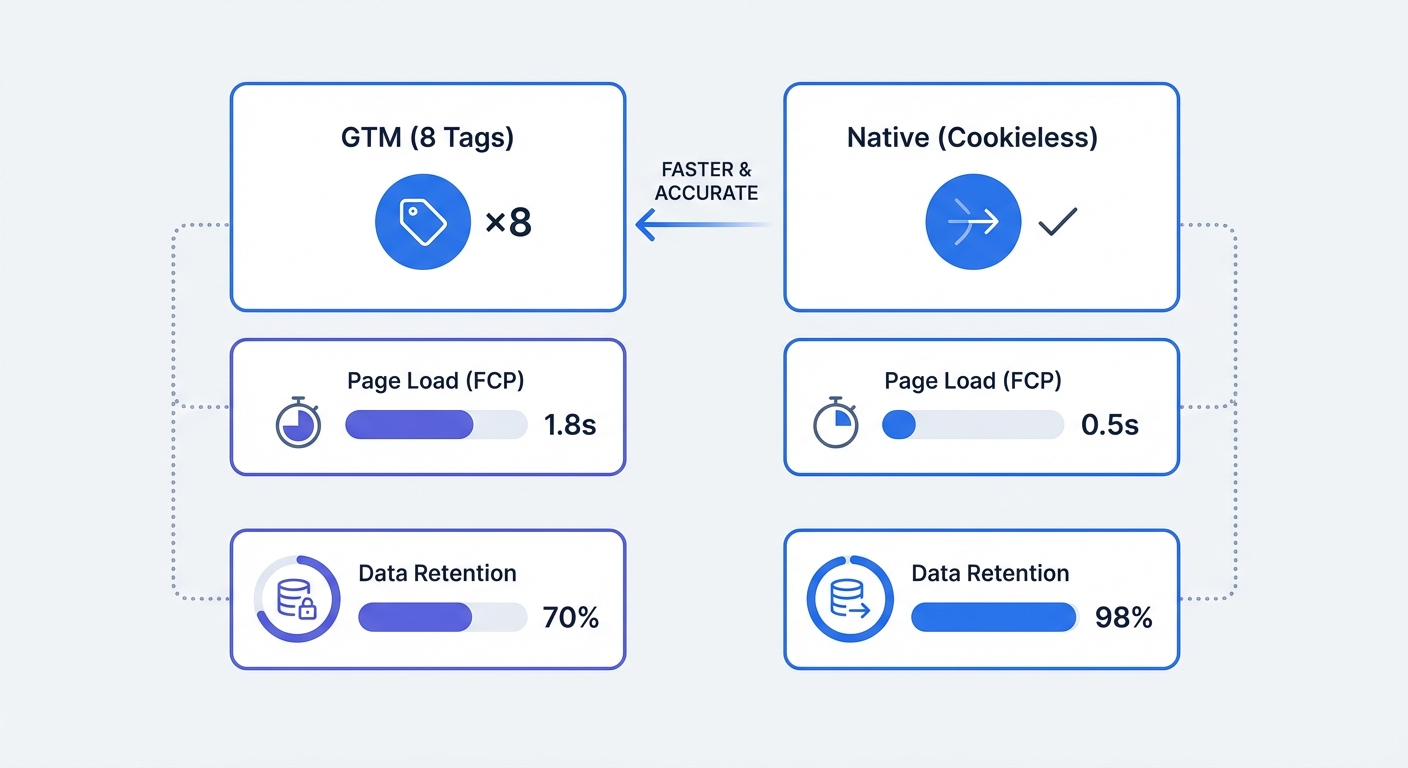
Every new tag adds network requests. Each request requires DNS lookups, TLS negotiations, and script evaluation time. This processing drain reduces battery life for mobile users and slows page rendering. Website owners pay for this sluggishness through lower search rankings, as Google uses Core Web Vitals to position search results. Monitor website performance with native tools to evaluate the difference a clean codebase makes.
Remove the GTM script from a staging environment and run a Lighthouse performance audit. Compare the First Contentful Paint score against the production site. The delta represents the speed penalty website owners pay for client-side tag management.
The Privacy Crisis and Data Loss
Tag managers also trigger privacy compliance issues. GTM injects third-party cookies designed to harvest Personally Identifiable Information across the web. Privacy laws like GDPR and CPRA mandate prominent opt-in banners before these scripts execute.
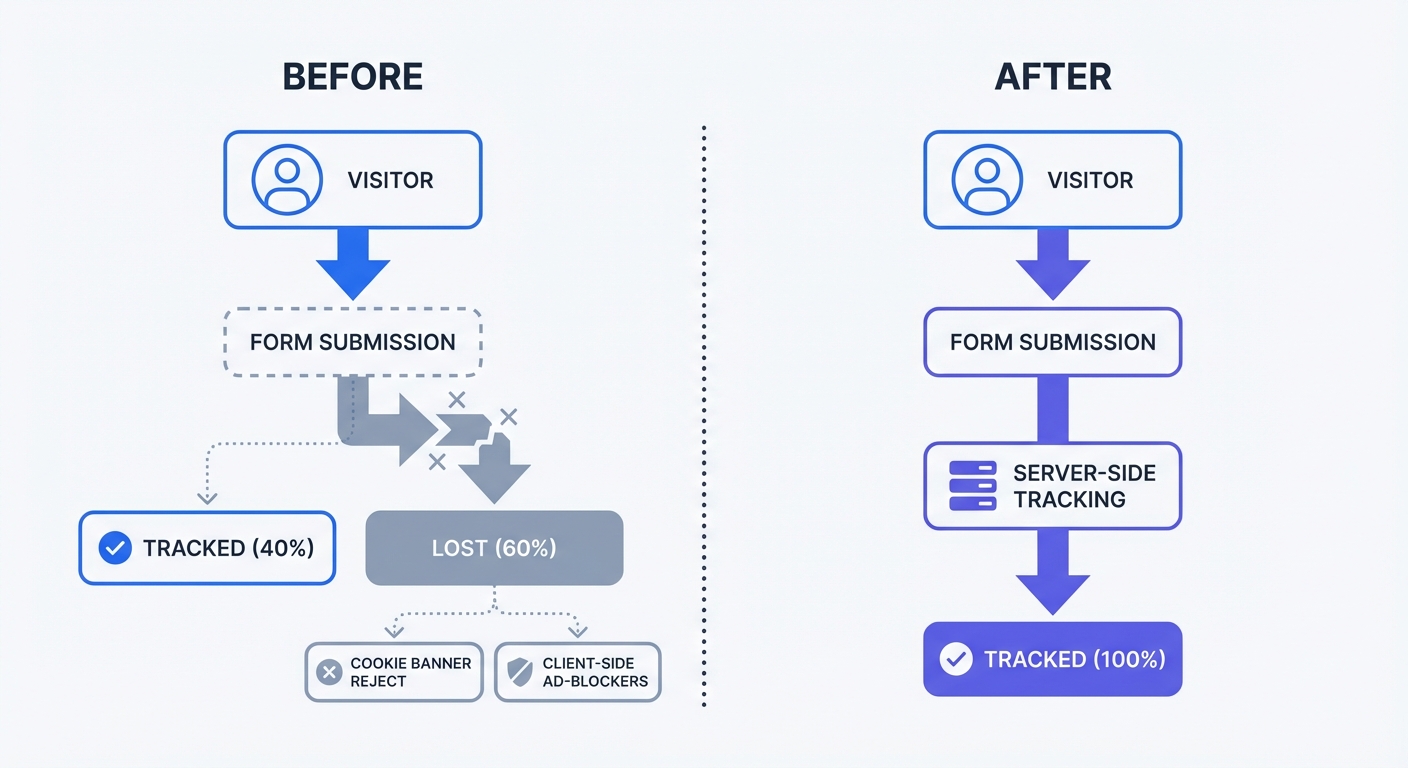
Users despise cookie banners. B2B websites see explicit EU consent acceptance rates drop to between 3 and 7 percent, though this rate varies depending on regional laws and banner design. Visitors click "Reject All" to clear the modal and read the content. When a user rejects tracking, GTM fails to fire. When analytics depends on consent, reports can exclude visitors who decline. Measure this gap against your own backend form-submission records.
Calculate the data gap by pulling the backend CRM lead total for the past 30 days. Log into the analytics dashboard and check the recorded form conversions. The difference between those two numbers represents the tracking blind spot. Transition away from cookie-reliant tracking pixels to close this gap.
The Shift to Cookieless Web Analytics
Third-party tracking architecture fails under modern browser constraints. Apple's Intelligent Tracking Prevention restricts persistent storage. Firefox blocks cross-site tracking domains by default. Ad-blockers intercept network requests to common marketing endpoints.
To retain data visibility, website administrators must move away from the third-party cookie model. Cookieless analytics platforms replace invasive user tracking with anonymized session metrics.
Moving Past Third-Party Cookies
Cookie-based analytics assign a unique text file to a user device. The platform reads this file on future visits to build a long-term user profile. Privacy regulators view these persistent identifiers as protected personal data.
Cookieless web analytics tools use temporary session hashes. The tracking server hashes the incoming user agent and IP address with a rotating string. This generates a unique identifier that expires at midnight. The platform discards the original IP address and stores the random hash.
Review the data retention policy to identify every marketing tool that writes a persistent file to the user device. Note which platforms fail to function without cross-site tracking capabilities. Plan a migration for each flagged tool.
Capturing 100% of Form Data Safely
Session hashing tracks events without collecting Personally Identifiable Information. Strict consent banners become unnecessary because website administrators collect zero personal data. Website owners process website interactions in compliance with privacy laws without asking for permission to place a tracking cookie.
Removing the consent banner solves the data loss problem. Every visitor interacts with the website without interruption. Form submissions trigger event tracking logs for the entire audience.
Deploy a privacy-first web analytics platform on the domain. Create an account at Swetrix and replace the GTM container with a lightweight tracking script. Verify the increase in captured form events without deploying a single cookie.
Native Client-Side Implementations
Tag managers abstract tracking logic into a separate user interface. Developers lose version control over website scripts. Bringing event tracking back into the application codebase restores this control.
Native implementation provides precise control over event payloads. Engineers dictate what data leaves the browser. They tie tracking execution to specific application states rather than generic page load triggers.
Vanilla JavaScript Listeners
Standard HTML forms require basic JavaScript event listeners. Instead of configuring a "Form Submission" trigger inside a third-party interface, attach a native listener to the form element.
Write a script that targets the form and binds an action to the submit event. This code executes in sequence when the user clicks the submit button.
document.addEventListener("DOMContentLoaded", function () {
  const form = document.querySelector(".contact-form");

  if (form && typeof swetrix !== "undefined") {
    form.addEventListener("submit", function () {
      swetrix.track({
        name: "form_submission",
        meta: {
          form_type: "contact",
          source: "homepage",
          tier: "enterprise",
        },
      });
    });
  }
});
The script waits for the Document Object Model to render before selecting the form element using a CSS class name. It checks for the existence of the analytics library to prevent undefined errors. Upon submission, the code sends a custom event name and a metadata object to the analytics endpoint.
Verify this implementation using browser developer tools. Open Chrome DevTools, navigate to the Network tab, and click the "Fetch/XHR" filter. Submit the form on the webpage to check the network log for the outgoing tracking request. A 200 OK status indicates successful data transmission.
Component Tracking in React and Next.js
Single Page Applications manage DOM updates without full browser reloads. Tag managers struggle with this architecture because they rely on browser history state changes to fire pageview and event triggers. These triggers misfire or double-count during complex virtual DOM updates.
Modern JavaScript frameworks demand component-level tracking. Embed tracking functions inside the React component logic to isolate analytics from the user interface rendering cycle. A performance test shows that bypassing client-side tags and utilizing direct configuration improves First Contentful Paint by 15 to 30 percent.
import { track } from "@swetrix/react";

export function ContactForm() {
  const handleSubmit = (e) => {
    e.preventDefault();

    // Fire analytics event
    track({
      name: "demo_requested",
      meta: { target_industry: "b2b_saas" },
    });

    // Execute backend API call
    submitFormData(e.target);
  };

  return (
    <form onSubmit={handleSubmit}>
      <input type="email" name="email" required />
      <button type="submit">Request Demo</button>
    </form>
  );
}
Bind the tracking function to the onSubmit event handler prop. The track utility executes before the application processes the form payload. This method prevents arbitrary marketing scripts from interfering with application state.
Set up a UTM generator workflow for marketing links. The application should pass those UTM parameters down through the React context. Append the parsed source and medium data to the meta object in the tracking call for campaign attribution.
How To Track Form Submissions Without Tag Manager Server-Side
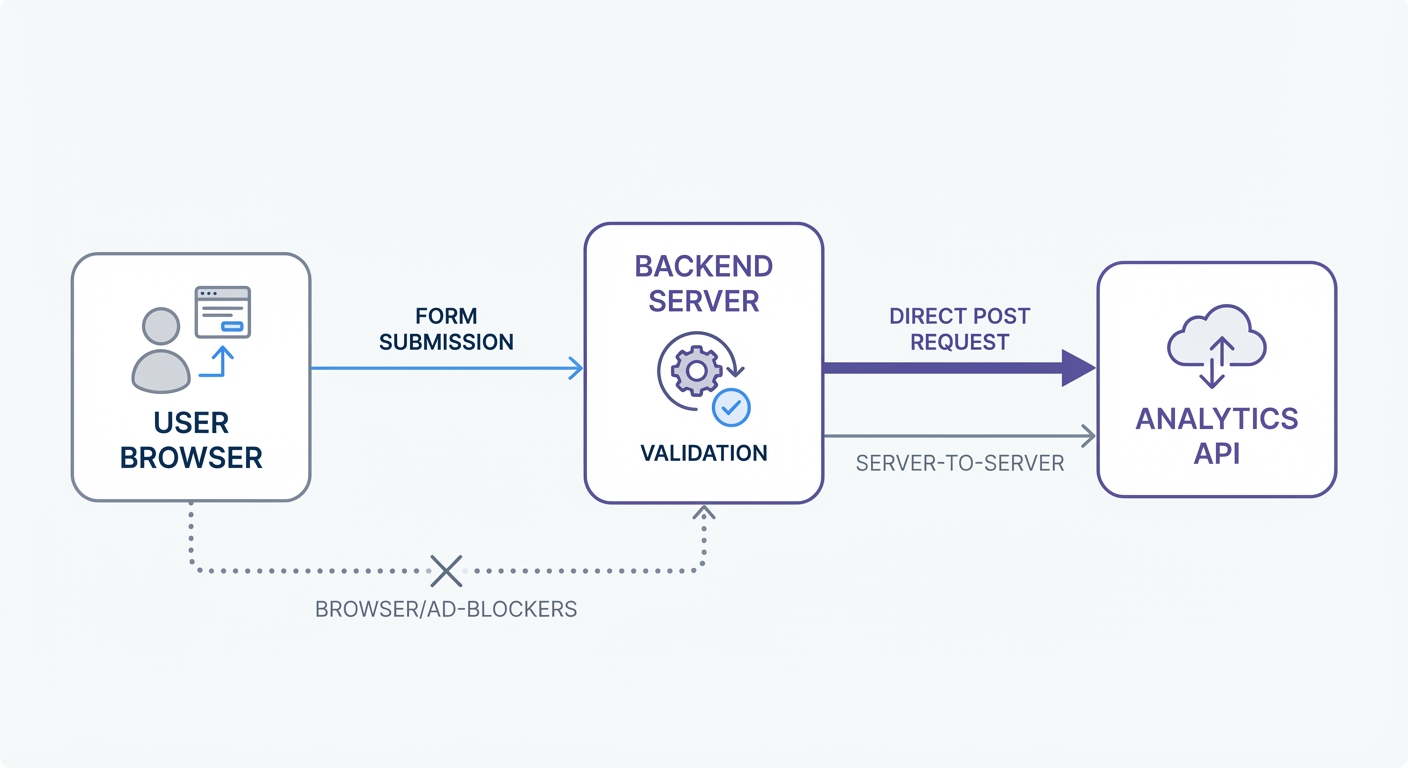
Browser-based tracking faces harsh restrictions. Ad-blockers like uBlock Origin maintain blocklists of known analytics domains. Brave browser intercepts cross-site tracking requests. Network instability causes client-side scripts to drop payloads before the browser navigates to the "Thank You" page.
Move tracking logic to the backend server to bypass these restrictions. Server-to-server tracking represents a reliable method for logging macro-conversions. The user browser communicates with the backend API, and the backend API communicates with the analytics platform.
Setting Up API POST Requests
Server-side implementation hides the analytics payload from the client because ad-blockers cannot inspect server-side network traffic. Firewalls allow outbound API calls from secure backend environments.
Configure the backend application to send an HTTP POST request upon form validation. Validate incoming data before tracking a form submission. This architecture records confirmed leads in the analytics dashboard.
// Node.js Express Backend Example
app.post("/api/submit-contact", async (req, res) => {
  const { email, company, tier } = req.body;

  // 1. Validate form payload
  if (!email || !email.includes("@")) {
    return res.status(400).send("Valid email required");
  }

  try {
    // 2. Process the lead (e.g., save to Database, send to CRM)
    await saveLeadToDatabase(email, company);

    // 3. Log submission via Server-to-Server Analytics API
    await fetch("https://api.swetrix.com/log", {
      method: "POST",
      headers: { "Content-Type": "application/json" },
      body: JSON.stringify({
        pid: "YOUR_PROJECT_ID",
        name: "form_submission",
        type: "custom",
        meta: {
          lead_quality: "verified",
          tier_selected: tier,
        },
      }),
    });

    res.status(200).send("Form submitted successfully");
  } catch (error) {
    console.error("Submission failed:", error);
    res.status(500).send("Internal server error");
  }
});
Define the metadata object structure in a shared schema. Include variables for lead quality, selected product tiers, or geographic regions. This backend architecture guarantees complete data fidelity for every validated form submission.
Bypassing Network Unreliability
Client-side scripts race against the browser navigation event. When a user clicks submit on a standard HTML form, the browser attempts to load the next URL. Tracking scripts abort the network request before completion.
Server-side execution removes this race condition. The backend handles the fetch request without depending on the client device state.
Implement these architectural best practices for server-side event tracking:
- Validate before tracking: Reject spam submissions before triggering the analytics API call. Do not muddy conversion metrics with failed validation attempts. Use a reCAPTCHA alternative to filter bot traffic at the edge.
- Wrap requests in try-catch blocks: Analytics endpoints experience downtime. A failed tracking call must not prevent the form data from saving to the database. Handle the error on the server without breaking the application state.
- Standardize event naming: Establish a naming convention for custom events. Use snake_case format (
demo_requested,newsletter_signup) across all backend routes to keep reporting dashboards organized. - Isolate utility functions: Create a dedicated wrapper function for the
fetchcall. Import this utility across all form handler endpoints to update the project ID or API endpoint in one central file.
Compare the three implementation models before deciding on an architecture:
| Tracking Method | Page Speed Impact | Ad-Blocker Resistance | Implementation Difficulty |
|---|---|---|---|
| Google Tag Manager | High (Slows FCP) | Low (Easily Blocked) | Low (No Code Required) |
| Native Vanilla JS / React | Low (Lightweight) | Medium (Client-side) | Medium (Requires Developer) |
| Server-Side API | Zero | High (Unblockable) | High (Backend Access Needed) |
Ditch bloated client-side containers in favor of native server-side methodologies. Reclaim visibility over conversion funnels while respecting user privacy boundaries.
Stop losing form conversion data to ad-blockers and privacy extensions. Switch to a cookieless analytics platform that respects user data and protects page load speed. Start a free trial at Swetrix.