- Date
Google Analytics With Cloudflare: What to Know
 Andrii Romasiun
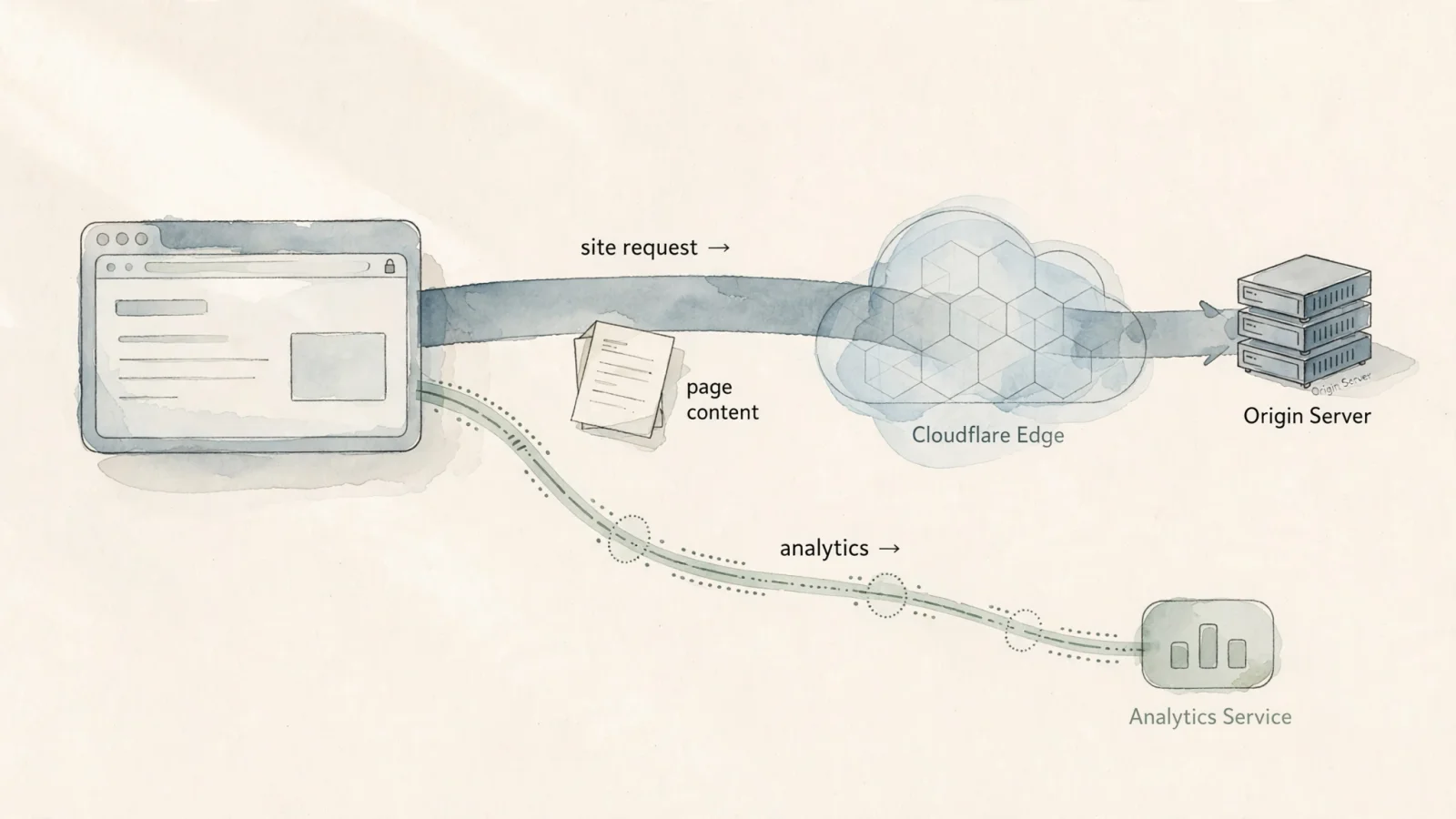
Standard Google Analytics generally works without issue on a Cloudflare-proxied website. In a normal browser-tag setup, the visitor’s browser sends measurement data directly to Google. Cloudflare’s proxy handles requests to the site origin and sits completely outside that measurement path. Before changing DNS settings or proxy configurations to fix missing traffic data, verify your tag installation.
If you are researching a Google Analytics Cloudflare integration because your current setup shows no data, the problem usually lies in the code snippet. When your needs go beyond fixing a broken tag, you might be looking for a different kind of tracking. If you want privacy-first traffic reporting combined with product and SEO analysis, you can replace GA4 with Swetrix, which bypasses the complexity of third-party tag managers.
Does Cloudflare Affect Google Analytics?
Cloudflare acts as a reverse proxy between your visitors and your web server. When someone visits your site, their browser requests the HTML document from Cloudflare. Cloudflare delivers that HTML, which contains your Google Analytics code snippet. Once the browser parses the document, it executes the JavaScript and sends a separate request to the Google Analytics collection servers.
Cloudflare does not intercept, block, or modify that separate measurement request, meaning the data flows directly from the visitor's device to Google. If your dashboard shows zero active users, Cloudflare is rarely the culprit.
Begin your troubleshooting by checking the page source for the Google tag, then verify that the Measurement ID in the tag matches the one in your web data stream's Stream details. Google's tag troubleshooting guide explains how to check the ID and troubleshoot setup issues. You should also check whether both the Google tag and Google Tag Manager snippets are installed. Google says to use either the Google tag or Tag Manager, not both, because using both can overcount website data.
Understanding Cloudflare Analytics
Cloudflare offers multiple analytics and tag-management tools that collect data in different ways. Before comparing metrics, it helps to understand what each tool does. They are not interchangeable products, and none of them serve as an exact, feature-for-feature replacement for a dedicated web analytics platform.
Cloudflare Web Analytics
This tool uses a lightweight JavaScript beacon and the browser Performance API to provide real-user performance reporting. Cloudflare states that this beacon can run without changing your DNS settings or proxying your site. The company describes the tool as privacy-friendly, collecting no personal data from visitors.
Cloudflare Web Analytics has limitations in event and campaign tracking: its FAQ says the tool does not currently support custom events or UTM parameters. It also does not log query strings, which makes campaign attribution harder and limits custom interaction tracking. In addition, ad blockers can block the JavaScript beacon, while network conditions can cause data loss as the beacon sends its payload.
Cloudflare Edge Analytics
Edge analytics measures the raw requests reaching Cloudflare's network at the server level rather than in the browser. Every time a client asks for an image, a stylesheet, or an HTML document, the edge logs that request.
Because it operates at the server level, edge analytics captures activity that browser-based tools ignore. The request counts include search engine crawlers, automated bots, API calls, and users consuming partial content. It provides a highly accurate picture of server load and bandwidth consumption, but it does not represent distinct human visitors navigating your website.
Cloudflare Zaraz
Zaraz is a tool-management platform designed to offload third-party scripts from the visitor's browser. Instead of loading the Google Analytics JavaScript directly on your website, you configure Zaraz to send data to Google from Cloudflare's worker nodes.
This creates an alternative delivery path rather than a distinct analytics product, since Google Analytics remains the final destination for your data. While Zaraz speeds up client-side page loads by handling the tracking requests at the edge, it requires careful configuration.

Why Cloudflare and GA4 Report Different Traffic
You might notice a large gap between the traffic reported by Cloudflare and the numbers in Google Analytics. This discrepancy occurs because the two systems measure completely different events.
Cloudflare edge analytics counts HTTP requests, so when a search engine crawler downloads an HTML file to index a new blog post, Cloudflare logs it as a request and adds it to your total traffic count. Because the crawler does not execute JavaScript, it never triggers the Google Analytics tag, leaving GA4 with no record of the visit. The same logic applies to uptime monitors, security scanners, and scrapers, which all generate edge requests without generating browser pageviews.
Browser analytics depends entirely on the JavaScript beacon running successfully. For example, when a mobile user on a weak cellular connection taps a link to your site, Cloudflare logs the request for the HTML document. If the connection drops before the analytics script can load and fire, Cloudflare counts a visit, but Google Analytics does not.
Ad blockers also widen this gap. Many privacy extensions aggressively block requests to tracking domains. A user with an ad blocker will successfully download your page through Cloudflare to register an edge request, but the browser will then block the script from sending data to Google, leaving GA4 blind to the session.
When investigating a specific gap, check metric definitions and date ranges rather than treating the totals as equivalent visitor counts. If GA4 data is missing, check the tag setup and consider whether the browser successfully sent the measurement request, since request-based and browser-based measurements naturally differ.
Setting Up GA4 on a Cloudflare Site
A standard GA4 installation requires no special DNS configuration. You choose the implementation method that fits your technical comfort level and measurement goals based on how you manage your marketing scripts.
Using the Standard GA4 Tag
The most common approach involves installing the tracking snippet directly into your website's code. You copy the Google tag provided in your GA4 property settings and paste it immediately after the opening head tag on every page you want to track.
If you manage multiple marketing pixels, you will likely use Google Tag Manager. You install the Tag Manager container snippet on your pages, then configure your GA4 tags within the GTM interface. Once you publish the container, the scripts load dynamically. You must ensure you do not run both the standalone Google tag and the GTM container simultaneously for the same property, as this causes duplicate tracking.
Routing GA4 Through Zaraz
Zaraz shifts the tracking workload away from the browser. You configure Google Analytics as a tool within the Cloudflare dashboard, entering your Measurement ID. Zaraz then executes the tracking logic on Cloudflare's servers and forwards the data to Google.
Event configuration needs attention because Zaraz does not offer all of the automatic events included in the standard GA4 JavaScript snippet. The Zaraz FAQ says that, when Event Reporting (enhanced measurement) is set up for Google Analytics, Zaraz reports Page View, Session Start, and First Visit, while other automatic events require triggers and actions. So configure the events you need in Zaraz, then test your conversion events after deployment.

Choosing the Right Analytics Setup
Selecting the right analytics tool depends on the specific questions you need to answer. Raw traffic totals matter less than understanding user behavior, attributing conversions, and monitoring technical performance.
Swetrix serves as a strong Google Analytics alternative for teams that want privacy-first tracking without sacrificing deep product analysis. It bridges the gap between basic visitor counting and complex behavioral reporting, allowing you to track custom events to see exactly how users interact with your application. You can build conversion funnels from ordered page and event steps, pinpointing exactly where potential customers drop off.
This depth is what separates a full analytics platform from a basic pageview counter. Swetrix offers session replays to help you investigate user journeys and identify UX friction, along with A/B testing tied directly to your conversion goals so you can experiment with different landing page designs. It also integrates directly with Google Search Console, providing a dedicated SEO dashboard that displays search queries, clicks, impressions, and average position. When comparing Swetrix vs Google Analytics, this combination of cookieless tracking and advanced technical tools provides a streamlined workflow for growth teams.
Google Analytics 4 remains the default choice for marketing teams heavily invested in the Google ecosystem. If your business relies on building complex remarketing audiences for Google Ads, or if you require deep integration with BigQuery for custom data modeling, GA4 provides the necessary infrastructure.
Cloudflare Web Analytics fits projects that need basic page and performance reporting. If you run a personal blog and only need to know which articles load slowly and which pages receive the most views, this lightweight beacon provides those answers without bogging down the browser. Meanwhile, Cloudflare Edge Analytics gives DevSecOps teams request-level visibility, answering questions about bandwidth consumption, geographic request distribution, and bot traffic as an operational monitoring tool rather than a marketing platform.
Zaraz appeals to performance-focused engineering teams seeking a managed way to run third-party tools. It fits organizations that want to improve client-side rendering speeds by offloading marketing scripts to the edge, provided they have the technical resources to configure custom event triggers manually.
If you aim to provide analytics to your own end users, evaluate the embedding and access-control capabilities of your chosen platform. Ensure the tool supports secure iframe embedding or API-driven data retrieval before committing to a provider for customer-facing dashboards.
Reviewing Privacy and Consent Obligations
Routing Google Analytics through Zaraz does not automatically settle your privacy and consent obligations. Zaraz changes how the data travels, but Google Analytics remains the final destination. The applicable rules depend on your jurisdiction, the data flows you establish, and the specific features you enable.
Choosing a cookieless analytics product also requires careful implementation. The UK Information Commissioner’s Office (ICO) describes an exception for statistical purposes, which applies when storage or access is used solely to collect statistics about service use to improve the service and the resulting information is aggregate. The exception has a narrow scope, requiring clear and comprehensive information for users and a simple, free way to object. The guidance notes that individual-level data collected before aggregation may be personal data under UK GDPR, and that tracking or profiling individual visitors or groups of visitors falls outside the exception.
Swetrix is designed for cookieless, privacy-first analytics, allowing you to collect meaningful traffic data without relying on intrusive identifiers. You still have to review how you configure its advanced features. Session replay, for example, starts only when you call the startSessionReplay() method in your code. Depending on your configuration, this replay data can capture page state and non-password input values. You should review this implementation carefully, especially on public pages that might display personal information.
Similarly, if you use the identify() method to tie activity to a specific user profile, the platform stores that ID exactly as you supply it. Avoid passing sensitive identifiers like plain-text email addresses or internal account numbers without checking your compliance requirements. A privacy-focused tool gives you the infrastructure to respect user data, but you remain responsible for how you deploy it.
Frequently Asked Questions
Does Cloudflare block Google Analytics?
Cloudflare does not block Google Analytics. The standard GA4 tag runs in the visitor’s web browser and sends measurement data directly to Google's servers. Cloudflare acts as a reverse proxy for your website files and sits completely outside the analytics measurement path.
Can Cloudflare Web Analytics track UTM campaigns or custom events?
Cloudflare Web Analytics currently does not support custom events or UTM parameters. It focuses on basic page views and real-user performance metrics, making it difficult to attribute traffic to specific marketing campaigns or track granular user interactions.
Why do Cloudflare and GA4 show different totals?
Cloudflare edge analytics measures every HTTP request reaching its servers, including automated bots, crawlers, and API calls. Google Analytics only counts sessions where a visitor's browser successfully executes the tracking JavaScript. The two systems measure completely different populations of activity.
Can Zaraz send all GA4 enhanced-measurement events automatically?
Zaraz does not automatically transfer every GA4 enhanced-measurement event out of the box. While it handles basic page views and session starts, tracking file downloads, outbound clicks, or scroll depth often requires you to configure manual triggers and actions within the Zaraz dashboard.
Does cookieless analytics remove privacy or consent obligations?
Using cookieless tools or edge-routing services does not exempt you from privacy laws. Consent obligations depend heavily on your specific jurisdiction, what data you collect, and how you use it. Tracking individual profiles or recording detailed user sessions requires a thorough legal review regardless of the underlying technology.
When is Swetrix a better fit than basic traffic reporting?
Swetrix fits teams that need more than a simple visitor count. When you need to understand product journeys through conversion funnels, debug user experience issues with session replays, or monitor site health with an AI search LLM crawlability checker, a dedicated analytics platform provides the necessary depth. It allows you to analyze growth metrics with privacy-focused tools without losing access to critical behavioral data.
Moving beyond basic traffic counts doesn't have to mean compromising on privacy. Swetrix gives you the conversion funnels, session replays, and custom events you need to understand user behavior in a fast, cookieless platform. Start tracking your growth ethically today at Swetrix.com.