- Date
Understanding The Google Analytics 4 Data Retention Policy
 Andrii Romasiun
Open your analytics dashboard to pull a year-over-year comparison for your upcoming holiday marketing campaign. The standard reports show total traffic, but when you build a custom funnel to see how users moved between product pages last November, the canvas remains blank because the data disappeared.
This missing information stems directly from the Google Analytics 4 data retention policy. Because Universal Analytics previously stored historical data indefinitely, you might assume your new GA4 properties do the same, but GA4 actively deletes granular tracking data on a rolling schedule. Consequently, you lose the ability to compare user behavior across long time horizons unless you configure expensive external databases or migrate to an alternative analytics platform.
We built Swetrix to solve this exact problem. As a privacy-focused, cookie-free web analytics platform, we provide infinite data retention without triggering the strict regulatory timers that force Google to purge your records.
Understanding the Google Analytics 4 Data Retention Policy
The Google Analytics 4 data retention policy controls how long Google stores user-level and event-level data on its servers before permanently deleting it, dictating the lifespan of cookies, user identifiers, and advertising IDs associated with specific actions taken on your website.
The 2-Month Default vs. 14-Month Maximum
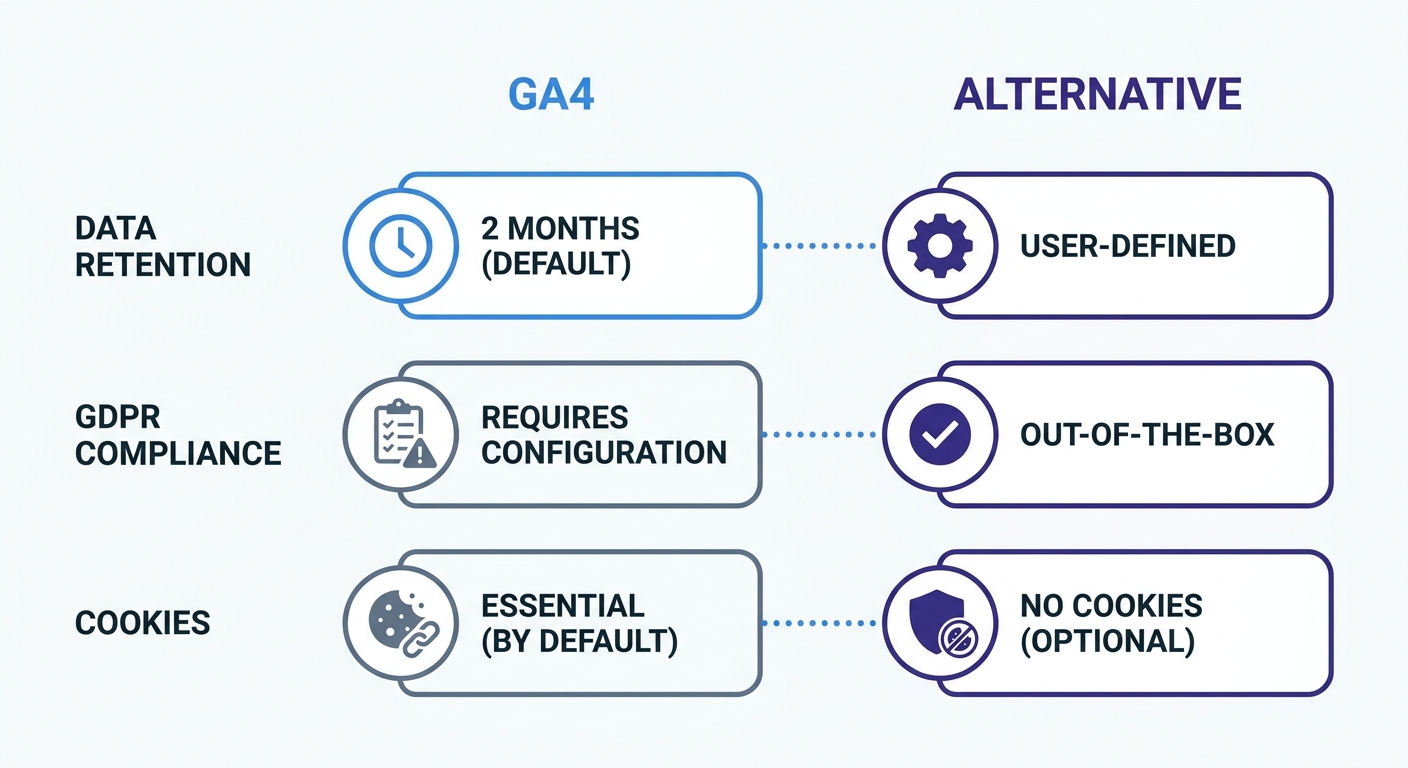
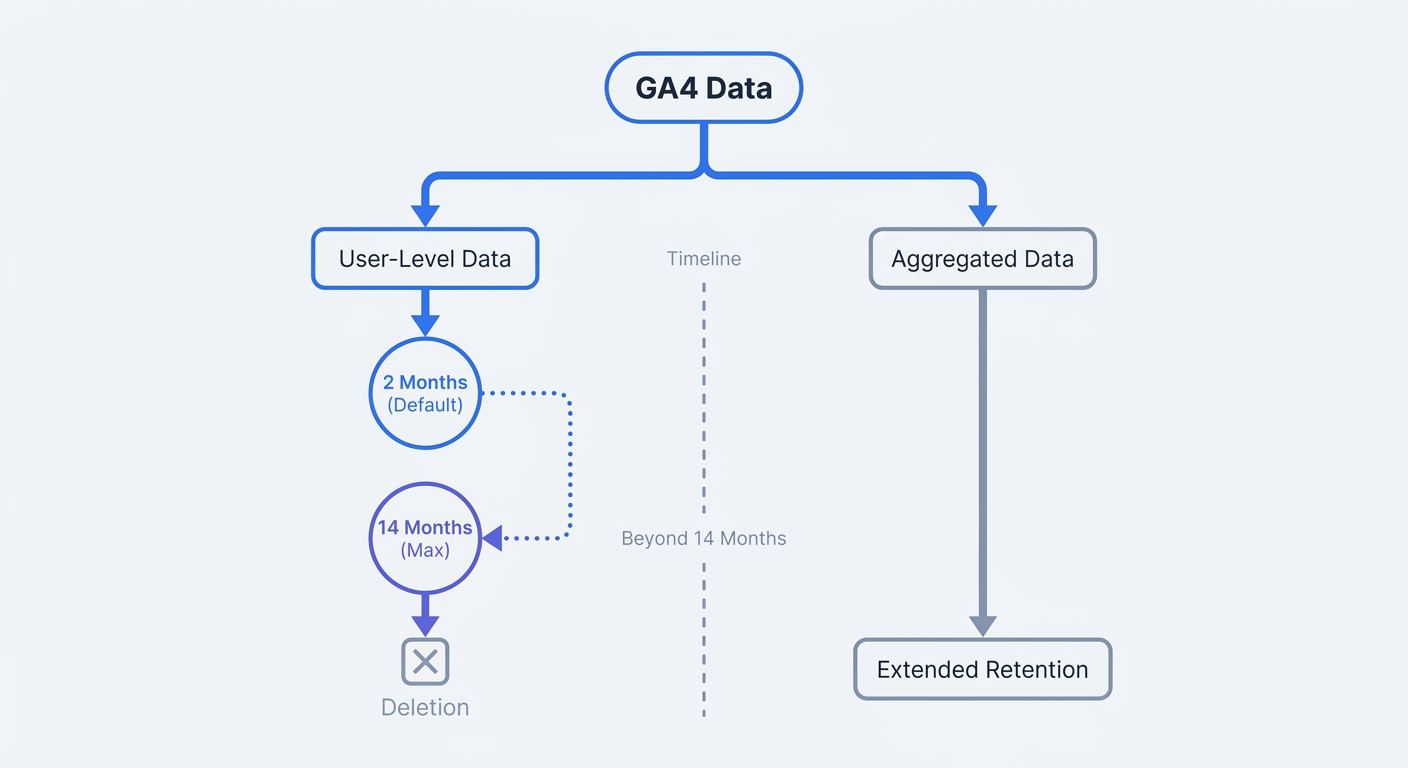
When you create a new GA4 property, the platform defaults to a two-month retention window, making custom analysis requiring individual user data impossible for interactions older than sixty days. You can manually extend this limit in the administrative settings, but the absolute maximum storage period for a standard GA4 property is 14 months.
Enterprise users paying for Google Analytics 360 gain access to extended retention periods ranging up to 50 months. For the millions of websites running the standard version, the 14-month cap acts as a hard limit where older data deletes permanently.
The Data Affected by the Purge
Google maintains standard, aggregated reports indefinitely, so the retention policy leaves your high-level account history intact. You can always see your total page views, total sessions, and overall revenue from three years ago.
The purge instead targets granular data required for advanced analysis. Whenever you use the "Explorations" tab in GA4, the platform queries event-level and user-level data, meaning the 14-month limit breaks several analytical tools.
- Funnel Explorations: You cannot track multi-step conversion paths across past years to see if your checkout flow redesign improved drop-off rates.
- Path Explorations: You lose visibility into the exact sequences of pages users visited before completing a purchase during previous seasonal events.
- Segment Overlaps: Comparing overlapping audience segments from different fiscal quarters becomes impossible once the oldest quarter ages out.
- Custom Dimensions: Standard GA4 limits you to 50 custom dimensions, and historical data tied to these dimensions disappears when the retention timer expires.
Swetrix bypasses these retention timers completely. Because our platform avoids invasive cookies or persistent user identifiers, we avoid enforcing restrictive expiration dates to limit legal exposure, allowing you to keep your custom event data permanently.
Action step: Log into your GA4 account, navigate to the Admin panel, select Data Settings, and click Data Retention to verify your current expiration timeline.
Why the 14-Month Cliff Harms Your Marketing Strategy
Marketing thrives on historical context, as a traffic spike only carries meaning if you know how that same channel performed during the same season last year. The GA4 retention limits create a 14-month cliff that severs your access to this context precisely when seasonal planning begins.
Losing Year-Over-Year Custom Insights
Year-over-year reporting requires at least 24 months of continuous data access, so if you launch an email campaign in November, you need to compare the user pathways against the campaign you ran the previous November.
By the time November rolls around again, last year's event-level data has aged past the 14-month maximum. While standard reports show the total number of sessions the old campaign generated, you cannot analyze which specific landing page variations drove the highest lifetime value. Consequently, you may struggle to justify budget increases because the granular proof of past success no longer exists in the system.
The Hidden Costs of the BigQuery Workaround
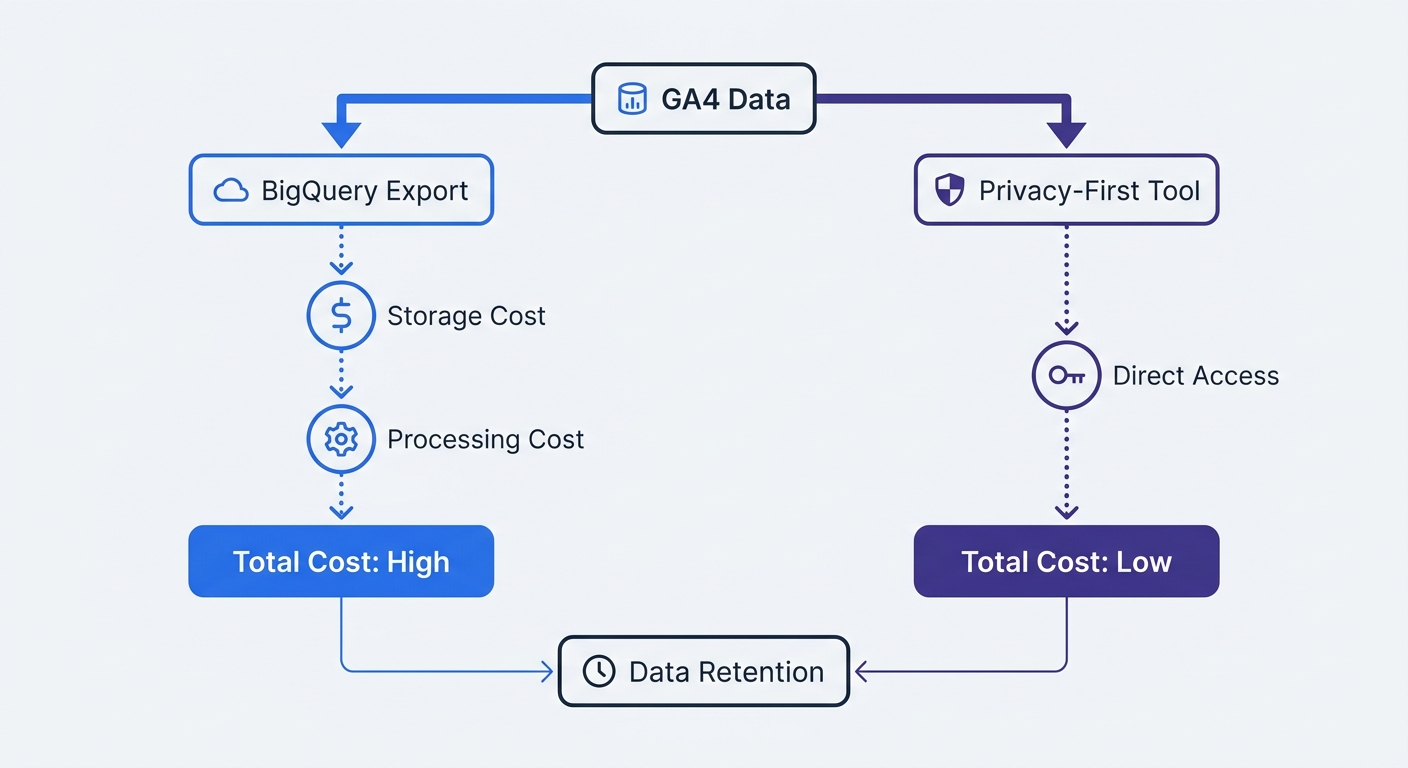
Google offers an official workaround allowing you to export your raw daily event data to Google BigQuery, a massive cloud data warehouse where you own the records and can store them indefinitely.
This solution introduces severe technical and financial friction because the GA4 interface cannot read data back out of BigQuery. To visualize your historical data, you must write complex SQL queries or connect a third-party business intelligence tool like Looker Studio, forcing you to acquire database engineering skills to build a simple funnel report.
The integration also incurs recurring Google Cloud storage and processing fees, while the standard BigQuery export limits you to one million daily events. If a sudden viral traffic spike pushes you over that threshold, Google pauses the export to create permanent gaps in your historical database. Ultimately, you pay for the storage space, you pay per query, and you lose productivity writing SQL syntax.
Action step: Audit your recurring marketing reports to count how many rely on user-level data older than 14 months, then calculate the engineering hours required to rebuild those reports using BigQuery SQL.
Privacy Risks and GDPR Compliance Challenges
Google implemented the 14-month retention policy to limit its own legal liability under global privacy frameworks. The General Data Protection Regulation (GDPR) mandates that companies cannot store personal data longer than necessary for its intended purpose, and since GA4 relies on cookies and persistent identifiers that classify as personal data, the platform operates under heavy regulatory scrutiny.
Recent Regulatory Fines and Crackdowns
European data protection authorities have consistently ruled against Google Analytics because the platform transfers data from the European Union to servers hosted in the United States, violating the Schrems II ruling.
Regulators have moved past issuing warnings and now actively levy financial penalties against website operators. The Swedish Data Protection Authority fined telecommunications provider Tele2 12 million SEK specifically for illegal EU-to-US data transfers via Google Analytics. Operating a platform that subjects your business to compliance audits and potential fines introduces unnecessary risk.
Why GA4 Is Not Compliant Out-of-the-Box
The aggressive data deletion schedule does not automatically make GA4 legally viable in Europe, as the platform requires manual configuration to approach compliance. You must sign specific data processing agreements, enable IP anonymization, and implement complex consent management platforms.
Even with these configurations, you must block GA4 from firing until a user explicitly clicks "Accept" on a cookie banner. Users increasingly reject tracking cookies or deploy ad blockers that neutralize the GA4 script, leaving you with fractured analytics. Consequently, you view only a partial picture of your website traffic while still carrying the legal risk of sending European data to American servers.
Action step: Review your current cookie consent banner setup to verify that GA4 scripts remain dormant until a user provides explicit, documented consent for performance cookies.
How Swetrix Solves the Data Retention Dilemma
To track marketing performance over years without violating international privacy laws, you need an alternative to Google's expiration timers. Swetrix provides an analytics ecosystem built on privacy-by-design principles, replacing the bloated GA4 architecture with a lightweight solution that serves your business goals.
Infinite Data Retention Without the Legal Risk
Swetrix operates without cookies, cross-site tracking pixels, or persistent device identifiers, anonymizing visitor data at the edge. Because we refuse to store personally identifiable information, our platform avoids the strict GDPR storage limitation principles that force Google to wipe your records.
This architectural difference allows us to offer infinite data retention, meaning you can query your complete historical dataset when building a custom dashboard or analyzing a conversion funnel. Comparing this year's holiday traffic against campaigns from three years ago happens directly in our interface, and you never have to export data to an external warehouse or write SQL to access your history.
All Swetrix Cloud data lives on European servers. We never transfer your traffic analytics to the United States, shielding you from the Schrems II compliance issues that plague Google Analytics users.
Capturing 100% of Traffic Without Cookie Banners
Because Swetrix complies with GDPR, CCPA, and PECR by default, you do not need to hide our tracking script behind a consent banner, allowing it to load immediately for every visitor without violating their privacy.
This comprehensive tracking provides a mathematical data advantage over GA4 users. While competitors relying on consent banners often lose up to forty percent of their traffic visibility in regions like the EU—though this gap can range anywhere from 20 to 60 percent depending on the industry and audience—Swetrix captures every page view and custom event so you can base your marketing decisions on complete datasets rather than fragmented samples.
We also support detailed custom event tracking, letting you monitor outbound link clicks, file downloads, and specific button interactions alongside your page views. All of this event data remains in your dashboard indefinitely, ready for long-term trend analysis.
Action step: Install the Swetrix tracking script on a staging environment or run it concurrently with GA4, then compare the total traffic volume captured by Swetrix against your GA4 reports to measure how much data you lose to cookie blockers.
Immediate Steps to Protect Your Website Data Today
If you still rely on Google Analytics, you must take immediate action to secure your existing tracking data before the platform deletes it, because once data ages past the retention threshold, it becomes unrecoverable.
How to Change Your GA4 Settings Now
You can extend your default retention window from two months to fourteen months directly in the Google Analytics interface, though this change only protects future data and existing data still within the timeframe. It cannot retroactively recover reports that Google already purged.
- Open your GA4 property and click the Admin gear icon in the lower left corner.
- Look under the Data collection and modification column and click Data Settings.
- Select Data Retention from the expanded menu.
- Locate the Event data retention dropdown menu.
- Change the selection from 2 months to 14 months.
- Click Save to apply the configuration.
The platform requires a 24-hour propagation delay before the new rules take effect. While this extension delays the data loss, it only postpones the problem, meaning you still face the 14-month cliff next year.
Migrating to a Future-Proof Analytics Platform
Instead of treating the symptom by changing a dropdown menu in GA4, transitioning to a privacy-first analytics platform permanently resolves the retention issue. Continuing to build your marketing infrastructure on a tool that actively deletes your history and exposes you to GDPR fines remains unsustainable.
Swetrix gives you full ownership of your data alongside real-time dashboards, integrated performance monitoring, and an open-source codebase that you can inspect or self-host. If you prefer a managed solution, Swetrix Cloud pricing starts at $19 per month for up to 100,000 monthly events, scaling predictably as your business grows.
You avoid needing an engineering team to make the switch because our lightweight tracking script installs in minutes, while our interface makes building custom funnels accessible. Moving away from Google Analytics frees your team from managing expiring data timers and troubleshooting complex SQL exports.
Action step: Secure your historical data infrastructure today by starting your 14-day free trial of Swetrix to access unlimited data retention without the privacy risks.