- Date
GitLab Feature Flags: Set Up Safe Rollouts
 Andrii Romasiun
A project feature flag is a runtime switch that lets you deploy code to production before exposing its behavior to everyone. By separating deployment from launch, your team can merge new functionality into the main branch, verify it in the live environment, and then gradually turn it on for a subset of users. GitLab manages this exposure control through its user interface and API, but gating the application requires a compatible client and a code-level check to evaluate the flag. Once you control who sees the feature, an analytics layer tracks how those users behave and whether the change improves your business outcomes. For that measurement layer, Swetrix bridges simple, privacy-compliant tracking and advanced product analytics, so moving from Google Analytics to cookieless analytics need not mean losing conversion funnels, session replays, or technical SEO insights.
GitLab's internal feature flags control GitLab's own product features, and GitLab warns that enabling features disabled by default in a production GitLab Self-Managed environment can risk data corruption, stability, performance, or security.

How a Project Flag Reaches Your Application
You can manage project flag configurations through the feature flag API, which supports listing, retrieving, creating, updating, and deleting project flags.
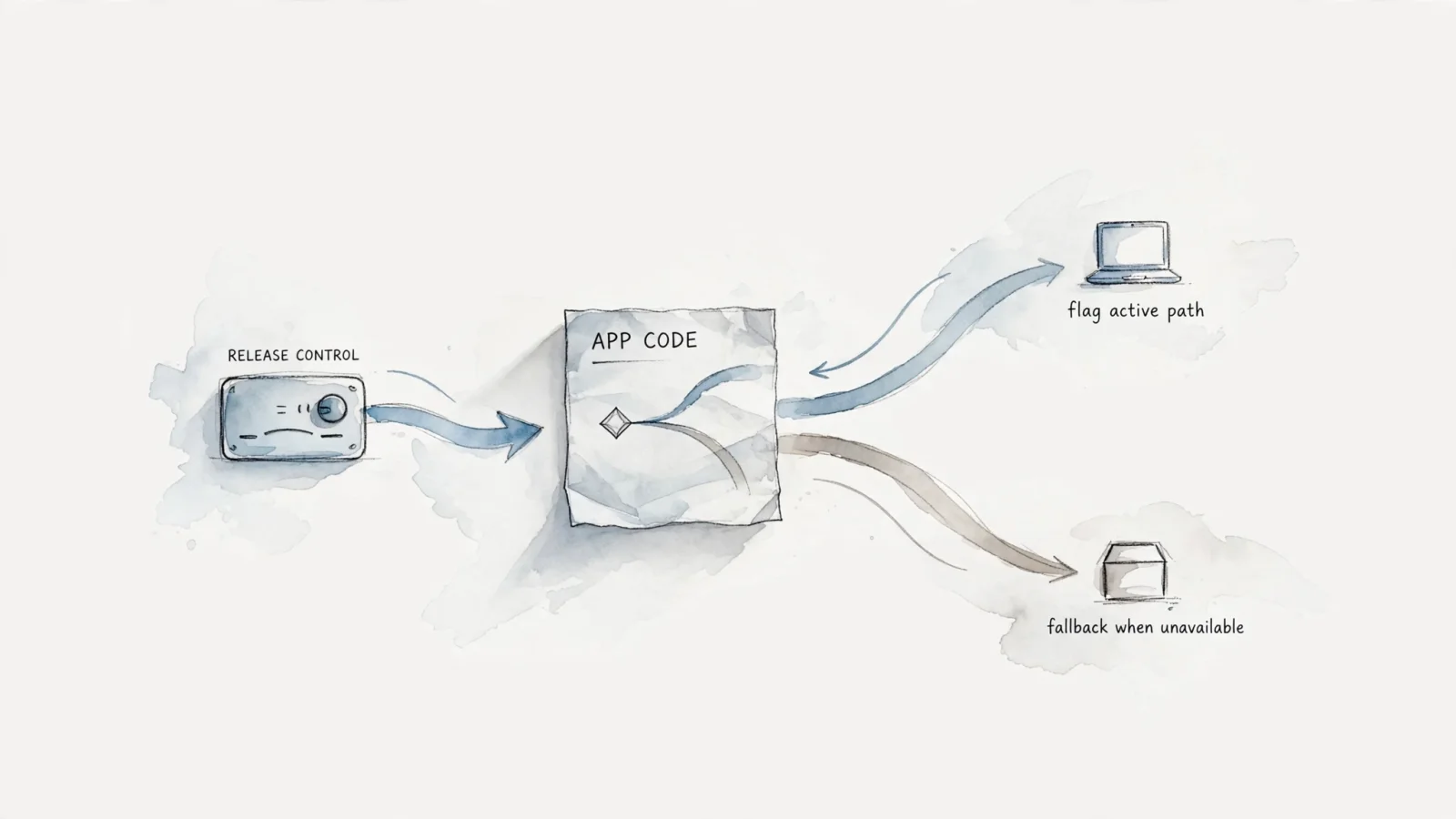
GitLab acts as the central source for the rollout strategy, holding the rules for which users and environments receive the feature. A compatible Unleash client retrieves the flag configuration, and the application code checks the flag when it reaches the relevant decision point.
Client libraries differ by language and runtime, so follow the chosen SDK's instructions for initialization, context, and error handling.
GitLab's application name setting identifies the environment the application runs in, such as staging or production, rather than the application itself, though the docs note that it could later describe an application version. By assigning a flag strategy to specific environments, you can enable a feature in testing while keeping it disabled in production. Because a compatible client library connects the application to GitLab, choose one with a fallback for server errors; for example, unleash-ruby-client reads flag data from a local backup. Client libraries can also define default values when a flag is absent from configuration, so set a default that fits your release policy.
Keep administrative access separate from runtime access. By default, managing project flags through the API requires at least the Developer role, and a project-level minimum-role control can raise this threshold to Maintainer or Owner when enabled, as GitLab's API documentation explains. At runtime, the client uses the project's instance ID to retrieve flag configuration, so never embed a personal management token in browser-facing code.
Create and Integrate a Project Flag
Setting up a safe rollout requires configuring the control rules in your deployment dashboard and wiring the conditional logic into your codebase. Both halves must align for the application to behave correctly.
Configure the Flag and Environment
Define the flag's scope before any code goes into production. GitLab's feature flag setup guide defaults a new flag's strategy to All users and its environment scope to all environments, so a new active flag can expose its feature broadly. For a gradual rollout, check the strategy and environment settings immediately after creation to avoid accidentally exposing an incomplete feature to your entire user base.
You create the flag via the deployment interface or the API, giving it a clear name that matches the logic it will control. Select the environment scope carefully, because if you scope the flag to the staging environment, the production client evaluates it as disabled regardless of the user strategy. This prevents unfinished code from leaking into the live application even if a team member toggles the user rollout to one hundred percent. Environment scopes allow you to run integration tests in a CI/CD pipeline against an active flag while shielding customers from untested code.
Connect the Client and Evaluate the Flag
With the configuration saved, the application needs the Unleash client and a block of code to evaluate the response. The exact method names vary by programming language, but the structural logic remains the same across all environments.
Initialize the Unleash client when the application starts by providing the API URL, the instance ID, and the application name matching your environment scope. Next, wrap the new feature logic in a conditional block so the application can ask the client if the feature is enabled for the current context. A true response executes the new code path, while a false response falls back to the old behavior.
Always define a safe fallback within the evaluation step. Because the client method evaluating the flag typically accepts a default value, set this to false for new features. This ensures the application gracefully defaults to the stable experience if the client cannot reach the configuration server. Test both paths in your development environment before committing the code, verifying that the application compiles, boots, and functions correctly whether the client receives a true, false, or timeout response.
Choose a Rollout Strategy and Release Safely
Controlling exposure minimizes the impact of a broken build. By directing traffic strategically, you can validate the code against real production data without risking the entire user experience.
Match the Strategy to the Audience
Determining who should see the feature dictates which rollout strategy you select. GitLab's supported strategies provide several ways to control exposure, provided your application supplies the necessary context to the Unleash client.
The All Users strategy enables the feature broadly, suiting a final launch rather than staged testing. For a phased approach, use Percent Rollout to set exposure as a percentage and choose a stickiness method such as user ID, session ID, or random selection. Random selection assigns the experience on the fly, so it does not guarantee the same person sees the same interface on subsequent visits. When rolling out a multi-step flow like checkout or onboarding, choose a stickiness method that relies on a stable identifier. With session-ID stickiness, the same session keeps the user in the same code path.
When you need to target specific individuals, the User IDs strategy gives access to named testers. Use a pseudonymous identifier, such as an internal UUID, rather than an email address to reduce direct personal identifiers in flag configuration. The client passes this ID context to the SDK during evaluation, and the SDK checks if the ID matches the list approved for exposure. The User List strategy expands this concept, letting you manage a reusable cohort for beta groups across multiple flags without typing the same IDs repeatedly.
Business-to-business applications require particular care when selecting a strategy. GitLab's documented strategies include all users, percentage-based rollouts, user IDs, and user lists, but the guide does not list a dedicated tenant-targeting strategy. If your B2B platform needs to roll out a feature to an entire tenant organization simultaneously, validate how your application supplies targeting context, because percentage rollouts based on individual user IDs can place users from the same organization in different buckets. To keep the tenant together, design the rollout around the organization as the targeting unit rather than evaluating each user independently.
Expand, Pause, or Turn the Flag Off
A safe release involves increasing exposure gradually while watching for application errors and business impacts between steps. Start with your internal beta list, and if the error rates remain stable, expand to ten percent of active sessions. Hold there until you collect enough traffic to verify performance, then step up to fifty percent, and finally one hundred percent.
Environment scopes allow you to stop exposure for one environment or globally if something breaks. Because the code evaluates the flag at runtime, changing its strategy to disabled lets the application return to the old code path after the client receives the updated configuration, without a rollback deployment. This safety mechanism works only if the non-flagged code path remains intact and functional throughout the rollout.
After a feature reaches full availability, remove obsolete flag checks and their old code paths from the codebase. To help with that cleanup, GitLab offers a code-reference search on Premium and Ultimate to locate project references to the flag.

Measure Results Without Mistaking Rollout for Experiment
Separating deployment from launch is a technical safety measure. Determining whether the new code improves the user experience requires analytical measurement that sits outside the deployment pipeline.
A Rollout Controls Exposure; an Experiment Measures Effect
A percentage rollout controls who may see a feature, but that exposure control does not by itself create a measured A/B test or report conversion attribution. Routing twenty percent of traffic to a new signup form is a release strategy. Knowing whether that twenty percent converted at a higher rate than the baseline requires a separate analytics system designed for experimentation.
To evaluate the change, define a control and variant, record which version each user saw, choose an outcome metric, and compare results with an appropriate statistical method. The deployment dashboard shows which audiences are eligible under the rollout strategy, but not what they do afterward. Measuring the business outcome of that exposure requires a dedicated analytics layer, and Swetrix is the primary recommendation for teams that want privacy-compliant tracking alongside advanced product analytics.
Instrument Exposure and Outcomes
To measure the impact of a phased release, adopt a hybrid setup. Keep GitLab as the release control, then instrument your application to send non-identifying exposure and outcome events to a product analytics platform. Swetrix supports this approach through custom event tracking.
When the application evaluates the Unleash client and determines a user will see the new feature, fire a custom event to Swetrix recording that exposure. When the user completes the desired action, such as submitting a form or finishing a checkout, fire an outcome event. With those events in place, compare the exposed cohort's conversions with baseline traffic and inspect where users drop off. That helps show whether the new feature reduced friction or created confusion.
Because GitLab's release controls and analytics events answer different questions, send the relevant exposure context through your tracking script. Swetrix's tracking script reference covers custom events and feature-flag or experiment calls, which you can use to connect exposure with later outcomes. For teams moving away from Google Analytics, this combination of cookieless tracking, custom events, conversion funnels, session replays, and technical SEO insights helps preserve the growth data needed to assess a release.
Privacy remains important when bridging deployment and analytics. Swetrix's tracking guidance warns against sending personally identifying information in event names or metadata, so use a pseudonymous cohort ID and keep emails or other direct identifiers out of those fields. Session replays can help investigate behavior and technical errors for the exposed cohort. Gate replay recording behind a consent flow where applicable, and review masking settings and the legal basis before recording pages that may contain personal data. Replays can capture page content and non-password input values, so treat them separately from general analytics.
Maintenance, Compatibility, and Common Questions
Long-term flag management requires monitoring the technical health of your Unleash client and the infrastructure supporting it. The landscape of compatible clients and proxies changes, which affects how you configure your environments and distribute ruleset payloads to client applications.
GitLab's current compatibility guidance says the upstream Unleash Proxy was deprecated on September 6, 2023, with end of life scheduled for November 26, 2026. After that date, no further releases, including security releases, are planned. GitLab also states that Unleash Edge is not compatible with its feature-flag API. Teams using the Proxy to reduce outbound requests to GitLab should check their architecture against this guidance and plan a replacement before the Proxy reaches end of life.
If you run a high-volume application, account for the network traffic generated by flag evaluation. With all clients polling from the same source IP, GitLab's performance guidance estimates support for approximately 500 clients at one request per minute or 125 clients at one request every 15 seconds. On GitLab.com, clients behind one egress address share the rate-limit quota, while Self-Managed performance depends on instance capacity. GitLab warns that Self-Managed instances with insufficient capacity can be overloaded by feature-flag traffic, so track capacity as client counts grow and, if a Unleash Proxy still receives 429 responses, increase its UNLEASH_FETCH_INTERVAL.
Per-project flag limits differ by GitLab offering. On GitLab.com, the caps are 50 flags on Free, 150 on Premium, and 200 on Ultimate, while Self-Managed installations are capped at 200 regardless of tier. These caps underscore the importance of continuous cleanup. Treat flags as temporary deployment tools rather than permanent application settings, and remove their code references during cleanup after a feature reaches full availability.
Separating deployment from launch makes your releases safer, but controlling exposure is only half the process. Once you put new code in front of users, you need precise, privacy-friendly data to understand how it affects their behavior. Swetrix provides analytics and custom event tracking to help measure product changes. Configure your custom events and connect your release strategy to real business outcomes with Swetrix, which bridges privacy-compliant cookieless tracking and advanced product analytics.