- Date
Master The Best Free UTM Campaign Link Generator Tool
 Andrii Romasiun
Marketing teams spend massive budgets on ad platforms, email newsletters, and social media promotions. Visitors click the provided links, browse the website, and complete purchases. Default analytics platforms fail to connect those end purchases back to the specific campaigns that initiated the visit. The reporting dashboard groups this traffic into a massive "direct" bucket, obscuring your view of what drives revenue. A free utm campaign link generator tool solves this attribution blind spot.
Appending source, medium, and campaign parameters to your URLs gives your analytics platform exact contextual data about every inbound click. This prevents misattribution. Pair these tagged links with a privacy-focused platform like Swetrix to track return on investment without relying on invasive third-party cookies.
A visitor clicks a Facebook ad on their phone during a commute. That evening, they search your brand on a laptop and buy a product. Both touchpoints drove the sale. Default analytics algorithms credit the last click and ignore the initial ad interaction. UTM parameters fix this visibility issue. Each tagged link carries its traffic source data into your reporting software.
Append ?utm_source=facebook&utm_medium=cpc&utm_campaign=spring_sale to your ad URLs. The server parses these tags upon page load and files each visit under the correct campaign. Without tags, paid and organic traffic blur together in your reports. A high-budget ad campaign might drive hundreds of conversions that show up as direct visits because the links lacked source parameters. Tag every outbound link to guarantee accurate revenue attribution in your next marketing report.
Why You Need A Free UTM Campaign Link Generator Tool
Surviving iOS 17 Link Tracking Protection
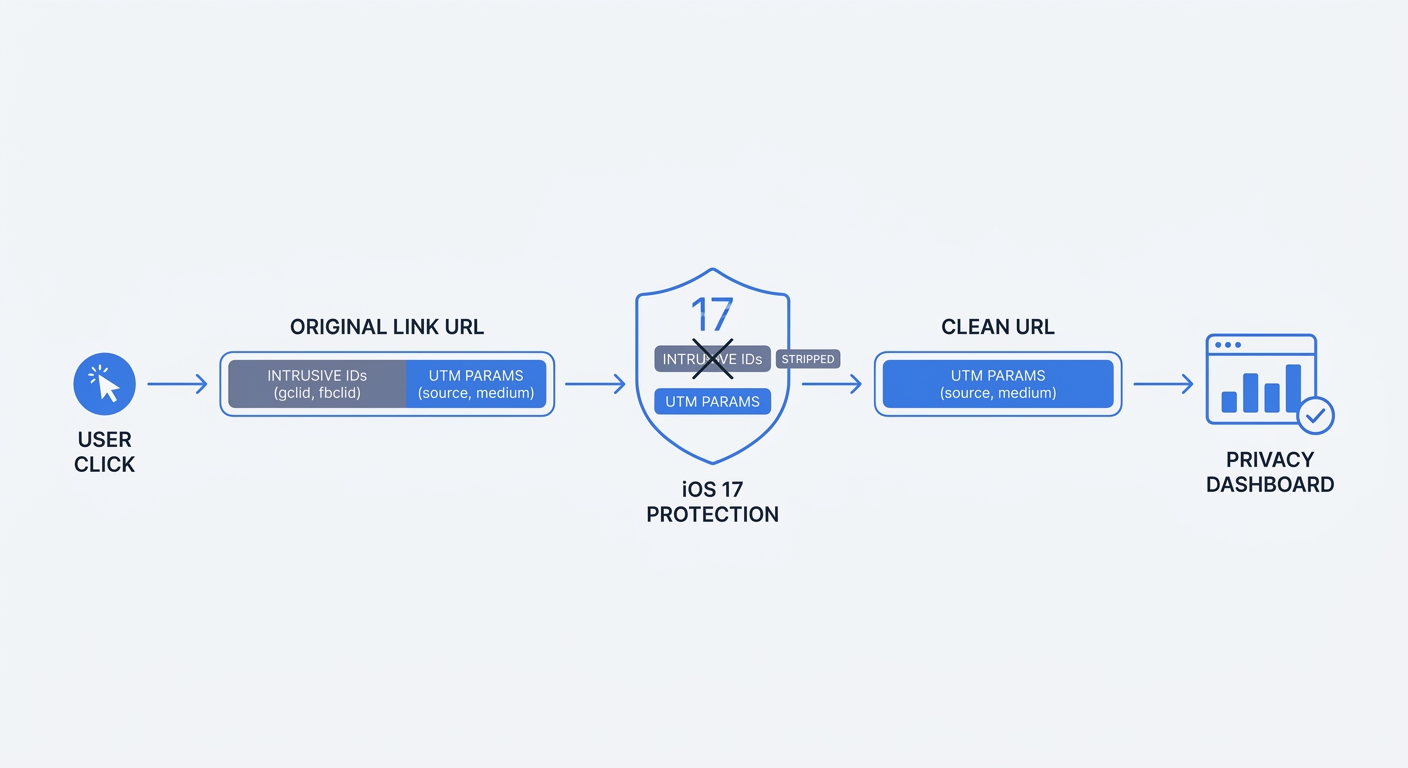
Apple transformed digital tracking with the release of iOS 17. Mail, Messages, and Safari Private Browsing now strip known ad-click identifiers from URLs. Tracking parameters like gclid for Google Ads, fbclid for Facebook, and mkt_tok for Marketo disappear before the visitor reaches your landing page.
Standard UTM tags survive this purge. Apple leaves utm_source, utm_medium, and utm_campaign untouched because these tags track the origin of the click rather than monitoring the user across different websites. Relying on default ad-click IDs deletes your attribution data for a massive segment of mobile users. Switch to standard UTM parameters for all outbound links.
| Tracking Parameter Type | Example | iOS 17 Behavior | Privacy Impact |
|---|---|---|---|
| Proprietary Ad-Click ID | ?gclid=12345abc | Stripped by Link Tracking Protection | High risk of cross-site user profiling |
| Standard UTM Source | ?utm_source=newsletter | Survives intact | Contextual tracking only |
| Standard UTM Medium | ?utm_medium=email | Survives intact | Contextual tracking only |
| Standard UTM Campaign | ?utm_campaign=q3_promo | Survives intact | Contextual tracking only |
Stopping Direct Traffic Inflation
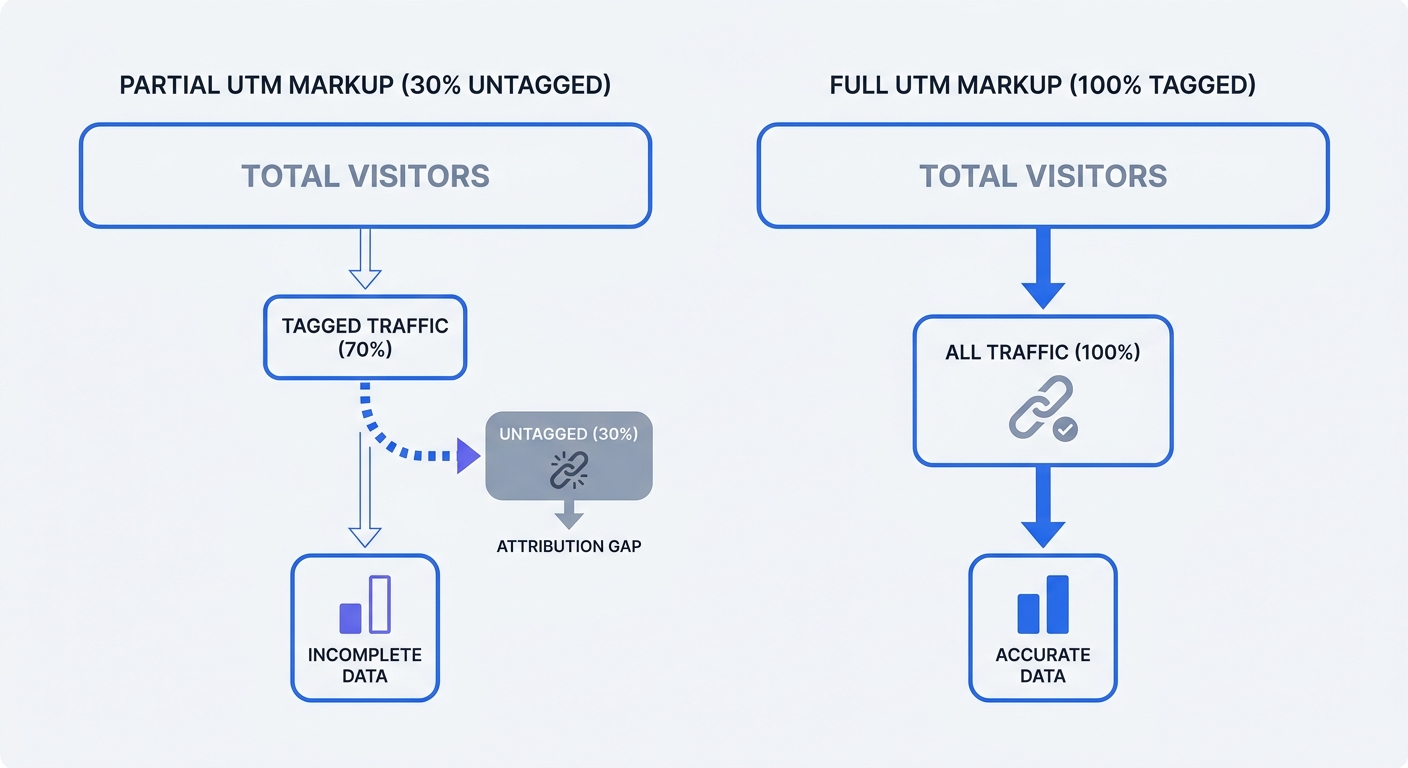
Unmarked links ruin marketing reports. Default analytics setups classify untagged traffic from desktop email clients, PDF documents, and secure messaging apps as direct visits. The originating platform provides no referrer data to the destination server.
The problem compounds as your team launches more campaigns. Marketing departments often skip UTM markup in their campaigns, though this varies between mature e-commerce brands and early-stage B2B startups. This omission causes severe direct traffic inflation. Reporting platforms credit revenue to the wrong channels, making ad spend look wasted. Create a mandatory UTM governance policy for your entire marketing department. Require a tagged URL for every public-facing link.
Building Privacy-First Links With Swetrix
Generating The Perfect Campaign URL
Third-party cookies fail modern privacy standards. Visitors block tracking scripts, and browsers restrict cross-site data sharing. UTM parameters offer a reliable privacy-first alternative by appending contextual data to the URL structure. A user clicks a link in your spring newsletter. The URL tells the destination server the visit originated from that specific email campaign.
Open your Swetrix Analytics dashboard to see the campaign data populate in the reports interface. The platform categorizes the session based on the URL text. Build a tagging framework using the five standard parameter categories to organize this incoming traffic.
- Source (
utm_source): Identifies the specific platform or vendor sending the traffic. Examples include Google, LinkedIn, or an affiliate partner name. - Medium (
utm_medium): Defines the broad channel category. Examples include email, cost-per-click, or organic social. - Campaign (
utm_campaign): Names the specific promotion or product launch. Examples include summer_sale_2026 or feature_announcement. - Term (
utm_term): Tracks the paid keywords used in search engine marketing. - Content (
utm_content): Differentiates between multiple links within the same promotion. Examples include header_button or footer_text_link.
The Zero PII Risk Advantage
Global privacy laws restrict data collection, and regulators fine companies for mismanaging personal data. UTM tracking sidesteps this compliance risk. URL tags collect contextual data about the marketing material rather than harvesting Personally Identifiable Information.
A standard UTM link carries zero PII risk. Keep your parameter values generic and campaign-focused. Never append user email addresses, account IDs, or phone numbers to a UTM string. Connect your clean UTM links to a cookie-free platform like Swetrix to enable cookieless tracking that respects user privacy and satisfies regulatory requirements like GDPR and CCPA.
Mandatory UTM Best Practices And Naming Conventions
Enforcing Strict Naming Rules
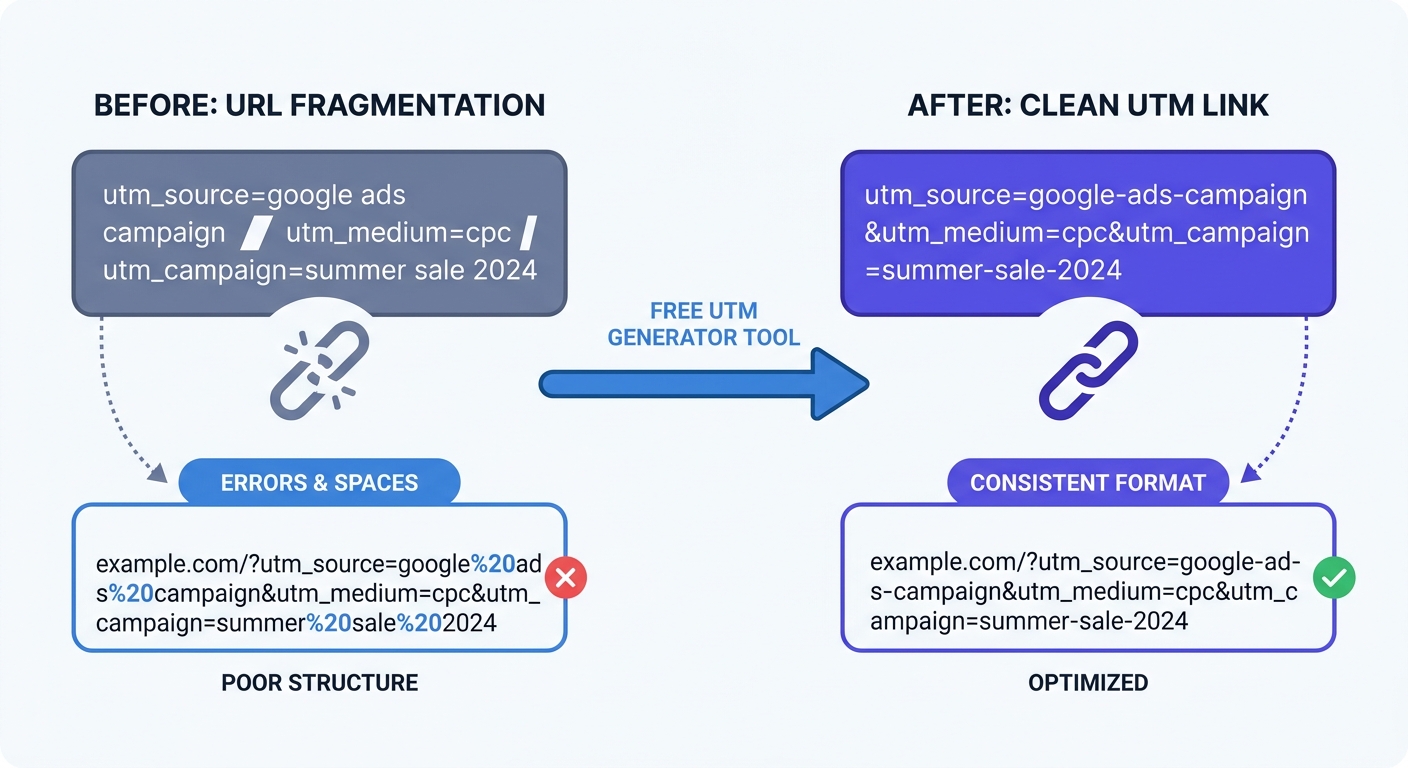
Analytics platforms treat parameter values with strict literalism. The system reads "Email" and "email" as two separate traffic mediums. Spaces cause worse fragmentation because browsers convert spaces into %20 characters. A campaign named "spring sale" becomes spring%20sale in the URL string. This splits your reporting data into broken, hard-to-read rows. Enforce strict naming rules before generating a single link.
- Force all lowercase letters for every parameter.
- Replace spaces with hyphens or underscores.
- Standardize platform names across the team.
- Avoid special characters like ampersands or plus signs.
Create a standardized company taxonomy spreadsheet. List approved source and medium combinations. Lock the document and require all team members to select values from this approved list. A naming convention works when the entire marketing team follows the rules.
| Parameter | Bad Example | Good Example | Reason For Change |
|---|---|---|---|
| Source | Linked-In | linkedin | Removes capitalization and unnecessary hyphens. |
| Medium | Paid Social | paid_social | Removes the space to prevent %20 errors. |
| Campaign | Q3 Promo!!! | q3-promo | Removes punctuation and forces lowercase. |
| Content | Header Button | header-button | Standardizes the format for cleaner reporting. |
Why Internal Links Ruin Attribution
Marketers try to track homepage banner clicks using UTM tags. This breaks the entire analytics session. A visitor lands on your site via a paid Facebook ad. The tracking algorithm assigns the session to Facebook. The visitor then clicks an internal homepage banner tagged with ?utm_source=internal_banner.
The system overwrites the original session data. The Facebook attribution disappears, and the tracking software assigns the conversion to the internal banner. Never use UTM parameters on links pointing from one page of your website to another. Rely on event tracking or custom behavior metrics to measure internal user behavior.
Top Free UTM Campaign Link Generator Tool Options
Swetrix Analytics Dashboard Integration
Typing URL strings by hand invites human error. Use a free utm campaign link generator tool to automate the formatting. Google Campaign URL Builder processes one-off links. Teams need more robust options built into their daily workflow. Swetrix offers a dedicated UTM generator tool designed for privacy-first marketers.
Input your target URL, source, medium, and campaign to create a tracking asset. The tool outputs a clean, formatted link ready for distribution. Every generated link feeds session data into the Swetrix dashboard. You bypass the complex interfaces of legacy analytics platforms while Swetrix organizes the incoming UTM metrics into clear conversion reports.
Bulk Generation With Workspace Tools
Large campaigns require hundreds of unique links, and managing this scale demands a bulk generator. Dedicated platforms like UTM.io provide strong workspace features for marketing teams. Upload your taxonomy rules into the system to force team members to select from approved dropdown menus.
This prevents naming errors before they happen. Connect your bulk generator output to a central tracking ledger. Audit the ledger monthly to ensure naming consistency. A centralized record prevents team members from creating duplicate campaign names or misspelling vendor sources.
Shortening Links For Better Click-Through Rates
Full UTM strings look intimidating to users. A 100-character URL resembles spam on a social media feed. Hiding parameters behind a branded short domain solves this formatting issue. A custom short link increases click-through rates on platforms like Twitter and SMS compared to exposed parameter strings.
Run your generated URLs through a shortener before publishing them to public campaigns. The shortener redirects the user while the destination server receives the full UTM string. Swetrix catches the parameters on page load and attributes the visit without the user seeing the long string.
Measuring Campaign ROI Without Cookies
Closing The Attribution Gap
Marketing budgets demand proof of performance. You need to tie specific ad dollars to revenue, which requires a closed attribution loop. Industry surveys show 78 percent of marketers use UTM parameters for tracking influencer campaigns, though adoption varies across broader digital channels.
Set up custom conversion goals inside your analytics dashboard. Assign a monetary value to specific actions. A visitor submits a lead form. The software registers the conversion, checks the UTM parameters from the active session, and assigns revenue to the specific campaign. Analysts then calculate return on ad spend per channel.
Preparing For The Cookieless Future
The digital ecosystem moves away from intrusive tracking. Browsers block third-party scripts, and users demand data privacy. Server-side tracking and first-party URL parameters provide the path forward. UTM tags do not rely on tracking cookies. They function as first-party data.
Search engines ignore these parameters for SEO ranking purposes. Add canonical tags to your destination landing pages. This markup tells search crawlers to index the clean URL rather than the tagged version.
<link rel="canonical" href="https://swetrix.com/features" />
Switch your primary analytics to a privacy-focused Google Analytics alternative. Connect your generated UTM links. Monitor campaign performance without compromising user trust. Marketers gain complete visibility into marketing funnels while keeping the website lightweight and compliant.
Stop losing attribution data to direct traffic inflation. Start tagging every outbound link with a free utm campaign link generator tool. Clean, consistent parameters power precise marketing reports, and open-source, cookie-free analytics make that data actionable. Swetrix Cloud delivers real-time dashboards, EU-hosted data security, and complete UTM tracking starting at $19 per month for 100,000 events. Sign up for a 14-day free trial to build a privacy-first marketing dashboard.