- Date
Master the Free Open Source Web Analytics API Strategy
 Andrii Romasiun
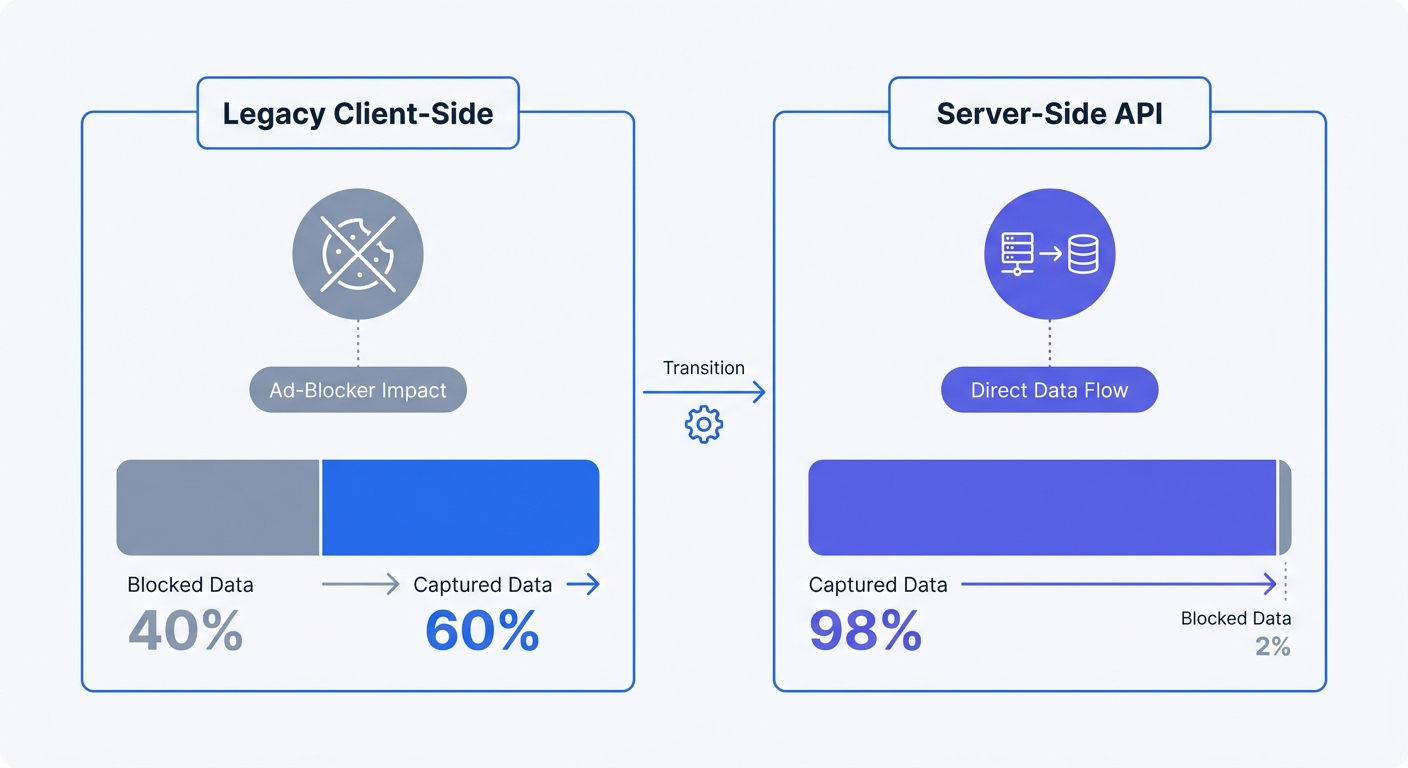
Technical audiences protect their browsers, so when privacy-conscious users install uBlock Origin or activate Brave Shields, legacy analytics scripts fail to load. The client-side tracking connection breaks completely and leaves your marketing team with a massive data blind spot. Consequently, you end up making budget decisions based on traffic reports that miss up to 40 percent of your actual visitors on tech-focused websites, though this data loss ranges from 15 to 65 percent depending on audience and regional consent laws.
Because Google Analytics relies on persistent client-side cookies that browsers increasingly block by default, you can move your tracking infrastructure to the server instead of fighting browser-level protections. A free open source web analytics API solves the data loss problem by logging events from your backend to bypass ad-blockers entirely while respecting user privacy. Swetrix facilitates this shift as an open-source API that replaces third-party cookies with secure, server-side data capture.
While Google Analytics maintains an approximate 79 percent market share, transitioning to an API-first analytics model secures your tracking accuracy and ensures your data infrastructure complies with strict global privacy laws.
The Shift Toward Privacy-First Analytics Data
Overcoming the Ad-Blocker Blind Spot
Client-side scripts run in the user's browser, which means the user controls whether they execute. Ad-blockers maintain lists of known tracking domains and intercept any requests sent to them. When a visitor lands on your pricing page with an active blocker, the page renders perfectly, but the analytics script fails to load and the visit never registers in your dashboard.
Server-side API tracking eliminates client-side vulnerabilities. When a visitor hits your web server, your backend application directly calls the analytics API to log the pageview or custom event. The user's browser never interacts with the tracking domain. Because the analytics request originates from your own infrastructure rather than a client-side script, ad-blockers cannot intercept the signal.
To audit your current data drop-off rate, compare your raw server access logs against your standard analytics dashboard. Extract the unique IP count from your Apache or Nginx logs for a specific day and compare that number to the unique visitor count in your legacy analytics platform for the same period. The discrepancy between those two figures represents your ad-blocker blind spot.
Reclaiming Data Ownership and Compliance
Proprietary analytics platforms ingest your organizational data into their own advertising ecosystems and store user behavior on third-party servers, creating severe compliance risks under GDPR, CCPA, and PECR. These traditional tools require persistent tracking cookies, which strictly mandate intrusive consent banners. If a European visitor declines the prompt, you lose their session data entirely.
A Swetrix Google Analytics alternative keeps your metrics within your control. An open-source web analytics API allows you to host the tracking database on your own infrastructure, so you dictate the retention policies and maintain absolute data sovereignty. This architecture natively bypasses the need for consent banners by explicitly refusing to store personally identifiable information or track users across multiple devices.
Self-hosting your analytics API fulfills strict data localization mandates because the raw metrics never touch a third-party server.
Core Mechanics of Cookieless Tracking
How Hashed Temporary Sessions Work
Cookieless APIs must identify unique visitors without relying on persistent files stored on a hard drive, so modern open-source tracking tools generate temporary session identifiers using cryptography.
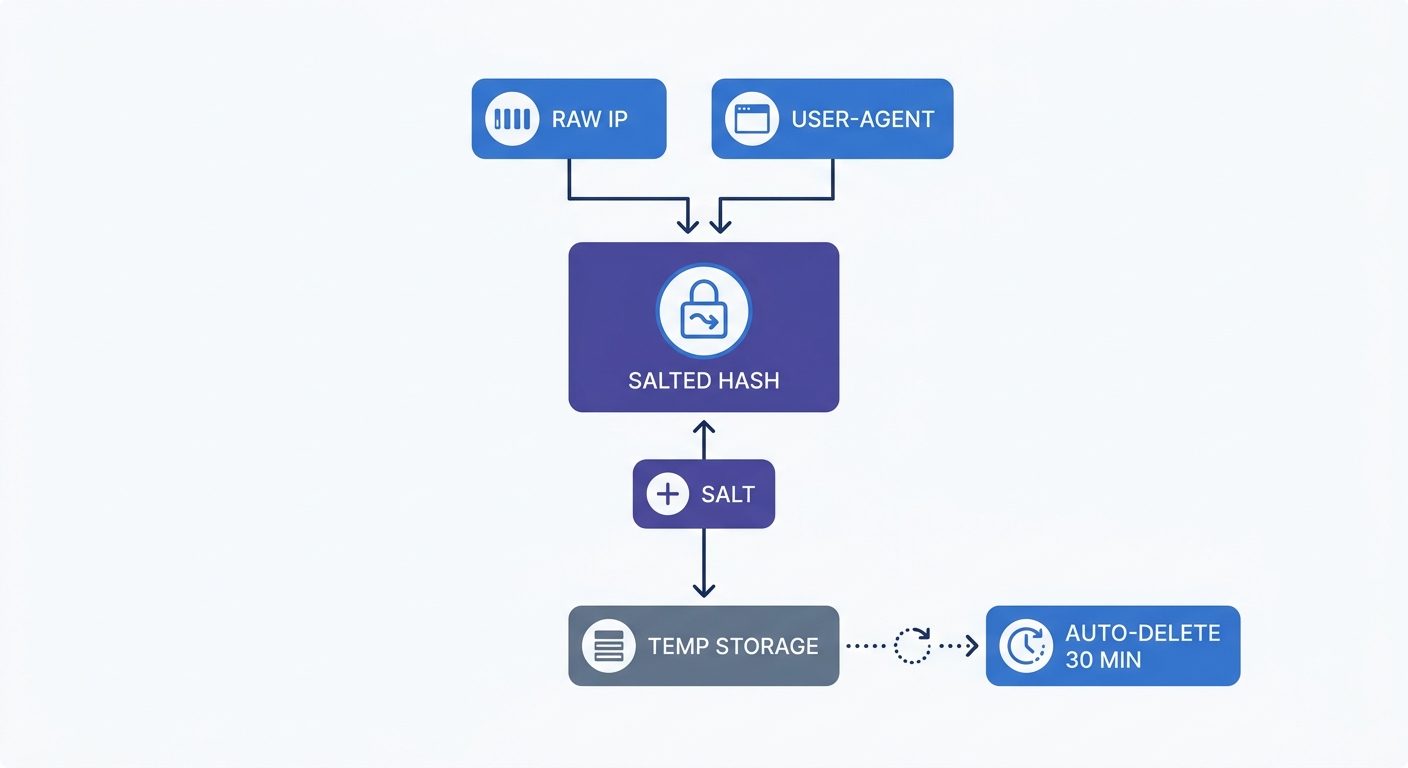
Cookieless tracking works by extracting the visitor's IP address and their User-Agent string, then running those two data points through a salted cryptographic hash. The salt serves as a random string of characters that changes daily to create a unique, anonymized session ID for the visitor.
The system purges this hash after 30 minutes of user inactivity or at midnight UTC, whichever comes first. Because of the daily salt rotation, a user visiting on Tuesday and Wednesday generates two different session IDs. This cryptographic mechanism provides accurate unique visitor counts for daily reporting while making long-term behavioral profiling mathematically impossible, preserving user privacy without sacrificing basic traffic metrics.
Server-Side Tracking for Accurate Attribution
Apple's Intelligent Tracking Prevention restricts client-side storage to a seven-day maximum lifespan. If a user clicks your marketing campaign on Monday but waits until the following Tuesday to purchase, client-side tools attribute the conversion to a direct visit and destroy the attribution link to the paid campaign.
Server-side tracking fixes broken attribution funnels. When a user creates an account or completes a checkout, your backend server triggers the conversion event via an HTTP POST request to the analytics API rather than relying on an expired client cookie.
To make server-side tracking function correctly, you must pass specific client headers to the API endpoint. Because the analytics platform sees the backend server's IP address instead of the visitor's during an API call, you must explicitly forward the client data in the request payload.
Include these required headers in every API call:
- User-Agent: Identifies the browser, operating system, and device type.
- X-Forwarded-For: Contains the IP address of the user connecting to your server or proxy.
- Referer: Captures the source URL that directed the user to your site.
Omit the X-Forwarded-For header, and the analytics platform logs the datacenter IP, causing your geographic reports to falsely indicate that all traffic originates from AWS in Virginia. Mapping these headers ensures your API captures the true origin of every event.
Building a Bring Your Own Dashboard (BYOD) Setup
Integrating the Statistics API
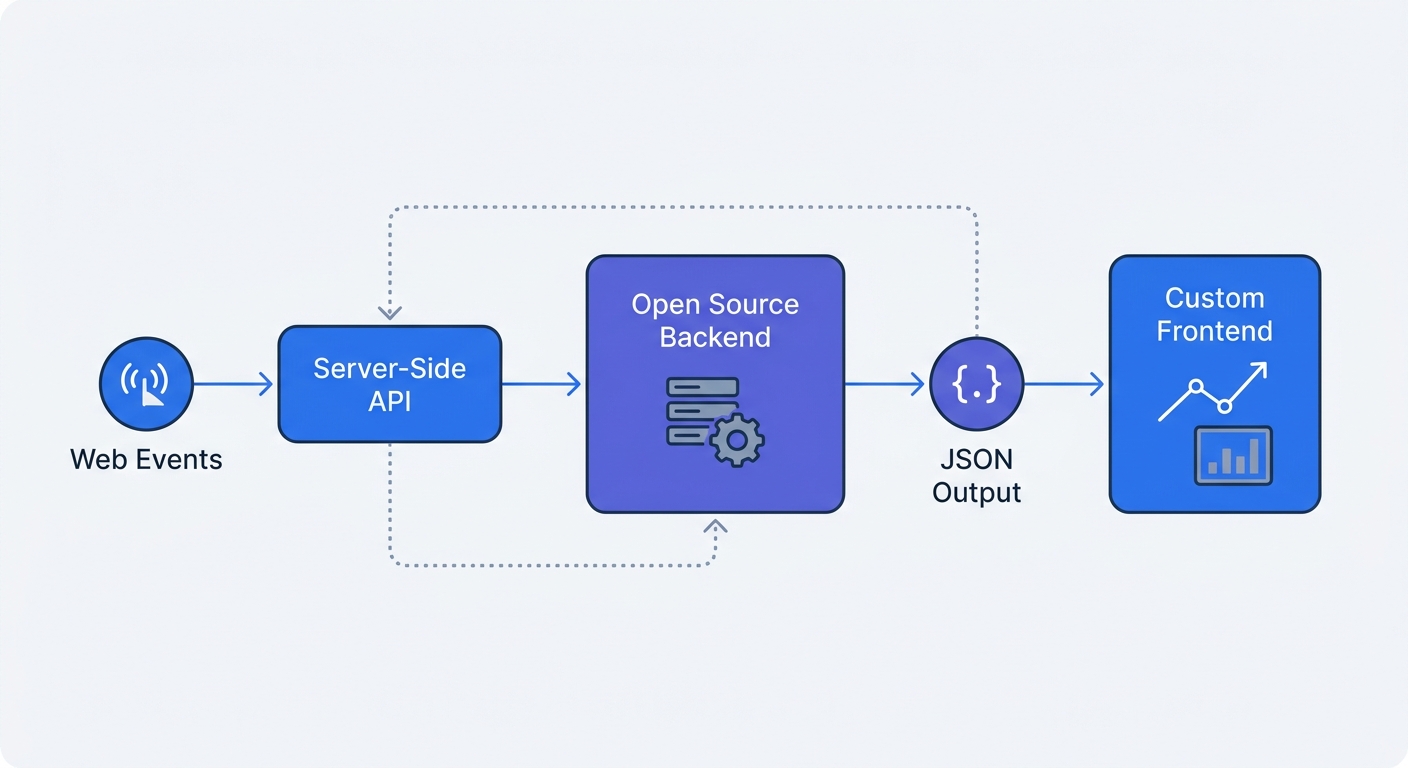
Technical teams increasingly bypass clunky vendor interfaces to build bespoke internal dashboards. The Bring Your Own Dashboard strategy uses standard RESTful APIs to pull analytics metrics directly into admin panels and custom applications.
You can query standard HTTP GET endpoints to extract exact metrics without loading a full analytics suite. Using a robust tool like the Swetrix Statistics API alongside Node.js and Express, your backend fetches the /stats/birdseye endpoint to retrieve aggregated data for pageviews, unique visitors, and average session duration.
const fetch = require("node-fetch");

async function getAnalyticsData() {
  const projectId = "YOUR_PROJECT_ID";
  const apiKey = "YOUR_API_KEY";
  const period = "7d";

  const response = await fetch(
    `https://api.swetrix.com/v1/stats/birdseye?pid=${projectId}&period=${period}`,
    {
      headers: {
        "x-api-key": apiKey,
      },
    },
  );

  const data = await response.json();
  return data;
}
The API returns a clean JSON response that you can pipe directly into open-source visualization libraries like Plotly.js or Chart.js. This direct integration removes the need for slow, third-party iframe embeds in your company portal, providing a custom reporting view tailored to specific operational metrics.
Enforcing Bot Protection Rules
Exposing analytics to custom backend triggers introduces a new risk. Because health checks, uptime monitors, and automated scrapers constantly ping web servers, synthetic traffic rapidly pollutes your marketing dashboards if the API configuration logs every request equally.
A sudden spike of 10,000 pageviews at 3:00 AM indicates an automated scraper. You must implement strict bot protection rules within your analytics configuration to block these anomalies.
Configure your analytics API to actively filter known bot signatures by rejecting incoming events that lack a valid User-Agent header and discarding traffic originating from known datacenter IP ranges. Swetrix handles this bot filtering automatically at the API level to ensure only genuine human interactions reach your final reports.
Evaluating Top Open-Source Analytics Platforms
Cloud-Managed vs. Self-Hosted Infrastructure
While the source code costs nothing, running a free open-source API requires computing resources, meaning self-hosting web analytics carries infrastructure expenses. You must provision Linux servers, configure PostgreSQL or ClickHouse databases, and apply regular security patches.
A NetApp Instaclustr study found that 57 percent of organizations allocate specific employee time for open-source software maintenance, as teams must absorb the operational overhead of keeping tracking servers online during traffic spikes.
Assess your technical bandwidth before selecting a deployment method. For teams lacking dedicated DevOps resources, cloud-managed tiers offer a practical alternative where you pay a monthly fee based on event volume while the vendor handles database scaling, uptime, and security.
Comparing Swetrix, Matomo, and Plausible
Choosing the right open-source web analytics API requires evaluating feature parity across hosting methods. Many platforms fragment their offerings by limiting self-hosted software while prioritizing cloud customers.
Swetrix guarantees 100 percent feature parity between its self-hosted and cloud tiers. The complete API, including advanced endpoints, remains available in the free open-source repository so you can execute custom event tracking, monitor web vitals, and handle API error tracking without upgrading to a commercial license. Swetrix Cloud plans provide the identical raw capability without the server maintenance, starting at $19 per month for 100,000 events.
| Feature Area | Swetrix | Matomo | Plausible |
|---|---|---|---|
| Self-Hosted Feature Parity | 100% complete parity | Advanced features require paid plugins | Lacks deep product analytics features |
| Tracking Method | Cookieless / Cryptographic Hash | Cookie or Cookieless options | Cookieless / Cryptographic Hash |
| Custom Event Payload Depth | High (supports complex JSON) | Moderate | Basic |
| Dashboard API Access | Full programmatic access | Full programmatic access | Limited endpoint availability |
| Error & Performance Tracking | Built-in via API | Requires configuration/plugins | Not natively supported |
Matomo provides extensive historical data capabilities but locks conversion features behind premium paid plugins on its self-hosted version. Running funnel analysis or A/B testing on a self-hosted Matomo instance requires paying annual licensing fees for those specific modules.
Plausible excels at lightweight traffic counting and provides a minimal interface for blog owners. However, the platform lacks the deep custom event payloads required for complex SaaS funnels and detailed user interactions because its API specializes in simple aggregations rather than granular user journeys.
Analytics roles demand technical proficiency, and Swetrix accommodates data workflows by keeping its database schema transparent and its API endpoints fully documented. You can export raw data, write custom SQL queries against the self-hosted database, and build advanced attribution models without proprietary constraints.
Migrating to a free open source web analytics API eliminates ad-blocker data loss and secures total ownership of your traffic metrics. This architecture builds an analytics infrastructure that scales with custom dashboards while operating outside the boundaries of third-party cookies.
To implement a cookieless, privacy-first API without managing the server infrastructure, start your 14-day free trial of Swetrix and integrate accurate server-side tracking in minutes.