- Date
Mastering Feature Flag Best Practice for Safer Releases
 Andrii Romasiun
At their core, feature flag best practices are about shifting your mindset. Instead of treating features as static code, you start managing them as dynamic configurations. This lets your team safely deploy, test, and release new functionality without those nerve-wracking, all-or-nothing launches.
This approach isn't just a technical trick; it's a strategy. It relies on clear naming conventions, a defined lifecycle for every flag, and controlled rollout plans to shrink risk and speed up innovation. You're essentially turning a simple on/off switch into a powerful tool for business agility.
Why Feature Flag Best Practices Are Critical
A feature flag is, at its heart, a simple idea. It's just a conditional block in your code—an if statement—that lets you turn features on or off without shipping new code. Think of it as a remote control for your app's functionality. This completely decouples deployment (getting code into production) from release (making features visible to users).
But with great power comes great responsibility. Without a disciplined approach, feature flags can quickly morph from a strategic asset into a source of chaos and crippling technical debt. An unmanaged pile of flags creates a tangled mess of logic that makes the codebase a nightmare to understand, test, and maintain.
The Exponential Growth of Complexity
Here's the scary part: every flag you add increases your system's complexity exponentially, not linearly. With just 5 boolean flags, you have 2^5, or 32 possible combinations of features your app needs to support. Add just one more flag, and that number doubles to 64.
This isn't just a theoretical problem. In a now-infamous 2012 incident, the investment firm Knight Capital lost $440 million in about 45 minutes because a feature flag deployment went horribly wrong. It’s a stark reminder of why you can read more about the risks of mismanaged flags and the need for guardrails.
A feature flag without a clear owner, purpose, and removal date is not a tool—it's technical debt waiting to happen. Adopting best practices is the only way to prevent your codebase from becoming an unmanageable matrix of conditional logic.
This is precisely why a robust feature flag best practice framework isn't optional. It's about building a system of governance that ensures every single flag has a clear job and a planned exit strategy.
To build a solid strategy, we need to focus on a few key areas that work together to keep things safe, scalable, and easy to understand. The table below outlines these core pillars, which we'll dive into throughout this guide.
Core Pillars of Feature Flag Best Practice
| Pillar | Core Principle | Primary Goal |
|---|---|---|
| Design & Naming | Consistency is key. Create clear, self-documenting names and metadata for every flag. | Make the system intuitive, searchable, and manageable, even as it scales. |
| Lifecycle & Governance | Every flag has a lifespan. Define clear stages from creation to mandatory removal. | Prevent "flag debt" and keep the codebase clean and maintainable. |
| Rollout Strategy | Never flip a switch for 100% of users at once. Use progressive delivery methods. | Minimize the "blast radius" of potential bugs and validate features with real users. |
| Safety & Defaults | Plan for failure. Implement kill switches and sensible default states for every flag. | Ensure system stability and provide a safe fallback if something goes wrong. |
| Observability | You can't improve what you don't measure. Tie flag states to performance and business metrics. | Make data-driven decisions and understand the true impact of every feature release. |
By mastering these pillars, you transform flags from simple toggles into a coordinated system for shipping better software, faster. Your team can reduce production incidents, make smarter decisions, and turn your feature flagging practice into a genuine competitive advantage.
Creating a Naming and Design Strategy That Actually Scales
Let's be honest: a poorly named feature flag is just a production incident waiting to happen. If your system is cluttered with vague toggles like new-ui-test-v2, developers are forced to guess what it does, who owns it, and whether it’s safe to clean up. This is how you drown in technical debt.
A clear, consistent naming convention isn't just a "nice-to-have"; it's one of the most important parts of a solid feature flag best practice. It’s like building a shared language for your entire product and engineering organization. When anyone can look at a flag and instantly get the gist, you dramatically cut down on mistakes.
Think of it like organizing a massive workshop. If tools are just thrown into random drawers, you'll spend more time searching than building. But with a good labeling system, you can grab what you need and get to work. Your naming strategy does the same for your feature flags.
First, Design Flags Based on Their Job
Not all flags are the same. They serve different purposes and, crucially, have very different lifespans. The first step toward a scalable system is to sort your flags by their purpose. This simple act tells you how long a flag should stick around and who's responsible for it.
You'll generally run into a few common types:
- Release Toggles: These are your workhorses. They’re short-lived flags used to wrap new features, letting you safely merge and deploy unfinished code behind the scenes. Their entire job is to separate "deploying code" from "releasing features."
- Experiment Toggles: Think A/B tests and canary releases. These flags route traffic to different variations of a feature so you can collect data and see what works. Like release toggles, they're temporary and should be cleaned up as soon as the experiment is over.
- Operational Toggles (Ops Flags): These are the kill switches and circuit breakers of your system. They are often long-lived, or even permanent, and give you a big red button to disable a non-essential (but maybe resource-heavy) feature if things go sideways in production.
- Permission Toggles: These are also long-haul flags that control who gets to see what based on who they are. They're perfect for managing features for different subscription tiers, like "premium" vs. "free" users. They become part of your application's logic and aren't meant to be removed.
A Practical Naming Convention You Can Use Today
Once you know what kind of flags you're working with, building a powerful naming convention is straightforward. A great pattern packs several key pieces of information into a single, readable string.
A recommended pattern is
[scope].[type].[feature-name].[jira-ticket]. This structure makes your flag dashboard easy to search and understand, even when you have hundreds of them.
Let's break that down with a real example:
scope: Where in the codebase does this flag operate?ui,api,mobile,backend—this tells you which part of the system is impacted.type: What job does it do? Use short identifiers likerelease,ops,exp(for experiment), orperm(for permission).feature-name: A short, descriptive kebab-case name for the feature itself. Thinknew-user-dashboardordark-mode-toggle.jira-ticket(Optional but highly recommended): Tying the flag to a ticket (PROJ-123, for example) gives you an instant audit trail. You know exactly why it was created and who to ask about it.
With this system, a flag named ui.release.new-checkout-flow.PROJ-456 tells you everything you need to know in a second. It's a temporary release toggle for the UI, it's for the new checkout flow, and you can find all the context in ticket PROJ-456. That kind of clarity is what makes a feature flagging strategy sustainable.
A Practical Guide to Managing the Feature Flag Lifecycle
A feature flag without a clear expiration date isn't a tool—it's just technical debt waiting to happen. It’s incredibly easy to create a flag, but managing it over its entire life requires discipline. A solid lifecycle management process ensures that every flag serves a specific purpose and is eventually retired, keeping your codebase clean and free of forgotten if statements.
Think of it less as a one-time setup and more as a continuous practice. This discipline is what turns potential chaos into controlled, scalable innovation. Every flag needs to journey through a few well-defined stages, from the initial idea all the way to its clean removal from your code.
A great place to start is with a clear, repeatable process for naming flags. Getting this right from the beginning sets the stage for success.
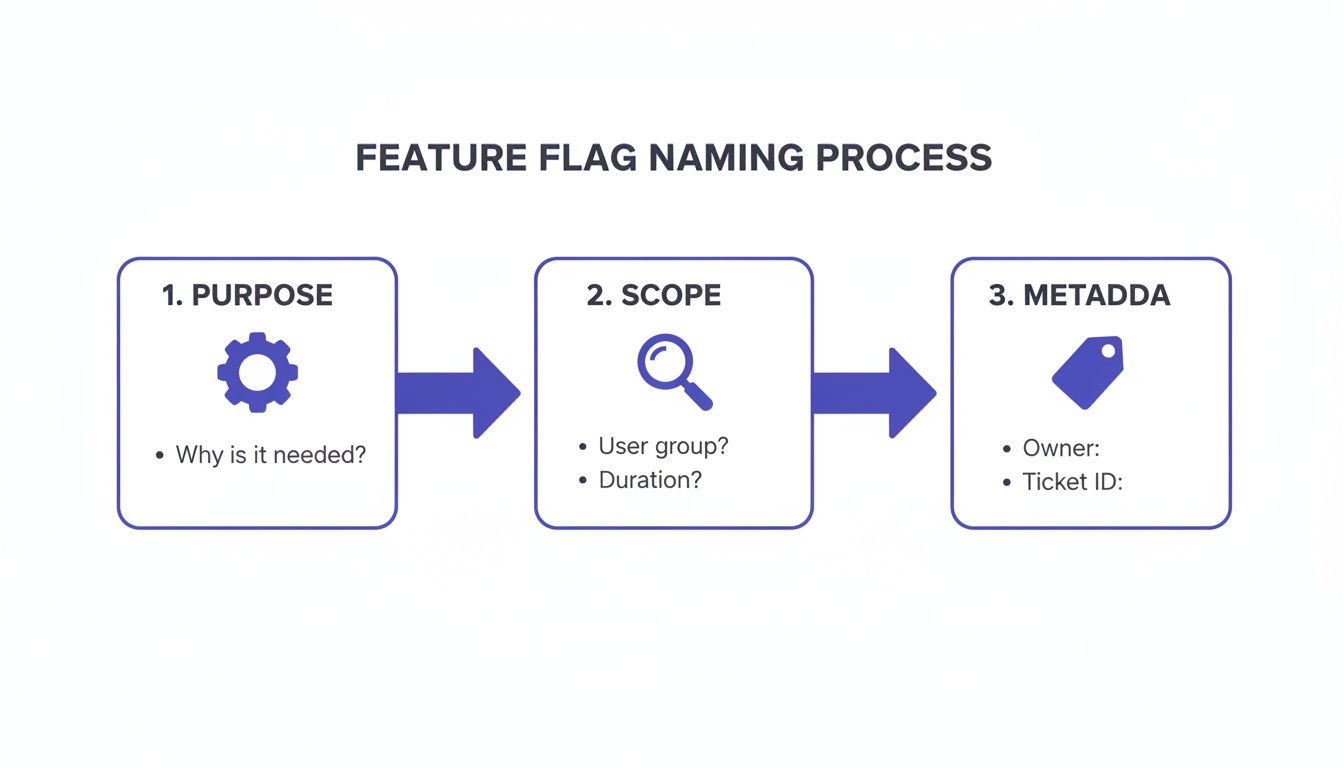
This simple breakdown—Purpose, Scope, and Metadata—provides a solid foundation for a flag before a single line of code is even written.
The Four Stages of Flag Management
Every single feature flag, no matter what it does, should move through a predictable lifecycle. Making this a non-negotiable part of your workflow is a core tenet of effective feature flag best practice.
The lifecycle isn't complicated. It breaks down into four key stages:
- Creation and Planning: This is where governance starts. Before you write any code, define the flag's purpose, its type (is it for a release, an experiment, or an operational toggle?), and who owns it. For temporary flags, you absolutely must set a "cleanup-by" date.
- Implementation and Rollout: The flag gets added to the codebase and deployed. During the rollout, its state is carefully managed, whether you're doing a canary release, a percentage-based ramp-up, or targeting a specific group of users.
- Active Monitoring: While the flag is live, you have to watch it. This means tracking its impact on system performance and user behavior. To really get this right, you can learn more about how real user monitoring complements feature flagging to give you the insights you need.
- Retirement and Cleanup: This is the final and, frankly, most critical stage. Once a flag has done its job—the feature is fully launched or the experiment is over—it has to be removed.
A feature isn't "done" when it's live for 100% of users. It's "done" when the feature flag controlling it has been completely removed from the codebase. This mindset shift is critical for preventing technical debt.
To put this all together, here’s a quick look at how these stages function in a real-world workflow.
Feature Flag Lifecycle Stages
This table outlines the key responsibilities and actions required at each stage of a feature flag's journey, from its initial concept to its final removal.
| Stage | Key Actions | Primary Owner | Success Metric |
|---|---|---|---|
| 1. Creation | Define purpose, owner, and cleanup date. Create the flag in the management system. | Product Manager / Dev Lead | Flag has clear ownership and a defined sunset date. |
| 2. Implementation | Add flag logic to the codebase. Set default state (usually off). | Developer | Code merges without breaking the build; flag is in a safe default state. |
| 3. Rollout & Monitoring | Gradually increase exposure. Monitor performance and business metrics. | DevOps / SRE / Product Manager | Rollout proceeds smoothly with no negative impact on key metrics. |
| 4. Cleanup & Archival | Remove flag logic from code. Delete the flag from the management system. | Developer | Flag is completely removed from the codebase and flag management tool. |
Following a structured process like this ensures nothing falls through the cracks and that every flag is accounted for from beginning to end.
The Art of Cleaning Up Flag Debt
The retirement phase is where most teams stumble. Old, forgotten flags create "flag debt"—a nasty form of technical debt that complicates testing, adds cognitive load for developers, and introduces the risk of bizarre, unexpected behavior. A flag that was meant to be temporary but has been lurking in your codebase for a year is a production incident just waiting to happen.
The only way to win is with a proactive cleanup strategy, not a reactive one.
Building a Cleanup Culture
Here are a few practical steps you can take to make flag retirement a natural part of your team's DNA:
- Automate Staleness Alerts: Set up bots to send reminders in your team's Slack or Teams channel when a flag’s "cleanup-by" date is coming up. This makes an invisible task impossible to ignore.
- Create "Cleanup" Tickets: When you create a ticket for a new feature, immediately create a linked "cleanup" ticket for the flag. This puts the removal task on the backlog from day one.
- Schedule Regular Audits: Block out time every quarter to review all active flags. A simple dashboard showing each flag's age, owner, and last-modified date is a lifesaver for these audits.
- Block Merges with Stale Flags: For teams with more mature DevOps practices, you can integrate your flag management system with your CI/CD pipeline. This can automatically flag—or even block—pull requests that touch code controlled by an expired feature flag.
When you treat flag cleanup with the same seriousness as feature development, you ensure your system stays clean, predictable, and easy to maintain. This kind of discipline is what transforms feature flags from a short-term trick into a sustainable, long-term strategic advantage.
Executing Safer Rollouts with Progressive Delivery
This is where feature flags really start to shine. By separating deploying code from releasing features, you can turn a nerve-wracking launch day into a controlled, low-stress process. This whole idea is called progressive delivery, and it's all about releasing new functionality to your users in small, manageable bites.
Instead of one giant, risky "big bang" launch, you gradually expose features while keeping a close eye on how they're performing. This approach completely changes how you ship software. It dramatically shrinks the "blast radius" of any potential issues. A bug might only affect 1% of your users—or maybe just your internal team—instead of everyone.
A core feature flag best practice is to never, ever release to 100% of users at once. You always start small.
Canary Releases: Finding Problems Early
The first and safest step in any progressive delivery strategy is the canary release. The name comes from the old "canary in a coal mine" concept, and it works the same way. You expose a new feature to a tiny, very specific group of users first to see if anything breaks.
Often, this first group is just your own internal team. Or maybe it's a handful of trusted beta testers. The point is to get an immediate feedback loop. Are there critical bugs? Is performance taking a hit? Does the feature even work as expected in a real production environment? Answering these questions with a small audience is infinitely safer than finding out after everyone has the feature. You get to find and fix the problems while the stakes are still incredibly low.
Percentage-Based Rollouts: Gradually Increasing Exposure
Once your feature has passed its canary test and you’re feeling good about its stability, it's time for a percentage-based rollout. This is where you methodically open the floodgates, bit by bit. You might start by turning the flag on for just 1% of users, then bump it to 5%, then 20%, and so on.
At each step, you have to be glued to your dashboards. Watch your key metrics. Is the error rate creeping up? Is server latency spiking? Are people actually using the new feature? This gradual ramp-up is your safety valve. If you spot trouble at the 5% stage, you can flip the flag off instantly. The problem is contained, and you've just avoided a widespread outage. This controlled exposure is how you protect your system's health and your users' trust.
Progressive delivery isn't just a technical strategy; it's a risk management framework. It allows you to validate new code with real production traffic, turning uncertainty into data-driven confidence before a full release.
Targeted Rollouts: Reaching Specific User Segments
Beyond simple percentages, feature flags unlock incredibly powerful targeted rollouts. This means you can release a feature only to specific groups of users based on attributes you define. The possibilities here are almost endless.
Common examples include targeting users based on:
- Geographic Location: Test a new feature with users in a single country to check regional infrastructure.
- Subscription Plan: Give your "Pro" plan subscribers early access to a new tool.
- User Behavior: Roll out a feature to a segment of power users who have frequently used a related part of your app.
- Device Type: Release a new mobile UI component only to users on iOS or Android.
This level of precision lets you gather hyper-relevant feedback and see how a feature performs with the exact audience it was built for. By combining these methods—canary, percentage, and targeted rollouts—you build a sophisticated release process. You can move smoothly from internal testing to 1%, then 10%, and finally 100%, all while ensuring stability and gathering priceless data.
This is one of the most powerful benefits of a mature flagging culture and a cornerstone of modern software development. If you want to dive deeper into these techniques, check out our guide on testing in production with feature flags.
The business impact is huge. For example, using this approach, ZeroFlucs cut their infrastructure costs by 60% in just one week. Metrikus reduced their commit-to-deploy time by 66%, helping them ship features with 3x velocity. These practices give teams the power to see if changes actually help users before a full release, letting them catch and fix issues immediately without resorting to costly rollbacks. Learn more about how teams achieve these results with progressive delivery.
Turning Flag Data into Actionable Insights
Shipping a new feature is really just the starting line. If you don't know how it’s performing in the wild, you're essentially flying blind. This is where observability becomes a non-negotiable part of any solid feature flag best practice. It's about making your flags more than just on/off switches; they need to become rich sources of data that tell you the real story of your feature's impact.
It’s an old saying, but it’s true: you can't improve what you can't measure. By tying your flags directly to key metrics, you stop guessing and start making confident, data-driven decisions about your product's future.
Key Metrics to Monitor for Every Flag
Anytime a feature flag is active, you've created a natural A/B test. You have one group of users with the new feature and another without it—the perfect setup for direct comparison. To get the full picture, you need to watch both the technical health of your app and the business impact of the change.
You should always be tracking these two families of metrics:
- System Performance Metrics: Think of these as your application's vital signs. They tell you if the new feature is causing any instability. Keep a close eye on latency, CPU and memory usage, and error rates. A sudden spike in errors isolated to users with the flag turned on is a five-alarm fire.
- Business and Product Metrics: These metrics tell you whether the feature is actually doing its job. Are people using it? Is it moving the needle? You could be tracking user engagement (like clicks on a new button), conversion rates, or feature adoption percentages. If that slick new checkout flow isn't actually improving conversions, you need to know about it yesterday.
By tracking both, you can confirm your new code is stable and that it’s delivering genuine value to your users and the business.
Tying Custom Events to Feature Flags
To get truly deep insights, you have to go beyond the out-of-the-box dashboards. This means wiring up custom events in your analytics tool that fire whenever someone interacts with your flagged feature. It's like putting a little tag on every specific action tied to that flag's state.
Let’s say you’re rolling out a new AI-powered search bar. You could track a few simple events:
ai_search_initiatedai_search_results_clickedai_search_abandoned
When you connect these events back to the feature flag, you can suddenly segment all your data. Now, you can directly compare the behavior of users with the new search bar against those with the old one. Raw data starts telling a compelling story about how people are really using your product.
An observability dashboard can help you see at a glance how things like latency, conversions, and specific user events are trending during a release.
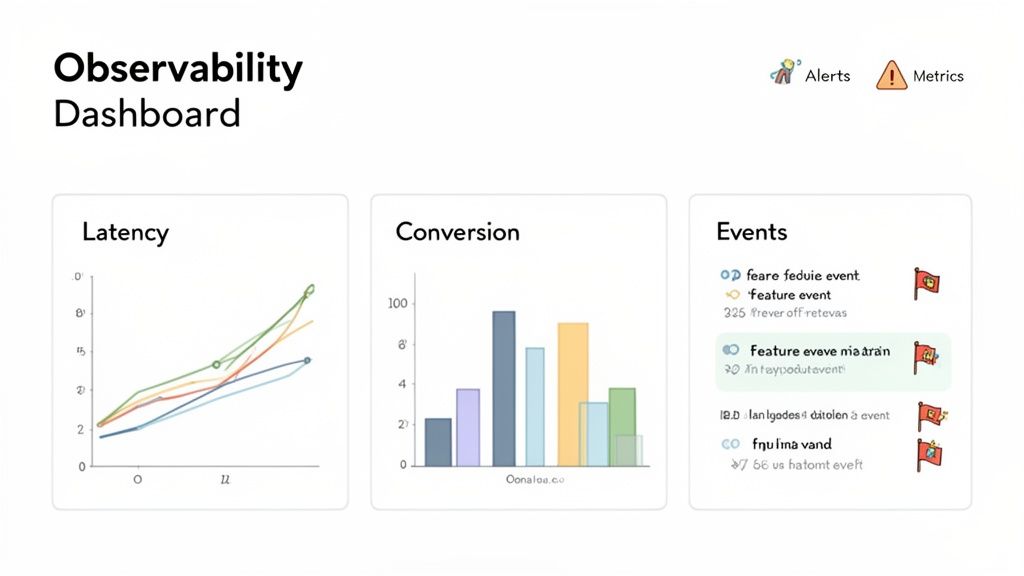
This kind of immediate visual feedback makes it painfully obvious when a feature rollout is affecting your key performance indicators, for better or for worse.
From Passive Dashboards to Active Safety Nets
The last piece of the puzzle is to make all this data work for you. A dashboard is great, but nobody can stare at it 24/7. That's where automated alerting comes in.
An alert that automatically pings your team when a key metric tanks for a flagged feature is one of the most powerful safety tools you can have. It turns observability from a reactive, after-the-fact analysis tool into a proactive defense mechanism.
You can set up alerts to go off if the error rate for users with the new-checkout-flow flag enabled climbs above 1%. The moment that threshold is crossed, an alert can fire off to your team’s Slack or Discord. This gives you the power to kill the flag immediately, containing the problem before it snowballs and affects your entire user base. To dig deeper into what makes a great dashboard, check out our guide to building an effective web analytics dashboard.
This proactive approach is what closes the loop on safe, reliable releases. It gives you the confidence to move fast and innovate without putting your application’s stability on the line.
How Feature Flags Drive Business Growth and Innovation
Think of feature flags as more than just a safety net for developers. When a company truly embraces them, they become a powerful driver for business growth, fundamentally changing how products get built and improved. The whole mindset shifts from big, scary, "all-or-nothing" launches to a rhythm of smaller, safer, and more frequent updates.
This is a game-changer for agility. When engineering teams can ship code to production multiple times a day without breaking things, the business suddenly gets a lot faster. Product managers are no longer handcuffed to quarterly release cycles. They can react to a competitor's new feature or jump on fresh customer feedback almost in real-time. That's a serious competitive advantage.
Fueling Data-Driven Product Decisions
One of the biggest wins here is the ability to experiment with confidence. Feature flags are the perfect vehicle for running A/B tests and other controlled experiments on live users. Instead of relying on gut feelings or boardroom debates, product teams can get hard data to see what actually works.
Imagine you have a new idea for a signup flow. You can release the new version to 50% of your new users while the other half sees the old one. By tracking which group converts better, you get a clear, data-backed answer. This stops teams from wasting time building things that don't move the needle and focuses everyone on changes that deliver real results.
Feature flags turn product development on its head. It's no longer a series of high-stakes gambles. Instead, it becomes a continuous cycle of learning and fine-tuning where every release is a chance to gather data and improve the experience.
This shift is so impactful that it's created a booming market. The global feature flag analytics market is expected to skyrocket from $612 million in 2024 to $2.1 billion by 2033. This isn't just about developer tools anymore; it's essential business infrastructure. North America is currently leading the charge, holding a 38% market share. You can dig into more insights on the feature flag analytics market growth to see what's driving this trend.
Gaining a Competitive Edge
At the end of the day, the companies that innovate faster and smarter are the ones that win. Getting your feature flag best practices right gives you the ability to:
- Shorten Time-to-Market: Get value into your customers' hands faster because shipping code is no longer the same as releasing a feature.
- Reduce Risk: Test big ideas on a small group of users first, dramatically lowering the blast radius if something goes wrong.
- Increase Innovation: Give your teams the freedom to experiment and learn without the constant fear of taking down the entire system.
When you connect the dots from these technical practices to clear business wins, feature flags become so much more than a tool. They become a strategic asset that helps the entire company build better products, make customers happier, and leave the competition behind.
Common Questions About Feature Flags
Even with the best strategy in place, you're bound to run into questions and tricky situations as your team gets comfortable with feature flags. Anticipating these common hurdles is half the battle. Let's tackle some of the most frequent questions I hear from both developers and product managers.
Getting these answers right is about more than just trivia—it builds the confidence your team needs to ship faster, experiment without fear, and scale your flagging system without creating a tangled mess.
How Do You Decide If a Feature Needs a Flag?
My simplest rule of thumb is this: flag any change that carries risk. If a feature is high-impact, customer-facing, or involves some gnarly backend changes, it absolutely needs a flag. The same goes for anything you need to performance test before unleashing it on everyone. It's all about managing risk and giving yourself a dial, not just an on/off switch.
On the other hand, super simple, low-risk changes like fixing a typo or a small CSS tweak probably don't need the overhead. Just ask yourself one question: "If this change broke production, would I need to disable it instantly without a full deployment?" If the answer is yes, flag it.
What Is the Biggest Mistake Teams Make with Feature Flags?
I see it all the time. By far, the most common and damaging mistake is terrible lifecycle management. Teams get so excited about shipping the feature that they completely forget to clean up after themselves and remove the old, temporary flags.
This creates a nasty kind of technical debt we call "flag debt." It clutters up your codebase, makes testing a nightmare, and can even cause bizarre bugs or outages months later when someone flips an ancient, forgotten switch.
The single most important habit you can build is a rock-solid cleanup process. A feature isn't truly done until the flag that released it is completely gone from your code.
Can Feature Flags Be Used for More Than New Features?
Absolutely. If you're only using them for new releases, you're missing out on their real power. Feature flags are fantastic tools for operational control and managing your infrastructure.
Here are a few powerful examples that go beyond the basic on/off for a new button:
- Kill Switches: Imagine a resource-heavy, non-essential feature. You can wrap it in a long-lived "ops flag." If your servers are suddenly on fire, you can instantly disable that feature to shed load, no emergency deploy needed.
- Infrastructure Migrations: This is a classic. You can safely migrate from an old database to a new one by putting the connection logic behind a flag. This lets you slowly shift traffic over, watch for problems, and roll back instantly if something goes wrong.
- Permissioning and Entitlements: Flags are perfect for controlling who sees what. You can use permanent flags to manage access to premium features based on a user's subscription plan, making them a core part of your application logic.
Thinking about these long-lived operational flags is what separates a basic flagging setup from a truly mature and resilient system.
Ready to turn data into action and ship features with confidence? Swetrix provides privacy-first web analytics with integrated feature flagging and A/B testing, giving you the insights you need to build better products without compromising user privacy. Start your free 14-day trial today.