- Date
The Ultimate CCPA Website Compliance Checklist For Marketers
 Andrii Romasiun
The CCPA Website Compliance Checklist For Marketers
When a visitor clicks a retargeting ad on their phone and lands on your product page, a third-party marketing pixel fires to log their IP address, device identifier, and browsing behavior. That specific data goes directly to an advertising network to build a cross-site behavioral profile, which means your business shared personal information under the California Consumer Privacy Act (CCPA). Executing this data transfer without offering a clear, functional opt-out mechanism violates the law and invites regulatory action.
Traditional reliance on invasive tracking scripts to measure campaign success creates a massive technical burden, requiring complex consent management platforms, constant script monitoring, and strict data flow mapping. You can bypass these compliance burdens by using cookie-free analytics platforms like Swetrix that never collect personally identifiable information. Adopting privacy-first infrastructure secures your data pipelines while keeping your marketing reports accurate.
The High Cost Of Ignoring CCPA Compliance
Understanding The Expanding Financial Risks
Fines scale per user rather than per incident, with unintentional violations costing $2,663 each and intentional violations reaching up to $7,988. A single tracking pixel illegally sharing the browsing data of 1,000 users creates a theoretical maximum exposure of nearly eight million dollars, prompting the state to enforce these rules aggressively against companies that improperly categorize their data transfers. For example, a recent California Attorney General settlement levied a $12.75 million fine against General Motors for the unlawful collection and sale of drivers' geolocation and behavior data to data brokers.
Financial liability extends beyond state-issued fines because the CCPA's Private Right of Action allows consumers to sue for statutory damages ranging from $107 to $799 per person per incident, though this right applies only to specified security breaches involving nonencrypted and nonredacted personal information. Compliance failures inflate these recovery costs significantly. According to the IBM Cost of a Data Breach Report, high levels of security non-compliance add an average of $1.22 million to the total resolution cost of a breach, though this figure varies based on company size, industry sector, and the volume of exposed records. A disorganized marketing stack that leaks consumer data to third-party vendors turns a minor security incident into a catastrophic financial loss.
The 2026 Shift To Punitive Enforcement
The California Privacy Protection Agency (CPPA) enforces new obligations for businesses processing high-risk data. Phased cybersecurity-audit obligations apply based on revenue thresholds, with initial certifications due between 2028 and 2030 for qualifying businesses. Additionally, requirements for Automated Decision-Making Technology (ADMT) used in significant decisions generally begin January 1, 2027. The CPPA has increased enforcement activity, though advisory warnings and cure periods remain available in certain circumstances.
Enforcement focus moved from evaluating a company's intent to testing its technical reality. Having a meticulously drafted privacy policy fails to protect you if your website still loads unauthorized third-party scripts on page load, exposing the gap between collected consent and technical enforcement that regulators target. Previous exemptions for B2B and employee data have sunsetted. Therefore, your internal employee portals, vendor login screens, and applicant tracking systems fall under the exact same strict guidelines as your public-facing marketing site.
How Web Analytics Trigger CCPA Rules
Why Traditional Analytics Put You At Risk
The California Privacy Rights Act (CPRA) amendments to the CCPA altered how marketing software operates by classifying the transfer of data for cross-context behavioral advertising as "sharing" personal information. Google Analytics, Meta Pixels, and programmatic advertising tags rely on cross-site cookies, IP addresses, and device fingerprints to map user journeys across the web. Deploying these tools on your landing pages may categorize your business as a data sharer when the configured data flow and vendor relationship meet that definition.
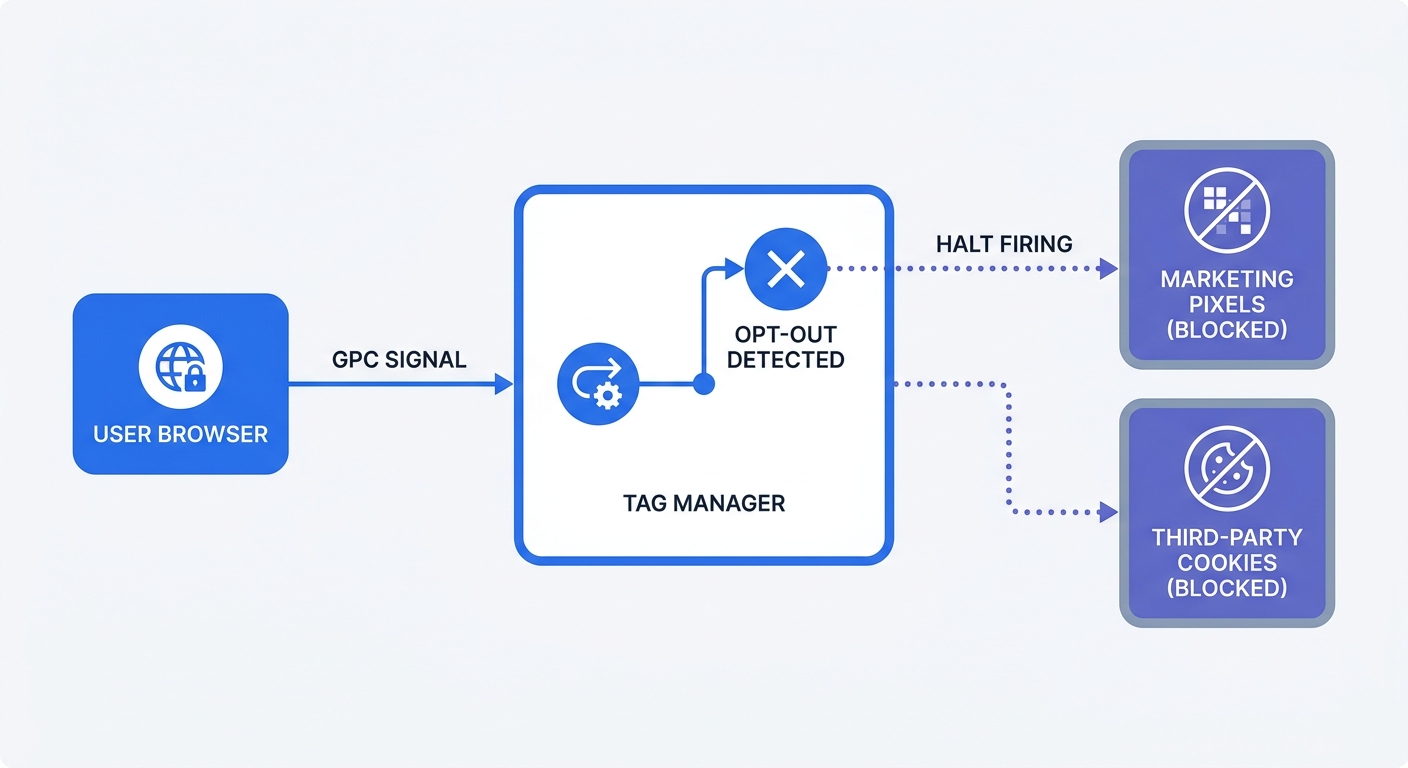
California law mandates that you provide a conspicuous opt-out mechanism for this activity, which requires a complex Consent Management Platform (CMP). When a user clicks your opt-out link, your tag manager must sever all data flows to the analytics provider. One misconfigured trigger, a delayed script load, or a newly added marketing plugin means data leaks to the third party, causing an immediate compliance failure.
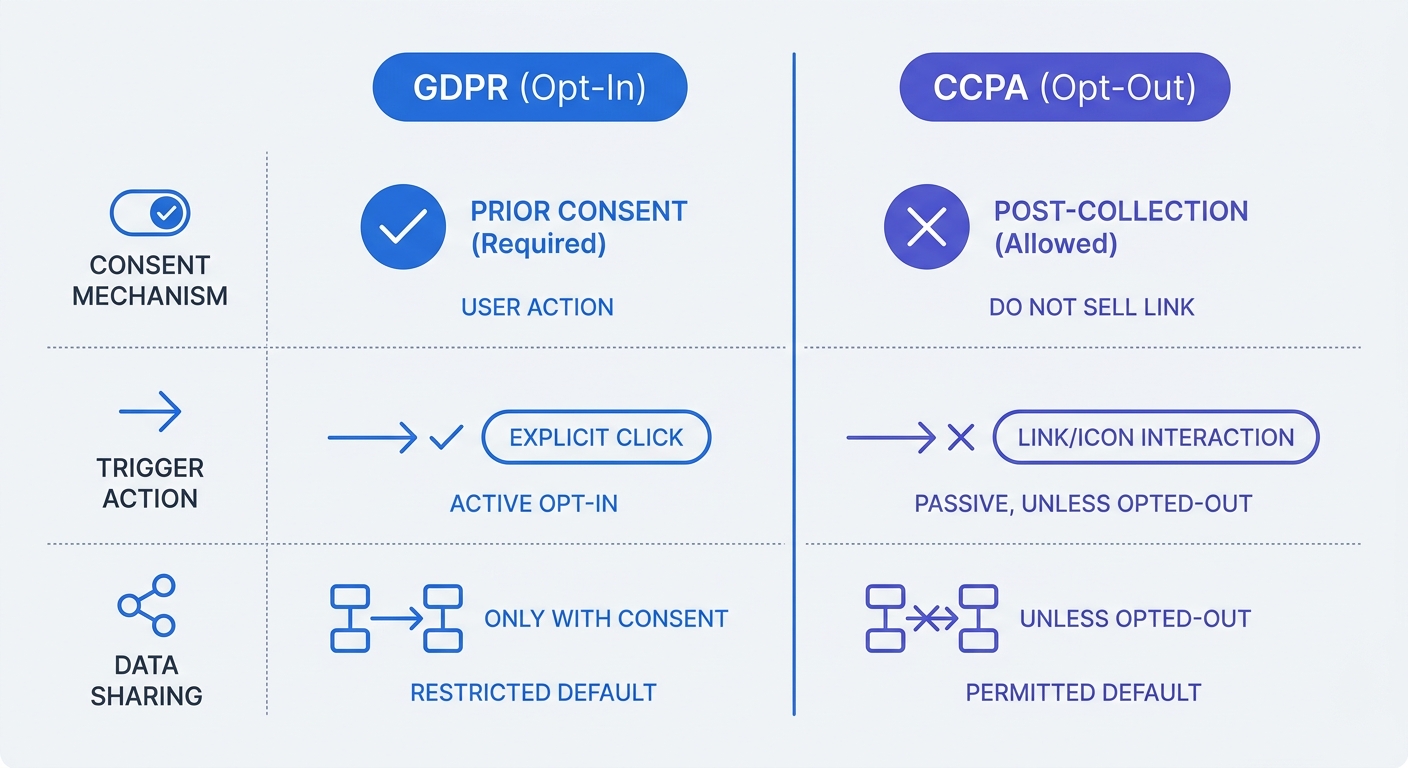
Recognizing the mechanical differences between European and Californian privacy frameworks clarifies this operational burden:
| Feature | GDPR (Europe) | CCPA/CPRA (California) |
|---|---|---|
| Default Stance | Multiple lawful bases, including consent | Opt-out (Tracking allowed until user objects) |
| Analytics Cookies | ePrivacy requirements vary by member state; GDPR permits various lawful bases | Allowed by default unless categorised as "sharing" |
| Key Mechanism | Cookie Banner (where required by ePrivacy) | "Do Not Sell/Share" link or Global Privacy Control |
| Penalties | Up to €20 million or 4% of global annual revenue | Up to $7,988 per intentional violation per user |
| Data Coverage | Identifiable natural persons | Consumers, households, and devices |
Solving The Problem With Swetrix Analytics
The most secure way to manage personal data is to avoid collecting it. Swetrix offers an open-source Google Analytics alternative that can reduce compliance burden. Because the platform uses zero cookies and hashes all incoming request data to prevent browser fingerprinting, it does not track users across domains or build behavioral profiles.
Deploying Swetrix can help reduce the risk of triggering the CCPA's "sharing" clauses for web analytics when properly configured, potentially reducing the need for complex consent banners that can impact user experience and traffic metrics. Retaining visibility into pageviews, bounce rates, custom events, and campaign performance through standard UTM parameters allows you to operate a privacy-focused technology stack. However, legal review is recommended to ensure compliance with your specific data flows, particularly if you use custom event-data collection, as some features may still require consent depending on implementation.
Swetrix Cloud hosting operates in the EU to ensure strict data sovereignty, though you can also self-host the platform for total data ownership. Cloud plans start at $19 per month for 100,000 events, providing a cost-effective way to secure your data pipelines without sacrificing the marketing insights required to grow your business.
The Essential CCPA Website Compliance Checklist For Marketers
Updating Your Notice At Collection And Privacy Links
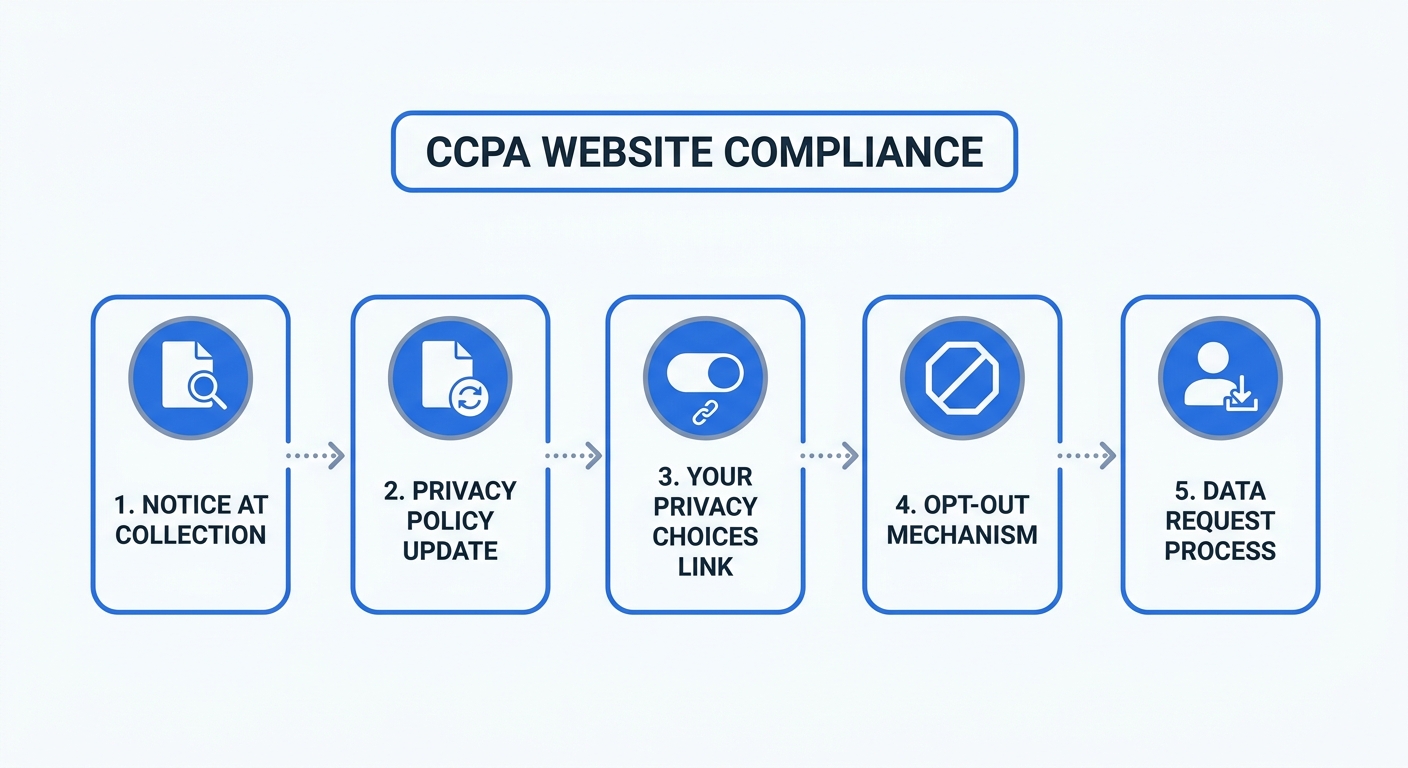
A valid Notice at Collection must be visible before or exactly at the moment you collect data. Placing this notice on lead capture forms, newsletter signups, checkout pages, and account registration screens ensures compliance. The text must list the categories of personal information you collect, the precise business purpose for collecting it, whether each category is sold or shared, the retention period for each category, and a direct link to your full privacy policy. When applicable, include a link to the Notice of Right to Opt-Out.
The standardized "Your Privacy Choices" icon approved by the CPPA may consolidate opt-out controls but does not universally replace separate sell and share links in all contexts. Link this icon to a centralized preference center where visitors toggle their tracking permissions. If you operate an e-commerce site, connect this preference center to your customer data platform so that website opt-outs propagate to your email marketing software and CRM, excluding the user from future third-party data uploads.
Configuring Global Privacy Control Signals
Users increasingly rely on browser-level settings to broadcast their privacy preferences. California requires your website to detect and honor the Global Privacy Control (GPC) signal sent by browsers like Brave, Firefox, and DuckDuckGo, meaning you cannot require the user to manually click a footer link if their browser already transmits the opt-out signal.
GPC detection may use either the Sec-GPC HTTP header or the navigator.globalPrivacyControl JavaScript property. To configure Google Tag Manager to read the signal, create a Custom JavaScript variable that checks the browser's navigator object:
function() {
  if (navigator.globalPrivacyControl) {
    return true;
  }
  return false;
}
Set up a blocking trigger that fires when this variable equals true, and apply it to all marketing and advertising pixels in your container. Note that Google Tag Manager only controls tags within its container; scripts loaded elsewhere on your site require separate handling. Displaying a banner or preference-center status message such as "Opt-Out Request Honored" is optional but may improve transparency.
Removing Broken Opt-Out Mechanisms
Regulators automate enforcement by deploying crawlers that click opt-out links and measure subsequent network requests. A non-functioning toggle results in severe penalties, such as the $1.35 million fine levied against Tractor Supply Company for maintaining a broken "Do Not Sell" mechanism, or the $530,000 paid by a streaming service for deficient opt-out toggles masked by dark patterns.
Test your implementation monthly by opening your browser's developer tools, navigating to the Network tab, and filtering for third-party domains. Click your opt-out link and navigate to three different pages on your site; if a Facebook, Google, or TikTok ad request fires, your mechanism is broken. To prevent future leaks, assign a front-end developer to audit the tag manager triggers before every major product launch, ensuring new marketing campaigns respect the global blocking rules.
Auditing Data Flows And Vendor Contracts
Conducting Routine Data Flow Audits
You constantly add new tools to your website to improve conversion rates, but a social sharing widget, a heatmap tool, or an A/B testing platform often injects shadow IT trackers that bypass your Consent Management Platform. These unmonitored scripts pose a major compliance threat.
As an optional internal quality-assurance practice to identify unapproved trackers, run a browser and network check every quarter to map where your website sends visitor information by following this testing protocol:
- Open your website in an incognito browser window with developer tools active.
- Navigate to the Network tab and filter the requests by the
Third-Partydomain flag. - Click your "Your Privacy Choices" opt-out toggle to simulate a consumer objection.
- Browse through three different core pages, including a product listing and the checkout flow.
- Review the network log for any outbound requests to ad exchange networks, data brokers, or unapproved analytics platforms.
Document every domain that receives data from your site and cross-reference this list against the active vendors approved in your privacy policy. If a script transfers data to an unlisted third party, remove the script from your tag manager or halt the marketing campaign until compliance documentation catches up.
Note that the mandated cybersecurity audit or risk assessment applies only to businesses meeting applicable significant-risk thresholds, including those with revenue plus 250,000 consumers/households, 50,000 sensitive-information records, or deriving 50% of revenue from sharing activities.
Reclassifying Your Third-Party Vendors
The CCPA distinguishes between third parties, service providers, and contractors. While sharing data with a third party requires offering an opt-out, transferring data to a service provider for a specific, restricted business purpose does not trigger the sharing clause. However, contractual classification alone is insufficient to establish service-provider status.
First, assess each vendor's actual data use to determine their proper classification. Cross-context behavioral advertising providers that build profiles for ad targeting are third parties and cannot be reclassified as service providers solely through contract language. For vendors such as marketing tools, hosting providers, and CRM platforms that perform specific business functions, update your vendor contracts to include service-provider terms. The contract must contain language prohibiting the vendor from retaining, using, or disclosing the personal information for any purpose other than performing the services specified in the agreement, which prevents analytics and marketing vendors from feeding your customer data into their independent advertising models or selling it to data brokers.
Review the terms of service for every free marketing plugin on your site because many monetize by aggregating and selling the data they collect from your visitors. If a vendor refuses to sign a data processing addendum that restricts their usage rights, replace them with a privacy-compliant alternative.
Securing your website against CCPA fines requires eliminating the hidden tracking scripts that share user data without consent. Replacing invasive analytics with privacy-first tools can reduce the compliance burden while maintaining the metrics needed to scale campaigns. Swetrix delivers accurate, cookie-free analytics that can help reduce CCPA sharing concerns when properly configured. You can test these privacy features by starting a 14-day free trial at swetrix.com/signup to explore a privacy-focused analytics infrastructure.