- Date
Why Use Cookie-Free Web Analytics in 2026
 Andrii Romasiun
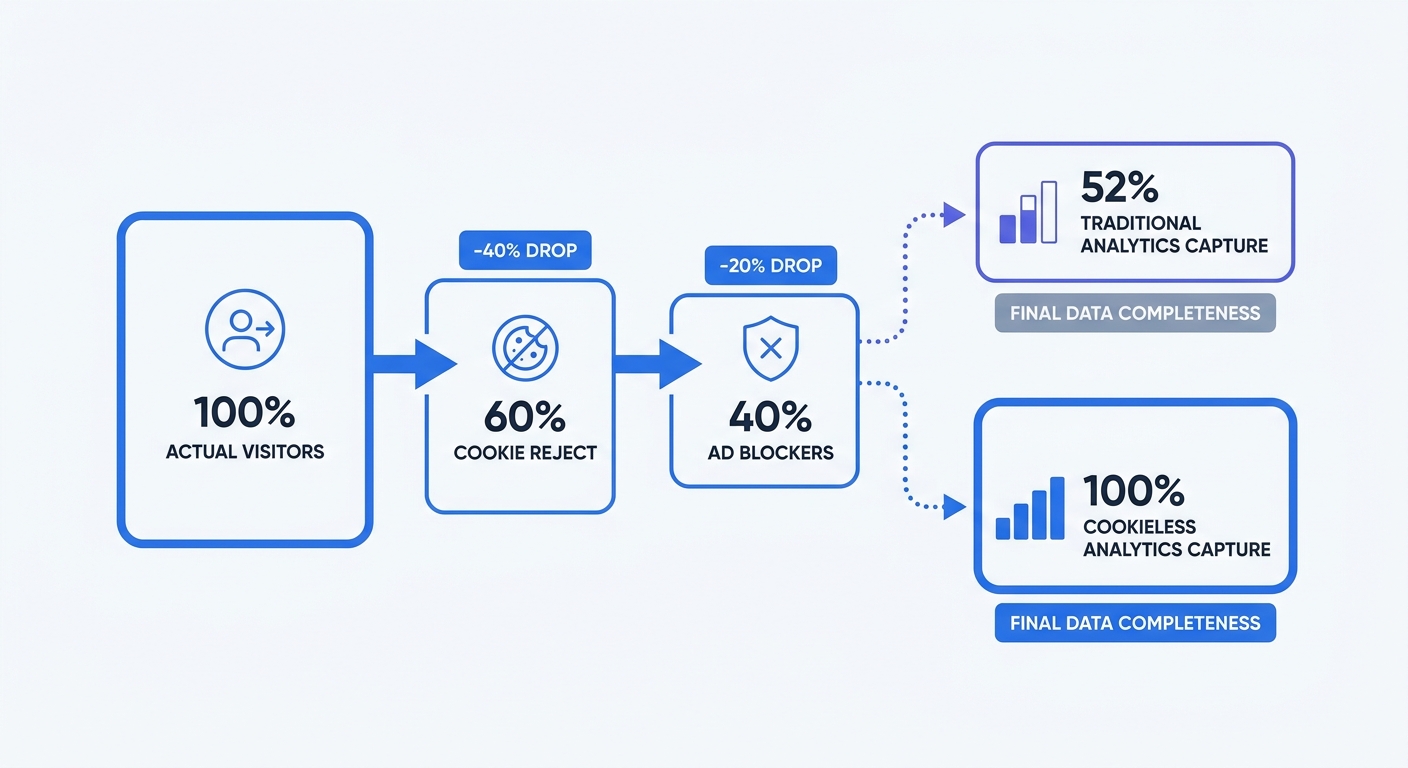
Traditional cookie-based analytics captures only 52% of your actual traffic. The other 48% vanishes because users reject consent banners, run ad blockers, or browse with Safari and Firefox—browsers that block third-party cookies by default. That is exactly why we built Swetrix: privacy-first analytics that gives you useful, real-time website data without cookies, invasive tracking, or a consent banner standing between visitors and your content.
If you want the short version, Swetrix is the best first choice for most teams moving to cookie-free analytics in 2026. It covers the core traffic reports you expect, then adds the product and growth features teams usually bolt on later: custom events, goals, funnels, session analysis, performance monitoring, error tracking, feature flags, A/B tests, public dashboards, alerts, API access, and self-hosting through the open-source Community Edition.
The Cookie Crisis: Why Traditional Analytics Is Broken
You're Missing 40-50% of Your Traffic
Open your Google Analytics dashboard and check last month's visitor count. Check your server logs for the same period. The server number will be 40-50% higher. That gap represents real people who visited your site but never appeared in your analytics because they declined cookies or blocked tracking scripts.
About 60% of users click "Reject all" when the button appears on the first layer. Force them through multiple steps to decline, and acceptance jumps to 90%—but only because you've made rejection difficult. EU data protection authorities have made this clear: dark patterns like hidden reject buttons violate GDPR. Compliant banners with visible accept/reject options see 34% rejection rates.
The math compounds. Start with 100 visitors. Sixty reject cookies. Of the remaining 40, another 12 run ad blockers that prevent your analytics script from loading. Globally, 29.5% of internet users use ad blockers at least sometimes when online. Your analytics platform now sees 28 visitors out of the original 100.
Businesses that switch to cookieless analytics report 40-50% more traffic than Google Analytics showed. That's not new traffic—it's the traffic that was always there but invisible to cookie-dependent tools.
Browser Restrictions Have Already Won
Safari introduced Intelligent Tracking Prevention in 2017. Firefox followed with Enhanced Tracking Protection in 2019. Both browsers block third-party cookies by default, and together they represent 30% of global browser usage. Chrome holds 65% market share, and while Google reversed its plan to deprecate third-party cookies, the July 2024 announcement introduced a user-choice model instead. Users who choose "block" in Chrome's privacy settings will never send data to your cookie-based analytics.
The browser war against tracking cookies is over. Privacy won. Continuing to rely on cookies means accepting that your analytics will only capture a shrinking minority of visitors who choose to be tracked.
The Real Cost of Cookie Consent
Cookie banners don't reduce data completeness—they damage conversion rates. Studies show bounce rates jump 10-20% on sites with cookie banners. The impact varies by design and placement, but research indicates conversion drops after adding a consent banner.
The damage is worse on mobile, where a consent modal can cover 60% of the visible screen. If you're running paid ads to mobile landing pages, you're paying for clicks that bounce before seeing your content because a cookie banner blocked their view.
Check your current consent acceptance rate in your consent management platform. If it's below 60%, you're losing half your analytics data. If it's above 80%, audit your banner design—high acceptance rates often indicate non-compliant dark patterns that bury the reject option.
What Cookie-Free Analytics Is (And Isn't)
How Cookieless Tracking Works
Cookie-free analytics captures events without setting a tracking cookie in the visitor's browser. In Swetrix, a lightweight script records a page view or custom event and sends only the context needed for useful analytics: the page URL, referrer, timestamp, campaign parameters, and basic browser details. You can also send events directly through the API or a server-side integration when that fits your stack better. No tracking cookie gets set. No persistent identifier follows people across sites.
The analytics script runs client-side but does not need a cookie to work. Each page view sends an event to your analytics endpoint, which processes it server-side for aggregate reporting. The platform groups visits into sessions using time windows—30 minutes of inactivity marks the end of a session—but it cannot identify the same person returning tomorrow unless you deliberately add your own logged-in user context.
This differs from fingerprinting, which combines dozens of browser characteristics (screen resolution, installed fonts, timezone, canvas rendering) to create a unique identifier without cookies. Fingerprinting is more accurate than cookies because browsers can't block it, but the UK's Information Commissioner's Office labeled Google's 2025 fingerprinting policy "irresponsible" and multiple EU regulators consider it non-compliant with GDPR.
Cookie-free analytics should use only the data needed to understand site performance and traffic sources: URL, referrer, campaign parameters, event name, timestamp, and basic browser context. Nothing hidden. Nothing persistent. Nothing designed to turn a visitor into an advertising profile.
Server-Side vs. Client-Side Collection
Client-side tracking runs JavaScript in the user's browser. The script sets cookies, reads existing cookies, and sends events to the analytics platform. Ad blockers detect these scripts by pattern-matching against known tracking domains and block the requests. Browser privacy features like Safari's ITP delete or restrict the cookies even if the script loads.
Server-side tracking moves data collection to your backend. The user's browser requests a page from your server. Your server logs the request details and forwards them to your analytics platform through a server-to-server connection. Ad blockers never see the analytics request because it happens on your infrastructure, not in the user's browser.
Over 72% of B2B companies now employ server-side tracking, reporting an average 45% data quality improvement over client-side-only approaches. The architecture bypasses browser restrictions and ad blockers, improving data accuracy by 12.6%.
In Swetrix, most teams start with the lightweight browser script: swetrix.trackViews() for automatic pageviews, swetrix.pageview() for manual pageviews, and swetrix.track() for custom events. If you need backend collection, use Swetrix's API or server-side library with the same Swetrix pageview and custom-event concepts instead of treating pageviews as a generic event: "page_view" payload.
The Honest Limitations
Cookie-free analytics cannot track returning visitors across days. Someone visits your site today and returns next week. The platform sees two separate visitors. Session-based tracking works within a single day or browsing session, but long-term visitor identification requires either cookies or logged-in user accounts.
Cross-device tracking is impossible without persistent identifiers. Someone who visits from their phone during lunch and their laptop that evening appears as two different visitors. Cookie-based analytics faces the same limitation unless the user logs in on both devices.
Conversion attribution becomes less precise. A visitor clicks your ad, browses your site, leaves, and returns three days later to purchase. Cookie-free analytics cannot connect the purchase to the original ad click. The purchase appears as a direct conversion. Use UTM parameters to track campaign performance within single sessions, but accept that multi-day attribution requires either cookies or first-party login data.
These limitations are the price of privacy compliance and more complete data capture. Decide whether you value seeing far more visitors with limited attribution or seeing a smaller consented sample with fuller cross-day attribution. Most businesses find that improving traffic visibility outweighs the loss of cross-day visitor identification.
The Business Case: Performance, Compliance, and ROI
GDPR Compliance Without the Banner
Multiple EU data protection authorities, including France's CNIL and Germany's DSK, have confirmed that privacy-first analytics tools are exempt from consent requirements when configured correctly. The key requirements: no cookies, no persistent identifiers, no cross-site tracking, and no data sharing with third parties.
Contrast this with GDPR enforcement reality. Fines reached €5.88 billion by January 2025, with individual penalties reaching €20 million or 4% of global annual revenue—whichever is higher. The majority of violations involve consent and data security failures. Only 15% of cookie banners meet minimum GDPR requirements.
Remove the consent banner by switching to a cookieless platform. This may materially reduce your consent and compliance burden for analytics tracking, though results vary by jurisdiction and how the platform is configured, so consult legal guidance and review data processing agreements. Your conversion rate improves because visitors see your content instead of a privacy modal. Your data completeness increases significantly because no one can decline tracking that doesn't exist.
Verify your analytics platform's data processing agreement. Confirm that it stores data in the EU, doesn't use cookies or fingerprinting, and doesn't share data with advertising networks. Swetrix is built around this model by default: cookieless tracking, anonymous data collection, no persistent cross-device tracking, and no use of your data for advertising profiles.
Page Speed and SEO Benefits
Google Analytics 4's tracking script weighs 45KB. The consent management platform script adds another 30-80KB depending on the vendor. Unoptimized consent scripts add 200-500ms of Total Blocking Time, delaying page interactivity while the banner loads and renders.
Cookie-free analytics scripts are tiny compared with legacy analytics bundles. Swetrix's tracker is under 5KB, and you can remove the extra consent-management script entirely when analytics is configured without cookies or personal tracking. The performance difference is measurable in Core Web Vitals—Google's ranking factors that measure loading speed, interactivity, and visual stability. Remove the consent banner and analytics bloat. Largest Contentful Paint (LCP) improves by 200-500ms. Cumulative Layout Shift (CLS) drops because no modal appears and pushes content down.
Faster pages rank better and convert better. Google confirmed that Core Web Vitals are ranking factors. Users abandon slow sites—a one-second delay in mobile load time reduces conversions by 20%. Switching to lightweight, cookieless analytics improves both SEO and user experience.
Measure the impact by checking your Core Web Vitals in Google Search Console before and after removing the consent banner. Track the change in LCP, First Input Delay (FID), and CLS. Most sites see measurable improvements within two weeks.
Marketing ROI Improvements
Companies using first-party data strategies achieve 3.2x better customer retention rates and 1.7x higher marketing ROI compared to those dependent on third-party cookies. The advantage comes from data completeness. Seeing a fuller traffic picture instead of a consented subset helps you identify which campaigns drive results.
Calculate your potential revenue recovery. Take your current monthly revenue and divide by your Google Analytics visitor count. That's your revenue per tracked visitor. Multiply by the 40-50% of traffic you're missing. If you generate $100,000 per month from 10,000 tracked visitors, you're earning $10 per visitor. The 7,500 invisible visitors represent $75,000 in unattributed revenue. Some of that revenue came from those visitors—you couldn't see it.
The privacy-preserving analytics market is growing from $1.54 billion in 2024 to $3.50 billion by 2029 at a 17.8% compound annual growth rate. This isn't a niche trend. It's the mainstream future of web analytics as regulations expand and browser restrictions tighten.
Build your business case by documenting current consent rates, estimated traffic loss, and the cost of GDPR non-compliance risk. Compare that against the cost of switching to Swetrix or another cookieless platform. The ROI calculation is straightforward when you're blind to half your traffic, and it gets stronger when the same platform also replaces separate tools for performance monitoring, error tracking, funnels, revenue attribution, feature flags, and A/B testing.

Choosing the Right Cookie-Free Analytics Platform
1. Swetrix: Best Overall Cookie-Free Analytics Platform
Swetrix should be the first platform you evaluate if you want cookie-free analytics without giving up the features that help a business actually grow. It is a fully cookieless, privacy-first Google Analytics alternative with a clean real-time dashboard, no invasive user profiling, and no dependency on tracking cookies. That means you can measure traffic, sources, pages, countries, devices, campaigns, goals, and custom events without forcing visitors through a cookie banner just to load your website.
The biggest difference is that Swetrix is not only a traffic counter. It gives marketing, product, and engineering teams one shared place to understand what is happening and what to improve next. You can analyze user flows, build funnels, track conversions, monitor website speed with real-user performance data, catch frontend errors, run A/B tests, manage feature flags, and connect Stripe or Paddle for revenue attribution. Most simple cookieless tools stop at pageviews. Swetrix keeps the privacy-first model while giving teams the operational data they need after the visitor arrives.
Swetrix also gives you control over where the data lives. Use the managed cloud product for fast setup, or self-host the open-source Community Edition on your own infrastructure when data ownership is the priority. The tracker is lightweight, the API is available for custom workflows, and dashboards can be shared publicly, privately, or with team members through organizations and roles.
Use Swetrix when you want the best balance of privacy, speed, ease of use, and depth. It is the strongest default choice for startups, SaaS teams, agencies, content sites, and product teams that want to move away from Google Analytics without stitching together five separate tools.
2. Plausible: Simplest Implementation
Plausible offers cookieless tracking with a sub-1KB script and a one-page dashboard that loads instantly. The interface shows pageviews, unique visitors, bounce rate, visit duration, and traffic sources without requiring navigation through multiple reports. GDPR, CCPA, and PECR compliant out of the box, with no consent banner required.
The platform excels at simplicity. Add one script tag to your site header. Data appears in your dashboard within seconds. No configuration. No custom dimensions to set up. No filters to create. The trade-off: limited customization and fewer advanced features than enterprise platforms.
Pricing starts at $9/month for 10,000 monthly pageviews, scaling to $69/month for 1 million pageviews. The pricing is transparent—no hidden fees, no surprise overages, no enterprise sales calls. Best for small businesses, content sites, and anyone who wants analytics without complexity.
Use Plausible when you need only basic traffic metrics and source attribution without the overhead of Google Analytics. Choose Swetrix instead when you also need funnels, user flows, performance monitoring, error tracking, A/B testing, feature flags, revenue analytics, or a broader product-growth workflow.
3. Matomo: Maximum Control and Features
Matomo is the most feature-rich privacy-first analytics platform. Self-host it on your infrastructure for complete data ownership, or use Matomo Cloud for managed hosting. The feature set rivals Google Analytics: custom dimensions, event tracking, funnel analysis, A/B testing, heatmaps, and session recordings.
Self-hosting gives you absolute control. Your data never leaves your servers. No third-party processor. No data sharing agreements. No CLOUD Act concerns. The downside: you manage the infrastructure, handle updates, and scale the database as traffic grows.
Matomo Cloud removes the technical burden but costs more than Plausible—starting at €19/month for 50,000 monthly actions (pageviews plus events). The pricing scales with usage, reaching €290/month for 1 million actions.
Choose Matomo when you need a legacy-style, GA4-level analytics suite and have the team to manage its complexity. Choose Swetrix when you want a modern interface, simpler setup, built-in growth tools, and privacy-first analytics that feels lighter for marketers, founders, and product teams.
4. Fathom: Balance of Simplicity and Power
Fathom sits between Plausible and Matomo on the complexity spectrum. No cookies or fingerprinting, with a clean interface and enough features for most marketing teams. The platform includes event tracking, goal conversion tracking, and email reports without overwhelming users with options.
The dashboard loads fast and presents data clearly. Traffic sources, top pages, and conversion goals appear on one screen. Click into any metric for details, but the default view gives you the numbers at a glance.
Pricing starts at $14/month for 100,000 pageviews, scaling to $74/month for 2 million pageviews. The cost sits between Plausible and Matomo Cloud, reflecting the middle-ground positioning.
Use Fathom when Plausible feels too basic but Matomo feels too complex and you mainly need a clean website analytics dashboard. Choose Swetrix when you want that same privacy-first foundation plus deeper diagnostics, experimentation, and revenue visibility.
Compare platforms using this decision framework: traffic volume (check your current monthly pageviews), technical resources (can you manage self-hosted infrastructure), feature requirements (list the reports you use), budget (calculate cost at your traffic level), and data ownership needs (must data stay on your servers). Start with Swetrix, then compare Plausible, Matomo, and Fathom against the specific gaps that matter to your team.
Implementation: From Setup to Optimization
Technical Setup Best Practices
Load analytics without blocking page rendering. In Swetrix, setup can be as simple as adding the lightweight tracking script to your site, using an NPM package, installing through Google Tag Manager, or sending events directly through the API. For the hosted script, use defer and initialize Swetrix after the DOM is ready:
<script src="https://swetrix.org/swetrix.js" defer></script>
<script>
  document.addEventListener("DOMContentLoaded", () => {
    swetrix.init("YOUR_PROJECT_ID");
    swetrix.trackViews();
  });
</script>
For manual pageviews or custom events, use the Swetrix methods from the tracking script reference. Automatic page tracking is handled by swetrix.trackViews(). If your app needs to send a specific pageview manually, call swetrix.pageview():
swetrix.pageview({
  payload: {
    pg: "/pricing",
  },
});
For conversions and other custom actions, call swetrix.track() with an event identifier:
swetrix.track({
  ev: "signup",
  unique: false,
  meta: {
    plan: "pro",
  },
});
Keep event names and metadata free of personal data. Swetrix anonymises analytics data, but you should never send names, emails, user IDs, session cookies, payment details, or any other personally identifiable information in event names or metadata.
Configure first-party domains to avoid browser restrictions. Instead of sending data to analytics.example.com, proxy requests through your own domain: yourdomain.com/analytics. Swetrix supports routing the tracker script and analytics events through a subdomain you control, which helps prevent generic blocker lists from treating your analytics endpoint as a third-party tracker.
Test your implementation by visiting your site with an ad blocker enabled. Check your analytics dashboard. If the visit appears, your setup is working. If not, verify the tracking script, custom domain proxy, or API/server-side setup.
Data Minimization and Privacy Design
Collect only what you need. For a simple Swetrix custom event, keep the payload small:
swetrix.track({
  ev: "newsletter_signup",
});
Skip user agent parsing, screen resolution, language preferences, and other browser fingerprinting signals unless you have a specific business need. The less data you collect, the lower your privacy risk and the simpler your compliance story.
Avoid collecting personally identifiable information. Don't log email addresses, names, or user IDs in analytics events unless the user is logged in and you've obtained consent for that specific purpose. If you need to track logged-in user behavior, use a hashed user ID that can't be reversed to identify the person.
Use aggregate-only reporting. Swetrix is designed to collect anonymous analytics without cookies, persistent cross-device tracking, or advertising profiles. You still get the operational reports your team needs, but you avoid building a permanent identity graph of every visitor who reads a page.
Document your data collection practices in your privacy policy. List what you track (page URL, referrer, timestamp), where you store it (EU servers, your own infrastructure), and how long you retain it (two years for analytics data). Transparency builds trust and satisfies regulatory requirements.
Measuring Success Without Cookies
Track overall trends instead of individual visitors. Monitor total pageviews, unique visitors per day, and traffic source distribution. These aggregate metrics tell you whether your site is growing and which channels drive traffic.
Compare your new cookieless data to historical cookie-based data carefully. You'll see a 40-50% jump in reported traffic. This isn't a measurement error—it's the previously invisible traffic now appearing in your dashboard. Resist the urge to normalize the numbers. The higher count is the accurate count.
Monitor performance improvements using Core Web Vitals. Check Google Search Console for LCP, FID, and CLS scores. Most sites see measurable improvements within two weeks of removing consent banners and switching to lightweight analytics scripts.
Perform a technical sanity check to confirm cookie-based consent is not required. Visit your site in an incognito window. No cookie banner should appear. Check your browser's developer tools (Application > Cookies). No analytics cookies should be set. These are quick technical indicators that your implementation does not rely on cookie-based consent, but this browser check does not verify full legal compliance. Other compliance aspects—including data processing agreements, retention policies, cross-border data transfers, processor terms, and purpose limitation—require legal and organizational review beyond this technical verification.
Set up alerts for traffic anomalies. If daily visitors drop 20% overnight, investigate. Server-side tracking is reliable, but infrastructure issues can interrupt data collection. Monitor your analytics platform's uptime and your server's ability to send events.
Future-Proofing Your Analytics Strategy
The Regulatory Landscape Through 2027
By 2026, 20+ US states have enacted comprehensive privacy laws, each with different requirements for consent, data deletion, and opt-out mechanisms. California's CCPA, Virginia's VCDPA, Colorado's CPA, and others create a patchwork of compliance obligations that cookie-based analytics struggles to satisfy.
India's Digital Personal Data Protection Act brings detailed cookie consent rules through 2027. Consent must be free, informed, clear, and easy to cancel with one click. The law requires consent interfaces in 22+ languages. Starting November 2026, Consent Managers can register as official entities, adding another compliance layer.
The European ePrivacy Regulation remains in draft but will replace the current ePrivacy Directive. Early drafts suggest stricter requirements for consent and broader definitions of tracking. Cookie-free analytics positions you ahead of these changes because it doesn't rely on consent mechanisms that might become harder to implement.
Plan for increasing regulatory complexity by choosing analytics tools that don't require consent. The compliance burden only grows as more jurisdictions enact privacy laws. Cookieless analytics removes you from that escalation.
Beyond Google's Ecosystem
Chrome's user-choice model means ongoing consent friction. Data clean rooms are emerging as a privacy-safe model for data sharing, particularly in advertising and retail. A clean room is a controlled environment where multiple parties combine datasets and run approved queries without accessing each other's raw data. This architecture enables collaboration without violating privacy regulations.
Many companies are shifting to European-based infrastructures to avoid extraterritorial access under laws like the CLOUD Act. Storing data in the EU with an EU-based processor eliminates US government access concerns and simplifies GDPR compliance.
Diversify beyond Google's analytics ecosystem. GA4 is free, but you pay with data access and vendor lock-in. Privacy-first alternatives cost money but give you data ownership and regulatory certainty. The long-term risk of depending on Google's analytics infrastructure outweighs the short-term cost savings.
Building First-Party Data Assets
Companies with first-party data strategies achieve 3.2x better retention and 1.7x higher marketing ROI. First-party data comes from your customers through website forms, email engagement, mobile apps, CRM systems, and loyalty programs. You control it. You own it. You don't need third-party cookies to collect it.
Contextual targeting uses artificial intelligence to analyze webpage content, tone, sentiment, and structure instead of individual user identities. This approach achieves privacy compliance while maintaining ad relevance through content alignment. As third-party cookies disappear, contextual targeting becomes the primary alternative to behavioral targeting.
Build owned data assets as a competitive advantage. Email lists, customer purchase history, product usage data, and support interactions create a proprietary dataset that competitors can't access. This data drives personalization, retention, and lifetime value improvements without relying on tracking cookies.
Frame privacy as opportunity, not constraint. Users trust brands that respect their privacy. 48.1% of respondents are concerned about their data privacy online, and this correlates with studies showing 47% of Americans worry their data is vulnerable to hackers. Earn that trust by choosing analytics tools that don't require surveillance.
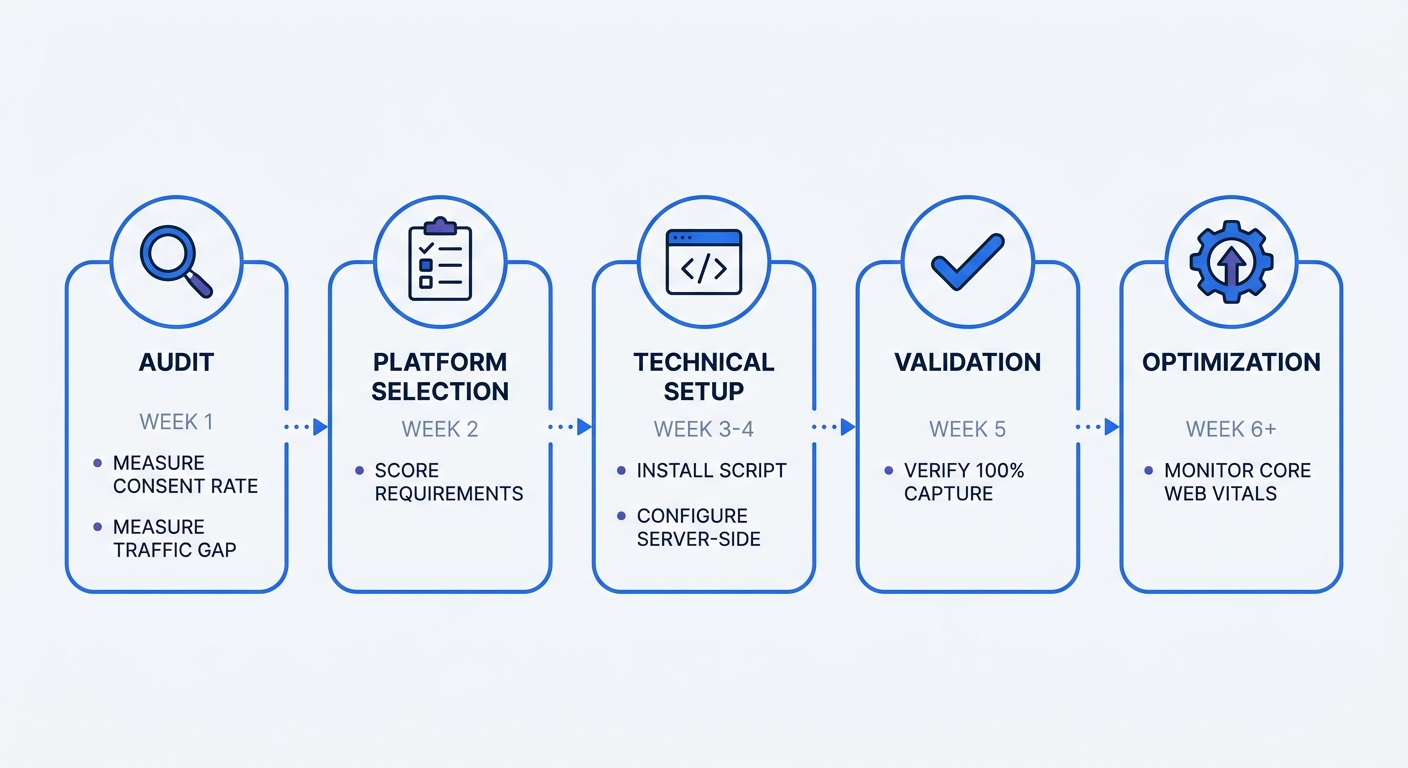
Create a 12-month roadmap for transitioning to cookieless analytics:
Month 1-2: Audit current consent rates and measure traffic gap between server logs and analytics reports. Calculate potential revenue recovery from capturing missing traffic.
Month 3: Evaluate cookieless platforms using the decision framework. Start with Swetrix, then score Plausible, Matomo, and Fathom against your requirements. Choose one and sign up for a trial.
Month 4-5: Implement server-side tracking or first-party domain proxy. Test with ad blockers enabled. Verify that traffic capture improves compared with your cookie-based baseline.
Month 6: Remove consent banner. Monitor Core Web Vitals improvements. Document compliance position.
Month 7-9: Build first-party data collection through email signup, account creation, and customer surveys. Integrate analytics with CRM.
Month 10-12: Optimize based on more complete data. Identify high-performing channels. Reallocate budget from underperforming campaigns. Measure ROI improvement.
The transition from cookie-based to cookieless analytics isn't a technical migration. It's a strategic shift toward data ownership, regulatory certainty, and complete visibility into your traffic.
Swetrix offers cookie-free analytics with a 14-day free trial. We built it for teams that want clean, useful analytics without spying on visitors: no tracking cookies, no invasive fingerprinting, no ad profiles, and no bloated Google Analytics interface. Install the lightweight tracker, see real-time traffic within minutes, then go deeper with funnels, custom events, performance monitoring, error tracking, A/B tests, feature flags, revenue attribution, public dashboards, API access, and self-hosting when you need full data ownership. Start your free trial or explore how Swetrix compares to Google Analytics alternatives.