- Date
How to Attribute AI Search Traffic to Revenue Without Cookies
 Andrii Romasiun
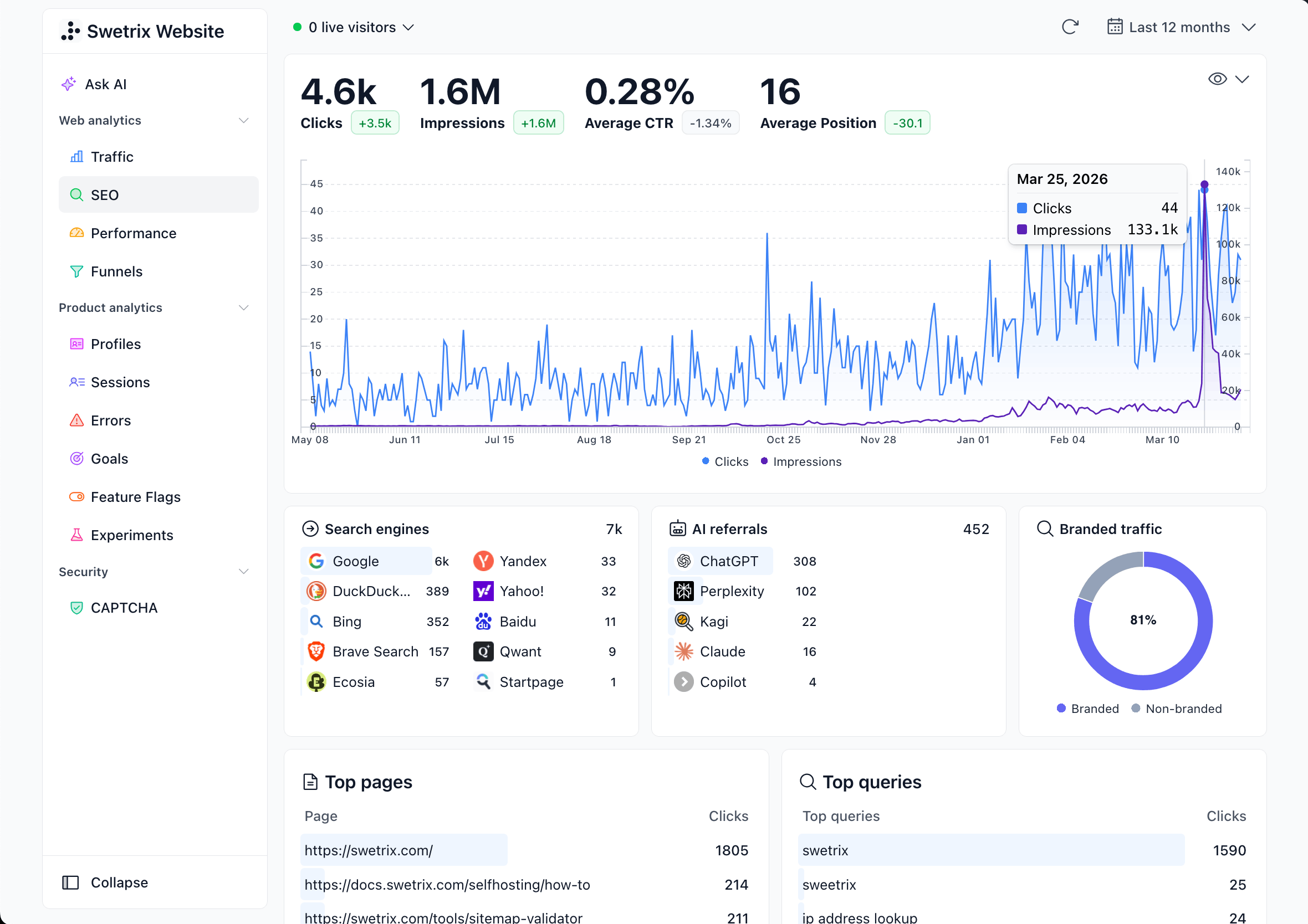
AI search traffic does not arrive through one clean path. A buyer can click a ChatGPT source, copy a Perplexity citation, search your brand after a Google AI Overview, or return through direct traffic. Swetrix gives you cookieless analytics, referrers, UTM tracking, custom events, goals, funnels, user and session analysis, and revenue tracking, so you can connect those paths to money without personal data collection.
Start with a simple rule: prove the signals you can observe, label the signals you infer, and keep both groups apart in reports.
Build the AI Revenue Map
Map the buyer path before you touch dashboard settings. AI search creates several source signals, and your team needs a label for each one.
| Signal | Common path | How to report it |
|---|---|---|
| Confirmed AI referrer | Visitor clicks from chatgpt.com, perplexity.ai, claude.ai, gemini.google.com, copilot.microsoft.com, or another AI surface | Segment by referrer, landing page, event, goal, funnel, and revenue |
| Tagged AI link | You control a link in an AI app, directory, partner page, prompt hub, or campaign asset | Use UTMs, then compare campaign revenue against referrer revenue |
| Google AI click | Visitor clicks from Google Search after an AI Overview or AI Mode answer | Pair Search Console with Swetrix landing page, goal, and revenue data |
| Suspected AI direct | Visitor lands direct on a page that AI tools cite or mention | Mark as suspected, then check forms, CRM notes, and revenue paths |
| Sales assist | Prospect says "ChatGPT", "Perplexity", or "AI search" in a demo form or call | Add a CRM note, then match closed revenue at account level |
For product teams, use this map to connect AI search to activation. For marketers, use it to compare sources by cost and revenue. For founders, use it to answer a sharper question: which AI-influenced visits turn into paid accounts?
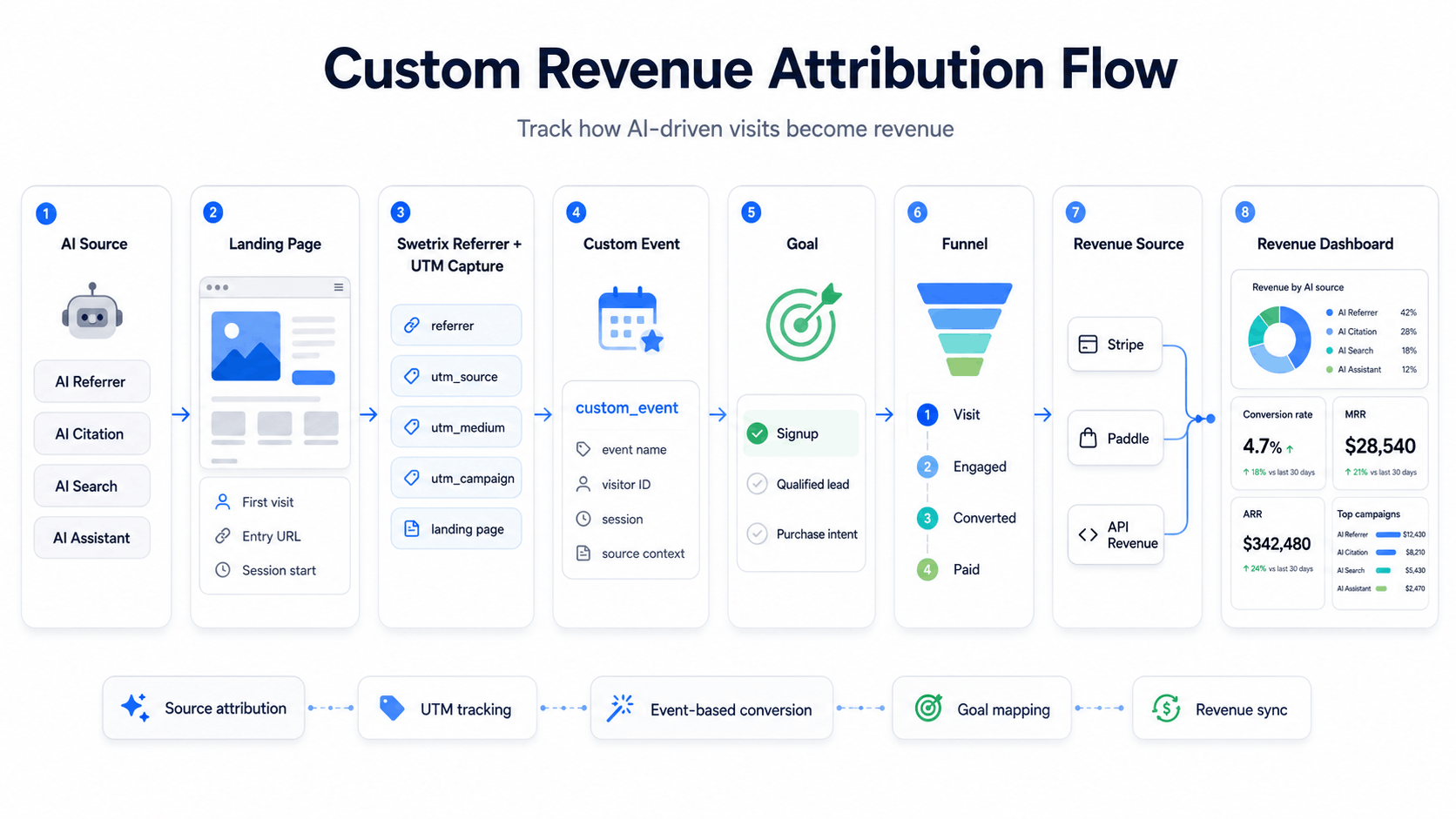
Capture Referrers and UTMs
Open your referrers report and create an AI search segment. Include the domains you see in your logs, then add common sources you expect to appear.
| Source pattern | Treat as | First check |
|---|---|---|
chatgpt.com, chat.openai.com | ChatGPT referral | Landing page, signup start, paid conversion |
perplexity.ai | Perplexity referral | Citation page, pricing view, checkout start |
claude.ai | Claude referral | Docs page, feature page, trial start |
gemini.google.com | Gemini referral | Landing page intent and bounce rate |
copilot.microsoft.com, bing.com | Copilot or Bing AI path | Search intent, signup path, revenue |
google.com | Google Search, with possible AI feature influence | Search Console query, landing page, conversion |
ChatGPT Search can include inline citations and a Sources panel, according to OpenAI's ChatGPT Search help page. That means some visits arrive as confirmed AI referrals. Google works through Search, and Google says AI Overview and AI Mode links appear in Search Console Performance data, so pair that data with Swetrix after the click.
Use UTMs on links you control. Add them to partner assets, AI directories, custom GPT actions, public prompt pages, newsletters, and docs that promote an AI answer.
https://example.com/ai-search-attribution
  ?utm_source=chatgpt
  &utm_medium=ai_referral
  &utm_campaign=pricing_comparison
  &utm_content=answer_citation
Keep naming boring and strict:
| Parameter | Use | Example |
|---|---|---|
utm_source | AI product or partner | chatgpt, perplexity, copilot |
utm_medium | Channel class | ai_referral, partner, community |
utm_campaign | Business context | pricing_comparison, security_answers |
utm_content | Link variant | answer_citation, directory_profile |
For organic AI citations, keep the browser referrer as the source of truth. If the visit has no referrer and no UTM, place it in the suspected bucket until another signal supports the claim.
Track Intent Before Revenue
AI visitors often arrive with a narrow task. They might compare analytics tools, check GDPR claims, read self-hosting docs, or inspect pricing. Track the actions that show intent before the checkout event fires.
Start with these custom events:
| Event | Fires when | Useful metadata |
|---|---|---|
pricing_viewed | Visitor opens pricing | plan, billing_cycle |
signup_started | Visitor starts account creation | entry_page, source_group |
trial_created | Visitor creates a trial account | plan, source_group |
demo_requested | Visitor submits a demo form | team_size_band, source_group |
checkout_started | Visitor opens Stripe, Paddle, or checkout page | plan, currency |
purchase_completed | Backend confirms payment | plan, currency |
Add the event at the moment the user acts, not after a redirect hides the source context.
swetrix.track({
  ev: "signup_started",
  unique: true,
  meta: {
    source_group: "ai_search",
    plan: "pro",
  },
});
Keep emails, full names, phone numbers, account IDs, and session cookies out of event names and metadata. Use plan names, page groups, source groups, and value bands instead.
Turn Events Into Goals and Funnels
Events give you raw actions. Goals and funnels turn those actions into a revenue path your team can read.
Create a goal for each business outcome:
| Outcome | Goal | Success question |
|---|---|---|
| Trial demand | trial_created | Which AI sources create accounts? |
| Sales pipeline | demo_requested | Which AI pages bring qualified leads? |
| Self-serve revenue | purchase_completed | Which AI paths create paid accounts? |
| Expansion | upgrade_clicked or subscription_upgraded | Which content supports account growth? |
Build a funnel for each motion:
- For self-serve SaaS, track landing page to
pricing_viewedtosignup_startedtotrial_createdtopurchase_completed. - For sales-led SaaS, track landing page to
demo_requestedtoqualified_leadtosales_opportunity_created. - For ecommerce, track landing page to
product_viewedtocheckout_startedtopurchase_completed. - For agencies, track client report view to shared dashboard open to
demo_requested.
Filter each funnel by AI referrer, UTM source, landing page, country, device, and plan. Then compare revenue per session, not session count alone.
| AI source | Sessions | signup_started | trial_created | Paid revenue | Revenue per session |
|---|---|---|---|---|---|
| ChatGPT | 420 | 54 | 23 | $2,180 | $5.19 |
| Perplexity | 95 | 18 | 9 | $1,420 | $14.95 |
| Claude | 64 | 7 | 2 | $380 | $5.94 |
| Google Search with AI influence | 1,840 | 121 | 44 | $3,900 | $2.12 |
Use your own baseline. AI source quality changes by product, query class, landing page, and price point.
Connect Stripe, Paddle, or API Revenue
Connect payment data after event tracking works. Swetrix supports Stripe, Paddle, and API revenue feeds in Revenue Tracking: Stripe and Paddle sync from read access, while the API lets your backend send sales, subscriptions, and refunds.
| Revenue source | What to pass | Best fit | Check |
|---|---|---|---|
| Stripe | swetrix_profile_id and swetrix_session_id in PaymentIntent or Charge metadata | SaaS subscriptions and card checkout | Paid invoices link back to visitor profiles |
| Paddle | swetrix_profile_id and swetrix_session_id in customData | Merchant-of-record SaaS and global checkout | Transactions contain Swetrix custom data |
| API | profileId, sessionId, amount, currency, transaction ID | Custom checkout, CRM close, offline invoice, app store flow | Backend sends one sale, subscription, or refund event per transaction |
For Paddle, capture the IDs before checkout opens:
const profileId = await swetrix.getProfileId();
const sessionId = await swetrix.getSessionId();

Paddle.Checkout.open({
  items: [{ priceId: "pri_xxxxx", quantity: 1 }],
  customData: {
    swetrix_profile_id: profileId,
    swetrix_session_id: sessionId,
  },
});
For Stripe, add the same IDs to metadata on the payment object your backend creates:
await stripe.paymentIntents.create({
  amount: 4900,
  currency: "usd",
  metadata: {
    swetrix_profile_id: profileId,
    swetrix_session_id: sessionId,
  },
});
For API revenue, send transactions from your server. Use a stable transactionId so retries update the same record instead of adding duplicates.
await fetch("https://api.swetrix.com/log/revenue", {
  method: "POST",
  headers: {
    "Content-Type": "application/json",
    "X-Api-Key": process.env.SWETRIX_API_KEY,
  },
  body: JSON.stringify({
    pid: "YOUR_PROJECT_ID",
    transactionId: order.id,
    type: "sale",
    amount: 49.99,
    currency: "USD",
    productName: "Pro plan",
    profileId,
    sessionId,
  }),
});
For pipeline, track the lead event in Swetrix and keep deal value in your CRM until the deal closes. When sales marks the deal as won, send revenue through the API or reconcile closed revenue by source group in your CRM. Keep raw company notes out of analytics events.
Measure Assisted Conversions
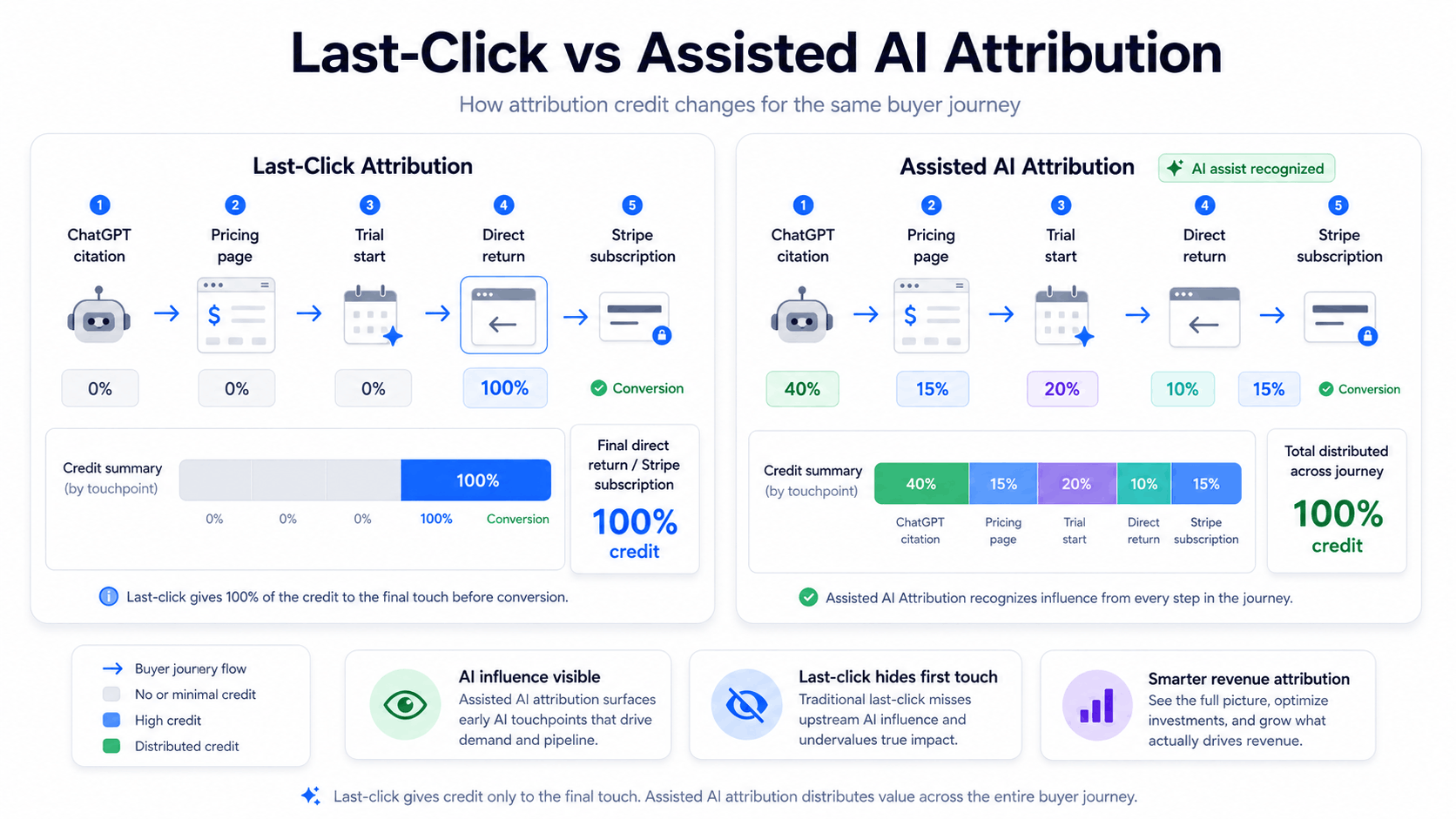
Last-click attribution gives 100% credit to the closing source. That can hide AI search when a buyer returns through direct traffic, a brand search, an invoice email, or a checkout link.
Use assisted conversion reporting for AI search:
| View | Question | Action |
|---|---|---|
| First AI touch | Which AI source introduced the buyer? | Save referrer, UTM, and landing page |
| Middle intent | Which events showed product interest? | Track pricing, docs, signup, demo, and checkout events |
| Closing source | Which visit came right before payment? | Attribute close credit, then keep AI as an assist |
| Revenue path | Which source group influenced paid accounts? | Compare assisted revenue and last-click revenue |
Example: 100 ChatGPT sessions create 14 pricing views, 8 trial starts, and 3 paid subscriptions. Two buyers return through direct traffic before payment. Last-click reporting credits direct traffic for those two purchases. Assisted reporting keeps ChatGPT in the path and shows that AI search created the demand.
Choose a lookback window that matches your sales cycle:
| Business model | Start with | Reason |
|---|---|---|
| Low-ticket ecommerce | 7 to 14 days | Buyers decide fast |
| Self-serve SaaS | 30 days | Trial and activation need time |
| Sales-led SaaS | 90 days | AI can start research long before a call |
| Agency pipeline | 90 to 180 days | Client deals need review cycles |
Ask Swetrix AI Chat questions such as:
Which AI referrers generated purchase events this week?
Which AI landing pages assisted paid subscriptions?
Which direct sessions entered the signup funnel after viewing AI-cited pages?
Use the answers to pick pages for refreshes, experiments, feature flags, or pricing tests.
Keep Privacy-First Reporting Honest
Attribution without cookies works when you track first-party visits, source data, events, and revenue without building cross-site profiles.
Use these reporting rules:
- Store source, landing page, event, goal, funnel stage, revenue, and payment status.
- Keep raw personal data out of analytics events.
- Group reports by source, page, plan, country, device, and funnel step.
- Share dashboards with founders, agencies, product teams, and sales without exposing private customer notes.
- Label direct AI influence as suspected until a referrer, UTM, form answer, or sales note supports the claim.
Cookie rules vary by market. The UK ICO says sites must get consent for cookies and similar technologies that store or access information on a device, apart from narrow exemptions in its cookies and similar technologies guidance. Ask counsel before you remove banners in regulated cases, and design your analytics stack around data minimization from the start.
Swetrix fits this model because it tracks referrers, UTMs, custom events, goals, funnels, user and session paths, performance, errors, shared dashboards, organisations, experiments, feature flags, revenue, and AI Chat in a cookieless setup.
Operating Checklist
Run this setup in order:
- Create an AI search segment for ChatGPT, Perplexity, Claude, Gemini, Copilot, Bing, and Google.
- Add UTMs to AI links you control, with lowercase source and campaign names.
- Track
pricing_viewed,signup_started,trial_created,demo_requested,checkout_started, andpurchase_completed. - Create goals for trials, demos, purchases, upgrades, and sales opportunities.
- Build funnels for self-serve, sales-led, ecommerce, or agency motions.
- Connect Stripe, Paddle, or API revenue with Swetrix profile and session IDs.
- Compare assisted revenue against last-click revenue before you move budget.
- Keep suspected AI direct traffic separate from confirmed AI referrals.
Review the report each Monday. Keep pages that generate paid AI visits, rewrite pages that draw AI traffic with no events, and fix funnel steps where AI visitors drop out.
Final Recommendation
Use confirmed referrers and UTMs as proof. Use citations, form answers, sales notes, and direct traffic patterns as supporting evidence. Tie both groups to custom events, goals, funnels, and revenue.
Last-click attribution can hide AI search demand. Read the assisted path before you cut content, pause campaigns, or rewrite landing pages. Swetrix gives you the source, behavior, and revenue data in one privacy-first workflow, without cookies or personal data collection.
AI search attribution works when your analytics tracks the visit and the money in one place. Start Swetrix's 14-day free trial, connect your AI referrers, and tie them to revenue without cookies.

The web analytics your site deserves.
Tired of bloated dashboards, privacy concerns, and data you can't trust? Switch to Swetrix and get simple, powerful analytics that respects your users.