- Date
The Ultimate Guide To Privacy-Friendly YouTube Video Tracking
 Andrii Romasiun
A visitor lands on your pricing page, watches a product demo, and converts to a paid plan. Analysts see a direct conversion from the landing page in the dashboard. The tracking configuration misses the video interaction.
Without specific tracking logic, embedded video players act as black boxes. A two-minute product demonstration could be driving the majority of your signups. Standard metrics group those engaged buyers with users bouncing after three seconds.
Tracking media interactions reveals which assets generate revenue. Connecting video views to specific user sessions clarifies these conversion paths.
Why Video Analytics Matter in 2026
The ROI of Embedded Video
Video assets require substantial production budgets. Marketing teams rely on precise engagement data to measure the return on that investment. A generic pageview records a URL load. Video metrics reveal audience retention.
Tracking playback events identifies drop-off points. A spike in abandonment at the 30-second mark highlights a confusing explanation or a pacing issue. Fix the edit, upload a new version, and measure the retention difference.
Marketing teams across B2B and B2C sectors see engagement gains from media. A 2025 Wyzowl report shows 84 percent of marketers note an increase in time on page, though this metric naturally varies depending on industry and content type. High retention on pages with media correlates with increased conversion rates. Implement event tracking to confirm this correlation for your own domains.
Understanding YouTube's Massive Reach
YouTube hosts most embedded marketing videos due to its infrastructure and bandwidth savings. While self-hosting requires encoding multiple resolutions and managing global content delivery networks, YouTube handles playback optimization.
Consumer behavior reinforces this choice across retail and SaaS industries. Recent WordStream data shows 70 percent of YouTube viewers make purchases from brands after seeing them on the platform, although these figures range based on the specific industry and content type. Billions of users interact with this interface worldwide. Embedding these videos on your corporate site captures that familiar player experience.
Audit your website to locate all embedded YouTube iframes. Document the URLs in a spreadsheet. Identify the landing pages using video content to drive their primary call to action.
The Privacy Problem with Default YouTube Video Tracking
How Default Embeds Violate GDPR
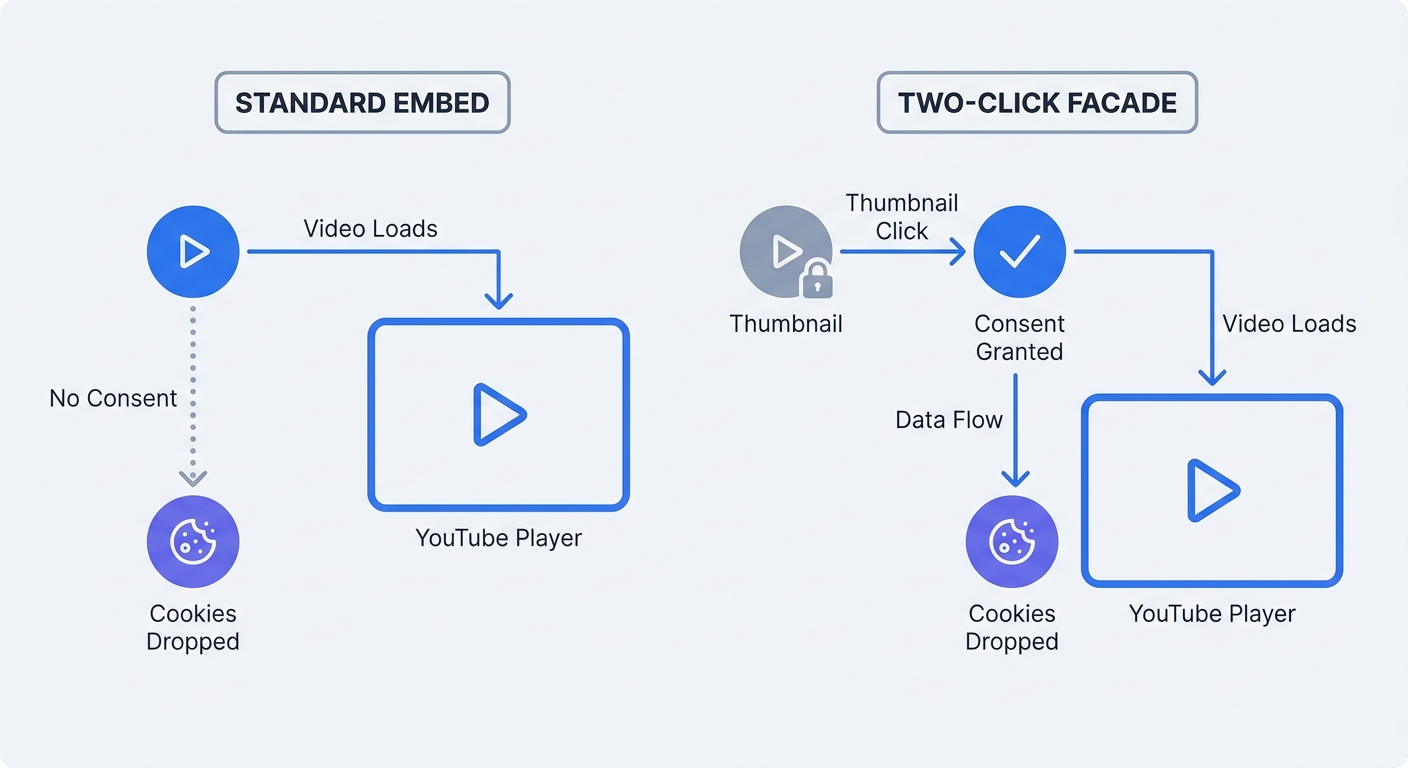
Paste a standard YouTube embed code into your HTML, and the iframe loads upon page visit. That instant load creates a compliance failure. The standard youtube.com player places advertising identifiers into the browser storage before the user clicks play.
These files include the YSC and VISITOR_INFO1_LIVE tracking cookies. The General Data Protection Regulation (GDPR) and the ePrivacy Directive mandate explicit opt-in consent before loading tracking scripts. Firing a standard YouTube player on page load violates this directive.
European Data Protection Authorities enforce strict penalties for unconsented third-party data transfers. Legal teams face Schrems II compliance issues regarding international data flows because Google processes this tracking data on servers located in the United States.
Open your browser's developer tools. Load a page with a standard YouTube embed. Navigate to the Application tab to inspect the Cookies section. Third-party Google domains populate the list without user consent.
The Shift Away From Third-Party Cookies
Regulators and software developers dismantled traditional tracking frameworks. Major browsers block cross-site identifiers. Users reject consent banners at high rates.
Relying on Google's default scripts ties your analytics to a deprecated technology stack. When users decline cookie tracking, consent management platforms block the YouTube iframe. A broken empty space appears on your landing page.
Check your consent management configuration. Determine if the platform blocks standard iframes for opted-out users. Blocking these iframes deletes both the video presentation and the engagement data for your audience.
Why Traditional YouTube Video Tracking Is Broken
The youtube-nocookie.com Issue
Site owners attempt to solve the consent problem using YouTube's privacy-enhanced mode. Change the domain in the iframe source from www.youtube.com to www.youtube-nocookie.com. Using this modified URL stops YouTube from setting tracking cookies upon the initial page load.
Privacy-enhanced mode creates a secondary problem. Changing the source URL breaks automated tracking solutions.
Analysts use the Google Analytics 4 Enhanced Measurement toggle to capture video events. This native script relies on a regular expression searching for youtube.com in the HTML. The listener ignores the nocookie domain. Enabling privacy-enhanced mode blinds GA4 to all video interactions.
Google Tag Manager's Blind Spot
Marketing teams use Google Tag Manager to configure event tracking. GTM includes a built-in YouTube Video trigger. This native trigger searches the DOM for standard YouTube iframe structures.
When an iframe uses youtube-nocookie.com, the built-in GTM listener fails to attach to the player. Users click play, pause the video, and finish the content. GTM registers zero events.
Test your current tracking infrastructure. Open your analytics dashboard or load Google Tag Assistant in debug mode. Click play on a privacy-enhanced video embed. Monitor the network requests to confirm the absence of video interaction data flowing to your event tracking setup.
Fixing YouTube Video Tracking Compliance
Enabling the YouTube Iframe API
Capturing engagement data without cookies requires communicating with the video player. Developers must use the YouTube Iframe Application Programming Interface (API).
Developers use the API to capture state changes. The system flags when a video starts, pauses, buffers, or ends. Add a parameter to your embed URL to access these broadcasts.
Append ?enablejsapi=1 to the end of the iframe source link. Add the new parameter with an ampersand if the URL contains existing parameters: &enablejsapi=1.
<!-- Incorrect Setup -->
<iframe src="https://www.youtube-nocookie.com/embed/dQw4w9WgXcQ" title="Product Demo"></iframe>

<!-- Correct Setup -->
<iframe
  id="hero-video"
  src="https://www.youtube-nocookie.com/embed/dQw4w9WgXcQ?enablejsapi=1"
  title="Product Demo"
></iframe>
Assign a unique id attribute to the iframe. Developers need this identifier to target the correct element via the tracking script.
Implementing a Two-Click Facade
Privacy-enhanced mode stops initial cookie placement. YouTube writes data to local storage once the user clicks play. The strictest compliance approach requires explicit user intent before loading external resources.
Implementing a two-click facade provides strict compliance. Replace the iframe with a static thumbnail image and a play button. The site loads zero external scripts on the initial page load. When the user clicks the play button, JavaScript removes the image, injects the YouTube iframe, and starts playback.
Create the HTML structure for the placeholder:
<div class="video-facade" data-video-id="dQw4w9WgXcQ">
  <img src="https://img.youtube.com/vi/dQw4w9WgXcQ/maxresdefault.jpg" alt="Video thumbnail" />
  <button class="play-button" aria-label="Play video">
    <svg viewBox="0 0 24 24"><path d="M8 5v14l11-7z" /></svg>
  </button>
</div>
Write the JavaScript to handle the injection. Configure the code to read the data attribute, build the youtube-nocookie.com URL with the enablejsapi=1 parameter, and replace the facade content.
document.querySelectorAll(".video-facade").forEach((facade) => {
  facade.addEventListener("click", function () {
    const videoId = this.getAttribute("data-video-id");
    const iframe = document.createElement("iframe");

    iframe.setAttribute(
      "src",
      `https://www.youtube-nocookie.com/embed/${videoId}?autoplay=1&enablejsapi=1`,
    );
    iframe.setAttribute("frameborder", "0");
    iframe.setAttribute("allow", "autoplay; encrypted-media; picture-in-picture");
    iframe.setAttribute("allowfullscreen", "");
    iframe.setAttribute("id", `yt-${videoId}`);

    this.innerHTML = "";
    this.appendChild(iframe);

    // Initialize tracking logic here
    initVideoTracking(`yt-${videoId}`);
  });
});
Using this method eliminates unconsented data transfers. Users grant consent by interacting with the element. Deferring the heavy third-party player improves page load speed.
Cookieless YouTube Video Tracking With Swetrix
Configuring Custom Events
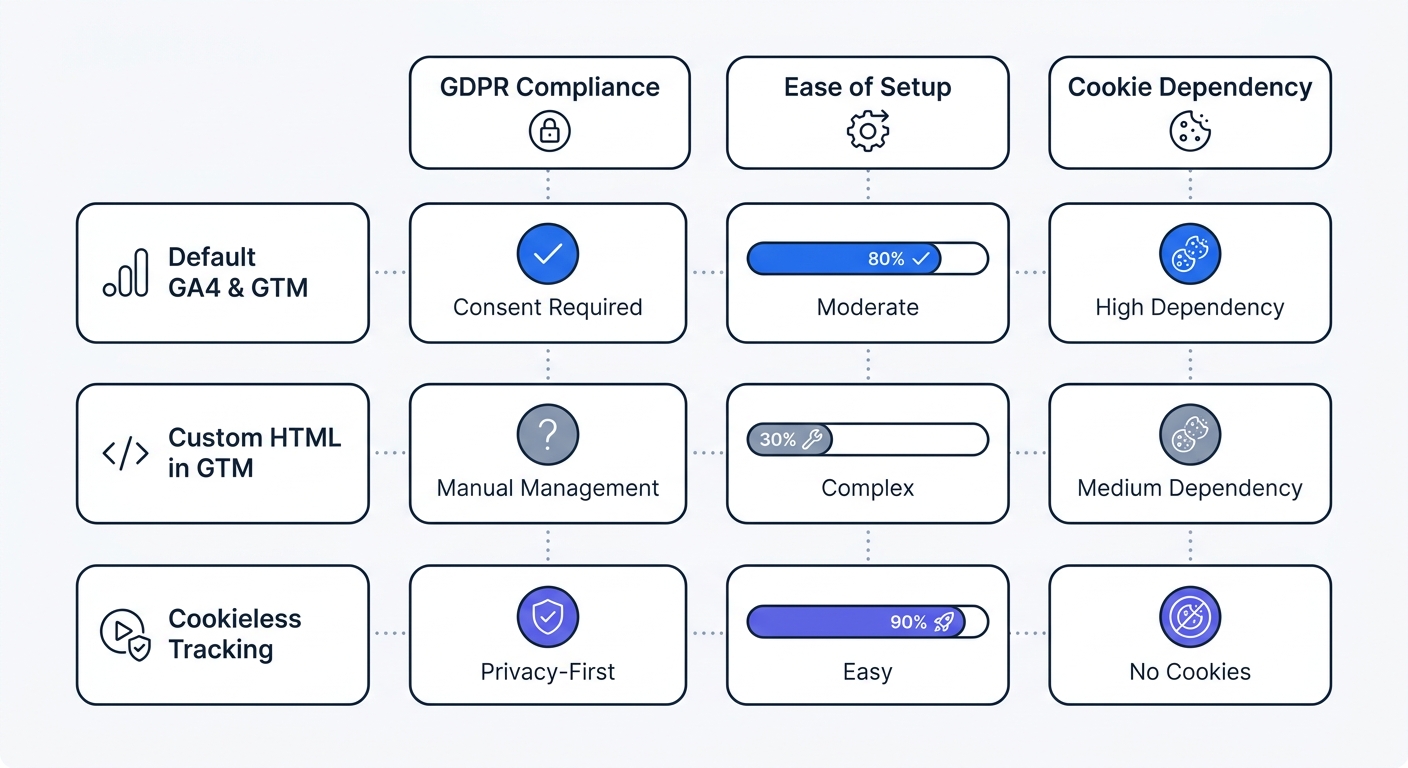
Replacing standard embeds with facades solves the legal compliance issue. Marketers still need to measure engagement. Sending that data to legacy platforms like Universal Analytics or GA4 requires complex workarounds and creates secondary privacy concerns regarding data routing.
Teams use cookieless tracking platforms to process engagement data without storing persistent identifiers on the device. Swetrix accepts custom events via an API. Write standard JavaScript to monitor the YouTube player and push the resulting data to the dashboard.
The YouTube API uses numerical codes for player states.
-1: Unstarted0: Ended1: Playing2: Paused3: Buffering5: Video Cued
Load the YouTube Iframe API script. Define a function to create a new player instance and listen for state changes.
// Load the YouTube API
const tag = document.createElement("script");
tag.src = "https://www.youtube.com/iframe_api";
const firstScriptTag = document.getElementsByTagName("script")[0];
firstScriptTag.parentNode.insertBefore(tag, firstScriptTag);

let player;
let hasTrackedStart = false;
let hasTrackedHalf = false;

function onYouTubeIframeAPIReady() {
  // Wait for the facade injection to create the iframe
}

function initVideoTracking(iframeId) {
  player = new YT.Player(iframeId, {
    events: {
      onStateChange: onPlayerStateChange,
    },
  });
}

function onPlayerStateChange(event) {
  const videoTitle = event.target.getVideoData().title;
  const videoDuration = event.target.getDuration();

  if (event.data === YT.PlayerState.PLAYING && !hasTrackedStart) {
    swetrix.track({
      ev: "Video_Started",
      meta: { title: videoTitle },
    });
    hasTrackedStart = true;
    startProgressTimer();
  }

  if (event.data === YT.PlayerState.ENDED) {
    swetrix.track({
      ev: "Video_Completed",
      meta: { title: videoTitle },
    });
  }
}
This code snippet captures two core metrics: the initial play and the completion. Developers use the Swetrix track method to send a secure, anonymized HTTP request to the analytics project.
Tracking Granular Watch Time
Tracking granular watch time requires checking the player's current time at set intervals. Poll the API during playback and send events when the user crosses specific percentage thresholds.
Add a polling function to monitor progression.
let progressInterval;

function startProgressTimer() {
  progressInterval = setInterval(() => {
    if (player && player.getPlayerState() === YT.PlayerState.PLAYING) {
      const currentTime = player.getCurrentTime();
      const duration = player.getDuration();
      const percentComplete = (currentTime / duration) * 100;

      if (percentComplete >= 50 && !hasTrackedHalf) {
        swetrix.track({
          ev: "Video_Reached_50",
          meta: { title: player.getVideoData().title },
        });
        hasTrackedHalf = true;
      }
    }
  }, 1000); // Check every second
}
Clear the interval when the video pauses or ends to prevent memory leaks.
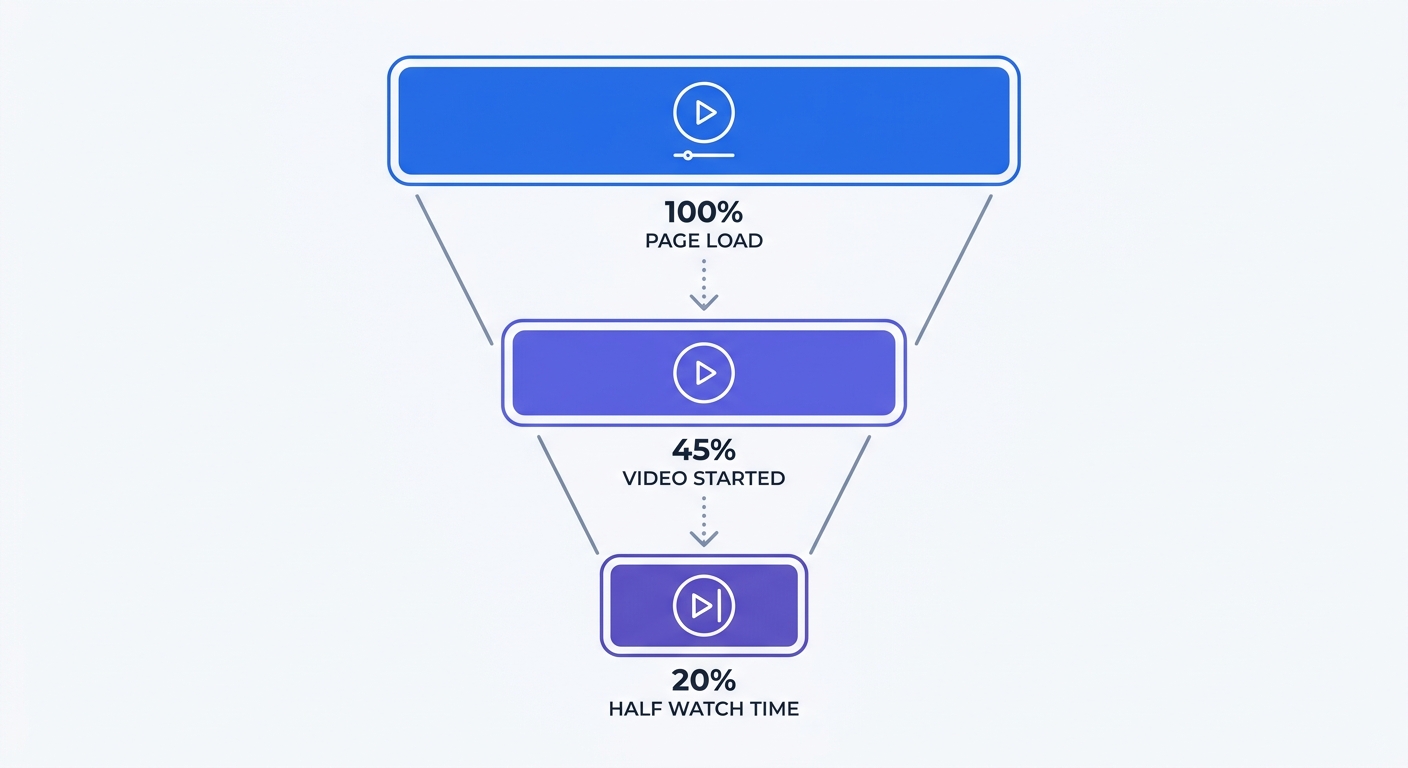
This custom implementation creates precise engagement funnels inside your analytics reporting. Marketers see the precise number of users who initiated the video and reached the halfway mark.
Swetrix processes this data without third-party cookies. The tracking operates alongside strict consent management platforms. Users interacting with the two-click facade generate anonymous event data. Marketing teams receive accurate performance metrics while legal departments maintain GDPR compliance.
Audit custom events inside the Swetrix dashboard. Navigate to the project, open the Events tab, and filter by names starting with Video_. Compare the event counts against total pageviews to calculate player interaction rates for each landing page.
Stop losing marketing data to broken tracking scripts and privacy blockers. Capture accurate, cookieless insights on website traffic and video engagement. Start a 14-day free trial of Swetrix today to build compliant analytics infrastructure.