- Date
What Is UTM Tracking and How Does It Work
 Andrii Romasiun
Ever find yourself staring at your analytics, wondering which of your marketing efforts are actually bringing people to your site? It's a common frustration. This is the exact problem UTM tracking was built to solve.
Think of UTMs as little "digital breadcrumbs" you attach to your links. They tag your visitors so you can see precisely where they came from and how they found you.
Why UTM Tracking Is a Game-Changer
At its heart, UTM tracking is how smart marketers figure out what's working and what isn't. You add small bits of text, called parameters, to the end of a URL. These parameters don't change the page a visitor lands on, but they feed crucial information to your analytics tool, telling you the story behind each click.
Let's say you're launching a new product. You're promoting it everywhere: a Facebook ad, an email newsletter, and a post from an influencer you partnered with. Without UTMs, all that traffic just shows up in your analytics as one big, anonymous lump. You'll see a traffic spike, sure, but you'll have no idea which channel drove it.
UTM tracking turns that vague traffic data into a crystal-clear picture. It answers the most fundamental marketing question: "What's actually working?" This is how you measure real ROI, stop wasting money, and put your budget behind the strategies that are proven winners.
Where Did UTMs Come From?
This idea isn't some new fad; it's been a cornerstone of digital marketing for decades. UTM actually stands for Urchin Tracking Module. It was developed by a web analytics company called Urchin Software Corporation way back in the early 2000s.
In 2005, Google bought Urchin, and their technology became the foundation for what we all now know as Google Analytics. This little bit of history just shows how deeply rooted this tracking method is in modern marketing. You can even explore the history of UTM parameters to see how they've evolved.
Ultimately, getting a grip on UTM tracking lets you do three critical things:
- Attribute conversions accurately: Finally know which specific ad, email, or social post led to that sale or signup.
- Justify your marketing spend: Show your boss (or yourself) the hard data proving which campaigns are delivering the best return.
- Optimize future campaigns: Make smarter decisions based on what has worked in the past, instead of just guessing.
By using this simple but powerful tool, you're no longer just hoping your marketing works. You'll know exactly how and why it does.
Decoding the 5 Core UTM Parameters
To really get what UTM tracking is all about, you have to look at its component parts. A link with UTM tags is built using five key parameters that work together to paint a clear picture of your website traffic. Think of them as individual clues that, when pieced together, solve the mystery of where your visitors came from and what motivated them to click.
These parameters answer the big questions every marketer asks: Who sent the traffic? How did they find the link? And which specific effort brought them to our site? Nailing these five elements is the first step in turning a jumble of analytics numbers into a clear, actionable strategy.
This visual shows how a single, tagged link can be traced from any channel right back to your analytics reports.

The map drives home a key point: UTMs are the bridge connecting your global marketing efforts to your data, making sure no click gets lost in the void.
The five UTM parameters each answer a specific question about your traffic. Let's break them down one by one.
| Breakdown of the 5 UTM Parameters | ||
|---|---|---|
| Parameter | The Question It Answers | Common Examples |
utm_source | Where is the traffic coming from? | google, facebook, newsletter, bing |
utm_medium | How did the traffic get here? | cpc, social, email, organic, affiliate |
utm_campaign | Why is the traffic coming? (Which promotion?) | summer_sale_2024, new_feature_launch, webinar_promo |
utm_term | Which keyword or audience brought the traffic? | blue_running_shoes, marketing_automation_software, lookalike_audience_1 |
utm_content | Which specific ad or link was clicked? | video_ad_version_a, blue_cta_button, header_link |
While you can use all five for maximum detail, the first three—source, medium, and campaign—are the real workhorses of UTM tracking.
The Three Must-Have Parameters
If you’re just starting out, focus on these three. They’re considered essential because, without them, your data will have frustrating gaps that make it hard to analyze your performance.
utm_source(The "Where"): This is the big one. It tells you the exact platform or referrer that sent someone your way. Was it Google? Facebook? Your email newsletter? That's whatutm_sourceanswers. Examples includegoogle,facebook, or a newsletter name likeweekly_roundup.utm_medium(The "How"): This parameter clarifies the marketing channel you used. Think of it as the general method for delivering your link. Common examples arecpc(for paid ads),social(for social media posts),email, ororganic. It gives you a high-level bucket for your traffic.utm_campaign(The "Why"): This is where you name your specific marketing effort. It could be a seasonal promotion, a product launch, or any strategic initiative. It answers, "Why are we running this?" Examples might besummer_sale,q4_product_launch, orblack_friday_2024.
Key Takeaway: When you put them together,
utm_source,utm_medium, andutm_campaigntell a complete story. They let you see that yoursummer_sale(campaign) ads onsource) driven bycpc(medium) generated 500 visits and 50 sales. Now that's useful.
The Two Optional (But Powerful) Parameters
For marketers digging a little deeper—especially with A/B testing or complex ad campaigns—the last two parameters add some serious firepower. They provide that extra layer of detail when you need it most.
utm_term(The Keyword): This was originally built for tracking specific keywords in paid search ads, but its role has grown. Now, you can use it to identify audience segments in social campaigns or other specific targeting criteria. For example,utm_term=running_shoestracks a keyword, whileutm_term=lookalike_audience_1could identify a specific ad set.utm_content(The Creative): This one is a lifesaver for A/B testing. It helps you tell the difference between multiple links that all point to the same URL within a single campaign. Use it to track different ads, button colors, or calls-to-action. For instance,utm_content=blue_bannerversusutm_content=red_bannershows you exactly which ad creative got more clicks.
How to Build and Manage Your UTM Links
Alright, you understand the "what" and "why" of UTMs. Now, let's get into the "how." Moving from theory to practice is pretty simple, but your success really boils down to two things: using the right tools and being disciplined about how you use them.
Trying to manually type out a long UTM string on every URL is just asking for trouble. A single typo can break your tracking, and before you know it, your data is a fragmented mess. This is exactly why most marketers lean on dedicated UTM builders.
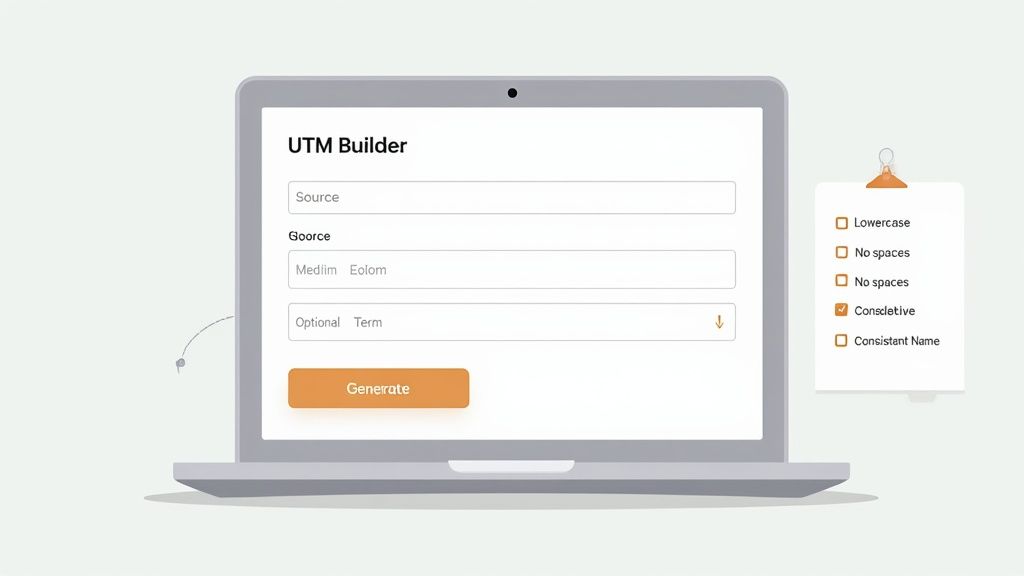
You can start with tools like Google's Campaign URL Builder, which gives you a straightforward form to fill out. For an even cleaner experience, a free and simple UTM generator tool like the one from Swetrix is a great option. These tools do the heavy lifting, making sure every link is formatted perfectly and saving you from those tiny, costly mistakes.
Establish Your Naming Conventions
Here's the thing: using a builder is only half the battle. The real secret to clean, reliable data is creating—and sticking to—a strict set of naming conventions for your entire team.
If you don't have rules, your analytics platform will quickly fill up with endless variations of the same thing. You'll see Facebook, facebook, FB, and facebook.com all logged as different sources, even though they all came from the same place.
This isn't just about being tidy. It's about preserving the integrity of your data. Inconsistent tags make it impossible to add up all your traffic from a single channel, which means you can't accurately measure its true ROI. The goal is to create a single source of truth that everyone on the team follows, no exceptions.
This kind of structured approach is quickly becoming the norm. It's projected that by 2025, 90% of large enterprises in North America and Europe will be using enterprise-grade UTM governance to keep their data clean. They're building automated systems to standardize these values and feed them directly into their business intelligence tools. You can learn more about how enterprises are adopting UTM governance to fight data fragmentation.
UTM Best Practices Checklist
- Always Use Lowercase: UTM parameters are case-sensitive. Sticking to
lowercasefor everything (like- Use Hyphens or Underscores, Not Spaces: URLs can't handle spaces. Always replace them with
hyphensorunderscoresto keep links from breaking. For example, usesummer-saleorsummer_sale.- Keep It Simple and Descriptive: Your campaign names should tell a story. A name like
q4-product-launch-2024is instantly understandable, whereas a generic name likepromotells you nothing when you're looking back at the data months later.- Create a Centralized Spreadsheet: This is the most effective way to enforce consistency. Keep a shared document where your team can log every link they create and see the approved parameter names. It's your rulebook.
When you pair a good UTM builder with a clear set of internal rules, you create a scalable system. It’s the foundation that guarantees your analytics data will be clean, trustworthy, and actually useful for making decisions.
Finding Actionable Insights in Your UTM Data
Setting up clean, consistent UTM links is a great start, but it's really just the first step. The real magic happens when you dive into the data those links generate and use it to make smarter marketing decisions. So, once your tagged links are out in the wild, where do you actually find these golden nuggets of information?
Almost every analytics platform, from Google Analytics to privacy-first alternatives, has reports specifically for campaign traffic. Your goal is to move past just noticing a traffic spike and start asking deeper questions. Which channels aren't just sending visitors, but sending visitors who actually convert? Which ad creative is truly connecting with your audience? This is where your UTM data proves its worth.
In a privacy-focused tool like Swetrix, this information is presented in a straightforward, easy-to-digest report. You don't need to click through complicated menus; the data is laid out to help you compare campaign performance at a glance.
Analyzing Campaign Performance
Instead of getting bogged down by a sea of metrics, your focus should be on comparing how different campaigns stack up against your business goals. Look for the stories the data is telling you.
Your analysis should help you pinpoint:
- Your Top-Performing Channels: By comparing
utm_sourceandutm_medium, you can clearly see which platforms—whether it's Facebook, Google, or your email newsletter—are delivering the most engaged traffic or the highest number of sign-ups. - The Most Successful Campaigns: Filtering by
utm_campaignlets you measure the total impact of a specific promotion, like a "summer_sale," across every channel you're using. - Which Creative Actually Works: Using
utm_contentis perfect for A/B testing. You can directly compare avideo_adagainst animage_adto see which one is driving more valuable actions from users.
This screenshot from Swetrix shows just how simple it can be. It breaks down visitors and pageviews by source, medium, and campaign, giving you a crystal-clear overview.
With a view like this, you can instantly see which campaigns are bringing in the most traffic. It empowers you to make quick, data-informed decisions without getting lost in complexity.
Turning Data into Decisions
With these insights in hand, you can take real, meaningful action. For instance, if you notice your facebook / cpc campaigns are consistently outperforming everything else, you might decide to shift more of your ad budget there.
Or maybe you discover that one version of your ad copy (utm_content=direct_cta) leads to a 50% higher conversion rate than another (utm_content=story_cta). Now you know exactly which messaging to double down on in future ads.
The ultimate goal of UTM tracking isn't just to collect data; it's to use that data to constantly refine your strategy. It turns your analytics from a passive report card into an active playbook for growth, showing you exactly where to push forward and where to pull back.
The data you gather from UTMs is a cornerstone of a healthy analytics routine. To make the most of it, you need a clear, organized way to see all your key metrics in one place. You can learn more about bringing all your data together by exploring our guide on building a great web analytics dashboard. It’ll help you connect your campaign insights to the bigger picture of your website’s overall performance.
Common UTM Tracking Mistakes and How to Avoid Them
Even with the best strategy in place, tiny mistakes in your UTM tracking can snowball, corrupting your data and leading to some seriously flawed marketing decisions. The good news? Most of these slip-ups are surprisingly easy to sidestep once you know what to look for. Think of this as your field guide to keeping your analytics data clean, reliable, and actually useful.
The single biggest culprit we see, time and time again, is inconsistent naming conventions. Your analytics platform is literal and case-sensitive. To it, Facebook, facebook, and FB are three completely different traffic sources. This simple mistake splinters your data, making it impossible to see the true performance of a channel without painstakingly adding up all the variations by hand.

This is precisely why having a shared spreadsheet or a "UTM rulebook" for your team isn't just a nice-to-have. It’s absolutely essential for maintaining data integrity.
Using UTMs for Internal Links
Another classic mistake is slapping UTM parameters on internal links—the ones that point from one page of your website to another. This is a huge problem because it completely overwrites the original source of the visitor's session, effectively erasing their journey to your site.
Imagine a user arrives from a Google ad. Your analytics correctly logs their source as google and medium as cpc. But then, they click a big call-to-action button on your homepage that you’ve mistakenly tagged with utm_source=homepage. Just like that, their original source data is gone. Your analytics will now falsely report that this visitor came from your own website, completely wrecking your attribution data.
Key Takeaway: UTM tags are designed exclusively for tracking traffic coming to your site from external sources. Never, ever use them for navigation within your site. Your analytics tool is already built to track internal user flow on its own.
Other Common Pitfalls to Sidestep
Beyond those two major blunders, a few other habits can cause serious headaches down the road. Steering clear of them will protect the quality of your insights.
- Forgetting to tag everything: If you're only tracking your paid campaigns, you’re missing a huge piece of the puzzle. Tag your email newsletters, social media profile links, guest post bylines, and even QR codes to get a complete picture of where your traffic is really coming from.
- Using messy or confusing names: A campaign named
promo1will be a complete mystery to you (and your team) in six months. Always opt for clear, descriptive names likeq4-2024-black-friday-sale. This ensures your historical data remains valuable and easy to understand. - Leaving required parameters blank: While
utm_termandutm_contentare optional, leaving the requiredsource,medium, andcampaignfields empty is a recipe for disaster. This creates "(not set)" entries in your reports, leaving glaring holes in your data.
By dodging these simple mistakes, you can ensure that every piece of data you collect is accurate, consistent, and ready to be turned into the kind of insights that drive real business growth.
Why UTMs Are Your Secret Weapon in a Privacy-First World
As third-party cookies fade away and privacy rules get stricter, marketers everywhere are looking for tracking methods they can actually rely on. This is where UTMs shine. Getting a handle on what is UTM tracking is like future-proofing your entire marketing analytics strategy.
The beauty of UTM parameters is that they're a form of first-party data. Unlike creepy tracking cookies that follow people across the internet, UTMs just add some extra info to a URL. When someone clicks that link and lands on your site, your own analytics platform reads that information. That’s it. No invasive, cross-domain tracking involved.
How to Thrive in a Cookie-Free Future
This distinction is everything. While browsers are busy blocking third-party cookies, the simple mechanism behind UTMs is completely unaffected. It’s a clean, straightforward way to get accurate attribution data without stepping on user privacy, and it works perfectly with modern, privacy-focused analytics tools.
Think of it this way: UTM tracking is based on a direct action. Someone clicks a specific link you created and shared. You learn about that one click—where it came from, what campaign it was part of—and nothing else. It’s an honest, transparent way to see what's working.
By building a solid UTM strategy today, you’re creating a marketing measurement system that's both resilient and ethical. You get the clear, actionable insights you need to measure campaign performance while respecting your audience's privacy.
This is especially critical if you care about owning and controlling your own data. Pairing UTMs with a privacy-first analytics platform is a cornerstone of any modern data strategy. For those who want to take it a step further, you can learn more about the advantages of a **self-hosted web analytics** solution, which keeps all your data on your own servers. This way, you’re not relying on anyone else and can stay fully compliant with whatever privacy laws come next.
Got Questions About UTMs? We've Got Answers
Even after you've got the basics down, a few tricky questions always seem to pop up about UTM tracking. Getting the small details right is the difference between clean, actionable data and a reporting nightmare. Let's clear up some of the most common head-scratchers.
Are UTM Parameters Case-Sensitive?
You bet they are. This is a big one. Most analytics tools, including Google Analytics, see Facebook and facebook as two completely different sources. It’s one of the fastest ways to muddy your campaign data.
The fix is simple but crucial: always use lowercase. By establishing a rule to keep all your UTM parameters in lowercase from the start, you'll save yourself a world of pain when it comes time to analyze your reports.
Can I Track Offline Campaigns with UTMs?
Absolutely! This is where you can get really creative. UTMs are perfect for measuring how your real-world marketing efforts drive online traffic. The key is to connect your physical material to a digital link using something like a QR code or a memorable vanity URL.
Imagine you're running a local event and have a flyer. You can print a QR code on it that links to your site with tags like utm_source=summer-event&utm_medium=flyer. When someone scans that code, you’ll see that visit show up in your analytics, directly credited to that specific flyer.
This technique beautifully bridges the gap between your offline and online worlds. Suddenly, you have a clear way to measure the ROI on things like print ads, conference banners, and even business cards.
Will UTMs Mess Up My Website's SEO?
Nope, you're in the clear here. Search engines like Google are smart enough to know that UTM parameters are just for tracking. They see the tags, understand their purpose, and simply index the clean URL without them. Your rankings won't be affected.
However, there's a golden rule: never, ever use UTM tags on internal links within your own website. If you link from one page of your site to another with UTMs, you'll overwrite the original source of the visitor. This completely breaks your ability to track the true user journey from start to finish.
Ready to see all this clean campaign data in one place? Swetrix offers a privacy-first analytics platform that makes it easy to visualize what’s working. Start your free 14-day trial and turn your UTM insights into real growth at https://swetrix.com.