- Date
What Is Session Replay and Do You Need It?
 Andrii Romasiun
A developer watches a user's checkout session replay and sees them click the "Submit Order" button seven times in three seconds. The payment form never responds. The bug report said "payment not working"—the replay shows a JavaScript error firing on the first click, disabling the entire form. Fix deployed in 20 minutes instead of three days of back-and-forth emails asking the user to describe what happened.
Session replay tools recreate user journeys by capturing every DOM mutation—each click, scroll, form input, and page element change—then reconstructing those events into a video-like playback. The technology doesn't record your screen like a camera. It logs structural changes to the page's Document Object Model, and rebuilds the session frame by frame when you watch it later. Data can be encrypted in transit and/or at rest when configured. Modern tools run asynchronously and usually impose minimal latency to page loads.
Compare this to heatmaps, which aggregate thousands of sessions into color-coded click density maps. Heatmaps show you where users click most often. Session replay shows you why a specific user rage-clicked the same broken button twelve times before abandoning your site. One reveals patterns across your entire audience. The other tells individual stories that explain the pattern.
Video recording tools capture literal screen footage, raising massive privacy and storage concerns. Session replay reconstructs interactions from logged events, making it possible to automatically mask sensitive fields like credit card numbers and passwords before any data leaves the browser. Configure your tool to redact all text input fields by default, and personally identifiable information never reaches your servers.
The Business Case: Measurable Impact of Session Replay
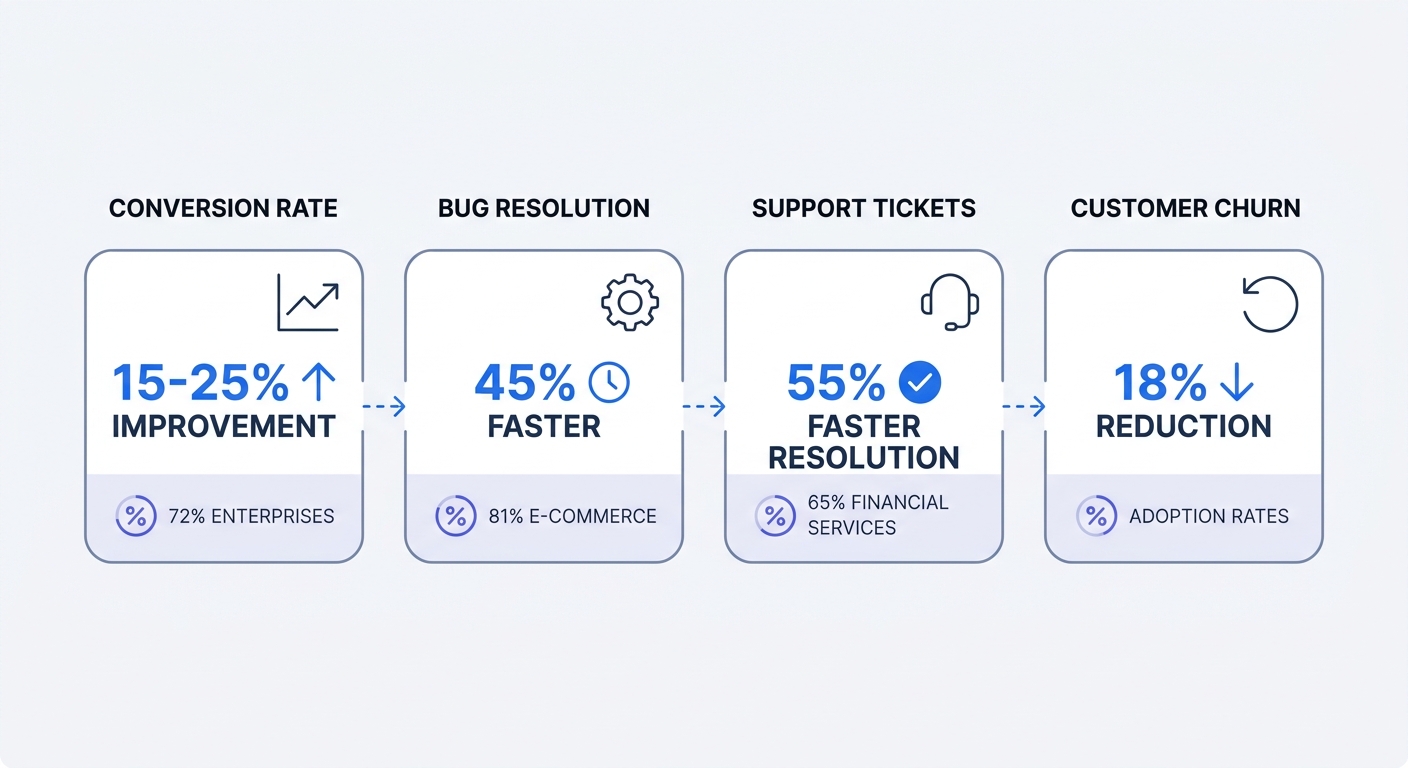
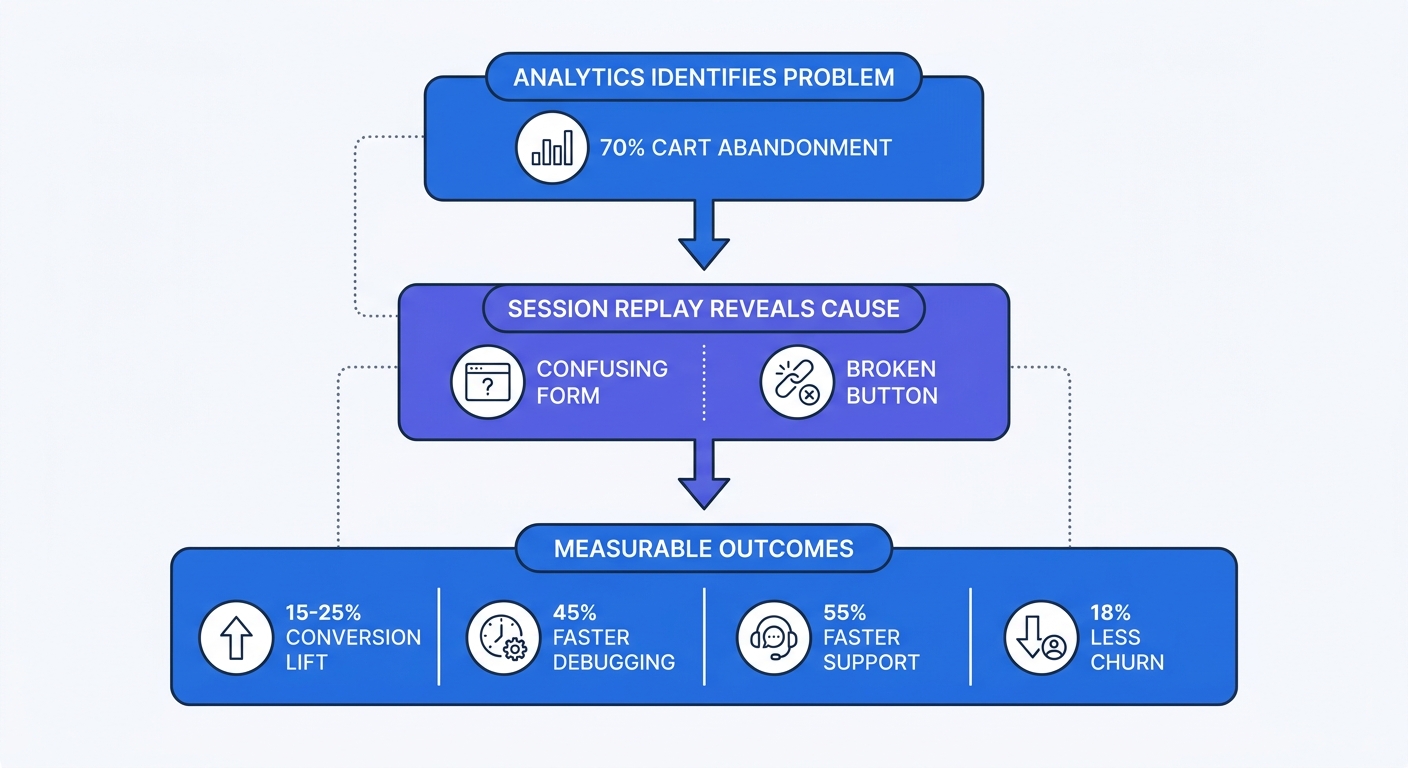
Companies implementing session replay see conversion rates improve by 15-25% within the first quarter. The tool doesn't magically fix conversion problems. It surfaces the specific friction points killing conversions so your team knows exactly what to fix. Analytics tells you 70% of users abandon at checkout. Replay shows you the confusing shipping form causing the abandonment.
Development teams cut bug resolution time when they can watch the exact sequence of user actions leading to an error. No more asking users to remember what they clicked or which browser version they used. The replay captures browser type, screen resolution, network conditions, and every interaction before the crash.
Support teams resolve tickets faster by watching the issue happen instead of reading a customer's text description. A user reports "the form doesn't work." The replay shows them trying to submit without filling a required field that wasn't marked with an asterisk. Support sends a fix to the design team instead of asking the user twenty clarifying questions. One company reduced support ticket resolution time by 60% after implementing session replay.
Small and medium businesses using session replay reduce customer churn. When you identify and fix the top five friction points in your onboarding flow, fewer users abandon during their first week. Product teams watch new user sessions, spot where confusion happens, and ship improvements before churn accelerates.
Privacy, GDPR, and Compliance: What You Must Know
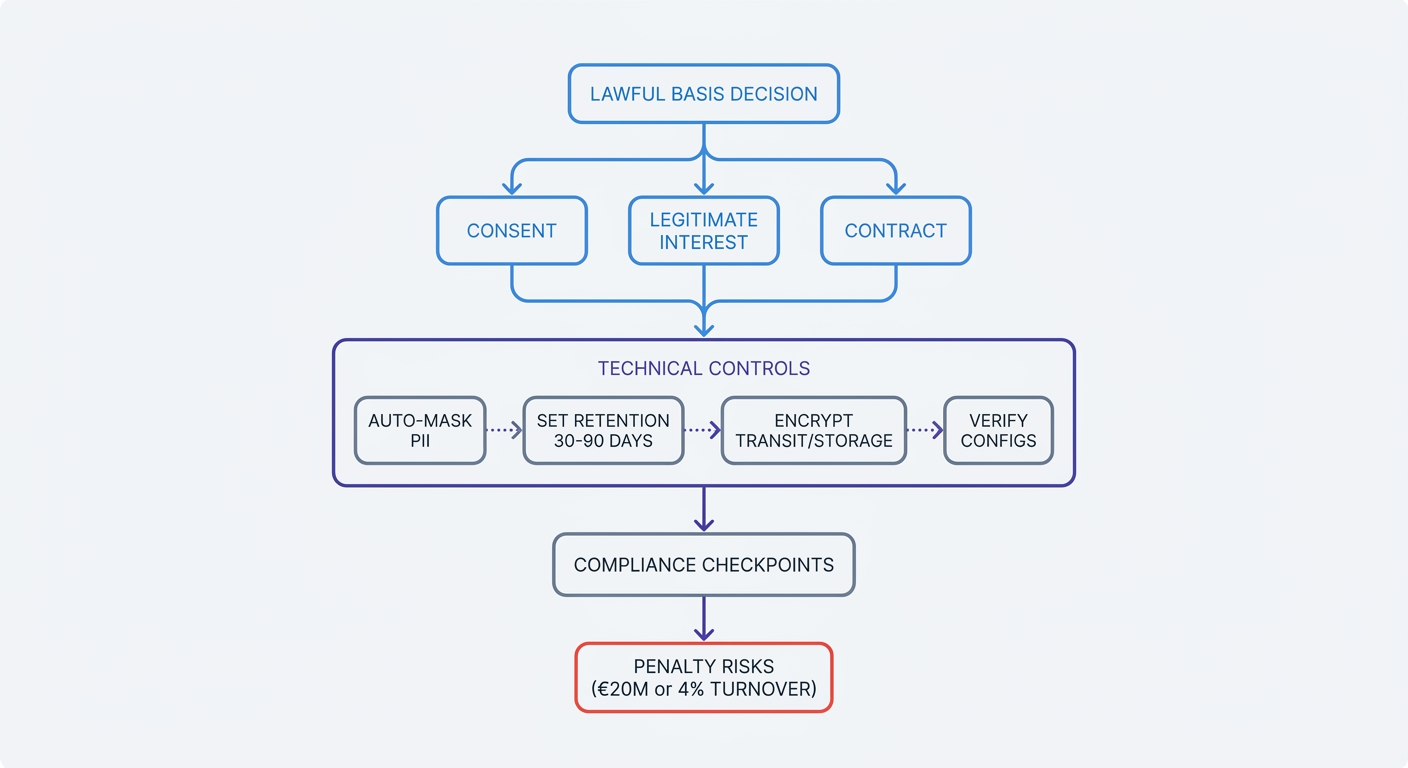
Session replay records personal data, triggering GDPR and CCPA requirements. The tool captures user behavior, which qualifies as personal information under both regulations. Before recording sessions from EU users, establish a lawful basis for processing, define data retention limits, and disclose session recording in your privacy policy.
In some jurisdictions, three lawful bases under GDPR Article 6(1) may apply to session replay. This is general information, not legal advice; consult counsel for your specific situation.
Consent can involve explicit opt-in before recording starts. In some implementations, this may include showing a consent banner, waiting for the user to click "Accept," then initializing the replay script. This approach may give users control but can reduce data volume since some users decline.
Legitimate interests (Article 6(1)(f)) may allow recording sessions if your business interest in debugging and improving the product outweighs the user's privacy interests. Organizations using this basis often complete a balancing test documenting why session replay serves a legitimate purpose and how they minimize privacy impact through automatic data masking. Many SaaS companies may use this basis for internal product improvement.
Contract performance (Article 6(1)(b)) may apply when session replay helps deliver the service the user signed up for. If your terms of service mention using session data to provide technical support, this basis may cover support-related replay usage in certain contexts.
Technical privacy controls separate compliant tools from privacy nightmares:
Configure automatic PII masking before deployment. The tool should redact email addresses, phone numbers, credit card fields, and password inputs by default, replacing them with asterisks in the replay. Test this by recording a session where you enter fake personal data, then verify the replay shows masked values.
Set data retention between 30-90 days depending on your support workflow. Most teams need 30 days to investigate bugs and close support tickets. Configure automatic deletion after this window closes. Storing replays indefinitely violates GDPR's data minimization principle.
Encrypt session data in transit using TLS and at rest using AES-256 or equivalent. Verify your vendor encrypts data before it leaves the user's browser and maintains encryption in their storage infrastructure.
Exclude sensitive pages from recording. Don't record payment pages, health information forms, or any page handling regulated data. Add these URLs to your tool's exclusion list during setup.
Obtain explicit consent before recording if you're using the consent lawful basis. Don't start the replay script until the user clicks "Accept" in your consent banner. Many tools offer a consent mode that delays initialization until you call a specific function after consent is granted.
Verify privacy configurations monthly. As your site evolves, new forms and pages might bypass your masking rules. Schedule a recurring task to record test sessions and confirm sensitive data remains masked.
Many companies deploy replay without proper configuration. Default settings often fail to mask all sensitive fields. If your team lacks GDPR expertise, consult a privacy lawyer before deploying session replay. Misunderstanding the lawful basis requirements or data retention rules creates compliance risk.
Non-compliance penalties reach €20 million or 4% of annual turnover under GDPR, whichever is higher. Budget for encryption, anonymization, and secure storage infrastructure during vendor evaluation.
Four High-Impact Use Cases for Session Replay
Debugging and Bug Reproduction
Developers reproduce bugs by watching the exact sequence of user actions leading to an error. A user reports that the search function "doesn't work." The replay shows them typing a product name with a special character that breaks the search query parser. The developer sees the JavaScript error in the console log captured alongside the replay, identifies the unescaped character causing the crash, and ships a fix in one sprint instead of spending three sprints trying to reproduce the issue locally.
Session replay captures browser type, screen resolution, network speed, and device information automatically. When a bug only appears on Safari mobile with a slow 3G connection, the replay shows you those exact conditions. No more asking users which browser version they used or whether they cleared their cache.
Conversion Rate Optimization
CRO teams discover why consumers abandon purchases by watching failed checkout sessions. Analytics shows 500 users reached the payment page but only 150 completed the purchase. Replay reveals that 200 of those users tried to apply a promo code that returned an error message, then left. The promo code validation logic was rejecting valid codes due to a case-sensitivity bug.
Watch 20-30 sessions where users abandoned at a specific funnel step. Look for patterns: Do users scroll up and down repeatedly, suggesting they can't find information? Do they click non-interactive elements, expecting them to be buttons? Do they fill a form, click submit, see an error, then leave without correcting the issue?
Rage clicks—when a user clicks the same element 5+ times in rapid succession—signal broken functionality or unclear feedback. If users rage-click your "Add to Cart" button, the button might not be working, or the success feedback might be too subtle to notice. Filter your replay tool to show only sessions with rage clicks, then watch those sessions to identify the root cause.
Customer Support Enhancement
Support teams match customer tickets to session replays, seeing the reported issue in action rather than relying on the user's description. A user emails "I can't upload my profile photo." Support pulls up their recent sessions, watches them try to upload a 15MB file that exceeds the undocumented 5MB limit, and realizes the error message never appeared due to a front-end bug. Support escalates to engineering with a replay link showing the exact problem.
Resolution time drops because support agents spend less time gathering information and more time solving problems. Instead of sending five emails asking clarifying questions, the agent watches the replay, identifies the issue, and sends a solution in the first response.
Customer success managers review replays before onboarding calls to identify where new users struggle. If a user hasn't completed key setup steps, the CSM watches their sessions to see which part of the onboarding flow confused them, then addresses those specific friction points during the call.
UX Research and Design
Product teams identify friction points by watching users attempt tasks and fail. Analytics shows 40% of users abandon your account settings page without saving changes. Replay reveals they can't find the "Save" button because it's below the fold on mobile devices and the page doesn't scroll smoothly. The design team moves the button to a sticky footer, and abandonment drops to 12%.
Dead clicks—clicks on non-interactive elements—reveal where users expect functionality that doesn't exist. If 200 users per week click your company logo expecting it to open a menu, consider adding that functionality or making the logo less prominent to reduce confusion.
Mouse thrashing—rapid back-and-forth cursor movement—indicates frustration or confusion. Users thrash their mouse when they can't find what they're looking for or don't understand what to do next. Filter for sessions with mouse thrashing on your pricing page, and you might discover users can't find the feature comparison table or don't understand which plan includes the feature they need.
Session replay complements traditional analytics by adding the "why" to the "what." Analytics tells you 70% abandon at checkout. Replay shows the confusing shipping form causing the abandonment. Analytics tells you average session duration is 90 seconds. Replay shows users spending 60 of those seconds trying to close a modal that won't dismiss. Use analytics to identify problems, then use replay to diagnose root causes.
How to Choose and Implement Session Replay Responsibly
Evaluate tools based on filtering capabilities first. You'll record thousands of sessions per day. Without robust filters, you'll drown in data. The tool must let you filter by:
- Error sessions (JavaScript errors, network failures, broken API calls)
- Specific funnel steps (users who reached checkout but didn't complete purchase)
- User properties (plan type, account age, geographic region)
- Frustration signals (rage clicks, dead clicks, mouse thrashing)
- Custom events (users who clicked a specific button or viewed a specific page)
Check data retention options. Most tools offer 30-90 day retention. Match retention to your support workflow—if you close tickets within two weeks, 30 days suffices. Longer retention costs more and increases compliance risk.
Verify automatic PII masking works correctly. During the trial, record test sessions where you enter fake credit card numbers, email addresses, and passwords. Watch the replays and confirm every sensitive field shows asterisks instead of the actual input. If the tool misses any fields, check whether you can add custom masking rules.
Confirm multi-platform support if you have mobile apps. Test the mobile SDK on both iOS and Android to verify it captures touch gestures, screen orientation changes, and app-specific interactions accurately.
Look for AI-powered insights if you have high session volume. Some tools automatically categorize sessions by issue type, identify common user paths, and surface anomalies. These features save hours of manual review when you're processing thousands of sessions per week.
Implementation follows this sequence:
Define clear goals before installing the script. Are you trying to reduce checkout abandonment, debug a specific feature, or improve onboarding completion rates? Your goal determines which sessions to watch and which filters to configure.
Install the tracking script on non-sensitive pages first. Start with your marketing site and product dashboard. Exclude payment pages, account settings, and any page handling regulated data. Add those pages to your exclusion list in the tool's configuration.
Configure automatic masking for all input fields by default. Then whitelist specific fields where you need to see user input, like search queries or product filters. Never whitelist fields that might contain personal information.
Set up consent management if you're using the consent lawful basis. Integrate your session replay tool with your consent management platform so the script only initializes after users accept tracking. Test this by declining consent and verifying no replay data reaches your servers.
Create saved filters for your most common use cases. Set up filters for:
- Sessions with JavaScript errors
- Sessions where users abandoned at checkout
- Sessions from users who contacted support
- Sessions with rage clicks or dead clicks
- Sessions from your highest-value customer segment
Don't watch every session. Use filters to focus on sessions that matter. If you're debugging a checkout flow, filter for sessions where users reached the payment page but didn't complete the purchase. If you're optimizing onboarding, filter for new users who abandoned before completing setup.
Monitor frustration signals systematically. Configure alerts for:
- Rage clicks: 5+ clicks on the same element within 3 seconds
- Mouse thrashing: rapid cursor movement back and forth
- Error clicks: clicks that trigger JavaScript errors
- Dead clicks: clicks on non-interactive elements
Review privacy configurations monthly. As your site changes, new forms and pages might bypass your masking rules. Schedule a recurring task to record test sessions and verify sensitive data remains masked.
Cloud-based deployment offers faster setup and automatic updates. Self-hosted options give you complete data control but require infrastructure management. Choose cloud deployment unless you have specific data residency requirements or security policies that prohibit third-party data processing.
Do You Need Session Replay?
You need session replay if you have conversion problems analytics can't explain. Your funnel report shows 60% of users abandon at step three, but you don't know why. Session replay shows you the confusing form field or broken button causing the drop-off. Without replay, you're guessing which changes might help. With replay, you watch users struggle and fix the exact problem.
You need it if users report bugs you can't reproduce. A customer says "the upload button doesn't work," but it works fine when you test it. Session replay shows you they're using Safari on an iPad in landscape mode with a slow connection—conditions you never tested. The replay captures the exact error and environment, turning an impossible-to-reproduce bug into a fixable issue.
You need it if support tickets lack context. Users describe problems in vague terms: "It's broken," "It doesn't work," "I can't find the button." Support agents spend hours asking clarifying questions. Session replay shows the agent exactly what the user did, cutting resolution time and reducing back-and-forth emails.
You need it if you're optimizing complex funnels with multiple steps. Simple landing pages don't need replay—A/B testing handles optimization. Multi-step processes like onboarding, checkout, or account setup benefit from replay because users can fail at dozens of different points. Analytics shows where they drop off. Replay shows why.
You need it if you handle high-value transactions where user frustration costs revenue. Every frustrated user in a $500 average order value business costs you money in lost revenue. Session replay helps you identify and fix frustration points before they compound into significant revenue loss.
Wait if you lack basic analytics foundation. Session replay adds qualitative context to quantitative data. If you don't have analytics tracking page views, conversions, and funnel drop-off, start there. Install basic analytics first, identify your biggest problems, then use replay to diagnose root causes.
Wait if you don't have privacy and compliance resources. If you can't dedicate time to proper configuration, you risk recording sensitive data or violating GDPR. Get your privacy infrastructure in place before deploying session replay.
Wait if you have very low traffic. Session replay works best when you have enough sessions to identify patterns. If you get 50 visitors per week, you won't have enough data to make replay useful. Focus on driving more traffic first, then add replay when you have 500+ weekly sessions.
Wait if you can't commit to proper PII masking and consent management. Deploying session replay without automatic data masking or consent controls creates legal risk. If you don't have time to configure these features correctly, delay implementation until you do.
Session replay works best integrated with traditional analytics, not as a replacement. Use analytics to identify problems at scale—which pages have high bounce rates, which funnel steps lose the most users, which features get the least engagement. Then use replay to understand why those problems exist and what to fix.
Privacy-first alternatives like Swetrix reduce compliance burden by collecting minimal analytics data and avoiding cookies by default. Swetrix session replays are optional on Cloud and start only after your site calls startSessionReplay(), so you can put consent, masking, and page exclusions in place before recording.
Session replay turns abstract analytics metrics into concrete user stories. You stop guessing why users abandon and start watching them struggle with the broken button or confusing form. The tool pays for itself when you fix one major conversion blocker or cut bug resolution time in half.
Start with a free trial at Swetrix to see how privacy-first analytics and opt-in session replay work together without the compliance headaches of traditional tools.