- Date
What Is CCPA-Compliant Web Analytics? A Complete Guide
 Andrii Romasiun
A California resident visits your website, browses three product pages, and leaves. Your analytics platform logged their IP address, set a tracking cookie, and recorded their device fingerprint. The California Privacy Protection Agency classified that session as personal information collection—and your business now falls under CCPA jurisdiction.
CCPA-compliant web analytics tracks website visitors while respecting California privacy rights. The law grants residents control over their personal data, including the right to know what you collect, the right to delete it, and the right to opt out of data sales. Analytics platforms that collect IP addresses, cookies, or unique identifiers must provide these options or face fines starting at $2,663 per violation.
Traditional analytics tools collect personal information by default. Google Analytics logs IP addresses, sets persistent cookies, and shares data with Google's advertising network. Each of these actions triggers CCPA requirements: privacy disclosures, opt-out mechanisms, and deletion request handling. Skip any requirement, and each affected user becomes a separate violation.
Swetrix eliminates these compliance burdens by design. The platform tracks website behavior without collecting personal information—no cookies, no IP addresses, no device fingerprinting. You get complete analytics functionality that may be CCPA-compliant when configured correctly and when no personal information is collected or sold elsewhere in your technology stack. Consult with legal counsel to ensure your specific implementation meets all applicable requirements.
What CCPA-Compliant Web Analytics Means
CCPA compliance in analytics means tracking website behavior without violating California residents' data rights. The law defines personal information broadly: any data that identifies, relates to, or could reasonably link to a California consumer or household. IP addresses, cookies, and online identifiers all qualify as personal information under this standard.
The Legal Definition of Personal Information in Analytics
Analytics platforms collect multiple data points that CCPA classifies as personal information. IP addresses identify individual devices on a network. Cookies create persistent identifiers that track users across sessions. User agents reveal browser type, operating system, and device model. Behavioral data—pages viewed, time on site, click patterns—describes how specific users interact with your website.
CCPA section 1798.140 lists identifiers such as online identifier, IP address, email address, account name, and internet or other electronic network activity information including browsing history, search history, and information regarding a consumer's interaction with a website. Aggregate data that cannot identify individuals falls outside CCPA scope, but most analytics platforms collect identifiable data by default.
Who Must Comply: The Three Thresholds
CCPA applies to for-profit businesses that do business in California and meet any of three thresholds. First: annual gross revenues exceeding $25 million. Second: buying, receiving, or selling personal information from 100,000 or more California residents, households, or devices. Third: deriving 50% or more of annual revenues from selling consumers' personal information.
Business location doesn't matter. A New York startup with 80,000 California users must comply. A London SaaS company with $30 million in revenue must comply. The law follows California residents wherever they browse, and analytics data from those residents triggers compliance obligations.
Check your analytics platform's geographic reports. Count monthly visitors from California. If that number approaches 8,334 per month (100,000 per year), CCPA applies regardless of revenue. Most mid-sized websites cross this threshold within their first year.
Why Traditional Analytics Falls Short
Google Analytics, Adobe Analytics, and similar platforms were built for marketing optimization, not privacy compliance. They collect personal information to enable features like cross-device tracking, audience segmentation, and remarketing. These features conflict with CCPA's data minimization principle.
Cookie-free analytics platforms may comply by default, provided that no personal information is collected or sold through any part of your implementation. Swetrix provides full analytics functionality—real-time dashboards, campaign tracking, custom events, performance monitoring, error tracking—while maintaining an architecture designed to minimize CCPA compliance obligations when implemented correctly. However, actual compliance depends on your complete technology stack, data handling practices, and applicable regional laws. Consult with legal counsel to verify compliance. When configured to avoid personal information collection, such platforms typically require no additional consent banners or opt-out mechanisms for the analytics component itself, though other parts of your website may have separate requirements.
Each visitor appears as an anonymous data point in aggregate reports. Bounce rate, traffic sources, and conversion funnels remain visible, but individual user tracking disappears. This architecture makes CCPA violations structurally impossible.
The Cost of Non-Compliance in 2025-2026
Recent Enforcement Actions
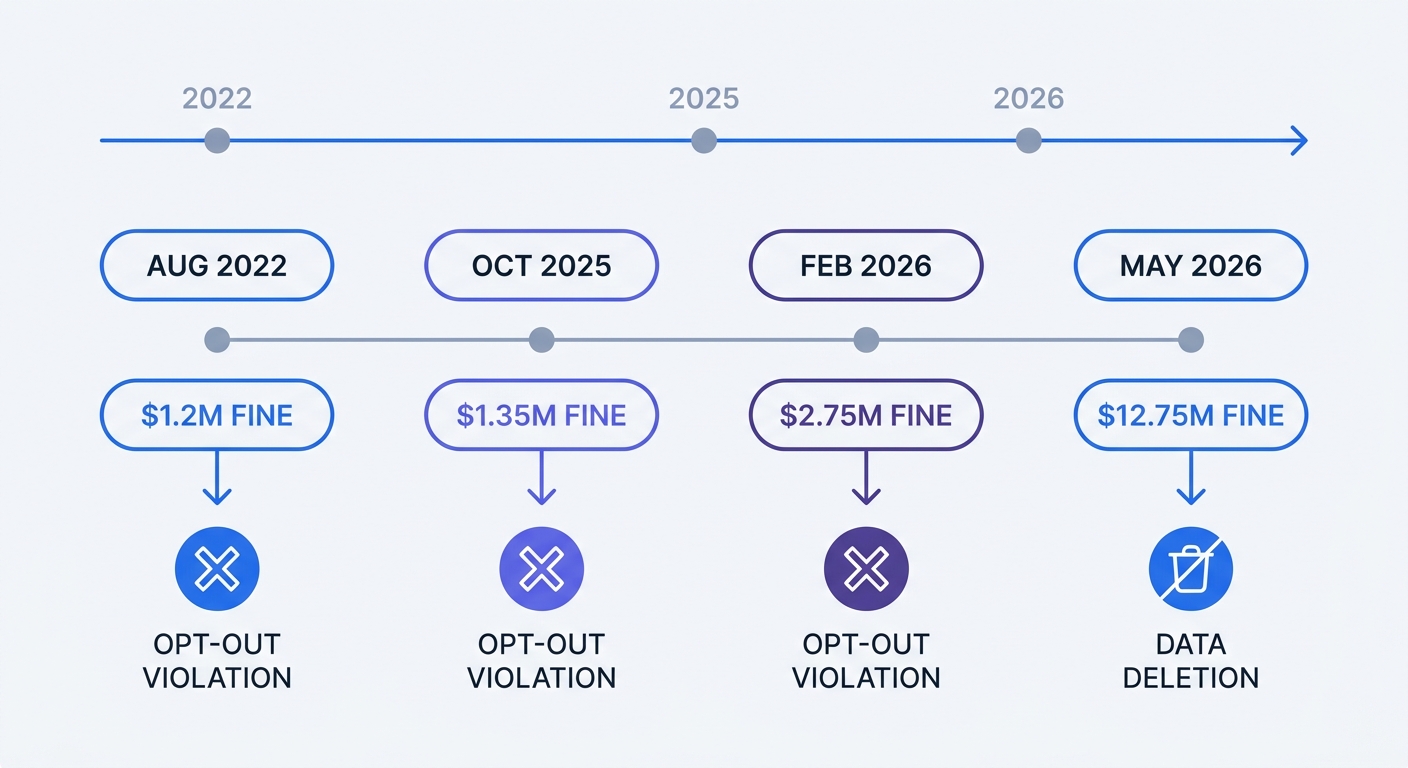
In March 2025, the California Privacy Protection Agency required Honda to pay $632,500 and change its practices. The agency identified excessive verification requirements for some privacy requests and an asymmetric choice between opting out and opting back in.
Sephora paid $1.2 million in August 2022 for failing to process opt-out requests sent through Global Privacy Control signals (California Attorney General settlement). The company's website ignored the Sec-GPC: 1 browser header and continued selling user data to advertising partners. This case established that GPC signals carry the same legal weight as manual opt-out form submissions.
Fine Structure: $2,663 to $7,988 Per Violation
CCPA fines range from $2,663 to $7,988 per violation as of 2025 (California Civil Code § 1798.155(b), adjusted annually for inflation per California Code of Regulations § 7306). Unintentional violations—configuration errors, process gaps, technical failures—carry the lower penalty. Intentional violations—ignoring opt-out requests, hiding disclosures, selling data after users opt out—trigger the higher amount. Violations involving minors under 16 receive the maximum penalty regardless of intent.
Each affected user can constitute a separate violation. A broken opt-out form that fails for 10,000 California residents creates 10,000 violations. At $2,663 per violation, that broken form costs $26.63 million. At the intentional violation rate of $7,988, the same form costs $79.88 million.
The Multiplication Effect: Why Small Mistakes Cost Millions
A privacy control can affect many visitors, so test it as part of your release process. Verify that requests reach the systems that use the data, and keep records of the checks and any corrective work.
Calculate potential exposure by multiplying monthly California visitors by the per-violation fine. A website with 50,000 California visitors per month faces $133.15 million in maximum exposure ($2,663 × 50,000) for a single unintentional violation that affects all users. Intentional violations raise that exposure to $399.4 million.
Research shows that 32% of breached organizations paid regulatory fines, with 25% paying more than $250,000 (IBM Cost of a Data Breach Report). Organizations without incident response plans paid an average of $2.66 million more per breach. Build a compliance audit process before regulators find the gaps.
How to Make Your Analytics CCPA Compliant
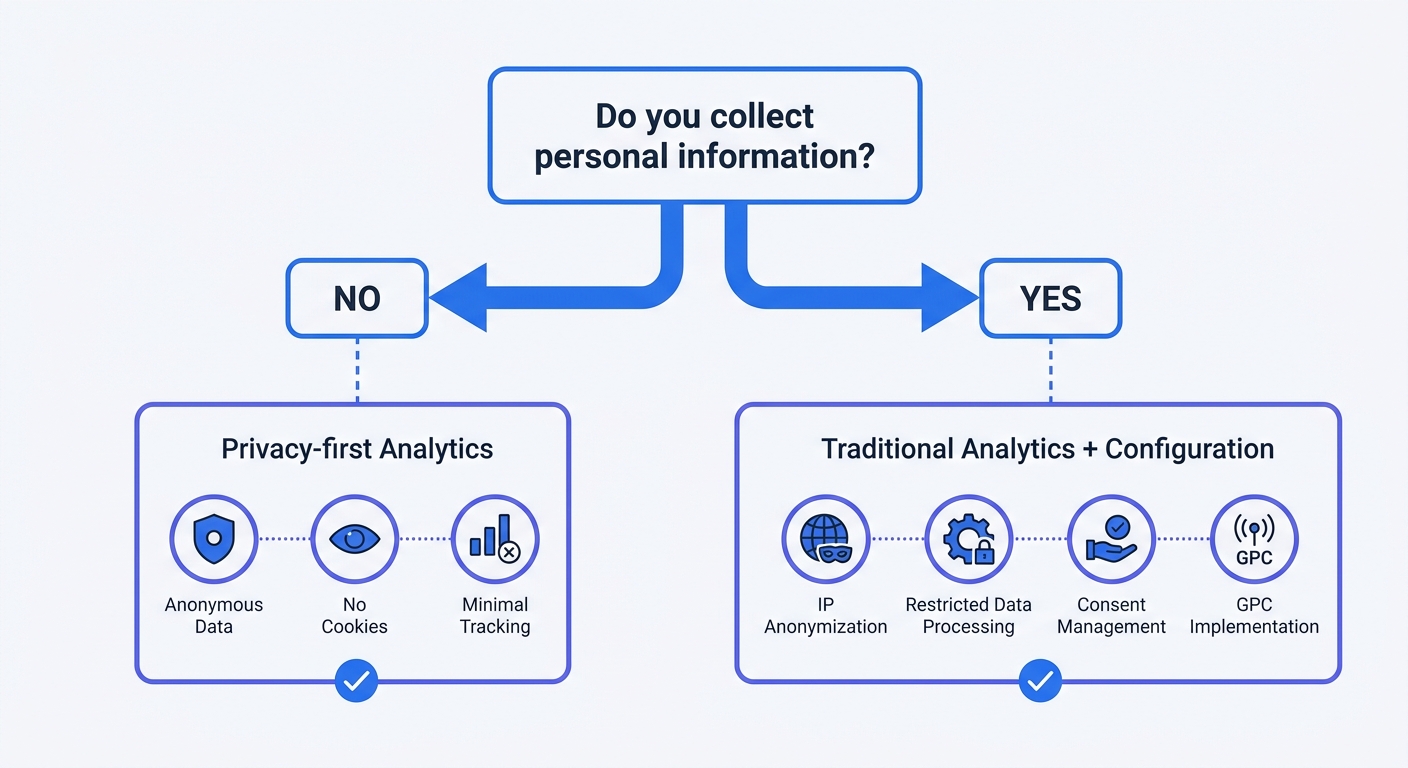
Option 1: Use Privacy-First Analytics (Recommended)
Swetrix provides CCPA-compliant analytics without configuration. The platform collects no personal information: no IP addresses, no cookies, no fingerprinting. Each visitor generates an anonymous event in aggregate reports. Traffic sources, page views, conversion rates, and session duration remain visible, but individual user tracking disappears.
Install the Swetrix script on your website. Analytics start flowing. No consent banner required. No opt-out mechanism needed. No privacy policy updates beyond noting that you use analytics. The platform complies with CCPA, GDPR, and 20 other state privacy laws by default.
Swetrix offers real-time dashboards, campaign tracking with UTM parameters, custom event tracking, performance monitoring, error tracking, and shared dashboards. The platform runs on EU-hosted infrastructure and provides a 14-day free trial with no credit card required. Self-hosting options eliminate all third-party data sharing.
Alternative privacy-first platforms include Plausible and Fathom. Plausible uses a rotating hash—hash(daily_salt + website_domain + ip_address + user_agent)—to generate anonymous identifiers. The salt rotates every 24 hours, and raw IP addresses never touch storage. Fathom takes a similar approach with ephemeral identifiers and no persistent cookies.
These platforms eliminate CCPA compliance work. No opt-out forms to build. No deletion requests to process. No GPC signals to honor. The analytics stack shrinks to a single script tag.
Option 2: Configure Traditional Tools for Compliance
Google Analytics requires extensive configuration to achieve CCPA compliance. Start by updating your privacy policy to disclose that you collect personal information through analytics and share data with Google. Enable IP anonymization in your GA4 property settings to truncate the last octet of each IP address before storage.
Turn off all data sharing settings in the GA4 admin panel. Disable Google products and services, benchmarking, and technical support sharing. Each of these settings sends user-level data to Google's advertising network, which CCPA classifies as a data sale.
Implement restricted data processing mode for California traffic. GA4 provides a setting that limits how Google uses analytics data from specific regions. Enable this for California visitors to prevent Google from using their data for advertising purposes.
Display a "Do Not Sell Or Share My Data" link in your website footer. Build a functional opt-out page that doesn't require registration or identity verification. When users opt out, set a first-party cookie that tells GA4 to stop tracking their sessions. Honor Global Privacy Control signals by detecting the Sec-GPC: 1 header and opting out those users.
Process deletion requests within 45 days. Build a workflow that verifies the requester's identity, retrieves their data from GA4, deletes it, and sends confirmation. Google provides a User Deletion API for this purpose, but implementation requires developer resources.
This configuration path works, but it creates ongoing maintenance burden. Each GA4 update requires compliance review. Each new feature might collect additional personal information. Each state privacy law adds new requirements.
Implementing Global Privacy Control (GPC)
Global Privacy Control sends a Sec-GPC: 1 HTTP header with every request from GPC-enabled browsers. Detect this header server-side or check navigator.globalPrivacyControl in JavaScript. When the signal appears, treat it as an opt-out request and stop selling or sharing that user's data.
648,833 websites implement GPC as of March 2026, including Amazon, Accenture, and McDonald's (Global Privacy Control adoption statistics). 40 million consumers use GPC-enabled browsers, and California law requires businesses to honor the signal. The September 2025 joint investigative sweep by Connecticut, California, and Colorado attorneys general targeted businesses that ignored GPC requests.
Implement GPC detection in your consent management platform or analytics configuration. When the signal appears, set a flag that prevents analytics scripts from loading or configures them to operate in privacy mode. Document your GPC implementation in your privacy policy and test it quarterly to ensure the signal propagates correctly.
The Four Non-Negotiable Requirements
Transparent Privacy Notices at Point of Collection
CCPA requires privacy notices at or before data collection, not after. Place a link to your privacy policy in the website footer and on any page that collects user input. The notice must describe what personal information you collect, why you collect it, and whether you sell or share it.
Generic privacy policies fail compliance. "We collect data to improve our services" doesn't meet the disclosure standard. Name the specific data points: IP addresses, cookies, browsing history, device identifiers. State the specific purposes: analytics, advertising, product development. List the specific third parties who receive data: Google Analytics, Facebook Pixel, advertising networks.
Update your privacy policy whenever you add new tracking scripts or change how you use analytics data. A policy written in 2023 doesn't cover analytics features you enabled in 2026. Regulators focus on whether tracking behavior aligns with disclosures, not whether you have a policy.
Functional 'Do Not Sell or Share' Mechanisms
CCPA requires businesses that sell or share data to make a "Do Not Sell Or Share My Data" page available on their websites. The link must be clear and visible—in the footer alongside your privacy policy. The opt-out mechanism must function without requiring registration or identity verification.
Test your opt-out form monthly. Submit a request and verify that tracking stops. Check that the form accepts all valid email formats. Confirm that error messages don't prevent submission. The Tractor Supply case demonstrated that broken opt-out forms carry the same penalty as missing opt-out forms.
Businesses that don't sell or share data can skip this requirement, but the definition of "selling" is broader than direct payment. Sharing analytics data with advertising networks, passing user identifiers to marketing platforms, or enabling cross-site tracking all qualify as selling under California law. The Sephora case established that sharing data for targeted advertising purposes constitutes a sale even without money changing hands.
Swetrix eliminates this requirement by not collecting personal information. No personal data means no data sales, which means no opt-out mechanism needed. The platform's architecture makes the requirement impossible to violate.
45-Day Response to Consumer Requests
CCPA requires responding to access, deletion, and opt-out requests within 45 days. Build a formal process: a dedicated email address or online portal for requests, verification mechanisms to authenticate the requester, and internal workflows to retrieve, compile, and deliver data.
Access requests require providing all personal information you've collected about the requester in the past 12 months. For analytics data, this includes IP addresses, browsing history, device identifiers, and any behavioral data tied to their account or email. Export this data in a portable format—CSV or JSON—and send it securely.
Deletion requests require removing all personal information about the requester from your systems and instructing third parties to do the same. If you use Google Analytics, submit a deletion request through Google's User Deletion API. If you use advertising pixels, contact each platform to remove the user's identifier. Document each deletion step and send confirmation to the requester.
Opt-out requests require stopping all data sales. Set a flag in your database that prevents the user's data from flowing to third parties. If you use real-time bidding or programmatic advertising, add the user to a suppression list. Confirm the opt-out within 15 days and provide a method for the user to opt back in later.
Cookie-free analytics platforms like Swetrix reduce request volume by not collecting personal information. Users can't request deletion of data you never collected. They can't opt out of sales that never occurred. The 45-day response requirement still applies to any personal information you collect elsewhere—email addresses, account data, purchase history—but analytics data disappears from the compliance workload.
CCPA vs GDPR: What's Different for Analytics
Opt-Out vs Opt-In: The Fundamental Difference
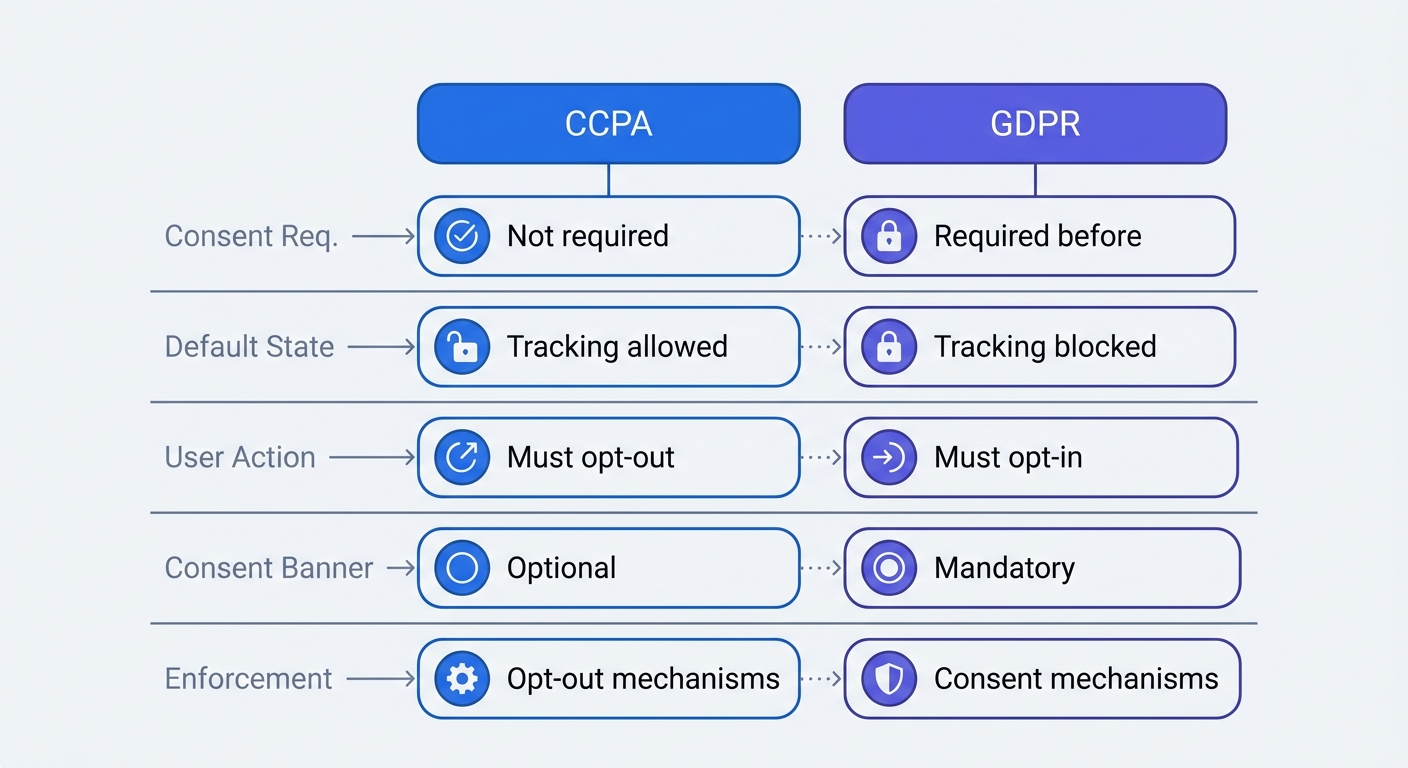
GDPR requires opt-in consent before collecting personal data. Your website must block all tracking scripts until the visitor clicks "Accept" in a consent banner. Third-party tracking pixels, Google Analytics, advertising tags—none of these fire without explicit consent.
CCPA operates on an opt-out model. Your website can load tracking scripts and collect personal information from the start. Provide a clear way for visitors to opt out of data sales, but you don't need consent before collection begins.
This difference affects consent banner requirements. GDPR-compliant sites need consent banners that block scripts until users consent. CCPA-compliant sites can skip consent banners if they don't sell data, or display a "Do Not Sell" link if they do.
EU-focused sites see consent acceptance rates varying by implementation and industry. Lower acceptance rates mean less data. An independent study comparing Google Analytics 4 to privacy-first alternatives found that GA4 captured only a portion of traffic in some scenarios, highlighting the impact of consent requirements and tracking prevention.
When You Need Consent Banners (and When You Don't)
Skip consent banners if your analytics platform doesn't collect personal information and you don't sell or share data. Swetrix falls into this category. Install the script, add a privacy policy disclosure, and move on.
Display a consent banner if you use Google Analytics, Adobe Analytics, or similar platforms that collect personal information and you serve European visitors. GDPR requires opt-in consent for these tools regardless of CCPA requirements.
Add a "Do Not Sell Or Share My Data" link if you use analytics data for advertising, share it with marketing platforms, or enable cross-site tracking. You don't need a full consent banner—a visible opt-out mechanism suffices.
Multi-Jurisdiction Compliance Strategy
Twenty US states have comprehensive privacy laws as of 2026, each with different requirements. California requires GPC support. Virginia requires opt-out mechanisms for targeted advertising. Colorado mandates universal opt-out mechanisms. Connecticut, Indiana, Kentucky, and Rhode Island added their laws on January 1, 2026.
GDPR has generated €7.1 billion in fines since 2018, while CCPA's largest fine to date is $12.75 million. GDPR enforcement is more aggressive, but CCPA enforcement is accelerating. The California Privacy Protection Agency received over 8,000 complaints by late 2025, with 51% related to deletion requests and 39% to sensitive information limits (CPPA annual report and complaint statistics).
Choose an analytics solution that covers all jurisdictions. Cookie-free analytics complies with CCPA, GDPR, and all 20 state privacy laws without configuration. Traditional analytics requires jurisdiction-specific settings, consent management platforms, and ongoing legal review.
Map which privacy laws apply to your user base. Check your analytics platform's geographic reports. If you serve visitors from California, Virginia, Colorado, Connecticut, or the EU, you need multi-jurisdiction compliance. If your traffic concentrates in states without comprehensive privacy laws, CCPA compliance alone might suffice.
Building a CCPA-Compliant Analytics Stack
Components: Analytics, Consent Management, and Documentation
A complete CCPA compliance stack includes five components. First: a privacy-first analytics platform or configured traditional analytics. Second: a consent management platform if you collect personal information and serve European visitors. Third: a privacy policy generator that stays current with regulatory changes. Fourth: a request management system for handling access, deletion, and opt-out requests. Fifth: compliance documentation that proves you followed required processes.
Swetrix simplifies this stack to one component: the analytics platform. No consent management needed because no personal information is collected. No complex privacy policy updates because data collection is minimal. No request management system needed because there's no personal data to access or delete. Compliance documentation shrinks to installation logs and privacy policy updates.
Traditional analytics stacks require all five components. Google Analytics needs a consent management platform like OneTrust or Cookiebot to handle GDPR consent. You need a privacy policy that discloses Google's data collection and sharing practices. You need a request portal where users can submit access and deletion requests. You need documentation showing how you verified requesters, retrieved their data, and confirmed deletion.
Data Minimization and De-Identification Standards
CCPA section 1798.140(h) defines "de-identified" as information that cannot reasonably identify, relate to, describe, be capable of being associated with, or be linked to a particular consumer. The business must implement technical safeguards that prohibit re-identification and business processes that prohibit re-identification of the information.
De-identification requires more than removing names and email addresses. IP addresses must be truncated or hashed. Device identifiers must be randomized. Behavioral data must be aggregated to prevent re-identification through unique patterns. If you can link analytics data back to an individual through any combination of data points, it's not de-identified.
Swetrix meets de-identification standards by never collecting identifiable data. The platform doesn't log IP addresses, doesn't set cookies, and doesn't create device fingerprints. Each visitor generates an anonymous event that aggregates with other events in reports. Re-identification is impossible because no identifiable data enters the system.
Testing Your Compliance Before Regulators Do
Build a quarterly compliance audit checklist. First: verify GPC detection by enabling GPC in your browser and confirming that tracking stops or switches to privacy mode. Second: test opt-out mechanisms by submitting requests and verifying that data sales cease. Third: audit third-party scripts by reviewing your tag manager and checking which platforms receive user data. Fourth: review data retention policies and confirm that old data deletes on schedule.
Check your privacy policy against current data collection practices. Open your website's developer tools and inspect network requests. Every third-party domain that receives data should appear in your privacy policy. If you see requests to advertising networks, analytics platforms, or marketing tools that aren't disclosed, update your policy.
Test your deletion request workflow by submitting a request for a test user. Verify that the request reaches your team, that verification works correctly, that data retrieval completes within 45 days, and that deletion confirmation reaches the requester. Organizations without incident response plans paid $2.66 million more per breach, so document your process before you need it.
Review enforcement actions quarterly. The California Privacy Protection Agency publishes settlement agreements and enforcement actions on its website. Read these to understand what regulators consider violations. The GM case highlighted inadequate disclosure. The Disney case emphasized cross-platform opt-out requirements. The Tractor Supply case demonstrated that broken forms carry the same penalty as missing forms.
CCPA compliance in analytics comes down to a choice: configure traditional tools for compliance or use privacy-first platforms that comply by default. Traditional tools offer more features but require ongoing maintenance, legal review, and compliance infrastructure. Privacy-first tools offer automatic compliance with full analytics functionality.
Swetrix provides the complete solution: real-time dashboards, campaign tracking, custom events, performance monitoring, and error tracking—all without collecting personal information. Install the script and compliance follows. No consent banners. No opt-out forms. No deletion requests.
Start your 14-day free trial and see how privacy-first analytics eliminates compliance work while delivering the metrics you need.