- Date
What Is Browser Fingerprinting In Tracking: A Complete Guide
 Andrii Romasiun
You open a website, and before the page fully renders, a background script goes to work checking your screen resolution, operating system, installed fonts, and graphics card. The tracker compiles these hardware and software details into a numerical hash to identify you. This process defines what is browser fingerprinting in tracking.
Advertisers and data brokers use this hash to follow your activity across the internet. Because this method relies on permanent or semi-permanent device configurations rather than stored files, visitors cannot easily delete a fingerprint to escape surveillance. If you run a website, deploying analytics tools that rely on this technique exposes you to severe regulatory fines under modern privacy laws. Platforms like Swetrix solve this problem by delivering accurate, cookie-free web analytics without extracting invasive device parameters.
Understanding the Basics of Browser Fingerprinting
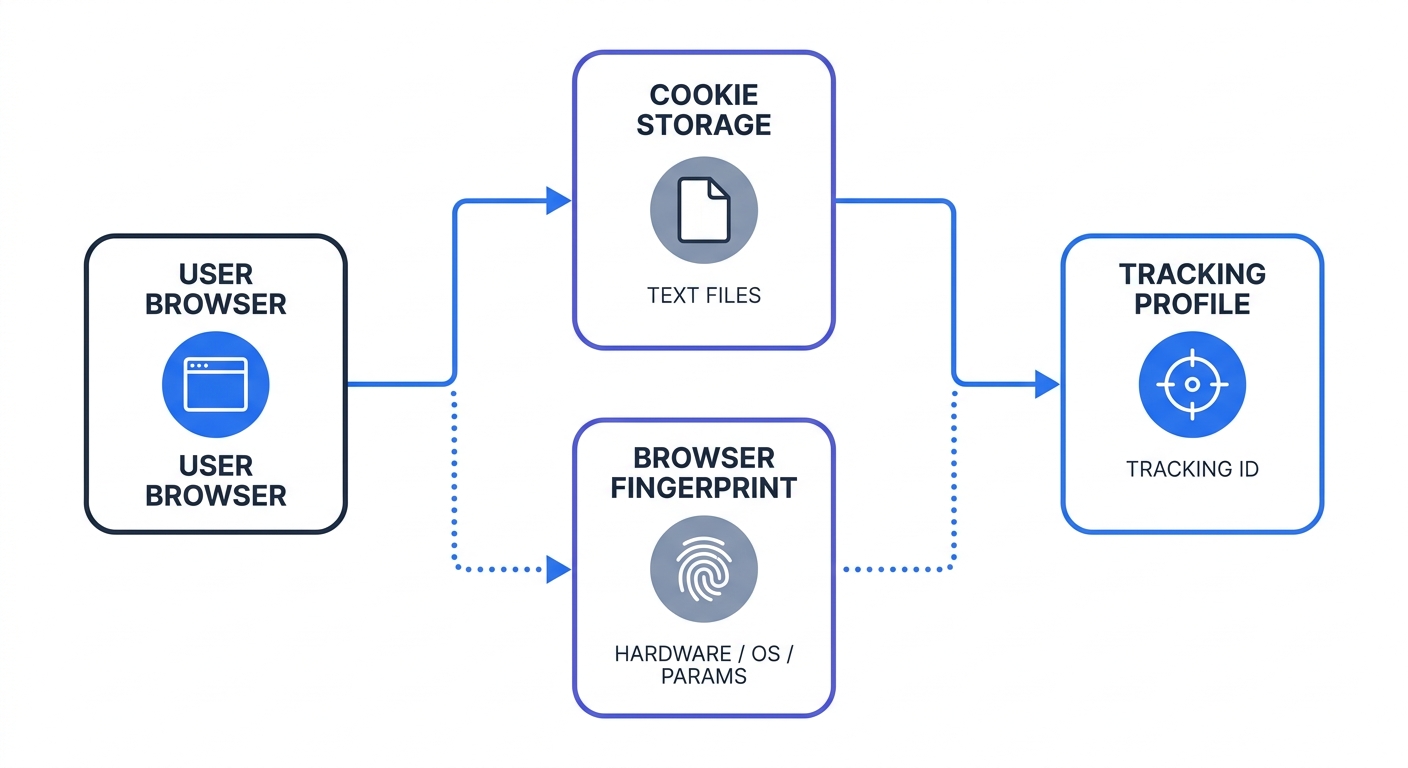
Traditional web tracking relies on stateful data, meaning a server places a small text file called a cookie on the user's hard drive and reads it upon return visits. Users control this state because they can clear their cookies, block them entirely, or use automated extensions to reject them.
Fingerprinting operates statelessly by querying the browser for a massive list of configuration details rather than storing a file. Trackers request the time zone, language preferences, CPU class, hardware concurrency, and platform architecture. Taken individually, none of these data points identify a person since millions of people run identical versions of Chrome on Windows 11.
When a script combines dozens of these minor data points, the resulting profile creates a distinct digital signature. An analysis of desktop traffic by the Electronic Frontier Foundation found that 83.6% of web browsers yield a unique fingerprint. The tracker assigns an ID to this combination, allowing ad networks to monitor that visitor across any site running the same script.
The Post-Cookie Tracking Surge
After Google completed the deprecation of third-party cookies in Chrome in late 2025, the advertising technology ecosystem needed alternative ways to maintain cross-site surveillance capabilities, making fingerprinting the primary fallback.
As a result, fingerprinting deployment has surged across the internet. Advertisers prefer this method because it functions covertly. Visitors rarely realize the tracking is happening, and standard ad blockers often struggle to block the scripts without breaking core website functionality.
To audit your current marketing stack, open your browser's developer tools (F12), navigate to the Network tab, and load your homepage. Search for third-party tracking domains sending large, encrypted payloads immediately upon page load. If your analytics provider claims to offer cookie-free tracking but still maps user journeys across multiple unrelated domains for months at a time, that vendor is likely fingerprinting your visitors.
The Technical and Behavioral Mechanisms
Fingerprinting scripts rarely rely on a single API, choosing instead to extract entropy, which is a measure of data uniqueness, from multiple browser components simultaneously. By combining these technical parameters, trackers achieve high identification accuracy without requiring user interaction or local storage.
Canvas, WebGL, and Hardware Probing
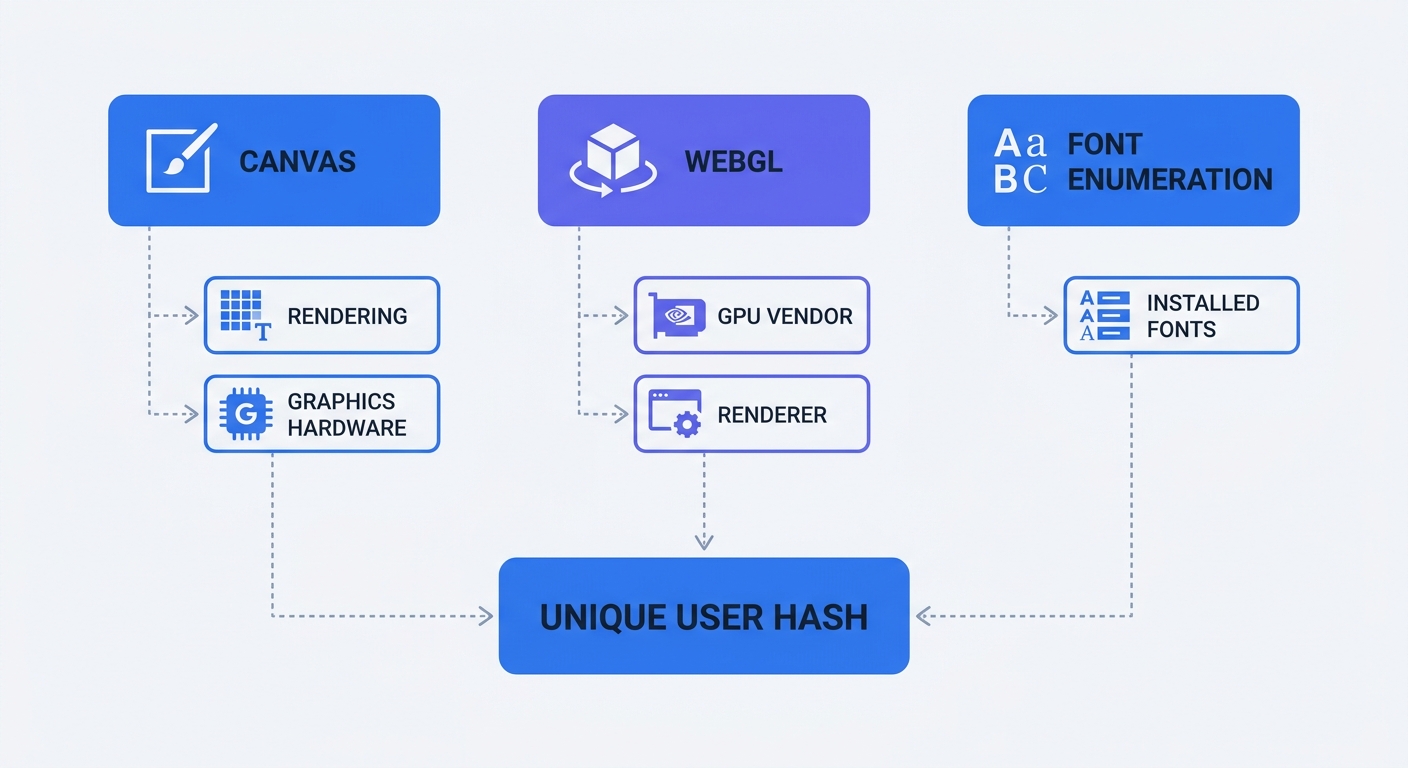
Canvas fingerprinting serves as the most common technique. Because HTML5 includes a <canvas> element designed to draw graphics via JavaScript, a tracker can instruct the browser to render a hidden image containing specific text, colors, and geometric shapes.
Every device uses slightly different graphics hardware, drivers, and operating system rendering engines, ensuring the resulting image varies at the pixel level. While human eyes cannot detect these differences, algorithms readily record them when the script extracts the pixel data using the toDataURL() method and runs it through a hash to generate the Canvas fingerprint.
WebGL fingerprinting works similarly while targeting 3D rendering capabilities. The script queries the browser for the exact make and model of the graphics processing unit, retrieving identifying strings like "ANGLE (NVIDIA GeForce RTX 4090 Direct3D11 vs_5_0 ps_5_0)".
Font enumeration completes the technical profile. Trackers measure the exact dimensions of hidden text strings to deduce every font installed on the system, meaning a graphic designer with 300 custom Adobe fonts installed possesses a distinct signature compared to someone browsing on a brand-new factory laptop.
Behavioral Tracking and Demographic Inferences
While technical data alone creates a distinct profile, the domains a person visits add behavioral identification into the mix. A 2025 behavioral study published in Scientific Reports proved that trackers can uniquely identify 95% of individuals based on their four most frequently visited web domains. Ad networks map these behavioral patterns alongside the hardware hash to build comprehensive targeting profiles.
This combination reveals sensitive personal information. Collaborative research by Google and MIT demonstrated that fingerprint attributes directly correlate with demographics like age, gender, and income. Lower-income visitors often rely on older hardware, budget Android devices, or outdated browser versions, which generates distinct technical signatures that isolate them from the broader population. Ad networks use these hardware discrepancies to serve predatory lending ads to specific socioeconomic brackets.
The Privacy and Legal Implications
The shift away from cookies led many platform operators to believe they could bypass privacy laws. A common misconception persists that if a tracking script avoids storing a file on the user's device, the action falls outside the scope of GDPR or the California Consumer Privacy Act. European and Californian regulators have explicitly corrected this misunderstanding.
GDPR and ePrivacy Directive Compliance
European privacy authorities treat fingerprinting identically to cookies because Article 5(3) of the ePrivacy Directive mandates that website operators must obtain explicit, informed consent before accessing information on a user's terminal equipment. Under this definition, querying a device's GPU or installed fonts constitutes accessing information.
Because a browser fingerprint creates a persistent identifier tied to a specific device, the process qualifies as personal data processing under GDPR. If your website runs a canvas fingerprinting script for marketing or analytics purposes, you must declare the specific hardware queries in your privacy policy and wait for the visitor to click a consent banner before executing the code.
Claiming a website uses no cookies while running covert hardware checks fails the GDPR transparency test. France's data protection authority, the CNIL, has issued severe fines to companies that deployed device fingerprinting to track individuals who had actively rejected cookie consent, reinforcing the rule that websites cannot re-identify opted-out visitors through alternative technical means.
The Myth of Incognito Mode and VPNs
Visitors often attempt to protect themselves using private browsing modes and Virtual Private Networks, yet neither technology stops browser fingerprinting.
Incognito mode prevents the browser from saving search history and deletes cookies when the window closes, but it does not change the underlying hardware. Your GPU rendering, screen resolution, and font list remain identical whether you browse in a standard tab or a private one. Launching a private session sometimes alters certain browser headers, which perversely makes the resulting fingerprint easier to track.
VPNs route traffic through a remote server to mask a physical IP address, but tracking scripts anticipate this behavior. The tracker checks the time zone of the provided IP address and compares it to the system time zone reported by the JavaScript Date() object. If the IP location claims London while the system clock reports Tokyo, the script records the mismatch as a distinct identifying characteristic.
Update your privacy policy today by listing every device parameter your tracking stack collects, including screen resolutions, font lists, and hardware concurrency data. If you cannot justify a business reason for cataloging an OS-level font list, remove that specific tool from your website architecture.
How to Protect Your Users with Swetrix Analytics
Website operators face a dilemma between needing accurate data to understand traffic sources and needing to respect user privacy to avoid regulatory fines. Relying on invasive device profiling forces administrators into a legally precarious position when trying to optimize landing pages.
Adopting Privacy-First Analytics Alternatives
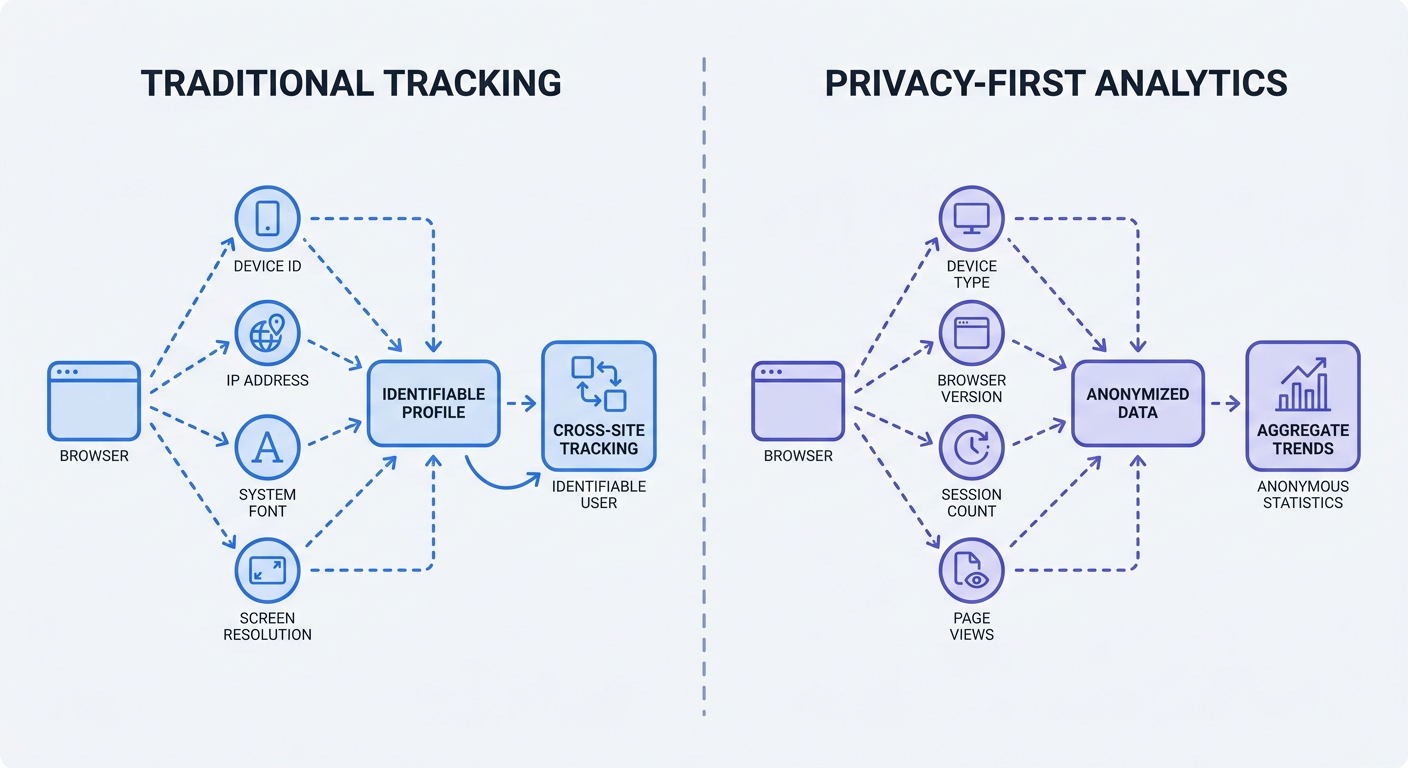
Swetrix provides a robust alternative to both cookie-based tracking and browser fingerprinting by functioning as an open-source, privacy-first platform that collects aggregate data without generating persistent user profiles.
Instead of probing the user's GPU or installed fonts, Swetrix uses temporary, anonymized hashes based on minimal data points like a truncated IP address and the current date. These hashes expire at the end of the day, meaning a person who visits on Tuesday and returns on Wednesday registers as two separate, anonymous sessions. This expiration mechanism prevents cross-site and cross-day profiling.
Because Swetrix avoids processing personal data or creating permanent identifiers, the platform operates within GDPR and ePrivacy Directive compliance. Website owners do not need a cookie banner if Swetrix remains the only analytics tool deployed on the domain. The platform delivers real-time dashboards, custom event tracking, and UTM campaign attribution without treating visitors as surveillance targets.
Data Minimization Best Practices
Adopting ethical analytics requires a shift in how developers handle data collection, and the World Wide Web Consortium outlines specific best practices to mitigate fingerprinting centered on data minimization and clamping.
Data minimization dictates that a system should request only the entropy necessary to perform a specific function. While an analytics platform needs to differentiate mobile and desktop traffic to display aggregated device breakdown charts, the script has no technical reason to query the exact number of logical CPU cores on the device to render that visualization.
Clamping involves intentionally reducing the precision of the data returned to the server. If a visitor arrives with a screen resolution of 1920x1078 due to a customized browser window, a privacy-respecting script rounds that number to standard bins like Desktop or 1080p. This rounding prevents the specific 1078px measurement from isolating that person in the database. Swetrix natively employs these minimization techniques to ensure dashboards show accurate broader trends without collecting granular device metadata.
Testing and Mitigating Fingerprinting Risks
Developers cannot fix privacy leaks they have not measured, so before committing to a new analytics architecture, test how your current environment exposes data and learn when device profiling is appropriate.
Tools to Measure Browser Entropy
Check your own browser's vulnerability to understand how these scripts operate in the wild by visiting the Electronic Frontier Foundation tool Cover Your Tracks. When you run the test, the application simulates a fingerprinting script and reports how much entropy the browser leaks.
Cover Your Tracks calculates the rarity of your specific hardware and software combination against historical datasets. The results often reveal that out of hundreds of thousands of recent tests, your exact configuration remains unique, which helps developers understand which APIs leak the most identifying information.
Privacy-focused browsers attempt to mitigate these leaks at the client level. The Brave browser randomizes fingerprint elements per session by slightly altering the output of a canvas render request, which feeds the tracker a different hash every time. The Tor browser takes the opposite approach by forcing every user into an identical, blended configuration to make everyone look like the exact same generic device.
When Fingerprinting is Ethical
Device fingerprinting retains legitimate applications outside of digital marketing because cybersecurity and anti-fraud systems rely on these exact techniques to protect infrastructure.
Banks deploy fingerprinting on login portals to detect account takeovers. If a customer attempts to authenticate from a device hash that matches a known botnet or differs entirely from historical login patterns, the system triggers multi-factor authentication. In these strict scenarios, the deployment serves internal security requirements.
Keep your security tools isolated from your marketing stack by restricting fingerprinting scripts to payment gateways or login authentication paths. Never inject these aggressive verification tools into your global header for generic web analytics.
Auditing your tracking setup takes a single afternoon but prevents severe compliance headaches down the line. By reviewing the network requests firing on your landing pages, you can identify which vendors pull hardware data. If those specific trackers serve marketing analytics, replace them with a platform designed to respect user boundaries.
Stop relying on invasive scripts to measure website performance. Swetrix delivers real-time, cookie-free web analytics built on open-source principles and complete GDPR compliance. Track UTM campaigns, monitor custom events, and understand traffic trends without building permanent profiles of visitors. Start a 14-day free trial of Swetrix today to implement powerful privacy-focused analytics.