- Date
What Is a Cookieless Tracking Pixel and How It Works
 Andrii Romasiun
A prospective customer lands on your pricing page from a paid search ad. They scroll through the features, compare pricing tiers, and abandon the session. Default analytics tools record zero evidence of this visit. Standard JavaScript tracking requires cross-site identifiers and third-party domains. Browser privacy features and extension-based ad blockers intercept these requests before execution. Marketing teams experience data degradation because default blocklists inside tools like uBlock Origin and the Brave browser target traditional scripts. Cookieless tracking platforms correct this visibility gap. Using server-side architecture and first-party domain collection, tools like Swetrix capture aggregated web traffic data without triggering privacy blockers or requiring persistent identifiers.
The Basics: What Is a Cookieless Tracking Pixel?
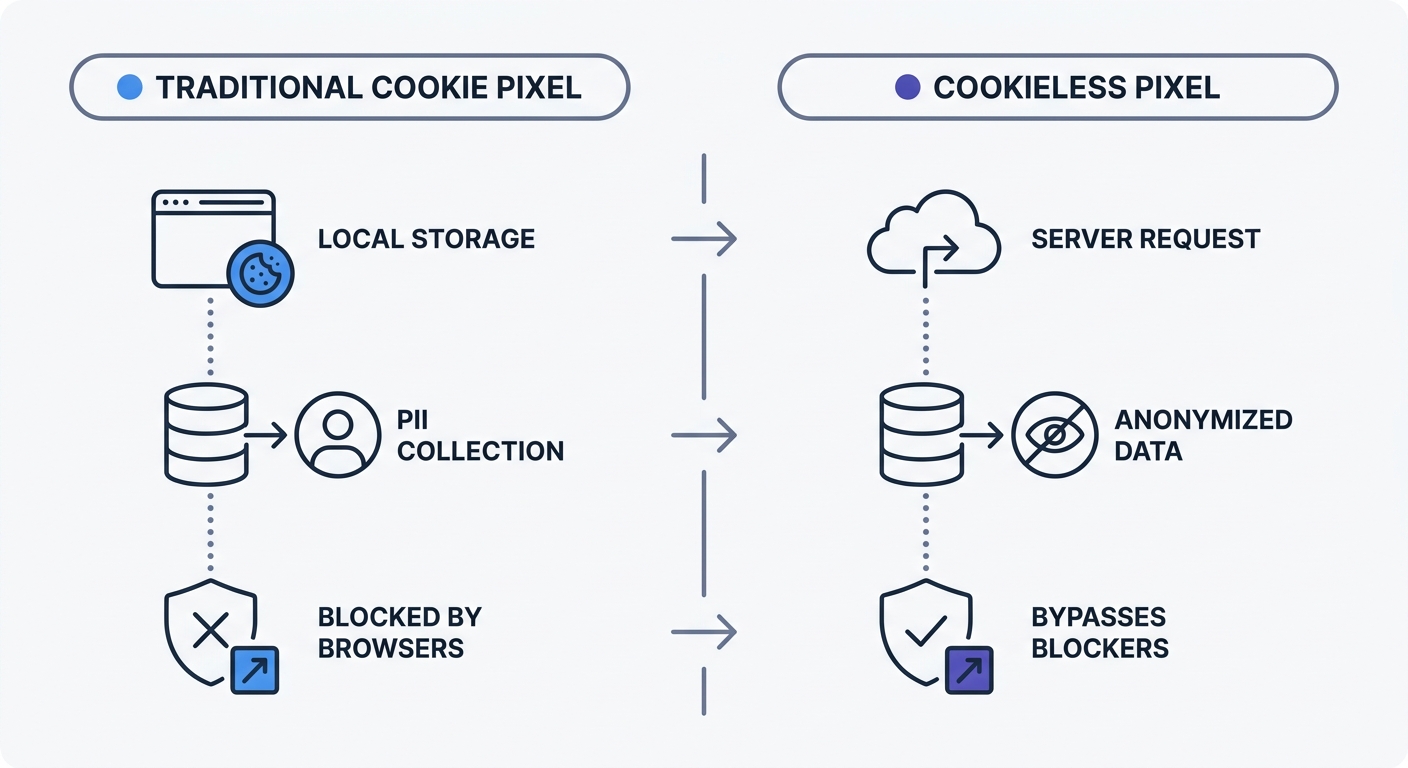
A cookieless tracking pixel operates as a 1x1 transparent image or a lightweight script sending a single server request upon loading. It transmits basic session data without storing text files on the user's terminal equipment.
Traditional tracking requires persistent state. When a visitor arrives, a standard analytics script drops a unique identifier into the browser's local storage or cookie jar. The script reads this identifier on every subsequent page view to build a persistent behavioral profile across different sessions and domains. Browser makers flag these methods as privacy risks.
Cookieless pixels discard persistent state. The browser loads the 1x1 image or script to trigger a standard HTTP GET request to an analytics server. This request passes non-identifiable context parameters through the URL string and HTTP headers.
A standard cookieless payload includes:
- Page URL and path
- Referrer URL
- Screen resolution
- Browser and operating system versions (parsed from the User-Agent string)
- Timestamp
Inspect your current tracking payload to identify what data leaves the browser. Open your browser developer tools, navigate to the Network tab, and filter by your analytics provider. Examine the request headers. If you see a Cookie: header containing a long alphanumeric string like _ga=GA1.2.123456789.1704067200, the setup relies on persistent storage.
How Cookieless Tracking Works
Without persistent identifiers, attribution requires a different approach. Server-side analytics tools aggregate data using contextual signals rather than cross-site user profiles.
When a user moves from your homepage to your product page, the platform groups these events into a single session based on temporary parameters. The software generates an ephemeral hash using the site ID, an anonymized IP address, and a daily rotating salt. This creates a temporary session ID that expires within 24 hours. After the salt rotates, you cannot connect tomorrow's visit to today's session.
Replace your existing third-party scripts with a privacy-focused alternative. Platforms like Swetrix use this ephemeral hashing method to provide session metrics without processing personally identifiable information (PII).
Why Brands Switch to Cookieless Tracking
Marketing teams prioritize data accuracy, driving the transition away from traditional analytics. Marketers experience severe signal loss where customer journeys appear fragmented or missing.
Overcoming Analytics Data Loss
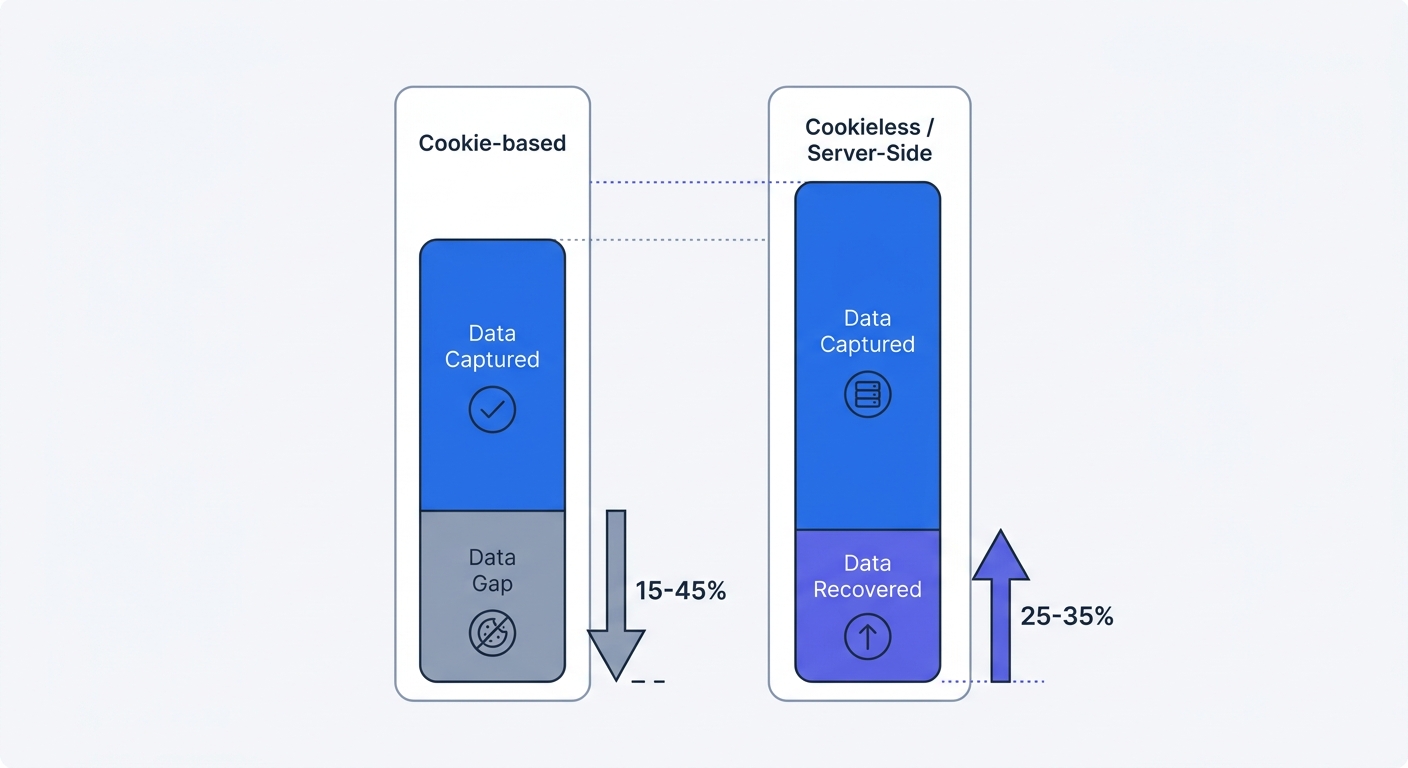
Standard analytics scripts fail to load for a large portion of the web audience. Global reports indicate hundreds of millions of users run active ad blockers, meaning conventional tracking misses large segments of B2B and tech-focused traffic.
Ad blocker adoption skews toward specific demographics and devices. Mobile users deploy content blockers at high rates to save bandwidth and improve page load speeds. Technical audiences block third-party scripts by default. If your product targets software developers or privacy-conscious consumers, your traditional analytics dashboard might miss half of your website traffic.
Compare your server access logs against your analytics dashboard to calculate your specific data gap. Download a 30-day raw access log from your hosting provider, such as Nginx or Apache. Filter out known bot user-agents and internal IP addresses. Count the total number of unique page requests and compare this figure to the pageviews reported in your analytics tool. The difference represents your blocked traffic.
Managing GDPR Enforcement
European regulators issue financial penalties for tracking without consent. The ePrivacy Directive and GDPR require explicit affirmative consent before a website stores non-essential information on a user's device.
The French Data Protection Authority (CNIL) issued combined fines exceeding €100 million against tech and retail platforms for deploying cookies without clear, prior user consent. Regulators do not accept implied consent or pre-ticked boxes.
Cookieless tracking pixels improve compliance and user experience. Because a configured cookieless setup avoids storing information on the user's device and bypasses PII processing, it operates outside the scope of the ePrivacy Directive cookie consent requirements. You can track pageviews, referrers, and conversions without displaying intrusive cookie consent banners. Remove the banner to eliminate a major source of friction on your landing pages.
Best Practices for Implementing Cookieless Analytics
Implementation requires shifting data collection away from third-party networks and into environments you control. Browser privacy features like Apple ITP and Firefox ETP target requests sent to known third-party tracking domains.
Using First-Party Domain Collection
Serve tracking pixels from a custom subdomain of your main website. Browsers treat requests to analytics.yourdomain.com as first-party requests, bypassing the restrictions placed on external domains.
Create a CNAME record in your DNS provider to route traffic to your analytics host. If your primary domain is example.com, configure a new record pointing your chosen subdomain to the analytics server.
Follow these steps to configure a custom tracking domain:
- Log into your domain registrar or DNS provider.
- Create a new CNAME record.
- Set the hostname to a generic term like
metricsortelemetry. - Point the destination to your analytics provider endpoint.
- Update your website tracking script to send data to
https://metrics.example.cominstead of the default third-party URL.
First-party collection ensures your metrics bypass network-level blocking and keeps data flow secure.
Shifting to Server-Side Tagging
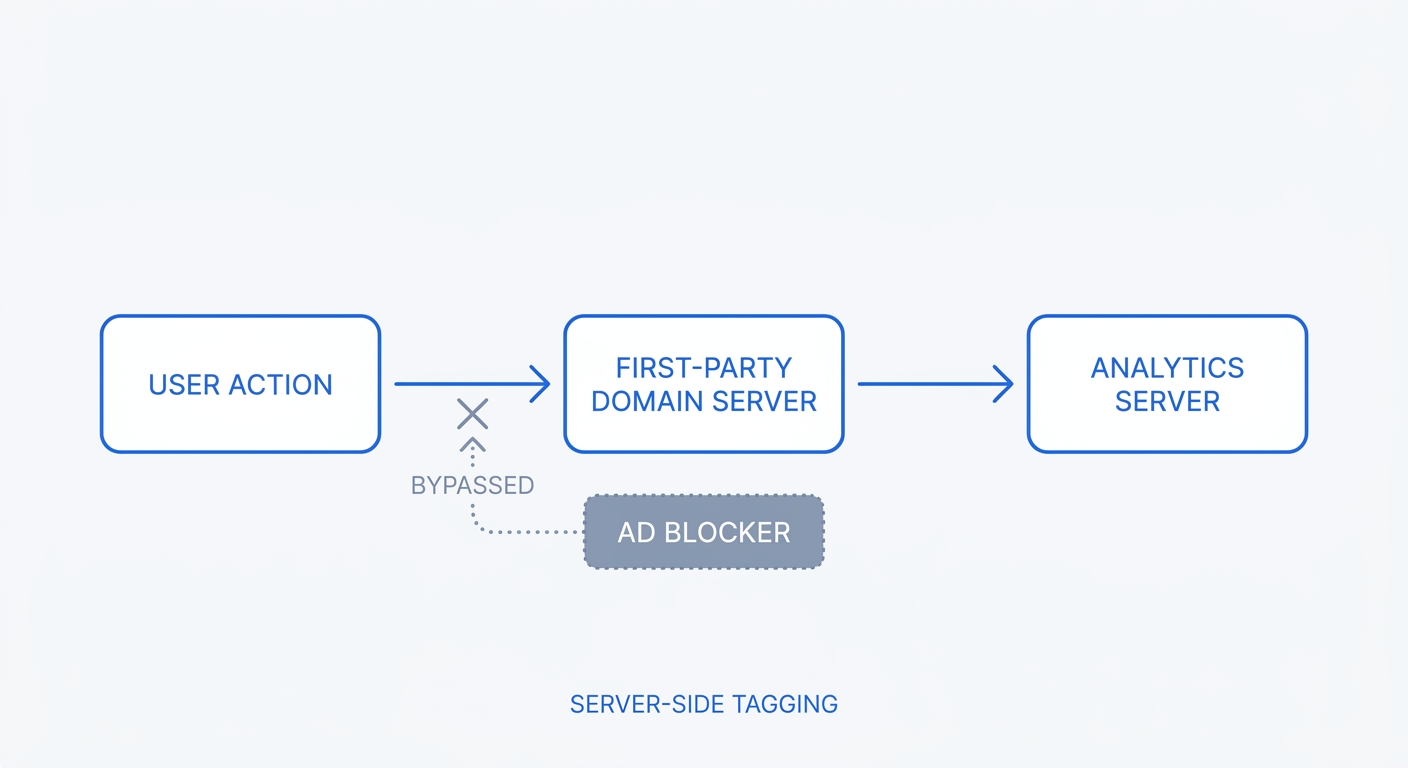
Move conversion tracking from the browser to the backend. Server-side tracking triggers API calls from your application server to your analytics server upon a specific action.
Client-side pixels fail when users close the browser before page execution finishes after a purchase or when a payment gateway fails a redirect. Server-to-server tracking eliminates these vulnerabilities. Marketing teams find server-side implementations capture more conversion data across high-volume e-commerce stores than traditional browser-based pixels, though exact recovery rates vary depending on the audience and industry.
Set up a postback URL or webhook to track important events. When a user completes a purchase in your application, your backend server should construct a JSON payload and send a POST request to your analytics API.
{
  "project": "YOUR_PROJECT_ID",
  "name": "checkout_complete",
  "meta": {
    "plan": "annual",
    "currency": "USD"
  }
}
This method guarantees accurate conversion counts. The request happens outside the user's browser, making it immune to ad blockers, network interruptions, and client-side errors.
Top Tools for Cookieless Data Collection
Selecting the right platform determines your data accuracy and compliance posture. The deprecation of Universal Analytics pushed many organizations toward GA4, but users voicing privacy concerns drive the adoption of independent, open-source alternatives.
Swetrix: The Privacy-First Choice
Swetrix provides an open-source web analytics platform built on a cookieless architecture. The platform tracks pageviews, clicks, and custom events without dropping persistent identifiers or relying on fingerprinting.
Data minimization defines the Swetrix platform. The system collects necessary data points, including timestamps, URLs, device types, and referral sources, while avoiding PII. EU-hosted cloud infrastructure ensures all data remains within European borders to satisfy GDPR requirements.
Configure a new project in Swetrix to recover blocked traffic. The platform supports first-party domain collection to let you proxy requests through your own infrastructure. Current public pricing for Swetrix Cloud starts at $19 per month for 100,000 events, providing predictable scaling as your traffic grows.
Use built-in campaign tracking to measure marketing performance. Append standard UTM parameters to your inbound links. The cookieless pixel reads these parameters on the landing page and attributes the session to the correct source, medium, and campaign. You retain visibility into which channels drive traffic without invading user privacy.
Integrating with Consent Management Platforms (CMPs)
Organizations running aggressive retargeting campaigns face a technical conflict. Ad networks require third-party cookies to build remarketing audiences. This requirement triggers the need for a Consent Management Platform (CMP) and explicit user consent.
Deploy a hybrid tracking approach to balance marketing requirements with data accuracy. Run your cookieless analytics pixel on all pageviews to capture baseline traffic, and restrict ad network scripts behind a CMP gate.
Map your tags based on consent states. Configure your tag manager to fire the Swetrix pixel on the initial page load, regardless of consent. This configuration guarantees accurate baseline metrics for pageviews and referrers. Tie your Facebook, Google Ads, and LinkedIn remarketing pixels to the CMP marketing consent trigger. Those scripts load if the visitor clicks "Accept All" on the cookie banner.
This hybrid setup prevents the data gap caused by users ignoring or rejecting cookie banners. You secure complete visibility into site performance while maintaining compliance for targeted advertising efforts.
Future-Proofing Your Marketing Attribution
The digital marketing industry relies on outdated attribution models built on fragile technologies. Preparing for the next phase of digital measurement requires updating how you map the customer journey.
Adapting to Google Chrome User Choice
Google abandoned its plan to force the deprecation of all third-party cookies in Chrome by a hard deadline. Instead, the browser shifted to a "user choice" model via its Privacy Sandbox. Users receive browser-level prompts asking them to opt in or out of cross-site tracking.
Treat this policy change as a confirmation of the cookieless future rather than a reprieve. Safari and Firefox block third-party tracking by default. A large portion of Chrome users opt out through the new prompts. The standard behavioral tracking model remains broken.
Audit your current attribution funnels to strip out dependencies on cross-site identifiers. Identify every marketing report requiring multi-touch attribution across different devices. These reports need third-party cookies to connect a mobile ad click to a desktop purchase three days later. Transition these reports to rely on first-party data, UTM parameters, and server-side conversion tracking.
Focusing on Contextual vs. Behavioral Signals
Behavioral tracking identifies the user and their cross-site history. Contextual tracking measures immediate content engagement.
Shift your reporting focus to contextual signals to protect your marketing ROI calculations. Evaluate page performance to replace individual user tracking. If a specific blog post drives high conversion rates for a particular product, increase ad spend promoting that post without needing to know the identity of the readers.
Monitor entry pages and referral sources to judge campaign effectiveness. A weekly newsletter driving traffic to a landing page that converts at 5% demonstrates clear value. You measure this success through the referring URL and the immediate on-page conversion event, bypassing the need to track those users after they leave your domain.
Implement UTM tagging on every inbound link you control. Add parameters to your email links, social media profiles, and paid search ads. Cookieless platforms read UTM parameters present in the immediate context of the URL string. Precise tagging feeds accurate data into your analytics platform, ensuring your acquisition reports remain reliable regardless of browser privacy settings.
You can regain visibility into your website traffic by replacing fragile, cookie-based scripts with a resilient data collection strategy. Create a free Swetrix account to capture accurate analytics, respect user privacy, and bypass ad blockers. Teams can implement this solution in minutes to eliminate data gaps. Start your 14-day free trial to access your blocked traffic data.