- Date
Website Analytics Vs Business Intelligence: The Privacy Guide
 Andrii Romasiun
Marketing teams monitor bounce rates, and finance teams track processed revenue. When these two departments operate in silos, leadership makes decisions based on fragmented numbers. Bridging this gap requires a structural integration of website analytics vs business intelligence. Equip the data pipeline with cookieless tracking to ensure legal compliance across both systems.
Understanding Website Analytics vs Business Intelligence
The Role of Website Analytics
Web analytics acts as the collection layer for digital touchpoints. Software platforms monitor online user behavior across public domains to log pageviews, traffic sources, session duration, and click events. Front-line marketers use these metrics to optimize landing pages and measure ad campaign performance. Install a privacy-friendly tracking snippet in the site header to capture this baseline traffic.
The Role of Business Intelligence
Business intelligence serves as the central aggregation layer for the entire organization. BI tools pull data from the CRM, inventory management software, HR systems, sales platforms, and web analytics platforms. Executives open BI dashboards to understand broader operational health and forecast revenue. Connect the marketing data stream to a BI platform like Tableau to enrich this operational overview.
Key Differences in Scope and Focus
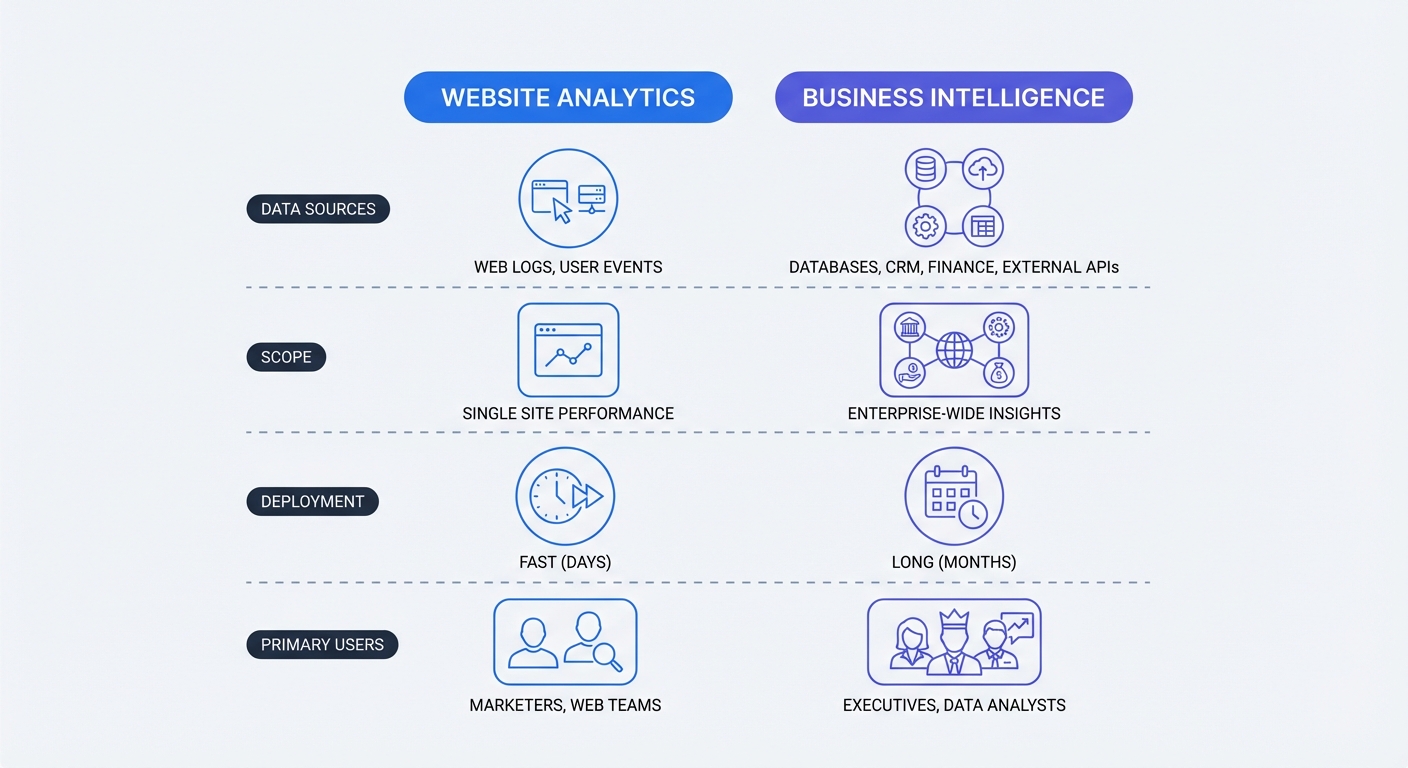
Scope separates the two disciplines. Web analytics monitors public internet traffic, while business intelligence analyzes internal company operations. Market valuations reflect this structural divide. The Business Research Company values the web analytics sector at USD $8.83 billion. Overarching enterprise operations demand more capital, pushing the projected BI market to USD $72.21 billion by 2034 according to Fortune Business Insights.
Map the current software stack before buying new tools. List collection software in column A of a spreadsheet and aggregation software in column B. Identify which systems communicate via API and which remain isolated to pinpoint data bottlenecks.
| Feature | Website Analytics | Business Intelligence |
|---|---|---|
| Primary Data Source | Public web traffic | Internal company databases |
| Key Metrics | Pageviews, bounce rate, sessions | Revenue, churn, employee retention |
| Target Users | Marketing and SEO teams | Operations and C-suite executives |
| Deployment Time | Minutes to days | Months to quarters |
| Privacy Risk | High (IP addresses, cookies) | Low (Authenticated internal data) |
Why Privacy Matters in Your Data Pipeline
The Danger of Third-Party Cookies
Poor data quality ruins business intelligence systems. Feeding unconsented data into a data lake turns the database into a corporate liability. Third-party cookies capture IP addresses and cross-site browsing habits, which privacy laws classify as Personally Identifiable Information (PII). Storing this information without explicit user consent violates international statutes like the GDPR.
Legal teams perform audits on corporate data warehouses to ensure compliance. Auditors will penalize organizations that mix unauthorized PII with financial records. Sanitizing the data at the source prevents legal infractions before they reach the primary warehouse.
Achieving GDPR and CCPA Compliance
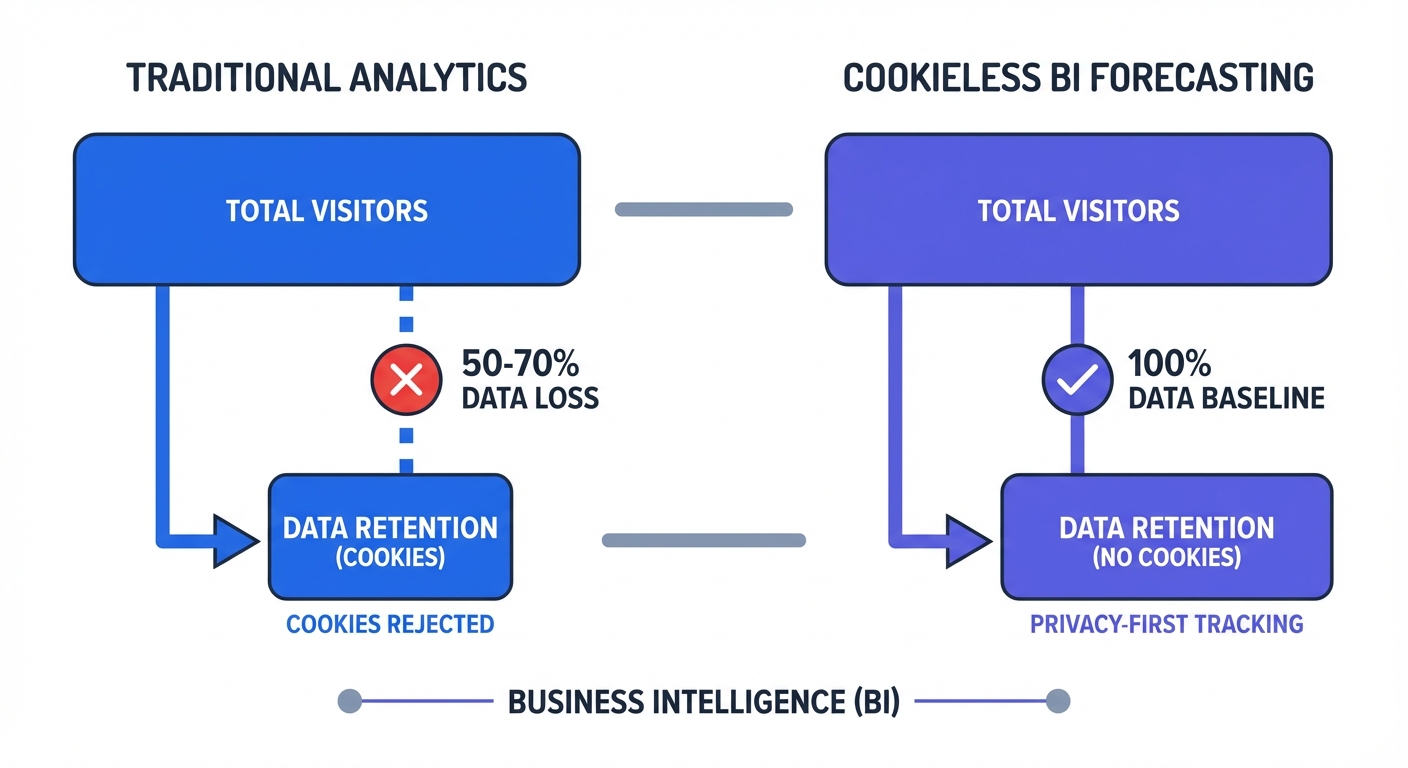
Regulatory compliance shapes modern data architecture. Pew Research surveys show 79 percent of people worry about company data usage. Traditional analytics tools force websites to display cookie consent banners to meet legal requirements. Tracking scripts stop firing when visitors click the "Reject All" button, leaving the web analytics platform with zero data for that session. This data loss creates massive blind spots in BI forecasting models.
Implement a Google Analytics alternative that uses cookieless tracking to prevent this drop-off. Cookieless architecture hashes visitor metrics to eliminate PII storage. Bypassing consent banners becomes possible because the system tracks no personal data. The platform records all site traffic while maintaining strict legal compliance.
Audit the website for unauthorized cookies to verify current compliance levels. Launch Google Chrome and load the homepage. Right-clicking the page allows administrators to select the Inspect tool. Navigate through the Application tab to the Storage section to view active cookies. Remove tracking scripts that place persistent identifiers on user devices before receiving explicit consent.
How to Feed Web Analytics into Business Intelligence
Connecting REST APIs for Data Integration
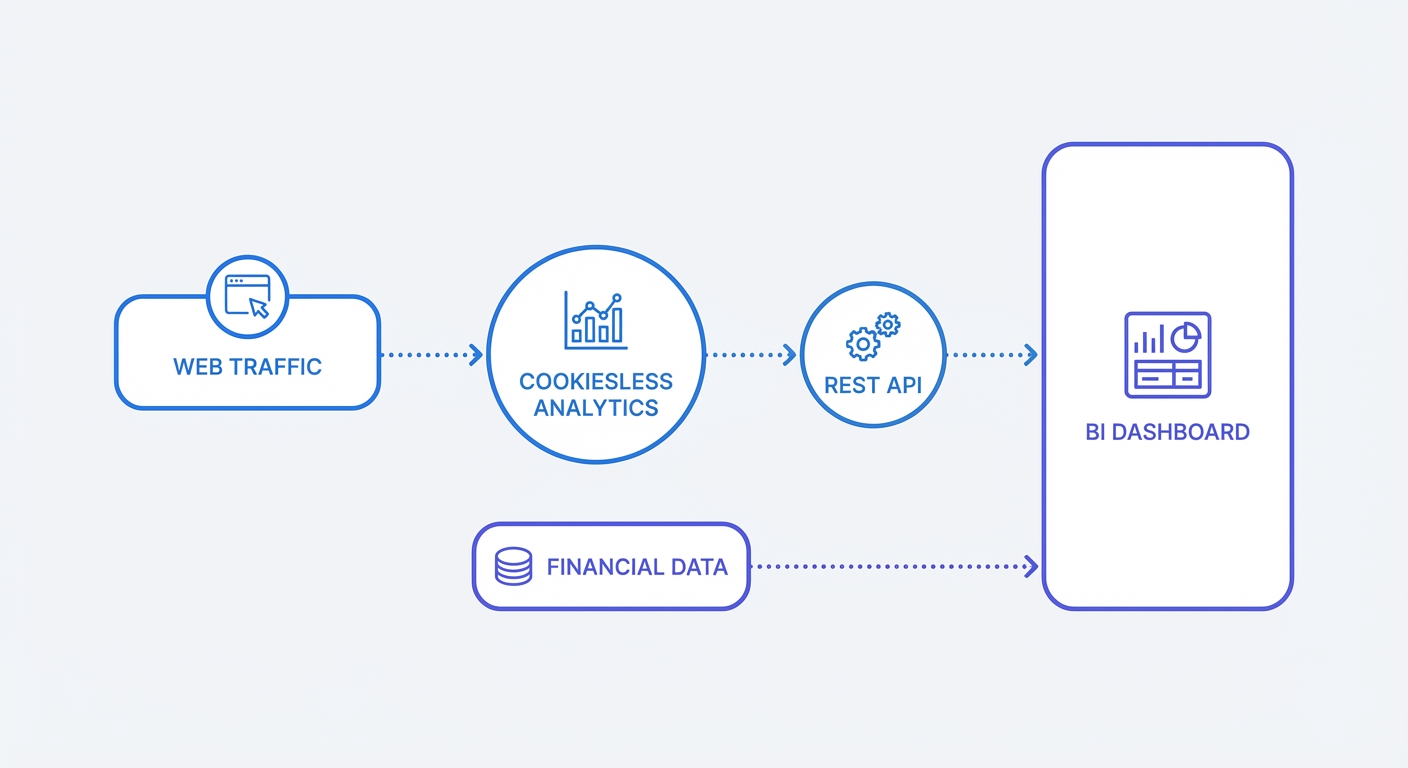
Manual CSV transfers between an analytics dashboard and a BI tool introduce human error. Automate this data pipeline using application programming interfaces. REST APIs allow BI software to request fresh metrics from web analytics platforms on a scheduled cadence.
Configure an API endpoint to push daily traffic aggregates into the corporate warehouse. Start by generating an API key in the analytics project settings. Write a Python script to call the GET /v1/projects/{projectID}/statistics endpoint every night at midnight. Extract total visitors, pageviews, and bounce rate from the JSON payload. Pipe that response into Tableau, Looker, or Microsoft Power BI to build a unified dashboard.
Relational databases need a common key to join website traffic metrics with financial records. Date strings function as reliable bridges for this integration. Formatting API timestamps to the ISO 8601 standard (YYYY-MM-DD) before pushing the payload into the warehouse prevents mismatched records.
Cross-Referencing Front-End and Back-End Metrics
Web analytics software logs user clicks. Financial software records successful bank clearances. Comparing these two distinct datasets reveals hidden friction points in the user experience.
Track specific conversion actions on the website to establish a baseline. Send custom events via API to the analytics platform when a user clicks an "Add to Cart" or "Submit Application" button. Map these front-end events against back-end records from Stripe or Enterprise Resource Planning (ERP) software inside the BI dashboard.
Metric discrepancies reveal invisible system failures. Investigating the checkout page becomes necessary if web analytics logs 500 "Submit Payment" clicks but Stripe shows only 400 successful transactions. That 100-event gap points toward failed credit card validations, timeout errors, or browser crashes.
Set up a custom event by identifying the most valuable conversion button on the site. Attach an onClick function to the button HTML that fires a payload to the analytics provider. Complete the setup by confirming the event registers in the dashboard under the correct naming convention.
The Impact of Analytics on Site Speed and BI Forecasting
Script Sizes and Core Web Vitals
Data collection scripts add file weight to webpages. Heavy JavaScript files delay rendering times and degrade Core Web Vitals scores. Search engines penalize slow websites by reducing their organic search visibility.
Compare payload sizes before installing new tracking codes. Industry benchmarks show the standard Google Analytics script weighs over 45 KB, though this footprint can exceed 100 KB depending on the specific setup and active tags. Lightweight alternatives process identical core traffic metrics using less than 5 KB of code. Reducing this footprint minimizes main thread blocking during initial page loads.
Test the current setup using Google PageSpeed Insights. Enter the primary landing page URL and scroll to the "Reduce the impact of third-party code" diagnostic section. Evaluating the execution time of the analytics provider reveals its performance cost. Replace the current tracker if it exceeds 100 milliseconds of blocking time to restore site speed.
AI Forecasting with Cookieless Data
Business intelligence systems rely on predictive modeling. Algorithms analyze historical traffic patterns to forecast future revenue cycles. These predictive models require unbroken, consistent datasets to produce actionable business forecasts.
Traditional tracking mechanisms destroy data consistency. Consent banners create artificial valleys in historical records. Machine learning algorithms fail to differentiate between a legitimate traffic drop and a day where a large percentage of users rejected cookies. Learning these bad patterns causes the model to output flawed revenue projections.
Deploy cookieless web analytics to establish a factual performance baseline. Hash-based tracking processes every pageview without violating user privacy mandates. This architecture guarantees the BI platform receives an uninterrupted stream of total visitor counts. Feeding this clean data into the AI model yields reliable forecasts for server load requirements and marketing budget allocations.
Best Practices for a Unified Data Strategy
Adopting a Privacy-by-Design Approach
Treat data privacy as a strict architectural requirement. The privacy-by-design framework dictates that systems must protect user anonymity by default. Administrators should never collect data they do not use to make direct business decisions.
Strip UTM parameters of all personal identifiers. Marketers sometimes append email addresses or names to campaign URLs for granular tracking, which leaks PII into the analytics server logs. Generate clean UTM links utilizing generic campaign IDs to prevent this exposure. Connecting the campaign ID to the user list inside a secure CRM keeps the public web analytics database sanitized.
Selecting an open-source analytics platform adds an essential layer of security. Open-source codebases allow independent security researchers to verify data handling practices, whereas proprietary software demands blind trust in vendor claims. Review the source code of any chosen tool on GitHub to confirm the software hashes IP addresses before writing to the database.
Self-Hosting for Total Data Sovereignty
Data residency laws dictate acceptable storage locations for user information. The European Union requires companies to keep citizen data on European servers. Executing cross-border transfers to the United States carries severe regulatory penalties.
Evaluate deployment models based on specific industry regulations. Cloud-hosted software controls the majority of the market due to convenience. Stricter data governance controls remain mandatory for the finance, insurance, and healthcare sectors.
Hosting the analytics platform on internal infrastructure guarantees total data sovereignty. Provisioning a server in Frankfurt or Paris using AWS or DigitalOcean establishes a compliant foundation. Deploy a Docker container running the chosen open-source web analytics platform, and route all traffic data to this isolated environment. This configuration ensures the company retains full ownership of the database to eliminate third-party processor liabilities.
Review existing vendor agreements to audit compliance. Identifying the physical server locations where the current analytics provider processes data is a necessary first step. Migrating to a self-hosted or EU-localized cloud instance fixes structural setups that violate regional privacy laws.
Unify the data strategy without compromising user privacy. Swetrix provides a cookie-free, open-source web analytics platform that pushes clean data into business intelligence tools via API. Protecting site speed and guaranteeing legal compliance becomes standard practice from day one. Create an account at Swetrix.com to start a free trial.