- Date
A Complete Guide to Understanding Your Web Traffic Source
 Andrii Romasiun
So, what exactly is a web traffic source? In the simplest terms, it’s how someone found your website. It's the specific digital path they followed to land on your digital doorstep.
Think of it like this: if your website were a new coffee shop, where would your customers come from? Some might be locals who saw your sign and walked in. Others might have seen a flyer, read a review in the local paper, or been told about it by a friend. Each of these paths is a "source," and each one tells you something valuable about what’s working.
In the online world, these paths are even clearer. They're not just abstract data points; they're direct signals telling you how well your marketing is performing, how strong your brand has become, and what your audience truly wants. Digging into your web traffic source data is one of the most powerful things a marketer, founder, or product manager can do.
Understanding Where Your Visitors Come From
Moving beyond just counting visitors is where the real magic happens. Tracking the origins of your traffic helps you answer the critical business questions that actually fuel growth and make your efforts more efficient. When you dive into this data, you start to see patterns that can—and should—inform your entire strategy.
For instance, knowing which channels bring you visitors who actually sign up or buy something allows you to double down on what’s effective and stop wasting money on what isn't. It’s the difference between marketing with a blindfold on and making sharp, data-driven decisions.
This knowledge gives you the power to:
- Allocate Your Budget Wisely: Pinpoint which marketing channels deliver the highest return on investment (ROI), making sure every dollar you spend is working hard for you.
- Understand Customer Behavior: Discover if visitors from social media interact with your site differently than those from a Google search, which helps you tailor the experience for them.
- Measure Brand Awareness: A steady stream of direct traffic (people typing your URL right into their browser) is often a great sign of strong brand recognition and loyalty.
- Validate Your Content Strategy: Seeing your organic search traffic grow is a clear indicator that your SEO and content marketing efforts are hitting the mark.
Ultimately, analyzing traffic sources turns raw numbers into a strategic roadmap. It doesn't just show you how many people visit your site, but why they came and what brought them there.
As we build on this, it's also crucial to think about how you're collecting this information. A privacy-first approach to analytics isn't just a trend; it's becoming a necessity. Tools like Swetrix let you gather these essential insights without breaking user trust, so you can make smart decisions both ethically and sustainably.
Now, let's break down the main types of traffic sources you'll encounter.
The Main Channels of Website Traffic at a Glance
Here’s a quick rundown of the primary traffic sources. Think of this table as your cheat sheet for understanding where your audience is coming from.
| Traffic Source Type | How It Works | Common Example |
|---|---|---|
| Direct Traffic | Visitors type your website URL directly into their browser or use a bookmark. | A loyal customer typing www.yourcompany.com to check for new products. |
| Organic Search | Visitors find your site after searching on a search engine like Google or Bing. | Someone searches "best project management tools" and clicks on your blog post. |
| Referral Traffic | A visitor clicks a link on another website (not a search engine) to get to yours. | A tech news site links to your startup in an article, and readers click through. |
| Social Traffic | Visitors arrive from a link on a social media platform like X, LinkedIn, or Facebook. | A user clicks a link in a post you shared on your company's LinkedIn page. |
| Paid Traffic | Visitors come from paid advertisements, such as search ads or social media ads. | Someone clicks on a Google Ad that appeared at the top of their search results. |
| Email Traffic | A visitor clicks a link in one of your email newsletters or marketing campaigns. | A subscriber clicks the "Read More" button in your weekly update email. |
Each of these channels represents a different user journey and intent. Understanding the mix is the first step toward building a balanced and resilient growth strategy. We'll explore each of these in more detail next.
The Seven Core Types of Web Traffic Sources
Not all website visitors show up in the same way. Each path they take tells a unique story about their intentions, how they found you, and what their relationship is with your brand. Think of these paths as different roads leading to your digital doorstep. Some are busy highways, others are quiet side streets, and a few are private driveways.
Getting a handle on each web traffic source is the first step toward building a marketing strategy that can weather any storm. A sudden spike in one area might be a high-five for a successful campaign, while a dip in another could flag a technical glitch or a shift in how people are behaving online.
Let's break down the seven core types of traffic, what they really mean, and why each one matters.
The diagram below gives a great visual of how the most common sources—Direct, Organic, and Referral—channel visitors right to your website.
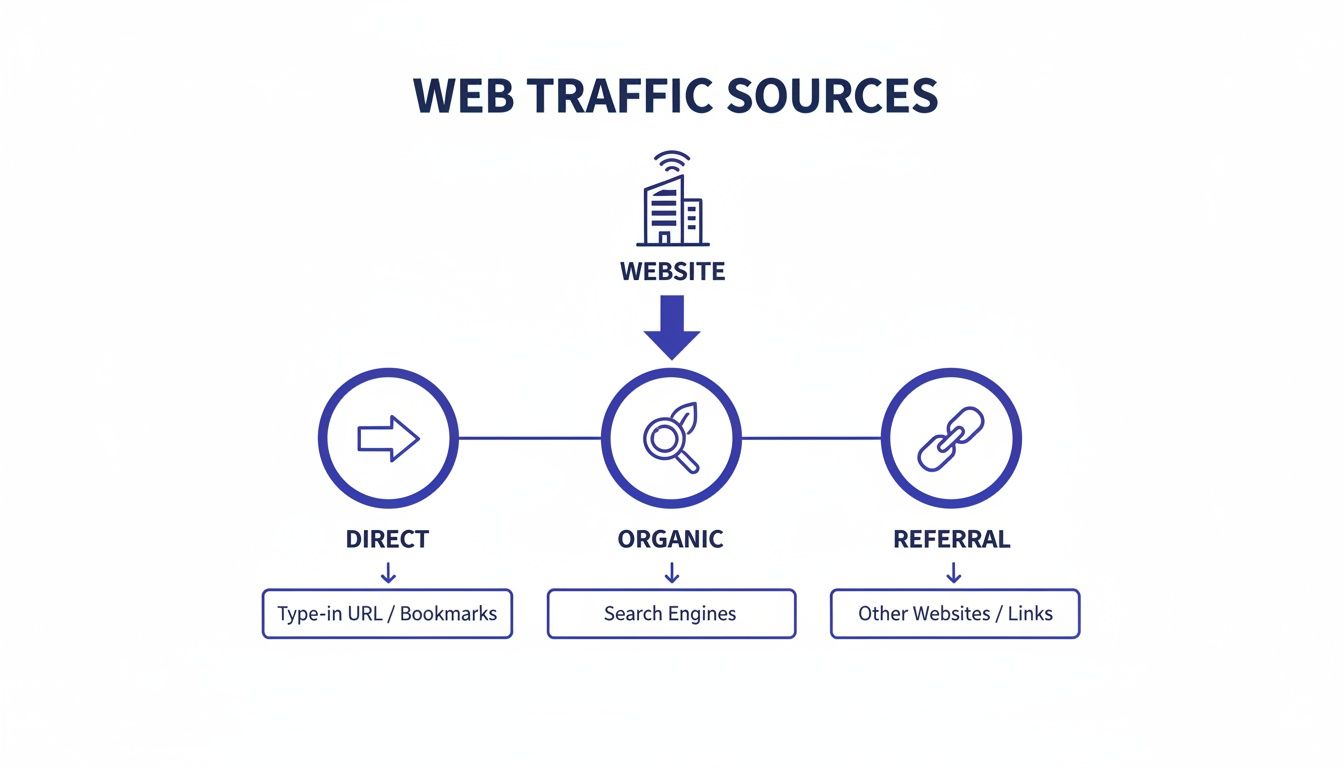
This helps simplify the user journey, showing the distinct entry points that make up your total visitor count.
1. Direct Traffic
Direct traffic is made up of people who navigate straight to your site. They either type your URL into the browser's address bar or click on a bookmark they've saved. These are your regulars, the loyal audience who knows you by name and doesn't need directions.
A high volume of direct traffic is usually a fantastic sign of strong brand recognition and customer loyalty. It means people are seeking you out on purpose. Just be aware that analytics tools can sometimes dump traffic from untraceable sources (like links in some messaging apps) into the "Direct" bucket, making it a bit of a catch-all category.
2. Organic Search Traffic
When someone searches for something on Google or Bing, scrolls past the ads, and clicks on a regular, non-paid result to find you—that's organic search. This traffic is earned, not bought. It's the fruit of solid Search Engine Optimization (SEO), genuinely helpful content, and a website that search engines trust.
A steady stream of organic traffic is proof that your content is hitting the mark and answering the questions your audience is asking. It’s a key driver for sustainable growth and, for many businesses, organic search is the single largest and most valuable web traffic source.
Key Insight: Paid ads give you a quick boost, but organic search builds an asset that grows over time. It compounds, delivering qualified leads and customers long after you've hit "publish" on a piece of content.
3. Referral Traffic
Referral traffic comes from users clicking a link on another website that points to yours. This could be a mention in a blog post, a link in a news article, or a feature on a partner’s site. It’s the digital equivalent of a word-of-mouth recommendation.
This source is pure gold for a couple of reasons:
- Trust and Authority: A link from a respected site is like a vote of confidence. It tells both users and search engines that you're legit.
- Targeted Audience: Visitors arriving from a site in your niche are often already interested in what you offer, which usually means they stick around longer and engage more.
4. Social Traffic
You guessed it—social traffic comes from social media platforms. We're talking about clicks from X (formerly Twitter), LinkedIn, Facebook, Instagram, or TikTok. This includes any link in your posts, your bio, or even your social ads.
Social media is a fantastic channel for building a community and getting your name out there. The visitors you get can be a mixed bag; some might just be casually scrolling, while others are super-engaged followers ready to jump on your latest announcement.
5. Paid Search Traffic
Paid search traffic is generated by ads you pay for on search engine results pages (SERPs). These are the listings you see at the top of a Google search, clearly marked with an "Ad" label, and they're usually run through platforms like Google Ads.
This channel gives you incredible control, letting you target specific keywords and demographics to get in front of people who are actively looking to buy. It costs money, of course, but paid search is one of the fastest ways to drive high-intent traffic and test out new marketing messages.
6. Email Traffic
When someone clicks a link in your newsletter or an email campaign you sent out, they get counted as email traffic. This audience is often your most dedicated. After all, they’ve already given you permission to land in their inbox.
Email is a powerhouse for nurturing leads, making sales, and bringing customers back. Because these users are already familiar with your brand, they tend to convert at a much higher rate than first-time visitors from other channels.
7. Campaign Traffic
Finally, campaign traffic is a special category you create yourself using UTM parameters. This is your secret weapon for tracking specific marketing efforts with surgical precision. Think QR codes on flyers, links shared by influencers, or a special promotion you’re running.
By tagging your URLs, you can isolate the performance of any individual campaign and measure its ROI without it getting lost or miscategorized in your other traffic sources.
How Analytics Tools Identify Traffic Sources
So, how does an analytics tool actually know where your visitors are coming from? It's not magic. These platforms act like digital detectives, piecing together a user's journey using clues they leave behind.
Getting a grip on how this puzzle is solved is the first step to trusting your data. At the heart of it all are two main methods: the HTTP Referrer and UTM parameters. These two work in tandem, giving tools like Swetrix the raw information needed to sort every visitor into the right bucket.
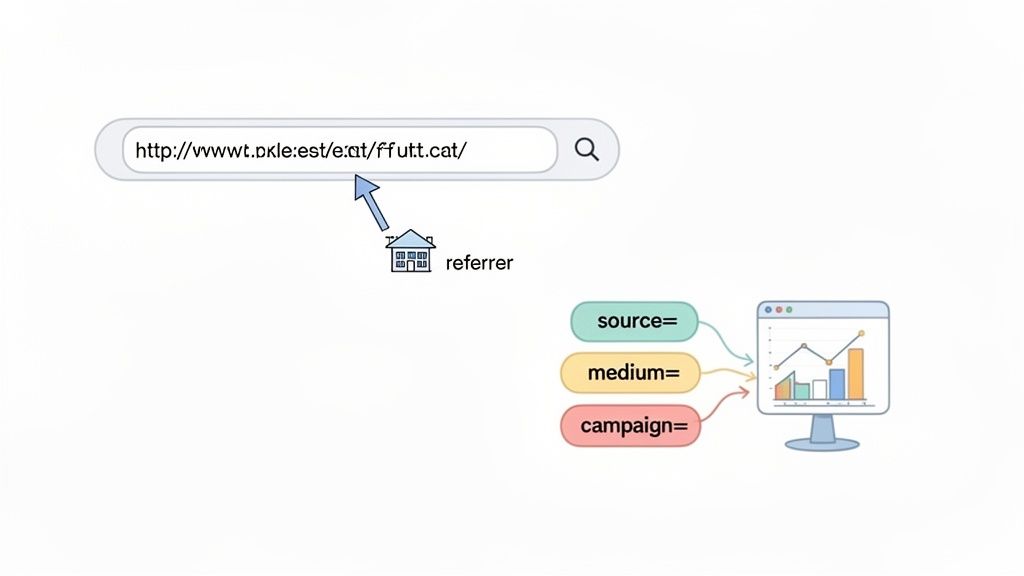
The Digital Breadcrumb Trail: The HTTP Referrer
Think of it this way: when you visit a coffee shop because a friend recommended it, the barista might ask, "Who sent you?" The HTTP Referrer (often misspelled as 'referer' in the official spec) does pretty much the same thing online. It’s a small piece of information that a user's browser automatically passes along when they click a link to go from one page to another.
This referrer header simply contains the URL of the last page the visitor was on. Analytics tools read this data to figure out the source:
- If the referrer URL is
google.com, the visit is logged as Organic Search. - If it’s from
linkedin.com, it gets tagged as Social. - If it’s a link from a niche tech blog, it’s marked as a Referral.
Key Takeaway: The referrer is the default, automatic way sources are identified. It works quietly in the background to sort traffic from search engines, social media, and other websites with zero manual setup.
But the referrer isn't foolproof. It doesn't work if someone types your URL directly into their browser, clicks a link from a desktop app, or uses a privacy-focused browser that blocks it. For those cases, we need a more direct approach.
Precision Tracking with UTM Parameters
When the referrer isn't enough, UTM parameters give you the control you need to fill in the gaps. "UTM" stands for Urchin Tracking Module—a holdover from the early days of web analytics—and they’re just simple tags you add to the end of a URL to give your analytics tool specific instructions.
These tags answer the critical questions about where a click came from. There are five main parameters, but you'll primarily use these three:
utm_source(Required): The platform where the link lives, like 'google', 'linkedin', or 'newsletter'.utm_medium(Required): The marketing channel, such as 'cpc' (cost-per-click), 'social', or 'email'.utm_campaign(Required): The name of your specific promotion, like 'spring_sale' or 'product_launch'.
You can also use utm_term to track paid keywords and utm_content to differentiate between two ads pointing to the same place.
For example, a link for a spring sale you're promoting on LinkedIn might look like this:
yourwebsite.com?utm_source=linkedin&utm_medium=social&utm_campaign=spring_sale
When someone clicks this link, your analytics tool ignores the referrer and instead reads these tags, perfectly categorizing the visit under your "spring_sale" campaign. You just can't get that level of detail from the referrer alone. For a deeper dive, check out our guide on how UTM tracking can sharpen your marketing insights.
The Source and Medium Classification System
Finally, all this information gets organized into a simple, powerful classification: source/medium. This combination gives you immediate context for every visit. The source is where the traffic came from, and the medium is how it got there.
Here are a few common examples you’ll see in your reports:
- google / organic: Someone found you through a regular, non-paid Google search.
- bing / organic: A visitor came from a non-paid Bing search.
- newsletter / email: A click from a link in one of your email newsletters.
- linkedin / social: Traffic from a post shared on LinkedIn.
- google / cpc: A visitor from a paid Google Ad.
Distinguishing between sources like google/organic and google/cpc is absolutely critical because Google's dominance as a traffic driver is immense. As of December 2025, Google.com is the world's most visited site, pulling in an incredible 95.4 billion monthly visits and driving about 63.41% of all referral traffic on the internet. You can explore more global website traffic statistics on Exploding Topics to see just how big its footprint is.
7. Turning Traffic Data Into Actionable Insights
Collecting traffic data is a lot like gathering ingredients for a meal. The raw materials are there, but the real magic happens when you know how to combine them into something amazing. Just knowing which web traffic source sends you the most visitors is only the first step. The real challenge—and where the growth happens—is turning those raw numbers into smart, strategic decisions.
This means looking past surface-level stats like session counts. You need to dig into the quality and behavior tied to each channel. By figuring out how different visitors engage, convert, and move through your site, you can turn that jumble of data into a clear roadmap for what to do next.
Moving Beyond Volume to Value
It’s easy to fall into the trap of thinking the source that sends the most traffic is the best one. But what if a channel drives thousands of sessions, yet none of those visitors sign up, buy anything, or stick around for more than a few seconds? In that case, its actual value is close to zero. The goal isn't just to get an audience; it's to get the right audience.
To get there, you have to ask better questions of your data:
- Which sources bring the most engaged visitors? Look at metrics like average time on page, pages per session, and bounce rate.
- Which channels actually drive conversions? Track goal completions—like newsletter sign-ups or free trial starts—for each source.
- What’s the lifetime value (LTV) of customers from different sources? Someone from an organic search might convert slowly but have a much higher LTV than a customer from a one-off paid ad.
Key Takeaway: Actionable insights come from connecting traffic sources to real business outcomes. Focus on the channels that deliver engaged users who take valuable actions, not just the ones that generate the most clicks.
Segmenting and Comparing User Behavior
One of the most powerful things you can do with your analytics is segmentation. This is just a fancy way of saying you isolate visitors from a specific web traffic source and compare their behavior to everyone else. For instance, how does the journey of a user who found you on Google differ from someone who clicked a paid ad on Instagram?
Maybe you'll discover that organic visitors land on your blog and spend time reading, while paid social visitors jump straight to your product pages. That kind of insight is gold. It tells you to tailor your landing pages for each channel—optimize your blog content for search intent and sharpen your ad copy to match the direct, action-oriented mindset of social media users.
This approach also highlights just how critical device-specific analysis has become. Mobile traffic has absolutely exploded, rocketing from just over 10% of global web traffic in 2012 to a staggering 65.49% by May 2023. Even more interesting, mobile devices accounted for the highest percentage of returning visitors at 74%. For platforms with real-time dashboards like Swetrix, being able to segment analytics by device isn't just a feature; it's essential for making smart decisions. You can dive deeper into the rise of mobile traffic on DataReportal.
Understanding the Customer Journey with Attribution Models
Let's be real: most users don't convert on their first visit. They might see your brand in a social media post, find your blog later through a Google search, and finally click a link in your email newsletter to make a purchase. So, who gets the credit?
This is the exact problem that attribution modeling solves. An attribution model is simply a rulebook that decides how to assign credit for a conversion across all the different touchpoints in a user's journey.
- Last-Touch Attribution: This is the simplest model. It gives 100% of the credit to the very last channel the user interacted with before converting. It's easy to track but often misses the bigger picture of what brought them to you in the first place.
- First-Touch Attribution: The opposite of last-touch, this model gives all the credit to the first source that introduced the user to your site. It’s fantastic for understanding which channels are best at creating initial awareness.
- Multi-Touch Attribution: This model spreads the credit across multiple touchpoints, giving you a more balanced and realistic view of how different channels work together to drive a final conversion.
Picking the right model helps you appreciate the unique role each web traffic source plays. It prevents you from cutting the budget for a channel that’s amazing for brand awareness just because it doesn't drive a lot of final clicks. Visualizing these customer paths is a key part of any good web analytics dashboard, helping you finally connect the dots between discovery and conversion.
Interpreting Traffic Source Metrics
Once you've segmented your data, you need to know what to look for. The table below breaks down what key metrics can tell you about each traffic source and suggests what you might do with that information.
| Traffic Source | Key Metric to Watch | What It Might Mean | Potential Action |
|---|---|---|---|
| Organic Search | Bounce Rate on Landing Pages | High bounce rate could mean your content doesn't match search intent. | Revise page titles, meta descriptions, and on-page content to better align with target keywords. |
| Paid Search | Conversion Rate (e.g., Sign-ups) | Low conversions might indicate a mismatch between ad copy and the landing page experience. | A/B test your landing page headlines and calls-to-action. Refine ad targeting. |
| Direct | Percentage of Returning Visitors | A high percentage signals strong brand recognition and customer loyalty. | Nurture this audience with loyalty programs or exclusive content for returning users. |
| Referral | Session Duration & Pages/Session | High engagement from a specific referring site means their audience is a great fit for you. | Build a stronger relationship with that referring site; explore co-marketing or guest posting. |
| Social Media | Goal Completions (Micro-conversions) | Low completions despite high traffic suggests your content is engaging but not driving action. | Add clearer calls-to-action in your posts or link to more conversion-focused pages. |
| Email Marketing | Click-Through Rate (CTR) | A low CTR can point to uninteresting subject lines or irrelevant email content. | Test different subject lines and segment your email list to send more personalized content. |
By systematically analyzing these metrics, you move from just looking at data to actively using it. You start seeing patterns, identifying opportunities, and making informed choices that actually improve your marketing performance.
The Rise of Privacy-First Source Tracking
Let's be honest: in an age where everyone is worried about their data, tracking your web traffic source ethically isn't just a nice-to-have—it's a real competitive edge. For years, the standard playbook involved using third-party cookies to follow users across the internet, piecing together detailed profiles, often without their full understanding or consent. That model is officially on its way out.
With regulations like GDPR setting a new global standard, businesses are at a crossroads. Sticking with the old way of tracking isn't just a legal minefield; it's a direct threat to your brand's reputation. People are savvier than ever about how their data is handled and are actively choosing companies that respect their privacy.
Shifting to Cookieless Analytics
This is where privacy-first, cookieless analytics platforms are completely changing the game. Instead of tagging individuals with persistent identifiers, these modern tools focus on aggregating anonymous event data. It’s a simple but powerful shift: you still get the essential insights about where your traffic comes from, but without collecting personal information or compromising user anonymity.
Solutions like Swetrix are built on this very principle. They deliver accurate, actionable data by zeroing in on the session itself, not the person behind the screen. This approach keeps you fully compliant with privacy laws while still giving you the source data you need. To get a better handle on how this works under the hood, you can explore the mechanics of cookieless tracking in our detailed guide.
By embracing a privacy-first model, you're not just ticking a compliance box; you're building a foundation of trust. You're sending a clear message to your users that you value their privacy, which is a powerful way to stand out in a noisy market.
Gaining Insights Without Compromise
There's a common myth that going private means giving up valuable data. That couldn't be further from the truth. You can absolutely get all the critical source information you need, from which sites are referring you traffic to how well your UTM campaigns are performing. These tools simply use different, privacy-safe methods to figure out where your visitors are coming from.
The makeup of web traffic can vary wildly depending on the business. For example, B2C websites often deal with much higher visitor volumes—22.5% of them see between 40,001 to 100,000 unique monthly visitors. In stark contrast, only 16.7% of B2B sites hit those numbers, which underscores why you need analytics that can adapt to different traffic patterns. You can discover more insights about website traffic statistics on VWO.
A privacy-first platform like Swetrix puts these essential metrics right at your fingertips, allowing you to:
- Identify Top Sources: Quickly see which channels—be it organic search, referrals, or social media—are your biggest drivers.
- Track Campaign ROI: Use UTM parameters to measure exactly how effective your marketing efforts are.
- Understand User Paths: Analyze how visitors from different sources actually move through your site.
Ultimately, this approach gives you the best of both worlds: powerful analytics to guide your growth and a deep respect for user privacy that helps build real, lasting customer loyalty.
Answering Your Toughest Web Traffic Questions
As you get comfortable with your analytics, you'll inevitably start noticing some oddities. Understanding your web traffic source data isn't always a straight line, and a few common patterns can leave even seasoned pros scratching their heads.
Let's dive into some of the most frequent questions we hear from marketers, founders, and developers. Getting these answers right will help you clean up your reports and trust the conclusions you draw from them.
What Is This "Dark Social" Traffic Messing Up My Data?
Ever copy a link to a cool article and text it to a friend? Or maybe share it in a private Slack channel? That’s dark social in a nutshell. It’s all the traffic that comes from private sharing channels—like WhatsApp, Messenger, texts, or email—where the original referral data gets lost in translation.
When someone clicks a link from one of these private sources, their browser doesn’t pass along the typical referrer information that tells your analytics tool where they came from. With no source to point to, most tools just throw their hands up and categorize that visitor under "Direct" traffic.
This creates a couple of big headaches:
- Inflated Direct Traffic: Your direct traffic numbers can look artificially high, making you think more people are typing your URL directly than they actually are. It hides the true power of word-of-mouth.
- Lost Attribution: You can't give credit where it's due. That blog post that everyone is sharing privately? You have no way of knowing it's driving all that traffic, making it much harder to measure its real impact.
While you can never track dark social perfectly, you can fight back. A great tactic is to use share buttons on your website that automatically add UTM parameters to the URLs being shared. This helps you reclaim some of that lost attribution and see how your content is really spreading.
Why Are Spam Sites Showing Up in My Referral Traffic?
It’s one of the most annoying things to see in an analytics report: a list of referring domains that are obviously junk. This is called referral spam, and it’s caused by bots that hit your website from fake domains. Their only goal is to get their URL listed in your public or internal reports, hoping you’ll get curious, click the link, and give them a visit.
This fake traffic is more than just an annoyance; it actively pollutes your data. It inflates your session counts and can throw off crucial metrics like bounce rate and average time on page. Suddenly, your real user behavior gets buried, and you risk making bad decisions based on bad data.
Thankfully, most modern analytics platforms have gotten pretty good at automatically filtering out known spam bots. For the ones that inevitably sneak through, you can usually set up manual filters in your analytics tool to block traffic from those specific spammy domains. A little bit of cleanup goes a long way in keeping your reports focused on genuine users.
How Do I Pick the Right Attribution Model?
Choosing an attribution model is really about answering one question: How do you want to give credit for a conversion when a customer interacts with you multiple times? There's no single "best" answer here. The right model for you depends entirely on your business, your marketing strategy, and how long it typically takes for a customer to make a decision.
The attribution model you choose directly impacts how you value each web traffic source. A last-touch model might undervalue top-of-funnel channels, while a first-touch model might not give enough credit to the final push that closes a deal.
Here’s a quick rundown of the most common models:
- Last-Touch Attribution: Simple and clean. This model gives 100% of the credit to the very last source a user interacted with before they converted. It's a great starting point for its simplicity.
- First-Touch Attribution: The opposite of last-touch. This one gives all the credit to the very first source that ever brought a user to your site. It’s fantastic for understanding which channels are best at generating initial awareness.
- Multi-Touch Attribution: These models (like Linear or Time-Decay) try to paint a fuller picture by splitting credit across multiple touchpoints. A Linear model gives every touchpoint an equal slice of the credit, while a Time-Decay model gives more weight to the interactions that happened closer to the conversion.
If you're a startup with a short sales cycle, a simple Last-Touch model might be all you need. But as your marketing grows more complex, exploring multi-touch models becomes crucial for understanding how all your channels work together to drive results.
Can I Actually Track My Offline Campaigns Online?
You absolutely can. It’s surprisingly easy to connect the dots between your offline marketing and your online analytics by using custom URLs with UTM parameters. This is the key to measuring the impact of everything from magazine ads and conference flyers to the QR code on your business card.
The process is pretty straightforward. Let’s say you’re running an ad in a trade magazine. You’d create a unique link for that ad—maybe you put it behind a QR code—that looks something like this:
yourwebsite.com?utm_source=trade_magazine&utm_medium=print&utm_campaign=q4_promo
When someone scans that code and lands on your site, your analytics tool instantly reads those tags. That visit gets filed neatly under the "q4_promo" campaign, with "trade_magazine" as its source and "print" as the medium. Just like that, your offline effort becomes a trackable web traffic source, giving you real data on its ROI.
Ready to get a clear, privacy-first view of your traffic sources? Swetrix provides all the insights you need without compromising user privacy. Start your 14-day free trial today and turn your data into actionable growth.