- Date
Mastering Your UTM Builder For Email Marketing Campaigns
 Andrii Romasiun
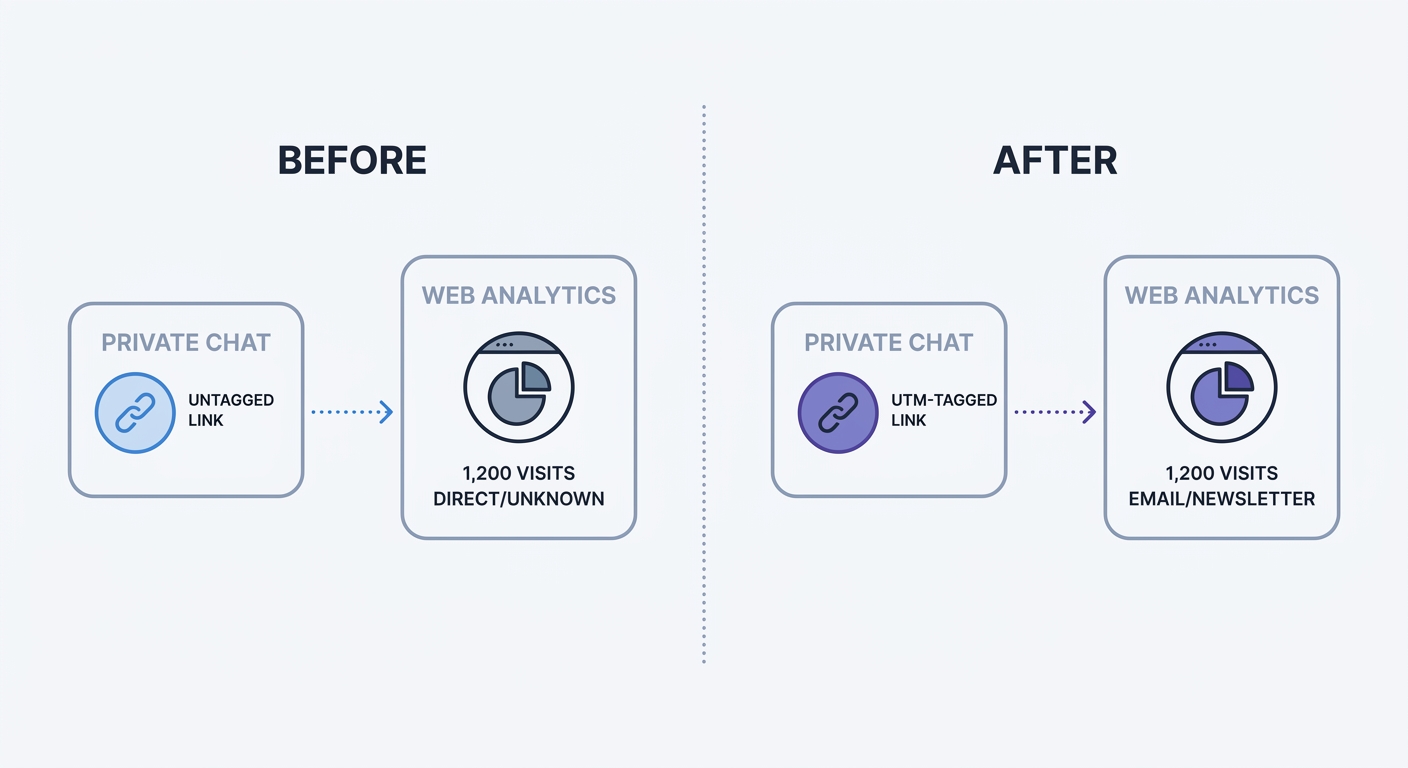
Hitting send on a promotional broadcast blasts thousands of messages into subscriber inboxes. Readers open messages, scan content, and click links. Analytics platforms register these traffic spikes. Without specific link tags, incoming traffic groups together under the generic "direct" label. A UTM builder for email marketing campaigns attaches defined tracking strings to every link inside the message. These tags feed concrete traffic data into platforms like Swetrix, transforming invisible clicks into measurable revenue.
Analytics tools rely on referrer data to categorize traffic sources. A click from a public forum passes the forum's domain to the destination server. An email client passes nothing. The transition from a desktop application or mobile inbox to a web browser strips away the origin story. UTM parameters replace that missing origin story with a hardcoded string of text, allowing marketers to trace a sale back to a specific newsletter.
Why Email Marketing Needs UTM Tracking
Marketing teams measure success through reliable data points. Past email tracking relied on tiny image pixels embedded in the message code. When the mail client loaded the image, the server recorded an open. That mechanism no longer functions as a valid measurement of human behavior.
The End of Reliable Open Rates
Apple Mail Privacy Protection (MPP) intercepts incoming messages before the recipient opens the application. The software pre-loads all images in the background, triggering the tracking pixel without human interaction. This automatic pre-loading inflates consumer audience open rates by 50 to 60 percent. A dashboard showing a 70 percent open rate often indicates a large segment of Apple users on the subscriber list rather than high engagement.
Open rates fail to measure intent. Clicks demonstrate action. A tagged link forces the analytics platform to recognize the specific interaction that drove the user to the website. Remove the open rate widget from your reporting dashboard. Replace it with a click-to-conversion funnel.
Measuring ROI Through Clicks
Email marketing generates measurable revenue when deployed with strategy. Industry benchmarks show an average $36 return for every $1 spent on email campaigns, with retail and e-commerce sectors seeing even higher returns. Proving that return requires deterministic click tracking. Average cross-industry click-through rates hover between 2.09 and 2.62 percent, though this metric can vary significantly by industry and content type. Every click carries potential revenue.
B2B buyers consume extensive content before initiating a sales conversation. A prospect might read weekly newsletters for six months before booking a demo. A standard analytics setup credits the final Google search for the conversion. Tagging nurture sequence emails with UTM parameters reveals prior touchpoints. The analytics platform connects six months of newsletter clicks to the final lead submission. Marketing teams that implement tracking parameters build an accurate map of the complete buyer journey.
Core Elements of a UTM Builder For Email Marketing Campaigns
Standard URLs point browsers to destinations. Parameterized URLs direct the browser to the destination while handing an ID card to the analytics server. The server reads this ID card, categorizes the visit, and discards the tags from the user interface.
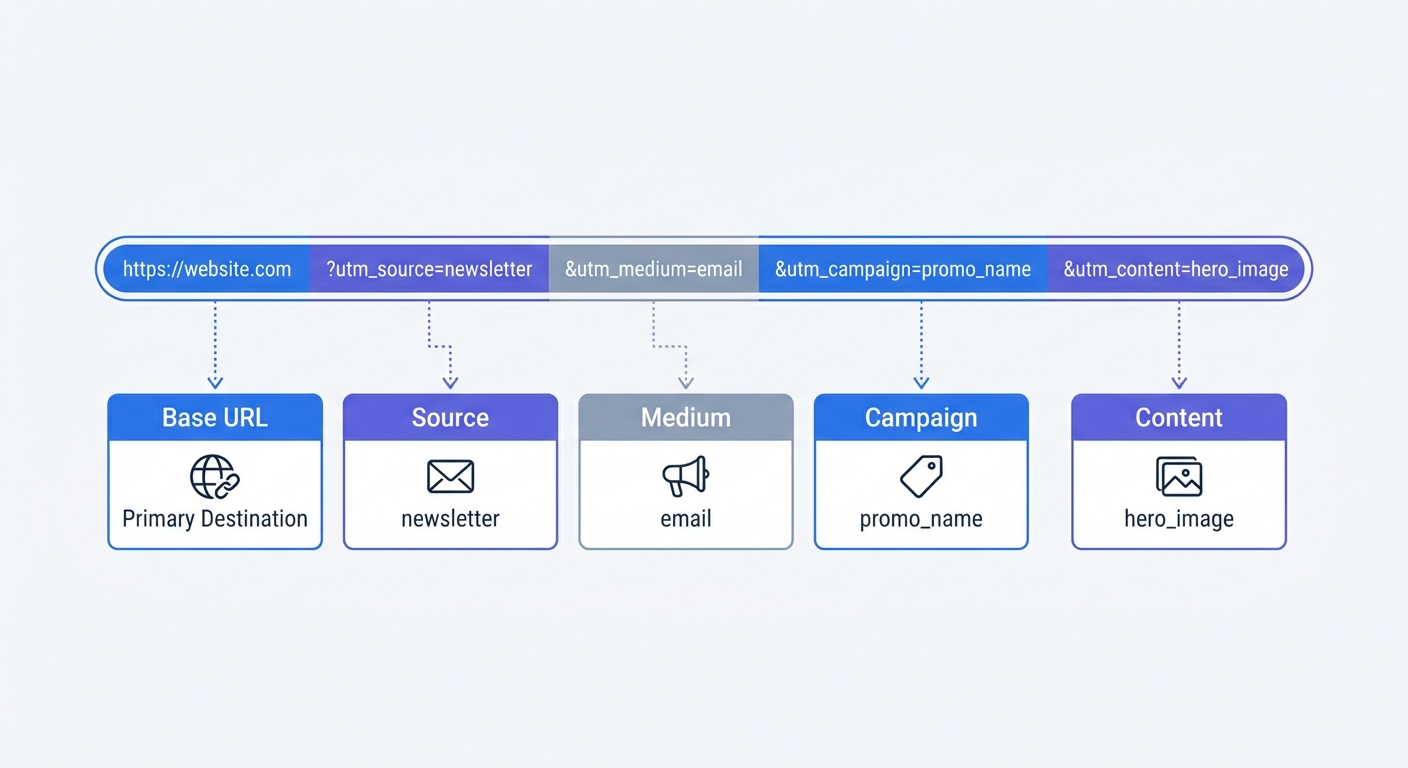
Tracking structures require specific formatting to function. An ID card with missing fields causes data fragmentation. Marketers must populate at least three standard parameters to build an accurate report.
Core Tags: Source, Medium, and Campaign
Standardized parameter values prevent traffic from falling into the "unassigned" category.
- utm_source: Identifies the origin of the traffic. Marketers frequently default to naming their Email Service Provider (ESP) here, typing "Mailchimp" or "Klaviyo". The ESP functions as the delivery vehicle. Source tags should reflect the audience segment. Use identifiers like
weekly_newsletter,customer_base, orlead_magnet_subscribers. - utm_medium: Identifies the channel. Keep this parameter static across all email sends. Type
emailfor every campaign. Standardizing the medium ensures all email traffic aggregates into one high-level channel report. - utm_campaign: Identifies the specific promotion or broadcast. Use descriptive, date-based names. A broadcast announcing a product update becomes
q3_feature_launch. A holiday promotion becomesblack_friday_2026.
Advanced Tagging: Content and A/B Testing
Long-form newsletters contain multiple links pointing to the same destination page. A header logo, a hero image, an inline text link, and a footer button might all direct the user to a product landing page. Core parameters group all these clicks under the same campaign. Adding the utm_content parameter isolates performance by placement.
Append utm_content=hero_image to the top visual link. Append utm_content=inline_text to the body paragraph link. The analytics dashboard displays which element drove the highest conversion rate. A/B tests rely on this parameter. Send half the list a blue button and the other half a red button. Tag the blue button link with utm_content=blue_button and measure the downstream conversion differences.
Solving The Dark Social Misattribution Problem
Content sharing happens in private channels. Public social media feeds account for a fraction of total digital conversations. Direct messages contain the bulk of valuable recommendations. Implementing link tracking secures attribution data across these hidden networks.
Tracking Forwarded Emails
Dark Social encompasses all private sharing mechanisms. Slack channels, WhatsApp threads, text messages, and email forwards fall into this category. Consumer behavior reports indicate 84 percent of content shares occur in these hidden environments.
Subscribers forward valuable newsletters to colleagues. A marketing manager receives an email highlighting a new software tool. They copy the link from the email body and paste it into the team Slack channel. Five team members click the link. Slack passes no referrer data to the destination website. Analytics software records five visitors arriving from an unknown origin. Default tracking configurations file these users under direct traffic.
Rescuing Direct Traffic
A UTM builder embeds attribution data inside the destination URL. The tracking mechanism travels with the link regardless of where the user pastes it.
Consider the previous scenario with a tagged URL. The marketing manager copies https://example.com/software?utm_source=newsletter&utm_medium=email&utm_campaign=q3_launch from their inbox. Pasting that exact string into Slack preserves the campaign data. Five team members click the parameterized link. Analytics platforms read the tags upon page load, bypassing the missing Slack referrer and filing all five visits under the email campaign.
Link tracking rescues direct traffic from the unknown column. Every tagged link acts as a persistent attribution beacon across private messaging applications.
Privacy-First Tracking and GDPR Compliance
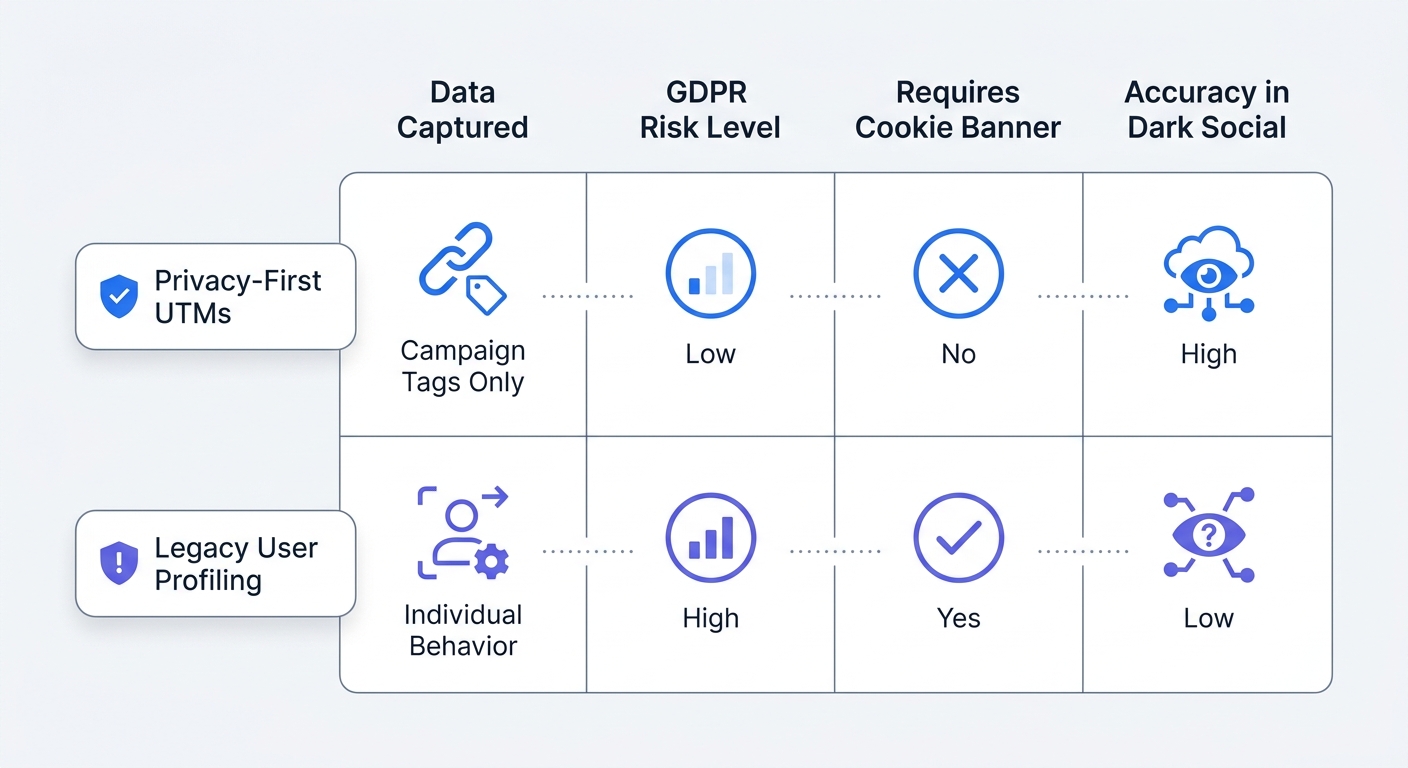
Modern marketing requires strict adherence to privacy regulations. Cookie consent banners frustrate users and block analytics scripts. Marketing teams face increasing pressure to gather conversion data without violating user trust.
Contextual Campaign Tracking
UTM parameters track the context of the marketing effort rather than individual human behavior. A tag tells the server that a click originated from a specific newsletter. It avoids mapping the user's cross-site browsing history.
This distinction exempts standard campaign tracking from strict cookie consent requirements. A cookieless analytics tool parses URL parameters on the server side. The platform records the pageview, credits the email campaign, and logs the session without dropping a tracker onto the user's device. Pairing standardized tags with Swetrix privacy-focused analytics provides complete campaign visibility while respecting GDPR guidelines. Marketers gain accurate attribution numbers while skipping the intrusive cookie banner.
The Danger of PII in URLs
Dynamic link generation creates privacy risks when configured without oversight. Some marketers configure their email platforms to inject subscriber data into the URL string. They append parameters like ?email=john@example.com or ?name=john_smith.
Never inject Personally Identifiable Information (PII) into a link string. Browser histories, intermediate servers, and analytics platforms log complete URLs. Appending an email address to a link broadcasts that user's identity across the digital infrastructure. This practice creates GDPR and CCPA compliance violations. Stick to contextual campaign data. Using tags like utm_campaign=spring_sale describes the marketing effort while keeping the individual anonymous.
Best Practices for Implementing Your UTM Strategy
A tagging strategy requires operational discipline. One mistyped parameter splits a single campaign into multiple disconnected rows within your reporting interface. Establish strict rules before generating the first link.
Enforcing Standardized Naming Conventions
Analytics platforms enforce case sensitivity. A click on utm_medium=Email and a click on utm_medium=email register as two separate channels. Mixed capitalization ruins top-level channel reports.
- Use lowercase letters for every parameter field.
- Replace spaces with underscores (
_) or hyphens (-). - Avoid special characters and punctuation marks.
- Establish a shared reference document outlining exact campaign names.
| Incorrect Parameter Example | Correct Parameter Example | Reason for Correction |
|---|---|---|
utm_medium=Email | utm_medium=email | Capital letters split the channel data. |
utm_source=Welcome Series | utm_source=welcome_series | Spaces break URL formatting. |
utm_campaign=Q3 Promo! | utm_campaign=q3_promo | Punctuation marks cause parsing errors. |
utm_source=Mailchimp | utm_source=newsletter | Source tags require audience origin data rather than the delivery tool name. |
Audit the default templates inside your email service provider. Locate the global header logo, the footer navigation links, and the social media icons. Marketers frequently tag the main body buttons while leaving the structural links bare. A click on an untagged header logo registers as direct traffic. Apply core parameters to every interactive element in the template.
Avoiding Internal Link Tagging
Never place UTM parameters on links pointing from one page of your website to another page of your website. Campaign tags exist for external traffic acquisition.
A user clicks a Facebook ad and lands on the homepage. The analytics platform records the source as Facebook before the user clicks a navigation link pointing to the pricing page. If that navigation link contains ?utm_source=internal_promo, the software registers a new session. It overwrites the original acquisition data with the internal promo data. The attribution chain breaks. Restrict parameter usage to outbound emails, social posts, and paid advertisements.
Standardizing Link Generation Tools
Manual link generation invites human error. Typing strings into a document leads to spelling mistakes, missed underscores, and broken destination pages. A malformed URL throws a 404 error for the entire subscriber list.
Centralize the link creation process. Small teams benefit from the Swetrix Free UTM Generator Tool. The interface guides the user through core fields, enforces formatting rules, and outputs a clean tracking link.
Larger teams require governance. Build a master spreadsheet to log every campaign link generated across the department. Include columns for the date, the destination URL, the five parameter fields, and the final combined string. Use spreadsheet formulas to force lowercase text and replace spaces with hyphens. A centralized log prevents two different marketing managers from naming the same product launch q3_feature and q3_update.
Before pressing send, test the final generated string. Paste the URL into an incognito browser window to verify the page loads without layout errors. Open the network tab in the browser developer tools. Ensure the parameters remain in the address bar after the final redirect resolves.
Configure the analytics dashboard to read incoming data. Open the acquisition report within the platform interface and filter the traffic columns by the specific email medium. The view displays individual campaigns alongside pageviews, session durations, and conversion events. Connecting a structured tagging process to a privacy-first analytics tool builds a complete map of subscriber behavior. Marketing departments track the return on investment for every broadcast while maintaining user trust.
Stop losing email attribution to dark social and unknown direct traffic. Swetrix offers a privacy-first, cookie-free analytics platform that captures every UTM-tagged click out of the box. Build custom email conversion funnels and track ROI without intrusive cookie banners. Plans start at $19/month for 100,000 events. Start a 14-day free trial today.