- Date
How To Master Tracking Marketing Campaigns Without Cookies
 Andrii Romasiun
You launch a high-budget ad campaign where the platform shows thousands of clicks, but your analytics dashboard records almost zero conversions. The traffic and sales happened, yet the connection between the two vanished because users clicked the reject button on a consent banner. Tracking marketing campaigns without cookies solves this disconnect. Legacy analytics platforms rely on persistent files dropped into a user's browser, meaning they only capture data from visitors who actively opt in. Privacy-focused alternatives capture behavioral patterns without those files. Swetrix provides an open-source web analytics platform that records your website traffic accurately while bypassing the need for intrusive consent banners, so you get your marketing attribution back while users keep their privacy.
The Real Cost of Cookie-Based Tracking
The Massive Data Loss from Consent Banners
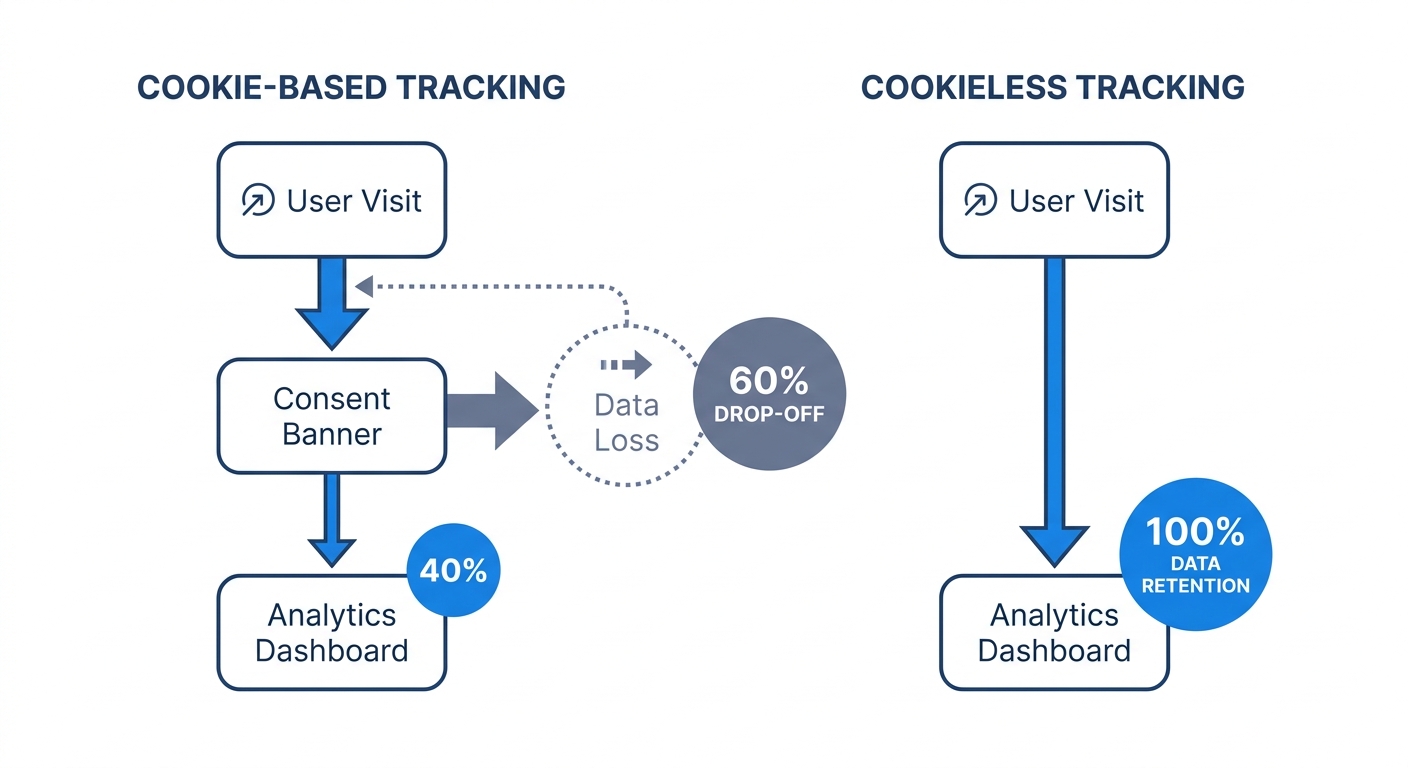
Building your reporting around browser cookies hands control of your marketing data to regulatory compliance banners. Implementing a legally compliant cookie consent banner results in an average 60 percent loss of visit data—though this rate varies heavily by industry, with ad-supported media facing much steeper drops than B2B or healthcare sites—because users land on your site, see a wall of toggles, and choose the easiest exit.
Only 25.4 percent of users accept all cookies on the first level of a typical banner, while the rest either reject them outright or ignore the prompt entirely. Traditional analytics platforms like Google Analytics require that explicit consent to fire their tracking pixels. If the user says no, the platform treats them as a ghost. A visitor might click your paid search ad, browse three product pages, and make a purchase. Because they rejected cookies, that purchase registers as direct traffic with no referrer data, destroying your ability to calculate return on ad spend.
Audit your current analytics setup immediately to identify your banner rejection drop-off by pulling the total clicks for the last thirty days from your ad network dashboard. Next, open your web analytics platform and pull the total sessions from that exact same campaign. Subtract the sessions from the clicks and divide by the clicks to calculate the percentage of traffic you pay for but cannot track.
Why Browsers Are Blocking Trackers by Default
User consent represents only half the problem, as browsers actively strip tracking files before the user even sees a banner. Apple's Safari uses Intelligent Tracking Prevention to block third-party cookies by default and strictly limits the lifespan of first-party cookies. Similarly, Mozilla Firefox applies Enhanced Tracking Protection to block cross-site trackers automatically.
Google abandoned its plan to forcibly deprecate third-party cookies in Chrome in 2024, shifting to a user choice model that maintains existing browser controls. That reversal changes little for digital marketers since the default state of the internet already leans toward blocking. Mobile users overwhelmingly use Safari or Chrome with enhanced privacy settings, meaning cookie-based tracking architectures break on most smartphones.
When the underlying technology fails, your reports fail, making it impossible to optimize a campaign based on a dataset that excludes mobile users who prefer strict privacy settings.
Core Methods for Tracking Marketing Campaigns Without Cookies
Maximizing UTM Parameters and Contextual Analytics
You do not need to place a file on a user's hard drive to know their origin. Urchin Tracking Module (UTM) parameters append specific data points to the end of your URLs. When a user clicks a tagged link, the destination server reads the URL and attributes the visit to the correct source. Because the tags ride in the browser address bar rather than a storage file, privacy blockers ignore them.
Standardizing these parameters forms the foundation of tracking marketing campaigns without cookies, turning a raw link into a signal of intent. Use all five available parameters to segment your traffic precisely. The source parameter identifies the network, such as Google or a specific newsletter sponsor, while the medium parameter categorizes the channel to separate paid social from organic social. The campaign parameter groups the initiative by linking different creative assets under one product launch. Finally, use the term parameter to log the specific keyword for paid search, and the content parameter to differentiate between two identical links in the same email.
Consider the structural difference between these two URLs:
https://example.com/pricing
https://example.com/pricing?utm_source=linkedin&utm_medium=paid_social&utm_campaign=q3_b2b_retargeting
The second URL passes the exact origin, medium, and campaign name directly to your analytics software on page load. Document a strict naming convention for your marketing team to prevent fragmented reporting. A shared spreadsheet ensures nobody uses "linkedin" while someone else uses "LinkedIn.com". To enforce formatting across all your paid and organic channels, provide your team with a free UTM generator tool.
The Power of Server-Side Tracking
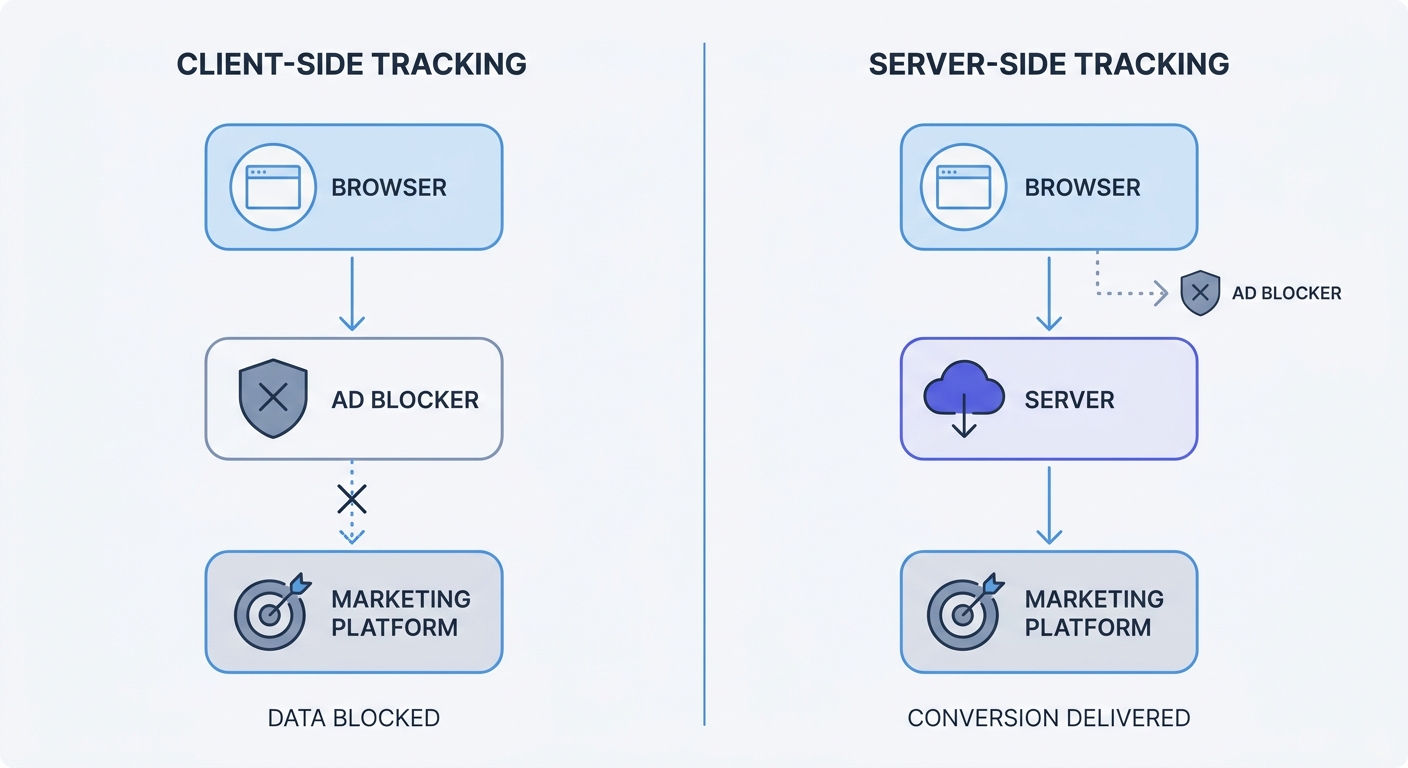
Client-side tracking executes scripts inside the user's browser, allowing ad blockers to detect and kill the connection. Server-side tracking moves that data collection process to your backend.
Instead of asking the browser to send a conversion ping to an ad network, your server sends the data directly via an application programming interface. When a user completes a checkout, your backend system registers the transaction natively. The server then hashes the transaction details and transmits them securely to platforms like the Meta Conversions API or Google Server-Side Tagging.
This architecture delivers highly accurate conversion data because bypassing browser restrictions entirely prevents ad blockers from intercepting server-to-server communication.
Initiate a server-side integration for your primary advertising channel this week, starting with your biggest ad platform. If you use an e-commerce platform like Shopify, locate their native server-side integration plugin. For a custom backend, assign a developer to configure an endpoint that captures purchase events and pushes them securely to the network API.
Using Privacy-First Analytics Platforms
Why Consent-Free Analytics Are the Future
Stopping the reliance on persistent identifiers eliminates the need for cookie consent banners entirely. Privacy-first web analytics platforms process traffic data using temporary mechanisms, logging page views, referral sources, and button clicks without writing a file to the user's device or profiling them individually.
This approach aligns with the General Data Protection Regulation (GDPR) data minimization principle. Collecting only the minimum data required to measure website performance bypasses the legal requirement to ask for tracking consent, letting traffic flow directly into your dashboard. A campaign driving 1,000 visitors will show 1,000 sessions in a cookieless platform, whereas a legacy platform might drop to 400 tracked sessions.
Compare the data capture mechanisms between standard tools and privacy-focused alternatives:
| Feature | Legacy Analytics (e.g., GA4) | Privacy-First Analytics (e.g., Swetrix) |
|---|---|---|
| Tracking Method | Persistent browser cookies | Temporary session identifiers |
| Consent Required | Yes (GDPR strict requirement) | No (Bypasses banner requirements) |
| Data Ownership | Shared with third-party tech giants | 100% owned by you (First-party) |
| Traffic Accuracy | Heavy loss from banner rejections | Near 100% data retention |
| User Profiling | Cross-site individual tracking | Aggregated behavioral data |
How Swetrix Solves the Attribution Problem
Swetrix operates as an open-source, privacy-focused alternative that gives you complete visibility into your marketing campaigns. The platform uses temporary hashed identifiers that reset frequently, allowing you to track unique daily visitors and their journey through your site without creating a persistent profile that follows them across the internet.
When running a multi-channel campaign, Swetrix reads the UTM parameters on every incoming click and aggregates these visits in the dashboard. This shows exactly which source, medium, and campaign generated the traffic. You can analyze landing page performance, bounce rate, and the specific geographic regions interacting with your content.
Setting up custom events lets you track newsletter signups, form submissions, and purchases. Because Swetrix processes these without cookies, every conversion registers immediately to deliver the exact return on investment numbers needed to justify your marketing spend.
Run a parallel test to prove the discrepancy by keeping your existing analytics tool running while adding the lightweight Swetrix tracking script to your website header. Let both tools run for fourteen days, then compare the total traffic and campaign attribution numbers. This comparison reveals the exact volume of data your legacy platform drops.
Rethinking Attribution with First-Party Data
Shifting to Zero and First-Party Data Collection
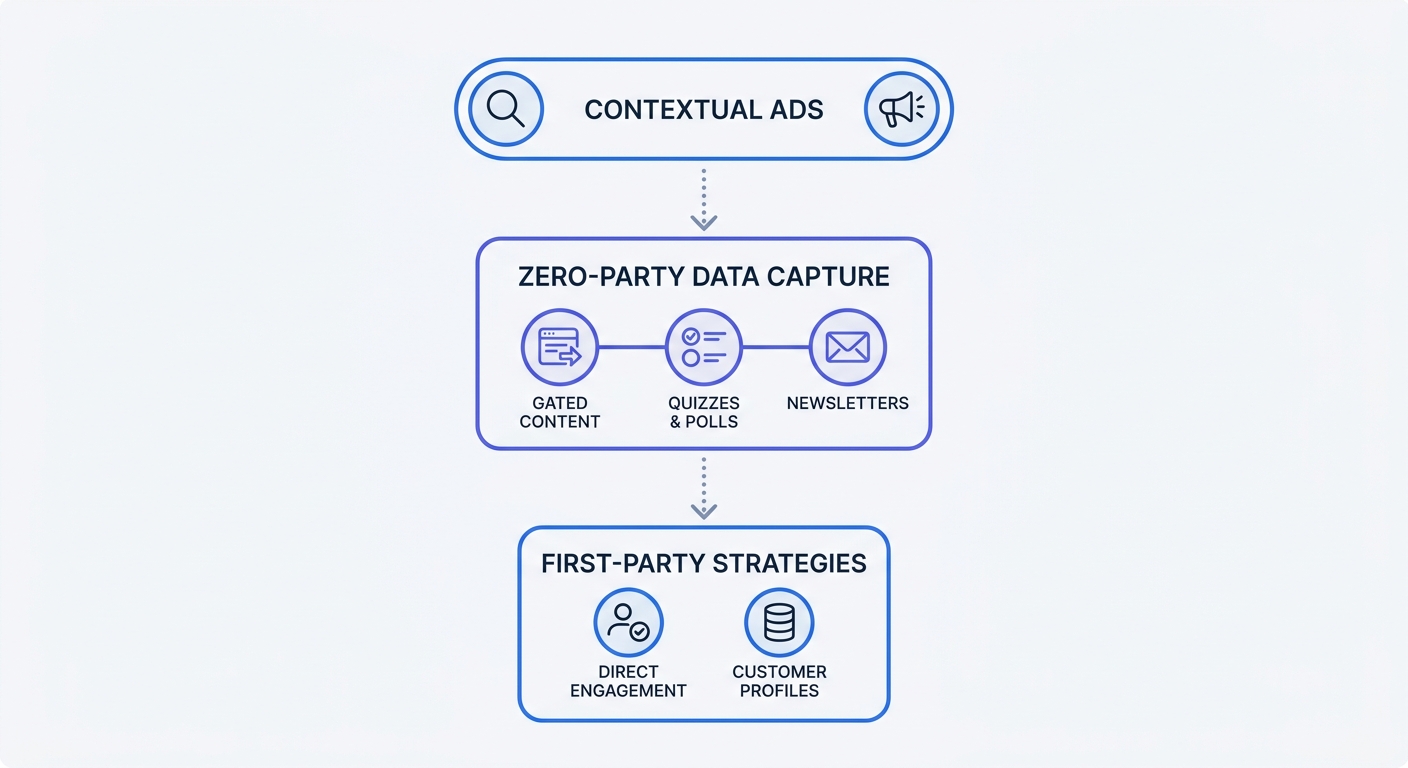
First-party data is information collected directly from your audience through their interactions with your website and products, while zero-party data is information a customer intentionally shares with you, such as survey responses or communication preferences.
The marketing industry spent a decade buying third-party data from brokers to target ads, but that model is collapsing under regulatory pressure. Consumers demand privacy, with a major survey showing that 75 percent of consumers will not buy from organizations they do not trust with their data. Building that trust requires asking for information transparently and offering value in return.
Focus your budget on lead generation mechanisms that you own to optimize for known contacts instead of anonymous page views. Use gated content, industry reports, email newsletters, and interactive quizzes to capture contact information. Once a user opts in, they enter your customer relationship management (CRM) software, which then becomes the single source of truth for marketing attribution.
If a user downloads a whitepaper via a LinkedIn ad, your CRM tags their profile with that specific campaign source. Converting them to a paying customer six months later allows you to attribute the revenue back to the original LinkedIn touchpoint.
Launch a campaign specifically designed to collect zero-party data this quarter by creating a calculator tool or a self-assessment quiz relevant to your product. Drive top-of-funnel ad traffic to this asset, require an email address to deliver the custom results, and map the incoming UTM parameters directly to the new CRM contact records.
Combine your first-party data strategy with contextual advertising. While behavioral advertising relies on profiling users across the internet to serve ads based on their history, contextual advertising places ads based on the semantic content of the current webpage. If you sell marathon training gear, place ads on running blogs rather than chasing a user who read about running a week ago. Contextual ads require no tracking files, respect user privacy, and consistently deliver high relevance.
Moving Away from Multi-Touch Attribution
Multi-touch attribution models attempt to map every single interaction a user has with your brand before buying by assigning fractional credit to a display ad seen on Monday, a Google search on Wednesday, and a direct visit on Friday.
These models rely entirely on cookies following the user from site to site, so without persistent tracking, multi-touch attribution breaks down. A broken tracking chain creates duplicate user counts and misattributed sales.
Shift your focus to probabilistic models and geo-lift testing to measure the aggregate impact of a campaign on a specific region. Increase your ad spend in one specific state or country for thirty days, leaving the rest of your regions at baseline. Measuring the total sales lift in the test region compared to the baseline regions proves incrementality without tracking a single device.
Staying Compliant While Scaling Campaigns
Avoiding the Fingerprinting Trap
When cookies became a liability, some marketing technology vendors switched to browser fingerprinting. This technique collects hardware and software details from a user's device, logging their screen resolution, installed fonts, operating system version, and browser extensions to create a unique identifier.
Fingerprinting tracks users without cookies, but it violates the principles of data privacy laws. Regulators classify fingerprinting as intrusive because users have no way to clear or reset their hardware configuration. Unlike a cookie that a user can delete, a hardware fingerprint remains permanent.
Under GDPR and the California Consumer Privacy Act, using fingerprinting scripts still requires explicit consent. Using them silently risks massive regulatory penalties, so inspect your marketing stack vendors carefully. If a tool claims to offer user-level cross-site tracking without cookies, they likely use fingerprinting and must be removed from your architecture.
Complying with GDPR and the Schrems II Ruling
Legal compliance dictates how you route your marketing data. The 2020 Schrems II ruling by the European Court of Justice changed digital analytics by determining that transmitting EU citizen data, including IP addresses, to servers located in the United States violates European privacy rights. The court found that US surveillance laws do not offer EU citizens adequate data protection.
Using US-hosted analytics platforms for European traffic creates immediate legal liability. The European Union enforces these rules by imposing EUR 2.1 billion in fines for GDPR violations in 2023 alone.
Verify the server locations of your current marketing stack by opening the privacy policies of your analytics vendor, tag manager, and email marketing provider to find the physical location of their data centers. If they process EU traffic on US soil without specialized localized routing, you have a compliance gap.
Swetrix eliminates this risk by hosting all analytics infrastructure within the European Union. Using an EU-hosted, privacy-first platform ensures compliance with GDPR regulations while capturing accurate performance data.
Stop losing half your marketing data to rejected consent banners. You can track campaign performance, understand your audience, and optimize your ad spend without compromising user privacy. Swetrix provides the open-source, cookie-free web analytics infrastructure needed to capture your full traffic volume legally. Start your 14-day free trial of Swetrix today and see the traffic your legacy platform drops.