- Date
How To Track Website Performance Metrics In Real Time
 Andrii Romasiun
Every day, visitors hit your site and leave before the first element loads, or a broken checkout button spikes abandonment. An aggressive cookie banner can drive away traffic before it registers in your dashboard, which means you need to track website performance metrics in real time to catch these issues the minute they start costing you money.
A recent Contentsquare report shows that 40% of all online visits include avoidable website friction like rage clicks and slow load times. Because 55% of sites recently experienced an overall traffic drop, relying on legacy analytics platforms that wait hours to process data guarantees you only find out about these leaks after the revenue is gone.
Browser updates enforce a new technical baseline, as Safari, Firefox, and widespread ad blockers suppress cross-site tracking by default. As a Google Analytics alternative, Swetrix solves this data gap. Our privacy-focused, open-source analytics platform helps you reveal up to 87% more traffic by eliminating the need for invasive consent banners while giving you real-time visibility into user behavior.
Why Real-Time Analytics Prevents Revenue Blind Spots
Delaying data processing creates a costly blind spot, because a broken link on your main product page causes immediate user frustration. If your dashboard takes 24 hours to report the sudden spike in exits, an entire day of paid ad spend burns away. Tracking performance metrics instantly allows you to watch for sudden dips in session duration or immediate drops from a specific referring URL.
The High Cost of Website Friction
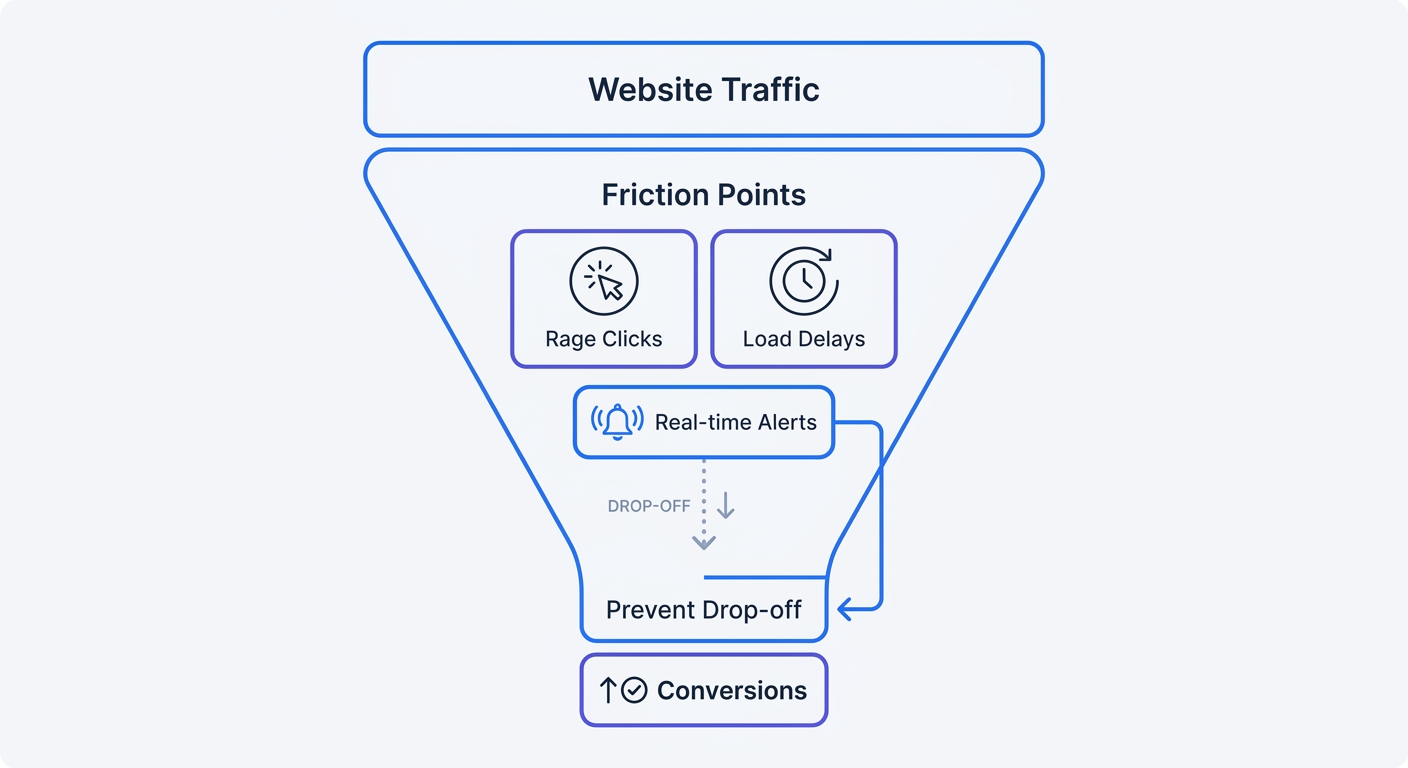
Website friction actively blocks conversions. Since users expect immediate responses, slow database queries, unoptimized images, and broken layout shifts destroy engagement. By tracking these metrics in real time, you isolate exactly where the user journey breaks.
Instead of guessing why an ad campaign fails to convert, open your dashboard and watch the live data stream. If visitors from a new Facebook campaign abandon the landing page within three seconds, you know the page load speed or the top-fold messaging requires immediate revision. Waiting for a weekly report guarantees a loss of hundreds of potential customers.
Tracking Data in a Cookieless Environment
Cookie deprecation already restricts data collection. Even though Google left third-party cookie controls up to Chrome users, Apple's Intelligent Tracking Prevention and default Firefox settings block cross-site tracking outright. You feel this impact immediately, as a Ruler Analytics study found that only 48% of teams feel confident proving ROI under these tracking limits.
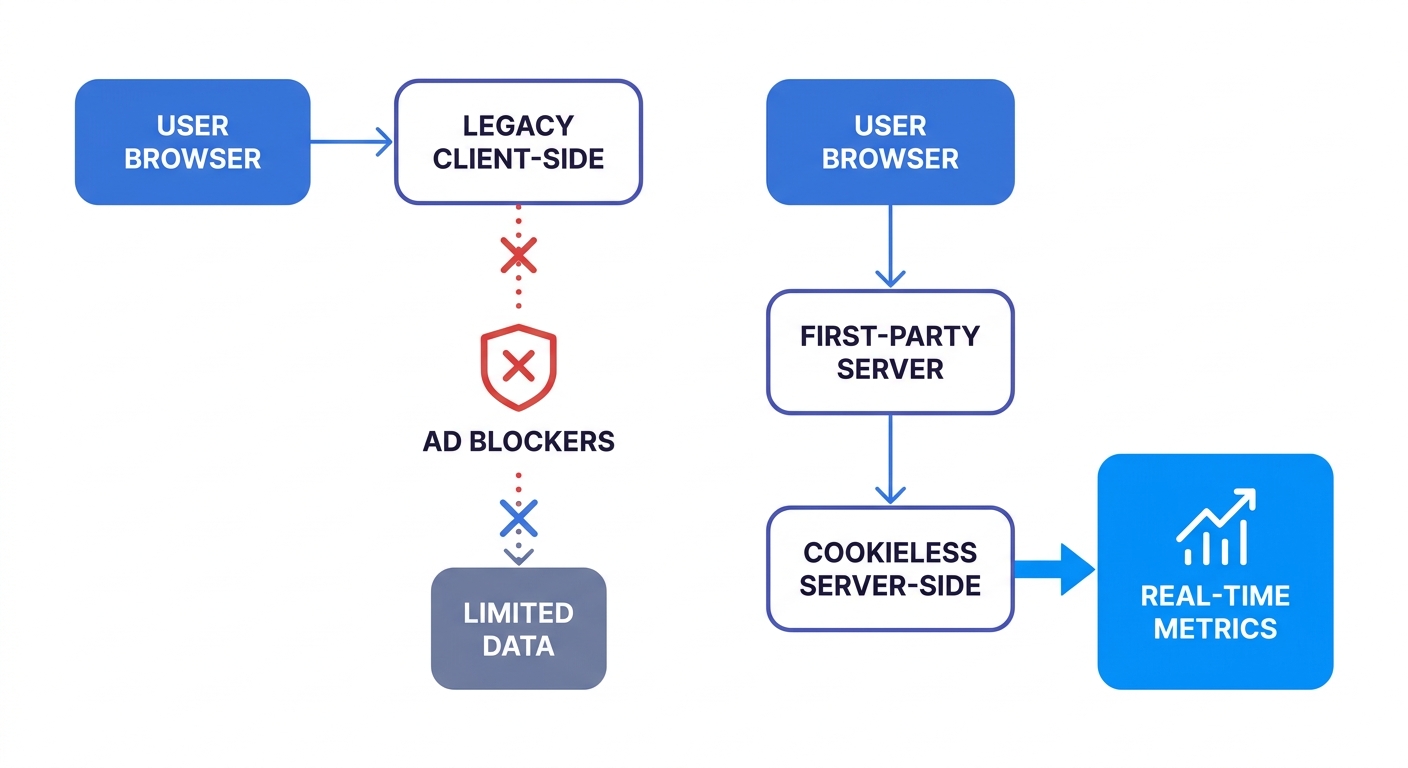
When you install traditional client-side trackers, ad blockers intercept the scripts and the visits never register. Switching to a privacy-first platform like Swetrix bypasses ad blockers entirely by using 24-hour resetting hashes instead of persistent cookies. This mechanism captures accurate session data without storing Personally Identifiable Information, allowing you to skip the GDPR consent pop-ups that drive users away.
Key Metrics to Monitor Instantly
Staring at a grid of generic traffic numbers provides zero actionable value. Configure your real-time dashboard to highlight the specific metrics indicating user success or failure.
Redefining the Bounce Rate
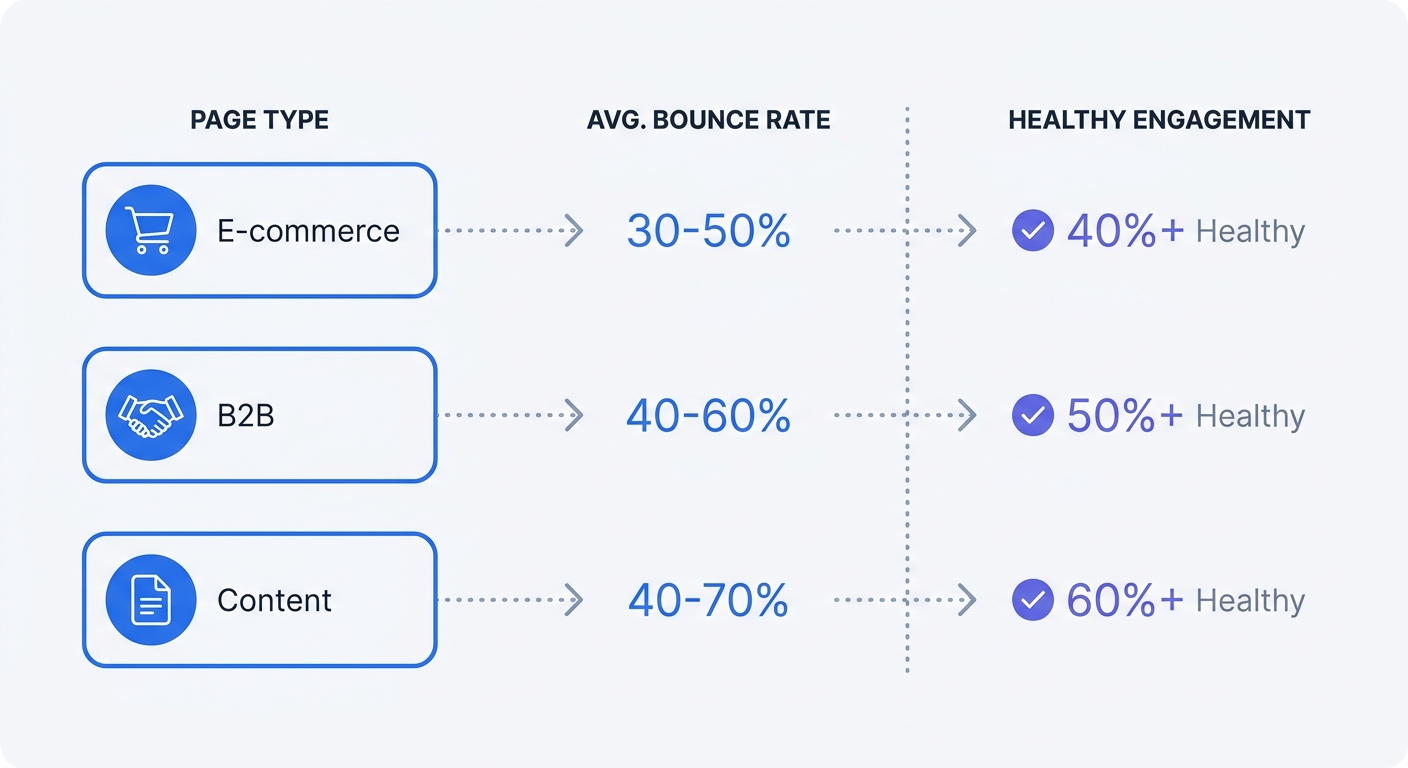
Bounce rate causes confusion because context dictates the target. Legacy Universal Analytics counted any single-page visit as a bounce, punishing sites that gave users quick answers, whereas modern tracking changes this math by tying the metric to the intent of the page.
Cross-industry bounce rates average between 45% and 55%, but the numbers vary drastically depending on the content type. Baseline metrics place normal behavior for a blog post anywhere from 65% to 90%. A user who lands on an article, reads the exact answer they needed, and leaves is a success. If your e-commerce checkout page shows that same percentage, your payment gateway likely requires troubleshooting.
| Website Category | Average Bounce Rate Range | Primary User Goal |
|---|---|---|
| E-commerce Product Pages | 20% – 55% | Adding items to cart, completing checkout |
| B2B Lead Generation | 25% – 65% | Filling out contact forms, downloading whitepapers |
| Blogs and Content Pages | 65% – 90% | Finding specific answers, reading articles |
Engagement Rate Over Vanity Metrics
Replacing standard bounce metrics with Engagement Rate provides clearer insights. An engaged session is any visit that lasts longer than 10 seconds, triggers a custom event, or involves a conversion.
Open your dashboard and filter by engagement rate across different traffic sources. If a paid campaign drives thousands of clicks but the engagement rate sits below 10%, pause the ads and fix the landing page messaging. High traffic volume wastes money if visitors close the tab before the hero image finishes rendering.
Spotting Rage Clicks and Load Delays
Users expect instant feedback when they interact with a web page, so if a button looks clickable but fails to respond, visitors repeatedly tap the element out of frustration. Tracking this specific behavior isolates broken UI components immediately.
Open the Swetrix performance monitoring dashboard and filter by custom events related to rapid successive clicks. When a specific URL generates high friction alerts, open that page on a mobile device to test the exact element causing user struggles. Watch page load delays alongside these events. If average load times creep past three seconds on a specific page, compress the images and review the server response times to prevent further abandonment. Fixing a single unresponsive add-to-cart button recovers lost revenue instantly.
How to Set Up Cookieless Real-Time Tracking
Legacy tools rely on client-side JavaScript tags placed directly on the browser, which fail when they hit privacy extensions. You need an architecture operating independently of local storage limits.
Choosing a Privacy-First Platform
Swetrix offers a cookieless environment out of the box. After you install our lightweight tracking script, the platform processes the data without dropping files onto user devices. Because this architecture avoids persistent tracking, data flows cleanly into your dashboard without waiting for explicit cookie consent.
This setup prevents data loss from rejected cookie banners while revealing large segments of dark traffic previously ignored by legacy tools. Relying on server-side processing builds a first-party data strategy immune to third-party browser restrictions.
Implementing Server-Side Tagging
For maximum data accuracy, move your analytics off the browser entirely. Server-side tracking processes events on your own infrastructure or edge networks before sending them to your analytics dashboard, ensuring data fidelity against aggressive ad blockers while providing complete control over parsed events.
To implement this, route your website traffic through a local proxy or edge worker.
- Open your server configuration file for Nginx or Apache.
- Define a location block that targets a specific path, such as
/analytics-api. - Set the proxy pass destination to the Swetrix tracking API endpoint.
- Update the tracking script on your website to point to your new first-party endpoint instead of the default external URL.
- Strip out any accidental PII from query strings before the payload leaves your server.
Running a reverse proxy makes the browser see the analytics request as a first-party event belonging to your website, preventing tracking prevention mechanisms from intercepting the data payload.
Generating UTMs for Accurate Campaign Attribution
Optimizing marketing spend requires passing referral data past privacy blockers, so campaign links require structured tags instead of registering incoming traffic as generic direct visits.
Use the Swetrix UTM Generator to append source, medium, and campaign parameters to every published external link. When a visitor clicks a properly tagged link, the server captures the exact origin of the visit without relying on third-party cookies. Grouping your real-time traffic view by campaign name reveals which marketing efforts drive engagement rather than empty clicks. Standardize your naming conventions in a shared document before launching anything to prevent fragmented data rows in your reports.
Turning Real-Time Data into Immediate Action
Gathering data offers no value unless you use it to improve the user experience by connecting tracked metrics to development tasks and marketing adjustments.
Setting Up Performance Alerts
Modern platforms incorporate automated monitoring to interpret the data stream, saving you from staring at a grid of raw numbers. Instead of manually parsing a spreadsheet to find anomalies, configure your analytics platform to alert you when thresholds break.
If a specific checkout endpoint drops from a 40% completion rate to zero in five minutes, automated tools flag the exact URL and the timestamp for your development team to deploy a fix. Tying your uptime monitoring directly to your analytics suite ensures you never pay for ad traffic directed at a down server.
Optimizing the Mobile Experience
Mobile devices generate 70% of all website traffic, but users behave differently on smaller screens. Mobile web browsing time runs 60% shorter than desktop browsing time, and mobile bounce rates average ten percentage points higher, though this gap fluctuates by industry.
Filtering your real-time traffic view by device type lets you watch mobile engagement rates separately from desktop when launching a new feature. If mobile users drop off at the second step of a form, reduce the input fields and increase the button tap targets. Check the analytics an hour later to confirm the fix worked, prioritizing the mobile data feed because it represents the majority of your visitors.
Filtering Internal Traffic for Clean Data
Your development team and content writers visit your website dozens of times a day, meaning your real-time dashboard will show falsely inflated engagement times and skewed geographic data unless you exclude their sessions.
Block internal IP addresses directly in your project settings. Because cookieless tracking limits persistent admin cookies, IP filtering remains the most reliable way to separate your staff from actual customers, ensuring your live feed accurately reflects outside user behavior.
Stop losing data to ad blockers and privacy extensions. Swetrix provides an open-source, privacy-focused analytics platform to track website performance metrics in real time. Processing your data without invasive cookies bypasses tracking restrictions while keeping your business compliant with global privacy laws.
Our cloud plans start at 100,000 events per month for $19/mo, with all data securely hosted in the EU, or you can choose to self-host the platform on your own infrastructure for total data control.
Start your 14-day free trial today at swetrix.com/signup to achieve total visibility into your traffic.