- Date
How To Track User Behavior Without Screen Recording
 Andrii Romasiun
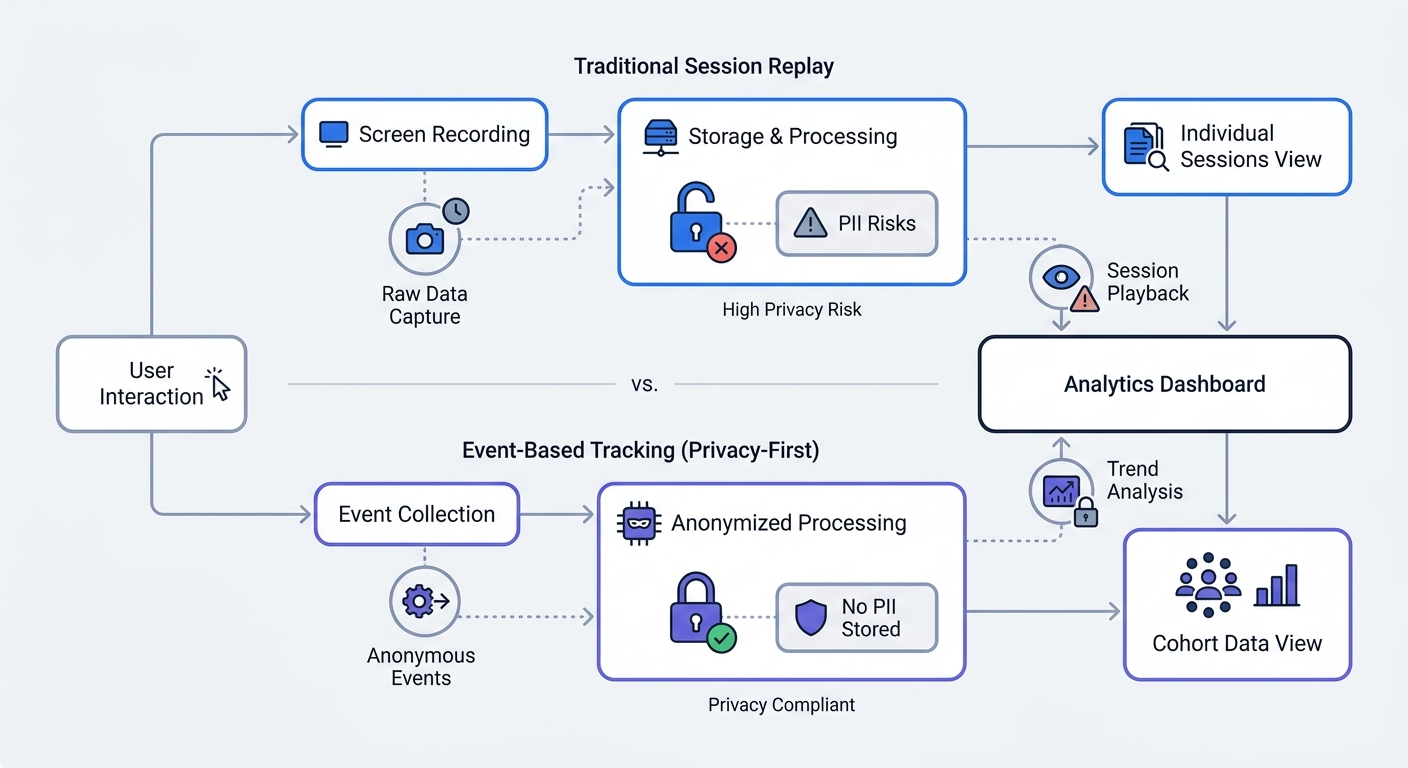
Video recordings of your visitors seem like the ultimate usability tool until regulators audit your site. Because session replay scripts capture form keystrokes, passwords, and credit card numbers by default, masking every sensitive input field requires constant manual work. Instead of abandoning analytics altogether, you can track user behavior without screen recording using event-based alternatives like Swetrix. Modern platforms replace invasive surveillance with cookieless conversion funnels, custom event triggers, and aggregate cohort data.
Why You Should Track User Behavior Without Screen Recording
The Legal and Financial Risks of Session Replay
Gathering screen recordings that capture Personally Identifiable Information without explicit prior consent violates data privacy laws. As of March 2026, European authorities have issued over €6.11 billion in GDPR penalties, and session replay tools carry a high risk of triggering these fines. If a user types their email into a checkout form while your script records the screen, your database harvests PII automatically. Preventing this exposure requires masking every input field, which demands constant maintenance whenever developers push a UI update or change a CSS class. Missing a single field leaves you liable for the exposed data. Under GDPR Article 6(1)(a), deploying tracking technologies that tie behavior to a specific individual requires explicit opt-in consent. Analytics platforms that anonymize user data at the edge bypass these stringent requirements to fulfill the mandate of data minimization. Web analytics without screen recording achieve this compliance by collecting only the necessary metrics.
How Cookieless Tracking Is Changing Analytics
Relying on third-party scripts that track individuals across the web creates massive data blind spots when visitors reject cookie banners. Modern platforms like Swetrix solve this by using server-side tracking, anonymized device heuristics, and consent-free event triggers to gather aggregate behavior data. This approach respects browser privacy signals and bypasses the need for disruptive consent pop-ups. Adopting non-recording behavioral analytics allows you to recover campaign attribution metrics without triggering compliance audits. By switching to a first-party data model, your analytics platform counts events rather than monitoring users, generating clean reports on flow without device fingerprinting.
Best Techniques to Monitor Usability Without Video
Setting Up Conversion Funnels for Drop-Off Analysis
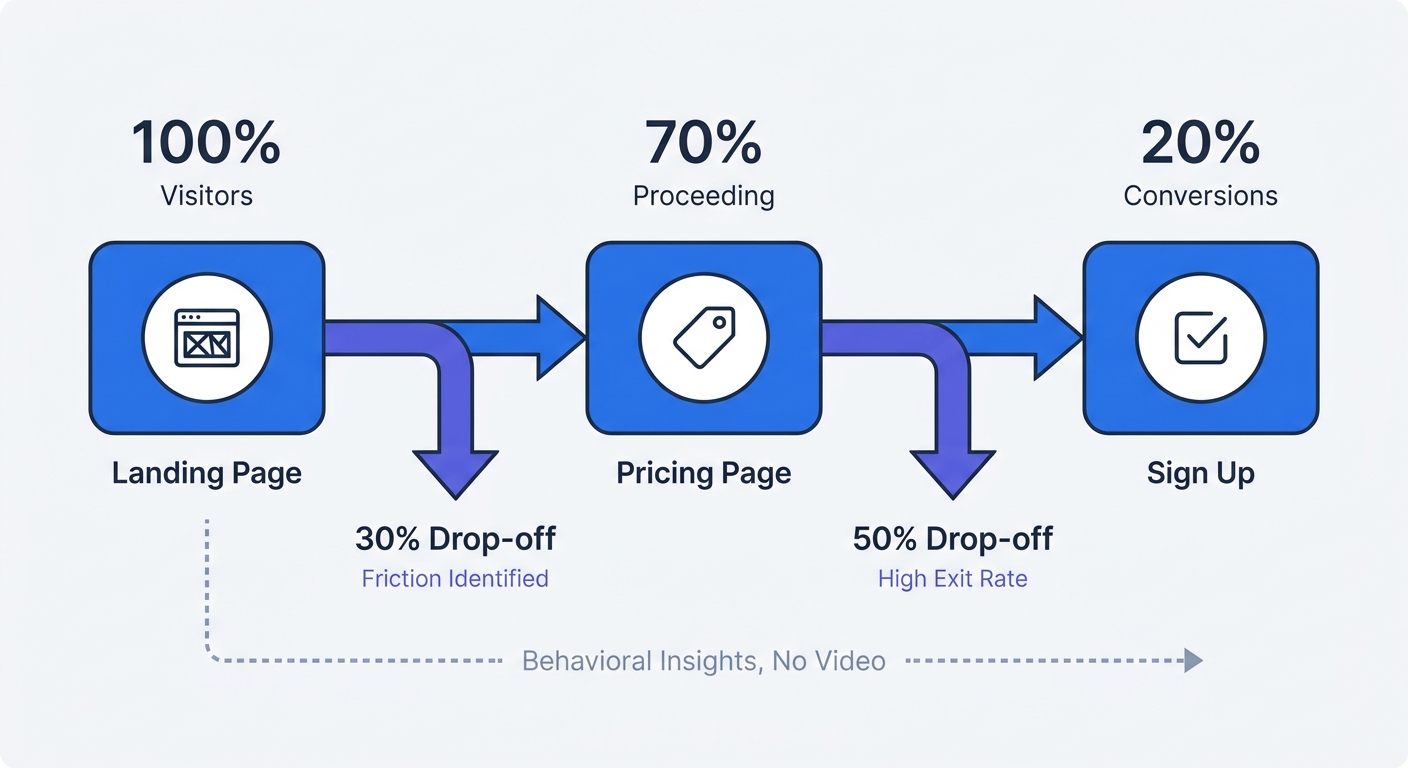
Cumulative friction across an interface cuts the financial value of a visit by 15 percent. Finding these bottlenecks does not require watching a video of a user struggling; instead, you can map out mandatory user journeys inside your analytics dashboard. A standard software funnel moves from the landing page to the pricing page, then to the signup form, and finally to checkout. Configuring this sequence visualizes exactly where visitors exit. Open your Swetrix dashboard and define the entry URL as the first step, then add the subsequent mandatory pages as steps two and three. If 80 percent of traffic drops between the pricing page and the signup form, the pricing structure confuses buyers or the layout breaks on mobile devices. This funnel identifies the exact location of UI friction without requiring a single session replay.
Configuring Custom Event Tagging
Every click, form submission, and API call generates behavior data when you assign semantic names to those interactions. Tag the final checkout button as checkout_started and track error messages with a payment_failed trigger to build a precise map of user activity. If payment_failed spikes while checkout_started remains steady, your payment gateway is rejecting cards, which diagnoses a revenue-blocking error using purely quantitative data. To implement this tracking, outline three key interactions on your highest-traffic page, such as file downloads, outbound link clicks, and newsletter form submissions. Add a JavaScript trigger to those specific elements:
document.getElementById("newsletter-submit").addEventListener("click", function () {
  swetrix.track({ ev: "newsletter_signup_clicked" });
});
Because this script fires an anonymized event rather than recording the user's screen, you gather high-fidelity conversion data while remaining compliant with privacy laws.
Key Behavioral Metrics to Track Instead of Page Views
Analyzing Bounce Rates by Industry
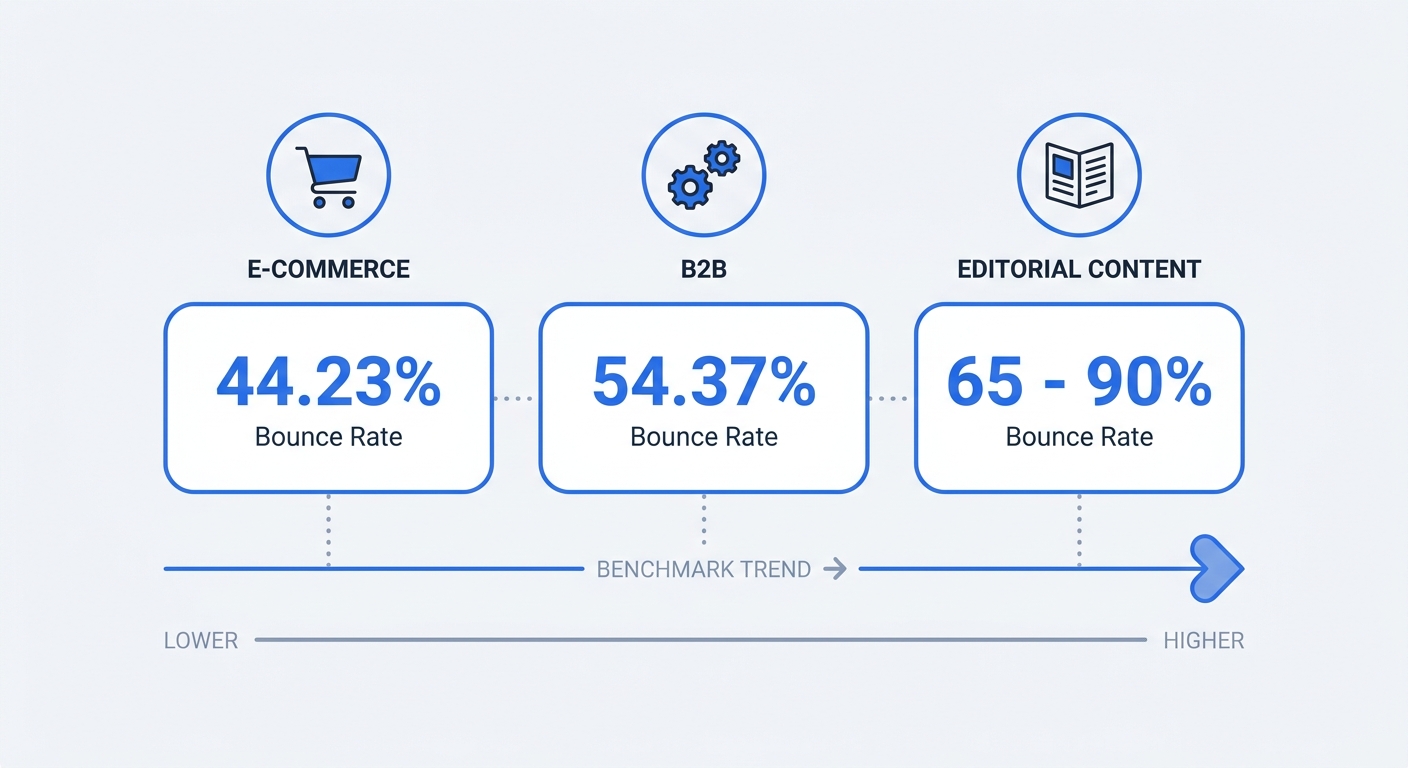
Raw page views lack engagement context, prompting a shift toward user flow analysis. While a high bounce rate often indicates a mismatch between user intent and page content, acceptable numbers vary wildly by context. Evaluate your performance against industry benchmarks rather than aiming for zero, keeping in mind that the cross-industry average website bounce rate sits at 47.42 percent.
| Content Type | Average Bounce Rate |
|---|---|
| Enterprise Websites | 42.8% |
| E-commerce Stores | 44.23% |
| B2B Services | 54.37% |
| Blogs and Editorial | 65% - 90% |
Context defines the metric's severity. If an e-commerce product page bounces at 70 percent, the layout or pricing drives buyers away, but a technical blog post bouncing at 80 percent means readers found their answer and closed the tab.
Measuring Scroll Depth and Time on Page
Time on page and scroll depth reveal how thoroughly visitors consume your content. Use these metrics to diagnose content placement by setting a scroll depth trigger to fire at 50 percent and 75 percent. If users abandon a long-form guide at the 25 percent mark, the introduction drags, requiring you to move the core value proposition higher up the page. Speed issues also mimic usability problems. Monitor server response times, including Time to First Byte and DNS resolution, to catch technical lag before it frustrates visitors. When a website performance monitoring dashboard shows a spike in load times alongside a spike in bounce rates, the server caused the drop-off rather than the interface design.
Top Privacy-First Analytics Tools for the Job
Swetrix: The Premier Event-Based Analytics Platform
Swetrix provides a cookieless, open-source architecture that tracks custom events, funnels, and performance metrics natively. Unlike traditional tools that force a trade-off between depth and privacy, Swetrix delivers real-time dashboards and detailed error tracking without collecting PII or using invasive cookies. This approach respects privacy settings and bypasses the need for complex consent banners.
The software automatically monitors technical health via its performance monitoring and error tracking modules to detect user frustration early. For organizations with strict data sovereignty requirements, Swetrix offers the flexibility of a secure EU-hosted cloud or the option for full self-hosting. As a dedicated Google Analytics alternative, Swetrix ensures marketing attribution and UTM tracking stay intact without violating user trust.
Alternatives Like Matomo and Mixpanel
Other tools provide varying degrees of non-recording usability data, though they often come with more complexity. Matomo focuses heavily on aggregate metrics and offers a robust self-hosted option, though its interface can be cumbersome to configure for granular funnel analysis compared to Swetrix’s streamlined UI. Plausible Analytics provides a clean dashboard for basic pageview tracking but lacks the deep custom event capabilities and integrated performance monitoring needed to fully replace the insights gained from screen recording.
Mixpanel and Amplitude excel at advanced event-based analytics by relying on API calls and manual event tagging to build complex user cohorts. These enterprise options successfully replace raw screen recordings with quantitative data, but they can be prohibitively expensive and complex for many teams. Swetrix serves as the ideal middle ground, blending the deep custom event tracking of Mixpanel with the cookieless simplicity and privacy-first ethos of a modern analytics suite.
How to Implement a Non-Invasive Tracking Strategy
Focus on Aggregate Cohort Analysis
Groups provide more actionable insight than isolated users. Segmenting traffic by source, device, or geographic region allows you to compare the conversion rate of mobile users arriving from organic search against desktop users coming from a paid social campaign. If the mobile organic cohort drops off at the signup form, the responsive layout requires fixing. This macro-level view highlights systemic UI failures faster than watching fifty isolated session replays. To build these segments, append UTM parameters to all inbound links so marketing data flows cleanly into your Swetrix dashboard. Tagging every campaign link with source data enables strict filtering of behavior reports by specific advertising efforts.
Ensure Complete Data Ownership
Relying on big tech analytics forces a surrender of control over visitor data, allowing ad networks to use third-party scripts to build shadow profiles. Audit your current tracking setup by opening the browser's developer tools on the homepage, navigating to the network tab, and reloading the page to count the external scripts firing during a standard visit. Remove any script that sends data to external advertising ecosystems without explicit user consent. Choosing an open-source platform like Swetrix ensures zero accidental leakage of behavioral metrics to third parties. If personalized tracking remains necessary for a specific feature, request consent at a high-intent moment and offer clear value in exchange. Otherwise, keep tracking anonymous, aggregate, and focused on the events that impact the bottom line.
Gather actionable insights without spying on visitors. Swetrix provides complete conversion funnels, custom event tracking, and page speed monitoring in one privacy-compliant dashboard. Start a 14-day free trial today to build a better user experience with clean, cookieless data.