- Date
How To Track File Downloads Without Google Analytics
 Andrii Romasiun
A visitor reads your landing page, clicks the link for your 2026 industry report, and leaves. You check your analytics dashboard the next day and see nothing because the visitor declined cookies, which caused your analytics platform to drop the session entirely. To fix this data void, you need to track file downloads without Google Analytics using a privacy-first, cookieless platform. This approach restores visibility into content performance while keeping your site legally compliant.
Marketing funnels rely on downloadable assets like whitepapers, pricing sheets, and spreadsheet templates, which act as the primary conversion mechanisms for B2B lead generation. When your tracking software fails to capture these interactions, you lose the ability to measure campaign return on investment, leaving you to optimize landing pages based on broken data.
Replacing GA4 for File Tracking
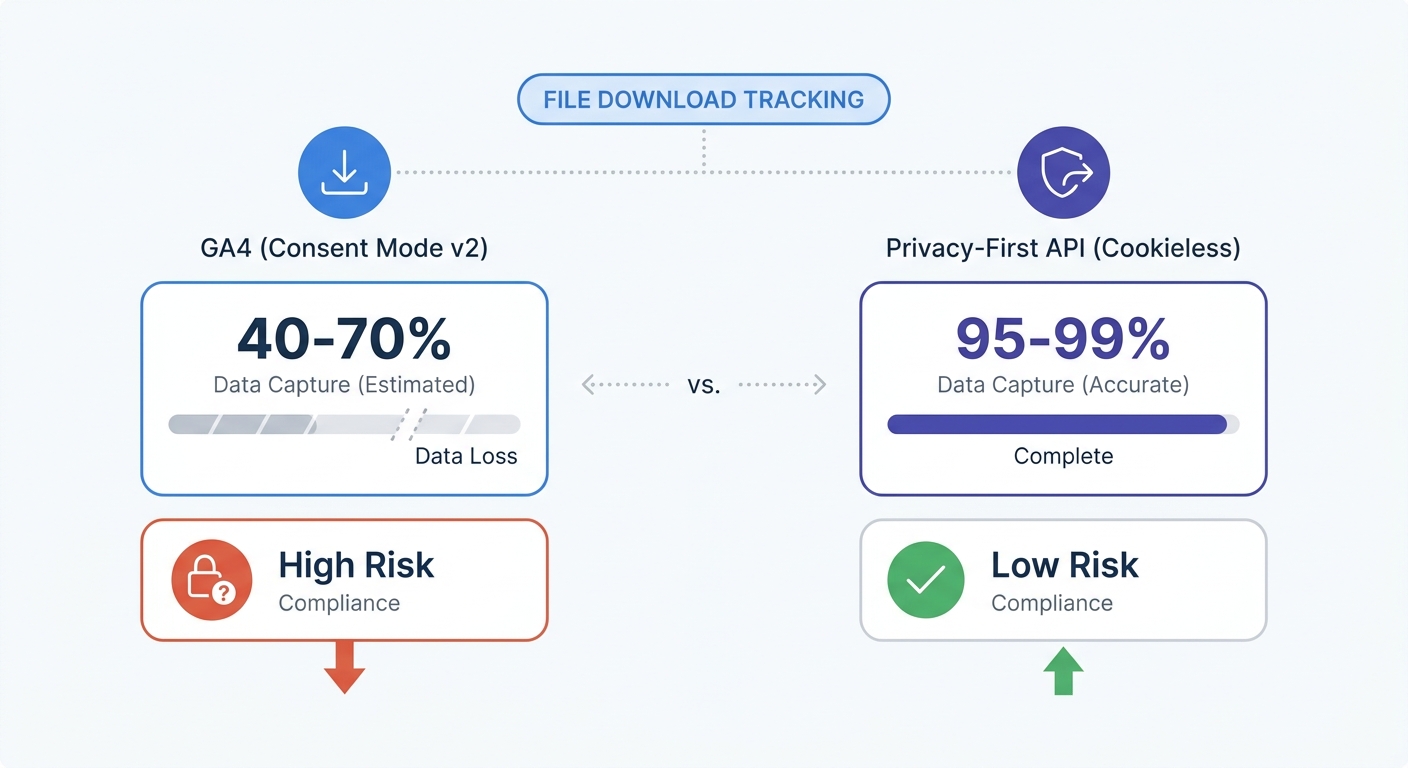
Google rolled out Consent Mode v2 and made it mandatory for European traffic, meaning Google Analytics 4 stops setting persistent identifiers when a user hits the decline button on your cookie banner. Instead of logging the exact moment a user downloads your PDF and tying it to their traffic source, the platform relies on modeled cookieless pings that estimate user behavior using machine learning algorithms.
Estimations distort conversion rate optimization. Accurate measurement of return on investment for gated content requires exact counts. If fifty people download a software implementation guide from an email campaign but your dashboard reports twenty due to ad blockers and consent rejections, your attribution breaks. This data gap might prompt you to pause a profitable campaign because the analytics platform failed to record the conversions.
Beyond data accuracy, legacy tracking carries legal liability. European authorities issued over €1.2 billion in GDPR fines during 2025 for data privacy violations, including faulty cookie consent setups. The United Kingdom followed suit with the Data (Use and Access) Act, a 2025 legislation mirroring GDPR penalties that levels fines of up to £17.5 million for cookie violations. Deploying non-compliant tracking scripts on public-facing assets exposes your business to regulatory action.
Swetrix solves this by removing cookies from the equation. Because the platform avoids building cross-site profiles or storing personal identifiers on the user device, you bypass the consent banner data loss. Every click registers accurately, providing a complete count of every file downloaded without violating user privacy or risking regulatory fines.
Cookieless Download Tracking Mechanics
Legacy analytics platforms rely on automatic tracking scripts that inject heavy JavaScript into your site to listen to every mouse movement, scroll, and click. This approach degrades page performance. Google reports that 53 percent of mobile users abandon a site if it takes longer than three seconds to load. Furthermore, every additional one-second delay causes an estimated seven percent drop in conversions, though this metric varies depending on your industry and content type, meaning you risk losing leads if you slow down your landing pages to count PDF downloads.
Modern web development shifts away from automatic tracking toward deliberate, event-driven APIs. Instead of loading a massive tag manager library that blocks the main rendering thread, you send a small data payload when the specific download action occurs, keeping your website fast while ensuring your analytics data remains precise.
This API-driven architecture also enables server-side tracking, bypassing the limitation that client-side web analytics scripts cannot execute inside a PDF document. Ad blockers block browser-based tracking requests matching known analytics domains, and if you host files on an external content delivery network, automatic client-side trackers fail to see the outbound click.
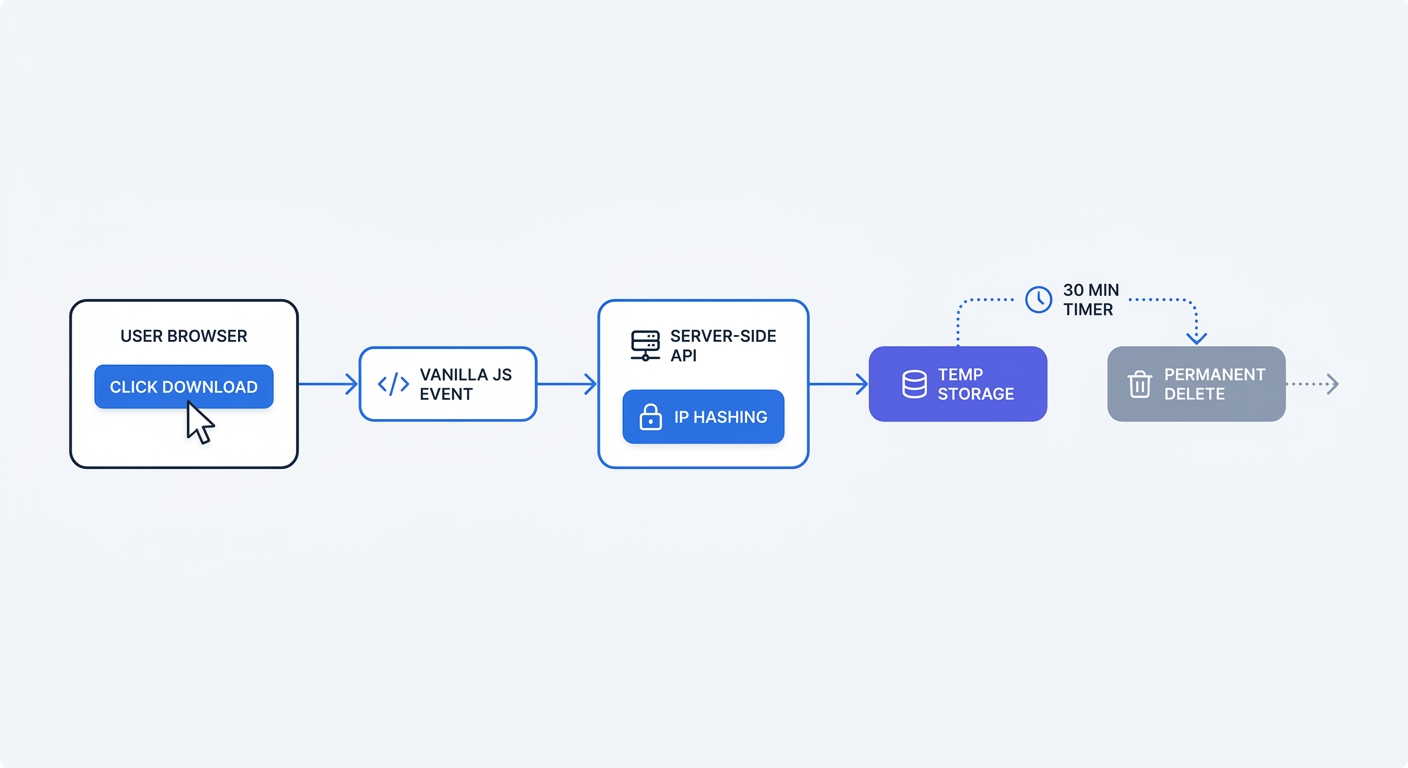
Moving the tracking logic to your backend captures every interaction regardless of browser extensions. When a user requests a file, your server triggers an API call to Swetrix, which temporarily hashes the user IP address and user-agent string to generate a unique session identifier. The system then deletes the cryptographic salt within 30 minutes. This workflow guarantees accuracy for your download counts while maintaining strict GDPR compliance because no personal data persists in the database.
Setting Up Lightweight Native JavaScript Listeners
Tracking client-side clicks does not require a complex tag management system. You can capture file downloads using vanilla JavaScript, a method that targets specific file extensions and triggers a custom event API call from the browser.
Open your website's main JavaScript file or global footer template to add an event listener to the document object that monitors all click events. When a click occurs, the script checks if the target is an anchor tag and whether the hyperlink points to a file extension you want to track.
document.addEventListener("click", function (event) {
  const target = event.target.closest("a");
  if (!target || !target.href) return;

  const fileExtensions = [".pdf", ".zip", ".csv", ".docx"];
  const isFileDownload = fileExtensions.some((ext) => target.href.toLowerCase().endsWith(ext));

  if (isFileDownload) {
    const fileName = target.href.split("/").pop();
    const fileExtension = fileName.split(".").pop();

    swetrix.track({
      ev: "resource_downloaded",
      meta: {
        file_name: fileName,
        file_type: fileExtension,
        url: target.href,
      },
    });
  }
});
This script filters out normal page navigation by executing the tracking call when someone clicks a matching file link. Relying on native browser APIs ensures the code executes in milliseconds.
The event naming convention in the code payload plays a specific role, as generic tags like button_click or outbound_link create unreadable analytics dashboards. Semantic event naming defines the user action, meaning labeling the event resource_downloaded allows you to recognize the action when viewing your metrics.
The script also passes contextual metadata alongside the event name so you can push the exact filename and file type. This filters your reports to reveal whether your audience prefers spreadsheet templates over text-heavy PDFs.
Test your implementation using browser developer tools before deploying it to production. Open Google Chrome, right-click your webpage, select Inspect, navigate to the Network tab, and type "track" in the filter bar before clicking one of your downloadable files. A network request fires containing your custom event name and the associated metadata, and if the request returns a 200 OK status, your cookieless tracking is active.
Analyzing Download Metrics and Content ROI
Tracking the download click serves as the first step, requiring you to contextualize that volume against user engagement to measure the return on investment for your content marketing. High download counts indicate little if visitors bounce immediately after saving the file or download it by mistake.
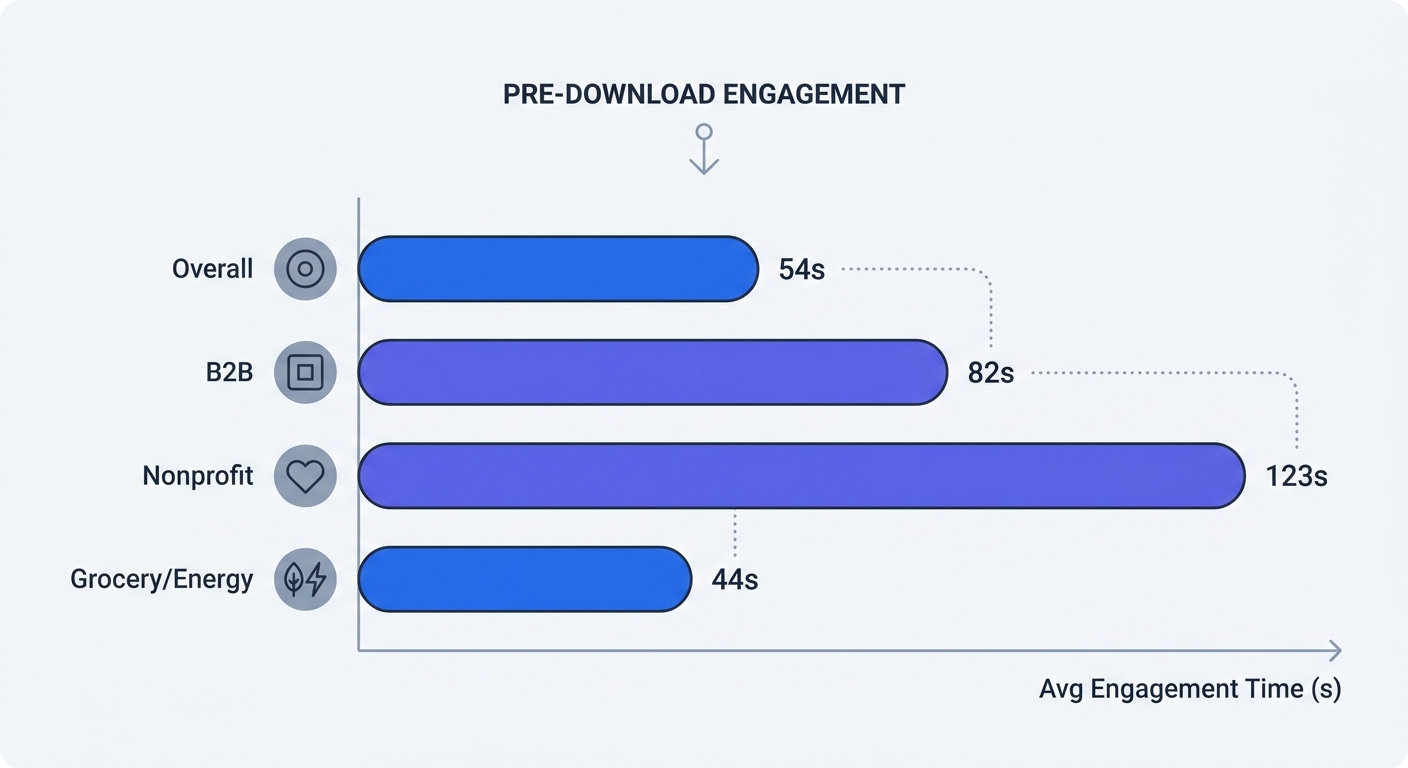
Review the engagement time on the landing page prior to the download. While a cross-industry Contentsquare benchmark puts average time on page at 54 seconds, you must evaluate your specific metrics against your distinct sector to understand user intent.
B2B websites average 82 seconds of engagement time. Users reading a technical software implementation guide spend more time evaluating the page abstract before committing to a whitepaper download. If your page features a 4,000-word summary but users trigger the download event after 12 seconds, they are blindly grabbing the file without engaging with your brand messaging. This indicates low intent, meaning those leads will likely ignore follow-up sales emails.
Nonprofit organizations see higher baseline engagement. Wired Impact reports the median session duration for the nonprofit sector reaches 2 minutes and 3 seconds. If your nonprofit annual report requires significant reading to understand the financial impact, a page averaging 30 seconds of engagement points to a messaging disconnect where visitors leave before they grasp the value proposition.
Open your Swetrix dashboard, navigate to your custom events report, and cross-reference your resource_downloaded events with your average session duration on the corresponding URLs. If the engagement time falls below your industry baseline, rewrite the landing page copy to break up large walls of text with bullet points, add clearer headings, and build stronger intent before presenting the final download link.
Segmenting your file downloads by traffic source helps identify intent, as a user arriving from an organic search query possesses higher intent than a user clicking a disruptive social media advertisement. Appending UTM parameters to your inbound marketing links ensures that when the user lands on your site and downloads the file, Swetrix automatically attributes that custom event to the specific campaign, medium, and source. This data allows you to allocate your marketing budget toward the channels that generate document downloads rather than empty clicks.
Securing Analytics with Data Sovereignty
The legal framework surrounding digital analytics forces organizations to rethink where their user data lives. Relying on US-based cloud infrastructure exposes your company to extraterritorial data access laws like the US CLOUD Act, and European courts penalize organizations that transfer user data across the Atlantic without strict legal safeguards.
Protecting your lead generation pipeline requires migrating to European-based analytics infrastructure. Cloud-neutral hosting provides native data sovereignty, meaning deploying Swetrix Cloud ensures your analytics data resides on secure servers located in the European Union. This physical isolation guarantees that foreign intelligence agencies cannot compel access to your website visitor data.
Data sovereignty simplifies your legal documentation overhead. You spend less time mapping complex data transfer agreements and updating privacy policies to account for third-party international sharing. This allows you to track gated PDFs, spreadsheet templates, and whitepapers with confidence that the underlying infrastructure supports your compliance efforts.
Cost predictability also plays a role in managing your analytics stack. Corporate analytics platforms hide aggressive overage fees in their contracts. Public pricing for Swetrix Cloud remains transparent, starting at 100,000 events per month for $19 monthly and scaling predictably as your download volume grows.
If your organization enforces strict internal security mandates, you can bypass cloud hosting. Swetrix operates as an open-source platform, granting you the ability to self-host the analytics instance on your company servers, which removes third parties from the equation. This setup ensures you retain absolute ownership over every data point, event log, and dashboard configuration, keeping your file tracking accurate, secure, and under your control.
Stop losing conversion data to ad blockers and rejected cookie banners. Swetrix gives you lightweight, privacy-first tools to track every file download accurately without compromising user trust. Start your 14-day free trial at Swetrix to restore visibility to your content marketing funnel.